RB03 - Robot vacuum DYSON - Free user manual and instructions
Find the device manual for free RB03 DYSON in PDF.



| Product type | Robotic vacuum cleaner |
| Brand | Dyson |
| Model | RB03 |
| Intended use | Household use only |
| Power supply | Rechargeable lithium-ion battery, mains charger included |
| Operating temperature | 10 °C to 35 °C |
| Recommended storage temperature | 18 °C to 28 °C |
| Connectivity | Wi-Fi 2.4 GHz and 5 GHz, Dyson Link app |
| Sensors | Navigation camera, infrared sensors, Class 1 laser |
| Cleaning modes | Automatic cleaning, scheduling via app |
| Dustbin capacity | Approximately 0.4 L |
| Filters | Washable filter (follow washing instructions) |
| Main brush | Motorized brush with brush bar |
| Typical runtime | Approximately 60 minutes (depending on conditions) |
| Charging dock | Docking station with charger (part number 281238) |
| Cleaning and maintenance | Dry cloth, check and wash filters, empty dustbin after each use |
| Safety | Do not use outdoors, do not expose to water, do not use with flammable liquids |
| Warranty | 2 years from date of purchase (normal household use) |
| Spare parts available | Battery, filter, brush, transparent dustbin, charging dock |
| Repairability | Repair by Dyson or authorized representative only |
Frequently Asked Questions - RB03 DYSON
User questions about RB03 DYSON
0 question about this device. Answer the ones you know or ask your own.
Ask a new question about this device
Download the instructions for your Robot vacuum in PDF format for free! Find your manual RB03 - DYSON and take your electronic device back in hand. On this page are published all the documents necessary for the use of your device. RB03 by DYSON.
USER MANUAL RB03 DYSON
Thank you for choosing to buy a Dyson robot
To read your safety instructions and guarantee terms and conditions in English, go to page X.
Thank you for choosing to buy a Dyson robot
To read your safety instructions and warranty terms and conditions in English, go to page X.
Thank you for choosing to buy a Dyson robot
To read your safety instructions and terms and conditions in English, go to page X.
Thank you for choosing to buy a Dyson robot
To read your safety instructions in English, go to page X.
Thank you for choosing to buy a Dyson robot
To read your safety instructions and guarantee terms and conditions in English, go to page X.
JJJJ JJJJgDyson
aJJI JJIJIJI JAJIJI JAIJI JALAWJI BgWg aLIWIJI cIJIJI
.X
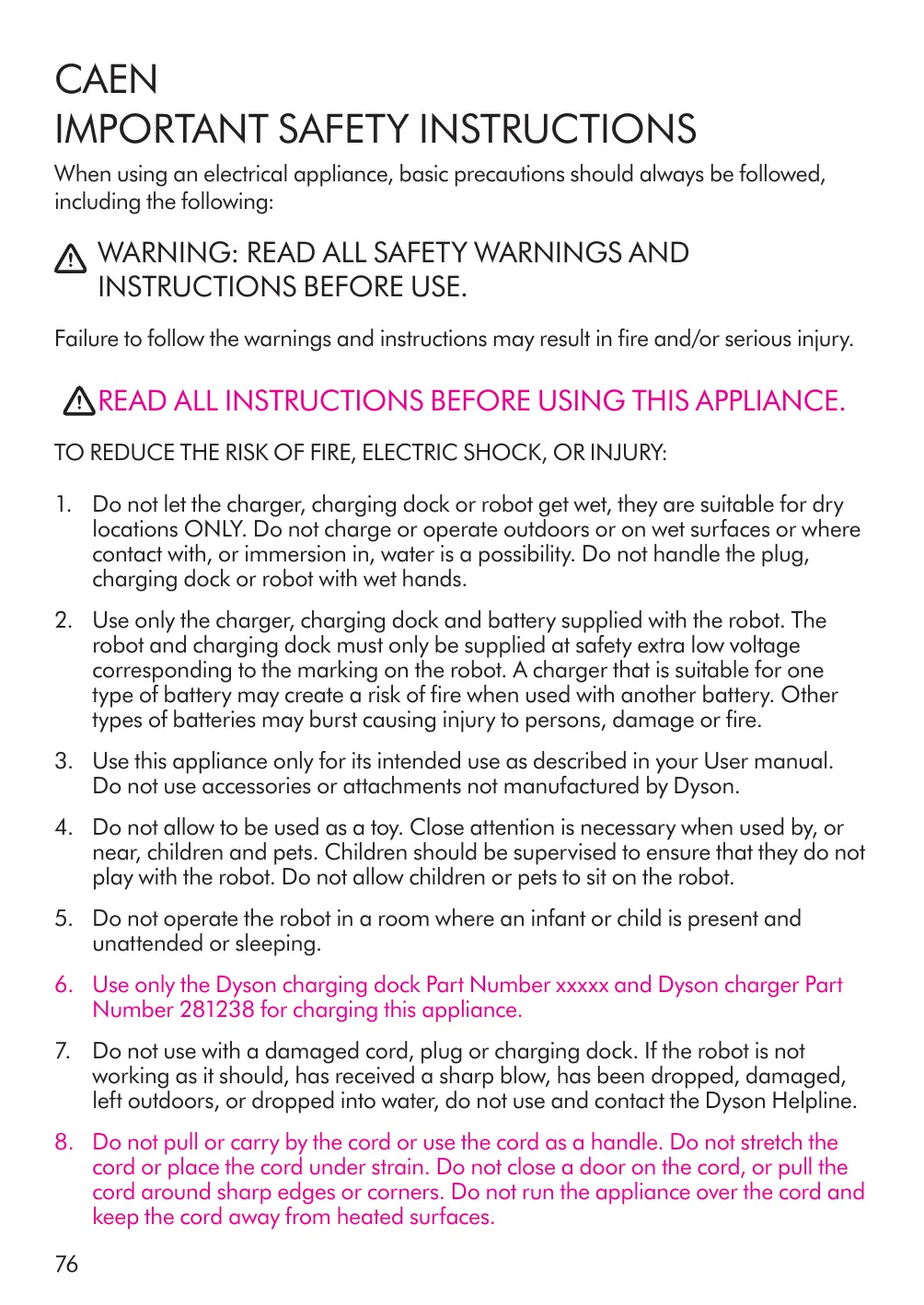
CAEN
IMPORTANT SAFETY INSTRUCTIONS
When using an electrical appliance, basic precautions should always be followed, including the following:
WARNING: READ ALL SAFETY WARNINGS AND INSTRUCTIONS BEFORE USE.
Failure to follow the warnings and instructions may result in fire and/or serious injury.
READ ALL INSTRUCTIONS BEFORE USING THIS APPLIANCE.
TO REDUCE THE RISK OF FIRE, ELECTRIC SHOCK, OR INJURY:
- Do not let the charger, charging dock or robot get wet, they are suitable for dry locations ONLY. Do not charge or operate outdoors or on wet surfaces or where contact with, or immersion in, water is a possibility. Do not handle the plug, charging dock or robot with wet hands.
- Use only the charger, charging dock and battery supplied with the robot. The robot and charging dock must only be supplied at safety extra low voltage corresponding to the marking on the robot. A charger that is suitable for one type of battery may create a risk of fire when used with another battery. Other types of batteries may burst causing injury to persons, damage or fire.
- Use this appliance only for its intended use as described in your User manual. Do not use accessories or attachments not manufactured by Dyson.
- Do not allow to be used as a toy. Close attention is necessary when used by, or near, children and pets. Children should be supervised to ensure that they do not play with the robot. Do not allow children or pets to sit on the robot.
- Do not operate the robot in a room where an infant or child is present and unattended or sleeping.
- Use only the Dyson charging dock Part Number xxxxx and Dyson charger Part Number 281238 for charging this appliance.
- Do not use with a damaged cord, plug or charging dock. If the robot is not working as it should, has received a sharp blow, has been dropped, damaged, left outdoors, or dropped into water, do not use and contact the Dyson Helpline.
-
Do not pull or carry by the cord or use the cord as a handle. Do not stretch the cord or place the cord under strain. Do not close a door on the cord, or pull the cord around sharp edges or corners. Do not run the appliance over the cord and keep the cord away from heated surfaces.
-
Do not put any objects into openings. Do not use with any openings blocked; keep free of dust, lint, hair, and anything that may reduce airflow.
-
Do not operate the robot where it can pick up flammable or combustible liquids, such as gasoline, or use in areas where they or their vapours may be present. Do not operate the robot where it can pick up anything that is burning or smoking, such as cigarettes, matches or hot ashes.
-
Do not operate the robot in areas where there are open fireplaces, lit candles or fragile objects.
-
Ensure floors are clear of any electrical cords and other items that may cause an obstruction in the robot.
-
Keep hair, loose clothing, fingers, and all parts of the body away from openings and moving parts such as the wheels and the brush bar.
-
To prevent unintentional starting, be careful to keep your hands and fingers away from the power button especially when picking up or carrying the appliance. Carrying the appliance with your finger on the power button invites accidents.
-
When the battery is not in use, keep it away from objects such as paper clips, coins, keys, nails, screws and other small metal objects, that can make a connection from one terminal to another. Shorting the battery terminals together may cause burns or a fire.
-
The battery is a sealed unit and under normal circumstances poses no safety concerns. In the unlikely event that liquid leaks from the battery, do not touch the liquid as it may cause irritation or burns, and observe the following precautions:
-
Skin contact – can cause irritation. Wash with soap and water.
- Inhalation – can cause respiratory irritation. Expose to fresh air and seek medical advice.
- Eye contact – can cause irritation. Immediately flush eyes thoroughly with water for at least 15 minutes. Seek medical attention.
-
Disposal - wear gloves to handle the battery and dispose of immediately, following local ordinances or regulations.
-
Do not use a battery or appliance that is damaged or modified. Damaged or modified batteries may exhibit unpredictable behaviour resulting in fire, explosion or risk of injury. Do not expose the battery or appliance to fire or excessive temperatures. Exposure to fire or temperatures above 130^ (265°F) may cause explosion.
-
Follow all charging instructions in the Dyson User manual. Do not charge the battery or appliance outside of the temperature range specified in the instructions. Charging improperly or at temperatures outside of the specified range may damage the battery and increase risk of fire. To ensure maximum battery life, Dyson recommends the following:
-
When not in use, the appliance should be stored between 18^ C ( 64^ F ) to
28^ C ( 82^ F ).
-
The ambient temperature range for operation and charging should be 10^ (50^) to 35^ (95^) .
-
Any servicing must be performed by Dyson or an authorized service agent using only genuine Dyson replacement parts. This will ensure that the safety of the appliance is maintained. Do not modify or attempt to repair the appliance.
- Do not use without the clear bin and filter(s) in place.
SAVE THESE INSTRUCTIONS
This robot is intended for household use only.
Additional information
Using your robot
- To turn the robot on, press and hold the UI Screen button.
- To turn the robot off, disconnect power to the charging dock or remove the robot from the charging dock and:
Press and hold the UI Screen button until the screen goes blank, or - Go to the Settings menu and select the option to turn off the robot.
Looking after your robot
Clean the robot with a dry cloth only. Do not use any lubricants, cleaning agents, polishes or air fresheners on any part of the robot.
- Do not spill water on the robot.
- Check all sensor covers and the navigational camera for dirt, fingerprints or smears. Wipe with a soft, dry, lint free cloth to clean. Do not use cleaning fluids, liquids or sprays of any kind.
- Check the brush bar and wheels regularly and clear away any debris (such as hair). Debris left on the brush bar and wheels may cause damage to flooring when vacuuming.
- Place the robot on a soft surface if it has to be turned over when looking for blockages, etc. This will help to avoid damaging the camera and sensors.
Emptying the clear bin
- Make sure that the clear bin is emptied before each use.
- Empty as soon as the dirt reaches the MAX level – don't overfill. Using the machine when the dirt is above the MAX line may cause the dirt to reach the filter and more frequent maintenance will be required.
Washing your filters
- Check and wash the filters regularly according to the instructions to maintain performance.
- Make sure the robot is not on the charging dock when removing the filters. Do not operate as this could result in personal injury.
- The filters may require more frequent washing if vacuuming fine dust or carpet cleaning powders.
Looking for blockages
Make sure the robot is not on the charging dock when looking for blockages. Do not operate as this could result in personal injury.
- Beware of sharp objects when checking for blockages.
- Refit all parts securely before using.
Clearing blockages is not covered by your warranty.
The brushes.
Battery safety instructions
If you need to replace a battery, please contact the Dyson Helpline.
Caution
- The battery used in this robot may present a risk of fire or chemical burn if mistreated. Do not short contacts, heat above 60^ (140^) , or incinerate. Replace battery with a Dyson battery only: use of any other battery may present a risk of fire or explosion. Dispse of used battery promptly. Keep away from children. Do not disassemble and do not dispose of in fire.
Dyson Link app connectivity
- You must have a live internet connection in order for the Dyson Link app to work.
The robot can connect to either 2.4GHz or 5GHz networks which includes most routers. Check your router documentation for compatibility. - Dyson endeavours to ensure that our technology is compatible with current operating systems but this is not guaranteed. If you have any questions or would like to check the latest compatibility, please contact the Dyson Helpline.
- Your mobile device must have Bluetooth® wireless technology 4.0 support (Bluetooth Low Energy) in order to set up a connection with the robot. Check your device specification for compatibility.
Conformity information
Industry Canada statements.
This device complies with Industry Canada licence-exempt RSS standard(s). Operation is subject to the following two conditions:
The device may not cause interference, and
The device must accept any interference, including interference that may cause undesired operation of the device.
This equipment complies with Industry Canada RF exposure limits set forth for an uncontrolled environment. In order to avoid the possibility of exceeding the Industry Canada RF exposure limits, human proximity to the antenna shall not be less than 20cm during normal operation.
Laser information
- This robot contains a Class 1 invisible laser and emits infrared light which is safe when viewed directly.

Disposal
- Dyson products are made from high grade recyclable materials. Recycle where possible.
- The battery should be removed from the machine before disposal.
- Dispose of or recycle the battery in accordance with local ordinances or regulations.
Limited 2-year warranty
Terms and conditions of the Dyson 2-year limited warranty
What is covered
- Your Dyson machine is warranted against original defects in materials and workmanship for a period of two years from the date of purchase, when used for normal domestic purposes in accordance with the Dyson User manual. Please retain your proof of purchase. If you do not have your proof of purchase, your warranty will start 90 days after the date of manufacture, according to Dyson's records. This warranty provides, at no extra cost to you, all labour and
parts necessary to ensure that your machine is in proper operating condition during the warranty period. The replacement of any part of your machine under warranty will not extend the period of warranty: however, your warranty will be extended for any time your machine is being repaired or retained for work being performed under the warranty. Any parts which are returned to Dyson will become the property of Dyson. Please call the Dyson Helpline on 1-877-397-6622 for more information.
This limited warranty is subject to the following terms:
What is not covered
Dyson Canada Limited shall not be liable for costs, damages or repairs incurred as a result of, due to, or from:
Purchases of machines from unauthorized dealers.
Careless operation or handling, misuse, abuse and/or lack of maintenance or use not in accordance with the Dyson User manual.
- Use of the machine other than for normal domestic purposes within Canada, e.g. for commercial or rental purposes.
- Use of parts not in accordance with the Dyson User manual.
- Use of parts and accessories other than those produced or recommended by Dyson.
- External sources such as weather, electrical outages or power surges.
- Repairs or alterations carried out by unauthorized parties or agents.
- Clearing blockages from your machine or washing of the filter.
- Normal wear and tear, including normal wearing parts, such as clear bin, filter, brush bar, and power cord (or where external damage or abuse is diagnosed), carpet or floor damage due to use not in accordance with the Dyson User manual or failure to turn the brush bar off when necessary.
- Reduction in battery discharge time due to battery age or use (where applicable).
- Damage as a result of use not in accordance with the rating plate.
- Use of this machine on rubble, ash, plaster, drywall, liquids, or wet surfaces.
- Additionally, this limited warranty does not apply to any machine that has had the serial number altered or removed.
Warranty limitations and exclusions
Any implied warranties relating to your machine including but not limited to warranty of merchantability or warranty of fitness for a particular purpose, are limited to the duration of this warranty. This limitation is not allowed by some Provinces and/or Territories and so this limitation may not apply to you.
- Your remedy for breach of this warranty is limited to the warranty service described above.
- Dyson Canada Limited will not be liable for any consequential damages or incidental damages you may incur in connection with the purchase and use of your machine.
This limited warranty gives you specific legal rights. You may also have other rights which vary by Province and/or Territory.
This limited warranty is not transferable.
- This limited warranty is only available in Canada.
Warranty service
Please fill out and return the Warranty form, or register online at www.dysoncanada.ca
Before a service can take place, the terms of the warranty require that you contact the Dyson Helpline with your model name/number, serial number, date and place of purchase.
Please keep your purchase receipt in a safe place to ensure that you have this information.
- All work will be coordinated by Dyson Canada Limited or its authorized agents.
- Any replaced defective parts will become the property of Dyson.
Service under this warranty will not extend the period of this warranty.
- If your machine is not functioning properly, please call the Dyson Helpline on 1-877-397-6622. Most issues can be rectified over the telephone by our trained Dyson Helpline staff.
Important data protection information
You will need to provide us with basic contact information when you register your Dyson machine or the Dyson Link app.
When registering your Dyson machine:
- You will need to provide us with basic contact information to register your machine and enable us to support your warranty. Failure to register will not diminish your warranty rights.
When registering via the Dyson Link app:
You will need to provide us with basic contact information to register the Dyson Link app. This enables us to securely link your machine to your instance of the app. - When you register, you will have the opportunity to choose whether you would like to receive communications from us. If you opt-in to communications from Dyson, we will send you details of special offers and news of our latest innovations.
We never sell your information to third parties and only use information that you share with us as defined by our privacy policies which are available on our website at privacy.dyson.com.
The Bluetooth® word mark and logos are registered trademarks owned by the Bluetooth SIG, Inc. and any use of such marks by Dyson is under license.
Apple and the Apple logo are trademarks of Apple Inc., registered in the U.S. and other countries. App Store is a service mark of Apple Inc., registered in the U.S. and other countries.
Google Play and the Google Play logo are trademarks of Google Inc.
CAFR
CONSIGNES DE SECURITÉ IMPORTANTES
USEN IMPORTANT SAFETY INSTRUCTIONS
When using an electrical machine, basic precautions should always be followed, including the following:
WARNING: READ ALL SAFETY WARNINGS AND INSTRUCTIONS BEFORE USE.
Failure to follow the warnings and instructions may result in fire and/or serious injury.
READ ALL INSTRUCTIONS BEFORE USING THIS MACHINE.
TO REDUCE THE RISK OF FIRE, ELECTRIC SHOCK, OR INJURY:
- Do not let the power adaptor, charging dock or robot get wet, they are suitable for dry locations ONLY. Do not charge or operate outdoors or on wet surfaces or where contact with, or immersion in, water is a possibility. Do not handle the plug, charging dock or robot with wet hands.
- Use only the power adaptor, charging dock and battery supplied with the robot. The robot and charging dock must only be supplied at safety extra low voltage corresponding to the marking on the robot. A power adaptor that is suitable for one type of battery may create a risk of fire when used with another battery. Other types of batteries may burst causing injury to persons, damage or fire.
- Use this machine only for its intended use as described in your User manual. Do not use accessories or attachments not manufactured by Dyson.
- Do not allow to be used as a toy. Close attention is necessary when used by, or near, children and pets. Children should be supervised to ensure that they do not play with the robot. Do not allow children or pets to sit on the robot.
- Do not operate the robot in a room where an infant or child is present and unattended or sleeping.
- Use only the Dyson charging dock Part Number xxxxx and Dyson power adaptor Part Number 281238 for charging this machine.
- Do not use with a damaged cord, plug or charging dock. If the robot is not working as it should, has received a sharp blow, has been dropped, damaged, left outdoors, or dropped into water, do not use and contact the Dyson Helpline.
-
Do not pull or carry by the cord or use the cord as a handle. Do not stretch the cord or place the cord under strain. Do not close a door on the cord, or pull the cord around sharp edges or corners. Do not run the machine over the cord and keep the cord away from heated surfaces.
-
Do not put any objects into openings. Do not use with any openings blocked; keep free of dust, lint, hair and anything that may reduce airflow.
-
Do not operate the robot where it can pick up flammable or combustible liquids, such as gasoline, or use in areas where they or their vapors may be present. Do not operate the robot where it can pick up anything that is burning or smoking, such as cigarettes, matches or hot ashes.
-
Do not operate the robot in areas where there are open fireplaces, lit candles or fragile objects.
-
Ensure floors are clear of any electrical cords and other items that may cause an obstruction in the robot.
-
Keep hair, loose clothing, fingers, and all parts of the body away from openings and moving parts such as the wheels and the brush bar.
-
To prevent unintentional starting, be careful to keep your hands and fingers away from the power button especially when picking up or carrying the machine. Carrying the machine with your finger on the power button invites accidents.
-
When the battery is not in use, keep it away from objects such as paper clips, coins, keys, nails, screws and other small metal objects, that can make a connection from one terminal to another. Shorting the battery terminals together may cause burns or a fire.
-
The battery is a sealed unit and under normal circumstances poses no safety concerns. In the unlikely event that liquid leaks from the battery, do not touch the liquid as it may cause irritation or burns, and observe the following precautions:
-
Skin contact – can cause irritation. Wash with soap and water.
- Inhalation – can cause respiratory irritation. Expose to fresh air and seek medical advice.
- Eye contact – can cause irritation. Immediately flush eyes thoroughly with water for at least 15 minutes. Seek medical attention.
-
Disposal - wear gloves to handle the battery and dispose of immediately, following local ordinances or regulations.
-
Do not use a battery or machine that is damaged or modified. Damaged or modified batteries may exhibit unpredictable behavior resulting in fire, explosion or risk of injury. Do not expose the battery or machine to fire or excessive temperatures. Exposure to fire or temperatures above 265^ ( 130^ ) may cause explosion.
-
Follow all charging instructions in the Dyson User manual. Do not charge the battery or machine outside of the temperature range specified in the instructions. Charging improperly or at temperatures outside of the specified range may damage the battery and increase risk of fire. To ensure maximum battery life, Dyson recommends the following:
-
When not in use, the machine should be stored between 64^ F ( 18^ C ) to 82^ F ( 28^ C ).
-
The ambient temperature range for operation and charging should be 50^ (10^) to 95^ (35^) .
-
Any servicing must be performed by Dyson or an authorized service agent using only genuine Dyson replacement parts. This will ensure that the safety of the machine is maintained. Do not modify or attempt to repair the machine.
- Do not use without the clear bin and filter(s) in place.
SAVE THESE INSTRUCTIONS
This robot is intended for household use only.
Additional information
Using your robot
- To turn the robot on, press and hold the UI Screen button.
- To turn the robot off, disconnect power to the charging dock or remove the robot from the charging dock and:
Press and hold the UI Screen button until the screen goes blank, or - Go to the Settings menu and select the option to turn off the robot.
Looking after your robot
Clean the robot with a dry cloth only. Do not use any lubricants, cleaning agents, polishes or air fresheners on any part of the robot.
- Do not spill water on the robot.
- Check all sensor covers and the navigational camera for dirt, fingerprints or smears. Wipe with a soft, dry, lint free cloth to clean. Do not use cleaning fluids, liquids or sprays of any kind.
- Check the brush bar and wheels regularly and clear away any debris (such as hair). Debris left on the brush bar and wheels may cause damage to flooring when vacuuming.
- Place the robot on a soft surface if it has to be turned over when looking for blockages, etc. This will help to avoid damaging the camera and sensors.
Do not attempt to modify or repair the robot or battery in any way other than specified in the instructions. If your robot is not working as expected, contact the Dyson Helpline.
- All servicing must be carried out by a Dyson engineer and only using genuine Dyson parts. This is to ensure that the safety and performance of the robot is maintained.
Emptying the clear bin
Make sure that the clear bin is emptied before each use.
- Empty as soon as the dirt reaches the MAX level – don't overfill. Using the machine when the dirt is above the MAX line may cause the dirt to reach the filter and more frequent maintenance will be required.
Washing your filters
- Check and wash the filters regularly according to the instructions to maintain performance.
- Make sure the robot is not on the charging dock when removing the filters. Do not operate as this could result in personal injury.
- The filters may require more frequent washing if vacuuming fine dust or carpet cleaning powders.
Looking for blockages
Make sure the robot is not on the charging dock when looking for blockages. Do not operate as this could result in personal injury.
- Beware of sharp objects when checking for blockages.
- Refit all parts securely before using.
Clearing blockages is not covered by your warranty.
The brushes.
Battery safety instructions
- If the battery needs replacing, please contact the Dyson Helpline.
Caution
The battery used in this robot may present a risk of fire or chemical burn if mistreated. Do not short contacts, heat above 140^ (60^) , or incinerate. Replace battery with a Dyson battery only: use of any other battery may present a risk of fire or explosion. Dispase of used battery promptly. Keep away from children. Do not disassemble and do not dispose of in fire.
Dyson Link app connectivity
- You must have a live internet connection in order for the Dyson Link app to work.
The robot can connect to either 2.4GHz or 5GHz networks which includes most routers. Check your router documentation for compatibility. - Dyson endeavors to ensure that our technology is compatible with current operating systems but this is not guaranteed. If you have any questions or would like to check the latest compatibility, please contact the Dyson Helpline.
- Your mobile device must have Bluetooth® wireless technology 4.0 support (Bluetooth Low Energy) in order to set up a connection with the robot. Check your device specification for compatibility.
Conformity information
This equipment has been tested and found to comply with the limits for a Class B digital device, pursuant to part 15 of the FCC Rules. These limits are designed to provide reasonable protection against harmful interference in a residential installation. This equipment generates, uses and can radiate radio frequency energy and, if not installed and used in accordance with the instructions, may cause harmful interference to radio communications. However, there is no guarantee that interference will not occur in a particular installation. If this equipment does cause harmful interference to radio or television reception, which can be determined by turning the equipment off and on, the user is encouraged to try to correct the interference by one or more of the following measures:
Reorient or relocate the receiving antenna.
- Increase the separation between the equipment and receiver.
- Connect the equipment into an outlet on a circuit different from that to which the receiver is connected.
- Consult the dealer or an experienced radio/TV technician for help.
This equipment complies with FCC radiation exposure limits set forth for an uncontrolled environment. In order to avoid the possibility of exceeding the FCC radio frequency exposure limits, human proximity to the antenna shall not be less than 20cm (8in) during normal operation.
Changes or modifications not expressly approved by the party responsible for compliance could void the user's authority to operate the equipment.
Laser information
- This robot contains a Class 1 invisible laser and emits infrared light which is safe when viewed directly.
Disposal
- Dyson products are made from high grade recyclable materials. Recycle where possible.
-
The battery should be removed from the machine before disposal.
-
Dispose of or recycle the battery in accordance with local ordinances or regulations.
Limited 2-year warranty
Terms and conditions of the Dyson 2-year limited warranty
What is covered
Your Dyson machine is warranted against original defects in materials and workmanship for a period of two years from the date of purchase, when used for normal domestic purposes in accordance with the Dyson User manual. Please retain your proof of purchase. If you do not have your proof of purchase, your warranty will start 90 days after the date of manufacture, according to Dyson's records. This warranty provides, at no extra cost to you, all labor and parts necessary to ensure your machine is in proper operating condition during the warranty period. The replacement of any part of your machine under warranty will not extend the period of warranty. Any parts which are returned to Dyson will become the property of Dyson. Please call the Dyson Helpline on for (866) 693-9766 more information. This limited warranty is subject to the following terms:
What is not covered
Dyson shall not be liable for costs, damages or repairs incurred as a result of, due to, or from:
Purchases of machines from unauthorized dealers.
Careless operation or handling, misuse, abuse and/or lack of maintenance or use not in accordance with the Dyson User manual.
Use of the machine other than for normal domestic purposes within the United States, e.g. for commercial or rental purposes.
- Use of parts not in accordance with the Dyson User manual.
Use of parts and accessories other than those produced or recommended by Dyson.
- External sources such as weather, electrical outages or power surges.
- Repairs or alterations carried out by unauthorized parties or agents.
- Clearing blockages from your machine or washing of the filter(s).
- Normal wear and tear, including normal wearing parts, such as the clear bin, filter, brush bar, and power cord (or where external damage or abuse is diagnosed), carpet or floor damage due to use not in accordance with the Dyson User manual or failure to turn the brush bar off when necessary.
- Reduction in battery discharge time due to battery age or use (where applicable).
- Damage as a result of use not in accordance with the rating plate.
- Use of this machine on rubble, ash, plaster, drywall, liquids, or wet surfaces.
- Additionally, this limited warranty does not apply to any machine that has had the serial number altered or removed.
Warranty limitations and exclusions
- To the fullest extent permitted by applicable law, any implied warranties relating to your machine including but not limited to warranty of merchantability or warranty of fitness for a particular purpose, are limited to the duration of this warranty.
- To the full extent permitted by applicable law, your remedy for breach of this warranty is limited to the warranty service described below. Dyson will not be liable for any consequential damages or incidental damages you may incur in connection with your purchase and use of your machine.
This limited warranty gives you specific legal rights. You may also have other rights which vary by State.
This limited warranty is not transferable.
The limitations or exclusions of liability stated herein apply in the state of New Jersey, to the fullest extent permitted by applicable law.
Warranty service
- You may have opted to auto-register your machine. If you have not, please visit www.dyson.com to register your machine.
Before a service can take place, the terms of the warranty require that you contact the Dyson Helpline with your model name/number, serial number, date and place of purchase. - Please keep your purchase receipt in a safe place to ensure that you have this information.
- All work will be coordinated by Dyson or its authorized agents.
- Any replaced defective parts will become the property of Dyson.
- Service under this warranty will not extend the period of this warranty; however, your warranty will be extended for any time your machine is being repaired or retained for work being performed under the warranty.
If your machine is not functioning properly, please call the Dyson Helpline on (866) 693-9766. Most issues can be rectified over the telephone by our trained staff.
Important data protection information
You will need to provide us with basic contact information when you register your Dyson machine or the Dyson Link app.
When registering your Dyson machine:
- You will need to provide us with basic contact information to register your machine and enable us to support your warranty. Failure to register will not diminish your warranty rights.
When registering via the Dyson Link app:
You will need to provide us with basic contact information to register the Dyson Link app. This enables us to securely link your machine to your instance of the app.
- When you register, you will have the opportunity to choose whether you would like to receive communications from us. If you opt-in to communications from Dyson, we will send you details of special offers and news of our latest innovations.
We never sell your information to third parties and only use information that you share with us as defined by our privacy policies which are available on our website at privacy.dyson.com.
Machine information
Please note: small details may vary from those shown.
The Bluetooth® word mark and logos are registered trademarks owned by the Bluetooth SIG, Inc. and any use of such marks by Dyson is under license.
Apple, the Apple logo and Siri are trademarks of Apple Inc., registered in the U.S. and other countries. App Store is a service mark of Apple Inc., registered in the U.S. and other countries.
Google Play and the Google Play logo are trademarks of Google Inc.
USES
IMPORTANT SAFETY INSTRUCTIONS
BEFORE USING THIS ROBOT READ ALL INSTRUCTIONS AND CAUTIONARY MARKINGS IN THE USER MANUAL AND ON THE ROBOT.
When using an electrical appliance, basic precautions should always be followed, including the following:

WARNING
These warnings apply to the robot, charging dock and charger.
TO REDUCE THE RISK OF FIRE, ELECTRIC SHOCK, OR INJURY:
-
This appliance can be used by children aged from 8 years and above and persons with reduced physical, sensory or reasoning capabilities, or lack of experience and knowledge, only if they have been given supervision or instruction by a responsible person concerning use of the appliance in a safe way and understand the hazards involved. Children shall not play with the appliance. Cleaning and user maintenance shall not be made by children without supervision.
-
This appliance must only be supplied at safety extra low voltage corresponding to the marking on the appliance. Dyson recommends that this appliance is only used with the power supply unit provided with it.
-
Unplug the charging dock when not in use for extended periods and before cleaning or performing any maintenance.

- WARNING: For the purposes of recharging the battery, only use the Dyson detachable supply unit Part Number 372458 provided with this appliance.
- The battery is not user-replaceable. If the battery needs replacing, the complete appliance must be replaced or repaired by the manufacturer or a designated service agent in order to avoid a hazard.
- The battery used in this appliance may present a risk of fire or chemical burn if mistreated. Do not place the robot on or near a cooker or any other hot surface. Do not disassemble, short-circuit the battery's contacts, heat above 60^ (140^) , or incinerate this appliance even if it is severely damaged. The battery might catch fire or explode.
-
Use only as described in the Dyson User manual. Do not carry out any maintenance other than that shown in the manual, on the Dyson Link app, on the Dyson website, or as advised by the Dyson Helpline. If a service or repair is needed, contact the Dyson Helpline so we can discuss the available options. Do not disassemble the robot as incorrect reassembly may result in an electric shock or fire.
-
Do not allow to be used as a toy. Close attention is necessary when used by, or near, children and pets. Children should be supervised to ensure that they do not play with the robot. Do not allow children or pets to sit on the robot.
- Do not let the charger, charging dock or robot get wet, they are suitable for dry locations ONLY. Do not charge or operate outdoors or on wet surfaces or where contact with, or immersion in, water is a possibility. Do not handle the plug, charging dock or robot with wet hands.
- Do not operate the robot in areas where there are open fireplaces, lit candles or fragile objects.
- Do not operate the robot where it can pick up flammable or combustible liquids, such as petrol, or use in areas where they or their vapours may be present. Do not operate the robot where it can pick up anything that is burning or smoking, such as cigarettes, matches or hot ashes.
- Risk of falling: Do not use the robot in areas where it can access a down stairway or balcony, or any other drop off or edge. Do not use in high or narrow spaces such as a shelf or stairs.
- Ensure that everyone in the household is aware of the robot when it is in use, particularly when using the scheduled clean function available via the Dyson Link app.
- Do not operate the robot in a room where an infant or child is present and unattended or sleeping.
- Ensure floors are clear of any electrical cables and other items that may cause an obstruction in the robot.
- Keep hair, loose clothing, fingers, and all parts of the body away from openings and moving parts such as the wheels and the brush bar.
- Do not use without the clear bin and filter(s) in place.
- To ensure maximum battery life and performance, Dyson recommends that the robot is stored, operated and charged in an ambient temperature range of 10^ (50^) to 35^ (95^) .
- Do not use with a damaged cable, charger or charging dock. If the robot is not working as it should, has received a sharp blow, has been dropped, damaged, left outdoors, or dropped into water, do not use and contact the Dyson Helpline.
- Do not touch the charging points on the appliance or the charging dock with any object.
- Do not use at altitudes above 2,760 metres.
READ AND SAVE THESE INSTRUCTIONS
This robot is intended for household use only.
Additional information
Using your robot
- To turn the robot on, press and hold the UI Screen button.
- To turn the robot off, disconnect power to the charging dock or remove the robot from the charging dock and:
- Press and hold the UI Screen button until the screen goes blank, or
- Go to the Settings menu and select the option to turn off the robot.
Looking after your robot
Clean the robot with a dry cloth only. Do not use any lubricants, cleaning agents, polishes or air fresheners on any part of the robot.
- Do not spill water on the robot.
- Check all sensor covers and the navigational camera for dirt, fingerprints or smears. Wipe with a soft, dry, lint free cloth to clean. Do not use cleaning fluids, liquids or sprays of any kind.
- Check the brush bar and wheels regularly and clear away any debris (such as hair). Debris left on the brush bar and wheels may cause damage to flooring when vacuuming.
- Place the robot on a soft surface if it has to be turned over when looking for blockages. This will help to avoid damaging the camera and sensors.
Take care not to press the power button when carrying out maintenance. Your robot has a safety feature that stops it from operating when picked up.
Do not attempt to modify or repair the robot or battery in any way other than specified in the instructions. If your robot is not working as expected, contact the Dyson Helpline.
- All servicing must be carried out by a Dyson engineer and only using genuine Dyson parts. This is to ensure that the safety and performance of the robot is maintained.
Emptying your clear bin
Make sure that the clear bin is emptied before each use.
- Empty as soon as the dirt reaches the MAX level – don't overfill. Using the machine when the dirt is above the MAX line may cause the dirt to reach the filter and more frequent maintenance will be required.
Washing your filters
- Check and wash the filters regularly according to the instructions to maintain performance.
- Make sure the robot is not on the charging dock when removing the filters. Do not operate as this could result in personal injury.
The filters may require more frequent washing if vacuuming fine dust or carpet cleaning powders.
Looking for blockages
Make sure the robot is not on the charging dock when looking for blockages. Do not operate as this could result in personal injury.
- Beware of sharp objects when checking for blockages.
- Refit all parts securely before using.
Clearing blockages is not covered by your guarantee.
- This robot has carbon fibre brushes. Take care if coming into contact with them, as they may cause minor skin irritation. Wash your hands after handling the brushes.
Battery safety instructions
- If the battery needs replacing, please contact the Dyson Helpline.
- The battery is a sealed unit and under normal circumstances poses no safety concerns. In the unlikely event that liquid leaks from the battery, do not touch the liquid as it may cause irritation or burns, and observe the following precautions:
- Skin contact - can cause irritation. Wash with soap and water.
- Inhalation – can cause respiratory irritation. Expose to fresh air and seek medical advice.
Eye contact - can cause irritation. Immediately flush eyes thoroughly with water for at least 15 minutes. Seek medical attention. - Disposal - wear gloves to handle the battery and dispose of immediately, following local ordinances or regulations.
Dyson Link app connectivity
- You must have a live internet connection in order for the Dyson Link app to work.
The robot can connect to either 2.4GHz or 5GHz networks which includes most routers. Check your router documentation for compatibility. - Dyson endeavours to ensure that our technology is compatible with current operating systems but this is not guaranteed. If you have any questions or would like to check the latest compatibility, please contact the Dyson Helpline.
- Your mobile device must have Bluetooth® wireless technology 4.0 support (Bluetooth Low Energy) in order to set up a connection with the robot. Check your device specification for compatibility.
Conformity information
Operation of this equipment is subject to the following two conditions:
- This equipment or device may not cause harmful interference.
This equipment or device must accept any interference, including interference that may cause undesired operation.
Laser information
This robot contains a Class 1 invisible laser and emits infrared light which is safe when viewed directly.
Disposal
- Dyson products are made from high grade recyclable materials. Recycle where possible.
- Dispose in accordance with local ordinances or regulations.
Important data protection information
You will need to provide us with basic contact information when you register your Dyson machine or the Dyson Link app.
When registering your Dyson machine:
You will need to provide us with basic contact information to register your machine and enable us to support your warranty.
When registering via the Dyson Link app:
You will need to provide us with basic contact information to register the Dyson Link app. This enables us to securely link your machine to your instance of
the app.
- When you register, you will have the opportunity to choose whether you would like to receive communications from us. If you opt-in to communications from Dyson, we will send you details of special offers and news of our latest innovations.
We never sell your information to third parties and only use information that you share with us as defined by our privacy policies which are available on our website at privacy.dyson.com.
The Bluetooth® word mark and logos are registered trademarks owned by the Bluetooth SIG, Inc. and any use of such marks by Dyson is under license.
Apple and the Apple logo are trademarks of Apple Inc., registered in the U.S. and other countries.
App Store is a service mark of Apple Inc., registered in the U.S. and other countries.
Google Play and the Google Play logo are trademarks of Google Inc.