
AES015 - Electric scooter ACER - Free user manual and instructions
Find the device manual for free AES015 ACER in PDF.
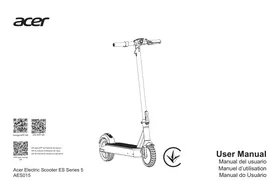



| Product type | Electric scooter |
| Brand | Acer |
| Model | AES015 |
| Unfolded dimensions | 118 x 49 x 125 cm |
| Folded dimensions | 118 x 49 x 55 cm |
| Weight | 18.5 kg |
| Maximum speed | 20 or 25 km/h (depending on regulations) |
| Maximum range | 60 km |
| Motor | 350 W |
| Battery | Lithium-ion 15 Ah |
| Charging time | 4 hours |
| Charger | 42 V / 2.0 A |
| Speed modes | 3 (0-6 km/h, 0-10 km/h, 0-20/25 km/h) |
| Brakes | Front electronic brake and rear disc brake |
| Wheels | 10 inches, pneumatic |
| Maximum load | 100 kg |
| Ground clearance | 11 cm |
| Folding | Yes |
| Water resistance | IPX4 |
| Lighting | Front headlight and reflectors |
| Bluetooth | Yes |
| Display | LED |
| Suspension | Yes |
| Main material | Aluminum alloy deck, steel front tube |
| Maintenance | Clean with a damp cloth; store in a cool, dry place |
Frequently Asked Questions - AES015 ACER
User questions about AES015 ACER
0 question about this device. Answer the ones you know or ask your own.
Ask a new question about this device
Download the instructions for your Electric scooter in PDF format for free! Find your manual AES015 - ACER and take your electronic device back in hand. On this page are published all the documents necessary for the use of your device. AES015 by ACER.
USER MANUAL AES015 ACER
| Scooter *1 | |
| 3 mm hex wrench *1 | |
| Owner manual *1 | |
| Battery charger *1 | |
| M5*14L countersunk screw *4 PCS |
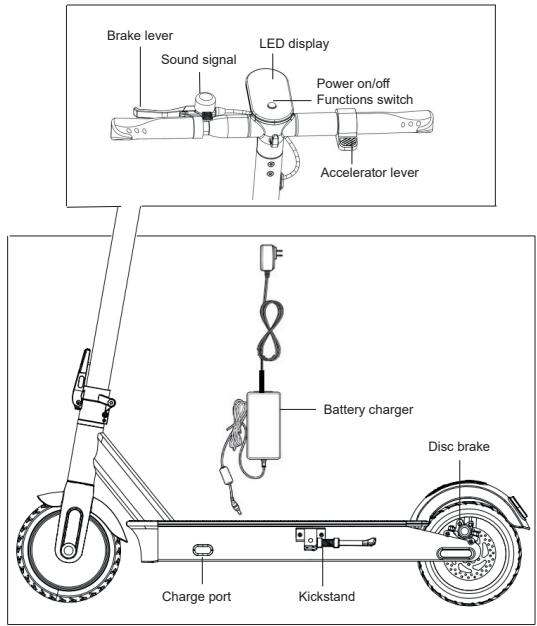
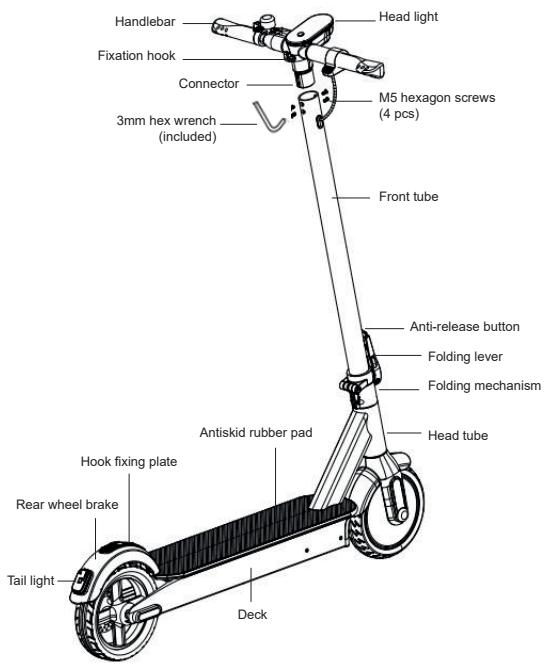
II. Parts
III. Assembling
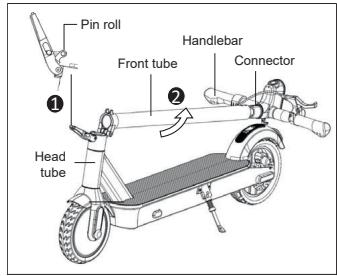
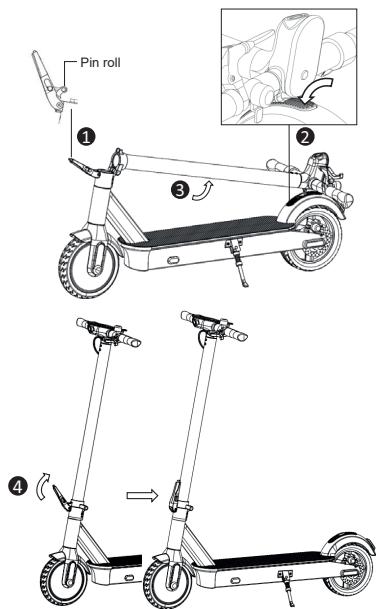
1. Open the folding lever fully to expose the pin roll. - Lift up the front tube along with connector and handlebar, level with head tube.
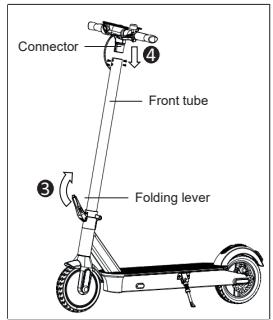
2. Lock the folding lever. 3. Insert the connector to the front tube.
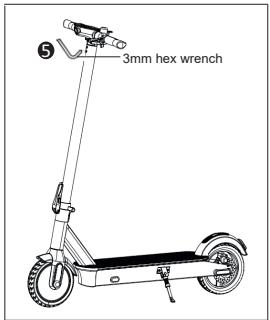
4. Tighten all the 4 hexagon screws on the front tube by the 3mm hex wrench included.
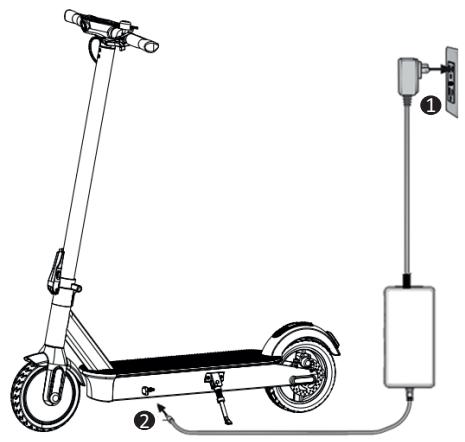
IV. Charge the Battery
Note: The charger light is red when charging and turns green when charging is complete.
V. USE
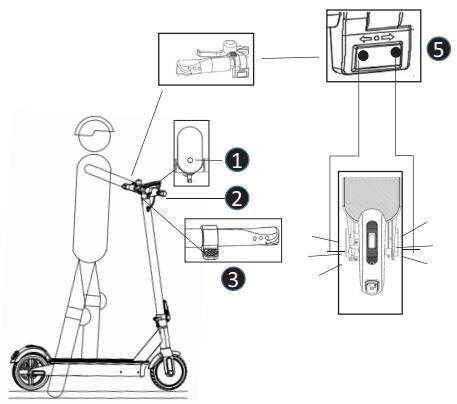
Starting the scooter
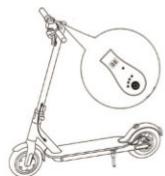
- Press and hold the power button in for 3 seconds to turn the scooter on. Press power button shortly once for light on/off.
Press power button continuously for twice to switch speed regulations. Press power button continuously for 3 times to switch between km/h & mp/h.
- Grip handlebars firmly with both hands.
- Step on deck with one foot, kick against the ground with the other foot to assist to speed up, and press the accelerator lever gently.
- Step both feet on the deck after starting.
- Turn signal (optional).
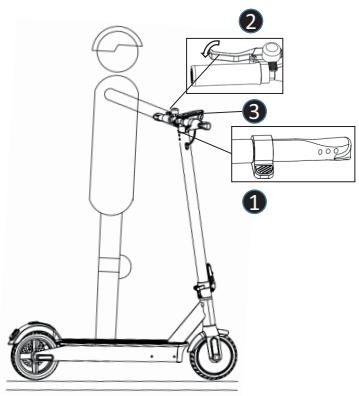
Stopping the scooter
- Release the accelerator lever.
- Brake by pressing down on the front hand brake lever.
- Press the power button off when not in use.
Folding the Scooter
- Press down the anti-release button.
- Unlock the folding lever.
- Fold back the front tube and lock the fixation hook to the fixing plate on the rear wheel brake.
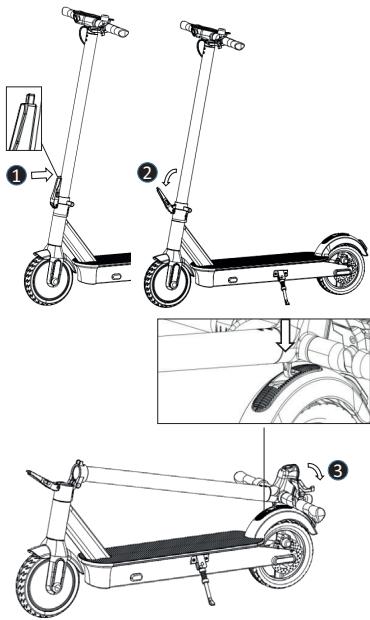
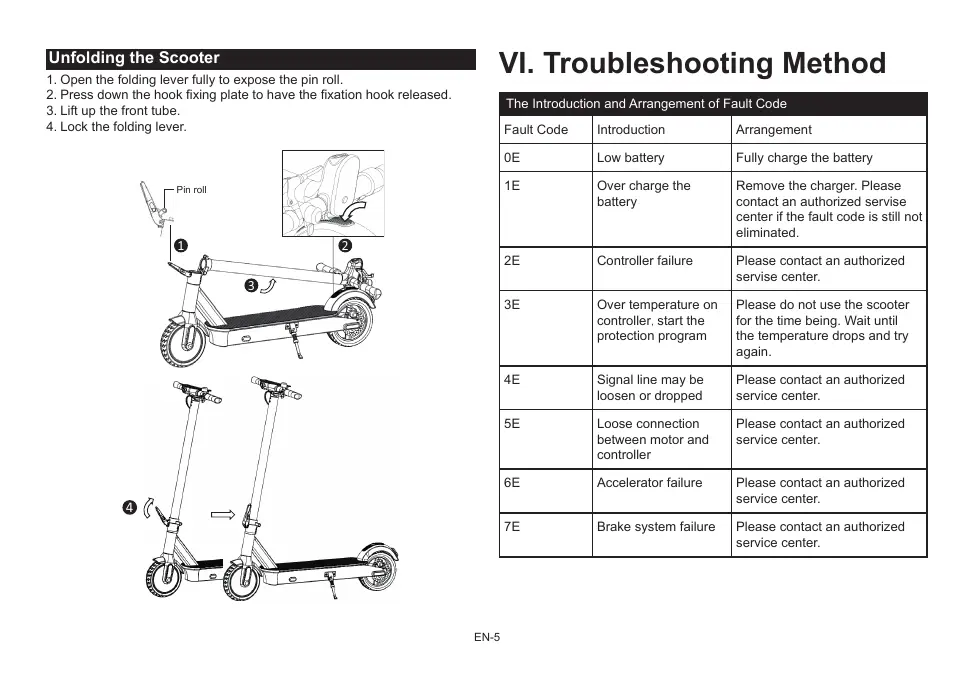
Unfolding the Scooter
- Open the folding lever fully to expose the pin roll.
- Press down the hook fixing plate to release the fixation hook.
- Lift up the front tube.
- Lock the folding lever.
VI. Troubleshooting Method
| The Introduction and Arrangement of Fault Code | ||
| Fault Code | Introduction | Arrangement |
| 0E | Low battery | Fully charge the battery |
| 1E | Over charge the battery | Remove the charger. Please contact an authorized servise center if the fault code is still not eliminated. |
| 2E | Controller failure | Please contact an authorized servise center. |
| 3E | Over temperature on controller, start the protection program | Please do not use the scooter for the time being. Wait until the temperature drops and try again. |
| 4E | Signal line may be loosen or dropped | Please contact an authorized service center. |
| 5E | Loose connection between motor and controller | Please contact an authorized service center. |
| 6E | Accelerator failure | Please contact an authorized service center. |
| 7E | Brake system failure | Please contact an authorized service center. |
| 8E | Over current, start the protection program | Stop the scooter and re-start later. Please contact an authorized service center if the fault code is still not eliminated. |
| 9E | Motor Locked Rotor | Stop the scooter and re-start later. Please contact an authorized service center if the fault code is still not eliminated. |
The battery does not charge.
Arrangement method:
- The plug is not properly inserted.
- The charger is damaged, use a new charger.
- The battery wiring is loose, re-connect the terminals.
Insufficient mileage after charging
Arrangement method:
- Insufficient charging, fully charge the battery.
- Uphill and heavy headwinds, heavy load, poor road surface and low temperature.
- The terminals connected between battery and charge port are loose, re-connect the terminals.
Speed is too low
Arrangement method:
- The battery voltage is too low, fully charge the battery.
The brake is not working
Arrangement method:
- The brake cable is too long, re-tighten the brake cable.
- If the brake pad is damaged, replace it with the original one.
Note: When a malfunction is detected, please contact an authorized service center. Do not repair or modify the scooter yourself, as this can void the warranty and cause injuries.
VII. RIDE AND SAFETY
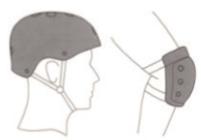
A learning process is necessary for the use of this device. Using it without proper training can cause injuries. Use protective gear to prevent damage. Once you have completed these steps, you can turn on the electric scooter:
BRAKE ADJUSTMENT
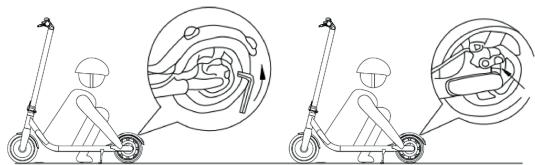
Before every ride, check the brakes. If you feel the brake is too tight, use the hex wrench counterclockwise to loosen the screws on the pressure plate on the disc brake seat, release the brake line to slightly shorten the exposed length, and tighten the screws of the pressure plate. If you feel that the brake is too loose, release the screws on the pressure plate, pull the brake cable to slightly lengthen it, and then lock the screws on the pressure plate.
WARNING! When hard braking, you risk serious injury due to loss of traction and falls. Maintain a moderate speed and watch out for potential hazards.
USE
Keep one foot on the board and one foot on the ground. Push off with the foot on the ground, and when the speed reaches 3 km/h, start accelerating. Keep the other foot on the board and accelerate appropriately or maintain a certain speed. This action is necessary to start moving, for your safety.
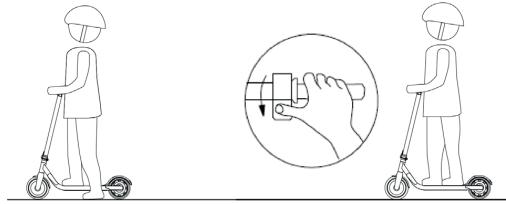
CONSTANT SPEED
If you keep the accelerator pressed, the speed will be fixed for greater travel comfort. To cancel this function, activate the brake.
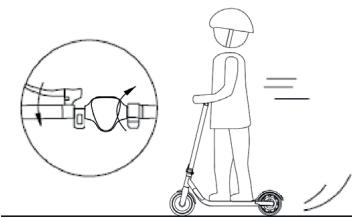
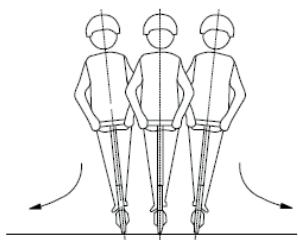
Look for the equilibrium posture to circulate constantly:
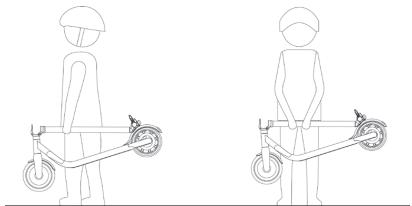
FOLDING AND TRANSPORTATION
Once folded, hold the electric scooter by the bar to transport it as indicated in the figure:
! Warnings: failure to follow these instructions could lead to serious injury.
- DO NOT ride the electric scooter in the rain.
- DO NOT get wet.
Watch your head when passing through doorways.
Keep your speed between 3.1-6.2 mph (5-10 km/h) when you ride through speed bumps, elevator door stills, bumpy roads or other uneven surfaces. Slightly bend your knee to better adjust to mentioned surfaces.
DO NOT keep your feet on the rear fender. - DO NOT press the throttle when walking with the electric scooter. Avoid contacting obstacles with the tire/wheel. - DO NOT carry heavy objects on the handlebar. - DO NOT ride the electric scooter with only one foot. - DO NOT ride on public roads, motorways, or highways. - DO NOT rotate the handle violently while driving at high speed. - DO NOT ride up and down stairs or jump over obstacles. - DO NOT take your hands off the handlebar while riding. Do not ride with one hand only.
- Do NOT ride through puddles or any other (water) obstacles. In such a case please lower your speed and bypass the obstacle.
- DO NOT carry any passengers. The electric scooter is for one rider only.
- Do not carry a child.
- Do not ride when pregnant. DO NOT use mobile phone or wear earphones when operating the electric scooter.
- DO NOT touch the hub motor after riding because it can get hot.
- Always keep both hands on the handlebar or you risk serious injury due to loss of balance and falls. Only for use in dry weather.
- We do not recommend the use on public roads.
- Never turn violently when driving fast.
- Do not start or stop suddenly.
- Make sure the speed of the electric scooter is safe for you and others and be ready to stop at any time while it is running.
- When driving the electric scooter, please stay at a distance from others to avoid collisions.
- When turning, you must use the center of gravity of your body; a violent change in the center of gravity can cause damage.
- Routinely check the bearings for moisture and dirt. Dry and clean the bearings. If necessary, grease the bearings after cleaning. Only use suitable lubricants for this purpose. Also check the steering position to ensure this product is safe.
- No modifications other than those in the manufacturer's instructions shall be made.
- Self-locking nuts and other self-locking fixings can lose their effectiveness.
- Avoid driving on steep slopes.
VIII. CLEANING AND MAINTENANCE
This electric scooter can be used as a means of transport and as such requires maintenance of all its components, which suffer wear and tear due to use and is not covered by the warranty.
CLEANING
Make sure the electric scooter is powered OFF, the charge cable is unplugged, and the rubber cap on the charge port is tightly sealed before cleaning; otherwise you may damage the electronic components. Always disconnect the product from the charger first, cover the charging waterproof plug, turn off the power of the product, and avoid fluid contact with the battery, motor and other electronic parts during cleaning to avoid unforeseen hazards. Do not use a high pressure water jet to clean the product or soak it in water.
To clean the electric scooter, use a damp cloth. If you need to scrape dirt, use a soft brush and then a damp cloth.
Be sure to cover the charging port to avoid problems with the electronic components.
Do not use alcohol, gasoline, kerosene or other volatile or corrosive chemical components. This can damage both the appearance and the internal structure of the electric scooter. Also, do not use a pressure water gun or running water.
CONSERVATION
Store the electric scooter in a cool, dry environment when not in use. Avoid leaving it outside, since it is not manufactured for use in wet areas, near corrosive agents such as seawater, ports, etc. It is also not recommended to expose it to high temperatures caused by direct sunlight for a long time.
IX. BATTERY HANDLING AND PROHIBITED ACTIONS
Do not use other models or brands of batteries, use only original battery.
Do not place the battery in an environment with high temperatures higher than 50°C or lower than -20circC (for example, do not place the electric scooter inside a car trunk in summer), and do not put the battery in places near the fire.
Otherwise, it may cause battery failure, overheating and even the risk of fire.
Avoid completely discharging the batteries, it is better to charge them while there is still power in them. This will prolong the life of the battery.
Also if you drive the electric scooter in very cold or warm areas, you can decrease the time of use of the batteries. It is not a failure of the batteries, but it is their normal behavior.
When not in use for more than 30 days, fully charge and store in a cool, dry place and fully charge the battery every 60 days. Failure to follow these steps could damage the battery, and this damage is not covered by the warranty.
It is forbidden to disassemble the battery compartment. Only its manipulation in Official Technical Services or adhered Workshops is allowed.
Use only the original charger to charge, otherwise there is a risk of damage or fire.
Inadequate disposal of used batteries can cause serious environmental contamination. Observe local regulations when disposing of this battery pack.
After each use, recharge the battery, this will lengthen the life of the battery.
DANGER!
Battery cell contains flammable and hazard substances. Mishandling can cause fire, smoke, explosion and severe personal injury or property loss. Always read and comply the following prohibited action, equip proper protective gear before perform any battery related operation.
Keep the battery away from infant and children to avoid any accidents. If younger children use the battery, their guardians should explain the proper handling method and precaution before using, and always ensure the integrity of the battery.
Use only dedicated charger and charge the battery only in the dedicated way. Don't charge the battery by an electric outlet directly or an automobile cigarette lighter charger. Don't charge battery unattended.
- Don't charge the battery reversely.
- Don't leave the battery near fire or a heat source, and don't throw the battery into fire.
- Don't charge or use the battery in a car or similar place where the internal temperature may exceed 50°C.
- Don't immerse, throw, or wet the battery in water, seawater, etc.
- Don't short-circuit the battery or connect the (+) positive and (-) negative terminals with metallic objects. Don't store the battery in a pocket or bag together with metallic objects such as keys, necklaces, hairpins, coins, or screws.
- Don't pierce the battery with sharp objects such as needles or screwdrivers.
- Don't heat partial areas of the battery with heated objects such as a soldering iron.
- Don't hit the battery with heavy objects such as a hammer or weight. Don't step on the battery, and don't throw or drop it to avoid mechanical shock. Don't use seriously deformed batteries.
- Don't disassemble the battery or modify its design, including the electric circuit.
- Don't solder directly on the battery, and don't use or assemble old and new batteries together.
- Don't put the battery into a microwave oven, dryer, or high-pressure container.
- Don't use or assemble the battery with other makers' batteries, or with different types and/or models of batteries such as dry batteries, nickel-metal hydride batteries, or nickel-cadmium batteries.
Keep away from fire immediately if leakage or foul odors are detected. If liquid leaks onto your skin or clothes, wash well with fresh water immediately. If liquid leaking from the battery gets into your eyes, don't rub your eyes; wash them with clean water and see a doctor immediately. If the terminals of the battery become dirty, wipe them with a dry cloth before using the battery.
Cover terminals with proper insulating tape before disposal.
Before using, installing, or removing the battery or using the charger, always read the user's manual and comply with the precautions for handling.
Replace the battery when the usage time becomes much shorter than usual.
If the battery needs to be stored for a long period, it should be removed from the application and stored in a place with low humidity and temperature.
While the battery is being charged, used, and stored, keep it away from objects and materials with static electricity.
Do not use non-rechargeable batteries as replacements.
The battery must be removed from the appliance before it is scrapped.
The appliance must be disconnected from the power supply when removing the battery.
The battery is to be disposed of safely.
Do not use the battery in the presence of static electricity (more than 100 V), as the battery protection circuit will be damaged.
Do not remove the battery. Removing the battery is complicated and can alter the operation of the machine. You must contact an authorized service center to operate the battery.
Do not store or charge the battery at temperatures outside the stated limits (see this manual). Do not puncture the battery. Refer to your local laws and regulations regarding battery recycling and/or disposal.
A well-maintained battery can perform well even after many miles of riding. Charge the battery after each ride and avoid draining it completely.

WARNING!
Keep away from fire immediately if leakage or foul odors are detected. If liquid leaks onto your skin or clothes, wash well with fresh water immediately. If liquid leaking from the battery gets into your eyes, do not rub your eyes; wash them with clean water and see a doctor immediately. If the battery terminals become dirty, wipe them with a dry cloth before using the battery.
Cover terminals with proper insulating tape before disposal.
Before using, installing, or removing the battery or using the charger, always read the user's manual and comply with the precautions for handling.
Replace the battery when the usage time of the battery becomes much shorter than usual.
If the battery needs to be stored for a long period, it should be removed from the application and stored in a place where humidity and temperature are low.
While the battery is charged, used, and stored, keep it away from materials with static electricity.
Cannot use non-rechargeable batteries as replacements.
The battery must be removed from the appliance before it is scrapped.
The appliance must be disconnected from the supply mains when removing the battery.
The battery is to be disposed of safely.
Do not attempt to disassemble the battery. Do not touch battery contacts. Do not dismantle or puncture the casing.
Keep the battery contacts away from metal objects to prevent short circuits. Risk of fire and electric shock. Do not charge or use your battery if it is damaged or shows traces of water.
In case of accident or breakdown: please contact an authorized repairer in your country.
User must contact an authorized or specialized customer service.
X. Charging/Discharging and storing the battery
Warning: always comply with the following message.
Use only original charger, improper use can cause personal injury and property loss. The warranty does not bear any liability caused by the use of non-original charger.
Do not charge when near any fluid or fire source, always avoid flammable substances. Do not leave the device unattended while charging.
Don't charge if the charge port or charge cable is wet.
Don't charge or use your battery if it is damaged or shows traces of water.
The charging interface is provided with a special slot. Do not force the connector to be inserted, which can cause damage to the device.
The charger indicator is red when the battery is charging. The indicator is green when charging is completed.
Remove the charger when the charger indicator is green. Overcharge or over discharge will cause irreversible damage to the battery or property loss. If the charger indicator turns green immediately while charging after riding, please disconnect the charger and allow the battery to cool down before recharging. This is the normal phenomenon of intelligent protection due to the high internal temperature of the battery. Charging can begin after the battery cools down.
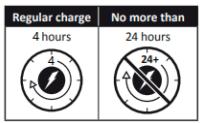
Stop charging and disconnect the charger if the battery is not fully charged after the following recommended period of time. Contact customer service for further information.
The charging port must be covered by the attached rubber cap after each charging.
Always take extra care while handling the battery.
Stop using the battery if it becomes abnormally hot, or has odor, discoloration, deformation, or other abnormal conditions are detected during use, charge, or storage.
The battery can be used within the following temperature ranges. Don't exceed these ranges.
Operating Temperature: -10-60°C (Battery performance varies by temperature)
Charging Temperature: 10 - 45°C
Storage & Transportation Temperature: -10-45°C
Storage Humidity: 10-80%
XI. Utilization information
| Product Name | Acer Electric Scooter ES Series 5 |
| Model | AES015 |
| Dimensions, unfolded | 118L x 49W x 125H (cm) |
| Dimensions, folded | 118L x 49W x 55H (cm) |
| Weight incl. battery | 18.5Kg |
| Motor | 350W |
| Battery | 15Ah |
| Battery type | lithium-ionic |
| Battery manufacturer | TIANHONG |
| Charging | 42V/2.0A |
| Adaptor Manufacturer: FUYUANDIAN, Model No.: FY-4202000 | |
| Full charging time | 4 hours |
| Maximum speed | 20 km/h or 25km/hr (Depends on countries regulation) |
| Maximum distance w/o charging | 60Km |
| Speed regulation | yes |
| Speed modes | 3 |
| Speed modes level | 0-6km/h; 0-10km/h; 0-20 or 25km/h (Depends on countries regulation) |
| Folding mechanism | Yes |
| Main material | aluminum alloy deck, steel front tube |
| Maximum load | up to 100 kg |
| Clearance | 11cm |
| Height adjustable handlebar | no |
| Brakes | front electronic brake and rear disc brake |
| Display | LED display |
| Wheel absorber | Yes |
| Wheels | solid tire wheel |
| Tire material | ruber |
| Drive unit | Front wheel drive |
| Wheel diameter | 10" |
| Waterproof | IPX4 |
| Reflectors | yes |
| Headlight | yes |
| Application | no |
| Sound signal | yes |
| Backlight | yes |
| Bluetooth | yes |
| Climbing Ability | 10° |
XII. Others
- Manufacturer date is mentioned on Product label
- Storage
Store this product in a dry, cool and safe place, avoid moisture and high temperatures. Humidity can cause electrical components damaged. When the lithium battery fails, please contact your local recycling agency and dispose of the lithium battery in accordance with your national or local laws and regulations.
- Operating Temperature: -10-60°C
- Charging Temperature: 10-45°C Storage & Transportation Temperature: -10-45°C Storage Humidity: 10-80%
- This product must not be disposed of with others household waste. Please recycle it to minimize environmental pollution in compliance with the local regulations or contact your local city office, household waste disposal service.
- 1) Devices are not intended for use at elevations greater than 2000 m above sea level.
Note: Canadian users
CAN ICES-003(B)/NMB-003(B)
EU Declaration of Conformity
We,
Acer Incorporated
8F, 88, Sec. 1, Xintai 5th Rd., Xizhi, New Taipei City 221, Taiwan
And,
Acer Italy s.r.l.
Viale delle Industrie 1/A, 20044 Arese (MI), Italy
Tel: +39-02-939-921, Fax: +39-02 9399-2913
www.acer.it
Product: Acer Electric Scooter ES Series 5
Trade Name: acer
Model Number: AES015
SKU Number: AES015 *
(* = 0~9 a~z A~Z or Blank)
We, Acer Incorporated, hereby declare under our sole responsibility that the product described above is in conformity with the relevant Union harmonization legislation: Machinery Directive 2006/42/EC and RoHS Directive 2011/65/EU. The following harmonized standards and/or other relevant standards have been applied:
EN17128:2020
EN 301 489-17 V3.2.4
EN 300 328 V2.2.2
EN 62479:2010
EN 301 489-1 V2.2.3
EN IEC 63000:2018
Year to begin affixing CE marking: 2022.
Federal Communications Commission Declaration of Conformity
This device complies with Part 15 of the FCC Rules. Operation is subject to the following two conditions: (1) this device may not cause harmful interference, and (2) this device must accept any interference received, including interference that may cause undesired operation.
The following local Manufacturer /Importer is responsible for this declaration:
| Product: | Acer Electric Scooter Series 5 |
| Model Number: | AES015 |
| Name of Responsible Party: | Acer America Corporation |
| Address of Responsible Party: | 333 West San Carlos St. Suite 1500 San Jose, CA 95110 U. S. A. |
| Contact Person: | Acer Representative |
| Phone No.: | 254-298-4000 |
| Fax No.: | 254-298-4147 |
FCC compliance statement
This device complies with Part 15 of the FCC Rules. Operation is subject to the following two conditions: (1) this device may not cause harmful interference, and (2) this device must accept any interference received, including interference that may cause undesired operation.
Changes or modifications not expressly approved by the party responsible for compliance could void the user's authority to operate the equipment.
This equipment has been tested and found to comply with the limits for a Class B digital device, pursuant to Part 15 of the FCC Rules. These limits are designed to provide
reasonable protection against harmful interference in a residential installation. This equipment generates, uses and can radiate radio frequency energy and, if not installed and used in accordance with the instructions, may cause harmful interference to radio communications. However, there is no guarantee that interference will not occur in a
particular installation.
If this equipment does cause harmful interference to radio or television reception, which can be determined by turning the equipment off and on, the user is encouraged to try to correct the interference by one or more of the following measures:
Reorient or relocate the receiving antenna. Increase the separation between the equipment and receiver. Connect the equipment into an outlet on a circuit different from that to which the receiver is connected. Consult the dealer or an experienced radio/TV technician for help.
FCC Radiation Exposure statement
This equipment complies with FCC radiation exposure limits set forth for an uncontrolled environment. This equipment should be installed and operated with minimum distance 5mm between the radiator and your body. This transmitter must not be co-located or operating in conjunction with any other antenna or transmitter.
ISED compliance statement
This device contains licence-exempt transmitter(s)/receiver(s) that comply with Innovation, Science and Economic Development Canada's licence-exempt RSS(s). Operation is subject to the following two conditions:
(1) This device may not cause interference. (2) This device must accept any interference, including interference that may cause undesired operation of the device.
Radiation Exposure statement
UK Declaration of Conformity
We,
Acer Incorporated
8F, 88, Sec. 1, Xintai 5th Rd., Xizhi, New Taipei City 221
And,
Acer UK Ltd
Heathrow Boulevard III 282 Bath Road West Drayton Greater London UB7 0DQ
Product: Acer Electric Scooter ES Series 5
Trade Name: acer
Model Number: AES015
SKU Number: AES015xxxxxxxxxx
(" x " = 0 9, a z, A Z, orblank)
We, Acer Incorporated, hereby declare under our sole responsibility that the product described above is in conformity with the relevant Union harmonization legislation:
Machinery (Safety) Regulations 2008 Radio Equipment Regulations 2017 - Electromagnetic Compatibility Regulations 2016 - The Restriction of the Use of Certain Hazardous Substances in Electrical and Electronic Equipment Regulations 2012.
The following harmonized standards and/or other relevant standards have been applied:
EN 17128:2020
EN 300 328 V2.2.2
EN 301 489-1 V2.2.3
EN 301 489-17 V3.2.4
EN 62479:2010
ENIEC63000:2018
Signed for and on behalf of:
8F, 88, Sec. 1, Xintai 5th Rd., Xizhi, New Taipei City 221, Taiwan
Y,
Acer Italy s.r.l.
Acer Incorporated (Taipei, Taiwan)
16/05/2022
Date

8F, 88, Sec. 1, Xintai 5th Rd., Xizhi, New Taipei City 221, Taiwan
Et,
Acer Italy s.r.l.
Viale delle Industrie 1/A, 20044 Arese (MI), Italy
Tel: +39-02-939-921, Fax: +39-02 9399-2913
www.acer.it
RU Jan / Sr. Manager
Acer Incorporated (Taipei, Taiwan)
16/05/2022
Date

Federal Communications Commission Declaration of Conformity
8F, 88, Sec. 1, Xintai 5th Rd., Xizhi, New Taipei City 221, Taiwan
E,
Acer Italy s.r.l.
Acer Incorporated (Taipei, Taiwan)
16/5/2022
Date



- PARTS
- ASSEMBLING
- CHARGE THE BATTERY
- USE
- STARTING THE SCOOTER
- STOPPING THE SCOOTER
- FOLDING THE SCOOTER
- UNFOLDING THE SCOOTER
- TROUBLESHOOTING METHOD
- THE BATTERY DOES NOT CHARGE
- INSUFFICIENT MILEAGE AFTER CHARGING
- SPEED IS TOO LOW
- THE BRAKE IS NOT WORKING
- RIDE AND SAFETY
- BRAKE ADJUSTMENT
- CONSTANT SPEED
- FOLDING AND TRANSPORTATION
- CLEANING AND MAINTENANCE
- CLEANING
- CONSERVATION
- BATTERY HANDLING AND PROHIBITED ACTIONS
- DANGER
- WARNING
- CHARGING/DISCHARGING AND STORING THE BATTERY
- WARNING: ALWAYS COMPLY WITH THE FOLLOWING MESSAGE
- OTHERS
- EU DECLARATION OF CONFORMITY
- FEDERAL COMMUNICATIONS COMMISSION DECLARATION OF CONFORMITY
- FCC COMPLIANCE STATEMENT
- FCC RADIATION EXPOSURE STATEMENT
- ISED COMPLIANCE STATEMENT
- RADIATION EXPOSURE STATEMENT
- UK DECLARATION OF CONFORMITY
Brand : ACER
Model : AES015
Category : Electric scooter