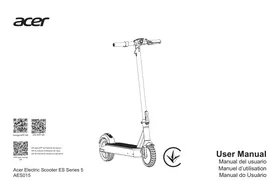
USER MANUAL AES023 ACER
Acer Electric Scooter Series 3 (AES023)
Acer Electric Scooter Series 5 (AES025)
Predator Electric Scooter Series 5 (PES025)
User Manual
User Manual / User Manual
| Scooter *1 | 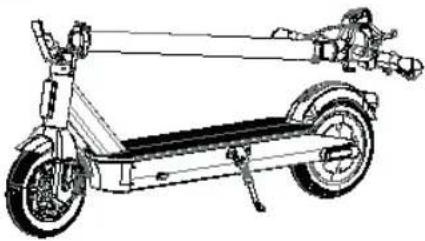 |
| 3 mm hex wrench *1 |  |
| User Manual *1 |  |
| Warranty manual *1 |  |
| Battery charger *1 | 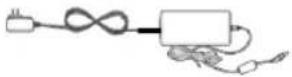 |
| M5*14L screw *4 PCS |  |
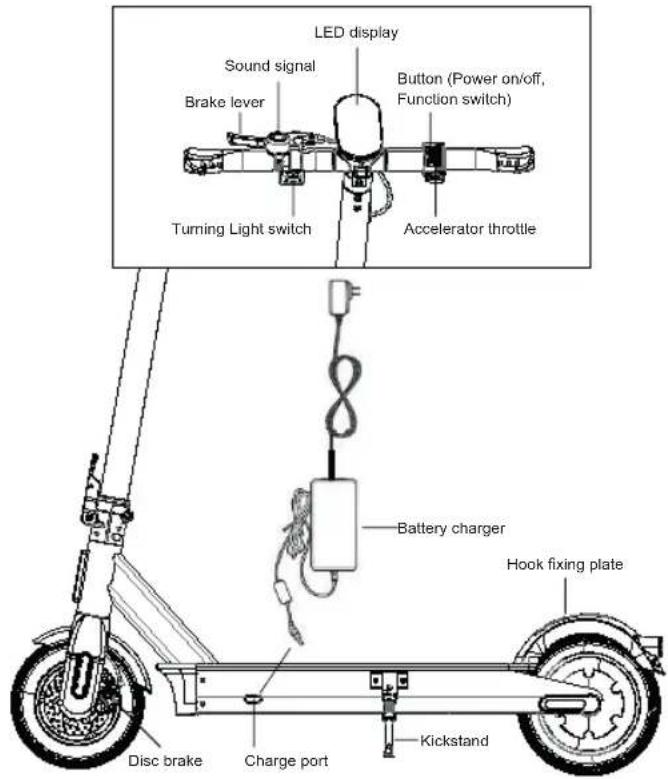
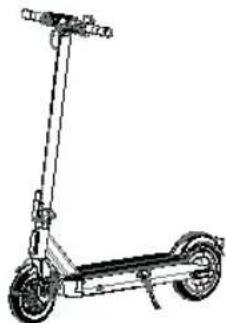
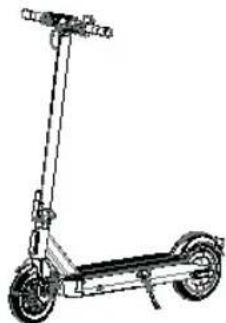
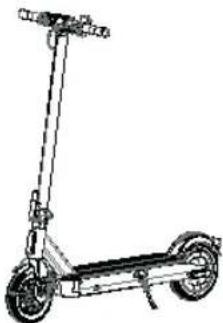
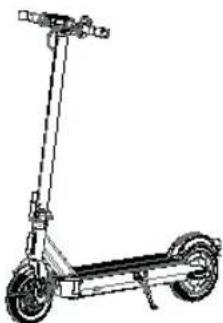
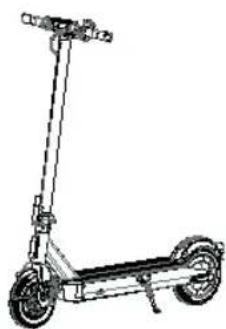
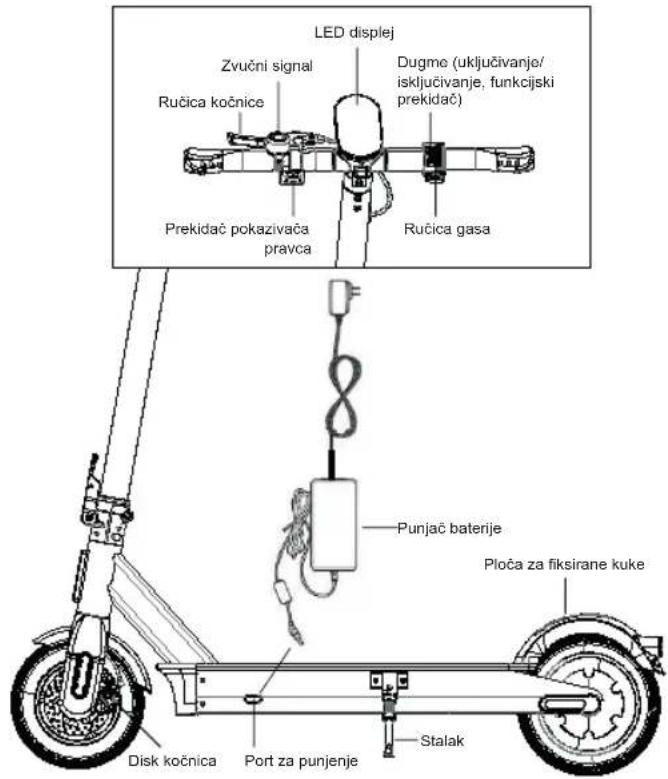
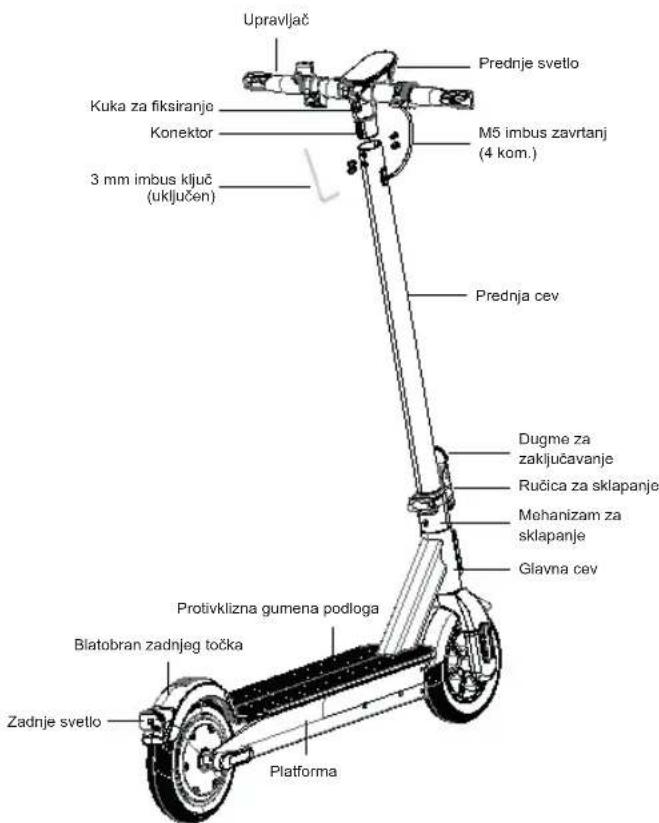
II. Parts
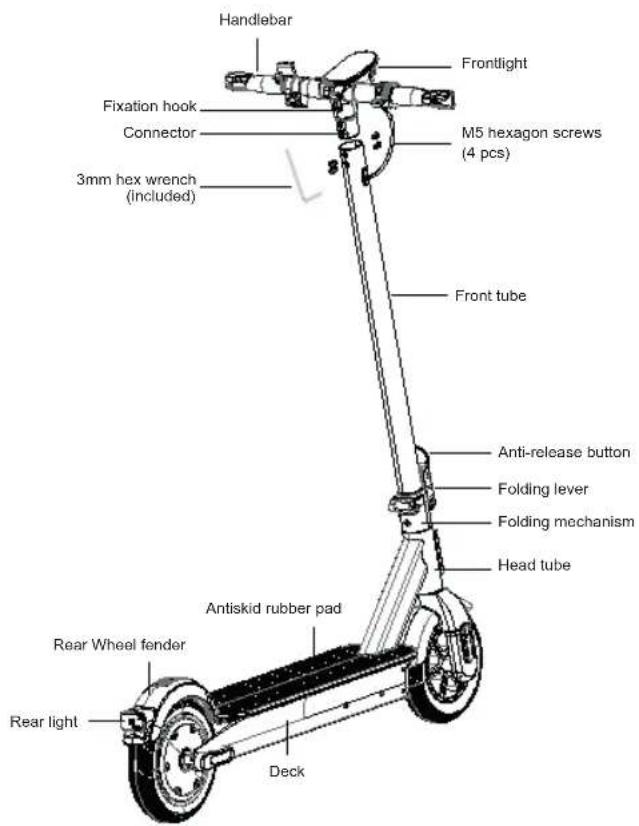
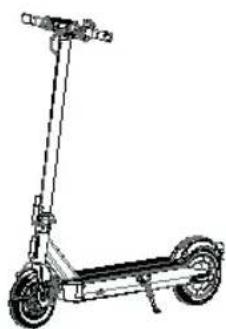
III. Assembling
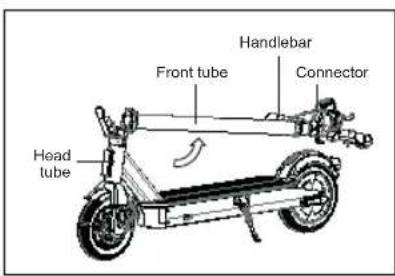
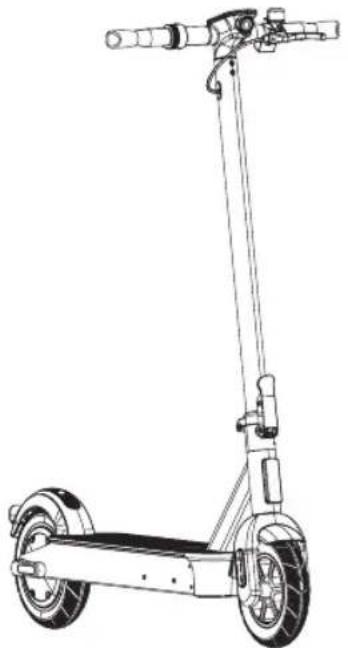
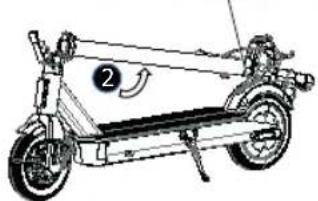
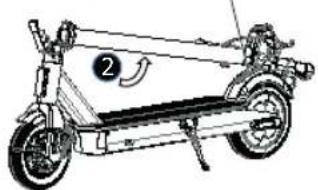
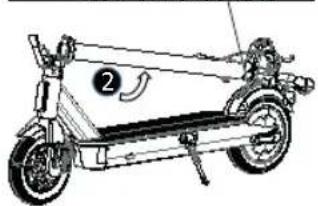
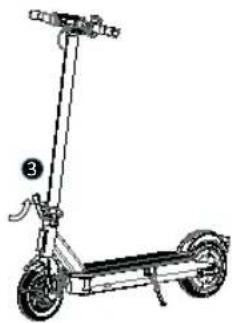
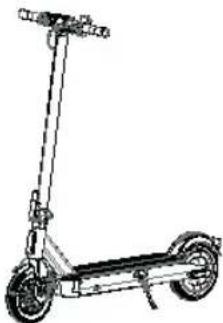
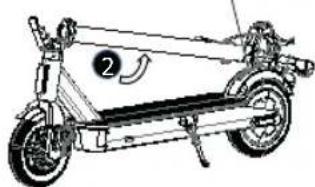
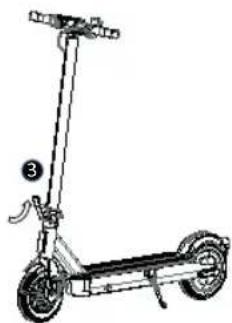
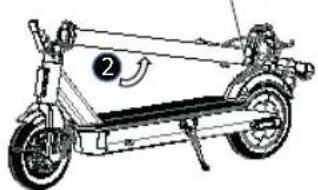
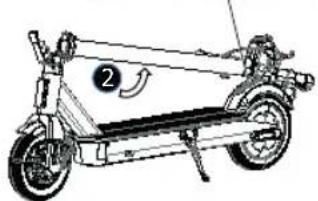
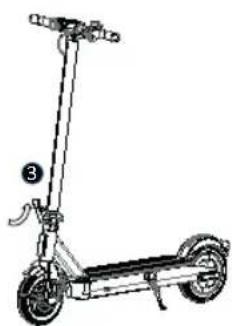
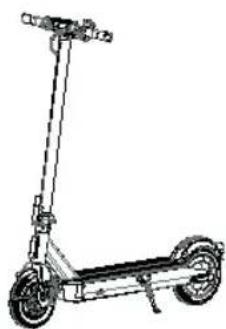
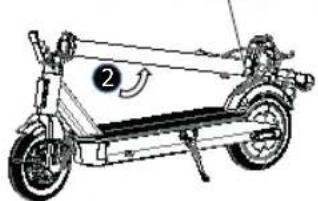
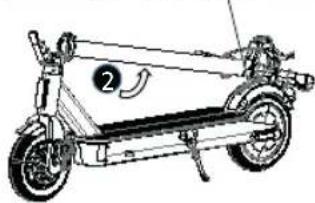
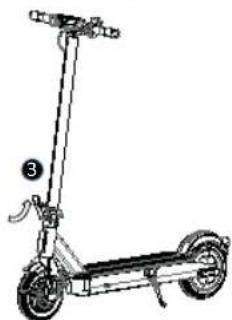
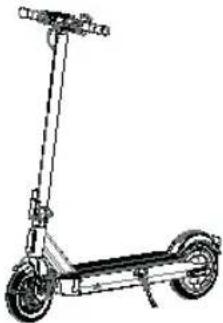
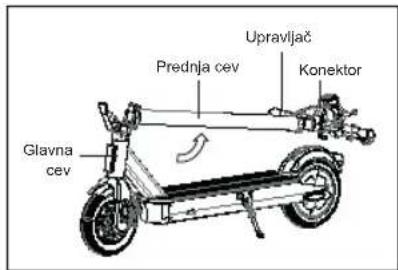
1. Lift up the front tube along with connector and handlebar, level with head tube.
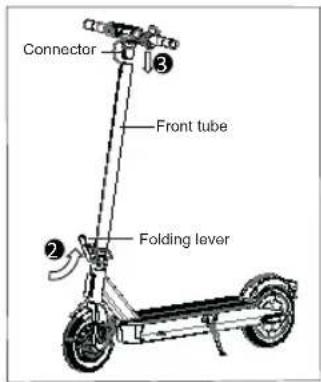
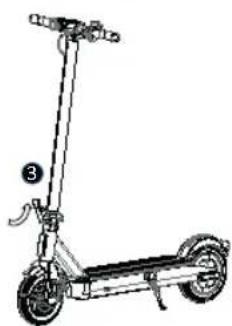
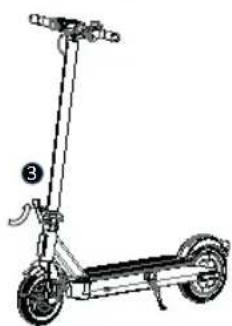
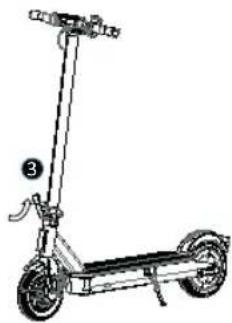
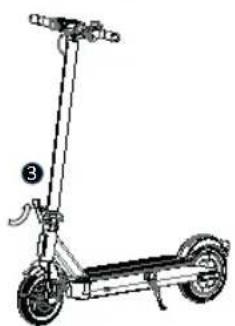
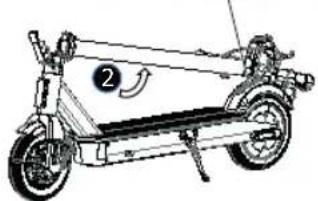
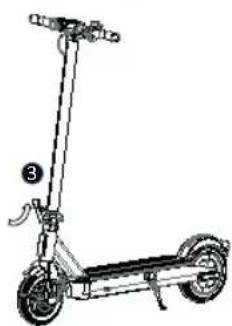
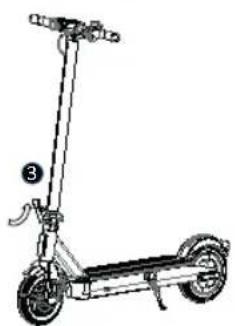
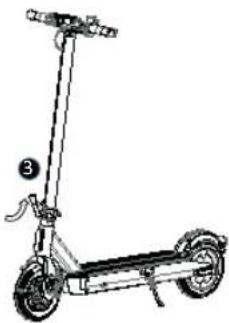
2. Lock the folding lever. 3. Insert the connector to the front tube.
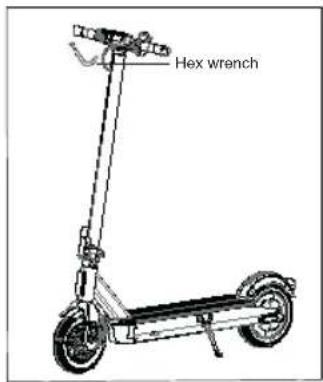
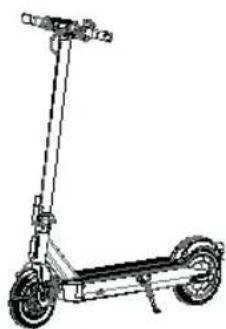
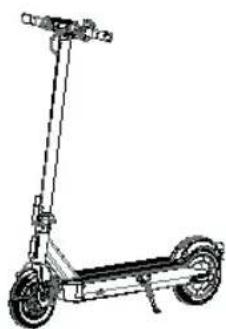
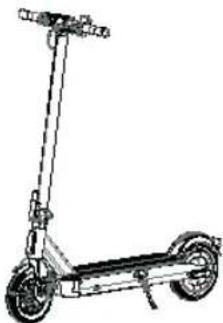
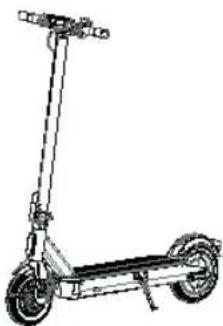
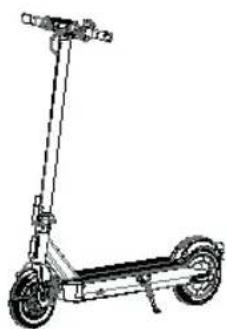
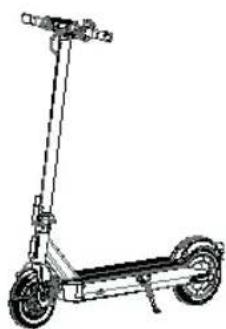
4. Lock the M5 screws on both sides of the pipe with the hex key.
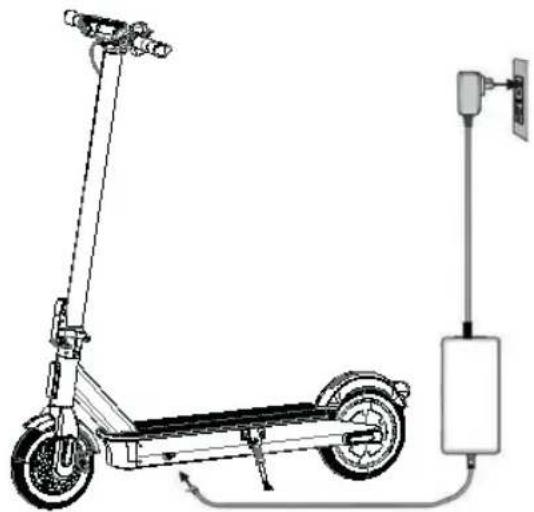
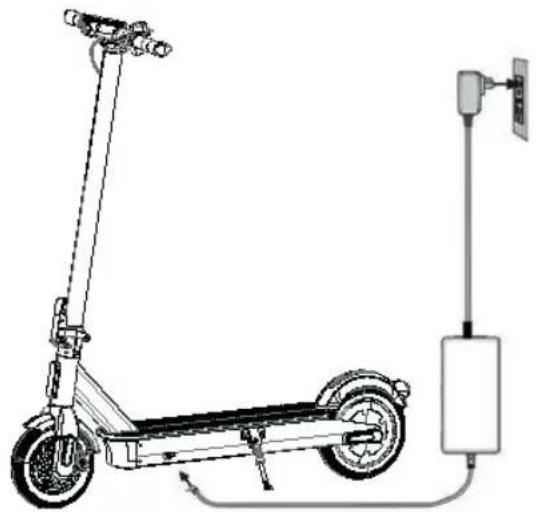
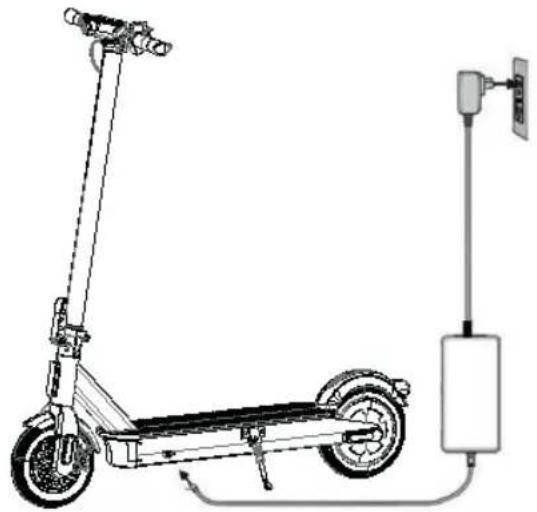
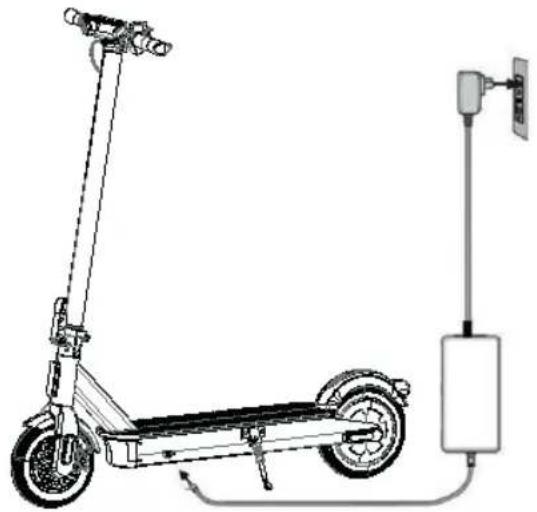
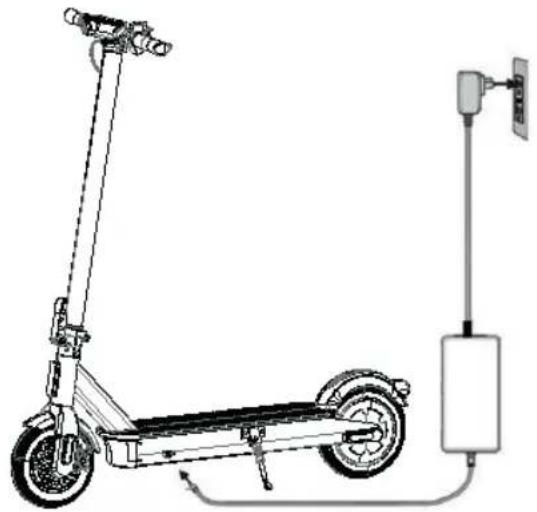
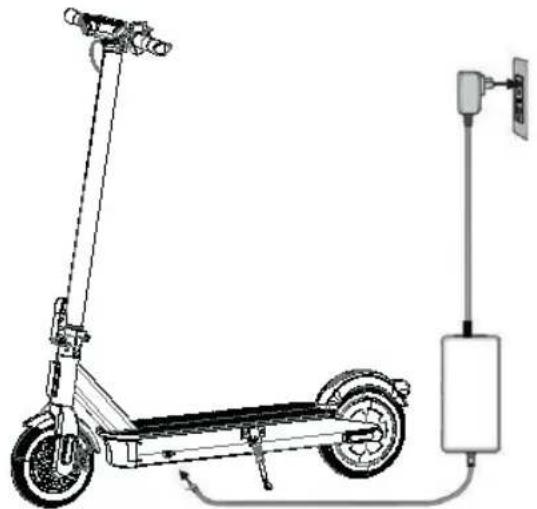
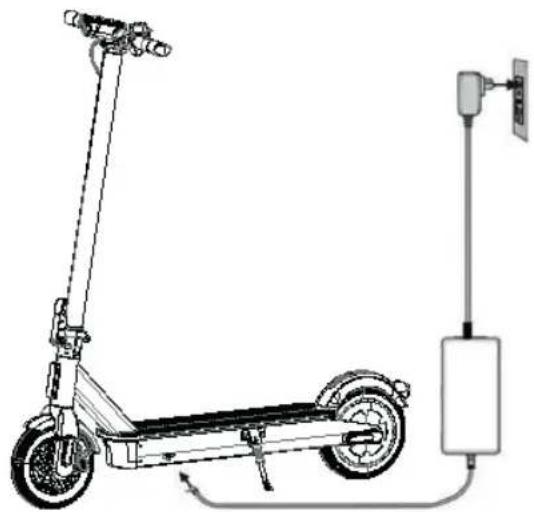
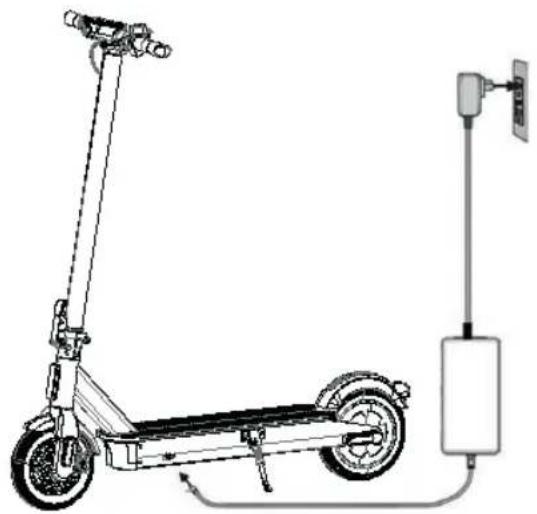
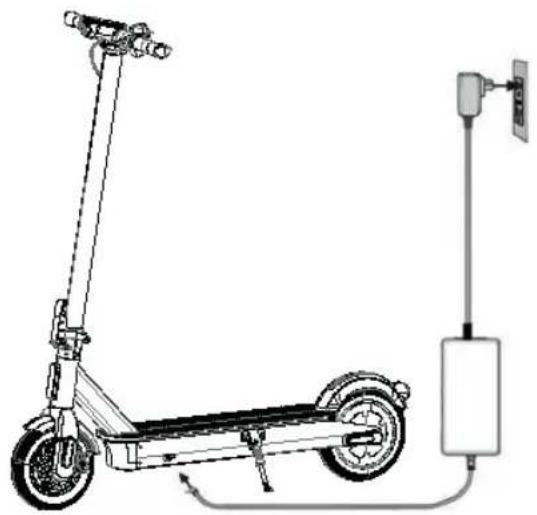
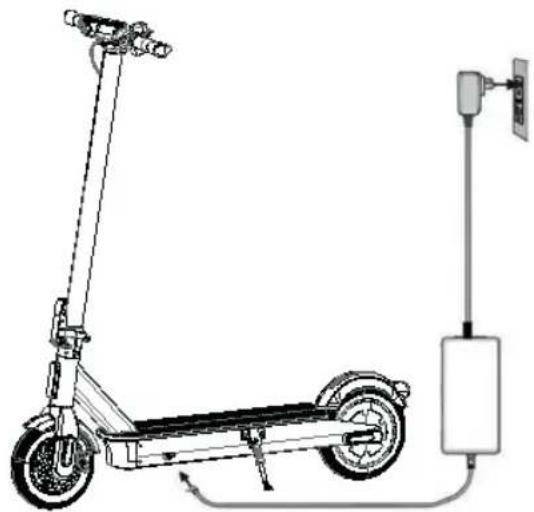
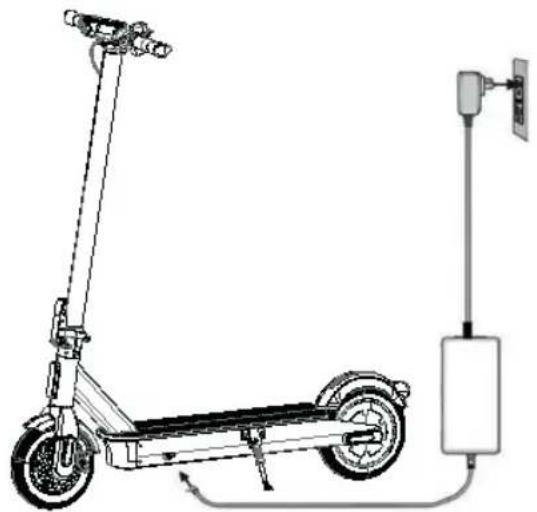
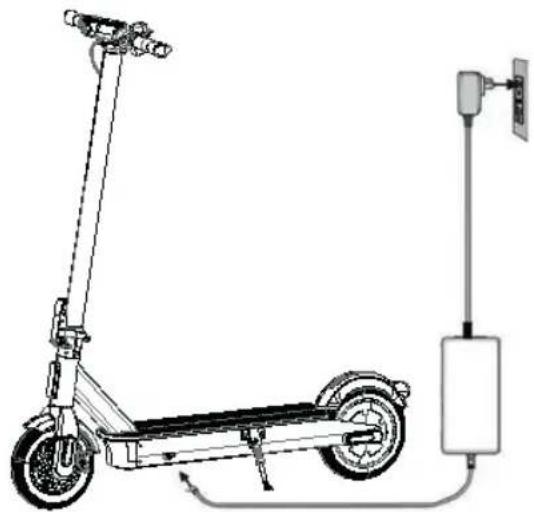
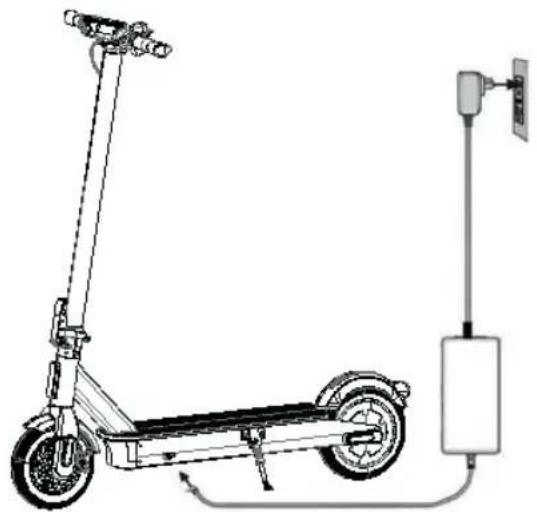
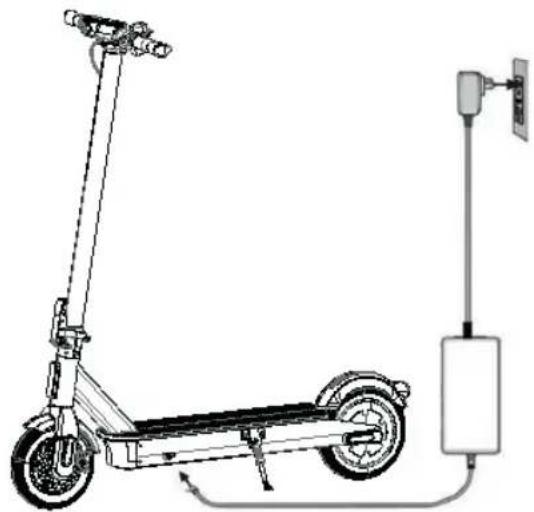
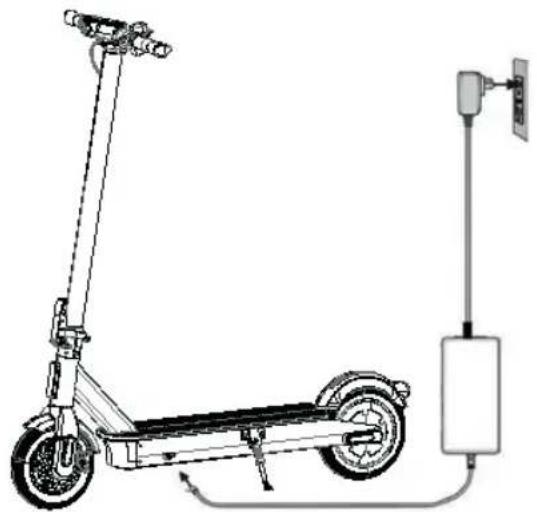
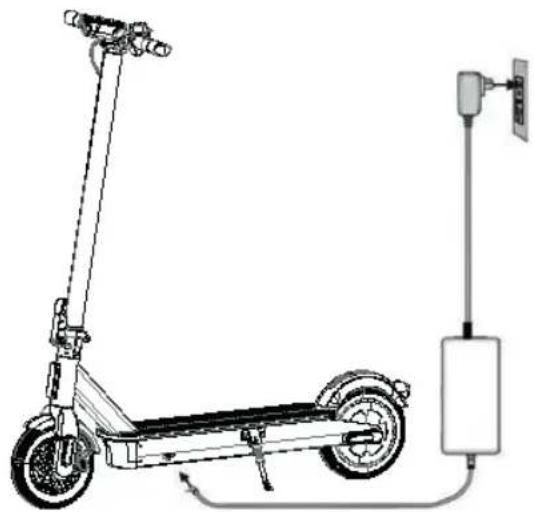
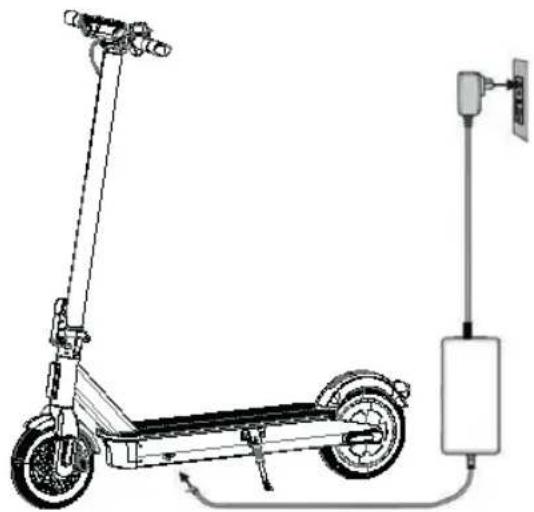
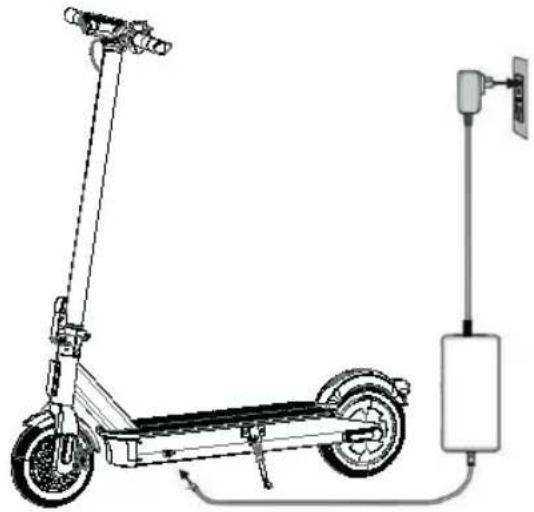
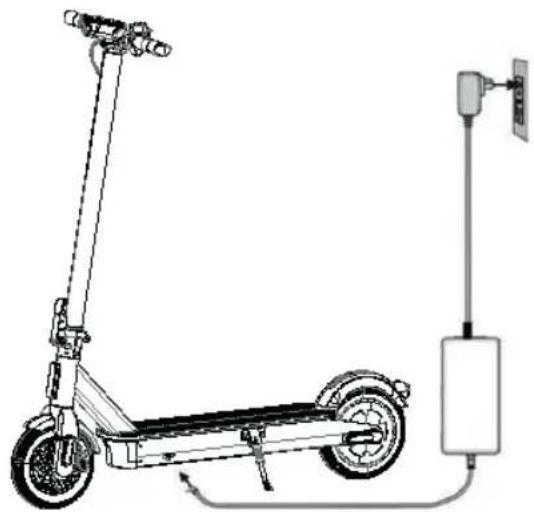
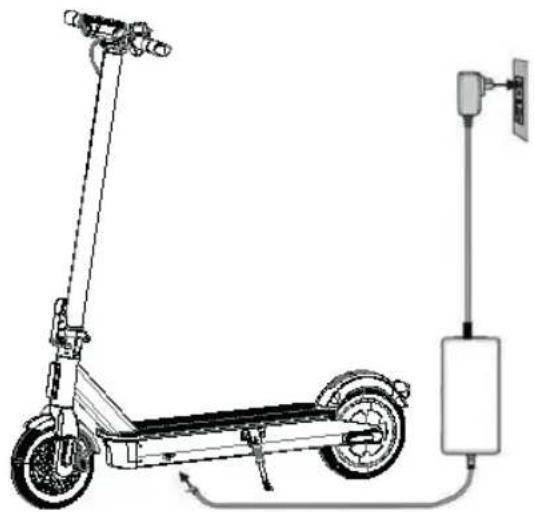
IV. Charge the Battery
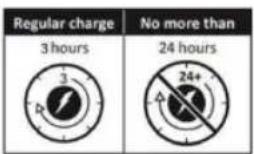
Charge your scooter before first ride.
Note: The charger light is red when charging and turns green when charging is complete.
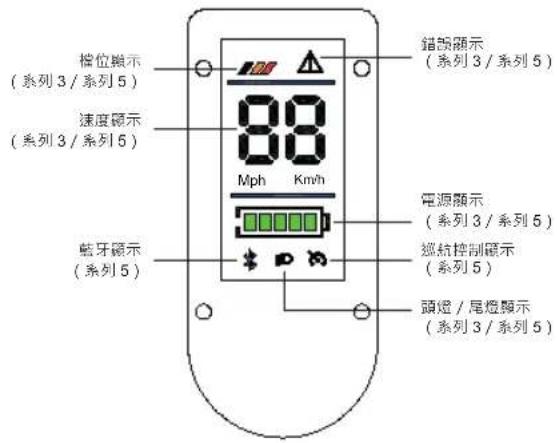
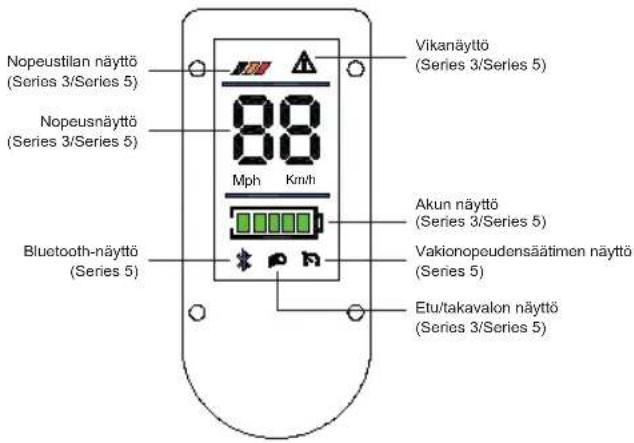
V. Introducing the dashboard
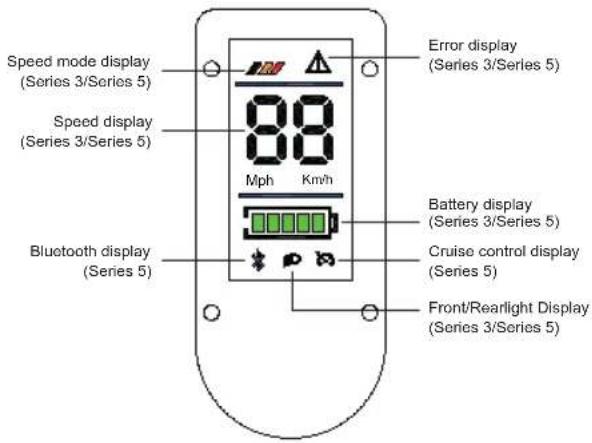
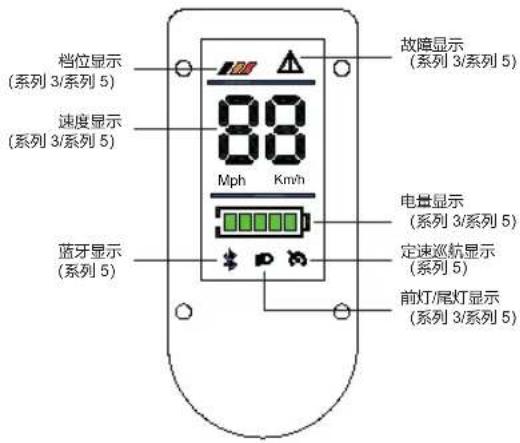
Speed mode display
| Speed mode 1 Speed: 6 km/h |
| Speed mode 2 Speed: 10 km/h |
| Speed mode 3 Speed: 20 km/h or 25 km/h or 30 km/h |
| (flashing) | Speed mode 4 Speed: 20 km/h or 25 km/h or 30 km/h |
* Max Speed in speed mode 3 and speed mode 4 depend on country regulations.
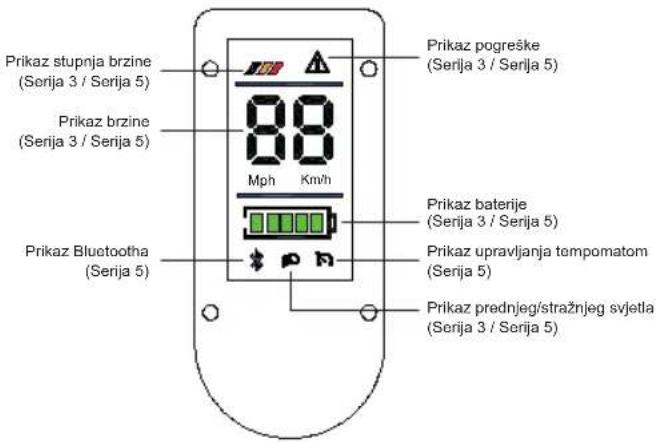
Speed display: Shows the current vehicle speed; displays the error code in case of vehicle failure. (Series 3/Series 5)
Error display: When the icon is lit, the speed section indicates the error code. Please contact the dealer for a repair inspection. (Series 3/Series 5)
Battery display: About 20% per grid. (Series 3/Series 5)
Front/Rear light display: When illuminated, the front and rear lights will turn on. (Series 3/Series 5)
Bluetooth display: Bluetooth icon stays on, indicating the device is connected. (Series 5)
Cruising control display: The cruising control is on when the light flashes. Press and hold the accelerator for about 7 seconds to enter cruise mode during which the cruise control display light stays on continuously. (Series 5)
VI. Starting the scooter
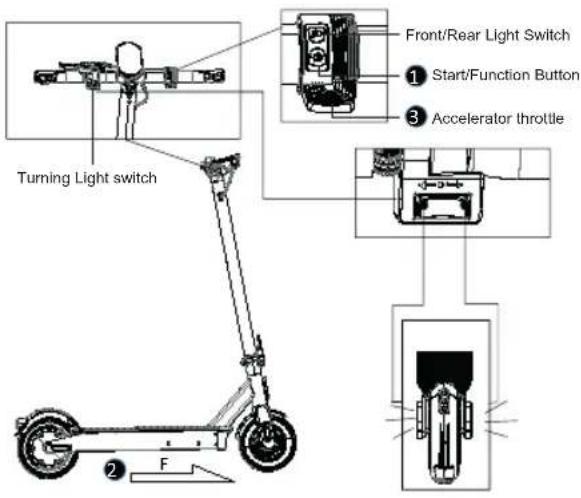
- Press and hold the start button for 3 seconds to turn on the power; the display screen lights up (after starting up, quickly press the start button twice in a row to switch between high and low speeds. Press the button three times in a row to switch between metric and imperial units.)
- Hold the handle tightly with both hands and look straight ahead, place one foot on the deck and use the other foot to assist on the ground to slide the vehicle forward.
- Slowly press the accelerator after sliding the vehicle. When the motor starts, place both feet on the deck.
VII. Stopping the scooter
- Release the accelerator throttle.
- Gently press the brake lever according to the vehicle speed.
- Press and hold the power button for 3 seconds to shut down when not in use.
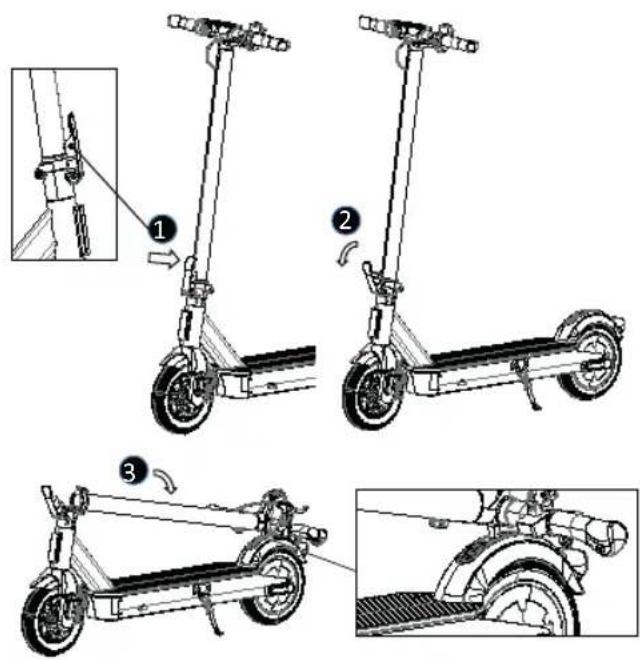
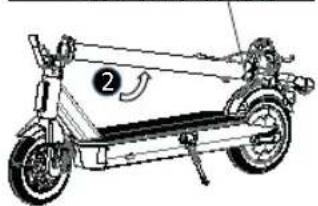
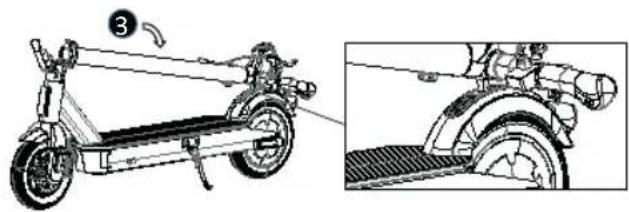
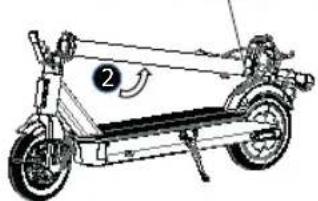
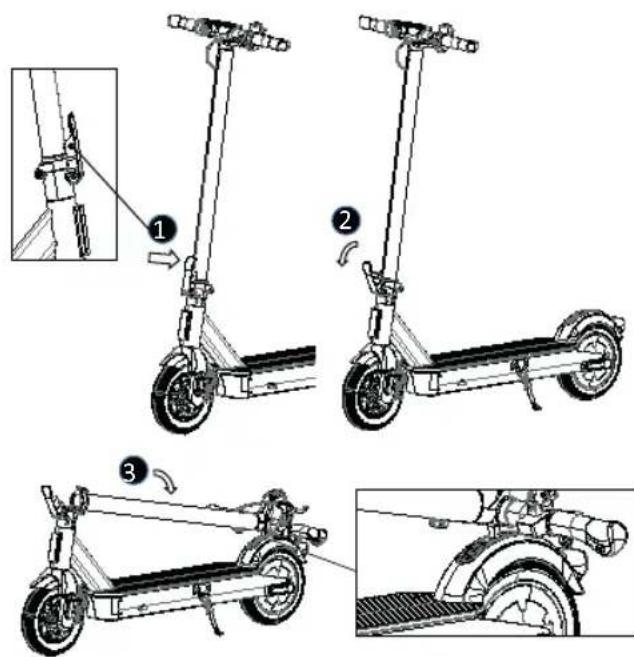
VIII. Folding the Scooter
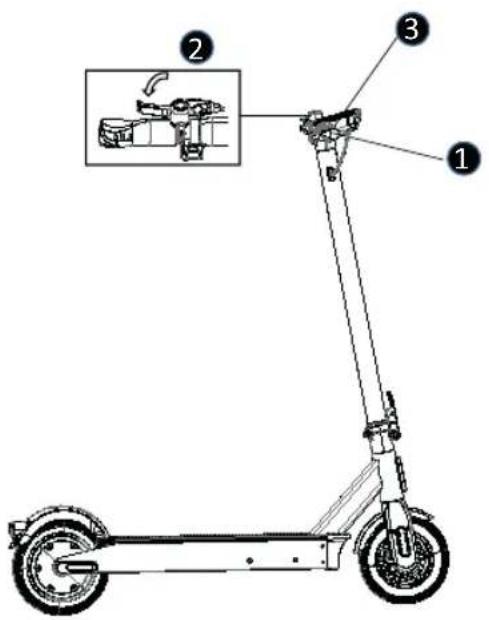
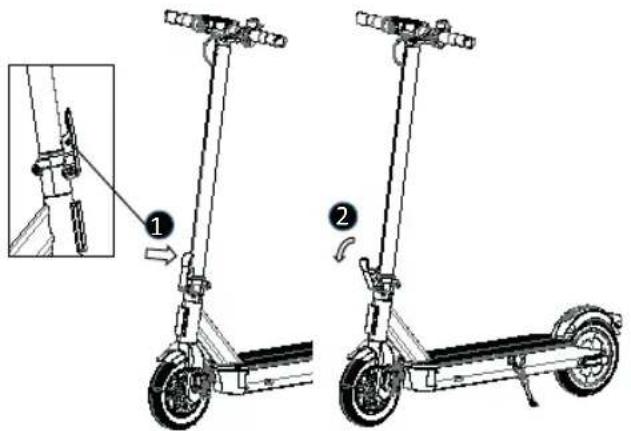
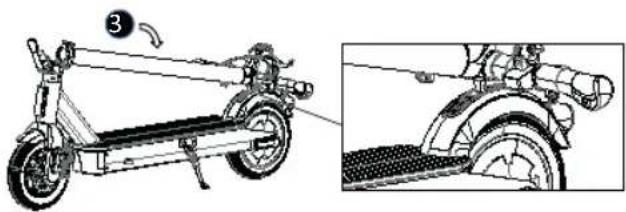
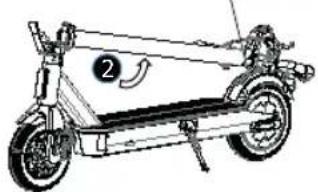
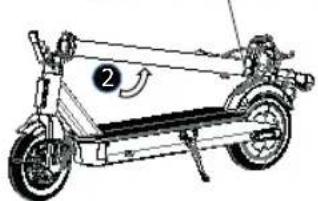
- Press down the anti-release button.
- Unlock the folding lever.
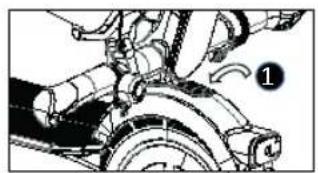
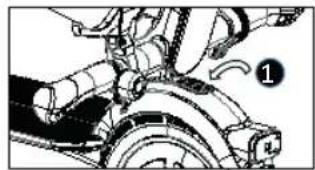
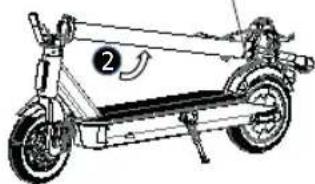
- Fold back the front tube and lock the fixation hook to the fixing plate on the rear wheel fender.
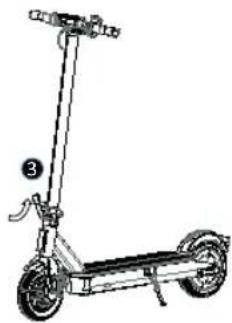
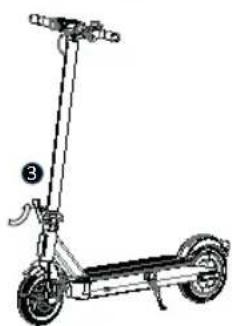
IX. Unfolding the Scooter
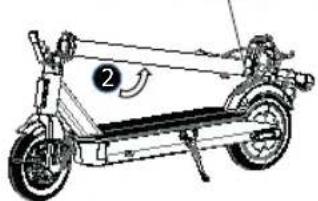
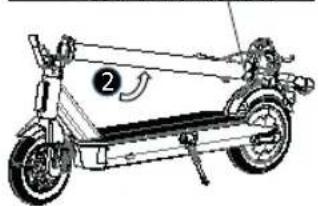
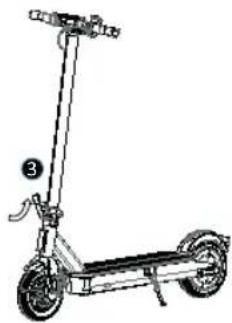
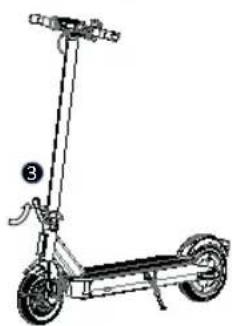
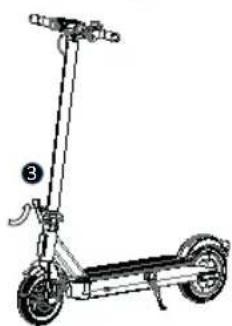
- Press down the hook fixing plate to release the fixation hook.
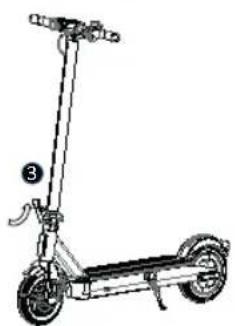
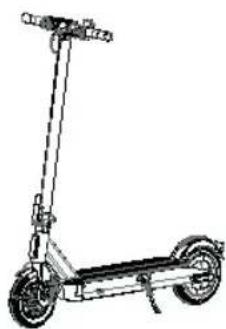
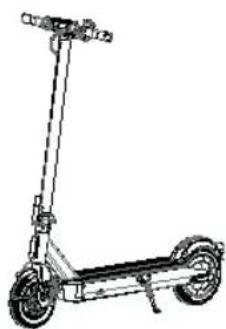
- Lift up the front tube.
- Lock the folding lever.
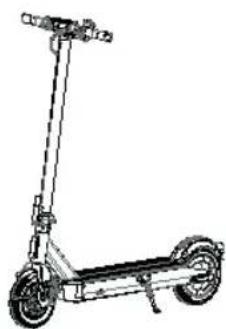
X. Troubleshooting Method
Error 1: Introduction and Arrangement of Error Codes
| Error code Solution | |
| How do we eliminate the error code “0E” when it appears on the dashboard? | The scooter needs to be charged when the dashboard shows the error code 0E. Simply charge the battery to solve the issue. |
| How do we eliminate the error code “1E” when it appears on the dashboard? | The scooter’s battery is supplying power beyond the system load when the dashboard shows the error code 1E. If you are charging, please unplug.If the fault is not resolved, please get in touch with your dealer for repair and inspection. |
| How do we eliminate the error code “2E” when it appears on the dashboard? | When the dashboard shows the error code 2E and the scooter does not work properly, please promptly get in touch with the dealer for repair and inspection. |
| How do we eliminate the error code “3E” when it appears on the dashboard? | When the dashboard shows the error code 3E, it indicates that the system has entered a protective state. This is because the system detects the controller temperature is too high. Simply pause riding, and once the temperature returns to normal, the issue will be resolved. |
| How do we eliminate the error code “4E” when it appears on the dashboard? | When the dashboard shows error code 4E, it is possible that the communication line at the bottom of the scooter is loose or has fallen off. Please get in touch with the dealer for repair and inspection. |
| How do we eliminate the error code “5E” when it appears on the dashboard? | When the dashboard shows error code 5E, it may be due to a loose or disconnected connection at the motor or between the motor and the controller of the scooter. Please get in touch with the dealer for repair and inspection. |
| How do we eliminate the error code “6E” when it appears on the dashboard? | When the dashboard shows the 6E error code, it may indicate an abnormality at the throttle handle of the scooter. If this issue occurs, please get in touch with the dealer to send it for repair and inspection. |
| How do we eliminate the error code “7E” when it appears on the dashboard? | When the dashboard shows error code 7E, it may indicate an abnormality in the scooter's brake system. If this issue occurs, please get in touch with the dealer for repair and inspection. |
| How do we eliminate the error code “8E” when it appears on the dashboard? | When the dashboard shows the error code 8E, it may be that the scooter is too fast when going downhill, reached a high speed with excessive current, causing the system to enter automatic protection. After stopping, restart the scooter to see if the system is back to normal. If not, please get in touch with the dealer for repair and inspection. |
| Error code Solution | |
| How do we eliminate the error code “9E” when it appears on the dashboard? | When the dashboard shows the error code 9E, it may indicate that the scooter's motor is blocked during operation. You can stop the scooter and then restart it.If the issue persists, please get in touch with your dealer for repair andinspection. |
Error 2: Battery Unable to Charge
Resolution methods:
- The charger plug is not properly plugged into the charging port.
- The charger is damaged. Replace it with a new one.
- The connection between the battery and the charging terminal is loose. Reinsert the terminal.
Error 3: Insufficient mileage after charging
Resolution methods:
- The voltage is too low. Charge the battery to full capacity.
- Power consumption is excessive due to uphill, strong wind, excessive load, poor road conditions, or low temperature.
- The connection between the battery and the charging dock terminal is loose. Reinsert the terminal.
Error 4: Too low speed
Resolution methods:
- Insufficient charging. Charge the battery to full capacity.
Error 5: Brake failure
Resolution methods:
- The brake cable core is too long. Re-tighten the brake cable for proper locking.
- If the brake pad is damaged, replace it with the pad from the original manufacturer.
Note: When a malfunction is detected, please contact an authorized service center. Do not repair or modify scooter by yourself, as this can void the warranty and possibly cause injuries.
XI. Utilization information
| Product Name Acer Electric Scooter Series 3 |
| Model AES023 |
| Dimensions, unfolded 101L x 49W x 120H (cm) |
| Dimensions, folded 101L x 49W x 49H (cm) |
| Weight incl. battery 15.61 Kg |
| Motor 36 V / 350 W |
| Battery 7.8 Ah |
| Battery type lithium-ionic |
| Battery manufacturer Jiangxi Hua ChuangLi New Energy Co.,Ltd. |
| Charging 42 V / 3.0 A |
| Adaptor Manufacturer FUYUANDIAN, Model No.: FY-1504203000 |
| Full charging time 3 hours |
| Maximum speed 20 km/h, 25 km/hr or 30 km/hr (Depends on countries regulation) |
| Maximum distance w/o charging 20 - 25 Km |
| Speed regulation Yes |
| Speed modes | 4 |
| Speed modes level 0-6 km/h; 0 - 10 km/h; 0 - 20, 25 km/h or 30 km/h (Depends on countries regulation) |
| Folding mechanism | Yes |
| Main material | Aluminum alloy deck, steel front tube |
| Maximum load | Up to 120 kg |
| Clearance | 8.5 cm |
| Height adjustable handlebar | No |
| Brakes | Front disc brake and rear E-ABS |
| Display | LED display |
| Wheel absorber | None |
| Wheels | PU foam tire |
| Tire material | PU |
| Wheel diameter | 8.5” |
| Drive unit | Rear-wheel drive |
| Waterproof | IPX5 |
| Reflectors | Yes |
| Frontlight | Yes |
| Application | No |
| Sound signal | Yes |
| Rear Light | Yes |
| Bluetooth | No |
| Climbing Ability | 14% |
Note: The maximum speed specified on the E-scooter specification is conducted at the battery fully charged (100%) condition. Be extra careful when applying the brakes. Do not squeeze the front brake abruptly to prevent the front disk from locking, which may pose a risk of skidding. The “total mileage” is tested under full charged battery, with a load of 75 Kg (165.3 lb), temperature of 25 - 30 degrees (77 \~ 86°F), and a speed of 10 km/h (6.2 Mph) on the smooth concrete road at an average speed without stopping.
| Product Name Acer / Predator Electric ScooterSeries 5 |
| Model AES025 / PES025 |
| Dimensions, unfolded 111L x 49W x 126H (cm) |
| Dimensions, folded 111L x 49W x 55H (cm) |
| Weight incl. battery 18.12 Kg |
| Motor 36 V / 500 W |
| Battery 16 Ah |
| Battery type lithium-ionic |
| Battery manufacturer Jiangxi Hua ChuangLi New EnergyCo.,Ltd. |
| Charging 42 V / 3.0 A |
| Adaptor Manufacturer FUYUANDIAN,Model No.: FY-1504203000 |
| Full charging time 5 - 6 hours |
| Maximum speed 20 km/h, 25 km/hr or 30 km/hr(Depends on countries regulation) |
| Maximum distance w/o charging 55 - 60 Km |
| Speed regulation Yes |
| Speed modes | 4 |
| Speed modes level 0 - 6 km/h; 0 - 10 km/h; 0 - 20,25 km/h or 30 km/h (Depends on countries regulation) |
| Folding mechanism | Yes |
| Main material | Aluminum alloy |
| Maximum load | Up to 120 kg |
| Clearance | 11 cm |
| Height adjustable handlebar | No |
| Brakes | Front disc brake and rear E-ABS |
| Display | LED display |
| Wheel absorber | Yes |
| Wheels | PU foam tire |
| Tire material | PU |
| Wheel diameter | 10” |
| Drive unit | Rear-wheel drive |
| Waterproof | IPX5 |
| Reflectors | Yes |
| Frontlight | Yes |
| Application | Yes |
| Sound signal | Yes |
| Rear light | Yes |
| Bluetooth | Yes |
| Climbing Ability | 15% |
Note: The maximum speed specified on the E-scooter specification is conducted at the battery fully charged (100%) condition.
Be extra careful when applying the brakes. Do not squeeze the front brake abruptly to prevent the front disk from locking, which may pose a risk of skidding.
The "total mileage" is tested under full charged battery, with a load of 75 Kg (165.3 lb), temperature of 25 - 30 degrees (77
~ 86°F), and a speed of 10 km/h (6.2 Mph) on the smooth concrete road at an average speed without stopping.
XII. RIDE AND SAFETY
A learning process is necessary for the use of this device. A use of it without a correct learning process can cause injuries. Use protections to prevent damage. Once you complete these steps you can turn on the electric scooter:
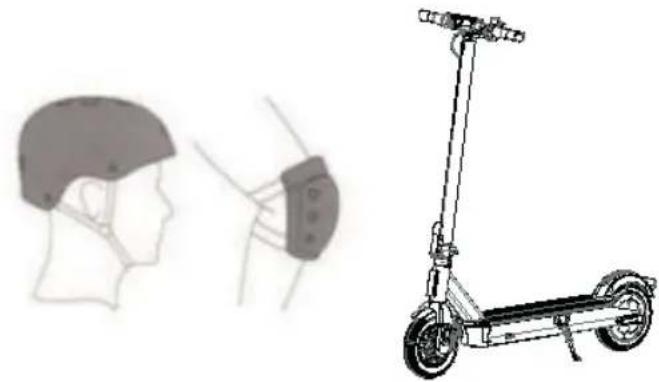
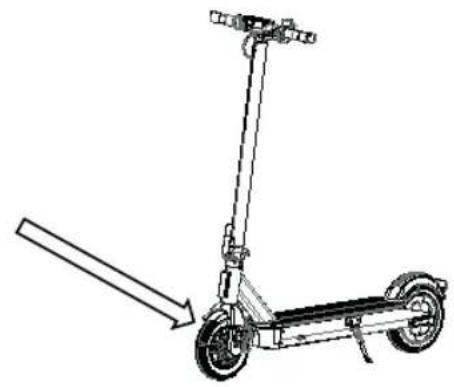
BRAKE ADJUSTMENT
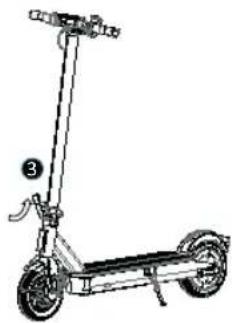
Before every ride check brakes. If you feel the brake is too tight, use the hex wrench counterclockwise to loosen the screws on the pressure plate on the disc brake seat, release the brake line to shorten slightly the exposed length and tighten the screws of the pressure plate. If you feel that the brake is too loose, release the screws on the pressure plate, drag the brake cable to slightly lengthen the length and then lock the screws on the pressure plate.
WARNING! When hard braking, you risk serious injury due to loss of traction and falls. Maintain a moderate speed and look out for potential hazards.
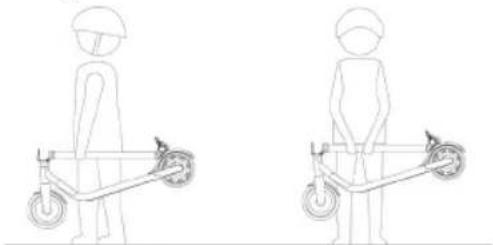
FOLDING AND TRANSPORTATION
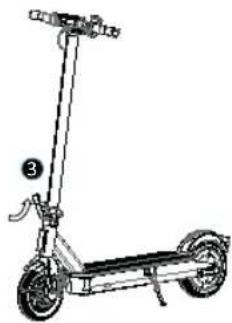
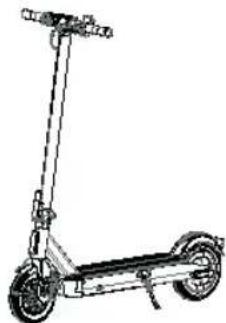
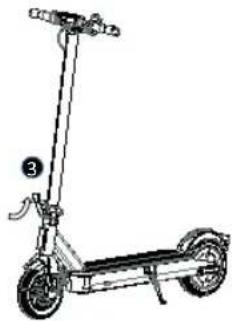
Once folded hold the electric scooter by the bar to transport it as indicated in the figure:

Warnings: failure to follow these instructions could lead to serious injury.
- DO NOT ride the electric scooter in the rain. • DO NOT get wet. Watch your head when passing through doorways.
Keep your speed between 3.1–6.2 mph (5–10 km/h) when you ride through speed bumps, elevator door stills, bumpy roads or other uneven surfaces. Slightly bend your knee to better adjust mentioned surfaces. • DO NOT keep your feet on the rear fender.
- DO NOT press the throttle when walking with the electric scooter. Avoid contacting obstacles with the tire/wheel.
- DO NOT carry heavy objects on the handlebar.
- DO NOT ride the electric scooter with only one foot.
- DO NOT ride on public roads, motorways, or highways.
- DO NOT rotate the handle violently while driving at high speed.
- DO NOT ride up and down stairs or jump over obstacles.
- DO NOT take your hands off the handlebar while riding. Do not ride with one hand only.
- Do NOT ride through puddles or any other (water) obstacles. In such a case, lower your speed and bypass the obstacle.
- DO NOT carry any passengers. The electric scooter is for one rider only.
- Do not carry a child.
- Do not ride when pregnant.
- DO NOT use mobile phone or wear earphones when operating the electric scooter.
- DO NOT touch the hub motor after riding because it can get hot.
• Always keep both hands on the handlebar or you risk serious injury due to loss of balance and falls. - Only for use in dry weather. • We do not recommend the use on public roads. - Never turn violently when driving fast. - Do not start or stop suddenly. - Make sure the speed of the electric scooter is safe for you and others and be ready to stop at any time while it is running. - When driving the electric scooter, please stay at a distance from others to avoid collisions. - When you turn you must use the center of gravity of your body; the violent change in the center of gravity can cause damage. - No other alterations are allowed except for the modifications specified by the manufacturer. - Self-locking nuts and other self-locking fasteners may fail. - Avoid riding on slopes.
XIII. CLEANING AND MAINTENANCE
This electric scooter can be used as a means of transport and as such requires maintenance of all its components, which suffer wear and tear due to the use of the same and is not covered by the warranty.
CLEANING
Make sure the electric scooter is powered OFF, the charge cable is unplugged, and the rubber cap on the charge port is tightly sealed before cleaning; otherwise you may damage the electronic components. Always disconnect the product from the charger first, cover the charging waterproof plug, turn off the power of the product, and avoid fluid contact with the battery, motor and other electronic parts during cleaning to avoid unforeseen hazard. Do not use a high pressure water jet to clean the product or soak it in water.
To clean the electric scooter, use a damp cloth. If you need to scrape dirt, use a soft brush and then a damp cloth.
Be sure to cover the charging port to avoid problems with the electronic components.
Do not use alcohol, gasoline, kerosene or other volatile or corrosive chemical components. This can damage both the appearance and the internal structure of the electric scooter. Also, do not use a pressure water gun or running water.
STORAGE
Store the electric scooter in a cool, dry environment when not in use. Avoid leaving it outside, since it is not manufactured for use in wet areas, near corrosive agents such as seawater, ports, etc. It is also not recommended to expose it to high temperatures caused by direct sunlight for a long time.
XIV. BATTERY HANDLING AND PROHIBITED ACTIONS
Do not use other models or brands of batteries, use only original battery.
Do not place the battery in an environment with high temperatures higher than 45°C or lower than -10°C (for example, do not place the electric scooter inside a car trunk in summer), and do not put the battery in places near the fire. Otherwise, it may cause battery failure, overheating and even the risk of fire.
Avoid completely discharging the batteries, it is better to charge them while there is still power in them. This will prolong the life of the battery. Also if you drive the electric scooter in very cold or warm areas, you can decrease the time of use of the batteries. It is not a failure of the batteries, but it is their normal behavior.
When not in use for more than 30 days, fully charge and store in a cool, dry place and fully charge the battery every 60 days. Failure to follow these steps could damage the battery, and this damage is not covered by the warranty.
It is forbidden to disassemble the battery compartment. Only its manipulation in Official Technical Services or adhered Workshops is allowed.
Use only the original charger to charge, otherwise there is a risk of damage or fire.
Inadequate disposal of used batteries can cause serious environmental contamination. Observe local regulations when disposing of this battery pack.
After each use, recharge the battery, this will lengthen the life of the battery.

DANGER!
Battery cell contains flammable and hazardous substances. Mishandling can cause fire, smoke, explosion, and severe personal injury or property loss. Always read and comply with the following prohibited actions, and equip proper protective gear before performing any battery-related operation.
Keep the battery away from infants and children to avoid any accidents. If younger children use the battery, their guardians should explain the proper handling method and precautions before use, and always ensure the integrity of the battery.
Use only a dedicated charger and charge the battery only in the dedicated way. Do not charge the battery directly from an electric outlet or an automobile cigarette lighter charger. Do not charge the battery unattended.
- Do not charge the battery in reverse.
- Do not leave the battery near fire or a heat source, and do not throw the battery into fire.
- Do not charge or use the battery in a car or similar place where the inside temperature may exceed 50°C.
- Do not immerse, throw, or wet the battery in water, seawater, etc.
- Do not short-circuit or connect the positive (+) and negative (-) terminals with a metallic object. Do not store the battery in a pocket or a bag together with metallic objects such as keys, necklaces, hairpins, coins, or screws.
- Do not pierce the battery with a sharp object such as a needle or screwdriver.
- Do not heat partial areas of the battery with heated objects such as a soldering iron.
- Do not hit the battery with heavy objects such as a hammer or weight. Do not step on the battery, and do not throw or drop the battery to avoid mechanical shock. Do not use a seriously deformed battery.
- Do not disassemble the battery or modify the battery design, including the electric circuit.
- Do not solder directly on the battery, and do not use or assemble old and new batteries together.
- Don't put the battery into a microwave oven, dryer, or high-pressure container.
- Don't use or assemble the battery with other makers' batteries, different types and/or models of batteries such as dry batteries, nickel-metal hydrogen batteries, or nickel-cadmium batteries.
Do not use the battery in the case of static electricity generation (more than 100V), the battery protection circuit will be damaged.
Do not remove the battery. Removing the battery is complicated and can alter the operation of the machine. You must contact the authorized service center only to operate the battery.
Do not store or charge the battery at temperatures outside the stated limits (see in this manual). Do not puncture the battery. Refer to your local laws and regulations regarding battery recycling and/or disposal.
A well maintained battery can perform well even after many miles of riding. Charge the battery after each ride and avoid draining the battery completely.

WARNING!
Keep away from fire immediately when leakage or foul odors are detected. If liquid leaks onto your skin or clothes, wash well with fresh water immediately. If liquid leaking from the battery gets into your eyes, don't rub your eyes and wash them with clean water and go to see a doctor immediately. If the terminals of the battery become dirty, wipe with a dry cloth before using the battery.
Cover terminals with proper insulating tape before disposal.
Before using /installing/ removing the battery or using the charger, always read the user's manual and comply the precaution of the handling.
Replace the battery when using time of battery becomes much shorter than usual.
If the battery is needed to be stored for an long period, battery should be removed from the application and stored in a place where humidity and temperature are low.
While the battery is charged, used and stored, keep it away from object materials with static electric.
Cannot use non-rechargeable battery as replacement.
The battery must be removed from the appliance before it is scrapped.
The appliance must be disconnected from the supply mains when removing the battery.
The battery is to be disposed of safely.
Do not attempt to disassemble the battery. Do not touch battery contacts. Do not dismantle or puncture the casing.
Keep the battery contacts away from metal objects to prevent short circuit. Risk of fire and electric shock. Do not charge or use your battery if it is damaged or see trace of water.
In case of accident or breakdown: please contact an authorized repairer in your country.
User must contact an authorized or a specialized customer service.
XV. Charging/Discharging and Storing the Battery
Warning: always comply with the following message.
Use only original charger, improper use can cause personal injury and property loss. The warranty does not bear any liability caused by the use of non-original charger.
Do not charge when near any fluid/fire source, always avoid flammable substances. Do not leave the device unattended while charging.
Don't charge if the charge port or charge cable is wet.
Don't charge or use your battery if it is damaged or see trace of water.
The charging interface is provided with a special slot. Do not force the connector to be inserted, which can cause damage to the device.
The charger indicator is red when the battery is charging. The indicator is green when charging is completed.
Remove the charger when the charger indicator is green. Overcharge or overdischarge will cause irreversible damage to the battery or property loss. If the charger indicator turns green immediately while charging after riding, please disconnect the charger and allow the battery to cool down before recharging. This is the normal phenomenon of intelligent protection due to the high internal temperature of the battery. Charging can begin after the battery cools down.
Stop charging and disconnect the charger if the battery is not fully charged after the recommended period of time. Contact customer service for further information.
The charging port must be covered with the attached rubber cap after each charging.
Always take extra care when handling the battery.
Stop using the battery if it becomes abnormally hot, or if odor, discoloration, deformation, or any other abnormal condition is detected during use, charging, or storage.
The battery can be used within the following temperature ranges. Do not exceed these ranges.
Operating Temperature: -10-60°C (Battery performance varies with temperature)
Charging Temperature: 10-45°C
Storage & Transportation Temperature: -10-45°C
Storage Humidity: 10-80%
XVI. Others
- Manufacturer date is mentioned on the product label.
2. Storage
Store this product in a dry, cool, and safe place, avoiding moisture and high temperatures. Humidity can damage electrical components. If the lithium battery fails, please contact your local recycling agency and dispose of the lithium battery in accordance with your national or local laws and regulations.
- Operating Temperature: -10-60°C • Charging Temperature: 10-45°C • Storage & Transportation Temperature: -10-45°C • Storage Humidity: 10-80%
- This product must not be disposed of with other household waste. Please recycle it to minimize environmental pollution in compliance with the local regulations or contact your local city office, household waste disposal service.
- 1) Devices are not intended for use at elevations greater than 2000m above sea level.
We,
Acer Incorporated
8F, 88, Sec. 1, Xintai 5th Rd., Xizhi, New Taipei City 221
And.
Acer Italy s.r.l.
Viale delle Industrie 1/A, 20044 Arese (MI), Italy
Tel: +39-02-939-921, Fax: +39-02 9399-2913
www.acer.it
Product: Acer Electric Scooter Series 3
Trade Name: acer
Model Number: AES023
SKU Number: AES023 *****
(* = 0-9, a-z, A-Z, or Blank)
We, Acer Incorporated, hereby declare under our sole responsibility that the product described above is in conformity with the relevant Union harmonization legislation: Machinery Directive 2006/42/EC and RoHS Directive 2011/65/EU. The following harmonized standards and/or other relevant standards have been applied:
EN 17128:2020
EN IEC 63000:2018
Year to begin affixing CE marking: 2023.
RU Jan / Sr. Manager
Acer Incorporated (Taipei, Taiwan)
2/28/2024
Date
We,
Acer Incorporated
8F, 88, Sec. 1, Xintai 5th Rd., Xizhi, New Taipei City 221
And,
Acer Italy s.r.l.
Viale delle Industrie 1/A, 20044 Arese (MI), Italy
Tel: +39-02-939-921, Fax: +39-02 9399-2913
www.acer.it
Product: Acer Electric Scooter Series 5
Trade Name: acer
Model Number: AES025
SKU Number: AES025 *****
(* = 0-9, a-z, A-Z, or Blank)
We, Acer Incorporated, hereby declare under our sole responsibility that the product described above is in conformity with the relevant Union harmonization legislation: Machinery Directive 2006/42/EC, Radio equipment Directive 2014/53/EU and RoHS Directive 2011/65/EU. The following harmonized standards and/or other relevant standards have been applied:
EN 17128:2020
EN 301 489-17 V3.2.4
EN 300 328 V2.2.2
EN 62479:2010
EN 301 489-1 V2.2.3
EN IEC 63000:2018
Year to begin affixing CE marking: 2023.
RU Jan / Sr. Manager
Acer Incorporated (Taipei, Taiwan)
2/28/2024
Date
acer
We,
Acer Incorporated
8F, 88, Sec. 1, Xintai 5th Rd., Xizhi, New Taipei City 221
And.
Acer Italy s.r.l.
Viale delle Industrie 1/A, 20044 Arese (MI), Italy
Tel: +39-02-939-921, Fax: +39-02 9399-2913
www.acer.it
Product: Predator Electric Scooter Series 5
Trade Name: acer
Model Number: PES025
SKU Number: PES025 *****
(** = 0 - 9, a - z, A - Z, or Blank)
We, Acer Incorporated, hereby declare under our sole responsibility that the product described above is in conformity with the relevant Union harmonization legislation: Machinery Directive 2006/42/EC, Radio equipment Directive 2014/53/EU and RoHS Directive 2011/65/EU. The following harmonized standards and/or other relevant standards have been applied:
EN 17128:2020
EN 301 489-17 V3.2.4
EN 300 328 V2.2.2
EN 62479:2010
EN 301 489-1 V2.2.3
EN IEC 63000:2018
Year to begin affixing CE marking: 2023.
RU Jan / Sr. Manager
Acer Incorporated (Taipei, Taiwan)
2/28/2024
Date

acer
We,
Acer Incorporated
81, 88, Sec. 1, Xintai 5th Rd., Xizhi, New Taipei City 221
And,
Acer UK Ltd
Heathrow Boulevard III 282 Bath Road West Drayton Greater London UB7 0DQ
Product:
de Name:
ler Number: AES025
SKU Number:
(*x'' = 0-9, a-z, A-Z, or blank)
We, Acer Incorporated, hereby declare under our sole responsibility that the product described above is in conformity with the relevant Union harmonization legislation:
- Machinery (Safety) Regulations 2008
- Radio Equipment Regulations 2017
- Electromagnetic Compatibility Regulations 2016
- The Restriction of the Use of Certain Hazardous Substances in Electrical and Electronic Equipment Regulations 2012.
The following harmonized standards and/or other relevant standards have been applied:
EN 17128:2020
EN 300 328 V2.2.2
EN 301 489-1 V2.2.3
EN 301 489-17 V3.2.4
EN 62479:2010
EN IEC 63000:2018
Signed for and on behalf of:

RU Jan / Sr. Manager
Acer Incorporated (New Taipei City)
Feb. 28, 2024
Date


We,
Acer Incorporated
8F, 88, Sec. 1, Xintai 5th Rd., Xizhi, New Taipei City 221
and
Acer UK Ltd
Heathrow Boulevard III, 282 Bath Road, West Drayton, Greater London UB7 0DQ
Product:
Predator Electric Scooter Series 5
Trade Name:
acer
Model Number:
PES025
SKU Number:
PES025 xxxxxxxxx
( x =0-9,a z,A Z, or blank)
We, Acer Incorporated, hereby declare under our sole responsibility that the product described above is in conformity with the relevant Union harmonization legislation:
- Machinery (Safety) Regulations 2008
- Radio Equipment Regulations 2017
- Electromagnetic Compatibility Regulations 2016
- The Restriction of the Use of Certain Hazardous Substances in Electrical and Electronic Equipment Regulations 2012.
The following harmonized standards and/or other relevant standards have been applied:
EN 17128:2020
EN 300 328 V2.2.2
EN 301 489-1 V2 2 3
EN 301 489-17 V3 2 4
EN 62470-2010
EN IEC 63000:2018
Signed for and on behalf of:

RU Jan / Sr. Manager
Acer Incorporated (New Taipei City)
Feb. 28, 2024
Date
VIII. Folding the scooter
IX. Unfolding the scooter
BRAKE ADJUSTMENT
FOLDING AND TRANSPORT

8F, 88, Sec. 1, Xintai 5th Rd., Xizhi, New Taipei City 221
E.
Acer Italy s.r.l.
Viale delle Industrie 1/A, 20044 Arese (MI), Italy
Tel: +39-02-939-921, Fax: +39-02 9399-2913
www.acer.it
RU Jan / Senior Manager
Acer Incorporated (Taipei, Taiwan)
28/2/2024
Date
8F, 88, Sec. 1, Xintai 5th Rd., Xizhi, New Taipei City 221
E.
Acer Italy s.r.l.
Viale delle Industrie 1/A, 20044 Arese (MI), Italy
Tel: +39-02-939-921, Fax: +39-02 9399-2913
www.acer.it
RU Jan / Senior Manager
Acer Incorporated (Taipei, Taiwan)
28/2/2024
Data
acer
8F, 88, Sec. 1, Xintai 5th Rd., Xizhi, New Taipei City 221
E.
Acer Italy s.r.l.
Viale delle Industrie 1/A, 20044 Arese (MI), Italy
Tel: +39-02-939-921, Fax: +39-02 9399-2913
www.acer.it
RU Jan / Senior Manager
Acer Incorporated (Taipei, Taiwan)
28/2/2024
Date
IX. Unfolding the scooter
BRAKE ADJUSTMENT
FOLDING AND TRANSPORT

8F, 88, Sec. 1, Xintai 5th Rd., Xizhi, New Taipei City 221
Y
Acer Italy s.r.l.
Acer Incorporated (Taipei, Taiwan)
28/2/2024
Date
8F, 88, Sec. 1, Xintai 5th Rd., Xizhi, New Taipei City 221
Y
Acer Italy s.r.l.
Acer Incorporated (Taipei, Taiwan)
Date
acer
8F, 88, Sec. 1, Xintai 5th Rd., Xizhi, New Taipei City 221
Y
Acer Italy s.r.l.
Acer Incorporated (Taipei, Taiwan)
Date
I. Package Contents
X. Troubleshooting
BRAKE ADJUSTMENT
FOLDING AND TRANSPORT

8F, 88, Sec. 1, Xintai 5th Rd., Xizhi, New Taipei City 221
a
Acer Italy s.r.l.
Viale delle Industrie 1/A, 20044 Arese (MI), Italy
Tel: +39-02-939-921, Fax: +39-02 9399-2913
www.acer.it
8F, 88, Sec. 1, Xintai 5th Rd., Xizhi, New Taipei City 221
a
Acer Italy s.r.l.
Viale delle Industrie 1/A, 20044 Arese (MI), Italy
Tel: +39-02-939-921, Fax: +39-02 9399-2913
www.acer.it
8F, 88, Sec. 1, Xintai 5th Rd., Xizhi, New Taipei City 221
Acer Italy s.r.l.
Viale delle Industrie 1/A, 20044 Arese (MI), Italy
Tel: +39-02-939-921, Fax: +39-02 9399-2913
www.acer.it
BRAKE ADJUSTMENT
FOLDING AND TRANSPORT

8F, 88, Sec. 1, Xintai 5th Rd., Xizhi, New Taipei City 221
Acer Italy s.r.l.
Viale delle Industrie 1/A, 20044 Arese (MI), Italy
Tel: +39-02-939-921, Fax: +39-02 9399-2913
www.acer.it
RU Jan / Sr. Manager
Acer Incorporated (Taipei, Taiwan)
28.2.2024
Date
8F, 88, Sec. 1, Xintai 5th Rd., Xizhi, New Taipei City 221
and.
Acer Italy s.r.l.
Viale delle Industrie 1/A, 20044 Arese (MI), Italy
Tel: +39-02-939-921, Fax: +39-02 9399-2913
www.acer.it
RU Jan / Sr. Manager
Acer Incorporated (Taipei, Taiwan)
28.2.2024
Data
acer
8F, 88, Sec. 1, Xintai 5th Rd., Xizhi, New Taipei City 221
and
Acer Italy s.r.l.
Viale delle Industrie 1/A, 20044 Arese (MI), Italy
Tel: +39-02-939-921, Fax: +39-02 9399-2913
www.acer.it
RU Jan / Sr. Manager
Acer Incorporated (Taipei, Taiwan)
28.2.2024
Date
I. Scope of Delivery
FOLDING AND TRANSPORT

8F, 88, Sec. 1, Xintai 5th Rd., Xizhi, New Taipei City 221
and
Acer Italy s.r.l.
Viale delle Industrie 1/A, 20044 Arese (MI), Italy
Tel.: +39-02-939-921, Fax: +39-02 9399-2913
www.acer.it
Product: Acer Electric Scooter Series 3
Trade name: Acer
Model number: AES023
RU Jan / Sr. Manager
Acer Incorporated (Taipei, Taiwan)
28.2.2024
Date
acer
acer
8F, 88, Sec. 1, Xintai 5th Rd., Xizhi, New Taipei City 221
and
Acer Italy s.r.l.
Viale delle Industrie 1/A, 20044 Arese (MI), Italy
Tel.: +39-02-939-921, Fax: +39-02 9399-2913
www.acer.it
Product: Acer Electric Scooter Series 5
Trade name: Acer
RU Jan / Sr. Manager
Acer Incorporated (Taipei, Taiwan)
28.2.2024
Date
8F, 88, Sec. 1, Xintai 5th Rd., Xizhi, New Taipei City 221
and
Acer Italy s.r.l.
Viale delle Industrie 1/A, 20044 Arese (MI), Italy
Tel.: +39-02-939-921, Fax: +39-02 9399-2913
www.acer.it
Product: Predator Electric Scooter Series 5
Trade name: Ace
Model number: PES025
RU Jan / Sr. Manager
Acer Incorporated (Taipei, Taiwan)
28.2.2024
Date
I. Package contents
BRAKE ADJUSTMENT

8F, 88, Sec. 1, Xintai 5th Rd., Xizhi, New Taipei City 221
Ta,
Acer Italy s.r.l.
Viale delle Industrie 1/A, 20044 Arese (MI), Italy
Tel: +39-02-939-921, Fax: +39-02 9399-2913
www.acer.it
8F, 88, Sec. 1, Xintai 5th Rd., Xizhi, New Taipei City 221
Ta,
Acer Italy s.r.l.
Viale delle Industrie 1/A, 20044 Arese (MI), Italy
Tel: +39-02-939-921, Fax: +39-02 9399-2913
www.acer.it
8F, 88, Sec. 1, Xintai 5th Rd., Xizhi, New Taipei City 221
Ta,
Acer Italy s.r.l.
Viale delle Industrie 1/A, 20044 Arese (MI), Italy
Tel: +39-02-939-921, Fax: +39-02 9399-2913
www.acer.it
V. Control panel description
VIII. Folding the Scooter
- Press the release button
- Unlock the folding lever.
- Fold the upper part of the handlebar stem backward and secure the locking hook onto the hook locking plate on the rear fender.
IX. Unfolding the Scooter
X. Troubleshooting
Error 1: Introduction and resolution of error codes
| Šifra pogreške Rješenje |
| Kako ukloniti šifru pogreške „0E“ kada se pojavi na nadzornoj ploči? | Romobil treba napuniti kada se na nadzornoj ploči prikaže šifra pogreške 0E. Napunite bateriju da biste riješili problem. |
| Kako ukloniti šifru pogreške „1E“ kada se pojavi na nadzornoj ploči? | Kada se na nadzornoj ploči pojavi šifra pogreške 1E baterija romobila dovodi napajane veće od opterećenja sustava. Ako je u tijeku punjenje, odvojite ga.Ako se neispravnost nije time riješila, obratite se zastupniku za pregled radi popravka. |
| Kako ukloniti šifru pogreške „2E“ kada se pojavi na nadzornoj ploči? | Kada nadzorna ploča prikazuje šifru pogreške 2E i romobil ne radi pravilno odmah se javite zastupniku za pregled radi popravka. |
| Kako ukloniti šifru pogreške „3E“ kada se pojavi na nadzornoj ploči? | Kada nadzorna ploča prikazuje šifru pogreške 3E to znači da je sustav pokrenuo stanje zaštite. To je stoga što sustav otkriva da je temperatura upravljača previsoka. Prekinite vožnju i napravite stanku, a kada se temperatura vrati na normalnu problem će se riješiti. |
| Kako ukloniti šifru pogreške „4E“ kada se pojavi na nadzornoj ploči? | Kada nadzorna ploča prikazuje šifru pogreške 4E postoji mogućnost da je komunikacijski vod na dnu romobila neučvršćen ili je pao. Obratite se zastupniku za pregled radi popravka. |
| Kako ukloniti šifru pogreške „5E“ kada se pojavi na nadzornoj ploči? | Kada nadzorna ploča prikazuje šifru pogreške 5E moguće je da postoje opušteni ili sasvim odvojeni spojevi na motoru ili između motora i upravljača romobila. Obratite se zastupniku za pregled radi popravka. |
| Kako ukloniti šifru pogreške „6E“ kada se pojavi na nadzornoj ploči? | Kada nadzorna ploča prikazuje šifru pogreške 6E moguće je da ukazuje na neispravnost poluge gasa romobila. Ako se pojavi taj problem obratite se zastupniku da biste je poslali na pregled radi popravka. |
| Kako ukloniti šifru pogreške „7E“ kada se pojavi na nadzornoj ploči? | Kada nadzorna ploča prikazuje šifru pogreške 7E moguće je da ukazuje na neispravnost sustava kočnice romobila. Ako se pojavi taj problem obratite se zastupniku za pregled radi popravka. |
| Kako ukloniti šifru pogreške „8E“ kada se pojavi na nadzornoj ploči? | Kada nadzorna ploča prikazuje šifru pogreške 8E možda romobil vozite prevelikom brzinom nizbrdo pa je postignuta velika brzina s prevelikom strujom što je prouzročilo pokretanje automatske zaštite sustava. Nakon zaustavljanja ponovno pokrenite romobil da biste provjerili radi li sustav normalno. Ako ne, obratite se zastupniku za pregled radi popravka. |
| Šifra pogreške Rješenje |
| Kako ukloniti šifru pogreške „9E“ kada se pojavi na nadzornoj ploči? | Kada nadzorna ploča prikazuje šifru pogreške 9E to znači da se elektromotor romobila blokirao tijekom rada. Zaustavite romobil, a zatim ga ponovno pokrenite.Ako se problem nastavi, obratite se zastupniku za pregled radi popravka. |
Error 2: Battery cannot be charged
Resolution method:
BRAKE ADJUSTMENT
Before each ride, check the brakes. If you feel the brake is too tight, use a hex key to loosen the screws on the push plate at the disc brake caliper in a counterclockwise direction, release the brake cable to slightly shorten the exposed length, and then tighten the push plate screws. If you feel the brake is too loose, loosen the screws on the push plate, pull the brake cable to slightly lengthen it, and then secure the screws on the push plate.
FOLDING AND CARRYING

8F, 88, Sec. 1, Xintai 5th Rd., Xizhi, New Taipei City 221
i
Acer Italy s.r.l.
Viale delle Industrie 1/A, 20044 Arese (MI), Italy
Tel: +39-02-939-921, Fax: +39-02 9399-2913
www.acer.it
Product: Acer Series 3 Electric Scooter
Acer Incorporated (Taipei, Taiwan)
2/28/2024
Date
EU Declaration of Conformity
We,
Acer Incorporated
8F, 88, Sec. 1, Xintai 5th Rd., Xizhi, New Taipei City 221
i
Acer Italy s.r.l.
Viale delle Industrie 1/A, 20044 Arese (MI), Italy
Tel: +39-02-939-921, Fax: +39-02 9399-2913
www.acer.it
Product: Acer Series 5 Electric Scooter
Acer Incorporated (Taipei, Taiwan)
2/28/2024
Date
acer
EU Declaration of Conformity
We,
Acer Incorporated
8F, 88, Sec. 1, Xintai 5th Rd., Xizhi, New Taipei City 221
i
Acer Italy s.r.l.
Viale delle Industrie 1/A, 20044 Arese (MI), Italy
Tel: +39-02-939-921, Fax: +39-02 9399-2913
www.acer.it
Product: Predator Series 5 Electric Scooter
Acer Incorporated (Taipei, Taiwan)
Date
VIII. Folding the Scooter
BRAKE ADJUSTMENT
FOLDING AND TRANSPORTING

8F, 88, Sec. 1, Xintai 5th Rd., Xizhi, New Taipei City 221
And,
Acer Italy s.r.l.
Viale delle Industrie 1/A, 20044 Arese (MI), Italy
Tel: +39-02-939-921, Fax: +39-02 9399-2913
www.acer.it
RU Jan / Sr. Manager
Acer Incorporated (Taipei, Taiwan)
2/28/2024
Date
8F, 88, Sec. 1, Xintai 5th Rd., Xizhi, New Taipei City 221
Et,
Acer Italy s.r.l.
Viale delle Industrie 1/A, 20044 Arese (MI), Italy
Tel: +39-02-939-921, Fax: +39-02 9399-2913
www.acer.it
RU Jan / Sr. Manager
Acer Incorporated (Taipei, Taiwan)
2/28/2024
Date
8F, 88, Sec. 1, Xintai 5th Rd., Xizhi, New Taipei City 221
Et,
Acer Italy s.r.l.
Viale delle Industrie 1/A, 20044 Arese (MI), Italy
Tel: +39-02-939-921, Fax: +39-02 9399-2913
www.acer.it
RU Jan / Sr. Manager
2/28/2024
Acer Incorporated (Taipei, Taiwan)
Date
I. Package Contents
V. Dashboard Introduction
VIII. Folding Scooter
IX. Unfolding Scooter
X. Troubleshooting Guide
Error 1: Introduction and Arrangement of Error Codes
Adjusting Brakes
Folding and Transport

V. Instrument Function Introduction
VIII. Folding the Scooter
IX. Uprighting the Scooter
X. Troubleshooting Methods
Adjusting the Brakes
Folding and Transport

Warning: Failure to follow these instructions may result in serious injury.
- Do not ride the electric scooter in the rain.
- Never get it wet.
Mind your head when passing through doorways.
VIII. Folding the Scooter
X. Troubleshooting
BRAKE ADJUSTMENT
FOLDING AND TRANSPORT

Acer Italy s.r.l.
Viale delle Industrie 1/A, 20044 Arese (MI), Italy
Tel: +39-02-939-921, Fax: +39-02 9399-2913
www.acer.it
Product: Acer Electric scooter Series 3
Trade name: acer
Model number: AES023
SKU number: AES023 *****
(* is "0-9", "a-z", "A-Z", "-", or blank)
RU Jan / Sr. Manager
Acer Incorporated (Taipei, Taiwan)
8F, 88, Sec. 1, Xintai 5th Rd., Xizhi, New Taipei City 221
En,
Acer Italy s.r.l.
Viale delle Industrie 1/A, 20044 Arese (MI), Italy
Tel: +39-02-939-921, Fax: +39-02 9399-2913
www.acer.it
Product: Acer Electric Scooter Series 5
Trade name: acer
Model number: AES025
SKU number: AES025 *****
("is "0-9", "a-z", "A-Z", "-", or blank)
RU Jan / Sr. Manager
Acer Incorporated (Taipei, Taiwan)
8F, 88, Sec. 1, Xintai 5th Rd., Xizhi, New Taipei City 221
En.
Acer Italy s.r.l.
Viale delle Industrie 1/A, 20044 Arese (MI), Italy
Tel: +39-02-939-921, Fax: +39-02 9399-2913
www.acer.it
Product: Predator Electric Scooter Series 5
Trade name: acer
Model number: PES025
SKU number: PES025 *****
(* is "0-9", "a-z", "A-Z", "-", or blank)
RU Jan / Sr. Manager
Acer Incorporated (Taipei, Taiwan)
BRAKE ADJUSTMENT

8F, 88, Sec. 1, Xintai 5th Rd., Xizhi, New Taipei City 221
and
Acer Italy s.r.l.
Viale delle Industrie 1/A, 20044 Arese (MI), Italy
Tel: +39-02-939-921, Fax: +39-02 9399-2913
www.acer.it
Acer Incorporated (Taipei, Taiwan)
2024.02.28.
Date
8F, 88, Sec. 1, Xintai 5th Rd., Xizhi, New Taipei City 221
and
Acer Italy s.r.l.
Viale delle Industrie 1/A, 20044 Arese (MI), Italy
Tel: +39-02-939-921, Fax: +39-02 9399-2913
www.acer.it
Acer Incorporated (Taipei, Taiwan)
Date
acer
8F, 88, Sec. 1, Xintai 5th Rd., Xizhi, New Taipei City 221
and
Acer Italy s.r.l.
Viale delle Industrie 1/A, 20044 Arese (MI), Italy
Tel: +39-02-939-921, Fax: +39-02 9399-2913
www.acer.it
Acer Incorporated (Taipei, Taiwan)
Date
I. Package Contents
BRAKE ADJUSTMENT
FOLDING AND TRANSPORT

8F, 88, Sec. 1, Xintai 5th Rd., Xizhi, New Taipei City 221
a
Acer Italy s.r.l.
Viale delle Industrie 1/A, 20044 Arese (MI), Italy
Tel: +39-02-939-921, Fax: +39-02 9399-2913
www.acer.it
RU Jan / Sr. Manager
Acer Incorporated (Taipei, Taiwan)
28.2.2024
Date
8F, 88, Sec. 1, Xintai 5th Rd., Xizhi, New Taipei City 221
a
Acer Italy s.r.l.
Viale delle Industrie 1/A, 20044 Arese (MI), Italy
Tel: +39-02-939-921, Fax: +39-02 9399-2913
www.acer.it
RU Jan / Sr. Manager
Acer Incorporated (Taipei, Taiwan)
28.2.2024
Date
acer
8F, 88, Sec. 1, Xintai 5th Rd., Xizhi, New Taipei City 221
a
Acer Italy s.r.l.
Viale delle Industrie 1/A, 20044 Arese (MI), Italy
Tel: +39-02-939-921, Fax: +39-02 9399-2913
www.acer.it
RU Jan / Sr. Manager
Acer Incorporated (Taipei, Taiwan)
28.2.2024
Date
I. Package contents
VIII. Folding the scooter
IX. Unfolding the scooter
BRAKE ADJUSTMENT
FOLDING AND TRANSPORT

8F, 88, Sec. 1, Xintai 5th Rd., Xizhi, New Taipei City 221
in
Acer Incorporated (Taipei, Taiwan)
28.02.2024
Date
EU Declaration of Conformity
Company
Acer Incorporated
8F, 88, Sec. 1, Xintai 5th Rd., Xizhi, New Taipei City 221
and
Acer Incorporated (Taipei, Taiwan)
28.02.2024
Date
acer
EU Declaration of Conformity
Company
Acer Incorporated
8F, 88, Sec. 1, Xintai 5th Rd., Xizhi, New Taipei City 221
in
Acer Incorporated (Taipei, Taiwan)
Date
I. Table of Contents
X. Troubleshooting Method
BRAKE ADJUSTMENT
FOLDING AND TRANSPORT

8F, 88, Sec. 1, Xintai 5th Rd., Xizhi, New Taipei City 221
and
Acer Italy s.r.l.
Viale delle Industrie 1/A, 20044 Arese (MI), Italy
Tel: +39-02-939-921, Fax: +39-02 9399-2913
www.acer.it
Product: Acer Electric Scooter Series 3
Trade name: acer
Model number: AES023
SKU number: AES023 ******
(** = 0 - 9, a - z, A - Z, or blank space)
RU Jan / Sr. Manager
Acer Incorporated (Taipei, Taiwan)
2024-02-28
Date
8F, 88, Sec. 1, Xintai 5th Rd., Xizhi, New Taipei City 221
And,
Acer Italy s.r.l.
Viale delle Industrie 1/A, 20044 Arese (MI), Italy
Tel: +39-02-939-921, Fax: +39-02 9399-2913
www.acer.it
Product: Acer Electric Scooter Series 5
Trade name: acer
RU Jan / Sr. Manager
Acer Incorporated (Taipei, Taiwan)
2024-02-28
Date
acer
8F, 88, Sec. 1, Xintai 5th Rd., Xizhi, New Taipei City 221
And.
Acer Italy s.r.l.
Viale delle Industrie 1/A, 20044 Arese (MI), Italy
Tel: +39-02-939-921, Fax: +39-02 9399-2913
www.acer.it
Product: Predator Electric Scooter Series 5
Trade name: acer
Model number: PES025
SKU number: PES025 *****
(** = 0 - 9, a - z, A - Z, or blank space)
RU Jan / Sr. Manager
Acer Incorporated (Taipei, Taiwan)
2024-02-28
Date
V. Introduction to the control panel
X. Troubleshooting
BRAKE ADJUSTMENT
FOLDING AND TRANSPORT

8F, 88, Sec. 1, Xintai 5th Rd., Xizhi, New Taipei City 221
Yes
Acer Italy s.r.l.
Viale delle Industrie 1/A, 20044 Arese (MI), Italy
Tel: +39-02-939-921, Fax: +39-02 9399-2913
www.acer.it
Product: Acer Electric Scooter Series 3
Trade name: acer
Model number: AES023
SKU number: AES023
(** = 0 - 9, a - z, A - Z, or blank)
Acer Incorporated (Taipei, Taiwan)
28.2.2024
Date
8F, 88, Sec. 1, Xintai 5th Rd., Xizhi, New Taipei City 221
and
Acer Italy s.r.l.
Viale delle Industrie 1/A, 20044 Arese (MI), Italy
Tel: +39-02-939-921, Fax: +39-02 9399-2913
www.acer.it
Product: Acer Electric Scooter Series 5
Trade name: acer
Model number: AES025
Acer Incorporated (Taipei, Taiwan)
28.2.2024
Date
acer
8F, 88, Sec. 1, Xintai 5th Rd., Xizhi, New Taipei City 221
Ja
Acer Italy s.r.l.
Viale delle Industrie 1/A, 20044 Arese (MI), Italy
Tel: +39-02-939-921, Fax: +39-02 9399-2913
www.acer.it
Product: Predator Electric Scooter Series 5
Trade name: acer
Item number: PES025
Acer Incorporated (Taipei, Taiwan)
28.2.2024
Date
I. Inbox contents
X. Troubleshooting
ADJUSTING THE BRAKE
ASSEMBLY AND TRANSPORT

8F, 88, Sec. 1, Xintai 5th Rd., Xizhi, New Taipei City 221
And,
Acer Italy s.r.l.
Tel: +39-02-939-921, Fax: +39-02 9399-2913
www.acer.it
Product: Acer Electric Scooter Series 3
Trade name: acer
Model number: AES023
SKU number: AES023 *****
(** = 0 9, a z, A Z, or blank)
We, Acer Incorporated, declare under our sole responsibility that the product described above is in conformity with the relevant Union harmonization legislation: Machinery Directive 2006/42/EC and RoHS Directive 2011/65/EU. The following harmonized standards and/or other relevant standards have been applied:
EN 17128:2020
EN IEC 63000:2018
RU Jan / Sr. Manager
Acer Incorporated (Taipei, Taiwan)
28.02.2024
Date
8F, 88, Sec. 1, Xintai 5th Rd., Xizhi, New Taipei City 221
And,
Acer Italy s.r.l.
Tel: +39-02-939-921, Fax: +39-02 9399-2913
www.acer.it
Product: Acer Electric Scooter Series 5
Trade name: acer
RU Jan / Sr. Manager
Acer Incorporated (Taipei, Taiwan)
28.02.2024
Date
acer
8F, 88, Sec. 1, Xintai 5th Rd., Xizhi, New Taipei City 221
And,
Acer Italy s.r.l.
Tel: +39-02-939-921, Fax: +39-02 9399-2913
www.acer.it
Product: Predator Electric Scooter Series 5
Trade name: acer
Model number: PES025
SKU number: PES025 *****
(** = 0 9, a z, A Z, or blank)
RU Jan / Sr. Manager
Acer Incorporated (Taipei, Taiwan)
28.02.2024
Date
I. Package contents
X. Troubleshooting
BRAKE ADJUSTMENT
FOLDING AND TRANSPORT

8F, 88, Sec. 1, Xintai 5th Rd., Xizhi, New Taipei City 221
And,
Acer Italy s.r.l.
Viale delle Industrie 1/A, 20044 Arese (MI), Italy
Tel.: +39-02-939-921, fax: +39-02 9399-2913
www.acer.it
Product: Acer Electric Scooter Series 3
Trade name: acer
Model number: AES023
SKU number: AES023 *****
(** = "0 - 9", "a - z", "A - Z", or blank)
We, Acer Incorporated, declare under our sole responsibility that the product described above is in conformity with the relevant Union harmonization legislation: Machinery Directive 2006/42/EC and RoHS Directive 2011/65/EU. The following harmonized standards and/or other relevant standards have been applied:
EN 17128:2020
EN IEC 63000:2018
RU Jan / Sr. Manager
Acer Incorporated (Taipei, Taiwan)
28/02/2024
Date
8F, 88, Sec. 1, Xintai 5th Rd., Xizhi, New Taipei City 221
And,
Acer Italy s.r.l.
Viale delle Industrie 1/A, 20044 Arese (MI), Italy
Tel.: +39-02-939-921, fax: +39-02 9399-2913
www.acer.it
Product: Acer Electric Scooter Series 5
Trade name: acer
Model number: AES025
SKU number: AES025 *****
(** = "0 - 9", "a - z", "A - Z", or blank)
RU Jan / Sr. Manager
Acer Incorporated (Taipei, Taiwan)
28/02/2024
Date
acer
8F, 88, Sec. 1, Xintai 5th Rd., Xizhi, New Taipei City 221
Og,
Acer Italy s.r.l.
Viale delle Industrie 1/A, 20044 Arese (MI), Italy
Tel.: +39-02-939-921, fax: +39-02 9399-2913
www.acer.it
Product: Predator Electric Scooter Series 5
Trade name: acer
Model number: PES025
SKU number: PES025 *****
(** = "0 - 9", "a - z", "A - Z", or blank)
RU Jan / Sr. Manager
Acer Incorporated (Taipei, Taiwan)
28/02/2024
Date
BRAKE ADJUSTMENT
FOLDING AND TRANSPORTING

8F, 88, Sec. 1, Xintai 5th Rd., Xizhi, New Taipei City 221
AND
Acer Italy s.r.l.
Viale delle Industrie 1/A, 20044 Arese (MI), Italy
Tel.: +39-02-939-921, Fax: +39-02 9399-2913
www.acer.it
Acer Incorporated (Taipei, Taiwan)
2/28/2024
Date
8F, 88, Sec. 1, Xintai 5th Rd., Xizhi, New Taipei City 221
AND
Acer Italy s.r.l.
Viale delle Industrie 1/A, 20044 Arese (MI), Italy
Tel.: +39-02-939-921, Fax: +39-02 9399-2913
www.acer.it
Acer Incorporated (Taipei, Taiwan)
02/28/2024
Date
acer
8F, 88, Sec. 1, Xintai 5th Rd., Xizhi, New Taipei City 221
and
Acer Italy s.r.l.
Viale delle Industrie 1/A, 20044 Arese (MI), Italy
Tel.: +39-02-939-921, Fax: +39-02 9399-2913
www.acer.it
Acer Incorporated (Taipei, Taiwan)
02/28/2024
Date
I. Package contents
| Skuter *1 | 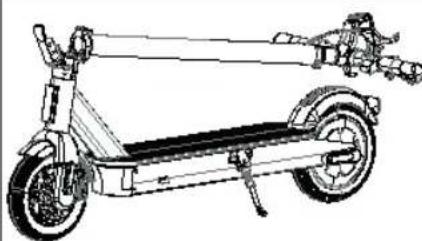 |
| 3 mm imbus ključ *1 |  |
| Uputstvo za upotrebu *1 |  |
| Garantni priručnik *1 |  |
| Punjač baterije *1 | 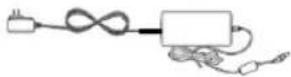 |
| M5*14L zavrtanj *4 KOM |  |
II. Parts
III. Assembly
VIII. Folding the scooter
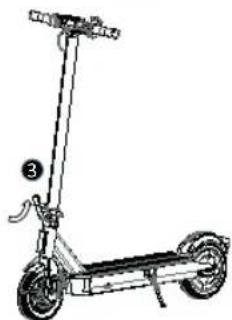
- Press the locking button.
- Unlock the folding handle.
- Fold the front tube and hook the fixing hook onto the attachment plate on the rear fender.
IX. Unfolding the scooter
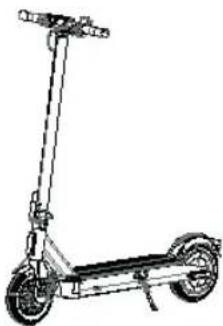
- Press the hook fixing plate to release the fixing hook.
- Lift the front tube.
- Lock the folding handle.
X. Troubleshooting
BRAKE ADJUSTMENT
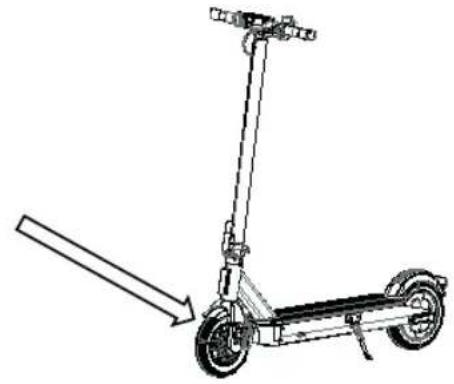
Before every ride, check the brakes. If you feel the brake is too tight, use an Allen key and turn counterclockwise to loosen the screws on the pressure plate on the disc brake caliper, release the brake cable to slightly shorten the exposed length, and tighten the pressure plate screws. If you find the brake is too loose, loosen the screws on the pressure plate, pull the brake cable to slightly extend the length, then secure the screws on the pressure plate.
WARNING! Sudden braking risks serious injury due to loss of traction and falls. Maintain a moderate speed and watch for potential hazards.
FOLDING AND TRANSPORT
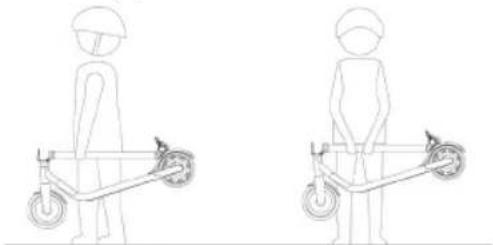
When folded, hold the electric scooter by the stem to transport it as shown in the figure:

Warnings: failure to follow these instructions may result in serious injury.
- DO NOT ride the electric scooter in the rain. • DO NOT allow it to get wet. Mind your head when passing through doorways. Maintain a speed between 3.1–6.2 mph (5–10 km/h) when riding over bumps, elevator doors, uneven roads, or other uneven surfaces. Slightly bend your knee to more easily traverse such surfaces.
- DO NOT rest your feet on the rear fender.
- DO NOT press the throttle when walking with the electric scooter. Avoid touching obstacles with the tire/wheel.
- DO NOT carry heavy objects on the handlebar.
- DO NOT ride the electric scooter with only one foot.
- DO NOT ride on public roads, highways, or freeways.
- DO NOT forcefully turn the handlebar while riding at high speed.
- DO NOT ride up or down stairs or jump over obstacles.
- DO NOT take your hands off the handlebar while riding. Do not ride with only one hand.
- DO NOT ride through puddles or any other (water) obstacles. In such cases, reduce speed and go around the obstacle.
- DO NOT carry passengers. The electric scooter is designed for one rider only. • Do not carry a child with you. • Do not ride when pregnant.
- DO NOT use a mobile phone or wear headphones when riding the electric scooter.
- DO NOT touch the motor after riding, as it may be hot.
- Always keep both hands on the handlebar; otherwise, you risk serious injury due to loss of balance and falls.
- For use in dry weather only.
- We do not recommend use on public roads.
- Never make sudden turns when riding at high speed.
- Do not start or stop abruptly.
- Make sure the speed of the electric scooter is safe for you and others, and be prepared to stop at any time during the ride.
- When riding the electric scooter, keep your distance from others to avoid collisions.
- When turning, you must use your body's center of gravity; a sudden shift in center of gravity may cause damage.
- No modifications other than those specified by the manufacturer are allowed.
- Self-locking nuts and other self-locking fasteners may fail.
- Avoid riding on slopes.
XIII. CLEANING AND MAINTENANCE
This electric scooter can be used as a means of transportation and, as such, requires maintenance of all components that wear during operation and are not covered by the warranty.
CLEANING
Make sure the electric scooter is turned off, the charging cable is unplugged, and the rubber cover on the charging port is properly closed before cleaning; otherwise, you may damage the electronic components. Always disconnect the product from the charger first, cover the waterproof charging cap, turn off the product's power, and avoid contact of liquids with the battery, motor, and other electronic parts during cleaning to avoid unforeseen hazards. Do not use a high-pressure water jet to clean the product or immerse it in water.
To clean the electric scooter, use a damp cloth. If you need to scrape off dirt, use a soft brush, then a damp cloth.
Be sure to cover the charging port to avoid issues with electronic components.
8F, 88, Sec. 1, Xintai 5th Rd., Xizhi, New Taipei City 221
i.
Acer Italy s.r.l.
Viale delle Industrie 1/A, 20044 Arese (MI), Italy
Tel: +39-02-939-921, Fax: +39-02 9399-2913
www.acer.it
Product: Acer electric scooter series 3
8F, 88, Sec. 1, Xintai 5th Rd., Xizhi, New Taipei City 221
i,
Acer Italy s.r.l.
Viale delle Industrie 1/A, 20044 Arese (MI), Italy
Tel: +39-02-939-921, Fax: +39-02 9399-2913
www.acer.it
Product: Acer electric scooter series 5
8F, 88, Sec. 1, Xintai 5th Rd., Xizhi, New Taipei City 221
i.
Acer Italy s.r.l.
Viale delle Industrie 1/A, 20044 Arese (MI), Italy
Tel: +39-02-939-921, Fax: +39-02 9399-2913
www.acer.it
Product: Predator electric scooter series 5

X. Troubleshooting
BRAKE ADJUSTMENT
FOLDING AND CARRYING

8F, 88, Sec. 1, Xintai 5th Rd., Xizhi, New Taipei City 221
Ve
Acer Italy s.r.l.
Viale delle Industrie 1/A, 20044 Arese (MI), Italy
Tel: +39-02-939-921, Fax: +39-02 9399-2913
www.acer.it
Product: Acer Electric Scooter Series 3
Trade Name: acer
Acer Incorporated (Taipei, Taiwan)
28/02/2024
Date
EU Declaration of Conformity
We,
Acer Incorporated
8F, 88, Sec. 1, Xintai 5th Rd., Xizhi, New Taipei City 221
And
Acer Italy s.r.l.
Viale delle Industrie 1/A, 20044 Arese (MI), Italy
Tel: +39-02-939-921, Fax: +39-02 9399-2913
www.acer.it
Product: Acer Electric Scooter Series 5
Trade Name: acer
Acer Incorporated (Taipei, Taiwan)
28/02/2024
Date
acer
EU Declaration of Conformity
We,
Acer Incorporated
8F, 88, Sec. 1, Xintai 5th Rd., Xizhi, New Taipei City 221
And
Acer Italy s.r.l.
Viale delle Industrie 1/A, 20044 Arese (MI), Italy
Tel: +39-02-939-921, Fax: +39-02 9399-2913
www.acer.it
Product: Predator Electric Scooter Series 5
Trade Name: acer
Acer Incorporated (Taipei, Taiwan)
28/02/2024
Date

8F, 88, Sec. 1, Xintai 5th Rd., Xizhi, New Taipei City 221
H,
Acer Italy s.r.l.
Viale delle Industrie 1/A, 20044 Arese (MI), Italy
Tel: +39-02-939-921, Fax: +39-02 9399-2913
www.acer.it
Product: Acer Electric Scooter Series 3
8F, 88, Sec. 1, Xintai 5th Rd., Xizhi, New Taipei City 221
Acer Italy s.r.l.
Viale delle Industrie 1/A, 20044 Arese (MI), Italy
Tel.: +39-02-939-921, fax: +39-02 9399-2913
www.acer.it
Product: Acer Series 5 electric scooter
8F, 88, Sec. 1, Xintai 5th Rd., Xizhi, New Taipei City 221
Acer Italy s.r.l.
Viale delle Industrie 1/A, 20044 Arese (MI), Italy
Tel.: +39-02-939-921, fax: +39-02 9399-2913
www.acer.it
Product: Predator Series 5 electric scooter