M700DQ8T - HMI Winmate - Free user manual and instructions
Find the device manual for free M700DQ8T Winmate in PDF.


User questions about M700DQ8T Winmate
0 question about this device. Answer the ones you know or ask your own.
Ask a new question about this device
Download the instructions for your HMI in PDF format for free! Find your manual M700DQ8T - Winmate and take your electronic device back in hand. On this page are published all the documents necessary for the use of your device. M700DQ8T by Winmate.
USER MANUAL M700DQ8T Winmate
Advisory Conventions 3
Safety Information 4
Handling and Maintenance 6
Declaration of Conformity (DoC) 7
About This User Guide 8
1.1 Introduction 10
1.2 Product Features 10
1.3 Unpacking 10
1.4 Description of Parts 11
1.5 Dimensions 13
1.6 Getting Started 13
1.6.1 SIM Card and SD Card Installation 14
1.6.2 Battery Installation 14
1.6.3 Charging the Battery 16
1.7 Turning On and Off the Device 16
1.7.1Turning On 16
1.7.2Turning Off 17
1.8 Resetting to Factory Defaults 18
2.1 Using the Touch Screen 20
2.2 Waking Up the HMI 21
2.3 Using the Home Screen 21
2.3.1 Personalizing Home Screen 22
2.3.2 Viewing Other Parts of the Home Screen 23
2.4 Status and Notification Icons 24
2.4.1 Notification Icons 24
2.4.2 Status Icons 25
2.5 Using the On-Screen Keyboard 26
2.5.1 Entering Text 26
2.5.2 Editing Text 27
2.6 Display Settings 28
2.7 Audio Profile Settings 29
2.7.1 Sound Settings 29
2.7.2 Adjusting Volume 29
2.8 Language and Keyboard Settings 30
2.8.1 Changing the Keyboard Language 31
2.9 About Phone 31
3.1 How to Lock Applications 33
3.2 How to Unlock Applications 35
3.3 How to Change Password 36
4.1 Connecting to Mobile Networks 38
4.1.1 Checking the Network Connection 38
4.1.2 Turning on Data Service 38
4.2 Connecting to Computer via USB 38
4.2.1 USB Computer Connection 38
4.2.2 USB Debugging Settings 40
5.1 Capturing Photos or Video 42
5.1.1 Opening Camera 42
5.1.2 Taking Pictures 42
5.1.3 Viewing pictures 42
5.1.4 Shooting Videos 43
5.2 The Gallery 43
6.1 Barcode Reader Location 45
6.2 Android Winmate® Data Collection (WDC) 45
6.3 Where to Find WDC 45
6.4 How to Turn On/Off the Power of Barcode Reader 46
6.5 How to Change the Symbologies of Barcode 47
6.6 How to Add Command to the Barcode Output 47
6.7 How to Change the Scan Type of the Barcode Reader 48
6.8 How to Change WDC Settings or Reset to Default 49
6.1.9 Scanning a Barcode 49
6.10 Scanning Tips and Considerations 50
7.1 Standard Accessories List 52
7.2 Optional Accessories List 52
Appendix A: Product Specifications 54
Appendix B: Software Development Kit 55
Appendix C: OS Image Update 55
Appendix D: OTA Online Update 55
Preface
Advisory Conventions
Four types of advisories are used throughout the user manual to provide helpful information or to alert you to the potential for hardware damage or personal injury. These are Notes, Important, Cautions, and Warnings. The following is an example of each type of advisory.

Note:
A note is used to emphasize helpful information

Important: An important note indicates information that is important for you to know.

Caution A Caution alert indicates potential damage to hardware and explains how to avoid the potential problem.
Warning! An Electrical Shock Warning indicates the potential harm from electrical hazards and how to avoid the potential problem.
Do Not Disassemble, Modify, or Insert Sharp Objects Into the Battery Pack. Electrolyte leakage, generation of heat, ignition or rupture may result.
Do Not Short the Positive (+) and Negative (-) Terminals of the Battery. Generation of heat, ignition or rupture may result. When carrying or storing the device, do not place the battery pack together with articles that may contact electricity.
Do Not Apply Shocks to the Battery by Dropping It or Applying Strong Pressure to It. Electrolyte leakage, generation of heat, ignition or rupture of battery may occurs.
Do Not Charge the Battery Other Than Methods Those Specified In This Manual. If the battery is not charged using one of the specified methods, electrolyte leakage, generation of heat, ignition or rupture may result.
When the Battery Pack Has Deteriorated, Replace It with a New Battery. Continued use of a damaged battery pack may result in heat generation, ignition or battery rupture.
Do Not Expose the Battery Pack to Excessive Heat, or Extreme Heat (Near Fire, in Direct Sunlight for example) Generation of heat, ignition or rupture may result
Do Not Use the Battery Pack With Any Other Products. The battery pack is rechargeable and is only designed for this specific product. If it is used with a product other than the specified product, electrolyte leakage, generation of heat, ignition or rupture may result.
Do Not Use This Product With Battery Other Than the One Specified.
Discontinue using device immediately if you notice the battery is swelling, or looks puffy or misshapen. Do not attempt to charge or use the device. Do not handle a damaged or leaking battery. Do not let leaking battery fluid come into contact with your eyes, skin or clothing.
General Product Safety
Handling and Maintenance

General Guideline Guide Général
Keep the product at least 13 cm (5 inches) away from electrical appliances that can generate a strong magnetic field such as TV, refrigerator, motor, or a large audio speaker.
Do not place heavy objects on top of the HMI computer as this may damage the display.
The screen surface can be easily scratched. Use with care. Do not use paper towels to clean the display but use the included cleaning cloth. Avoid touching it with a pen or pencil.
To maximize the life of the backlight in the display, allow backlight to automatically turn off as a result of power management. Avoid using a screen saver or other software that prevents the power management from working.
Use a soft cloth moistened with water or a nonalkaline detergent to wipe the exterior of the product.
Gently wipe the display with a soft, lint-free cloth. Do not use alcohol or detergent on the product.
Use your finger or the stylus on the display. Using sharp or metallic object may cause scratches and damage the display, thereby causing errors.
Use a soft cloth to remove dirt on the display. The touchscreen surface has a special protective coating that prevents dirt from sticking to it. Not using a soft cloth may cause damage to the special protective coating on the touchscreen surface. To clean off hard to remove dirt, blow some steam on the particular area and gently wipe away using a soft cloth.
Do not use excessive force on the display. Avoid placing objects on top of the display as this may cause the glass to break.
When there is a noticeable discrepancy in the operation of the touchscreen function (your touch does not correlate to the proper location on the screen), recalibrate the touchscreen display.
Declaration of Conformity (DoC)
Federal Communication Commission Interference Statement
This device complies with Part 15 of the FCC Rules. Operation is subject to the following two conditions: (1) This device may not cause harmful interference, and (2) this device must accept any interference received, including interference that may cause undesired operation.
This equipment has been tested and found to comply with the limits for a Class B digital device, pursuant to Part 15 of the FCC Rules. These limits are designed to provide reasonable protection against harmful interference in a residential installation. This equipment generates, uses and can radiate radio frequency energy and, if not installed and used in accordance with the instructions, may cause harmful interference to radio communications. However, there is no guarantee that interference will not occur in a particular installation. If this equipment does cause harmful interference to radio or television reception, which can be determined by turning the equipment off and on, the user is encouraged to try to correct the interference by one of the following measures:
- Reorient or relocate the receiving antenna.
- Increase the separation between the equipment and receiver.
- Connect the equipment into an outlet on a circuit different from that to which the receiver is connected.
- Consult the dealer or an experienced radio/TV technician for help.
FCC Caution: Any changes or modifications not expressly approved by the party responsible for compliance could void the user's authority to operate this equipment.
This transmitter must not be co-located or operating in conjunction with any other antenna or transmitter.
Radiation Exposure Statement:
The product comply with the FCC portable RF exposure limit set forth for an uncontrolled environment and are safe for intended operation as described in this manual. The further RF exposure reduction can be achieved if the product can be kept as far as possible from the user body or set the device to lower output power if such function is available.
CE Notice (European Union)

Electromagnetic Compatibility Directive (2014/30/EU)
EN55024: 2010/A1: 2015
。 IEC61000-4-2: 2009
。 IEC61000-4-3:2006+A1:2007+A2:2010
。 IEC61000-4-4: 2012
O IEC61000-4-5:2014
。 IEC61000-4-6:2014
。 IEC61000-4-8:2010
O IEC61000-4-11:2004
EN55032: 2012/AC:2013
EN61000-3-2:2014
EN61000-3-3:2013
Low Voltage Directive (2014/35/EU)
EN 60950-1:2006/A11:2009/A1:2010/A12:2011/A2:2013
This equipment is in conformity with the requirement of the following EU legislations and harmonized standards. Product also complies with the Council directions.
Industry Canada Statement
This device complies with ISED's licence-exempt RSSs. Operation is subject to the following two conditions: (1) This device may not cause harmful interference, and (2) this device must accept any interference received, including interference that may cause undesired operation.
Radiation Exposure Statement:
The product comply with the Canada portable RF exposure limit set forth for an uncontrolled environment and are safe for intended operation as described in this manual. The further RF exposure reduction can be achieved if the product can be kept as far as possible from the user body or set the device to lower output power if such function is available.
This User Guide provides information about using the Winmate® M700DQ8T and accessories.

Note: Some pictures in this guide are samples and can differ from actual product.
Chapter 1: Getting Started
This chapter tells you information about Winmate® M700DQ8T Series HMI, its highlighted features, and provides basic instructions for using the M700DQ8T, including powering on and resetting the M700DQ8T.
1.1 Introduction
Thank you for purchasing Winmate® Rugged HMI M700DQ8T.
The M700DQ8T is a compact rugged HMI PC with robust set of features designed to withstand industrial use while providing high tech solutions that increase productivity, improve safety, and reduce operational costs. The processing power comes from QualcommSnapdragon 660 processor that supports Android 9.0 OS. The HMI features a brilliant, in-plane switching with projected capacitive touch screen and offers 1280 × 720 pixel resolution. Weighing at just 1.2 pounds (approx. 550 grams) the M700DQ8T delivers lightweight mobility in a pocket-sized rugged HMI.
1.2 Product Features
Winmate® M700DQ8T Industrial HMI features:
Qualcomm® SDA660 processor
- 7" 1280 x 720 TFT panel with direct optical bonding
Supports Android 9.0 OS
IP65 waterproof and dustproof
- Rated for extreme temperature use
1.3 Unpacking
If any of the following items are missing or damaged, contact us.
Standard packing list includes:
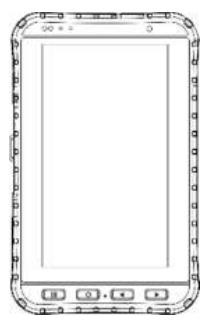
Rugged HMI M700DQ8T
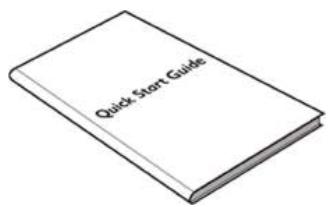
Quick Start Guide (Hardcopy)
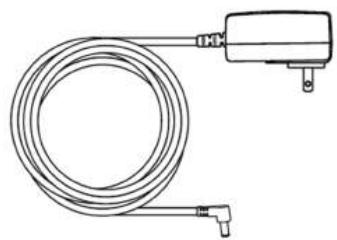
*AC Adapter
Input: AC 100-240V
50/60 Hz
Output: 5V-3A
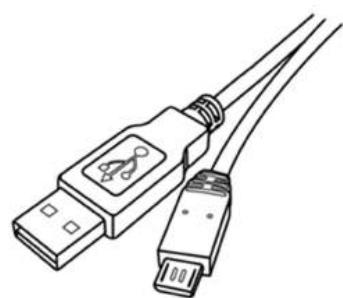
USB Cable USB-C to USB-A
- Adapter socket varies by country and region. M700DQ8T will be shipped with the socket according to your order.
Your package may include optional accessories based on your order. To see the list of available accessories and its specifications, refer to Chapter 7 of this User Guide.
1.4 Description of Parts
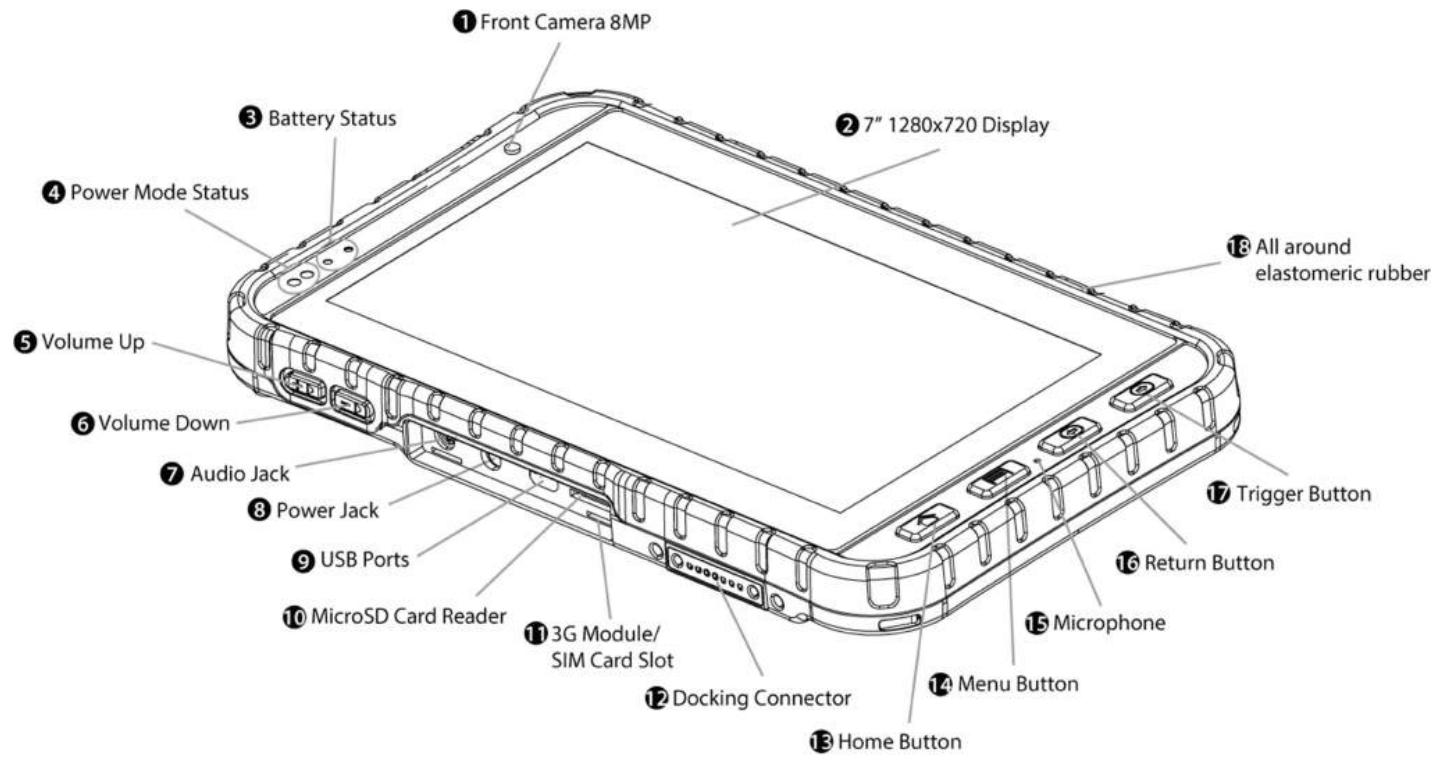
Front and Side View
| No | Item | Description |
| 1 | Front Camera | 8MP Front Camera. |
| 2 | 7" 1280 x 720 Display | Displays and act as one of the inputs for the HMI Computer. |
| 3 | LED Indicator | LED indicator indicates the battery power or charging status. Red: 0~89% Green: 90~100% Off: The PDA is not charging or not properly connected. |
| 4 | Proximity Sensor | Turns off the screen when detecting an object within a specific range. |
| Light Sensor | Display brightness auto-adjusting | |
| 5 | Volume Up | Increase the volume of music or radio. |
| 6 | Volume Down | Decrease the volume of music or radio. |
| 7 | Audio Jack | To connect a set of headphones, external speakers, or an audio device. |
| 8 | Power Jack | DC-IN power input jack. |
| 9 | USB Ports | USB 3.0 Type-C connector. |
| 10 | MicroSD Card Reader | Memory card reader port for MicroSD Card. |
| 11 | SIM Card Slot | Service window to insert Micro SIM card. Also provide access to WWAN Module. |
| 12 | Docking Connector | Port to docking solutions such as vehicle docking to provide power and external antenna. |
| 13 | Home Button | Return to home screen. |
| 14 | Menu Button | Open a list of actions that user can do on the current screen. |
| 15 | Dual Noise Cancelling Microphones | Use for making a phone call or voice recordings. |
| 16 | Return Button | Return to the previous screen. |
| 17 | Trigger Button | If the device was equipped with scanners, this button can be function as a trigger button. |
| 18 | All Around Elastomeric Rubber | Protects the device from water and dust. |
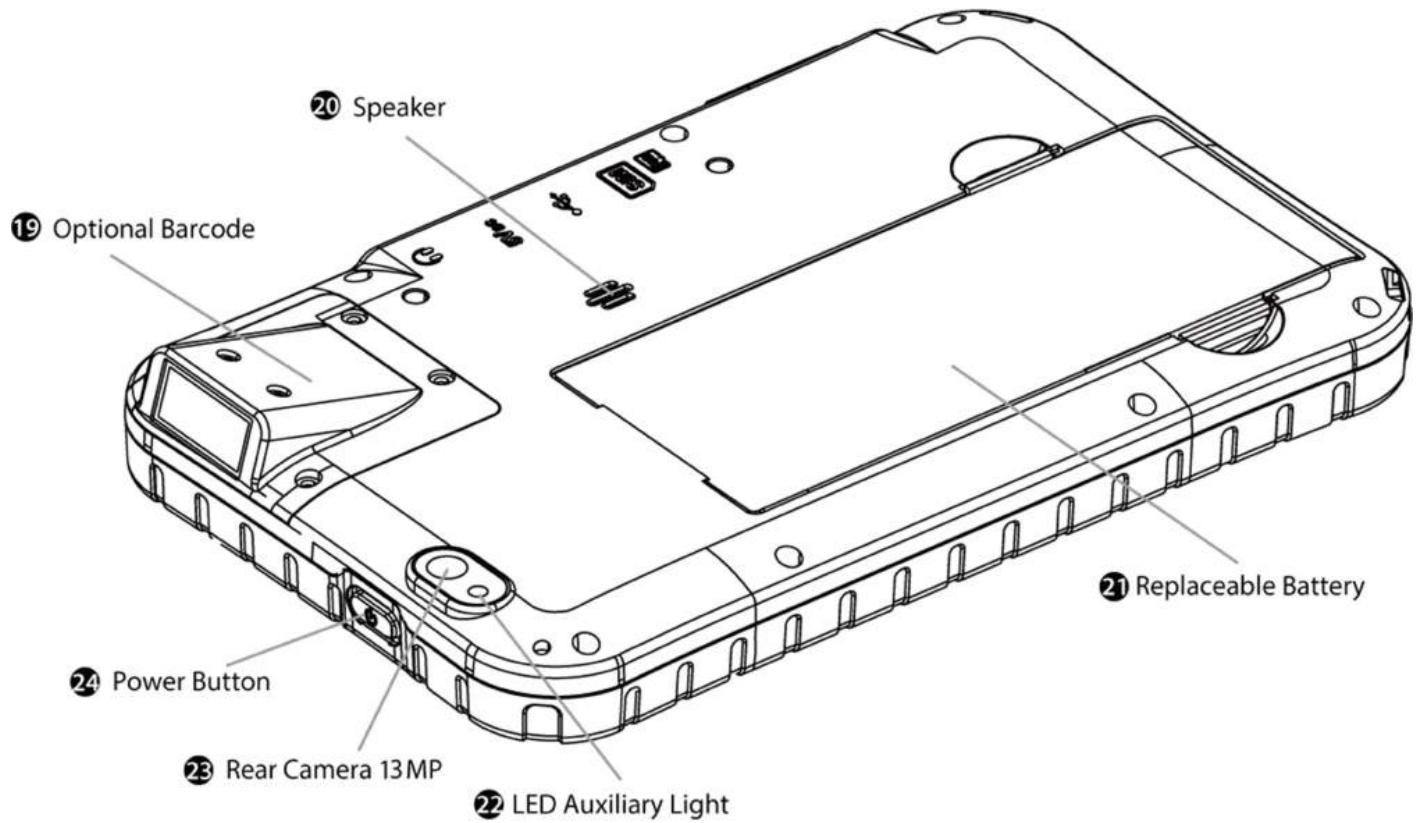
Rear and Top View
| No | Item | Description |
| 19 | Optional Barcode | Barcode reader for reading of 2D barcode. |
| 20 | Speaker | Provide audio output for music and video. |
| 21 | Battery | 3.7V 5300 mAh Li-ion Battery. |
| 22 | LED Auxiliary Light | To provide lighting while using camera. |
| 23 | Rear Camera | 13 MP Autofocus Camera. Captures photos and videos. |
| 24 | Power Button | Press and hold the button for 3 seconds to turn on M700DQ8T Press to turn on/off the screen. Press and hold the button for 3 seconds to select: • Power Off -- to turn off the M700DQ8T press button for 8 Sec to force system power off • Airplane Mode – to disable all wireless connection • Restart – to restart the device |
1.5 Dimensions
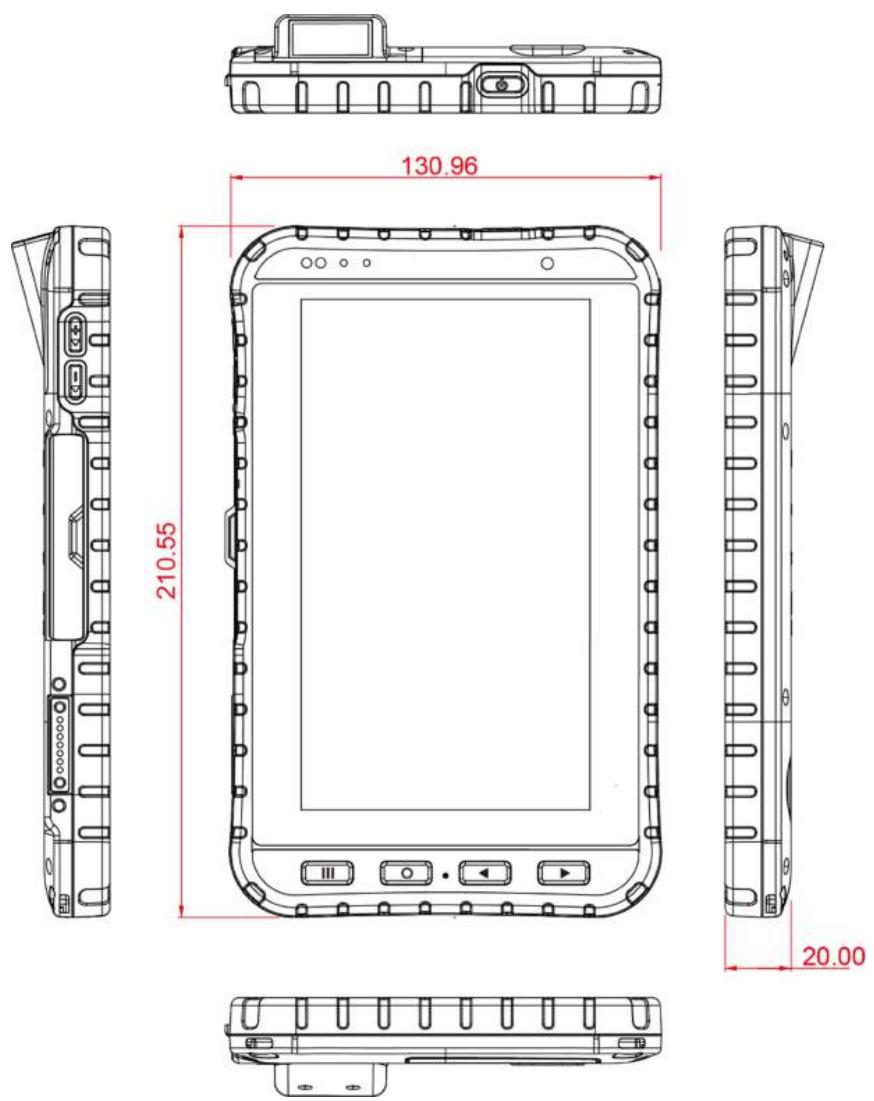
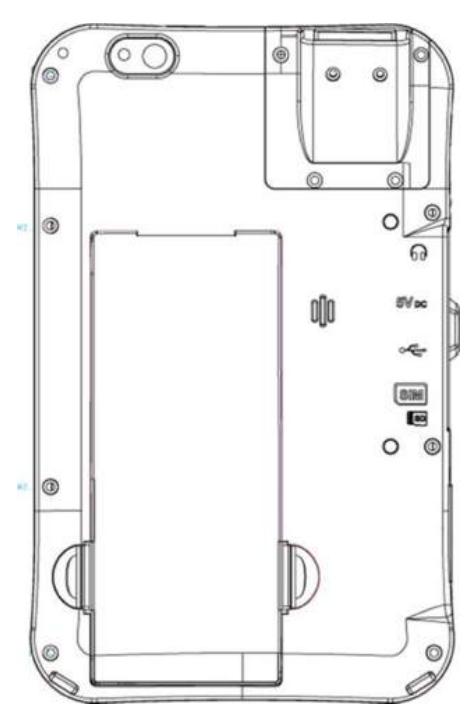
Note: this is a simplified drawing and some components are not marked in detail.
1.6 Getting Started
To start using the M700DQ8T for the first time:
Install SIM Card
Install Micro SD Card
Install the Battery
Charge the M700DQ8T
Power on the M700DQ8T
- Configure the M700DQ8T
1.6.1 SIM Card and SD Card Installation
To Install the SIM Card and SD Card:
- Open the I/O cover located on the left side.
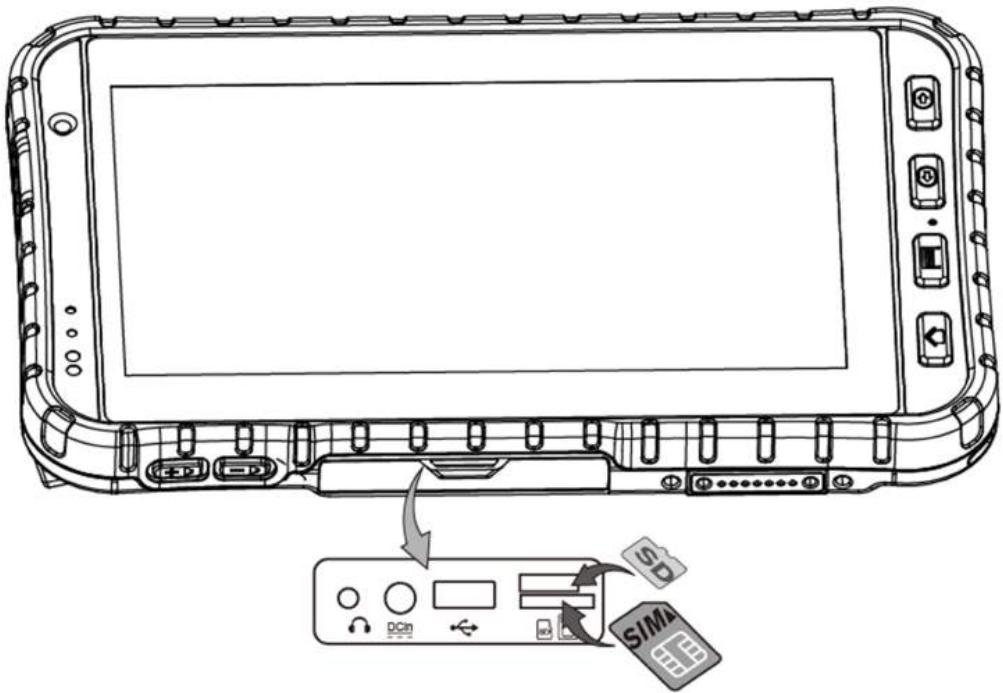
- Insert the SIM card (with the gold parts facing up and cut-off corner facing in) in the direction of the arrow as shown in the figure.
- Pick and raise the SD card holder up in upright position and then put the SD Card into the socket.
- Close the I/O cover.

Note: Please make sure your device is powered off before swapping SIM cards.
1.6.2 Battery Installation

Caution The lithium battery used in this HMI may swell after being charged/ discharged many times, but there is no problem regarding safety. Continued use in such a state may result in the battery getting jammed, so please stop using the battery, and purchase a new one.
Inserting the standard Battery Pack into the device:
- Disconnect AC adapter and power cord from the device.
- Turn the device over, back facing up.
- Push the battery latch.
- Insert the battery on the connector-pins side first, and then lower the battery into the battery compartment. Continue to hold the Battery Release Slider before battery is fully inserted.
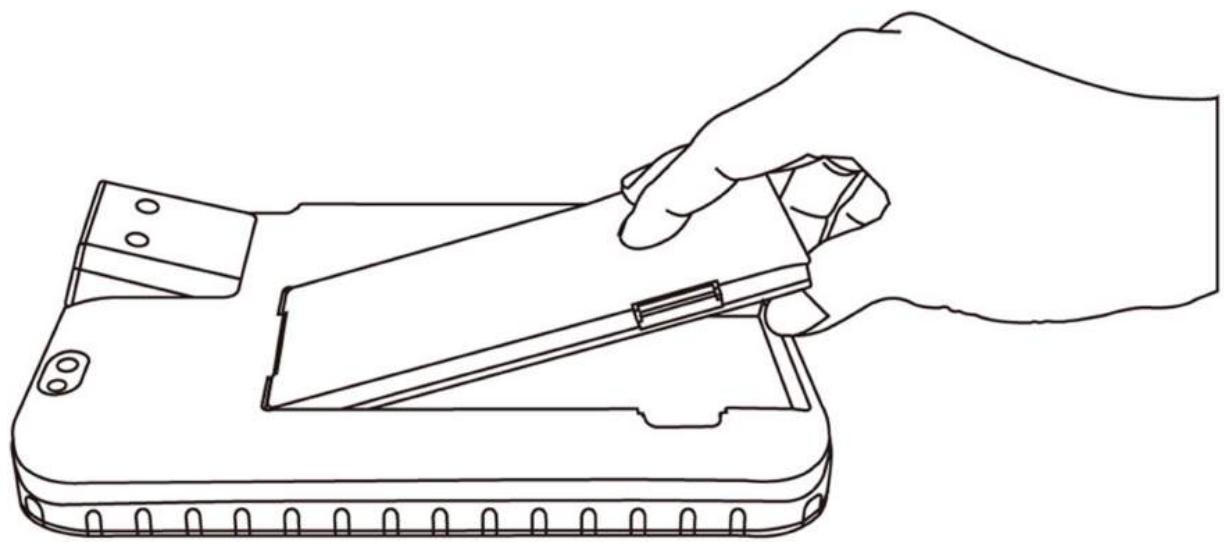

Caution Do not insert your fingers into contact hole when inserting the battery.
Caution To keep battery health and prevent possible issues from battery over-discharged, please charge the HMI built-in back-up battery once every two months.
Removing the Battery Pack:
- Power off the PDA. Disconnect any cords connected to the device.
- Turn the PDA over, back facing up.
- Push Battery Lock Latch to the "Unlocked" position.
- Lift the battery out using the opening on side of battery compartment.
1.6.3 Charging the Battery
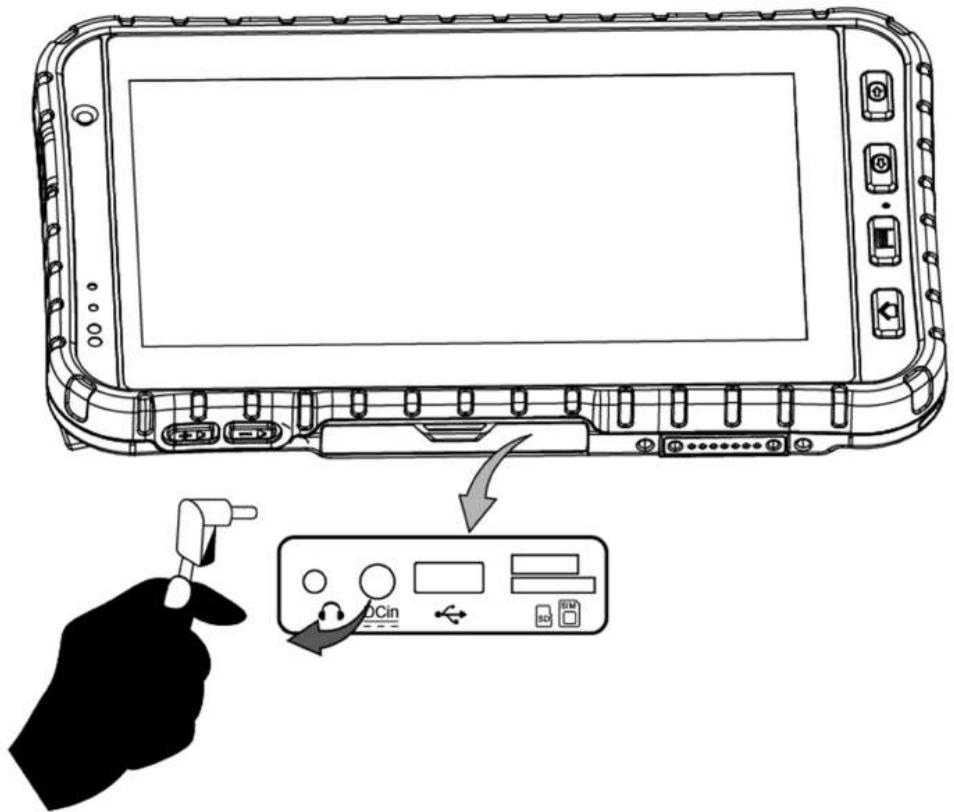
Charge the battery before using the PDA for the first time, charge the battery until the LED indicator turns solid green. To charge the M700DQ8T, use a cable or a docking with appropriate power supply.
| LED Status | Indicator | |
| Off | The M700DQ8T is not charging or not properly connected. | |
| Solid Red | ● | Battery charged 0~89%. |
| Solid Green | ● | Battery charged 90~100%. |
To charge the battery:
- Connect the power supply output connector to the input power port on the DC Jack cable.
- Remove the protective rubber and connect the DC Jack cable to the side of M700DQ8. The battery charge LED indicates the battery charging status.
1.7 Turning On and Off the Device
This section describes how to turn on/ off the device.
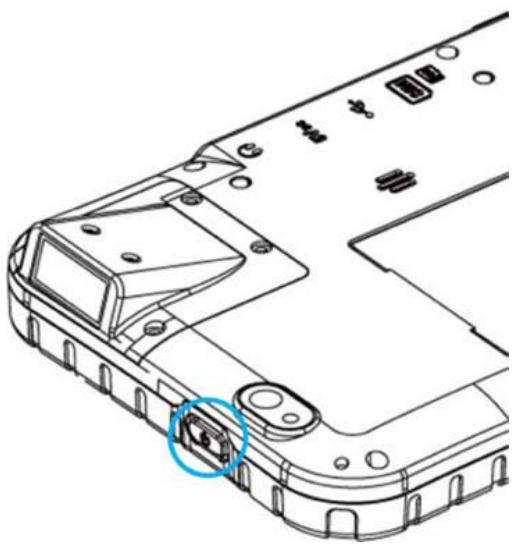
1.7.1 Turning On

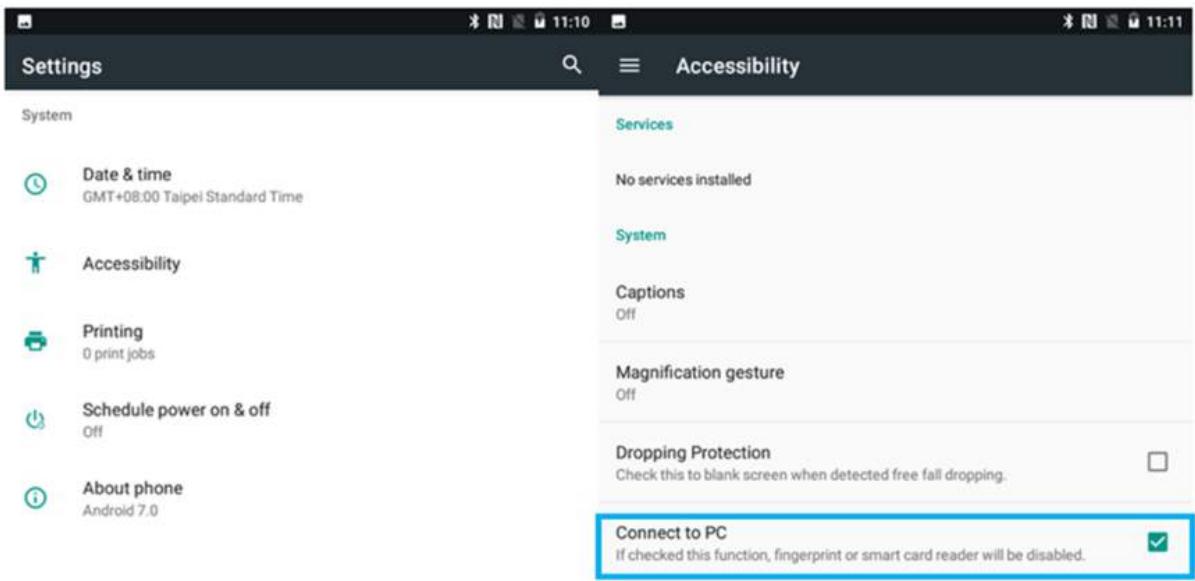
Note: For power saving purpose, please enable Connect to PC in Accessibility settings. When connected to PC external 4G, USB and LAN on Docking will be disabled.
- Press and hold the power button for 3 seconds, located on the top side of the unit.
- When the device vibrate, release the power button. The LED Indicator will be solid blue during the launching process.
The desktop screen will then be displayed once operating system has been launched.
1.7.2 Turning Off
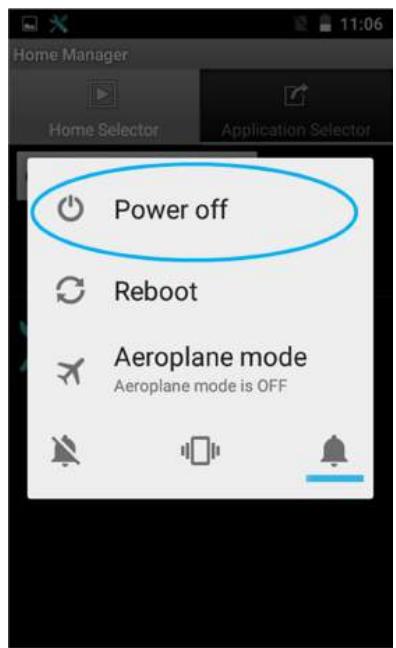
- To turn off the device, press and hold the power button until the options menu appears, tap the Power Off.
- User can also use the options menu to put the device into silent or airplane mode, see features HMI.
1.8 Resetting to Factory Defaults
To reset the device to factory defaults:
- Tap Menu , than tap Settings
- In the Personal tab, tap Backup & Reset.
- User can select to back up application data.
- Tap Factory Data Reset to reset the HMI.
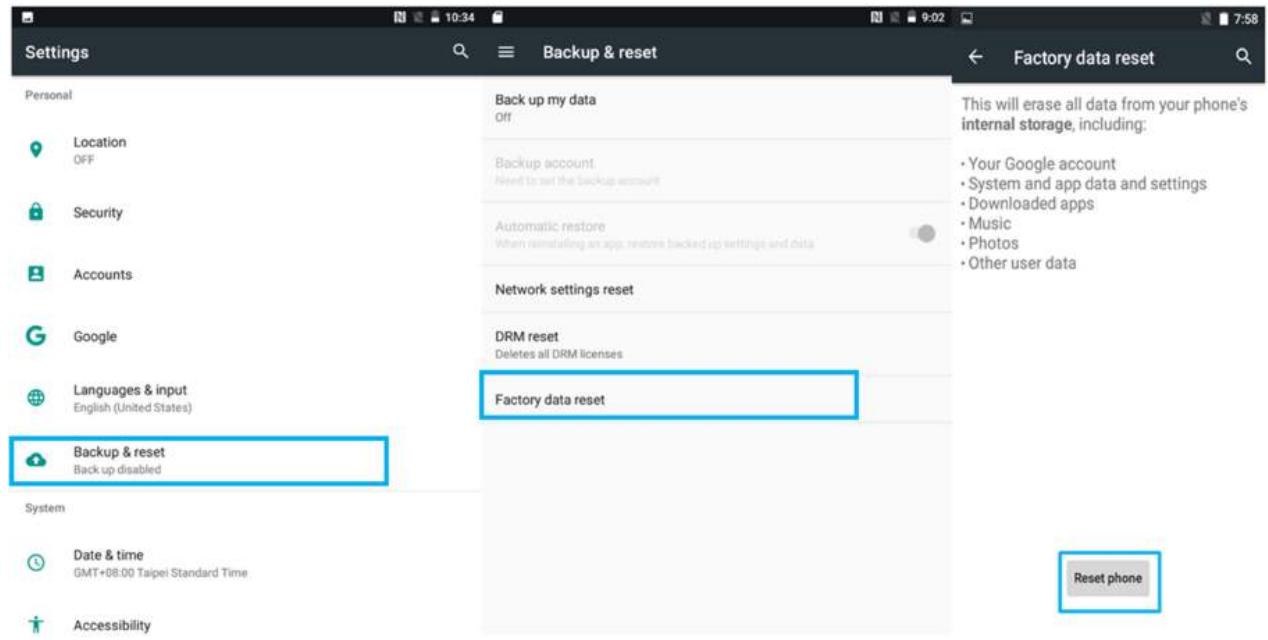
- Read all the available information and then check Erase storage if user wants to erase all the data in storage such as music or photo.
Chapter 2: Using the HMI
This chapter explains how to use the buttons, status icons, and controls of M700DQ8T Rugged HMI running on Android 9.0 operating system and provides instructions on entering and capturing data.
2.1 Using the Touch Screen
The touchscreen supports the core gestures for Android.
| Gesture | Action | Description |
| Tap | To select or activate something | |
| Tap & Hold | Touch and hold an item on the screen by touching it and not lifting your finger until it respond | |
| Touch, Hold & Drag | Touch and hold an item for a moment and then without lifting your finger, move your finger on the screen until you reach the target position. i.e. moving the apps around the home screen | |
| Swipe or slide | Quickly move the finger across the surface of the screen. i.e. slide a lock screen to open the lock | |
| Double-tap | Tap quickly twice on a webpage, screen, or App to zoom | |
| Scale | Place two finger on the screen and pinching them together | |
| Rotate | Two-finger press, simultaneously orbit both fingers around the center point, lift. |
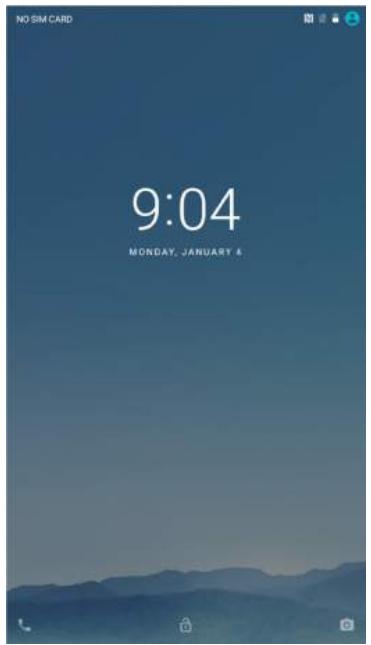
2.2 Waking Up the HMI
If you do not use the HMI for a while, the screen dims and then darkens to conserve the Battery. To wake up the HMI:
- Press the Power button on the top side of the HMI.
- Drag the lock icon upwards to unlock the screen.
2.3 Using the Home Screen
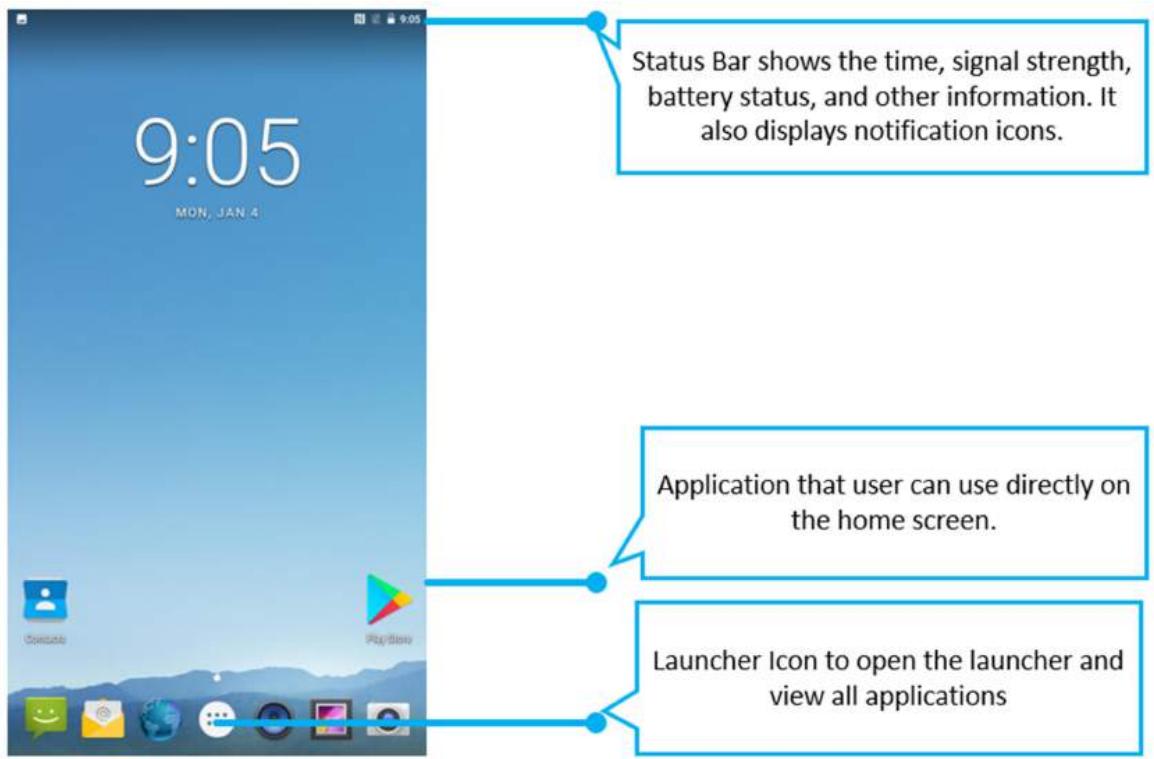
Home screen is the starting point to access all the features on your HMI Device. It displays application icons, widgets, shortcuts, and other features. User can personalize the home screen. See "Personalizing home screen".
2.3.1 Personalizing Home Screen
User can add application icons, shortcuts, widgets, and other items to any part of any Home screen where there is free space. User can also switch the wallpaper.
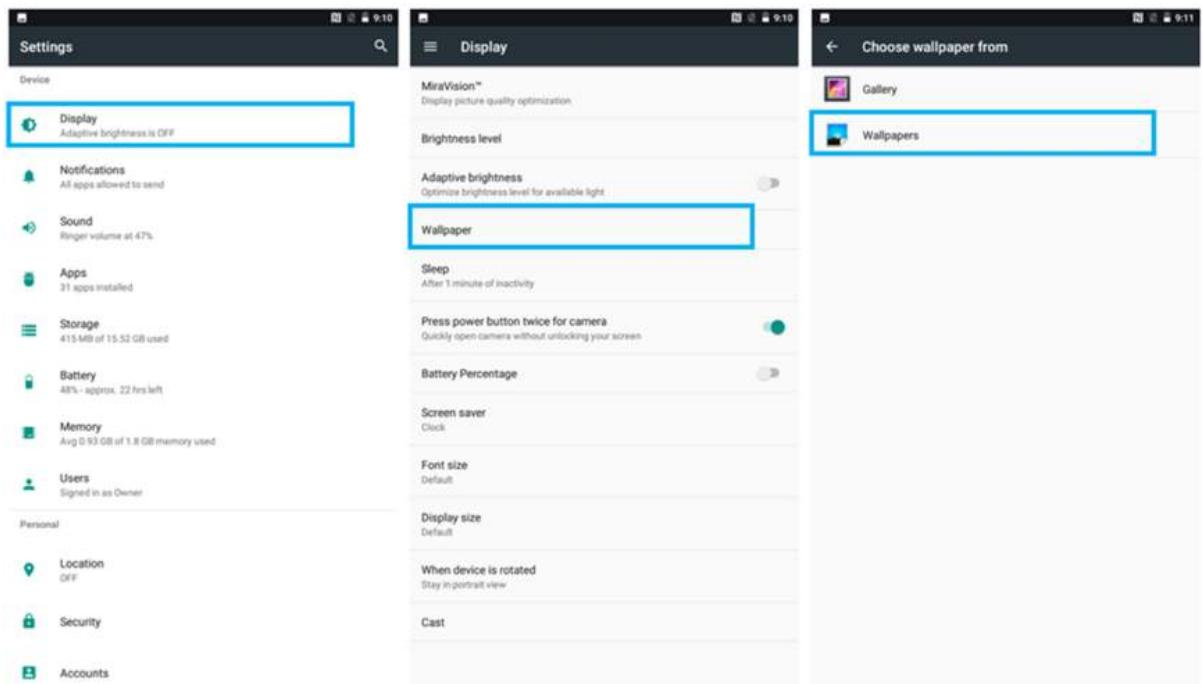
To change wallpaper on the HOME SCREEN:
- Tap MENU , and then open Settings
- In the Device tab, tap Display > Wallpaper.
- In the Wallpaper menu select the location of wallpaper, and then tap the type of item you want to add.
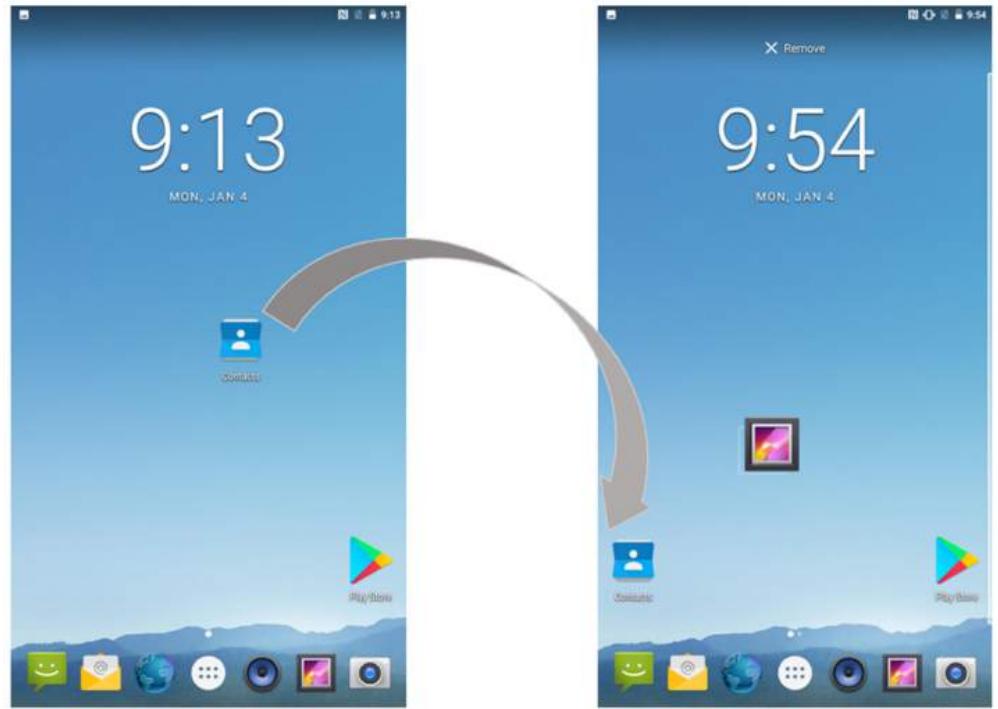
To move an item on the HOME SCREEN:
- Tap and hold the item you want to move, until it can be moved.
- Drag it to a new location on the screen.
- Place the item where you want to put it and lift your finger.
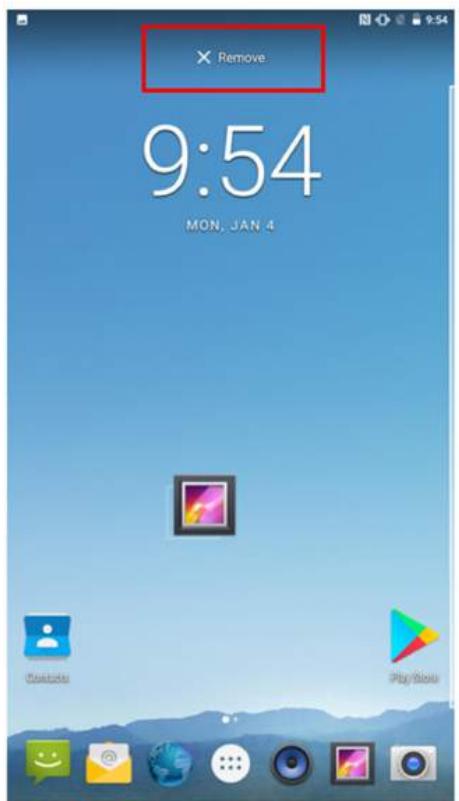
To remove items from the HOME SCREEN:
- Tap and hold the item you want to remove. The launcher icon will show Remove on the top of the screen.
- Drag the item you want to remove to the Remove icon.
- When the icon turns red, release your finger.
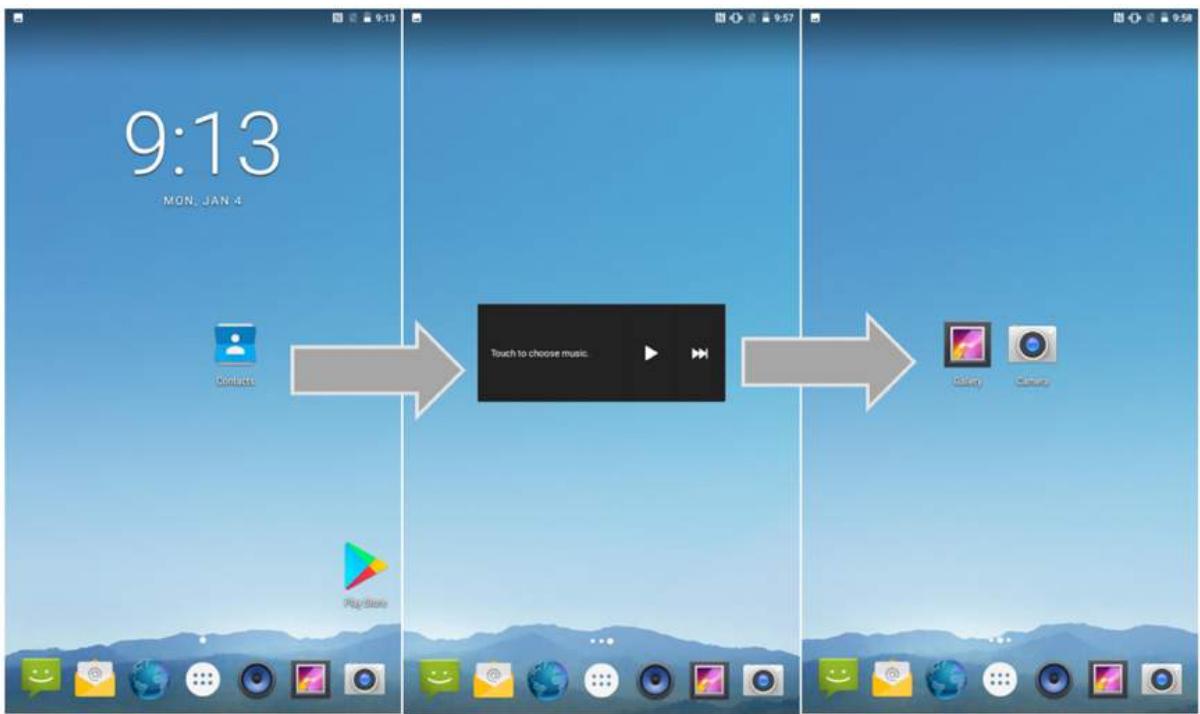
2.3.2 Viewing Other Parts of the Home Screen
- Slide your finger left or right across the Home screen. Extensions to the Home screen provide extra space for APPS, shortcuts, and other items.
- Tap the launcher icon to view the entire APPS of the device.
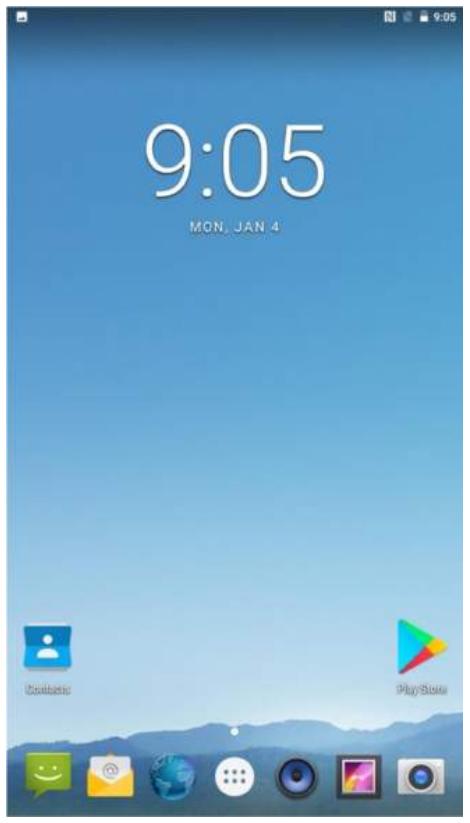
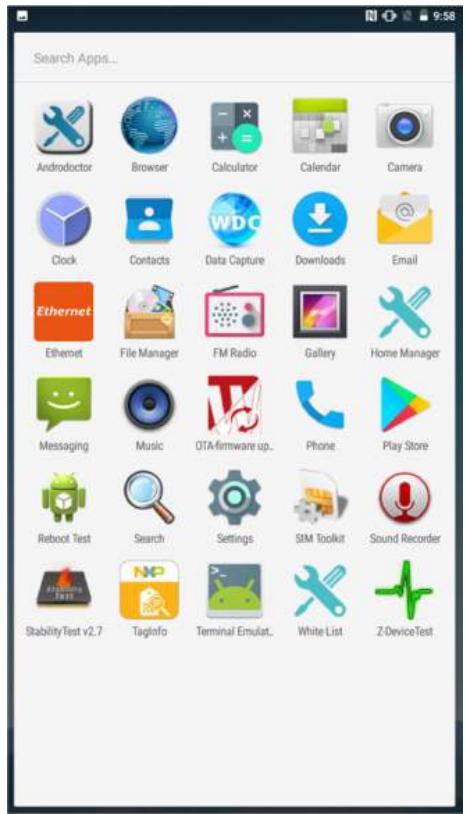
The status bar appears at the top of every screen. On the left are notification icons and on the right are status icons, along with the current time.
2.4 Status and Notification Icons

2.4.1 Notification Icons
Pull down from the left top of the screen to get the notifications area. The following icons indicate that you have received notification.
| New email message | Incoming call |
| New text or multimedia message | Missed call |
| Alarm is set | Speakerphone is activated |
| Upcoming event | Phone microphone is muted |
| Data isSyncing | Downloading data |
| Problem with sign-in or sync | Phone is connected via USB cable |
| A screenshot is captured |
2.4.2 Status Icons
Pull down from the right top of the screen to get the notifications area. The following icons indicate the status of your device.
Status icons that appear in the status bar are as follows:
| G | Connected to GPRS mobile network | # | Bluetooth is on |
| 1X | Connected to 1xRTT mobile network | # | Connected to a Bluetooth device |
| E | Connected to EDGE mobile network | # | No SIM card installed |
| 3G | Connected to 3G mobile network | # | Vibrate mode |
| 4G | Connected to 4G mobile network | # | Ringer is silenced |
| Mobile network signal strength | # | Battery is very low | |
| Searching for a network signal | # | Battery is low | |
| No signal | # | Battery is partially drained | |
| Connected to a Wi-Fi network | # | Battery is full | |
| Δ | Roaming | # | Battery is charging |
| → | Airplane mode | # | Receiving location data from GPS |
2.5 Using the On-Screen Keyboard
User will be able to enter text using the On-Screen Keyboard. Some applications will launch the keyboard automatically. In others, user needs to touch a text field where user wants to enter text to launch the keyboard.
2.5.1 Entering Text
- Open a text field, in this example we used Messaging to compose a message. The On-Screen Keyboard opens.
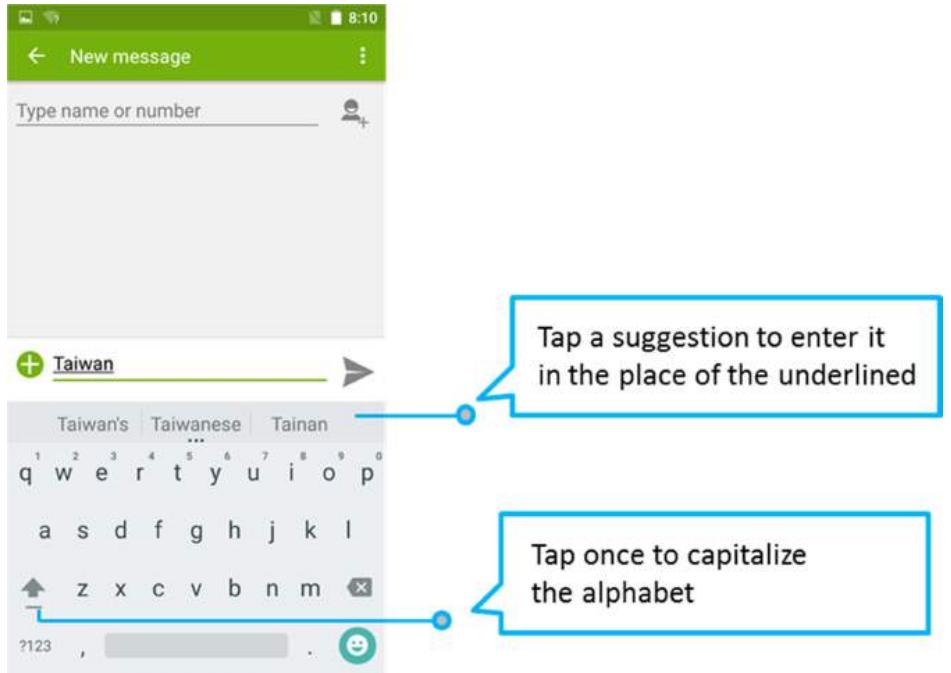
*If user taps in a text field which already contains text, the insertion point is set where user tap and the cursor appears. User can drag the cursor to pick exactly where you want to add more text. User can also select a word to copy, cut and paste it. See "Editing Text".
- Tap the delete key to erase characters to the left of the cursor.
- Tap ?123 to enter numbers. Tap ABC to return to letters.
- To enter symbols and other characters, tap and hold one of the top-row keys and slide your finger up to the list of the options. Lift your finger when you find your selection.
- To view additional symbols, tap on the numeric keyboard.
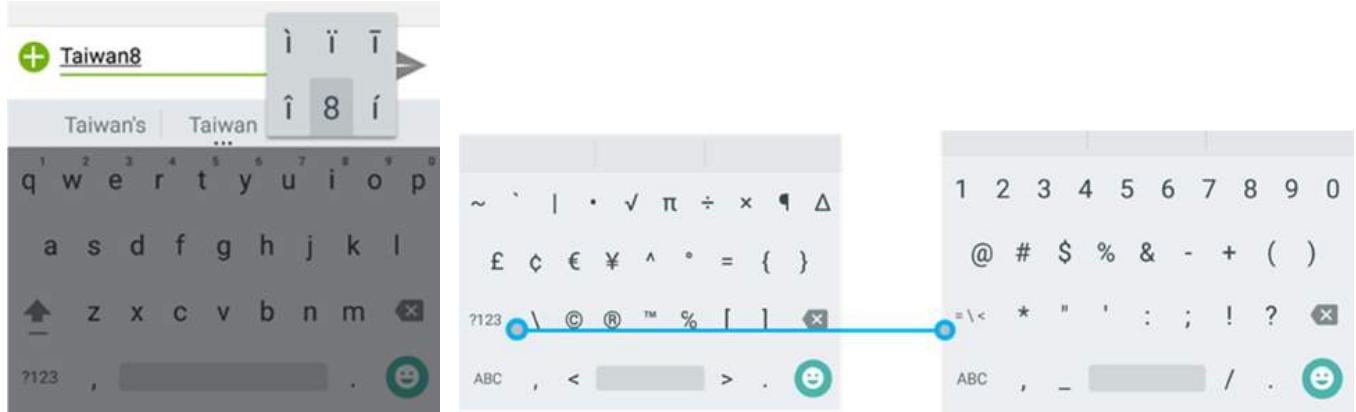
- To close the On-Screen keyboard, press the back button
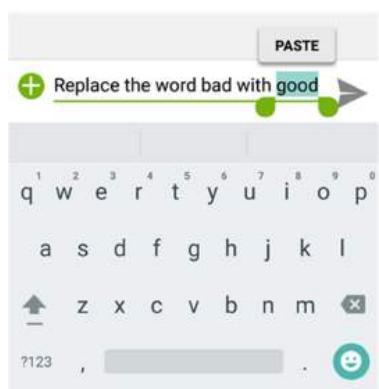
2.5.2 Editing Text
To select text:
- Double-tap the text you want to select.

- Tap to select all the sentences in the menu that appears, the selected text is highlighted in blue, with a tab at each end of the selected word.
- Drag selection tab to expand or reduce the range of the selected text.
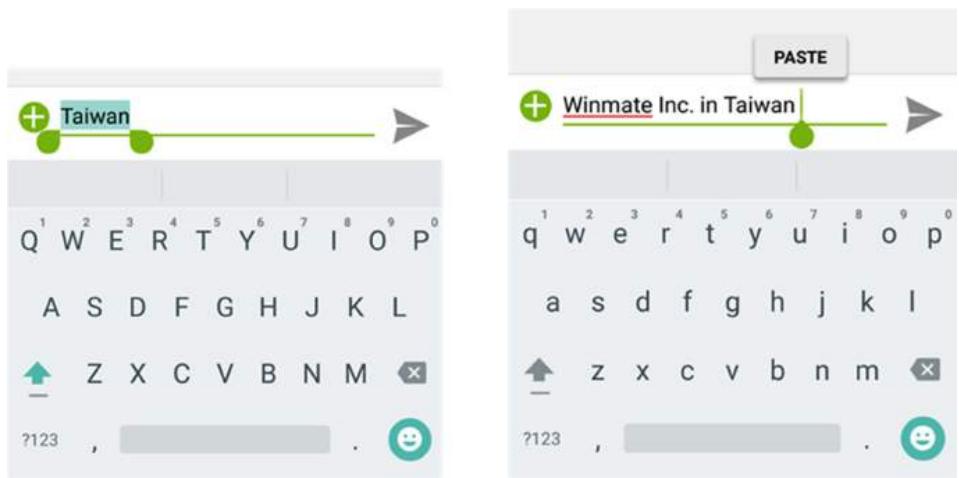
To Cut or Copy Text:
- Select the text to cut or copy, see the section above "To select text".
- Tap or in the Edit text menu.
- If you select , the selected text is removed from the text field; it is stored in temporary area so that you can paste it into different text field.
To Paste Text:
- After Cut or Copy the text, see the section above "To Cut or Copy Text"
- Place the cursor in the text field where you want to paste the text, user can paste text that you copied from one application into a text field in any application.
- Tap and hold into the location that you want to paste. Tap PASTE in the menu that opens or user can also tap to replace the existing text with copied text.


2.6 Display Settings
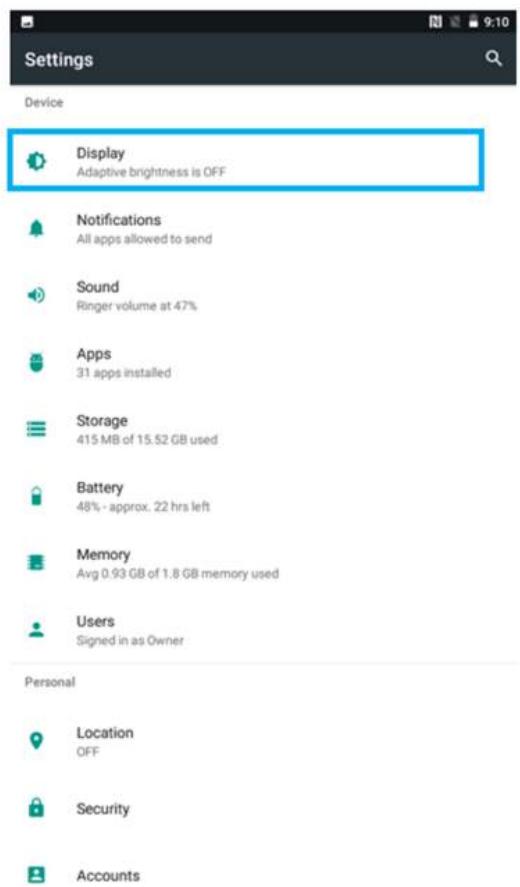
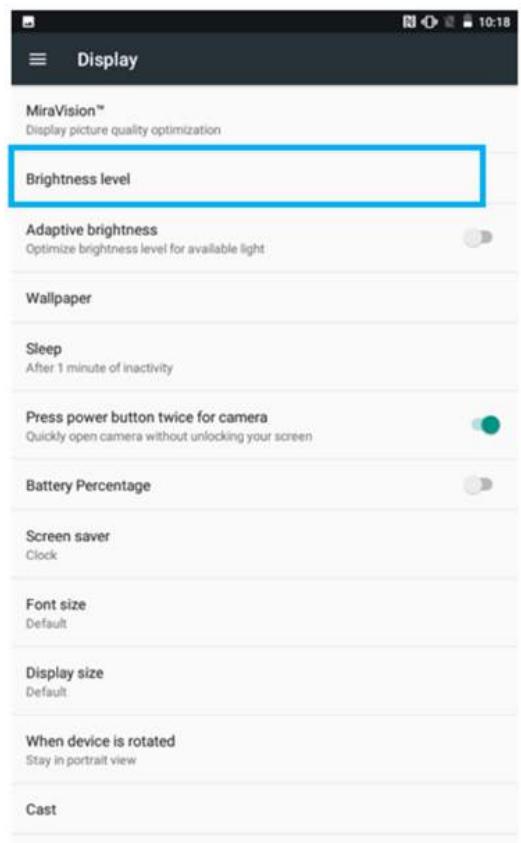
Use the display settings to configure brightness and other screen settings.
- Tap MENU and then tap Settings
- In the Device tab, tap Display:
Display
- MiraVision™ - to display picture quality optimization options.
- Brightness level- for adjusting the brightness of the screen.
- Adaptive brightness – to optimize brightness level for available light
- Wallpaper - to select wallpaper
- Sleep – to set up the device's sleep mode after the specified period of inactivity
- Press power button twice for camera - Quickly open camera without unlocking your screen
- Battery Percentage – to control battery percentage display.
- Screen saver – to control what happens when the HMI is docked and/or sleeping, turn screen saver on
- Font size - Make the text on screen smaller or larger
- Display size - Make the items on your screen smaller or larger. Some apps on your screen may change position.
- When device is rotated - for switching the orientation of the screen when user turns the device sideways or upright.

Note: For the longest battery life between charges, use the shortest Sleep time.
2.7 Audio Profile Settings
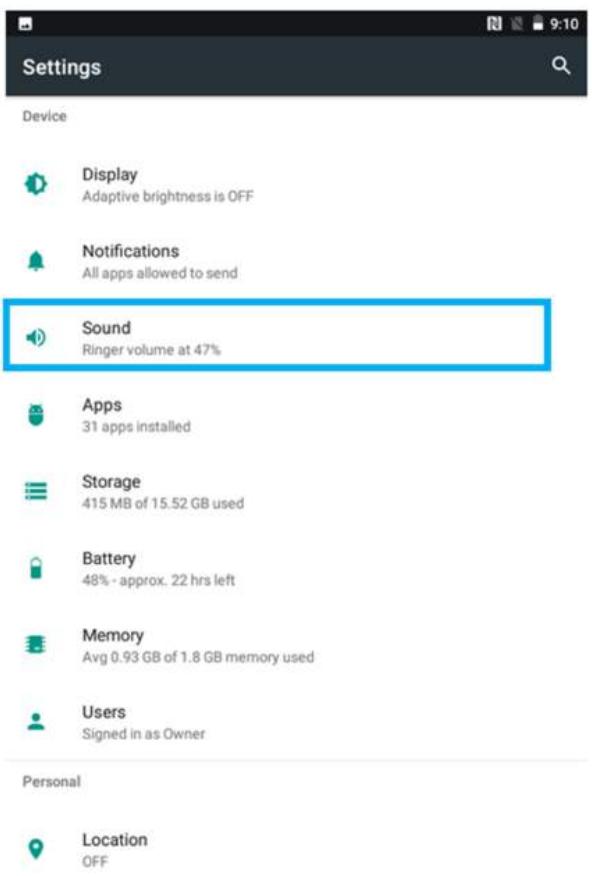
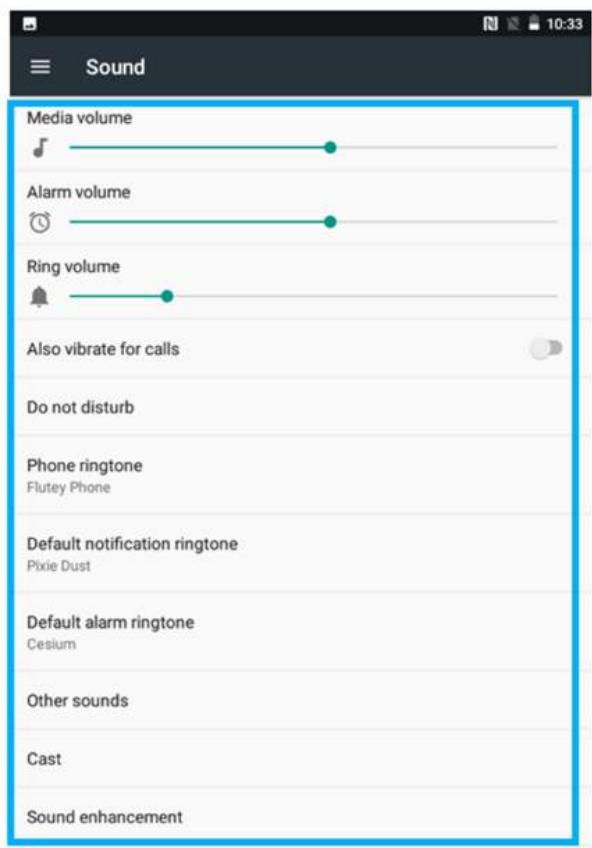
Use the sound settings to configure how and at what volume the HMI rings, vibrates, or alerts user in other ways when user receive a call, receive a notification or an alarm sounds.
2.7.1 Sound Settings
- Tap MENU and then tap Settings
- In the Device tab, tap Sound & Notification and then user can select General, Silent, Meeting or Outdoor profile.
2.7.2 Adjusting Volume
- Press the volume keys to change the ring volume (On Home screen) or earpiece volume (during a call).

- Press the volume key to set up Vibration mode.

2.8 Language and Keyboard Settings
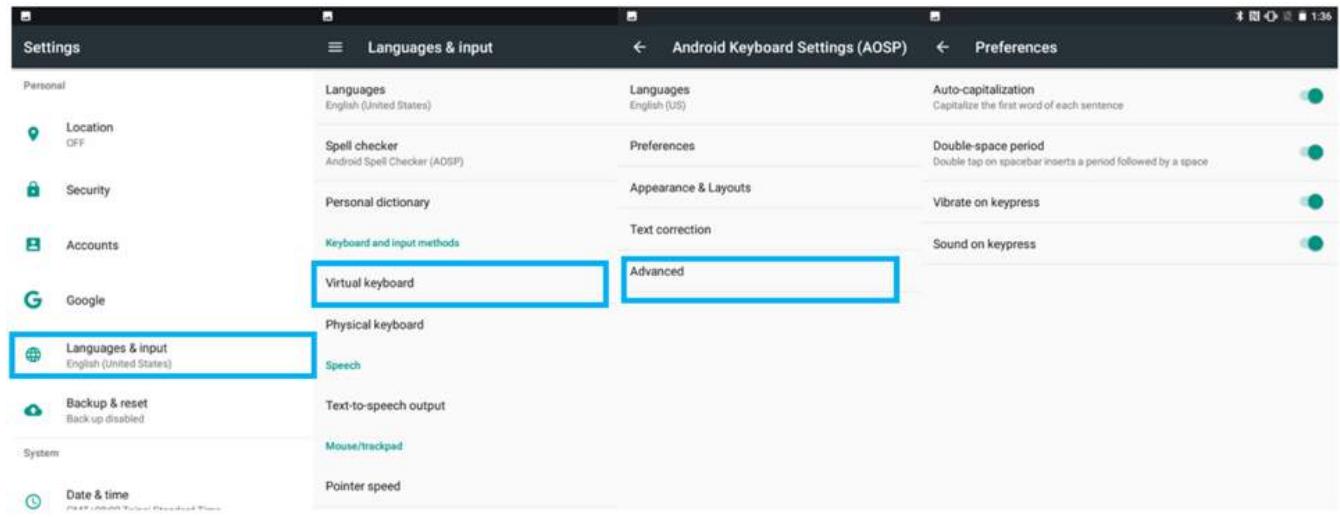
Use the Language & keyboard settings to select the language for the text on your HMI and for configuring On-Screen Keyboard, including words that you have added to its dictionary.
-
Tap MENU and then tap Settings
-
In the Personal tab, select Language & Input.
-
Language - to open the language screen, where user can select the language to use for the text on the device.
Spell Checker - to activate Android Spell Checker (AOSP) and check to correct misspelled words. - Personal dictionary- to open a personal dictionary.
- Keyboard & input methods
Virtual Keyboard - to apply the onscreen keyboard that is included with user's device. Default Android Keyboard (AOSP).
Physical Keyboard - allows the user to apply physical keyboard settings if connected.
- Appearance & layouts
○ Theme – to select the theme of layout.
- Custom input styles - user can select custom input style, such as QWERTY keyboard.
Enable split keyboard - toggle to activate split keyboard layout.
Text Correction
Personal dictionaries
Add-on dictionaries
○ Block offensive words – disable suggesting potentially offensive words
○ Auto-correction - spacebar and punctuation automatically correct mistyped words.
o Show correction suggestions – display suggested words while typing.
○ Personalized suggestions – learn from your communications and typed data to improve suggestions.
○ Suggest contact names - use names from Contacts for suggestions and corrections.
Next-word suggestion - use previous word in making suggestion.
Advanced
Keypress vibration duration
Keypress sound volume
Key long press delay
Emoji for physical keyboard
Show app icon
2.8.1 Changing the Keyboard Language
The current keyboard language is displayed on the Space key and user can switch languages.
- Tap and hold the space key
- Without lifting the finger, slide it to the left or right until the language you want to use appears in the center of the small window above the Space Key.
- Lift the finger to change the keyboard language.
2.9 About Phone
About Phone includes information about user's device.
- System Update — provides information regarding the local or online update of your devices.
- Status — opens the status screen with a list of information about battery, network, signal strength and other details.
- Legal Information — lists details about the model number, Android Version, Baseband version etc. this information is useful if user need to work with support team.
- Model number - displays the model name of the current device.
- Android version - displays the current Android operating system version the device running.
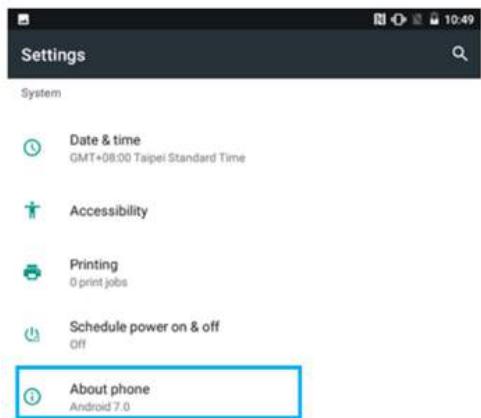
To access the information about the phone:
- Tap MENU
- Tap Settings
- Scroll down to System, and then tap About phone.
Chapter 3: Winmate Home Manager
Every M700DQ8T series HMI comes with preinstalled APP named Winmate® Home Manager (WHM). This application lets the device manager to lock the launcher. When the launcher is locked the user can only use one application assigned by the device manager.
3.1 How to Lock Applications
Step 1
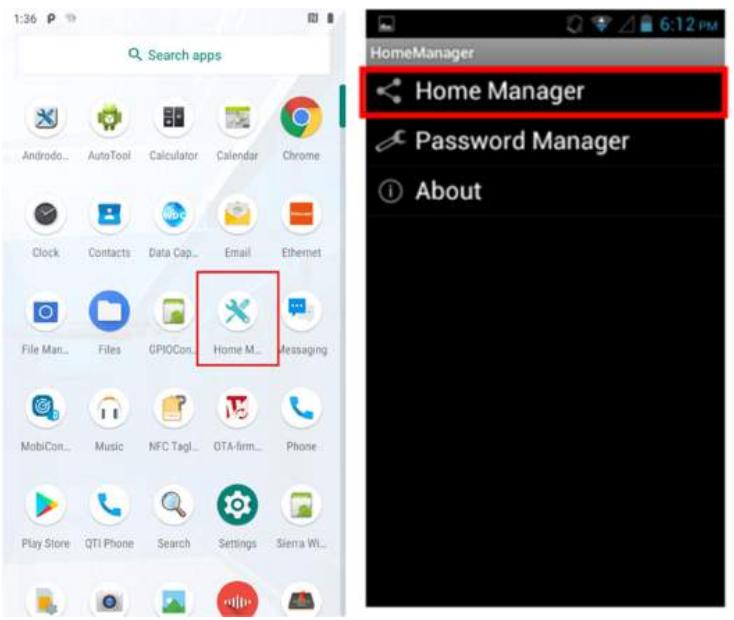
In the main APPS window, select the Home Manager APP and enable it.
Select Home Manager to start your settings.
Go to Password Manager and set your own password for this APP. The default password is "0000".
Step 2
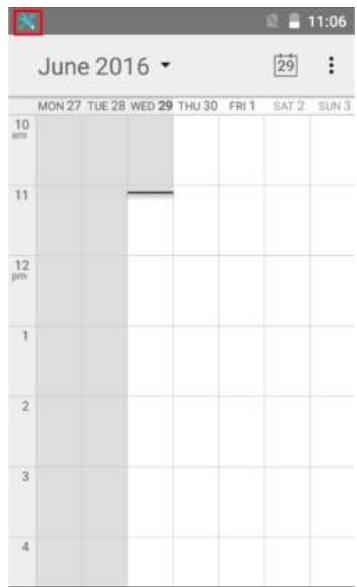
Go to "Application Selector" and choose an Application to be locked. Example: Select the Calendar AP.
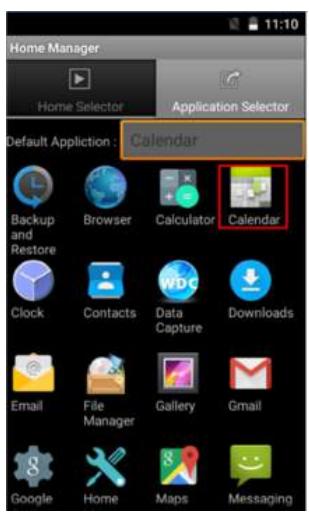
Step 3 Go back to "Home Selector" and press "Clear and Reset Default Home".
Step 4 Select "Restrict Home", and then restart the HMI.
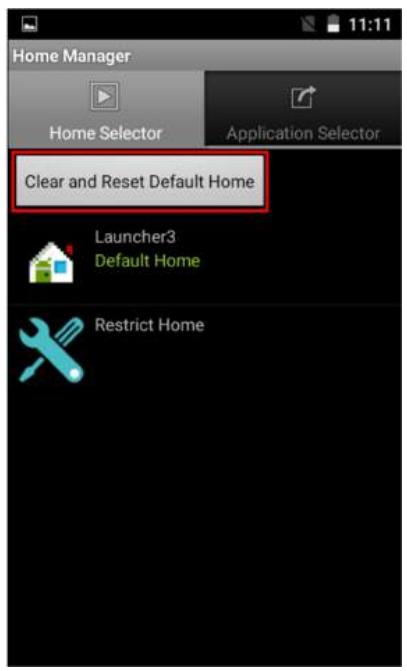
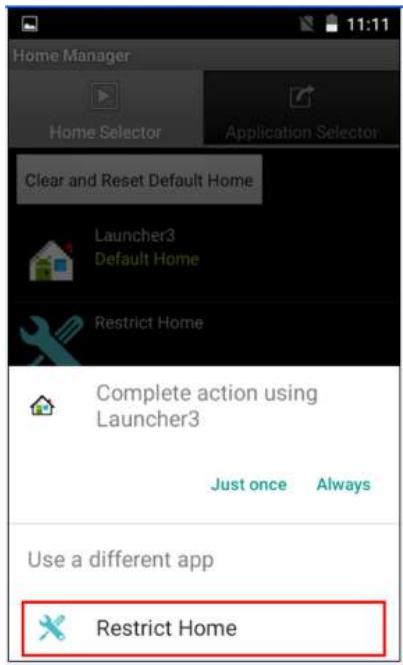
Step 5 System will ask to select "Just once" or "Always" to use this launcher, please select "Always".
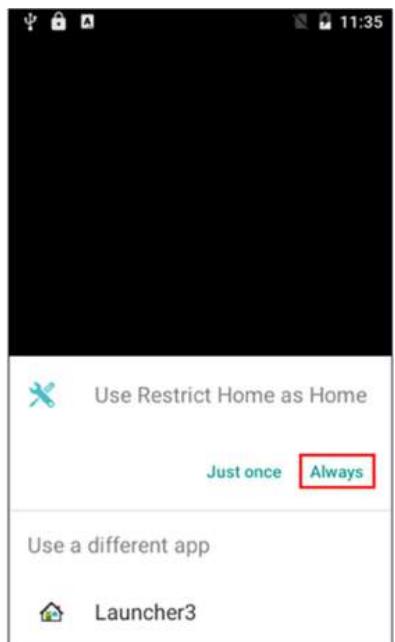
The system will automatically start the application which you selected and lock it.
Any time you press home key or back key, the system will go back to the same application which you have selected.
3.2 How to Unlock Applications
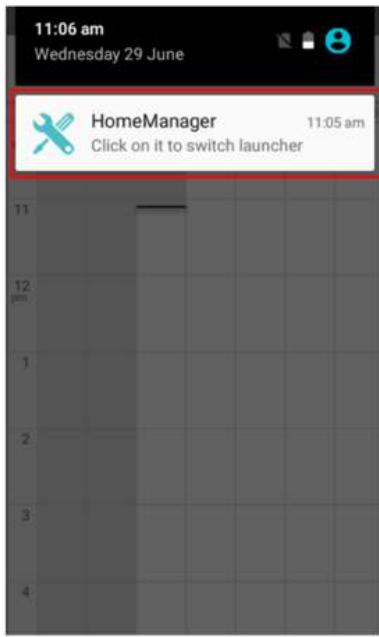
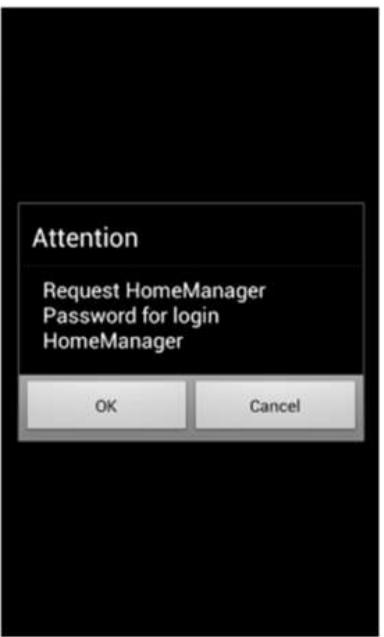
Step 1 Slide down the top bar and press "Home Manager" icon then you can find the menu and please enter the password to login (The default password is "0000").
Step 2 Go back to "Home Selector" and press "Clear and Reset Default Home".
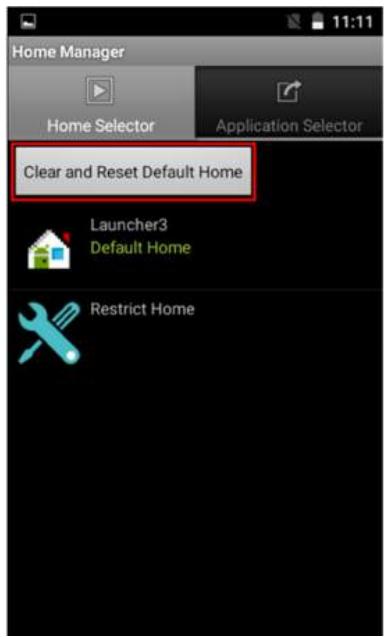
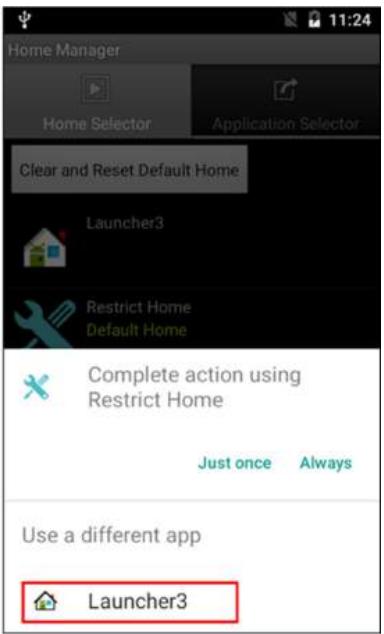
Step 3 Restart the system and you will go back to the normal Launcher.
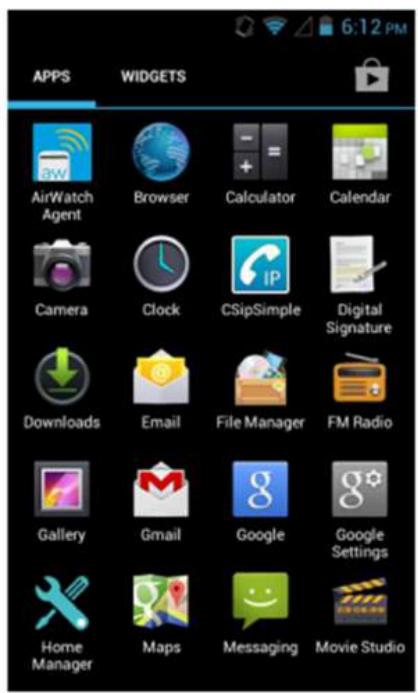
3.3 How to Change Password
Step 1 Go to Password Manager and set your own password for this APP.
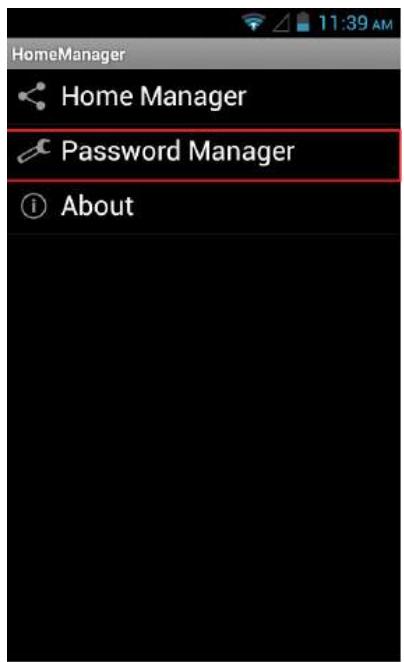
Step 2 The default password is "0000". Enter a new password in New Password field, and then tap Change Password.
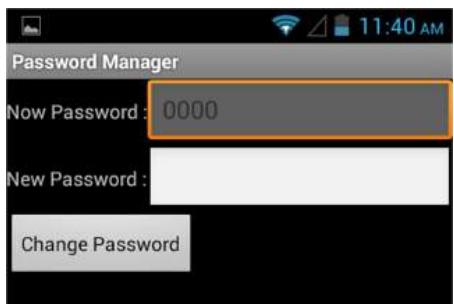
Chapter 4: Networks and Wireless Devices
This chapter explains how to connect the rugged HMI to network and peripheral devices.
4.1 Connecting to Mobile Networks
When users install a SIM card from service provider to the M700DQ8, the device is configured to use the provider's networks for voice calls and for transmitting data. Different locations may have different mobile networks available; user may need to configure M700DQ8T to use certain networks.

Note: To obtain faster networks, configure the device to 4G. To extend the life of battery, user can use 2G network.
4.1.1 Checking the Network Connection
- Tap and then tap System Settings
- Tap More in the Wireless & networks, and then tap Mobile networks.
- Tap 3G/4G Service to check the network connection.

Important: Do not change the parameters of the access point to prevent inability to access network sources.
4.1.2 Turning on Data Service
- Tap MENU and then tap Settings
- Tap More.in the Wireless & networks, and then tap Cellular networks.
- Tap Data connection.
- Select the desired network operator to enable the data connection.
4.2 Connecting to Computer via USB
User can connect their HMI to a computer with USB cable to transfer files between HMI and computer.

Important: When connecting your HMI to a computer and inserting its USB storage or SD card, user must follow the computer's instructions for connecting and disconnecting USB device, to avoid damaging or corrupting files. Notice that the M700DQ cannot be charged via USB.
4.2.1 USB Computer Connection
- Enter setting menu, and enter select "Accessibility", and then check "Connect to PC". When Connected to PC is selected:
| Check | Uncheck | |
| USB-C-OTG | V | X |
| USB-C-Host | V | V |
| External 4G (U-blox) (If equipped) | X | V |
| Docking (USB & LAN) | X | V |
- Connect HIM to the computer via USB connector.
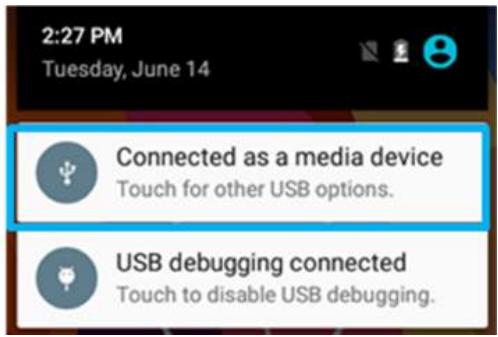
- In the notifications area USB connected sign will appear.
- Pull down the notification area to open notification panel.
-
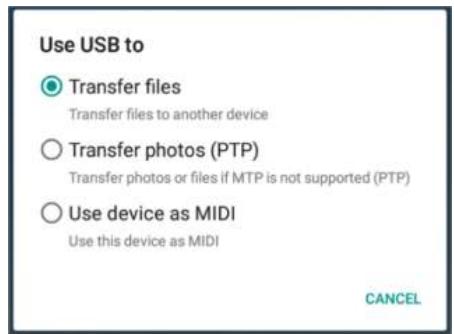
Tap this icon to choose the type of USB connection.
-
Transfer files -let user transfers files between computer and HMI.
- Transfer photos (PTP) - let users transfer photos or media files if MTP is not supported.
- Use device as MIDI - let users use device as MIDI
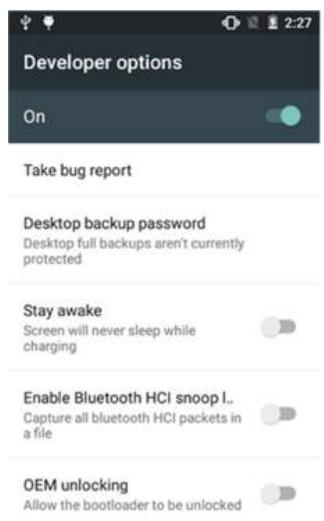
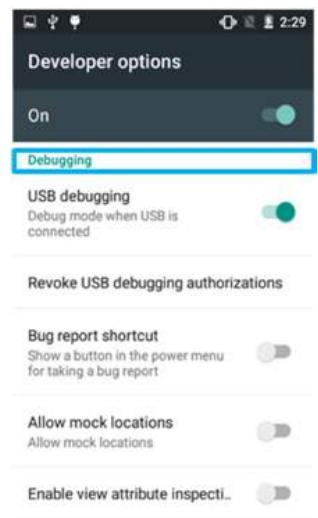
4.2.2 USB Debugging Settings
To permit debugging tools on a computer to communicate with User's HMI via USB Connection.
- Connect HMI to the computer via USB cable.
- In the notifications area USB debugging connect sign will appear.
- Pull down the screen to open notification panel.
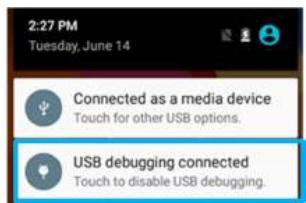
- Tap USB debugging connected.
- In the Developer options user can choose the action to perform.

Important: Carefully follow your computer's instructions to un-mount the USB storage or SD card. Disconnect USB device not properly can cause a loss of important data or information.
Chapter 5: Using Camera
This chapter explains how to use camera to capture photos and videos.
5.1 Capturing Photos or Video
Winmate® M700DQ8T is equipped with an 13MP Camera on the rear side and an 8 MP Camera on the front side, which user can use to capture photos or video.
5.1.1 Opening Camera
- Tap the launcher and then tap Camera
Camera opens in Portrait mode, ready to take a picture or shoot a video.

Important: Make sure the protective lens cover is clean before taking pictures. A lens cover with smudges from fingers can cause blurry pictures.
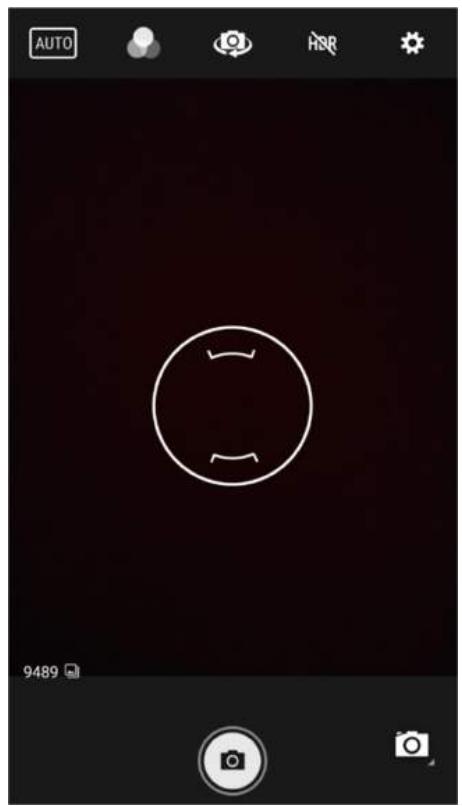
5.1.2 Taking Pictures
- Adjust the exposure, flash, and other necessary settings. Or leave it automatic.

- Tap the On Screen Shutter icon
- The camera brings the image into focus, when the image is in focus, the focus indicators in each corner will turn green and ready to capture.
- Tap to change camera settings.
5.1.3 Viewing pictures
- After taking a photo, a thumbnail of the picture is shown on the corner of the capture screen. Tap the thumbnail to view it.
- Tap the onscreen button:

to share a photo.

to edit the photo.

For more Camera options such as Delete, Edit, Rotate, Crop or photo details.
- Swipe right or left to view more photos.
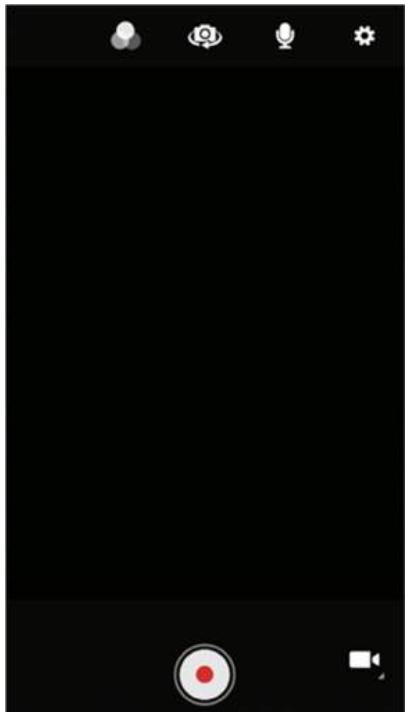
5.1.4 Shooting Videos

to start recording video.
- The countdown time remaining to shoot is located on the upper left; when the time left is less than a minute, the countdown turns red.
- Point the lens to record the scene where you want to start.
Tap the icon again to stop shooting.
The time remaining to shoot counts down at the left; when less than a minute is left, the countdown turns red.
5.2 The Gallery
- Swipe up to the launcher and then tap Snapdragon Gallery
- Tap a folder to view the pictures or video inside in full screen mode.
- Flick the pictures left or right to view the previous or next picture.
Chapter 6: Using Barcode Reader
This chapter explains how to use Barcode Reader and Android Winmate® Data Collection application.
6.1 Barcode Reader Location
2D Barcode Reader is an optional feature for Winmate® M700DQ8T and may not be present in your device. Barcode Reader is located on the top side of the HMI.
6.2 Android Winmate® Data Collection (WDC)
The M700DQ8T with Barcode Reader comes with pre-installed software made by Winmate® - Winmate Data Collection (WDC) that allows users to turn on the readers and set up the button to trigger the scan function.
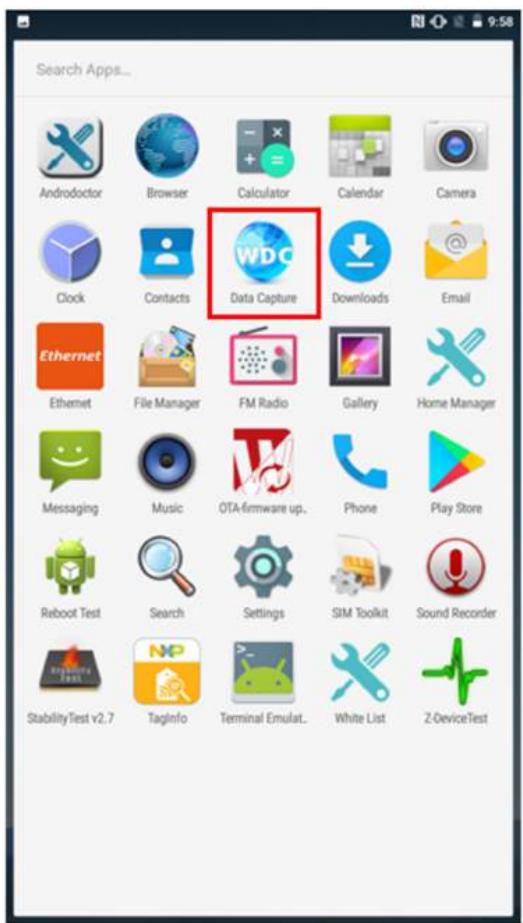
6.3 Where to Find WDC
- Tap application menu
- User can find the application Data Capture (WDC) on the menu screen, with the Globe mark
- User can change the settings of the Barcode Reader through WDC application.
6.4 How to Turn On/Off the Power of Barcode Reader
- Go to the WDC application.
- Tap Barcode Setting
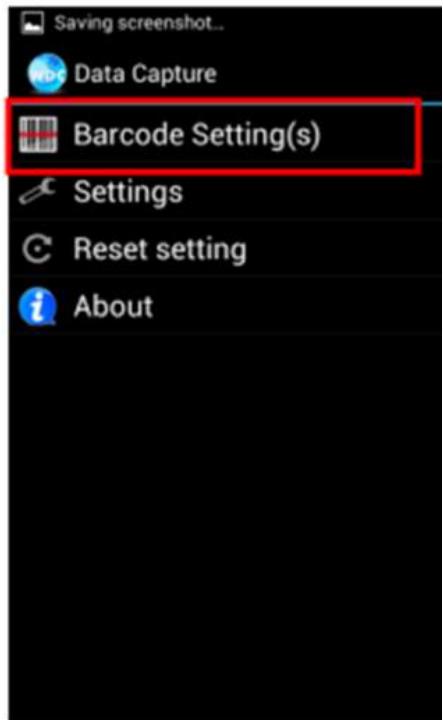
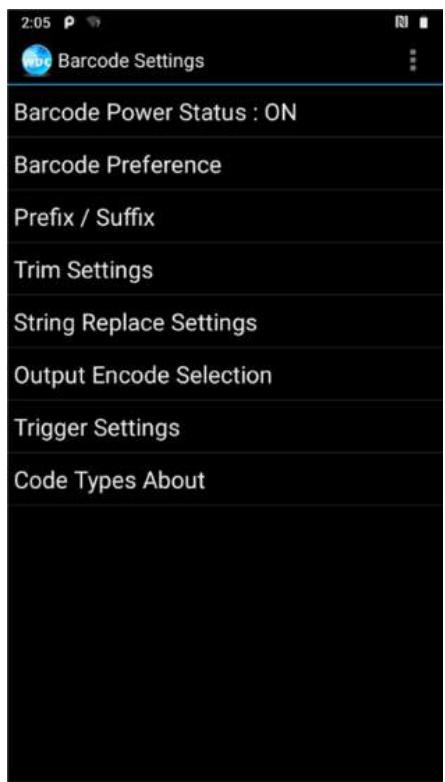
- Once the user entered the WDC application, the device will automatically turn on the Barcode Reader. And the user can turn off the Barcode Reader by tapping Barcode Power Status: ON.
6.5 How to Change the Symbologies of Barcode
- Go to the WDC application
- Tap Barcode Settings
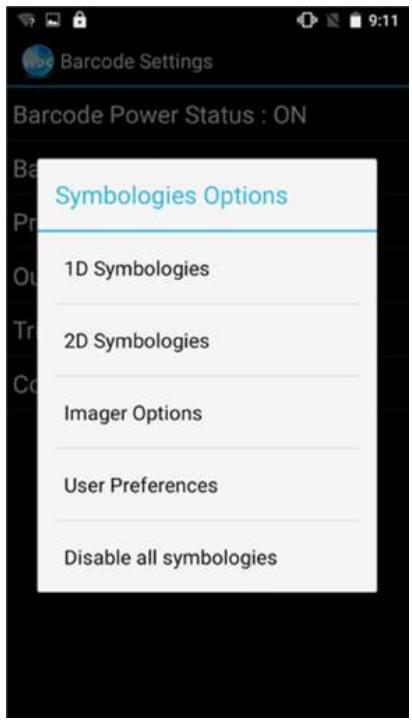
- Tap Barcode Preference.
- Users can change the symbologies of the barcode:
2D Symbologies
- Imager Options
- User Preference
- Disable all symbologies.
6.6 How to Add Command to the Barcode Output
- Go to the WDC application
- Tap Prefix / Suffix.
- Enter special characters at the beginning (prefix) or end (suffix) of the scanned barcodes.
- Tap Set to add into the data.

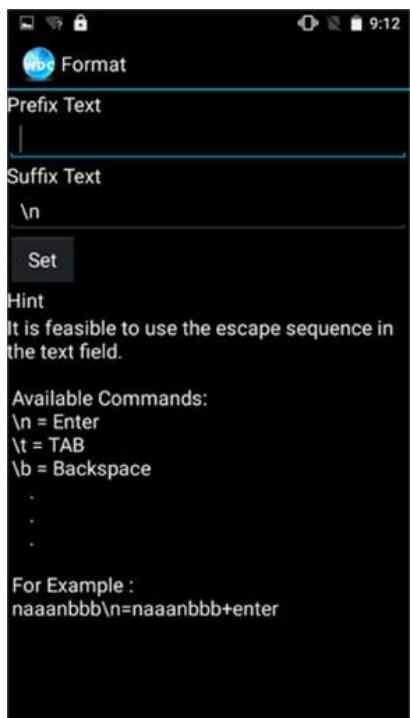
The output will show the command that you entered in the prefix or the suffix;
For example, if user enters "\n" in the prefix text, the output of the barcode reader will appear on the next line of the page. And if the user enters "\n" in the suffix, the output of the barcode reader will show the barcode and change to the start of the next line for the user. Same with the command "\t" and "\b".
6.7 How to Change the Scan Type of the Barcode Reader
- Go to the "WDC" application

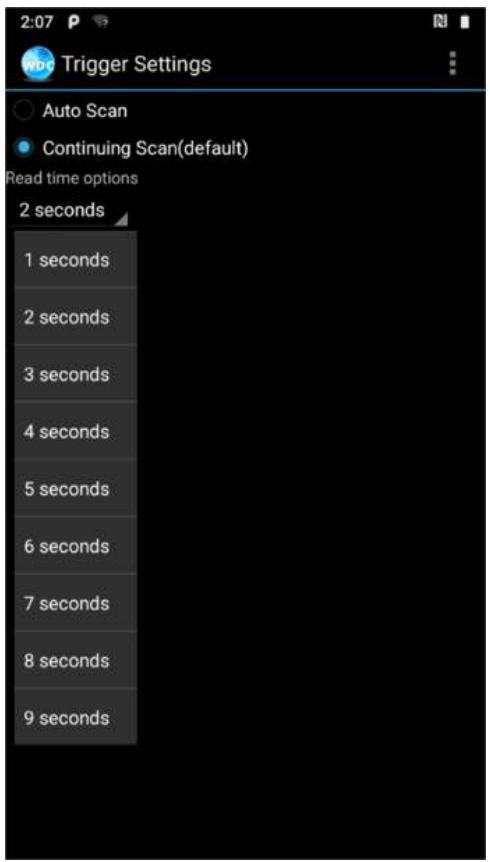
- Go to Barcode Settings , tap Trigger Settings.
- Select the Scan Type or select read time of the Barcode Reader.
To start scanning the barcode user has to leave the WDC application.
- Auto Scan - Barcode Reader starts auto-scanning once the user leaves the WDC application.
- Multiple Scan - After pressing the trigger button Barcode Reader starts continuously scanning and reading multiple codes within the time duration specified in Read time option.
- Auto Detect Scan - Barcode Reader keeps auto-scanning while the device is being moved.
- Continuing Scan or Single Scan (default) - After pressing the trigger button Barcode Reader can only read a single code within time duration selected in Read time option.
Note: The options showed will be different depending on the version of Barcode Reader or Android.
6.8 How to Change WDC Settings or Reset to Default
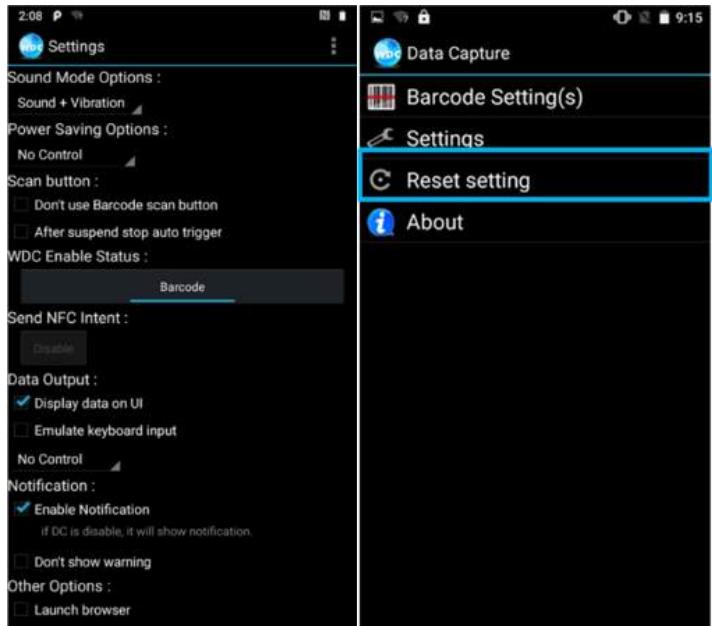
- Go to the WDC application

- Tap Settings.
- Users can select the options to change the setting of the application.
- Users can reset to the default setting by tapping Reset setting.
6.1.9 Scanning a Barcode
How to scan a barcode:
- Press the function button to trigger the barcode.
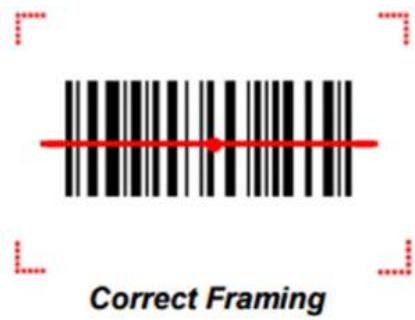
- Aim the barcode.
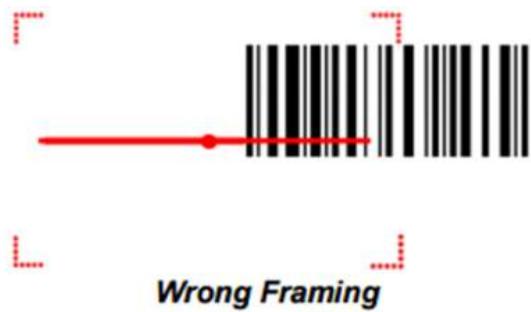
- Ensure the entire barcode is within the rectangular area formed by the brackets in the laser framing.
- Release the trigger.
6.10 Scanning Tips and Considerations
Distance
Scanning device will decode perfectly over a certain working range, there are minimum and maximum distance from the barcode. To specify the appropriate working range per barcode type is through a HMI as follows.
| Symbology | Density | Min Distance | Max Distance |
| Code 39 | 0.100 mm | 9.5 cm | 11.5 cm |
| 0.125 mm | 8.0 cm | 14.5 cm | |
| 0.500 mm | 6.5 cm | 50 cm | |
| 1.000 mm | 9.5 cm | 75 cm | |
| EAN / UPS 100% | 0.33 mm | 6 cm | 34 cm |
| DataMatrix | 0.18 mm | 7.5 cm | 16.5 cm |
| 0.25 mm | 6.0 cm | 23.0 cm | |
| 0.38 mm | 5.5 cm | 34.5 cm | |
| PDF417 | 0.25 mm | 5.5 cm | 26 cm |
| 0.38 mm | 6.5 cm | 37 cm |
Angle
Scanning angle is important for promoting quick decodes.
| Scanning Angle | Horizontal 34.4° | 34.4° |
| Vertical | 22.2° | |
| Framing Angle | Horizontal | 30° |
| Vertical | 20° |
Chapter 7: Accessories
The M700DQ8T accessories provide a variety of product support capabilities. Some of the accessories are optional and are not included to standard packaging list.
7.1 Standard Accessories List
Standard Accessory List M700DQ8T:
Universal USB Adapter*
Input: AC 100-240V
Output: 5V 3A
Part No. 9226015W05V1
- Battery
Part No. 98K007SP002P
USB Cable
USB-C to USB-A
*Universal USB Adapter socket varies by country and region. M700DQ8T will be shipped with the socket according to your order.
7.2 Optional Accessories List
Optional Accessory List M700DQ8T:
- Battery Charging Dock
Part No. 98TA00Z00003
- Vehicle Dock (Charging + Connectors)
Part No. 98TA07Z00004
- Vehicle Dock (Charging Only)
Part No. 98TA07Z00003
- Desk Dock
Part No. 98TA07Z00005
- Carry Bag
Part No. 9B00000000X
- Capacitive Touch Stylus
Part No. 9B000000001D
- Vehicle Adapter
Part No. 98TZ00ZZ0006
Appendix
Appendix includes additional product information, including technical specifications; order information, OS image and OTA update procedures.
Appendix A: Product Specifications
| Model Name | ||
| M700DQ8T | ||
| Display Specification | Size | 7" |
| Resolution | 1280 x 720 | |
| Brightness | 650 nits with direct optical bonding | |
| Touch | Projected capacitive multi-touch | |
| Contrast Ratio | 800:1 | |
| Viewing Angle | 80/80/80/80 | |
| System Specification | Processor | Qualcomm®Snapdragon™ 660, Octa-core up to 2.2 GHz |
| System Memory | 3 GB RAM | |
| Storage | 32 GB eMMC | |
| OS | Android 9.0 | |
| Wireless Communications | WLAN | No Support |
| BT | No Support | |
| GNSS | GPS/ GLONASS | |
| WWAN | Optional | |
| Interface | Audio | 1 x Audio Combo connector (Mic in or Line out)2 x Built-in Mic1 x Speaker1 x Receiver |
| Docking | 1 x Docking Connector | |
| USB Ports | 1 x USB Type-C | |
| Power Input | 1 x Power Jack | |
| Micro SD | 1 x Micro SD Card Slot | |
| SIM Card Slot | 1 x SIM Card Slot | |
| Keyboard and Input | Touch | Support Hand / Gloves and Rain Mode |
| Button | 1 x Volume +/-, 1 x Power Button,1 x Home Button, 1 x Menu Button,1 x Return Button, 1 x Trigger Button | |
| LED Indicators | 2 x LED indicator | |
| Data Capture | Camera | Rear: 13 MP Camera with LED auxiliary light (auto focus)Front: 8 MP Camera |
| Data Capture | NFC (Read / Write, Peer to Peer mode) (Optional)2D Barcode Reader (Optional) | |
| Security Function | Mobile DeviceMng. | SOTI MobiControl® compatible |
| Mechanical and Environment | Dimensions | 212.4 x 132.8 x 19 mm (8.36 x 5.23 x 0.75 inches) |
| Weight | 550 g | |
| Operating Temp. | -10°C ~ +50°C (Battery Mode) | |
| Storage Temp. | -30°C to 70°C | |
| IP Rating | IP65, water and dust proof | |
| Shock | MIL-STD-810G Method 516.6 Procedure I | |
| Vibration | MIL-STD-810G Method 514.6 Procedure I | |
| Drop | MIL-STD-810G Method 516.6, 5 ft | |
| Power Management | Power Rating | 5V |
| Battery | 3.7V 5300 mAh | |
| Adapter | 5V 3A Adapter | |
NOTE:
1. Total usable memory will be less dependent upon actual system configuration.
2. Measured at dimming LCD brightness. Varies depending on the usage conditions, or when an external device is attached.
- Accessories and Integrated Options may vary depending on your configuration. The product shown in this document is a standard model. For diagrams that contain customized or optional I/O, please contact the Winmate Sales Team for more information.
- All specifications are subject to change without prior notice.
Appendix B: Software Development Kit
Winmate® provides the following drivers and SDK for M700DQ8. Download SDK from Winmate Download Center at https://www.winmate.com > Support > Download Center
| Item | File Type | Description |
| 1 | General SDK (WDC) | Development kit for WDC, including Barcode Reader |
Appendix C: OS Image Update
Winmate provide OS Image update tool. Please contact our sales representative to receive the latest OS image available for your device.
Appendix D: OTA Online Update
You can use online OTA Update tool to update firmware version.

Important Battery capacity must not be lower than 30% during update.
To update OTA:
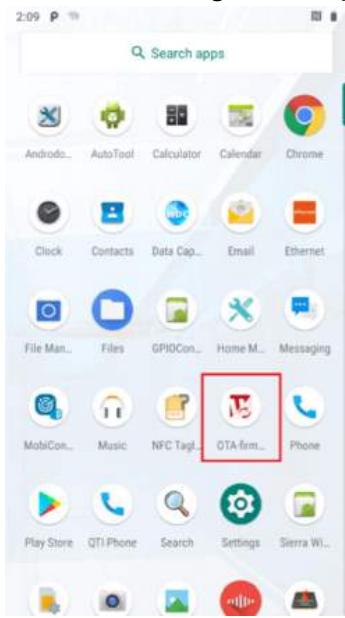
- Select OTA-firmware.
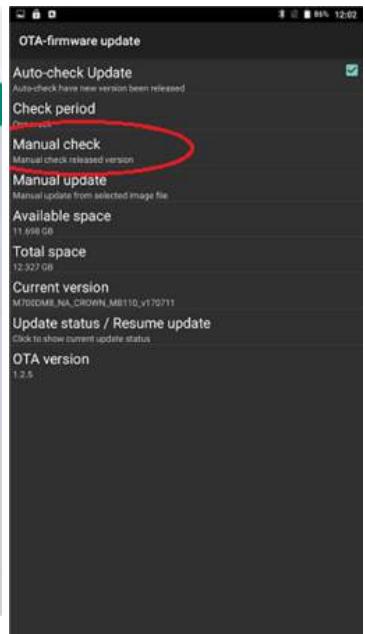
- Select Manual check.
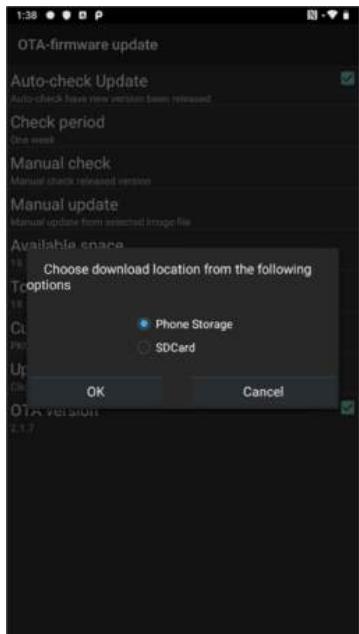
- Choose file storage location.
- Check "I agree to update" and click "UPDATE".

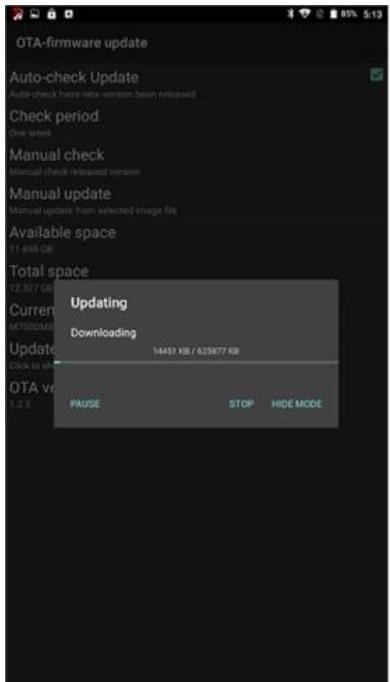
- Wait for download finish it will take some time.
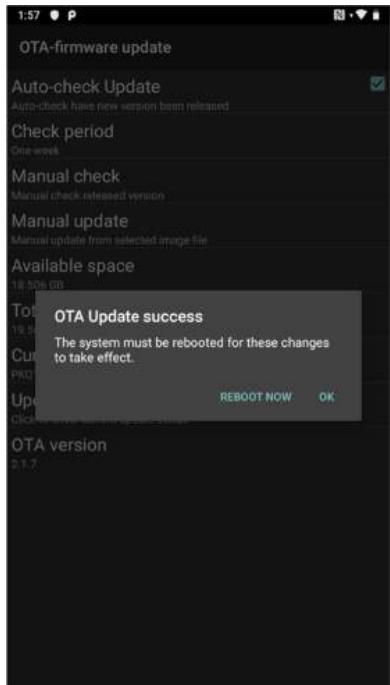
- Click "REBOOT NOW".
- Wait while Ota is updating.