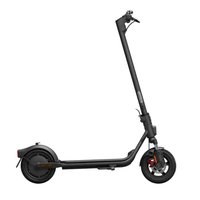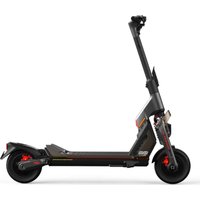
ST - Electric scooter SEGWAY - Free user manual and instructions
Find the device manual for free ST SEGWAY in PDF.



User questions about ST SEGWAY
0 question about this device. Answer the ones you know or ask your own.
Ask a new question about this device
Download the instructions for your Electric scooter in PDF format for free! Find your manual ST - SEGWAY and take your electronic device back in hand. On this page are published all the documents necessary for the use of your device. ST by SEGWAY.
USER MANUAL ST SEGWAY
1 Diagram and Functions_01
2 Specifications_07
3 Common Failures and Solutions_09
4 Certifications_11
5 Trademark_12
FR_13~24
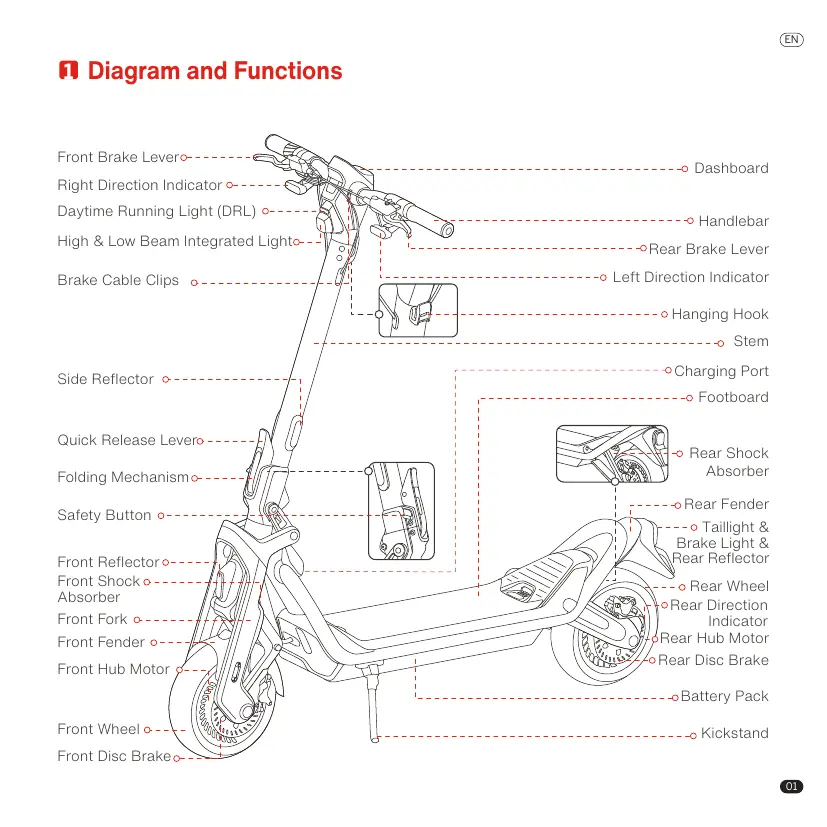
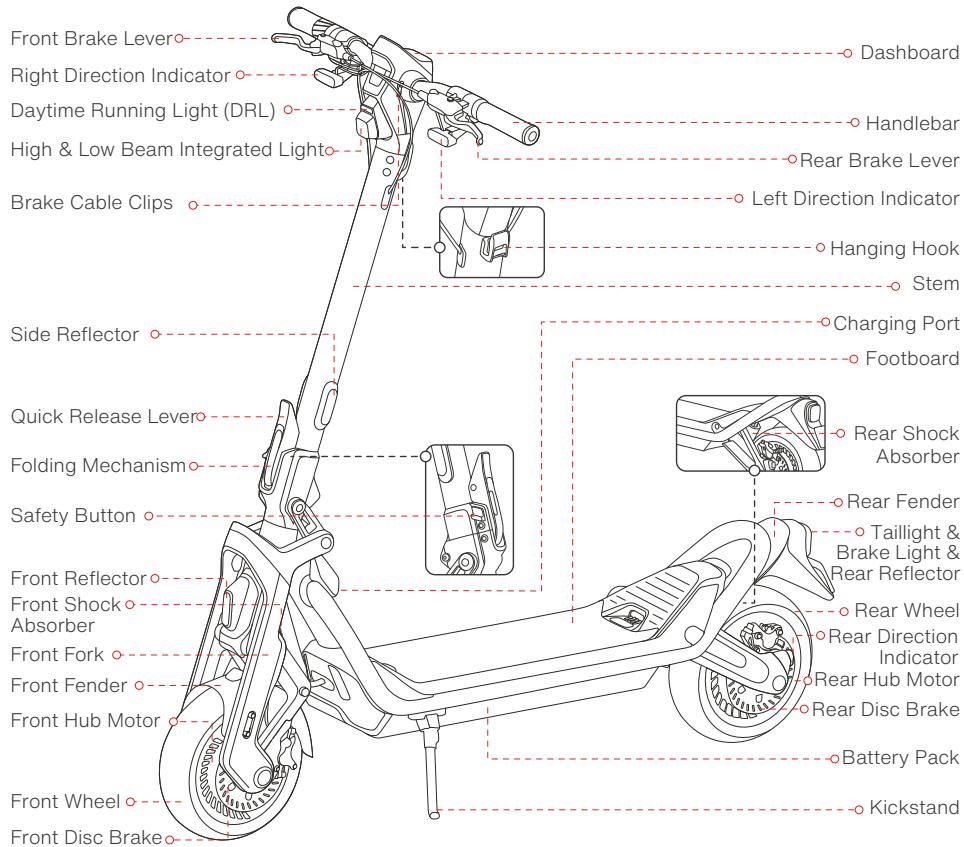
Diagram and Functions
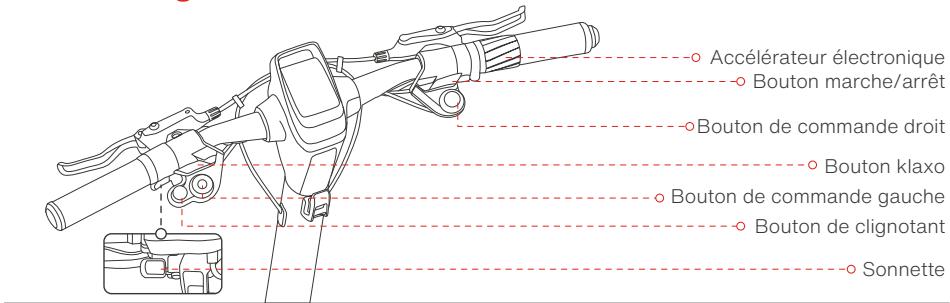
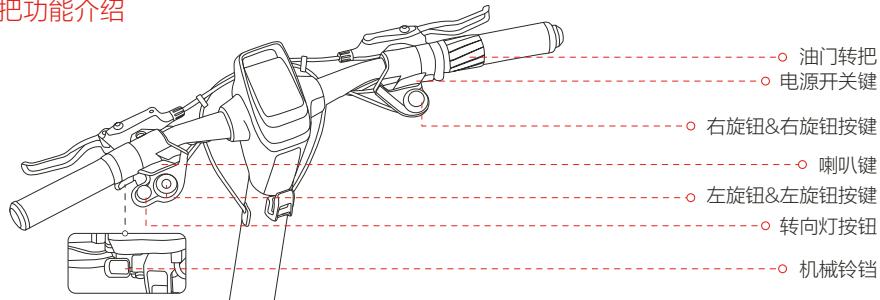
Handlebar Functions
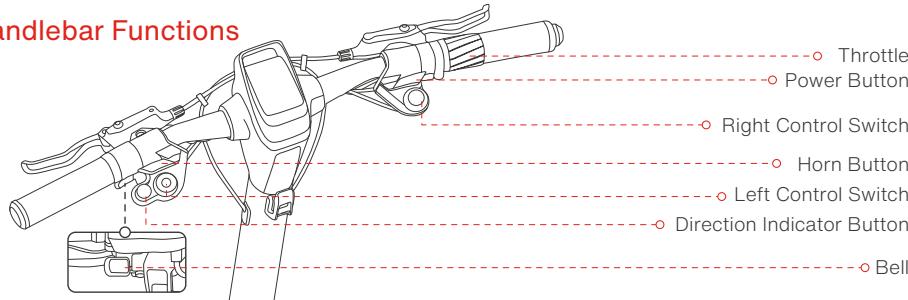
| Name | Function | Operation method |
| Power Button | Power on/off | Press the Power Button to power on the scooter. Press and hold to power it off. Note: Only available when the scooter is unlocked. |
| Wake up the dashboard | Press the Power Button to wake up the dashboard when the dashboard automatically dims. | |
| Back to the previous speed mode | When the scooter automatically enters Park Mode, press the Power Button to go back to the previous speed mode. | |
| Confirm Bluetooth password | While connecting to the scooter via the Segway-Ninebot App, press the Power Button to confirm Bluetooth password. | |
| Left Control Switch | Light mode switching | Rotate clockwise to switch light modes, successively Low Beam Mode, High Beam Mode, Auto Headlight Mode and OFF. Rotate counterclockwise to go back to the previous light mode. |
| Enable/Disable Cruise Mode | Press the Left Control Switch to enable Cruise Mode, and the scooter will cruise at a constant speed. Press again to disable it. | |
| Switch between 1WD and 2WD | When the scooter is at a complete stop, press and hold the Left Control Switch to switch between 1WD and 2WD. | |
| Right Control Switch | Mode switching | Rotate clockwise/counterclockwise to switch between speed modes. |
| Activate BOOST Mode | 1) Press the Right Control Switch to enable BOOST Mode. * In Race Mode only. 2) Press again or switch the speed mode to disable it. | |
| Switch to Walk Mode | When the scooter is at a complete stop, press and hold the Right Control Switch to switch to Walk Mode. At this point, press and hold the Right Control Switch again to go back to the previous speed mode. | |
| Throttle | Speed up | Twist the throttle to speed up. |
| Direction Indicator Button | Turn on/off the left/right direction indicator | Press button to light up left/right signal, then the signal flashes, and press the button again to turn it off. |
| Use emergency flashers | Double press the left or right turn signal button to use emergency flashers. | |
| Horn Button | Use horn | Press and hold the horn button, and the horn will blare out constantly. |
| Bell | Use bell | Press the button to use bell. |
ST2 Pro
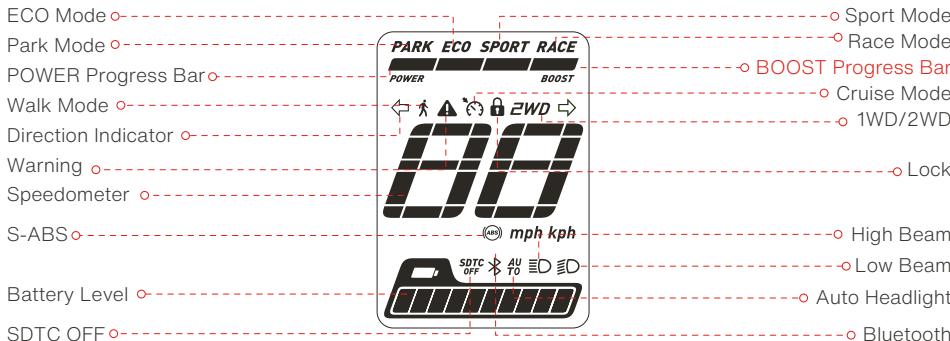
| Name | Symbol | Meaning | Description | |
| Speedometer | BB | The symbol displays the current speed of the scooter, and displays battery level when charging. | ||
| Headlight Modes | Low Beam Mode | ID | Low Beam Mode is on. | |
| High Beam Mode | ID | High Beam Mode is on. | ||
| Auto Headlight Mode | AUTO | SuperScooter is in Auto Headlight Mode. Speed ≤ 24.9 mph(40 km/h): Headlight enters Low Beam Mode; Speed > 24.9 mph(40 km/h): Headlight enters High Beam Mode; (Enable / disable via Segway-Ninebot App). | ||
| Cruise Mode | C | The symbol indicates that Cruise Mode is enabled | 1) In ECO, Sport or Race mode, press the Left Control Switch to turn on Cruise Mode when the speed ≥ 3.1 mph (5 km/h). Once turned on, the scooter will cruise at the current speed. 2) Turn off Cruise Mode with the following methods: Method 1: Twist the throttle or squeeze brake levers. Method 2: Press the Left Control Switch. Method 3: Switch the speed mode. DO NOT turn on Cruise Mode in complex environments, bad weather or undesirable road conditions. Serious danger or injury may occur. | |
| Lock | @ | When the symbol 8 lights up, it means the scooter is locked. | When the scooter is locked via the Segway-Ninebot app:1) The dashboard will go dark in 5 seconds, at this point, press the Power Button to wake up the dashboard.2) The scooter will sound the alarm with flashing lights when it is moved for 3 seconds.3) The scooter will keep beeping when it is moved for 10 seconds, and if the scooter is moved again within 60 seconds, the beep will not stop.4) When the scooter is unlocked, it will automatically power off if there is no operation within 10 minutes.Methods of locking:1. Lock SuperScooter on the homepage of Segway-Ninebot App.2. Turn on locking function, enable CodeLock and set passcode in Segway-Ninebot App, then the SuperScooter will automatically be locked when powered off.Methods of unlocking:1. Unlock SuperScooter on the homepage of Segway-Ninebot App.2. Press power button and enter unlocking passcode. The number entered increases by pressing left direction indicator switch and decreases by pressing the right one. Press left control switch for confirming each passcode entered.Note: Enabling locking function via Segway-Ninebot App, and then set your unlocking passcode, or your SuperScooter can not be unlocked by passcode. | |
| 1WD/2WD | 1WD | EWD | If the icon is not lit, that means SuperScooter is driven by one wheel. | |
| 2WD | The symbol 2WD indicates that the scooter is in the two-wheel drive mode. | |||
| Direction Indicator | Left Direction Indicator | ← | Left Direction Indicator is on. | |
| Right Direction Indicator | → | Right Direction Indicator is on. | ||
| POWER Progress Bar | POWER | The symbol displays the motor output power of the scooter. | ||
| Speed Modes | Walk Mode | A | Vehicle is in Walk Mode. | |
| Park Mode | PARK | Vehicle is in Park Mode. | ||
| ECO Mode | ECO | Vehicle is in ECO Mode. | ||
| Sport Mode | SPORT | Vehicle is in Sport Mode. | ||
| Race Mode | RACE | Vehicle is in Race Mode. | ||
| Bluetooth | B | The symbol indicates that the scooter is connected to the Segway-Ninebot App. | ||
| Warning | ▲ | The symbol indicates that the scooter has detected an error. The error code will display on the dashboard. See Part 3 for possible causes and solutions. | ||
| Name | Symbol | Meaning | Description |
| Battery Level | A | The symbol displays the remaining battery level. | |
| SDTC OFF | SDTCOFF | The symbol indicates that the SDTC (Segway Dynamic Traction Control) feature is off. | 1) With two-wheel drive, SDTC feature is auto-on in non-Race modes. Note: This feature helps prevent wheel slippage and maintain stability when accelerating. 2) With one-wheel drive, SDTC feature is auto-off in Race mode. |
| BOOST Progress Bar | BOOST | The symbol displays the BOOST energy accumulation status. | 1) Press the Right Control Switch to activate the BOOST Mode. (In Race Mode only) 2) In BOOST Mode, vehicle can accelerate faster by twisting the throttle. 3) In BOOST Mode, the BOOST progress bar will decrease until it goes out, then BOOST will be disabled. When the BOOST Mode is activated, the scooter will accelerate faster. DO NOT apply this feature in complex environments, bad weather or undesirable road conditions. Serious danger or injury may occur. |
| S-ABS (Segway powered antilock brake system) | (ABS) | Flashing of this symbol means the S-ABS has engaged in. (Enable / disable via Segway-Ninebot App). | |
Speed Modes Introduction
| Mode/model | ST2 Pro | Switching methods |
| ( WALK ) | 4 mph (6 km/h) | 1) When the scooter is at a complete stop, rotate the Right Control Switch. 2) Hold and press the Right Control Switch. Note: In this mode, twist the throttle slightly to walk with the scooter at a low speed. |
| PARK | 0 mph (0 km/h) | 1) Rotate the Right Control Switch. 2) Park or stop for more than 5 seconds after riding. 3) After switching from Park Mode to another mode, vehicle will automatically enter Park Mode again after standing still for 20 seconds. * At this point, press the Power Button to go back to the previous mode. (Except the case of directly entering Park Mode upon powering on) |
| ECO | 24.9 mph (40 km/h) | Rotate the Right Control Switch. (Mode speed can be customized via Segway-Ninebot App) |
| SPORT | 50 mph (80 km/h) | Rotate the Right Control Switch. (Mode speed can be customized via Segway-Ninebot App) |
| RACE | 50 mph (80 km/h) | Rotate the Right Control Switch. (Mode speed can be customized via Segway-Ninebot App) |
Damper Adjustment
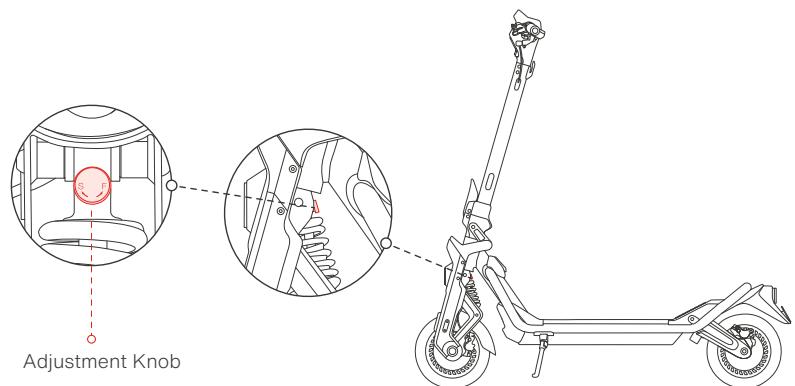
S (Slow rebound): Increase rebound resistance by rotating the Adjustment Knob clockwise.
F (Fast rebound): Decrease rebound resistance by rotating the Adjustment Knob counterclockwise.
Note: The damper is set to the default position before leaving the factory. Please follow the steps above to adjust it according to your riding habits.
Specifications
| Items | Parameter | |
| Product | Name | Segway SuperScooter ST2 Pro |
| Model | 060205PE | |
| Vehicle: L x W x H | Approx. 53.7 x 26.8 x 53.1 in (1365 x 680 x 1350 mm) | |
| Folded: L x W x H | Approx. 53.7 x 26.8 x 27.4 in (1365 x 680 x 696 mm) | |
| Net Weight | Approx. 100 lbs (45.2 kg) | |
| Rider | Max. Payload | 330 lbs (150 kg) |
| Recommended Age | 16+ years old | |
| Required Height | 3.9-6.6 ft (120-200cm) | |
| Machine | Wheelbase | 41.4 in (1045 mm) |
| Ground Clearance | 5.9 in (150 mm) | |
| Drive System | 2WD (Two-wheel drive) | |
| Max. Speed [1] | Approx. 49.7 mph (80 km/h) | |
| Range at 15.5 mph (25 km/h) [2] | Approx. 46.6 miles (75 km) | |
| Typical Range [3] | Approx. 31.1 miles (50 km) | |
| Max. Slope | Approx. 30% | |
| Traversable Terrain | Asphalt/flat pavement; obstacles < 1.2 in (3 cm); gaps < 1.2 in (3 cm) | |
| Operating Temperature | 14 °F-104 °F (-10°C-40°C) | |
| Storage Temperature | -4 °F-122 °F(-20°C-50°C) | |
| IP Rating | IPX5 | |
| Duration of Charging | Approx. 5 h | |
| Battery | Model | NDBF7220A |
| Nominal | 72V | |
| Max. Charge Voltage | 84V | |
| Rated Energy | 1382.4 Wh | |
| Rated Capacity | 19.2 Ah | |
| Normal Charging Temperature | 32 °F-104 °F (0°C-40°C) | |
| Battery Management System | Over-heating, short circuit, over-current, over-discharge and over-charge protection | |
| Wheel Motor | Motor Type | Air cooled hub motor |
| Rated Power | 1500 W*2 | |
| Max. Power | 3500W*2 | |
| Battery Charger | Charger Model | NBW84D004D0D |
| Input | 100-240V~50-60Hz | |
| Max. Output Voltage (VDC) | 84V — | |
| Rated Output | 83V =— 4A | |
| Output Power | 332 W | |
| Tire | Type | 10.5-inch Self-sealing tubeless tires |
| Tire Pressure | 29-35psi | |
| Material | Rubber | |
| Others | Speed Modes | Park Mode, ECO mode, Sport Mode and Race Mode, Walk Mode |
| Suspension System | Front and rear spring suspension | |
| Front and rear adjustable damper | ||
| Brake System | Front: Disc brake + Electronic brake | |
| Rear: Disc brake + Electronic brake |
[1] Warning: it is your legal duty to comply with your local traffic law and regulations when using this product. In the United States, in certain States, an electric kickscocoter is not allowed to be used on public road (i.e., "on-road"), if its maximum speed capacity, weight and/or other features do not comply with the mandatory requirements imposed by law. With respect to maximum speed capacity restriction, certain States require that an electric kickscocters' maximum speed capacity shall be capped at / limited to a specific miles per hour if it is for on-road use, and the cap / limit varies in different States. By way of examples, the States that impose such maximum speed capacity restriction include New York, Florida, Arizona, New Jersey etc. In the event you intend to use this product on-road in a State that imposes such maximum speed capacity restriction, you MUST select a proper lower speed mode of this Product to assure that the product's maximum speed capacity under such speed mode complies with the law. In the event the maximum speed capacity of the lowest speed mode of this product nevertheless exceeds the maximum speed capacity restriction imposed by a State for on-road use, you shall not use this product on-road in that State. Furthermore, a State may have other law regulating on-road use of this product, such as maximum speed requirement and/or helmet requirement. In addition to State law, there may be further restrictions or prohibition on use of electric kickscocters by local law and/or regulations. For off-road use of this product, there may be other restrictions and/or limitations imposed by the property owner or others. The App of the product may provide additional useful information related to this matter.
Disclaimer: this is not a legal opinion or legal advice. The information provided herein (including in the App) is for your convenience and information purpose only. It is not intended to cover every piece of law and/or regulation that may be applicable to this product. Segway and Ninebot explicitly hereby disclaim any and all warranty and/or representation, express or implied, related to completeness, accuracy, up-to-date of such information. Segway and/or Ninebot reserves the right but not obligation to correct, implement and/or update the information. You shall use the information at your own risk. It is your sole responsibility to learn and understand any and all the law and/or regulation, requirements, prohibition, restriction and/or limitation imposed by either law, government authority, court, private party or the others that may apply to your use of this product.
[2] Range at 15.5 mph (25 km/h): Tested while riding with a full battery, 165 lbs (75 kg) load, 77^ (25°C), at the speed of 15.5 mph (25 km/h) on average on pavement.
[3] Typical Range: Tested while riding with a full battery, 165 lbs (75 kg) load, 77^ (25^) , at the speed of 24.9 mph (40 km/h) on average on pavement.
3 Common Failures and Solutions
| Problem code | Type | Possible causes | Solution |
| 0 | Error | Throttle abnormality | Please contact after-sales service or an authorized dealer. |
| 1 | Error | Dashboard communication failure | |
| 2 | Error | Battery communication failure | |
| 6 | Error | Over-voltage protection of motor controller | |
| 7 | Error | Under-voltage protection of battery/motor controller | Please try to charge the scooter. |
| 9 | Warning | High battery temperature | Please try to apply heat dissipation for the scooter. |
| 10 | Warning | Low battery temperature | Please ride the scooter within the operating temperature range mentioned in the product manual. |
| 12 | Warning | Front-drive-wheel stall | Please restart the scooter and try again. |
| 13 | Error | Front-drive-wheel current sensor error | Please contact after-sales service or an authorized dealer. |
| 14 | Error | Front-drive-wheel over-current | Please restart the scooter and try again. |
| 15 | Error | Front-drive-wheel motor phase failure | Please contact after-sales service or an authorized dealer. |
| 17 | Warning | Rear-drive-wheel stall | Please restart the scooter and try again. |
| 18 | Error | Rear-drive-wheel current sensor error | Please contact after-sales service or an authorized dealer. |
| 19 | Error | Rear-drive-wheel over-current | Please restart the scooter and try again. |
| 20 | Error | Rear-drive-wheel motor phase failure | Please contact after-sales service or an authorized dealer. |
| 21 | Warning | Rear motor hall sensor error | |
| 22 | Warning | Front motor hall sensor error | |
| 24 | Error | Watchdog reset error | Please restart the scooter and try again. |
| 28 | Warning | Rear hub motor temperature sensor error | Please contact after-sales service or an authorized dealer. |
| 29 | Warning | Front hub motor temperature sensor error | |
| 31 | Warning | Rear hub motor controller MOS temperature sensor error | |
| 32 | Warning | Front hub motor controller MOS temperature sensor error | |
| 40 | Warning | Master controller SN error | Please contact after-sales service or an authorized dealer. |
| 42 | Warning | Battery type error | |
| 43 | Warning | Charging overcurrent protection | Please restart the scooter and try again. |
| 44 | Warning | Discharge overcurrent protection | |
| 45 | Warning | Charging over temperature protection | Please charge within the charging temperature range mentioned in the product manual. |
| 46 | Warning | Charging low temperature protection | |
| 47 | Error | Discharging MOS short circuit | Please contact after-sales service or an authorized dealer. |
| 48 | Error | Charging MOS short circuit | Please contact after-sales service or an authorized dealer. |
| 49 | Warning | High temperature of charging MOS between charging port positive pole and battery cell positive pole. | Please try to apply heat dissipation for the scooter. |
| 50 | Warning | High temperature of charging MOS between charging port negative pole and battery cell negative pole. | |
| 51 | Warning | Left electronic brake error | Please restart the scooter and try again. |
| 52 | Warning | Right electronic brake error | |
| 53 | Warning | Locking function error | Please contact after-sales service or an authorized dealer. |
Error: In the case of "Error" code, that means there is something wrong with some certain parts of your vehicle, please contact after-sales service and check whether your vehicle needs a repair.
Warning: In the case of "Warning" code, the vehicle still can be ridden, but it is recommended to handle the problem in accordance with the corresponding solution timely.
4 Certifications
This product is certified to ANSI/CAN/UL-2272.
The battery complies with UN/DOT 38.3.
The battery complies with ANSI/CAN/UL-2271.
Federal Communications Commission (FCC) Compliance Statement for USA
This device complies with part 15 of the FCC rules. Operation is subject to the following two conditions: (1) This device may not cause harmful interference, and (2) this device must accept any interference received, including interference that may cause undesired operation.
Any Changes or modifications not expressly approved by the party responsible for compliance could void the user's authority to operate the equipment.
NOTE
This equipment has been tested and found to comply with the limits for a Class B digital device, pursuant to part 15 of the FCC Rules. These limits are designed to provide reasonable protection against harmful interference in a residential installation. This equipment generates, uses and can radiate radio frequency energy and, if not installed and used in accordance with the instructions, may cause harmful interference to radio communications. However, there is no guarantee that interference will not occur in a particular installation. If this equipment does cause harmful interference to radio or television reception, which can be determined by turning the equipment off and on, the user is encouraged to try to correct the interference by one or more of the following measures:
—Reorient or relocate the receiving antenna.
—Increase the separation between the equipment and receiver.
-Connect the equipment into an outlet on a circuit different from that to which the receiver is connected.
-Consult the dealer or an experienced radio/TV technician for help.
This equipment complies with FCC radiation exposure limits set forth for an uncontrolled environment.
Industry Canada (IC) Compliance Statement for Canada
This device complies with Industry Canada license-exempt RSS standard (s). Operation is subject to the following two conditions: (1) this device may not cause interference, and (2) this device must accept any interference, including interference that may cause undesired operation of the device.
CANICES-3 (B)/NMB-3(B)
Neither Segway Inc. nor Ninebot is responsible for any changes or modifications not expressly approved by Segway Inc. or Ninebot. Such modifications could void the user's authority to operate the equipment.
Model: 060205PE
FCC ID: ****
C:*
5 Trademark
Segway, Segway ST, Powered by Segway and Rider Design are trademarks of Segway Inc. Apple, Apple Find My, Apple Watch, Find My, iPhone, iPad, iPadOS, Mac, macOS and watchOS are registered trademarks of Apple Inc. Android is trademark of Google LLC. IOS is trademark or registered trademark of Cisco in USA and in other countries. The Bluetooth® word mark and logos are registered trademarks owned by Bluetooth SIG, Inc. and any use of such marks by Segway-Ninebot is under license. Other trademarks and trade names are those of their respective owners.
We have attempted to include description and instructions for all the functions at the time of printing. However, due to constant improvement of product features and the changes of design, etc., there may differ slightly from the products you purchased. Please download the APP for Android or iOS system and read the latest electronic version of the manual. In addition to Segway SuperScooter ST, there are multiple series and models with different functions of Segway-Ninebot's products and some of the functions mentioned herein may not be applicable to your other Segway-Ninebot's products. Due to the constant updates of products, this manual and the actual products may be slightly different in color, appearance, etc. Actual product shall prevail when there is a discrepancy between the actual product and the manual.
©2023 Ninebot (Beijing) Technology Co., Ltd. All rights reserved.
Scheme et fonctions
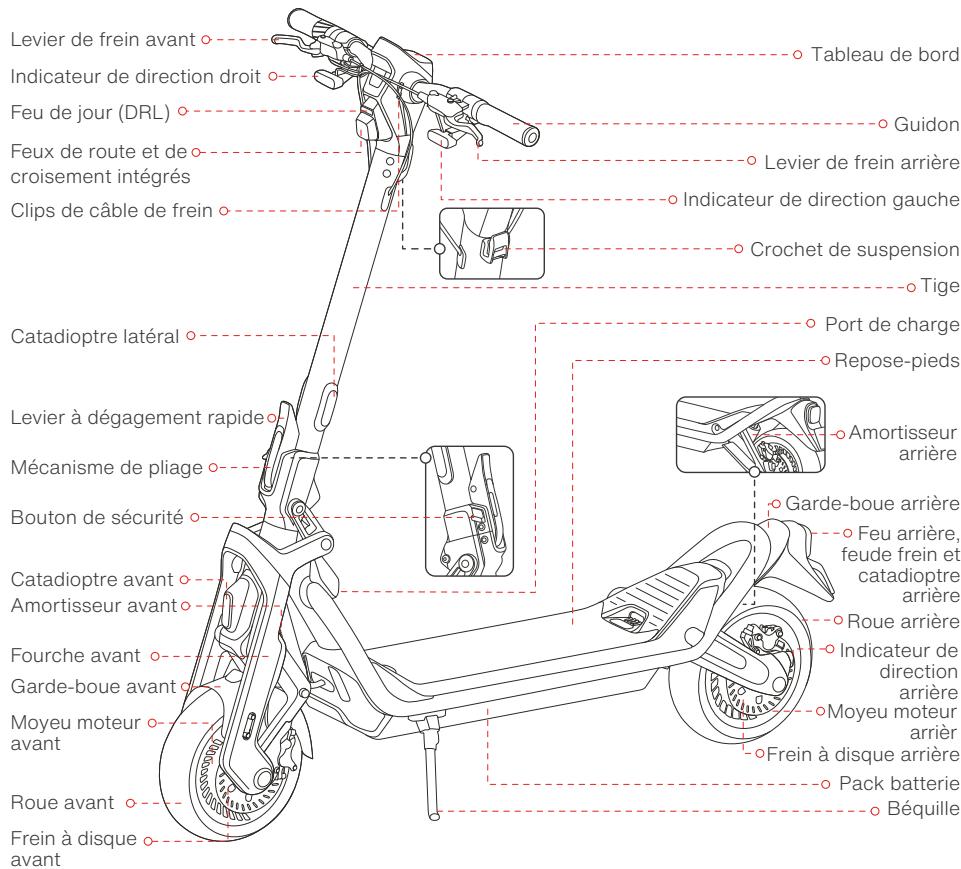
Fonctions du guidon
AkkymyIaTOp COOTBETCTByET CTaHApTy UN/DOT 38.3.
AkkymyIaTOP COOTBETCTByet Tpe6oBaHnIam ANSI/CAN/UL-2271.
3aBHeHne FeepaJIbHOI KOMnCCmI NO CBaN (FCC) O COOTBeTCTBmI Dnla CLJIA
3To yctpoiCTBO COOTBETCTBYET quchn 15 npabIN FCC. 3Knpyataunu BO3MOKHa npin c6bIIOJedHn CNEdyuOxuDBy uxycNobn: (1) 3To yctpoiCTBO He doJIKNHO Co3DAbaTb BpeHbIe nomExn, n (2) 3To yctpoiCTBO DoJIHXo OCTaBaTbCpa60tocno6hBm npn HAIyHn IHObIX NOMEX, BKIOHAY NOMEXN, KOtOpBe MOrY pInBcTeN K HENpABINbHO pa6Ote.
ПРМЕЧАНЕ
3To 06bOyOBaHHe 6bIIO npOTcTnOBOHn I np3HaHO COOTBCTBHyOuIM ORpaHueHnM IJrZdPbObx yctpoCTB KlaCC B V COOTBCTBmI C aCTbI 15 npABIn FCC. 3To orpAunHEnra Pa3pa6oTaHbI Df oEbcTeHnepn PA3ymHO 3aUHTbI O TBeDhX POMEX pIy cTAHOB H XINbIX NOpMeUeHNx. 3To 06bOyOBaHHe rtepepyet, IcNOb3yET n MocKET 3IyUaTh bPaIOuAcTOHYO 3HePRINO I, ECNI OHO YCTaHOBn I NCNOB3yETcH E BoCOTBCTCBm I NCHTrpKUaMn, MoKET cO3daBaTb BEDhNo Iomex I dpaIOOCBAHn. ODAHKe rAPaHTn, Yo TOMnx He BO3NHyTn PnI KOHKPTHO tYcOHAOBHe. ECNI 3To 06bOyOBaHHe DEiCTBNTelHO Co3DAeT HeDOyCTMbIe NOMEXI DParIeMa paIO INI TeLEBvENHn, Yo MOHX ONPeJIeITyTEM BKIOUeHn I BkIKIOeHn OOBpyOBaHn, PONbOBeAtIIO peKOMeHyETc NOnbTaBC yctpaHNTb NOMEXI ODNIM INI HeCKOLbKMIMN I3 CLeNyUOxN CNOOCOB:
-IV3MeHHTbOpneHTaLIOUJINMeCTOnOLOXKeHNePpIeMHoAHTeHHbl.
- YBéniuTb paCCToHnE MEXy O6OpyOboAHnEM I npEmHKOM.
-Подклочь obopудане К розетке Bцени, отлично о Тови, к сокори подклочец приемнik.
-06paTntbC3a nOMoUbK dInpepy nnOnbTHOMy cneuaJIncTy no paIIO/TeJIeBnDEHHIO.
3aBHeHne O COOTBeTCTBn Tpe6oBaHnM MnHnCTepCTBa pOmbIeHnHOcN KaHaDbI (IC) IJy KaHaDbI
3To yctpoiCTBO COOTBETCTBYeT CTaHdapTaR RSS MINHcTepcTBa npomblJeHHocTn KaHaDbI, He Tpe6yUoM IInueh3npoBaHna.
KcNpIyataaB0MoxHApnC6oJeHNChJcElyuOxHbXbXycLOBHy (1) 3To yCTPOICTBO He oJLKnHO C03DaabTb NOMEXH, (2) 3To yCTPOICTBO D0JIHXO OCTaBcpaB6OTcNO6bHbIM PnP HAIUYINIO6bXnOMEX, BKIOUaYAMONEXN, KOTOpIe MOrTy pINBeCTN K hENPABILHOH paB6Te yCTPOICTBa.
CAN ICES-3 (B)/NMB-3(B)
Le present appeareil est conforme aux CNR d'Industrie Canada applicables aux appeareils radio exempts de licence.
© Ninebot (Beijing) Technology Co., Ltd., 2023 Bce npaba zauniuhebl.
功能示意图
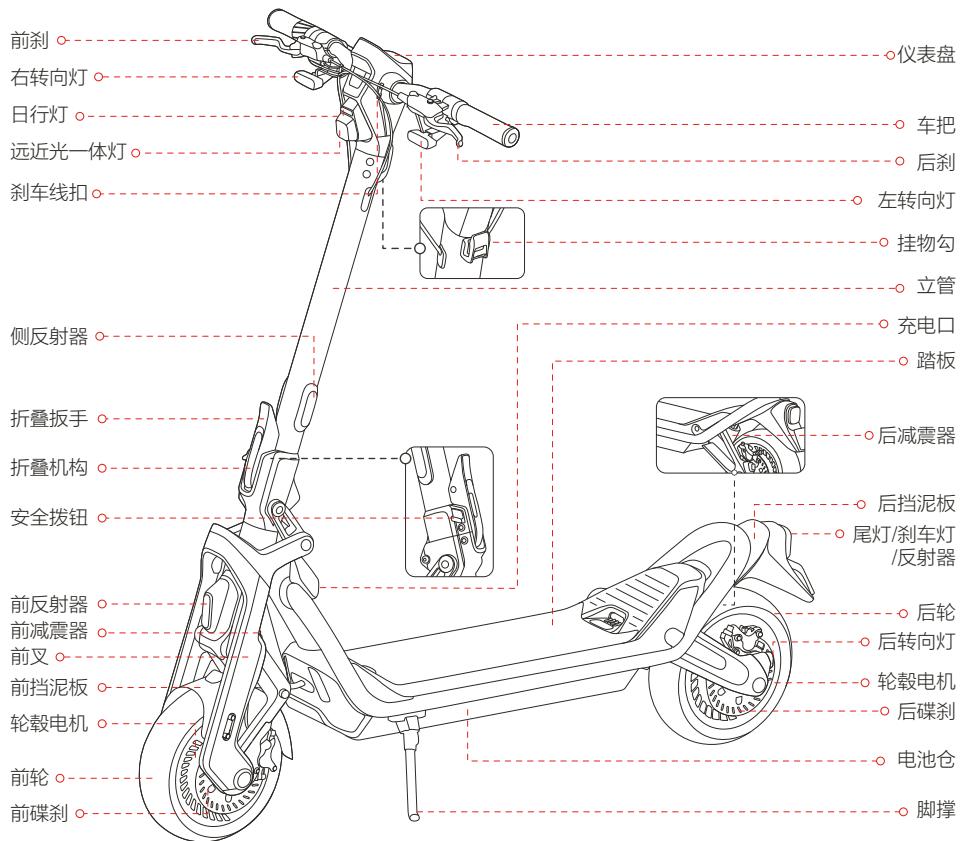
车把功能介绍
EN Scan the QR code to download the Segway-Ninebot app
EN Please download Segway-Ninebot App and activate your SuperScooter before riding.
EN The manufacturer reserves the right to make changes to the product, release firmware updates, and update this manual at any time.
EN Visit www.segway.com or check the Segway-Ninebot app to download the latest user materials. You must install the app, activate your scooter, and obtain the latest updates and safety instructions.
EN The pictures shown are for illustration purposes only. The actual product may vary.