ManualGo.com
 Ninebot KickScooter - Electric scooter SEGWAY - Free user manual and instructions
Find the device manual for free Ninebot KickScooter SEGWAY in PDF.


Download the instructions for your Electric scooter in PDF format for free! Find your manual Ninebot KickScooter - SEGWAY and take your electronic device back in hand. On this page are published all the documents necessary for the use of your device. Ninebot KickScooter by SEGWAY.
USER MANUAL Ninebot KickScooter SEGWAY
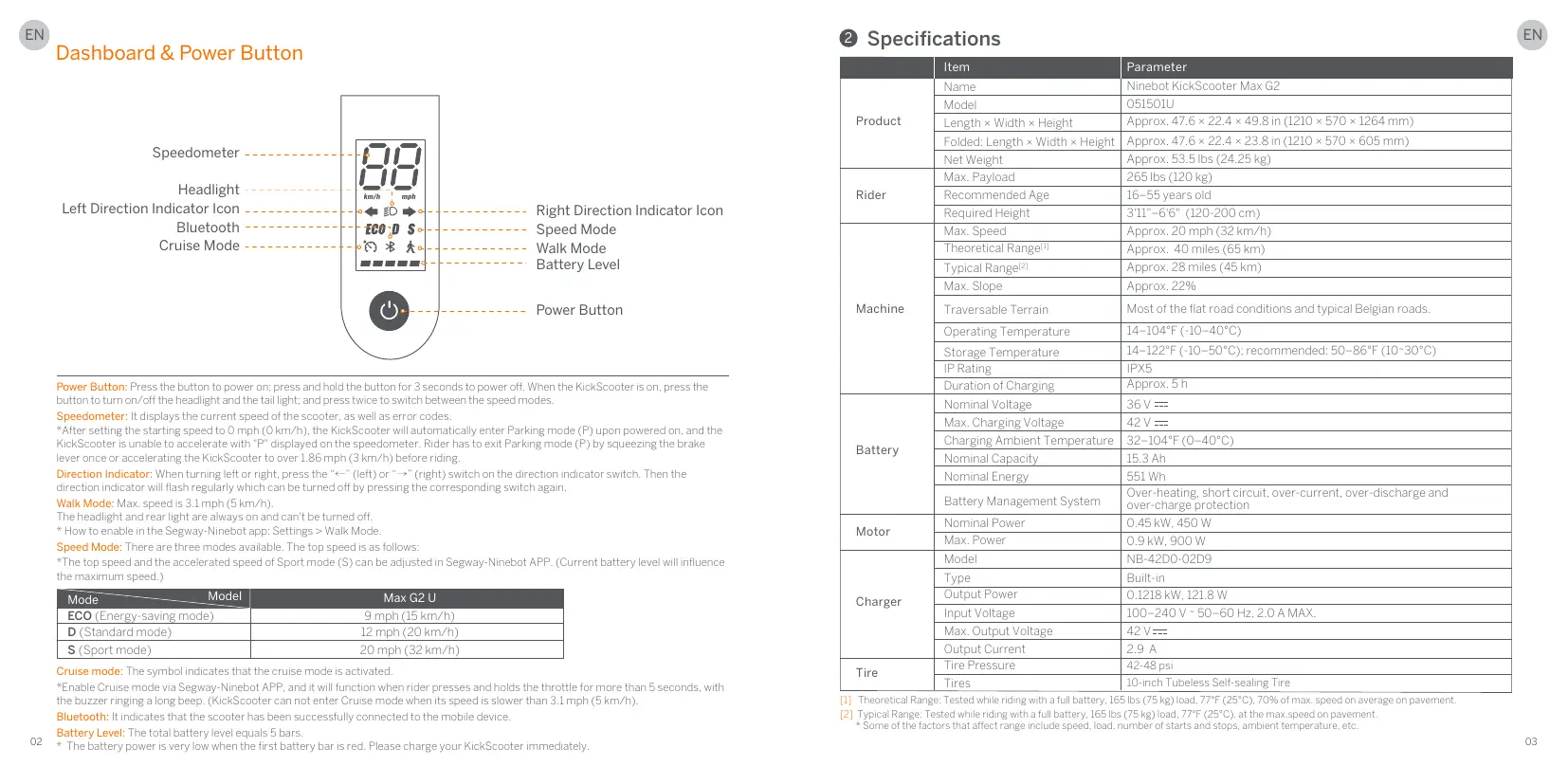
Dashboard & Power Button Speedometer - Headlight Left Direction Indicator Icon = Right Direction Indicator Icon Bluetooth - - Speed Mode Cruise Mode - = Walk Mode Battery Level -_ Power Button ton: Press Power But butte n andthe tailight: and pres: Speedometer: I displays the curre “After setting the starting speed to O mph speed of € scooter, as well as error code km/h) ooter will automatically enter Par fred on, and t KickScooter is unable to accelerate with"P" displaye reter. Rider has to @ mg the brake lever once or accelerating the KickScooter ta over 1.86 mph (3 km/h) before riding. Direction Indicator: When turning left or right, press the “<-" (left) or “—>" (right) sw Then the directian indicator vil flash regulariy which can be turned off by pressing the corresponding sit Walk Mode: Max. speedis 3.1 mph (5 km/h) Theheadight andrear light are always on and can't be turned off. *Howto enable in the Speed Mode: There are thr “The top speed andthe accelerated speed of Sport mode (S) c imum speed) rgay-Ninebot app: Settings > ak Mode. des avalable. The top speed is as follows: be adjustedin Segway-Ninebot APP. (Current battery level vil influence ECO (Energy-saving mode) 9 mph (15 km/h) D (Standard mode) 12 mph (20 km/h) S (Sport mode) 20 mph (82km/h) tivated t wil function when rider presses and holds throftle formore than S seconds, with the buzzer ringing along becp. (Kickcogter can not enter Cruise made when ts speed is siower than 3.1 mph (5 km/h) Bluetooth: indicate: he scooter has be successfully Battery Level: The total battery level equals 5 bars. 92 * The battery power is very lowrwi the first ery bar isred. Please c| ge your K nected tathe mobile des coter immediately @ Specifications PE LE Name Ninebot KickScooter Max G2 Model EU Product Length > Width x Herght Approx 47.6 x 224 x 498 (2105, h x eight Approx. 47.6 x 22.4 x 23.8 in (1210 x 570 Approx. 53.5 Ds (24.25 ke) Max. Payload 265 1bs (120 kg) Rider Recommended Age 16-55 years old Required Heignt FI-66" (120-200 em) Max Speed Approx 20 mph (2 km/h) Approx_ 40 miles (65 km) CaRange Approx. 28 miles (45 Km) Max. Slope Approx. 22% Machine Traversable Terrain Most of the flat road onditions and typical Belgian road Operating Temperature T-IOFF (10-400) Storage Temperature D°C): recommended: 50-86°F (10-30°C) P Rating Duration of Charging ApprOx ST Nominal Voltage 36v a Charge VOTRE ET Cnaraine Ambient Temperate | 32-1010 400) Battery Nominal Capacity 15.3 Ah Nomina Energy ET Der RESTE ERNEST VE ARRETE en EEE
Fa Pare DS. SOO NT ace NE 2200-0200 Type Burn cher CORP DIANTTEN irpuiVoage DO AOV- 80-G0 HE 20 AN ia Output VOTRE Output Current 10-inch Tubeless Selfsealng Tire 1]. Thedretical Range: Tested while riding with a fl battery, 12] Typical Range: Tested wie riding with a fu battery, 16 Some ofthe factors that affec 5 Ds (75 Kg) losd. luc speed. load, number 0 C), 70% of max speed on average on payement °C), at the max speed on pavement. Ps, ambient temperature, etc «load
© Certifications This product is certified to ANSI/CAN/UL-2272 ‘The battery complies with UN/DOT 38.3 ‘The battery complies with ANSI/CAN/UL-2271 Federal Communications Commission (FCC) Compliance Statement for USA This device complies with part 15 of the FCC rules. Operation is subject ta the following two conditions: (1) This device may not cause harmfulinterference, and (2)this device must accept any interference received including interference that may cause undesired operation. Any Ganges or modifications not expressly approved by the party responsible for compliance could void the users authority to operate the equipment. NOTE This equipment has been tested and found to comply with the limits far a Class B digital device. pursuant to part 15 ofthe FCC Rules. These limits are designed to provide reasonable protection against harmfulinterference in a residential installation. This equipment generates, uses and can radiate radio frequency energy and. f not installed and used in accordance with the instructions, may cause harmfulinterference to radio communications. However, there is no guarantee that interference will not oceur in a particular installation. this equipment does cause harmful interference to radio or television reception, which can be determined by turing the equipment off and on, the user is encouraged to try to correct the interterence by one or more of the following measures: —-Reorient or relocate the receiving antenna — increase the separation between the equipment and receiver. —Connect the equipment into an outlet an a circuit cfferent from that to which the receiver is connected —Consult the dealer or an experienced radio/TV technician far help. This equipment complies with FCC radiation exposure limits set forth for an uncontrolled environment This equipment should be installed and operated with minimum distance 20cm between the radiator & your body. Cet équipement est confarme aux limites d'exposition aux radiations de la IC définies pour un environnement non conträlé. Cet équipement doit être installé et utiisé à une distance minimale de 20 em entre le radiateur et votre corps. Industry Canada (IC) Compliance Statement for Canada This device complies with Industry Canada license-exempt RSS standard (s). Operation is subject to the following two conditions: (1) this device may not cause interference, and (2) this device must accept any interference, including interference that may cause undesired operation ofthe device. CAN ICES-3 (B)/NMB-3(8) Le présent appareil est conforme aux CNR d'industrie Canada applicables aux appareils radio exempts de licence. L'exploitation est autarisée aux deux conditions suivantes (1) l'appareil ne doit pas produire de brouilage, et (2) lutiisateur de l'appareil doit accepter tout brouillage radioélectrique subi. même si le brouillage est susceptible d'en compromettre le fonctionnement Neither Segway Inc. nor Ninebot is responsible for any changes ar modifications not expressiy approved by Segway Inc. or Ninebot. Such modifications could void the users autharity to operate the equipment. Model: 051010
FCC ID: 2ALS8-KS0013
IC ID: 22636-KS0013 © Trademark Ninebot is the trademark of Ninebot (Beijing) Tech Co. Ltd: Segway and the Rider Design are the registered trademarks of Segway Inc. App Store®/App Store, Apple logo® /Apple logo, iPadOS®/iPadOS, macOS@/macOS, Find My"“/Find My and Works with Apple Find My logo"#/ Warks with Apple Find My logo are registered trademarks/trademarks of Apple Inc. registered in the US. and other countries. OS is a trademark or registered trademark of Cisco inthe US. and other countries and is used under license. Google Play and the Google Play logo are trademarks of Google LLC.The Bluetooth® word mark and logos are registered trademarks owned by Bluetooth SIG, Inc. and any use of such marks by Segway-Ninebot is under license. Othertrademarks and trade names are those of their respective owners. The KickScooter is covered by relevant patents. For patent information, go to http://mww.segway.com We have attempted to include descriptions and instructions for al the functions of the KickScooter at the time of printing. However, due to constant improvement of product features and changes of design. your KickScooter may difer light from the ane shown in this document. Scan the QR code ar visit the Apple App Store (i0S) or the Google Play Store (Android) to download andinstall the App. Please note that there are multiple Segway and Ninebot models with different functions, and some of the functions mentioned herein may not be applicable to your unit. The manufacturer reserves the right to change the design and functionality of the KickScooter product and documentation without prior notice © 2022 Ninebot (Beijing) Tech Co. Ltd. All rights reserved GThe Segway-Ninebot App can support KickScaater with bult-in Bluetooth)
© Recommended Maintenance Schedule Toensu fe riding, how often you use your regular n re essential. You, the one: how hard you use it and where you use it. Itis the er to autho ntrol and ner's responsibility ta perform regu checks an ing your sc le below d service center for inspection and service. Please refer to raintenance maintenance schedule charges a service fee Use a soft, wret Mainframe parts | Use a soft we cloth to wpe the Tirepressure | infatetires 2-48 CheckIfthe tres are cracked. Tirewear deformed, er significantly vor Tighten the serews fixed with the rm. The suggested Mainframe maintenance | : Tigrien era ont lent The suggested torqueis 8.5 + 0.5 Tighten the fixing screws handle and the front fark, wo lateral crew at the orque is 15 + 1N-m d he upper Vertical screw ecommended torque is 15 + IN-m he comecting red, and fasten the mecting rod screws en rockIng On bike. The folding is smooth without Shaking, Functio inspe he hub motor is stalled or has
shaky Fine frontw or the axis heelis stalled or gets haftis unbalanced. Drake is too th line (decrease/incr length), and tighter Test standard: the 1 mph (20 km/h) a distances within
enthe screw onthe st te brake Base the expose: the screw an. se usethed Drum brake Front wheel canr sbnormal s6 braked after sque the brake ral na see ifitlights. Check the headlighi bnighty lethe he left/right respec d iicator side flash normally 5 on the le! indicater button tively. checkifthe ight Power on the sou marks properly er, the dashboard he horn b on and the sounds andholdthe it checking for acce decelerat Note: Release i, ché back to the positior rot then release eleration ar ckif the throttle ll