HiBuds 5 - Headphones HiBuds - Free user manual and instructions
Find the device manual for free HiBuds 5 HiBuds in PDF.



User questions about HiBuds 5 HiBuds
0 question about this device. Answer the ones you know or ask your own.
Ask a new question about this device
Download the instructions for your Headphones in PDF format for free! Find your manual HiBuds 5 - HiBuds and take your electronic device back in hand. On this page are published all the documents necessary for the use of your device. HiBuds 5 by HiBuds.
USER MANUAL HiBuds 5 HiBuds
■ PRODUCT INTRODUCTION
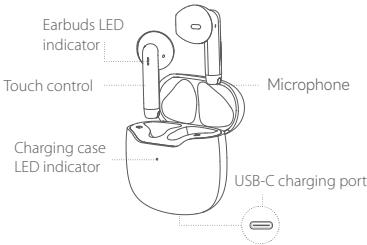
DEVICE CONNECTION
Method 1: 1. When using the product for the first time, open the charging case cover. When the earbuds LED indicator are blinking in red and blue alternately, the earbuds enter the "Pairing state".
- Turn the Bluetooth on, and select "HiBuds 5".
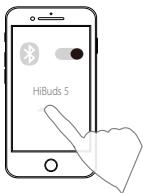
There is a connection prompt tone after successful connection.
Method 2: 1. When the earbuds are already connected to the device, Click the "Touch" button four times. The indicator will blink in red and blue alternately, and the earbuds will enter the pairing state(Cannot operate while making calls or playing music).
- Turn the Bluetooth on, and select "HiBuds 5". There is a connection prompt tone after successful connection.
Note: The above is the connection method when the product is pairing a new device for the first time. After the initial use of the product, the earbuds will automatically switch on and connect to the device when you take it out from the charging case.
CONTROL
i) Equipment operation
- Power on: Open the charging case, and the headphones will automatically power on.
- Shut down: Put the headphones into the charging case and close the charging case to shut down.
- Restore factory settings:
- (In pairing mode)Double touch + long press 55; when the blue light flashes for 3 times, the headphones will enter the factory reset mode, put the headphones into the charging case, the headphones status will be restored to the factory settings. You can open the cover to re-pair.
ii) Playback Mode

1)Play / Pause

L/R


2)Volume Down/ Previous


3)Volume Up/ Next

4) Siri

4)Google Voice Assistant

2s
L/R
iii) Call Mode
INCOMINGCALL


L/R


L/R
1)Answer a call
2) Reject an incoming call
ONGOINGCALL


L/R
3) End a call
SWITCH TO DIFFERENT CALLS


L/R

4) Answer call 2. Call 1 is hold-on


5) Switch between call 1 and call 2


6) Reject call 2. Hold call 1
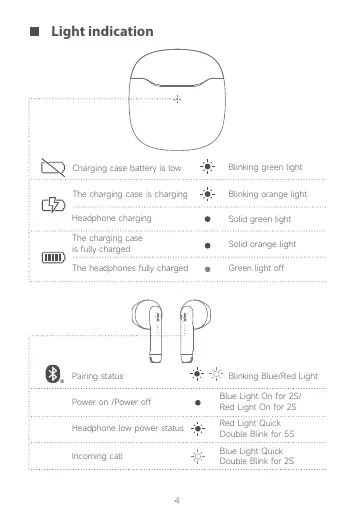
Light indication
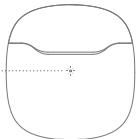

Charging case battery is low

Blinking green light

The charging case is charging

Blinking orange light

Headphone charging

Solid green light
The charging case is fully charged

Solid orange light
The headphones fully charged

Green light off


Pairing status


Blinking Blue/Red Light
Power on /Power off

Blue Light On for 2S/ Red Light On for 2S
Headphone low power status

Red Light Quick Double Blink for SS
Incoming call

Blue Light Quick Double Blink for 2S
TECHNICAL SPECIFICATIONS
Earbuds driver
- 13mm neodymium magnet sound Units x 2
Frequency Response
20-20,000 Hz
Microphone
- Omnidirectional MEMS x1 (per earbud)
Bluetooth Version
Bluetooth 5.3
Bluetooth profile
A2DP
AVRCP
HFP
Audio Codec
SBC·AAC
Wireless operating frequency
2402-2480 MHz
Wireless transmission range
- Up to 10 meters (measured in open area). Walls and wall structures may affect the transmission range of the device.
Playback time
- Up to 5 hours on a single full charge
Total playback time: 20 hours
Battery
- Earbuds: Rechargeable lithium-ion Polymer Battery 3.7 V 30 mAh 0.111 Wh
- Charging case: Rechargeable lithium-ion Polymer 3.7 V 320 mAh 1.184 Wh
Charging time
- <2 hours
IP Rating
- IPX7 waterproof
Operating temperature: 0.45^
Maximum output power - 5 dBm
Input rated power - SV 1A
Based on moderate volume. Actual battery life will vary, depending on specific use, settings, and environmental factors
NOTE: Compliance markings are in the charging case.

CAUTION: Do not use the earbud at a high volume for extended periods of time as this may cause hearing loss.
Answers for Common Questions
(1) The bluetooth headset cannot be switched on.
Reason: The battery in the charging compartment is low or the power of the bluetooth headset is low.
Solution: Put the headset into the charging box, close the cover, and charge the charging box for more than 1 hour before use.
(2) The phone cannot search for bluetooth headset.
Reason: 1. The Bluetooth headset is not in the pairing state; Solution: When the earbuds are already connected to the device, Click the "Touch" button four times. The indicator will blink in red and blue alternately, and the earbuds will enter the pairing state.
Reason: 2. There are mobile phone bluetooth program errors;
Solution: After the bluetooth of the mobile phone is restarted, clear all pairing data stored in the the mobile phone; Search for bluetooth again.
(3) There is no sound from the headset speaker
Reason: 1. Turn the volume of the mobile phone and headset to the maximum and confirm whether it is caused by volume adjustment.
Solution: When the headset is connected, adjust the volume of the mobile phone;
Reason: 2. The Bluetooth headset is not properly connected with the mobile phone.
Solution: Reconnect bluetooth and mobile phone through pairing.
Reason: 3. The Bluetooth headset is not within the valid working range.
Solution: Keep the headset within 10 meters of the mobile phone, and there are no large objects, walls and other obstacles between the headset and the device.
(4) The headset doesn't send messages or the voice is low.
Reason: 1. The Bluetooth headset is too far from the mouth; Solution: The bluetooth headset should be worn on the ear for normal use;
Reason: 2. The microphone hole of Bluetooth is blocked or water has entered;
Solution: Remove the blockage of the microphone hole or prevent water from entering the microphone hole.
(5) The headphone get stuck or disconnected when talking or listening to music.
Reason: 1. The Bluetooth headset is too far away from the mobile phone or there are obstacles.
Solution: 1. Keep the headset within 10 meters of the mobile phone, and there are no large objects and walls between the headset and the device. Be careful not to cover the bluetooth headset with your hand. In order to maintain the continuous stability of the signal, please try to keep the bluetooth and the mobile phone in the same direction.
Reason: 2. There is a problem with the bluetooth signal of the mobile phone or there is strong signal interference nearby.
Solution: It is best not to make the mobile phone close to metal objects. You can also change another mobile
phone or try another place.
Reason: 3. The power of bluetooth headset is insufficient. Please charge the headset as soon as possible.
Solution: Please charge the headset as soon as possible.
(6) There is no sound in the headset during voice call, and the sound comes out of the mobile phone.
Reason: The headset is operated during a voice call or call. Double click the headset.
Solution: Turn off the bluetooth of the mobile phone and then turn it on, or put the headset into the box, close the cover, turn off the headset and then open the cover; The headset does not support the connection or hanging up of voice calls. If there is a voice call, please connect or hang up on the mobile phone.
(Note: at present, the headset only supports incoming calls from GSM cards, not app network calls.)
(7) After the headset is put into the box and the cover is closed, the headset is not disconnected.
Reason: 1. The charging box is completely dead;
Solution: Charge the charging box;
Reason: 2. The headset is not put into the box properly, and the communication between the headset and the base is abnormal.
Solution: Reopen the charging box, take out the headset from the box, and then put it into the box.
Reason: 3. The charging box is damaged. Solution: Replace the charging box.
Attention
- Please do not disassemble this product by yourself.
- Please use standard charging cable and adapter to avoid damage and accidents.
- Please avoid using corrosive cleaning detergent to clean this product.
- Please avoid product usage in the rain and keep away from heating or fire.
Maintenance
Please follow the following suggestions to prolong product working life.
- Keep product dry and don't put in damp places in case of affecting internal circuit.
- Avid product usage during intense sporting or on sweating occasions in case sweat infiltrate into product and cause damages.
- Keep off sunlight or high temperature in case of shortening working life of electric parts battery damage, plastic parts deformation.
- Keep off intense vibration and impact from hard material in case of internal circuit damages.
Onncahne yctpoiCTBa
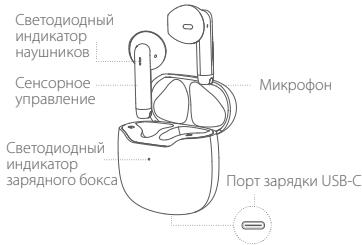
IopKnlueneyeucptpoiCTBa
CnO6o1: 1. IpiI nIcNIIbOaHmV yCTPOICTBA BpRBeB tOKPoe 3aepiHybKOICNIOCTaHte HauyHNIKOr Korga CbeTOIDHbINuDnKaTOp HauyHNIKOB MMRaTe NOUepeIN kpaChbIM cNtHM, HauyHNIKA HXoDITCR B COCTOHINYCTOAHOkCOPRAKJEHNA.
- BkIouTe Bluetooth n BbIepePte «HiBuds 5».
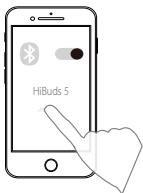
PnIy cynuHOM NQkNIOeHN pAA3aTeC KOTOKK CRIHAN. CnOc2 1. Kogda HuaHNIK yKe NQkIOeHbK I cyTOPOCTBy, YHeTApEckblh NaMIXte KHONky I oHTouch). CBeToIOKnDIn HnIKNtAKOP bEyd MIRATNo OnepeDIn KPacBmI h CNHM, HnayUHNIK npeyDyt B COCTOAHy tAcyBOHKo cOpRKeHHeB WBEp 3B0XHaN oBCrpo3MeBENMy Mz3bKn ORePAaIN HeNDocTyHbN. 2.BKNOvHTe Bluetooth N bVbePejt iHbUs5. PnIy cYueNHonN kQNDKHOeHN pAA3aTeC KOTOKK CRIHAN.
PnmpmaeHAnHe: BIIbe OINsCnO nCnO6 NOIKNIOUeHNH, KOGa IPOyDKT NOIKNIOAETcK HOBOMY UCTPOCTBYB NBPbEJIe. PONCe nepBOrNO IPOKIOHNEHNIOPODyTKaHayuNkIK AOBtAMouKEN BKIOHTaCnIOKNIOHATcK UCTPOCTBY, KOJBA Db BbHNIMAtee IN 3z 34pndHORO 60kCa.
UnpaBneHne
HayuHnKINNONHOCTbIO3aPaeKeHbI

3eHbCBETBikIOueH


CoctoHnne copjxehna


Myaolooi cnivn/ kpaechb cebt
BkIIOueHne /BbIKIOueHne

CANH CEBT NOCTHOHNO 1000000000000000000000000000000000000000000000000000000000
Haulynnkhu HaxhaoTcHnHKMOYpO8h3a4pApK

KpChbn CEBT MMaTeB 6b3po 5Ceb Da 9pa
BxOaIyI BbI3OB

CINH CEBR MCTAEB 6b002 T CEB Dp3a43
Texnueckne xapaKTePncTnKn
ДраиВер hayшнков
- 3BYK - MATHTH H A OCHOBE HEOJIMHA 13 MM 2 UT.
YactoTHaXapaKTepeNtUka
20-20000Γu
Mukpooh
• M-HorogaripaneehNHB MEMS x1 (B kAnD mHauniKHe)
Bercsia Bluetooth
Bluetooth 5.3
PiofoNB Bluetooth
A2DP
AVRCP
HFP
AydnoKOeK
SBC·AAC
P6o0aJnactOta 6ecpnoBDOHOro coOpDHeHHA
2402-2480 mFl
·Jo 10 METOB (IMepeHO Ha OTKPTOMIPOPTCACTBE).CTbHn I nepekBtBMy ONTY MEmBuHbTbIaHaon3NPepeDaY cYTOPTCBA.
BpemBaocpon3BeDeHn
Hominumtabha BxOogdha MooHTboc
·5B1A
A/PTnycOBmCpeHrTOyOBprrnPOPcKoTt.0aKTHueckoeBpErmABBOHOHMHO paboTbBAPmYECrTc, B3aBMCMOCTOn OTKOHPKETHOIONcB03aHn, HACPoEKn YcOBmO OKQyKaouepeCpeD
PIMCUEAHANE: MapinkoBka O COOTBCTBN TpeOBOAHNAM pamaehueHa 3aepdHon6KcEe.

PINEYDNTJEKHEIHE: He IcnbOJI3yJIe HauJIHINKI Ha BIXOKOM YOBDIE PROMKOTKI HA POPTKJEHNI DINOHOI RPONIOA BPEMEN, TAK KAC 30 MÖKET pNBECTI K NOTE CJIyNA.
OTBeTbHa qacto 3aDaBaemble BOnpocbl
(1) Hayshnkn Bluetooth He BkIouaIOTc.
BMOxOkoBnePnMnKb:Pa3pRJaKeHaBpaTeR B 3aprAHOmOTC6EKNI B HauNkHKn
Moroj peewen: IomeCTIne HauuHnKIN B 3apdHyo Kopo6Ky INaKoTIe Kp5iKhU, 3aETM IcNoJIb3yIte 3apdHoe yctpoCTBO DnA 3apdKIM 3apdHOrO yctpoCTBa 00JeE 1 caca neped erIOcnH3bOAHmE.
(2) TenefoH He MoKet HauTn HayuHNKn.
B0MOKKbIe pUmNbI:1.HayuHnKInHe BKNOHeHa HcONPKeHa.
Motopeuherma:Korda Hayuzhkinyue NQKIQHcOHeb K YCTOPCHBt, YetbTePekkIbKaHmKNTNHYKooTJHToC. CBeTOIOIDMbHy INHdKATOp BSyed MIRaTb NO Oepepei KaPcSHMn i CHINAM, N HAYUHNIKn IpeEyDy T B COCTOHNY eYCTAOHNB CONPKeHHN.
BMOxMnHBe PNUHb?2. Osi6Ba B nporgpamme Bluetooth M06INHORo TenedoHa.
Motoj pepehne: Nocne nepeaznycka Bluetooth
MOBNIbHO Tenefoha ydaNJITE BCE daHnBE coPRAKENIA,
XpaJIaMEcB B Bluetooth, CHBa bIyNOnHIE NOINCK Bluetooth.
4)Google Assistant vocal

2s
L/R
iii)Mode Appel


Specifications techniques
This device complies with part 15 of the FCC Rules. Operation is subject to the following two conditions:
(1)This device may not cause harmful interference, and
(2) this device must accept any interference received, including interference that may cause undesired operation.
This equipment has been tested and found to comply with the limits for a Class B digital device, pursuant to part 15 of the FCC Rules.
These limits are designed to provide reasonable protection against harmful interference in a residential installation.
This equipment generates, uses and can radiate radio frequency energy and, if not installed and used in accordance with the instructions.
may cause harmful interference to radio communications. However, there is no guarantee that interference will not occur in a particular installation.
If this equipment does cause harmful interference to radio or television reception, which can be determined by turning the equipment off and on,
the user is encouraged to try to correct the interference by one or more of the following measures: Reorient or relocate the receiving antenna.
. Increase the separation between the equipment and receiver.
. Connect the equipment into an outlet on a circuit different from that to which the receiver is connected.
Consult the dealer or an experienced radio/TV technician for help.
Caution: Any changes or modifications to this device not explicitly approved by manufacturer could void your authority to operate this equipment. RF Exposure Information
The device was evaluated to meet general RF exposure requirements. This equipment should be installed and used with a minimum distance of 0mm between the radiator and your body.

www.escal.hk