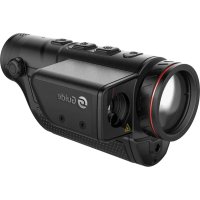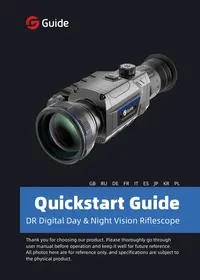
DR Digital Day & Night Vision Riflescope - Riflescope Guide - Free user manual and instructions
Find the device manual for free DR Digital Day & Night Vision Riflescope Guide in PDF.



User questions about DR Digital Day & Night Vision Riflescope Guide
0 question about this device. Answer the ones you know or ask your own.
Ask a new question about this device
Download the instructions for your Riflescope in PDF format for free! Find your manual DR Digital Day & Night Vision Riflescope - Guide and take your electronic device back in hand. On this page are published all the documents necessary for the use of your device. DR Digital Day & Night Vision Riflescope by Guide.
USER MANUAL DR Digital Day & Night Vision Riflescope Guide
Thank you for choosing our product. Please thoroughly go through user manual before operation and keep it well for future reference. All photos here are for reference only. and specifications are subject to the physical product.
- CONTENTS -
GB DR Digital Day & Night Vision Riflescope Quick Start Guide 1-18
RU RykoBooCTBO nO 6bIcTpoJeCTBnIO zuΦpOBOrO npuεela dHeBHO r HouHOro BuDeHnR DR .........19-38
DE Kurzanleitung für das digitale Tag/Nacht-Sichtgerät DR 39-58
FR Guide d'exploitation rapide de la lunette numérique de visée à vision diurne/nocturne DR. 59-77
IT Guida di operazione rapida per DR Telescopo di Puntamento Digitale a Vista Diurna e Notturna 79-97
ES Guía de Inicio Rápido del Visor de Visión Diurna y Nocturna Digital DR. 99-117
JP DR日夕日夜視照準鏡のクは操作ガト……119-136
KR DR 微信网 报告:137-154
PL Cyfrowy celownik optyczny DR, dzien i noc Skrocona instrukcja obstugi 155-174
-IMPORTANT -
Thank you for choosing this product. Please read this guide before use and keep it for future reference. We hope you'll be satisfied with this product.
This guide is a general guide for a series of products, which means that the specific model you receive may differ from the picture in the guide. Please refer to the actual product you receive.
This user guide is organized for the convenience of users to use and understand our products. We will do our best to ensure the accuracy of the contents of this guide, however, we still cannot guarantee the completeness of the contents thereof. As our products are subject to continuous upgrading, we reserve the right to modify this guide from time to time without prior notice.
- FCC WARNING -
This equipment may generate or use radio frequency energy. Changes or modifications to this equipment may cause harmful interference unless the modifications are expressly approved in the instruction manual. The user could lose the authority to operate this equipment if an unauthorized change or modification is made.
This device complies with part 15 of the FCC Rules. Operation is subject to the following two conditions: (1) This device may not cause harmful interference, and (2) this device must accept any interference received, including interference that may cause undesired operation.
The device has been evaluated to meet general RF exposure requirement. The device can be used in portable exposure condition without restriction.
NOTE: This equipment has been tested and found to comply with the limits for a Class B digital device, pursuant to part 15 of the FCC Rules. These limits are designed to provide reasonable protection against harmful interference in a residential installation. This equipment generates, uses and can radiate radio frequency energy and, if not installed and used in accordance with the instructions, may cause harmful interference to radio communications. However, there is no guarantee that interference will not occur in a particular installation. If this equipment does cause harmful
interference to radio or television reception, which can be determined by turning the equipment off and on, the user is encouraged to try to correct the interference by one or more of the following measures:
Reorient or relocate the receiving antenna.
- Increase the separation between the equipment and receiver.
- Connect the equipment into an outlet on a circuit different from that to which the receiver is connected.
- Consult the dealer or an experienced radio/TV technician for help.
The rating information is located at the bottom of the unit.
- PRECAUTIONS -
DANGER
1) Please charge the battery with the method described in this Guide and follow the charging procedure and precautions. Improper battery charging will cause heating, damage and even physical injury.
2) Do not try to open or disassemble the battery at any time. Once the battery leaks and the spill enters the human eye, wash the eyes with clean water immediately and take medical care.
WARNING
1) When using the equipment, please try to keep it stable and avoid violent shaking.
2) Do not use or store the instrument in an environment that exceeds the allowable working temperature or storage temperature of the equipment.
3) Do not directly aim the equipment at high-intensity thermal radiation sources, such as the sun, lasers, spot welding machines, etc.
4) Do not block the holes on the equipment.
5) Do not knock, throw or vibrate instruments and
accessories to avoid damage.
6) Do not disassemble the machine by yourself, which may cause equipment damage and loss of warranty rights.
7) Do not use soluble or similar liquids on equipment and cables, which may cause damage to the equipment.
8) Please do not use the equipment in an environment that exceeds the operating temperature of the equipment, which may cause damage to the equipment.
9) Please observe the following measures when wiping this device:
Non-optical surface: use a clean soft cloth to wipe the non-optical surface of the thermographic camera when necessary.
Optical surface: when using the thermographic camera, please avoid polluting the optical surface of the lens, especially avoid touching the lens with your hands, because the sweat on your hands will leave traces on the lens glass and may corrode the optical coating on the glass surface. When the surface of the optical lens is polluted, use special lens paper to wipe
GB RU DE FR IT ES JP KR PL
it carefully.
10) Do not put the battery in a high-temperature environment or close to high-temperature objects.
11) Do not short circuit the positive and negative poles of the battery.
12) Do not put the battery in wet environment or water.
CAUTION:
1) Do not expose the device to dust or moisture. Avoid water splashing to the device when being used in an environment with water. Cover the lens when not using the camera.
2) When this device is not used, please put the device and all accessories in a special packing box.
3) Avoid using SD cards for other purposes.
4) Using the eyepiece for a long time will reduce the contrast of the eyepiece, and the picture will turn white. You can switch to LCD display, and then to eyepiece display after a period of time.
- LIST OF ACCESSORIES -
Standard accessories
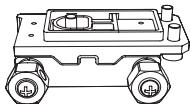
Sightingscopebase
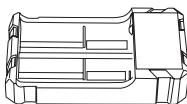
18650 charger
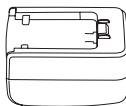
5V2A adapter
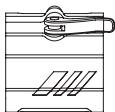
Fill light stand
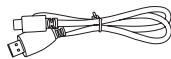
Type-C cable
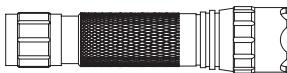
Infrared fill light
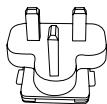
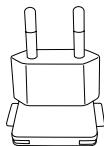
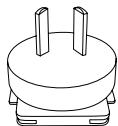

Plug of American, British, Australian, European standard
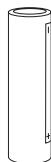
Cell
Optional accessories
18650 battery
External laser ranger
Bluetooth remote control
Dovetail guide
- INTRODUCTION TO PRODUCT PARTS -
This guide is applicable to multiple products of this series, and the illustration is only for one of them.
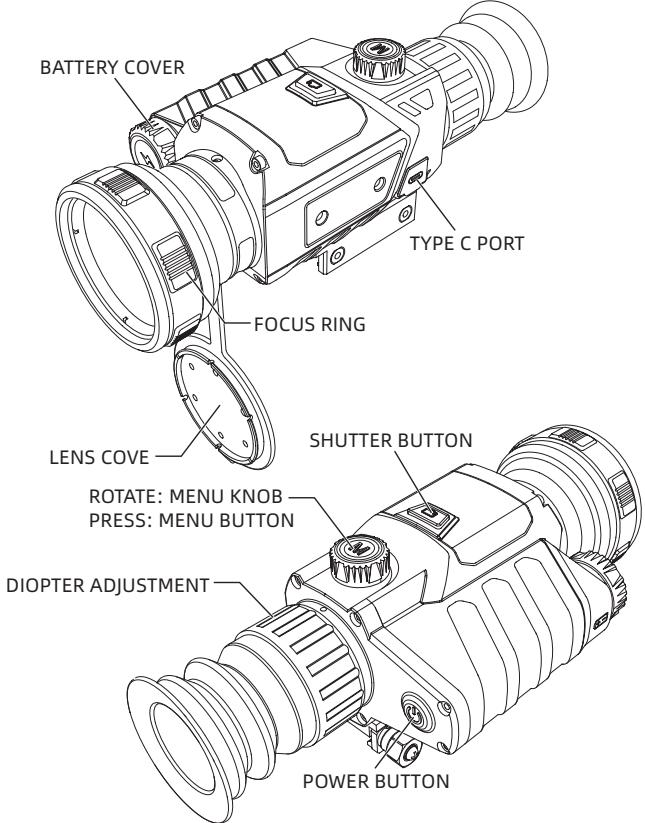
1. FOCUSING RING
Focus the target after the thermographic camera is turned on. The image may appear blurry when the distance to the target changes. Turn the lens focusing ring to refocus until the target image sharpens.
2. LENS COVER
Please cover the lens when not using the product to protect the lens!
3. USB TYPE C PORT
Use the USB cable to connect external power via the external interface to supply power to the product. The output specification of external power is 5V 2A.
4. BATTERY COVER
The battery cover is the entrance of battery disassembly and assembly when the product uses battery.
- QUICKSTART INSTRUCTIONS -
| Buttons | Current Device Status | Rotate | Short Press | Long Press |
| Power button | Power on | / | / | Display off/ Power off |
| Power off | / | / | Power on | |
| Display off | / | Display on | Display on | |
| Menu knob | Menu not displayed | Rotate clockwise to zoom in | / | / |
| Menu not displayed | Rotate anticlockwise to zoom out | / | / | |
| Menu button | Menu not displayed | / | Display the shortcut menu | Enter menu |
| Initial menu displayed | / | Confirm the current option and back to the previous menu | Not confirm the current option and back to the previous menu | |
| Shutter button | Menu not displayed | / | Take a photo and freeze it for 300ms to restore the real-time screen | Start video recording |
| Video recording | / | Take photos | End video recording and save the video |
[BUTION DESCRIPTION]
1. POWER BUTTON
POWER ON
Long press the Power button until the boot screen appears in the eyepiece, then the device is turned on successfully.
POWER OFF
Manual power-off: Long press the Power button to display the shutdown progress bar until the progress bar is completed and the shutdown is successful.
DISPLAY OFF
Long press the Power key to display the shutdown progress bar. Before the progress bar is completed, release the Power key to cancel the shutdown and enter the Display off mode.
DISPLAY ON
In Display off mode, press any button to wake up the screen.
2. MENU KNOB
ROTATE CLOCKWISE
The menu is not displayed, rotate clockwise to zoom in and lock at the maximum.
ROTATE ANTICLOCKWISE
The menu is not displayed, rotate anticlockwise to zoom
out and lock at the minimum.
3. MENU BUTTON
ENTER MENU
When it is turned on and the menu is not called up, short press the Menu key to pop up the shortcut menu. Rotate the knob to select.
TOGGLE MENU OPTIONS
When it is turned on and the menu is called up, short press the Menu button and rotate the knob to adjust the value.
EXIT MENU
When it is turned on and the menu is called up, long press the Menu button to save and exit menu.
4. SHUTTER BUTTON
TAKE PHOTOS
Short press the Shutter button to take a photo and freeze it for 300ms to restore the real-time screen.
TAKEVIDEOS
Long press the Shutter button to start video recording, and long press it again to end video recording the save the video.
| Icon | Meaning | Icon | Meaning |
| Image adjustment | Other settings | ||
| Line settings | Scene mode | ||
| Zero calibration settings | PIP | ||
| WiFi | Screen brightness | ||
| Record mode | Super power saving | ||
| Power saving settings | Rough ranging | ||
| Local settings | Zero calibration distance | ||
| Photo taking successfully | Video recording successfully |
[FUNCTION DESCRIPTION]
- Image adjustment: The image can be adjusted, including switching the scene mode, enabling image enhancement and setting the brightness and
contrast.
- Line settings: The line configuration, type, color and brightness can be set.
- WIFI settings: WIFI switch. When the mobile client and the device are connected, real-time videos can be transmitted to the mobile phone, the device can be operated through the APP.
- Record mode: There are three modes to be selected: Single shot/Shooting while transmitting/ Transmitting record.
- Power saving settings: Auto sleep time can be set at 5min/10min/15min or automatic power off time can be set at 15min/30min/60min to achieve power saving.
Time settings: The time format can be 12H/24H. - Language settings: Language can be selected in English/Russian/German/French/Simplified Chinese /Spanish/Italian/Japanese/Korean/Polish.
- Memory card formatting: The memory card can be formatted.
- Restore default: You can restore the device to the default values.
Remote control: Switch on the controller and turn on Bluetooth to search for nearby Bluetooth remote
control to connect, and external ranging device is not connected.
- External ranging: Switch on external ranging and turn on Bluetooth to search for nearby external ranging device to connect, and remote control is not connected.
- Scene mode: The scene mode can be switched among day, night and low light.
- PIP: PIP can be switched among four states: upper left, upper middle, upper right and off.
- Screen brightness: The screen brightness can be adjusted from level 1 to 10.
- Super power saving: The super power saving mode can be turned on or turned off.
- Rough ranging: The approximate distance (m) to rabbit, wolf, boar and deer can be calculated.
- Zero calibration distance: You can quickly select the zero calibration settings saved for different zero calibration distances (50m / 100m / 200m/ 300m / 500m).
- Photo and video: Short press the Shutter button to take photos and long press the Shutter button to take videos.
Battery status:
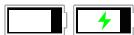
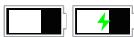
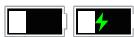
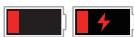
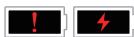
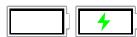
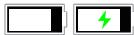
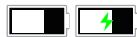
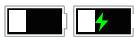
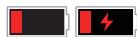
When the thermographic camera is turned on and the battery capacity changes, the capacity indicator is displayed in the lower left corner of the screen, and the part of the lit power indicator shows the remaining battery capacity.
After starting up and entering the real-time screen, the icon corresponding to the above power capacity will be displayed in the left bottom of the screen.
The power capacity is as follows:


High capacity
Medium high capacity


Medium capacity
Medium low capacity


Low capacity
Insufficient capacity
Notes:
Please replace the battery in a timely manner when the battery is low!
- COMMON TROUBLESHOOTING GUIDE -
1. The device cannot be powered on
Solution: replace the battery or connect the adapter for power supply
2. The device cannot take photos/videos
Solution: the internal storage space of the device is full. It is needed to format the memory card or disconnect the device from the computer
3. The display time of the device is inconsistent with the actual time
Solution: reset the time and date of the device in the menu
4. The screen goes black during use
Solution: short press any key to wake up sleep and light up the screen
5. The imaging of the device is blurred in use
Solution: turn the lens for manual focusing until the image sharpens
- STORAGE AND TRANSPORT -
The following is the correct storage and transportation of the product. To prevent danger, property loss, etc., please read the manual carefully before using the device. Strictly observe it, and keep the instruction properly after reading it.
Storage:
- The packaged product shall be stored in a well-ventilated, clean, condensate-free and corrosive gas-free room with temperature of -30^ 60^ and relative humidity not exceeding 95% .
- Please take it out and charge it once every 3 months.
Transport:
During transport, it shall be protected against rain, water flooding and falling, without severe vibration and impact. It shall be handled with care and throwing is strictly prohibited.
- BaxkhoepnpMeuahne -
HactoIeeyakuOBDCTBOAIBJETcYHNQnUPOBaHHbIM pyKoBODCTBOMdIaCepIN npOdyKTOB,3TO03NaHaayet,HTO npOdyKT KOHKpeTHoMoeJI,NOTOpbl BBi NOlyuNlI, MOXET OTNIuTaTBCr OT N3O6paXeHnB BYpkuOBoDCTBe, nOxJaNyIcTa,obpaTntecb KΦakTnueckomy NOLyueHHOMy npOdykTy.
HactoIuee pyKOBODCTBO nOJIb3OBAteIe IoprAHn3OBAHOДЯ ydo6CTBa nOJIb3OBAteIeB INCpOJIb3OBAHnN NOHmAHn NpoDyKTa HauWeI KOMNaHnM. Mbl CpeJaem BCE Bo3MOxHoe, qTO6bl ObecneuHTb TOnHocTb CoedjXaHnR HaCToIeOpyKOBODCTBa, HO Bce Jxe He MoJem rapaHTnpoBaTb noHOTy erO coDejXaHnR, T.K. NaHIpOduKyTb INoCToHnHO o6HOBIAJOTcN uIyuShaIoTcR, KOMNaHnOCTaBJIeT 3a c60i npABo BVocntb I3MeHeHnR B IIO6oe BpEmr 6e3 npedBapInTeIbHorO yBeDoMJIeHnR.
- FCC WARNING -
This equipment may generate or use radio frequency energy. Changes or modifications to this equipment may cause harmful interference unless the modifications are expressly approved in the instruction manual. The user could lose the authority to operate this equipment if an unauthorized change or modification is made.
This device complies with part 15 of the FCC Rules. Operation is subject to the following two conditions: (1) This device may not cause harmful interference, and (2) this device must accept any interference received, including interference that may cause undesired operation.
The device has been evaluated to meet general RF exposure requirement. The device can be used in portable exposure condition without restriction.
NOTE: This equipment has been tested and found to comply with the limits for a Class B digital device, pursuant to part 15 of the FCC Rules. These limits are designed to provide reasonable protection against harmful interference in a residential installation. This equipment generates, uses and can radiate radio frequency energy and, if not installed and used in accordance with the instructions, may cause harmful interference to radio communications. However, there is no guarantee that interference will not occur in a particular installation. If this equipment does cause harmful
interference to radio or television reception, which can be determined by turning the equipment off and on, the user is encouraged to try to correct the interference by one or more of the following measures:
Reorient or relocate the receiving antenna.
- Increase the separation between the equipment and receiver.
- Connect the equipment into an outlet on a circuit different from that to which the receiver is connected.
- Consult the dealer or an experienced radio/TV technician for help.
The rating information is located at the bottom of the unit.
- 0c06bIe 3aMeuHnIy -
Onachoctb
1) Пожалунста, зардпт ecKKулготор, кak onicaHo B 3Tom rykoBoDCTBe,и седун Te INHcTpKuzmпо зардк e n oc6bIM zameuahnЯm. HenpaBvIbHajarapdka moxket npnbectn K neperpeBy aKKyMylTopa, erO noBpeJdeHnIO nII n daJte TpaBMe;
2) Hn B Koem clyuae He nbItaIteCb BCKpbIBaTb nn pa36npaTb aKKymyIaTOp. Ecnn aKKymyIaTOp npoteK n JxNkOcTB nOpJLaB rIa3a, HeMeJleHNO npomoyTe rla3a YnCToB BOOn I o6paITeCb 3a MeDnCnHcKoN pOMOuBu.
PDEyPExkDeHnE
1)ДержинецустороствКак можно 6олей устонивиминзегаитесильно Травский по erо Истоньзовани;
2) He nCloIb3yIte n He xpaHnTe npi6Op B cpeDe, TempepaTypa KOTopoN pReBbIshaet dOnyctmmyo pa6Ouyu TempepaTypy nn TempepaTypy xpaHEnia o6OpydoBaHn;
3) He haprablaIte npnbop npma Ho nCTOuHnKn
IHTHeCnBHO TeIIOBOrO I3JIyUeHn, TaKne KaK COJHcE, Ia3epbI, TOpueHbIe CBapOuHbIe aPnpaTbI IN T. D.;
4) He zakpbIbAte OTBepCTnB npn6ope;
5) He ydapayte, 6pocaiTe n Tpcaite np6op n ero npnHaJekHoCTn BO n36exKaHne ero noBpeKdEHHa;
6) He pa3bupaIte MaunHy caMoCToTeIbHo, 3TO MoKcT npBecTu K nobpeXdEHNIO o6OpyDoBaHn I aHHynIpOBAHnIO rapaHTn;
7)Избerte pa6obu np6bopa n ero ka6eJBA MeCTe c pactBOPMOI INaHANOHyOJ KINKOCtBu, yTO MOxET npVBecn K NOBpeJDeHIO np6bopa;
8) Пожалунста, не сплььтугданн布局 рибов в срeded с temператури, певышюшей eropapбочую Велочини, чTO может ривеси Кповржданю рибора;
9)При пotingуразни данного рпбора соблдайтследуюше мерbl:
B OTHOWeHn HeoTNUeCKo NOBepXHOCTn: npn Heo6xOaIMOCt MoJHo IcNoIb3OBAt b YNCTyU IN MraKyu TkaHd Jn PnOTnpAHHa HneoTNUeCKo NOBepXHOCTu TeJIIOBUn3Opa;
B OTHOWeHnO NTNUeCKo NOBepXHOCTN:
GB RU DE FR IT ES JP KR PL
n36eaiTe 3aqr3HeHnOPTnueckoI
noBepxHocTn obekTuBa npin nCpOJIb3OBAHnI TeNIOBn3Opa,OCo6eHNo He npKacaiTeCb K o6bekTuBy pykAmn,NOTOMy uTO nOT Ha pykax OCTaBt CteDbHa CTekNe obekTuBa n MoKet Bbl3BaTb Kopp03HNO ONTNUeCKOTO NOKpbITNa Ha CTekJIAHHo nobexHoCTn. Pn 3aqr3HeHnn NOBepxHOCTn ONTNUeCKoI LInH3bI TzAteJIbHO npOTPnPte ee npOpeccnOHaJIbHO 6yMaRoI Dlra OUnCTKn IINH3;
10) He pa3meaIte aKKyMylTOp B yCIOBnX BbICOKo TeMpepaTypbI nn B6IIn3n O6BeKta C BbICOKo TeMpepaTypo;
11) He 3ambykaJte NaKOpOTko NIOJoxNtBnHbI n OtpuzaTeNbHbI NIOJIOCbI aKKyMylrTopa;
12) He noDBeprAte aKKyMnyTOp BO3JeCTBnO BlaRn nn BOdbl.
BHMMaHHe:
1) He noDBeprAaTe 6ObpyoBaHne BO3JeCTBnIO nblnn BnaRn. PpN nCNoIb3OBAHN B BODHOcpe n36eaiTe nOpaHaHn 6pbI3r BOdbI Ha npin6op. 3aKpbIbAaTe o6bekTnB, KOrda npin6Op He nCNoIb3yETc;
BbIXoHnA cpeuΦnKaZnBHeUHero NCTOuHnKa nHTaHnCoCTaBnEeT 5V2A.
4. Kpbioka 6aTapen
- KpaTkoe pyKOBoDCTBO NO 3KcnIyatauN -
KoIda nITaHHe BkIoUeHo I MeHIO He BbI3bBaETcA, HaxMnte KHOIIKy MeHIO, UTo6bI BbI3BaTb KOHTeKCTHOe MeHIO. NObepHnTe pyuKy, UTo6bI BbI6paTb.
IpekeKIOUeHne OOnm MeHIO
KoIda nHTaHne BkIIOueHo N BbI3bIBaETcMeHIO, KOpOTKO HaxMITE KhoNky MeHIO N IOBepHnTe pyUky, UTo6bl OtpereyInpObaTb 3HaueHne COOTBETCTByUoJeonL.
BbIXoA u3 MeHIO
KoTda yctpoiCTBO BKIIOUeHO N Bbl3bIBaETcMeHIO, HaxMMTe N ydePknBaIte KHOKNy MeHIO, YTO6bl COxpaHnTB N BblTN n3 MeHIO.
4. 3aTBop
ΦOTOCbEmKa
Kopotko Haxmnte 3aTbOp, yTo6bl cdeNaTb cHIMOK, n 3amOp03bTe Ha 300 Mc, yTo6bl BOCCTaHOBtB
BbICOKn ypOBeHb 3apdNocTn
CpeDHe-ByICOKn ypoBeHb 3aprAnOCTn
CpeHn ypoBeHb 3apdnoctn
CpeIHe-Hn3Km ypoBeHb 3apAHOCTN
Hn3kn ypOBeHb 3apJdNcTn
CnIuKOM Hn3KnI ypoBeHb 3aprAnOCTN
BHHMaHHe:
Korda 6atapea pa3pjaKeHa, BOBpeMa 3aMeHnte 6atapeo!
-PykoBoCTBO NO yCTpaHeHIO TUNuHbIX HencnpaBHOtei -
1. UcTpoIcTBo He BkIIOucaETc
PeseHne: 3aMeHnTb aKKyMnyTOp nIi NpOKnIouChTb aadTep K nCTOuHnKy nITaHn
2. YcTpoiCTBO He MoXeT CHIMaTb FOTo/BnIeO
PeWeHHe: BHTpeHHra NaMraTb yCTpoiCTBa 3aNoJIHeHa, Heo6xOdImo OToFopMaTInpOBaTb KapTu NaMraTn IJN OTKIIOuHTb yCTpoiCTBO OT KOMNbIoTepa.
3. Bpem OTo6paXeHn yCTpoNCTBa He COOTBeTCTByET peaIbHomy OTo6paXeHnIO BpeMeHn.
PeeHne: cHOBa yCTaHOBnTb BpeM n DaTy yCTpoiCTBa B MeH0
4. 3kpaH rachET BO BpeM YcNoIb3ObaHn
PeseHne: KpaTko HaxMnte IIObUO KHOIpK, UTo6bl BbIITn n3 COCToHn POKo N 3aJKeYb EKpaH.
5.ИЗбрахени Ha yctpoиCTbe pa3MbITO npn INcNoIb3OBAHIN
PeWeHne: NOBepHyTb 06BeKTHB, UTo6bl cOkycnpoBaTbCBApyHuO, noka OTo6paJKeHne He CTaHet YETKIM.
-XpaHeHne n TpaHCnOpTnOpOBka-
XpahenHe:
- Cpeoyn xpaenhy ynpakobahnhor npodykta ybIeTcnyctoe nomeeHne c tempeatypoyn xpaenhy ot-45°C do 70°C, BnaJHoCTbO npn ekCpNyaTaun iXpaenHn oT 10% do 95% (6e3 KOndehcaun), 6e3 KOndehcaun, 6e3 arpeccnbhix ra3OB n c xopoWei BeHTnlaunei;
- Пожалуньста, Велини майе erо и заю кайе раз в 3 месяца.
TpaHcnpOpTIpOBKa:
BoBpemTpaHcnpOpTnpoBknNobpaUeHnOHOJOLKeH 6bIb3aunueHOTdoxJa, npOHKnHOBeHn BObl N KaHTOBKn, n He DOJIxHo 6bITb CnIbHOBn Bu6paunu N ydapOB.
This equipment may generate or use radio frequency energy. Changes or modifications to this equipment may cause harmful interference unless the modifications are expressly approved in the instruction manual. The user could lose the authority to operate this equipment if an unauthorized change or modification is made.
This device complies with part 15 of the FCC Rules. Operation is subject to the following two conditions: (1) This device may not cause harmful interference, and (2) this device must accept any interference received, including interference that may cause undesired operation.
The device has been evaluated to meet general RF exposure requirement. The device can be used in portable exposure condition without restriction.
NOTE: This equipment has been tested and found to comply with the limits for a Class B digital device, pursuant to part 15 of the FCC Rules. These limits are designed to provide reasonable protection against harmful interference in a residential installation. This equipment generates, uses and can radiate radio frequency energy and, if not installed and used in accordance with the instructions, may cause harmful interference to radio communications. However, there is no guarantee that interference will not occur in a particular installation. If this equipment does cause harmful
interference to radio or television reception, which can be determined by turning the equipment off and on, the user is encouraged to try to correct the interference by one or more of the following measures:
Reorient or relocate the receiving antenna.
- Increase the separation between the equipment and receiver.
- Connect the equipment into an outlet on a circuit different from that to which the receiver is connected.
- Consult the dealer or an experienced radio/TV technician for help.
The rating information is located at the bottom of the unit.
- Hinweise -
A Gefahr
This equipment may generate or use radio frequency energy. Changes or modifications to this equipment may cause harmful interference unless the modifications are expressly approved in the instruction manual. The user could lose the authority to operate this equipment if an unauthorized change or modification is made.
This device complies with part 15 of the FCC Rules. Operation is subject to the following two conditions: (1) This device may not cause harmful interference, and (2) this device must accept any interference received, including interference that may cause undesired operation.
The device has been evaluated to meet general RF exposure requirement. The device can be used in portable exposure condition without restriction.
NOTE: This equipment has been tested and found to comply with the limits for a Class B digital device, pursuant to part 15 of the FCC Rules. These limits are designed to provide reasonable protection against harmful interference in a residential installation. This equipment generates, uses and can radiate radio frequency energy and, if not installed and used in accordance with the instructions, may cause harmful interference to radio communications. However, there is no guarantee that interference will not occur in a particular installation. If this equipment does cause harmful
interference to radio or television reception, which can be determined by turning the equipment off and on, the user is encouraged to try to correct the interference by one or more of the following measures:
Reorient or relocate the receiving antenna.
- Increase the separation between the equipment and receiver.
- Connect the equipment into an outlet on a circuit different from that to which the receiver is connected.
- Consult the dealer or an experienced radio/TV technician for help.
The rating information is located at the bottom of the unit.
- Consignes -
Danger
This equipment may generate or use radio frequency energy. Changes or modifications to this equipment may cause harmful interference unless the modifications are expressly approved in the instruction manual. The user could lose the authority to operate this equipment if an unauthorized change or modification is made.
This device complies with part 15 of the FCC Rules. Operation is subject to the following two conditions: (1) This device may not cause harmful interference, and (2) this device must accept any interference received, including interference that may cause undesired operation.
The device has been evaluated to meet general RF exposure requirement. The device can be used in portable exposure condition without restriction.
NOTE: This equipment has been tested and found to comply with the limits for a Class B digital device, pursuant to part 15 of the FCC Rules. These limits are designed to provide reasonable protection against harmful interference in a residential installation. This equipment generates, uses and can radiate radio frequency energy and, if not installed and used in accordance with the instructions, may cause harmful interference to radio communications. However, there is no guarantee that interference will not occur in a particular installation. If this equipment does cause harmful
interference to radio or television reception, which can be determined by turning the equipment off and on, the user is encouraged to try to correct the interference by one or more of the following measures:
Reorient or relocate the receiving antenna.
- Increase the separation between the equipment and receiver.
- Connect the equipment into an outlet on a circuit different from that to which the receiver is connected.
- Consult the dealer or an experienced radio/TV technician for help.
The rating information is located at the bottom of the unit.
- Precauzioni -
A Pericolo
This equipment may generate or use radio frequency energy. Changes or modifications to this equipment may cause harmful interference unless the modifications are expressly approved in the instruction manual. The user could lose the authority to operate this equipment if an unauthorized change or modification is made.
This device complies with part 15 of the FCC Rules. Operation is subject to the following two conditions: (1) This device may not cause harmful interference, and (2) this device must accept any interference received, including interference that may cause undesired operation.
The device has been evaluated to meet general RF exposure requirement. The device can be used in portable exposure condition without restriction.
NOTE: This equipment has been tested and found to comply with the limits for a Class B digital device, pursuant to part 15 of the FCC Rules. These limits are designed to provide reasonable protection against harmful interference in a residential installation. This equipment generates, uses and can radiate radio frequency energy and, if not installed and used in accordance with the instructions, may cause harmful interference to radio communications. However, there is no guarantee that interference will not occur in a particular installation. If this equipment does cause harmful
interference to radio or television reception, which can be determined by turning the equipment off and on, the user is encouraged to try to correct the interference by one or more of the following measures:
Reorient or relocate the receiving antenna.
- Increase the separation between the equipment and receiver.
- Connect the equipment into an outlet on a circuit different from that to which the receiver is connected.
- Consult the dealer or an experienced radio/TV technician for help.
The rating information is located at the bottom of the unit.
- Precauciones -
A Peligro
This equipment may generate or use radio frequency energy. Changes or modifications to this equipment may cause harmful interference unless the modifications are expressly approved in the instruction manual. The user could lose the authority to operate this equipment if an unauthorized change or modification is made.
This device complies with part 15 of the FCC Rules. Operation is subject to the following two conditions: (1) This device may not cause harmful interference, and (2) this device must accept any interference received, including interference that may cause undesired operation.
The device has been evaluated to meet general RF exposure requirement. The device can be used in portable exposure condition without restriction.
NOTE: This equipment has been tested and found to comply with the limits for a Class B digital device, pursuant to part 15 of the FCC Rules. These limits are designed to provide reasonable protection against harmful interference in a residential installation. This equipment generates, uses and can radiate radio frequency energy and, if not installed and used in accordance with the instructions, may cause harmful interference to radio communications. However, there is no guarantee that interference will not occur in a particular installation. If this equipment does cause harmful
interference to radio or television reception, which can be determined by turning the equipment off and on, the user is encouraged to try to correct the interference by one or more of the following measures:
Reorient or relocate the receiving antenna.
- Increase the separation between the equipment and receiver.
- Connect the equipment into an outlet on a circuit different from that to which the receiver is connected.
- Consult the dealer or an experienced radio/TV technician for help.
The rating information is located at the bottom of the unit.
- 注意事項 -
A 危 险
This equipment may generate or use radio frequency energy. Changes or modifications to this equipment may cause harmful interference unless the modifications are expressly approved in the instruction manual. The user could lose the authority to operate this equipment if an unauthorized change or modification is made.
This device complies with part 15 of the FCC Rules. Operation is subject to the following two conditions: (1) This device may not cause harmful interference, and (2) this device must accept any interference received, including interference that may cause undesired operation.
The device has been evaluated to meet general RF exposure requirement. The device can be used in portable exposure condition without restriction.
NOTE: This equipment has been tested and found to comply with the limits for a Class B digital device, pursuant to part 15 of the FCC Rules. These limits are designed to provide reasonable protection against harmful interference in a residential installation. This equipment generates, uses and can radiate radio frequency energy and, if not installed and used in accordance with the instructions, may cause harmful interference to radio communications. However, there is no guarantee that interference will not occur in a particular installation. If this equipment does cause harmful
interference to radio or television reception, which can be determined by turning the equipment off and on, the user is encouraged to try to correct the interference by one or more of the following measures:
Reorient or relocate the receiving antenna.
- Increase the separation between the equipment and receiver.
- Connect the equipment into an outlet on a circuit different from that to which the receiver is connected.
- Consult the dealer or an experienced radio/TV technician for help.
The rating information is located at the bottom of the unit.
-
A 命题
[Bate] I am going to see the museum.
賊贝拉 1
[BateRl]
[BateRl]KanLgJ
[Bate]
[B]
[B]
孕的:
[BateRl]
This equipment may generate or use radio frequency energy. Changes or modifications to this equipment may cause harmful interference unless the modifications are expressly approved in the instruction manual. The user could lose the authority to operate this equipment if an unauthorized change or modification is made.
This device complies with part 15 of the FCC Rules. Operation is subject to the following two conditions: (1) This device may not cause harmful interference, and (2) this device must accept any interference received, including interference that may cause undesired operation.
The device has been evaluated to meet general RF exposure requirement. The device can be used in portable exposure condition without restriction.
NOTE: This equipment has been tested and found to comply with the limits for a Class B digital device, pursuant to part 15 of the FCC Rules. These limits are designed to provide reasonable protection against harmful interference in a residential installation. This equipment generates, uses and can radiate radio frequency energy and, if not installed and used in accordance with the instructions, may cause harmful interference to radio communications. However, there is no guarantee that interference will not occur in a particular installation. If this equipment does cause harmful
interference to radio or television reception, which can be determined by turning the equipment off and on, the user is encouraged to try to correct the interference by one or more of the following measures:
Reorient or relocate the receiving antenna.
- Increase the separation between the equipment and receiver.
- Connect the equipment into an outlet on a circuit different from that to which the receiver is connected.
- Consult the dealer or an experienced radio/TV technician for help.
The rating information is located at the bottom of the unit.