BO38A33001-300 - Instant Camera FUJIFILM - Free user manual and instructions
Find the device manual for free BO38A33001-300 FUJIFILM in PDF.



| Product Type | Hybrid instant camera |
| Brand | Fujifilm |
| Model | BO38A33001-300 (INSTAX MINI EVO) |
| Power supply | Rechargeable lithium-ion battery via USB-C (cable included) |
| Print format | INSTAX MINI film (62 x 46 mm) |
| Number of expressions | Up to 100 combinations (10 lens effects × 10 film effects) |
| Main functions | Shooting with LCD screen, direct printing, Bluetooth, selfie mirror, remote shooting via app |
| Screen | Color LCD screen |
| Selfie mirror | Yes, adjustable for framing selfies |
| Connectivity | Bluetooth 2.4 GHz (compatible with INSTAX MINI EVO app) |
| Storage | Internal memory + micro SD card (sold separately) |
| Self-timer | Yes, with indicator light |
| Flash | Built-in, adjustable |
| Housing material | Plastic with classic finish |
| Operating temperature | 5°C to 40°C (41°F to 104°F) |
| Cleaning | Soft dry cloth; avoid solvents and abrasive products |
| Safety | Do not disassemble, do not expose to heat, do not wet, keep out of reach of children |
| Included accessories | Strap, USB cable, quick start guide |
| General information | Compliant with FCC, CE, IC; recycling via waste disposal |
Frequently Asked Questions - BO38A33001-300 FUJIFILM
User questions about BO38A33001-300 FUJIFILM
0 question about this device. Answer the ones you know or ask your own.
Ask a new question about this device
Download the instructions for your Instant Camera in PDF format for free! Find your manual BO38A33001-300 - FUJIFILM and take your electronic device back in hand. On this page are published all the documents necessary for the use of your device. BO38A33001-300 by FUJIFILM.
USER MANUAL BO38A33001-300 FUJIFILM
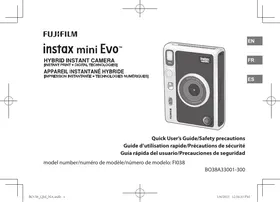
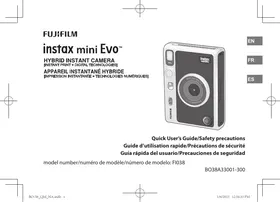
Quick User's Guide/Safety precautions
Before using the camera, check the following.
Supplied Accessories
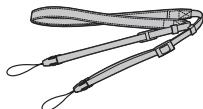
Shoulder strap (1)
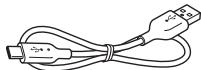
- USB cable for charging (1)
(YR059291QAD0000)
-User's Guide (1)
- Use the strap over your shoulder, not around your neck.
- Make sure the camera strap does not hang over the film ejection slot.
- The battery has not been fully charged at the factory, be sure to charge the battery before using the camera.
This Quick User's Guide provides instructions as to the use of the INSTAX MINI EVO hybrid camera.
For a comprehensive guide of the INSTAX MINI EVO, please access the following web site and download the digital version of the User's Guide (full version).
https://instax.com/minievo/support/manuals/
You can also scan the following QR Code with your Smartphone to download a digital version of the User's Guide (full version).

The text QR Code itself is a registered trademark and wordmark of Denso Wave Incorporated.
Notes on Disposing of the Camera
A built-in lithium ion battery is used for this camera.
When you dispose of the camera, follow your local regulations and dispose of it properly.
Do not attempt to remove the built-in battery. Injury may result.
For proper disposal in the United States at product end-of-life, please contact 1-800-800-3854 Option #1 Help Desk.
EN
Part Names
Front
Rear
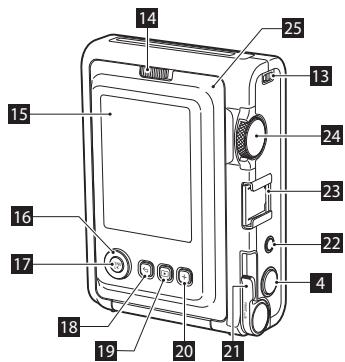
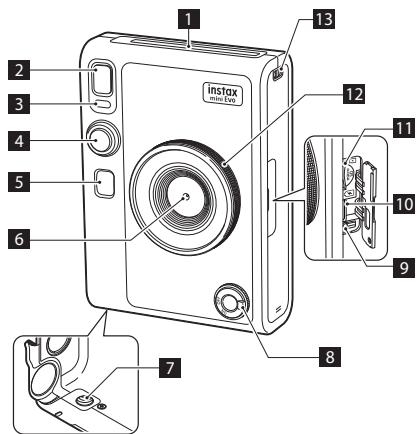
1 Film ejection slot
The exposed INSTAX MINI instant film will be ejected from the film ejection slot during printing.
2 Flash
The flash operates depending on the setting. You can also set the flash to not operate.
3 Self timer lamp/Charging lamp
The self timer lamp/charging lamp blinks when you take a photo with the self-timer. Also, it lights up during charging and turns off when charging is complete.
4 Shutter button
Press the shutter button halfway to focus on the subject. Then press it fully to operate the camera shutter and take a photo. Press the shutter button in playback mode to switch to shooting mode.
Selfie mirror
Use the selfie mirror to check your framing before taking a selfie.
6 Lens
This is the lens used to take photos. Make sure that your fingers do not obstruct the lens during shooting.
7 Tripod hole
You can attach a tripod by using this hole.
8 Power switch
Turn the power switch clockwise to turn on the power. Turn it counter-clockwise to turn off the power.
9 Reset button *1
If the camera is not operating properly, press this button to force the camera to turn off. After pressing the reset button, turn the power switch off and then on again to start the camera. Do not use the reset button while the camera is operating normally. Doing so may cause the photo data to be erased.
10 USB Type-C port
This is the USB port for charging the camera. The USB port cannot be used for data transfer.
11 Micro SD card slot
This is the slot for a micro SD card.
Lens dial
Turn the lens dial to switch between 10 different lens effects.
13 Strap hook
Pass the cord on the strap through the strap hook to attach the strap.
14 Film door lock
Slide the film door lock to the right to unlock the film door so that it can open.
EN
15 LCD Screen
You can preview the image before printing and shooting and view the image after it has been captured on the LCD Screen. Also, menus are displayed on the LCD Screen based on the user operation.
16 Select buttons (X)
Use the select buttons to select menu items and to use the functions displayed on the LCD Screen.
17 MENU/OK button
During shooting or playback, press the MENU/OK button to display the menu on the LCD Screen. This button is also used to confirm menu items.
18 (Back) button
Press the (Back) button to return to the previous screen from the menu currently displayed on the LCD Screen. This button is also used to cancel photo printing.
19 Playback) button
Press the (Playback) button to display the photos you have taken on the LCD Screen. When in shooting mode, this button is also used to switch to playback mode.
20 + (Function) button
Press the + (Function) button in shooting mode to check the current effect on the LCD Screen. You can also save and recall effects.
21 Print lever
Print the image displayed on the LCD Screen.
22 Effect reset button
Return both the lens and film effects to normal.
23 Accessory shoe
This is the mounting connector for camera accessories.
24 Film dial
Turn the film dial to switch between 10 different film effects.
25 Film door
When loading/unloading a film pack, slide the film door lock to unlock the film door and lift it open. Do not open the film door until you have used up the film.
About This Camera
Main Features
- Provides unsurpassed INSTAX image quality in the history of INSTAX.*
- Provides up to 100 different expressions with 10 lens effects and 10 film effects.
- You can take photos while looking at the LCD Screen and save them to either the main unit or a micro SD card (sold separately).
- Select stored photos to print using the INSTAX Print feature.
- Luxurious, classic design.
- Analog-like operability with lens dial, film dial, and print lever.
- Features a selfie mirror for easy selfies.
Functions Available with the Free INSTAX MINI EVO App
Download of the Free INSTAX MINI EVO App is required for the below features. For instructions on how to download the App, please see the product box.
- Direct print
Transfer a photo from your Smartphone to the camera, and print it with the INSTAX Print feature. Before transferring the photo, you can use the INSTAX MINI EVO App to rotate it, enlarge it or reduce its size.
Remote shooting function
Control the camera with your Smartphone for remote shooting of photos.
Print photo save function
You can choose photos that you printed with the camera to send to the INSTAX MINI EVO App. You can add INSTAX frames to your photos and save them on your Smartphone.
Charging the Battery
Turn off the camera before charging the battery. Battery will not charge if the camera is powered on.
EN
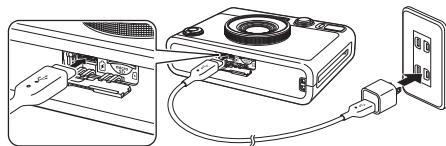
Connect the camera and a USB AC adapter supplied with your Smartphone using the supplied USB cable, then connect the USB AC adapter to an indoor power outlet.
- Charging time is approximately X to X hours.
Charging status indication
| While charging | Self timer lamp lights up. |
| Charging finished | Self timer lamp goes off. |
| Charging error | Self timer lamp flashes. |
EN
Power on/off
Turn the power switch to the right to turn on the power.
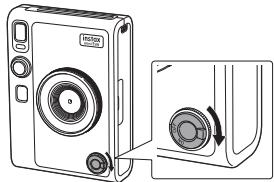
Turn the power switch to the left to turn off the power.
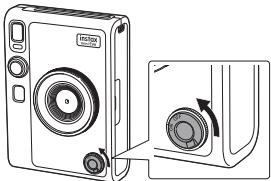
- If you do not operate the camera for a certain period of time, it will automatically turn off. If the camera turns off automatically, turn the power switch off and then on again to turn it on.
Printing a Photo
1 Press the (Playback) button.
2 Press or 出 on the Select button to select the photo you want to print.
3 You can add a frame, enlarge the photo or make other edits before printing.
4 Turn the print lever.

Use only INSTAX MINI instant print film. After the sound of the film ejecting stops, hold the tip of the ejected film and remove it from the camera.
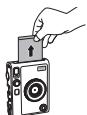
- Be careful not to let your fingers or the camera strap get caught in the film ejection slot.
Loading/Unloading the INSTAX MINI Instant Film Pack
Loading the Film Pack
1 Slide the film door lock and open the film door.
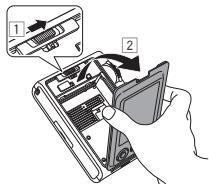
2 Insert film pack by aligning the yellow marks.
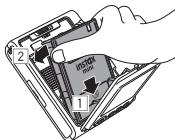
3 Close the film door.
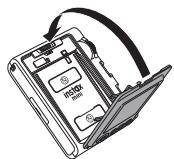
4 Remove the black film cover that is automatically rejected.
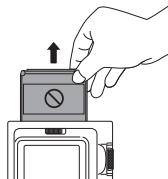
EN
Unloading a Used Film Pack
1 Slide the film door lock and open the film door.
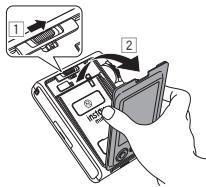
2 Grasp the rectangular holes on the film pack, then pull film pack out from the camera.
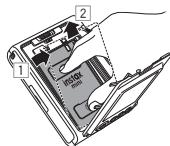
EN
IMPORTANT SAFETY NOTICE
This product has been designed with safety in mind, and to provide safe operation when handled correctly and in accordance with the instructions in this User's Guide. It is important that both the product and the INSTAX MINI instant film pack are handled properly and used only to print photos as instructed in this User's Guide and in the INSTAX MINI instant film pack instructions. For your ease and safety, strictly follow the instructions in this User's Guide. Keep this User's Guide in a safe, convenient place for easy future reference as needed.
WARNING
This symbol indicates danger, which could result in product damage, injury or death. Follow the instructions indicated to avoid damage to the camera or injury.
WARNING
If one of the following cases occur, immediately unplug the USB Type-C cable, turn the camera off and refrain from any further use of the camera:
- The camera becomes hot, emits smoke, has a burnt smell, or otherwise seems abnormal.
- The camera is dropped into water, or foreign objects like water, sand, dirt or metal get inside the camera.
The camera has a built-in lithium battery. Do not subject it to heat, expose it to an open flame, drop it, or otherwise apply force or impact to it. Doing so may cause the camera to explode, resulting in injury.
WARNING
Never attempt to take this product apart. You may be injured.
All repairs should be handled solely by FUJIFILM. Injury may result from attempts to self-assess or repair this camera.
If this product is dropped or damaged so that the outer case becomes cracked or open, do not touch it. Contact FUJIFILM.
Do not touch any parts which are inside the film door. You may be injured.
Never get this product wet or handle it with wet hands. Doing so may result in electric shock and injury.
Promptly unplug the USB Type-C cable once battery is fully charged.
Keep out of the reach of small children. This product could cause injury in the hands of a child.
Do not cover or wrap the camera or the AC power adapter in a cloth or blanket, or otherwise place the camera in the sun or an environment where heat may build up. This could distort the casing or cause a fire.
C E
The "CE" mark certifies that this product satisfies the requirements of the EU (European Union) regarding safety, public health, environment and consumer protection. ("CE" is the abbreviation of Conformité Européenne.)
Common Sense Camera Care
Handling the Camera and Battery
- CAUTION - Do not expose to excessive heat such as sunshine, fire or the like during use, storage, or transportation. An explosion or leakage of flammable liquid or gas could result. Also, ensure proper disposal in accordance with the instructions below.
- CAUTION - Do not dispose of the lithium battery into fire or a hot oven, or mechanically crush or cut a battery, as an explosion could result.
- CAUTION - Do not subject to extremely low air pressure at high altitude. An explosion or the leakage of flammable liquid or gas could result.
Camera Care
- Do not open the film door until you have used up the film. Doing so will expose the remaining film, causing the remainder of the film pack to become unusable.
- Your camera is a precision instrument. Do not get it wet or drop it. Also, do not expose it to sand, dust or dirt.
- Do not use a strap made for cellular phones or other similar electronic products. These straps are usually too weak to hold your camera securely. For safety, use only straps designed for your camera, and use only as specifically intended and instructed.
- Do not use cleaning products or solvents such as those with bleach or alcohol to remove dirt.
- In hot weather, do not leave your camera in hot places such as in a car or on the beach. Do not leave it in damp places or places where weather exposure could result.
- Moth repellent gas such as naphthalene may affect your camera and prints. Store your camera and photo prints
in a place where exposure to harmful cleaning or other household elements will be avoided.
- Note that the temperature range within which your camera should be used is 41^ to 104^ ( 5^ to 40^ ).
- Take great care to ensure that your prints do not violate copyright, image rights, privacy or other personal rights and do not offend public decency. Actions that violate the rights of others, are contrary to public decency or constitute a nuisance may be punishable by law or otherwise legally actionable.
■ Handling the LCD Screen
As the LCD Screen can be easily damaged, do not scratch the surface with a solid material. To avoid the LCD Screen getting damaged, we recommend you attach a protective, clear plastic sheet (commercially available) on the LCD Screen.
Charging the Battery
The battery is not charged at shipment. Charge the battery completely before use.
Charge the battery using the supplied USB Type-C cable and the USB Adapter from your Smartphone. Charging times will increase at ambient temperatures below 50^ (10^) or above 95^ (35^) . Do not attempt to charge the battery in environments with temperatures above 104^ (40^) ; at temperatures below 41^ (5^) , the battery will not charge.
Battery Life
At normal temperatures, the battery can be recharged about 300 times. A noticeable decrease in the length of time the battery will hold a charge indicates that it has reached the end of its service life.
Caution: Handling the Battery
The battery and camera body may become slightly warm to the touch after extended use. This is normal.
EN
- Certification marks acquired by the camera are located inside the film chamber.
Cautions During Printing
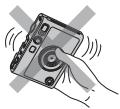
Do not shake the camera while printing.
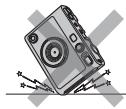
Do not drop the camera while printing.
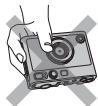
Do not cover the film ejection slot while printing.
INSTAX MINI Instant Film and Print Care
This camera uses INSTAX MINI instant print film, sold separately. See FUJIFILM INSTAX MINI instant film pack use instructions. Follow all instructions for safe and proper use.
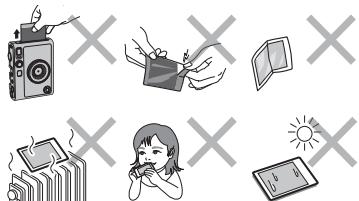
- Keep the film in a cool place. Do not leave the film in a place where the temperature is extremely high (e.g., in a closed car) for many hours.
- Do not puncture, tear, or cut INSTAX MINI instant film. If film becomes damaged, do not use.
- When you load a film pack, use the film as soon as possible.
- If the film has been kept in a place where the temperature is extremely high or low, bring it to room temperature before loading or starting to print photos.
- Be sure to use the film before the expiration or "Use Before" date.
- Avoid airport checked luggage inspection and other strong X-ray illumination. Such exposure may cause fogging and otherwise affect your unused film. Carrying your camera and film onto an aircraft in your carry-on
luggage is recommended. (Check with each airport for more information.)
- Avoid strong light, and keep the developed prints in a cool and dry place.
- Do not puncture or cut the film as it contains a small amount of caustic paste (high alkaline). Never let children or animals put the film into their mouth. Also pay attention so that the paste does not come into contact with skin or clothes.
- If the paste inside the film comes into contact with skin or clothes, immediately wash off with plenty of water. If the paste comes into contact with the eyes or mouth, immediately wash the area with plenty of water and contact a doctor. Note that the alkaline inside the film remains active for about 10 minutes after the photo has been printed.
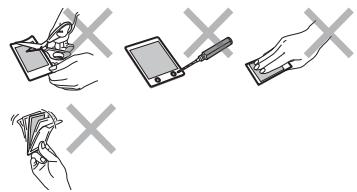
Cautions on Handling the Film and Prints
See below for film activities to be avoided.
Bluetooth® Device Cautions
IMPORTANT: Read the following notices before using this camera's built-in Bluetooth transmitter.
Use only as part of a Bluetooth network.
FULFILM Corporation and its affiliates do not accept liability for damages resulting from unauthorized use or misuse. Do not use in applications requiring a high degree of reliability, for example in medical devices or other systems that may directly or indirectly impact human life. When using the device in computer and other systems that demand a greater degree of reliability than Bluetooth networks, be sure to take all necessary precautions to ensure safety and prevent malfunction.
Use only in the country in which the device was purchased.
This device conforms to regulations governing Bluetooth devices in the country in which it was purchased. Observe all location regulations when using the device. FUJIFILM Corporation and its affiliates do not accept liability for problems arising from use in other jurisdictions.
Wireless data (images) may be intercepted by third parties.
FUJILM Corporation and its affiliates are not responsible for intercepted transmissions, or for unintended image uses.
Do not use the device in locations subject to magnetic fields, static electricity, or radio interference.
Do not use the transmitter in the vicinity of microwave ovens or in other locations subject to magnetic fields, static electricity, or radio interference that may prevent reception of wireless signals. Mutual interference may occur when the transmitter is used in the vicinity of other wireless devices operating in the 2.4 GHz band.
The Bluetooth transmitter operates in the 2.4 GHz band. The maximum radio-frequency power is X.XX mW.
This device operates on the same frequency as commercial, educational, and medical devices and wireless transmitters.
It also operates on the same frequency as licensed transmitters and special unlicensed low-voltage transmitters used in radio-frequency identification tracking systems for assembly lines and in other similar applications.
To prevent interference with other devices operating on the same frequency, observe the following precautions.
Confirm that the radio-frequency identification transmitter is not in operation before using this device. If you notice that this device causes interference in low-voltage radio-frequency identification tracing systems, contact a FUJIFILM representative.
The following may be punishable by law:
- Disassembly or modification of this device.
- Removal of device certification labels.
Trademark Information
The Bluetooth® word mark and logos are registered trademarks owned by the Bluetooth SIG, Inc., and any use of such marks by FUJIFILM is under license.
For customers in the USA:
FCC ID:W2Z-03000012
FCC Statement
This device complies with part 15 of the FCC Rules. Operation is subject to the following two conditions: (1) This device may not cause harmful interference, and (2) this device must accept any interference received, including interference that may cause undesired operation.
For more information, access the website below. https://www.fujifilm.com/products/instant/photo/camera/ instax_small_evo/
CAUTION
This equipment has been tested and found to comply with the limits for a Class B digital device, pursuant to Part 15 of the FCC Rules. These limits are designed to provide reasonable protection against harmful interference in a residential installation. This equipment generates, uses, and can radiate radio frequency energy and, if not installed and used in accordance with the instructions, may cause harmful interference to radio communications. However, there is no guarantee that interference will not occur in a particular installation. If this equipment does cause harmful interference to radio or television, which can be determined by turning the equipment off and on, the user is encouraged to try to correct the interference by one or more of the following measures:
- Reorient or relocate the receiving antenna.
-
Increase the separation between the equipment and receiver.
-
Connect the equipment into an outlet on a circuit different from that to which the receiver is connected.
- Consult the dealer or an experienced radio/TV technician for help. Changes or modifications not expressly approved by FUJIFILM responsible for compliance could void the user's authority to operate the equipment.
This transmitter must not be co-located or operated in conjunction with any other antenna or transmitter.
The available scientific evidence does not show that any health problems are associated with using low power wireless devices. There is no proof, however, that these low power wireless devices are absolutely safe. Low power wireless devices emit low levels of radio frequency energy (RF) in the microwave range while being used. Whereas high levels of RF can produce health effects (by heating tissue), exposure of low-level RF that does not produce heating effects causes no known adverse health effects. Many studies of low-level RF exposures have not found any biological effects. Some studies have suggested that some biological effects might occur, but such findings have not been confirmed by additional research. This device has been tested and found to comply with FCC radiation exposure limits set forth for an uncontrolled environment and meets the FCC radio frequency (RF) Exposure Guidelines.
Notes on the Grant
To comply with Part 15 of the FCC Rules, this product must be used with a FUJIFILM-specified USB Type-C cable.
For customers in Canada :
IC:7736B-03000011
CANICES-003(B)/NMB-003 (B)
This device contains licence-exempt transmitter(s)/receiver(s) that comply with Innovation, Science and Economic
Development Canada's licence-exempt RSS(s). Operation is subject to the following two conditions:
- This device may not cause interference.
- This device must accept any interference, including interference that may cause undesired operation of the device. The available scientific evidence does not show that any health problems are associated with using low power wireless devices. There is no proof, however, that these low power wireless devices are absolutely safe. Low power wireless devices emit low levels of radio frequency energy (RF) in the microwave range while being used. Whereas high levels of RF can produce health effects (by heating tissue), exposure of low-level RF that does not produce heating effects causes no known adverse health effects. Many studies of low-level RF exposures have not found any biological effects. Some studies have suggested that some biological effects might occur, but such findings have not been confirmed by additional research. This device has been tested and found to comply with ISED radiation exposure limits set forth for an uncontrolled environment and meets RSS-102 of the ISED radio frequency (RF) exposure rules.
Proper Disposal

Disposal of Electric and Electronic Equipment in Private Households
Disposal of used Electrical & Electronic Equipment
(Applicable in the European Union and other European countries with separate collection systems)
This symbol on the product, or in the manual and in the limited product warranty, and/or on its packaging indicates that this product shall not be treated as household waste.
Instead it should be taken to an applicable collection point for the recycling of electrical and electronic equipment.
By ensuring this product is disposed of correctly, you will help prevent potential negative consequences to the environment and human health, which could otherwise be caused by inappropriate waste handling of this product.
The recycling of materials may help to conserve natural resources. For more detailed information about recycling of this product, please contact your local city recycling office, your household waste disposal service or the authorized FUJIFILM dealer from which you purchased the product or contact FUJIFILM at the address below.
For proper disposal in the United States at product end-of-life, please contact 1-800-800-3854 Option #1 Help Desk. In Countries outside of the US: If you wish to discard this product, please contact your local authorities and ask for the correct way of disposal.
Information for FUJIFILM in the United States
FUJIFILM North America Corp.
200 Summit Lake Drive
Valhalla, New York 10595, USA
Information for FUJIFILM in Canada
FUJIFILM Canada Inc.
600 Suffolk Court, Mississauga, Ontario L5R 4G4, Canada
Avant l'utilisation
200 Summit Lake Drive
600 Suffolk Court, Mississauga, Ontario L5R 4G4, Canada
Antes del uso
Antes de usar la CAMERA, verifie lo suiviente.
https://instax.com/minie Evo/support/manuals/
Tambienouldescanearlesquigiente cuestionoQRcon su
telefonoligentileparadescargaruna versiondigitalde la
Guia del usuario (versioncomplete).

El datoístico QR en si mesmo es una MARCA comercial registrada y una MARCA registrada de Denso Wave Incorporated.
200 Summit Lake Drive
600 Suffolk Court, Mississauga, Ontario L5R 4G4, Canada
[en] If you have any inquiries about this product, please contact a FUJIFILM authorized Dealer, or access the website below.
[1] Si vous avez des questions sur ce produit, veuillez vous adresser à un distributeur FUJIFILM autorisé, ou consultez le site web ci-dessous.
[es] Si tiene alguna pregunta sobre este producto, consulte la informacion en la tarjeta de service adjunto o visite el siguientes situo web.
https://global.fujifilm.com/