AESEB2 - Headphones Klein Tools - Free user manual and instructions
Find the device manual for free AESEB2 Klein Tools in PDF.



User questions about AESEB2 Klein Tools
0 question about this device. Answer the ones you know or ask your own.
Ask a new question about this device
Download the instructions for your Headphones in PDF format for free! Find your manual AESEB2 - Klein Tools and take your electronic device back in hand. On this page are published all the documents necessary for the use of your device. AESEB2 by Klein Tools.
USER MANUAL AESEB2 Klein Tools
natural_image
Two black KLEIN earbuds with metallic clamps, shown from different angles (no text or symbols visible)GENERAL SPECIFICATIONS
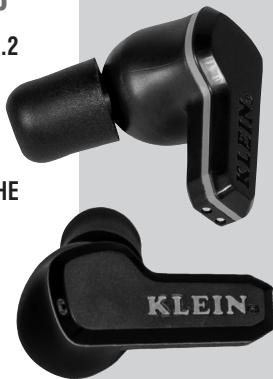
Klein Tools AESEB2 ELITE Jobsite Bluetooth Earbuds combine hearing protection, up to 25NRR using the included memory-foam tips, with an immersive audio experience featuring rich bass, clear mids and crisp treble.
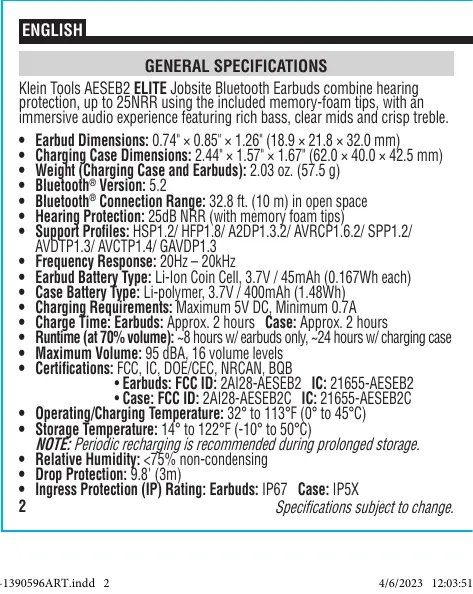
- Earbud Dimensions: 0.74" × 0.85" × 1.26" (18.9 × 21.8 × 32.0 mm)
- Charging Case Dimensions: 2.44" × 1.57" × 1.67" (62.0 × 40.0 × 42.5 mm)
• Weight (Charging Case and Earbuds): 2.03 oz. (57.5 g) - Bluetooth® Version: 5.2
- Bluetooth® Connection Range: 32.8 ft. (10 m) in open space
• Hearing Protection: 25dB NRR (with memory foam tips) - Support Profiles: HSP1.2/ HFP1.8/ A2DP1.3.2/ AVRCP1.6.2/ SPP1.2/ AVDTP1.3/ AVCTP1.4/ GAVDP1.3
• Frequency Response: 20Hz – 20kHz
• Earbud Battery Type: Li-Ion Coin Cell, 3.7V / 45mAh (0.167Wh each)
• Case Battery Type: Li-polymer, 3.7V / 400mAh (1.48Wh)
• Charging Réquirements: Maximum 5V DC, Minimum 0.7A
• Charge Time: Earbuds: Approx. 2 hours Case: Approx. 2 hours
• Runtime (at 70% volume): \~8 hours w/ earbuds only, \~24 hours w/ charging case
• Maximum Volume: 95 dBA, 16 volume levels
• Certifications: FCC, IC, DOE/CEC, NRCAN, BQB
• Earbuds: FCC ID: 2AI28-AESEB2 IC: 21655-AESEB2
• Case: FCC ID: 2AI28-AESEB2C IC: 21655-AESEB2C
• Operating/Charging Temperature: 32° to 113°F (0° to 45°C)
• Storage Temperature: 14° to 122°F (-10° to 50°C)
NOTE: Periodic recharging is recommended during prolonged storage.
• Relative Humidity: <75% non-condensing - Drop Protection: 9.8' (3m)
- Ingress Protection (IP) Rating: Earbuds: IP67 Case: IP5X
2
Specifications subject to change.
CONTENTS
• AESEB2 ELITE Bluetooth® Jobsite Earbuds
- Charging Case
- 2' (61 cm) USB-A to USB-C Cable
• 3 Sets of Memory Foam Tips (for hearing protection)
• 3 Sets of Silicone Tips (for casual listening)
• This instruction manual
SYMBOLS ON PRODUCT

Warning or Caution
Risk of Electrical Shock
Read Instructions
The Bluetooth ^® word mark and logos are registered trademarks owned by Bluetooth SIG, Inc. and any use of such marks by Klein Tools, Inc. is under license.
! WARNINGS
Read, understand, and follow these instructions to ensure safe operation. Keep these instructions for future reference.
These hearing protectors help reduce exposure to hazardous noise and other loud sounds. Misuse or failure to wear hearing protection at all times that you are exposed to noise may result in hearing loss or injury.
- Silicone tips on earbuds DO NOT provide hearing protection.
ONLY memory foam tips on earbuds provide hearing protection. - Use only appropriately sized Klein Tools memory foam tips for hearing protection in loud-noise environments. Improper fit of this device will reduce its effectiveness in attenuating noise. Consult the OPERATING INSTRUCTIONS section for proper fit.
- Prolonged exposure to high volumes can cause hearing damage. It is the responsibility of the user to set the audio input level to the recommended volume. See table on next page for noise exposure levels.
- DO NOT use this product in situations that require special attention: using noise reduction equipment and listening to audio can reduce awareness of the surrounding environment.
Failure to observe these warnings can result in risk of fire or electric shock.
- DO NOT use the product if it is damaged or modified. Damaged or modified batteries may exhibit unpredictable behavior resulting in fire, explosion, or injury.
- Risk of fire and burns. DO NOT open, crush, heat above specified maximum temperature or incinerate. Prolonged exposure to direct sunlight can result in elevated temperatures.
4

WARNINGS
• DO NOT immerse in water or other liquids.
- Properly seal the charging port cover to achieve specified water & foreign object ingress protection. Keep seal free of dirt, oil, sand, or other material that interferes with proper sealing. Failure to do so can result in risk of fire or electric shock.
- DO NOT open the charging port cover if wet or in a wet environment. Thoroughly dry the unit and the seal around water-resistant cover completely before opening water resistant cover
- DO NOT subject to impacts or drops greater than 9.8 ft. (3 m). Drops larger than this may not show signs of damage, but internal components may have been compromised. It is advisable to replace the unit if any such severe events occur.
- DO NOT attempt to repair the product or charging cable. There are no user-serviceable parts.
NOISE EXPOSURE VALUES
| EXPOSURE TIME | EXPOSURE LEVEL PER NIOSH RECOMMENDED EXPOSURE LIMIT | EXPOSURE LEVEL PER OSHA PERMISSIBLE EXPOSURE LIMIT |
| 8 hours | 85 dBA | 90 dBA |
| 4 hours | 88 dBA | 95 dBA |
| 2 hours | 91 dBA | 100 dBA |
| 1 hour | 94 dBA | 105 dBA |
| 30 minutes | 97 dBA | 110 dBA |
| 15 minutes | 100 dBA | 115 dBA |
See www.cdc.gov/niosh/topics/noise/reducenoiseexposure for more details.
FEATURE DETAILS
6
NOTE: There are no user-serviceable parts inside.
FEATURE DETAILS
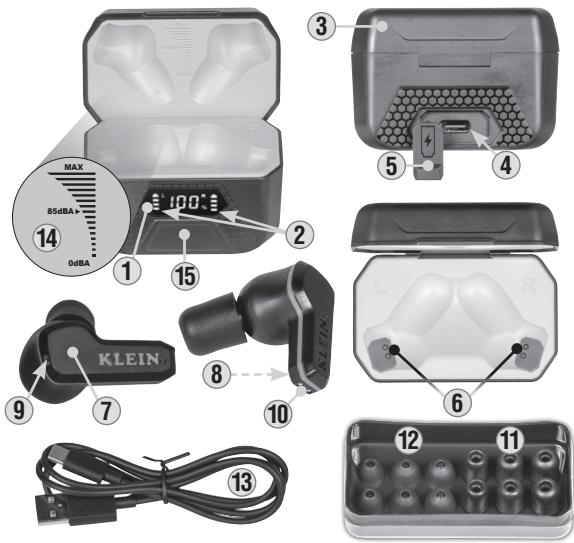
① Charging Case LED Screen
② "L" & "R" Earbud Charging Indicators
③ Charging Case Cover
④ USB-C Charging Port
⑤ USB-C Port Cover
⑥ Charging Case Contacts
⑦ Capacitive Touch Area
⑧ Earbud Microphones
⑨ Dual-Color LEDs
⑩ Earbuds Charging Contacts
⑪ Memory Foam Tips (3 sets)*
12 Silicone Tips (3 sets)*
⑬USB-A to USB-C Charging Cable
14 Recommended Volume Instructions (printed inside lid)
15 Case Touch Area
*NOTE: Silicone Tips 12 are intended for casual listening only. When hearing protection is required, use the Memory Foam Tips 11.
NOISE REDUCTION RATING (NRR)
The NRR for the AESEB2 ELITE Bluetooth® Jobsite Earbuds is 25dB. It is tested and in accordance with ANSI S3.19-1974. To ensure adequate hearing protection, the provided memory foam tips must be used with the Bluetooth® Jobsite Earbuds.
ANSI S3.19-1974 TESTING
| Frequency (Hz) | 125 | 250 | 500 | 1000 | 2000 | 3150 | 4000 | 6300 | 8000 | NRR |
| Mean Attenuation | 30.2 | 28.6 | 34.0 | 36.7 | 35.7 | 39.2 | 38.0 | 40.6 | 42.6 | 25 |
| Standard Deviation | 5.2 | 4.0 | 6.0 | 4.9 | 3.8 | 3.0 | 2.3 | 2.9 | 3.0 |
The level of noise entering a person's ear when the hearing protector is worn as directed, is closely approximated by the difference between the A-Weighted environmental noise level and the Noise Reduction Rating (NRR).
EXAMPLE:
- The environmental noise level as measured at the ear is 93dB(A).
- The NRR is 25dB.
- The level of noise entering the ear is approximately equal to 68dB(A).
NOISE REDUCTION RATING (NRR)
⚠️CAUTION: For noise environments dominated by frequencies below 500 Hz, the C-weighted environmental noise level should be used.
NOTE: Although hearing protectors can be recommended for protection against the harmful effects of impulsive noise, the Noise Reduction Rating (NRR) is based on the attenuation of continuous noise and may not be an accurate indicator of the protection attainable against impulsive noise such as gunfire. The Environmental Protection Agency uses the Noise Reduction Rating (NRR) as a rating of a hearing protector's noise-reducing performance. Klein Tools cannot guarantee the suitability of the NRR as a method of rating protection as protection relies on the level and exposure of sound and how well a product fits.
AUDIO INPUT LEVEL
The audio level in the hearing protector is dependent on the audio input level. To prevent harmful noise levels, the AESEB2 ELITE Bluetooth® Earbuds automatically default to 85dB(A) when connected to music device. If the hearing protector is connected to a music device with a high audio output level, it is the user's responsibility to set the audio input level to safe level. See table in WARNINGS section for noise exposure levels.
OPERATING INSTRUCTIONS
CHARGING THE CASE
Open the USB-C Charging Port Cover ⑤ and insert the USB-C end of the included charging cable ⑬ into the USB-C Port ④ of the charging case. Connect the USB-A end of the cable into an appropriate charging source (not included, see GENERAL SPECIFICATIONS section).
While the case is charging (0 to 100%) the LED Screen ① will indicate the charge status in a numerical fashion (e.g. 35%). The LED Screen ① can be activated by touching and holding the Capacitive Touch Area ⑮ for one second.
Provided the charging case has been charged, open the charging case cover and place the earbuds in their respective slots. The "R" and "L" Earbud Charging Indicators ② on the LED Screen ① will blink, indicating the earbuds are charging.
OPERATING INSTRUCTIONS
natural_image
Illustration of a hand holding a small object with a black triangular shape, labeled 'FIG. A' (no text or symbols on the object itself)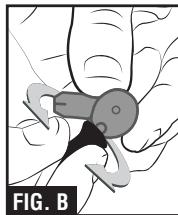
natural_image
Illustration of a hand holding a small mechanical component, possibly a tool or clamp, with no visible text or symbols.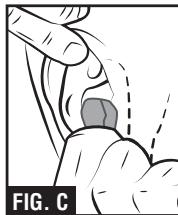
natural_image
Medical illustration showing a hand performing a laparoscopic procedure with a highlighted area (no text or symbols)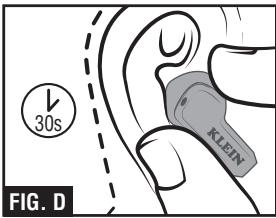
text_image
30s KLEIN FIG. D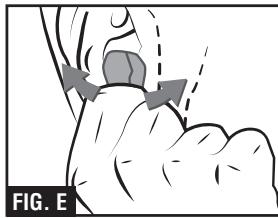
natural_image
Illustration of a hand holding a small object with directional arrows indicating movement or force (no text or symbols)OPERATING INSTRUCTIONS
USING MEMORY FOAM TIPS ⑪ FOR HEARING PROTECTION
⚠ WARNING: Inspect before each use. Damage to the memory foam tip can reduce noise reduction performance.
INSERTING EARBUDS INTO EARS
The AESEB2 comes with three silicone and three memory-foam eartip sets.
The silicone eartips are best suited for casual or leisure use.
The memory foam eartips must be worn for hearing protection (NRR):
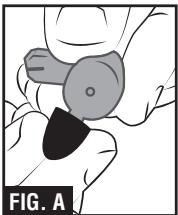
- Choose the eartip size (S/M/L) that best fits your ear canal and install onto the earbuds (FIG. A). Inspect each tip for dirt and damage before use.
- With clean hands, roll and compress the memory foam tips along the stem of the earbud (FIG. B).
- Reach over your head with free hand to pull your ear up and back and insert the memory foam tip portion of the earbud as deep as possible (FIG. C).
- Hold the earbud and wait 30 seconds, until the memory foam tips are fully expanded (FIG. D).
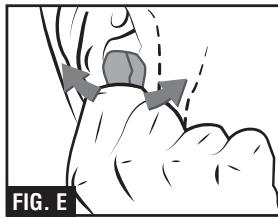
- Rotate the earbud if necessary to make sure the earbuds rest firmly and securely inside the inner ear (FIG. E).
- Repeat process for other earbud.
12
OPERATING INSTRUCTIONS
ON: If the earbuds are inside the charging case, opening the Charging Case Cover ③, will automatically power on the earbuds. If the earbuds are not inside the case, touch and hold the Capacitive Touch Area ⑦ on either earbud for 1.5 seconds.
OFF: Placing both earbuds into the charging case and closing the cover ③ will automatically power off the earbuds. Alternatively, touch and hold the Capacitive Touch Area ⑦ on either earbud for 1.5 seconds.
PAIRING
After successfully powering on, the earbuds will automatically enter Bluetooth® pairing mode. "Pairing" voice prompt will be heard and the Dual-Color LEDs on the earbuds ⑨ will alternate between flashing Red and Blue every second. To pair with your device:
- Ensure that Bluetooth is enabled on your device and it has discovered "Klein ELITE Buds" in the pairing list.
- Select “Klein ELITE Buds” and upon successful connection, “Connected” voice prompt will be heard, and the Dual-Color LEDs on the earbuds ⑨ will turn solid blue for three seconds, then turn off.
NOTES: 1) In the event auto pairing fails, power the earbuds off and on again. 2) The earbuds will automatically attempt to connect to the last paired wireless device when turned on, but are ready to pair with any compatible device within two minutes of powering on if the last paired device is not detected.
AUTO POWER-OFF
If no Bluetooth device is connected and pairing has failed, the earbuds will automatically power off after 10 minutes.
OPERATING INSTRUCTIONS
Play/Pause: Single tap the Capacitive Touch Area ⑦ on either earbud.
Next Track: Double tap the Capacitive Touch Area ⑦ on right earbud.
Previous Track: Double tap the Capacitive Touch Area ⑦ on left earbud.
Volume Up: Touch and hold the Capacitive Touch Area ⑦ on right earbud.
Volume Down: Touch and hold the Capacitive Touch Area ⑦ on left earbud.
NOTE: Volume can only be increased or decreased when music is playing.
CONTROLS DURING PHONE CALLS
Answer Call: Single-tap the Capacitive Touch Area ⑦ on either earbud.
End Call: Touch and hold the Capacitive Touch Area ⑦ on either earbud for one second until call is disconnected.
Reject Call: Touch and hold the Capacitive Touch Area ⑦ on either earbud for one second.
End Current Call and Answer Incoming Call: Single-tap the Capacitive Touch Area ⑦ on either earbud.
Hold Current Call and Answer Incoming Call: Double-tap the Capacitive Touch Area ⑦ on either earbud.
Switch Between Two Active Calls: Double-tap the Capacitive Touch Area ⑦ on either earbud.
End Current Call and Other Call on Hold: Touch and hold the Capacitive Touch Area ⑦ on either earbud for one second to end new call, then touch and hold again to end initial call.
Cancel Outgoing Call: Single-tap the Capacitive Touch Area ⑦ on either earbud.
NOTE: In-call volume is adjustable on phone only, not via earbud controls. 14
OPERATING INSTRUCTIONS
OTHER FUNCTIONS
Enter Voice Assistant: Triple-tap the Capacitive Touch Area ⑦ on either earbud. Exit Voice Assistant: Single-tap the Capacitive Touch Area ⑦ on either earbud.
COMPLIANCE
FCC COMPLIANCE
This device complies with part 15 of the FCC RULES. Operation is subject to the following two conditions: (1) this device may not cause harmful interference, and (2) this device must accept any interference received, including interference that may cause undesired operation.
NOTE: Changes or modifications not expressly approved by the party responsible for compliance could void the user's authority to operate the equipment.
This equipment has been tested and found to comply with the limits for a Class B digital device, pursuant to part 15 of the FCC Rules. These limits are designed to provide reasonable protection against harmful interference in a residential installation. This equipment generates, uses and can radiate radio frequency energy and, if not installed and used in accordance with the instructions, may cause harmful interference to radio communications. However, there is no guarantee that interference will not occur in a particular installation. If this equipment does cause harmful interference to radio or television reception, which can be determined by turning the equipment off and on, the user is encouraged to try to correct the interference by one or more of the following measures:
COMPLIANCE
- Reorient or relocate the receiving antenna.
- Increase the separation between the equipment and receiver.
- Connect the equipment into an outlet on a circuit different from that to which the receiver is connected.
- Consult the dealer or an experienced radio/TV technician for help.
FCC RF EXPOSURE STATEMENTS:
This equipment complies with FCC radiation exposure limits set forth for an uncontrolled environment and meets the FCC RF Exposure Guidelines. This device must not be co-located or operated in conjunction with any other antenna or transmitter.
IC COMPLIANCE
This device contains license-exempt transmitter(s)/receiver(s) that comply with Innovation, Science and Economic Development Canada's license-exempt RSS(s). Operation is subject to the following two conditions: (1) This device may not cause harmful interference, and (2) This device must accept any interference received, including interference that may cause undesired operation of the device.
This device complies with RSS-247 of Industry Canada. Operation is subject to the condition that this device does not cause harmful interference. This Class B digital apparatus complies with Canadian ICES-003.
IC RADIATION EXPOSURE STATEMENT:
The equipment complies with SAR limits set forth for an uncontrolled environment and meets the RSS-102 of the IC RF Exposure Rules. This transmitter must not be co-located or operating in conjunction with any other antenna or transmitter.
MAINTENANCE
CLEANING: Be sure earbuds are turned off and case is unplugged, and wipe with a clean, dry lint-free cloth. Do not use abrasive cleaners or solvents.
STORAGE: If the earbuds are to be left unused for an extended period of time, charge before storing, and recharge periodically during storage, to maintain battery's charging capacity.
WARRANTY
Do not place equipment and its accessories in the trash. Items must be properly disposed of in accordance with local regulations. Please see www.epa.gov/recycle for additional information.
CUSTOMER SERVICE
KLEIN TOOLS, INC.
450 Bond Street Lincolnshire, IL 60069 1-800-553-4676
customerservice@kleintools.com www.kleintools.com
NOTES
18
text_image
KLEIN EST 1857 TOOLSELITE
natural_image
Two black KLEIN earbuds with charging case, shown from different angles (no text or symbols visible)natural_image
Illustration of a hand holding a small object with a black triangular shape, labeled 'FIG. A' (no text or symbols on the object itself)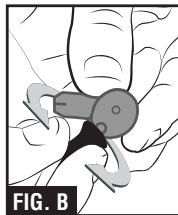
natural_image
Illustration of a hand holding a small mechanical device with no visible text or symbols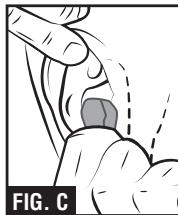
natural_image
Medical illustration showing a hand performing a laparoscopic procedure (no text or symbols present)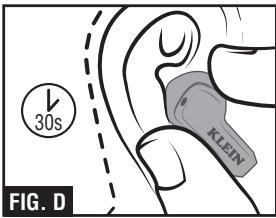
text_image
30s KLEIN FIG. D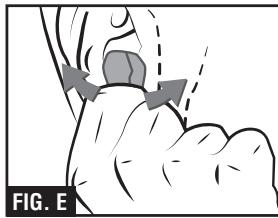
natural_image
Illustration of a hand holding a small object with directional arrows indicating movement or force (no text or symbols)natural_image
Two black KLEIN earbuds with visible branding and black plastic caps (no text or symbols on the product itself)KLEIN TOOLS®

text_image
KLEIN EST 1857 TOOLSCARACTÉRISTIQUES GÉNÉRALES
SYMBOLES SUR LE PRODUIT

natural_image
Illustration of a hand holding a small object with a black triangular shape, labeled 'FIG. A' (no text or symbols on the object itself)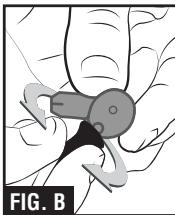
natural_image
Illustration of a hand holding a small mechanical component, possibly a tool or clamp, with no visible text or symbols.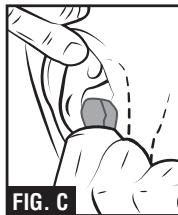
natural_image
Medical illustration showing a hand performing a laparoscopic procedure with a highlighted area (no text or symbols)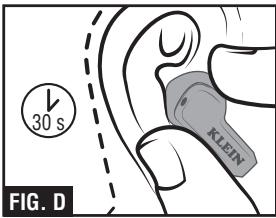
text_image
30 s KLEIN FIG. D