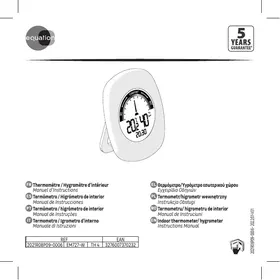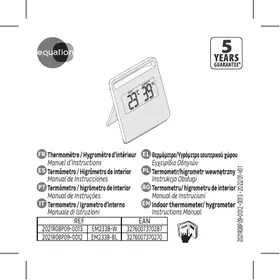
EQUATION TH2 - Thermometer

TH2 - Thermometer EQUATION - Free user manual and instructions

Find the device manual for free TH2 EQUATION in PDF.

📄 28 pages English EN Download 💬 AI Question 11 questions ⚙️ Specs
Notice EQUATION TH2 - page 24
Pick your language and provide your email: we'll send you a specifically translated version.
Product Type Indoor Thermometer/Hygrometer
Brand EQUATION
Model TH2
References EM2338-W (white), EM233B-BL (blue)
EAN Codes 3276007370287 (white), 3276007370270 (blue)
Approximate Dimensions 6 x 6 x 1.5 cm
Approximate Weight 50 g (with battery)
Power Supply 1 LR1130 button cell 1.5 V
Main Functions Temperature measurement (°C/°F) and relative humidity, LCD digital display
Temperature Units Selectable °C or °F via a pointed object (stylus)
Startup Remove the plastic battery tab
Battery Replacement Unscrew the screw with a Phillips screwdriver, replace the LR1130 battery respecting polarity
Maintenance and Cleaning Clean with a soft, dry cloth; do not use solvents
Safety Keep batteries out of reach of children; do not ingest; respect polarity; remove batteries if not used for extended period
Used Batteries Do not dispose of in fire or water; dispose of according to local regulations
Spare Parts and Repairability LR1130 battery (standard); repair not intended by user
General Information Indoor thermometer/hygrometer, easy-to-read display, compact

Frequently Asked Questions - TH2 EQUATION

How to change the temperature unit (ºC / ºF)?
Use a pointed object (like a paperclip or pin) to press the small hole or button located on the back or side of the device. This switches between °C and °F units.
How to replace the battery of the TH2 thermometer?
Unscrew the battery compartment screw using a Phillips screwdriver. Remove the cover, replace the battery with a LR1130 1.5 V respecting polarity (+ and -), then replace the cover and screw it back.
What to do if the screen is blank or the device does not turn on?
Check that the plastic battery tab has been removed. If it has, replace the battery with a new one (LR1130) respecting polarity. Make sure the battery contacts are clean.
The thermometer displays a strange or incorrect humidity value, what to do?
Place the device in a ventilated area, away from direct humidity and heat sources. Let it acclimate for a few minutes. If the problem persists, replace the battery.
Can I use this thermometer outdoors?
This model is an indoor thermometer/hygrometer. It is not designed for outdoor use as it is not protected against weather.
How to clean the TH2 thermometer?
Clean the casing with a soft, dry cloth. Do not use chemicals or solvents. Do not immerse the device in water.
What to do if the battery leaks?
Immediately remove the battery wearing protective gloves. Clean the compartment with a dry cloth. Dispose of the used battery according to local regulations. Replace with a new one checking polarity.
Is the device under warranty?
The legal warranty of conformity applies. Keep your proof of purchase. For any questions, contact EQUATION customer service.
How to dispose of the device at end of life?
Do not throw the device with household waste. Drop it off at a collection point for Waste Electrical and Electronic Equipment (WEEE) or return it to the store when purchasing new equipment.
Can I leave the device on permanently?
Yes, the device operates continuously. To save the battery, you can remove the battery if not using for an extended period.

User questions about TH2 EQUATION

1 question about this device. Answer the ones you know or ask your own.

Ask a new question about this device

The email remains private: it is only used to notify you if someone responds to your question.

How to replace the battery of the TH2 thermometer and respect the polarity?
Frequently Asked Questions - 09/06/2026
Response Notice-Facile

The EQUATION TH2 thermometer uses a LR1130 1.5 V button cell.

Replacement Steps

  • Unscrew the screw using a Phillips screwdriver
  • Remove the cover
  • Replace the LR1130 1.5 V button cell
  • Ensure that the + (positive) symbol on the battery is correctly oriented upwards or towards the positive contact, depending on the internal configuration
  • Re-screw the cover

Important Points

  • The polarity must be respected - the + and - marks must be correctly aligned
  • Do not short-circuit the battery contacts
  • If you do not use the device for an extended period, remove the battery to prevent leaks

Powering On After Replacement

If the thermometer does not turn on after changing the battery, check that the polarity is correct (the + mark should be visible and properly positioned).

Respond (be the first)

Download the instructions for your Thermometer in PDF format for free! Find your manual TH2 - EQUATION and take your electronic device back in hand. On this page are published all the documents necessary for the use of your device. TH2 by EQUATION.

USER MANUAL TH2 EQUATION

  • Unscrew the screw using a Phillips screwdriver and remove the cover.
  • Replace the LR1130 1.5 V button battery. Make sure that the polarity ( + + ) is respected.
  • Replace the cover and screw.

Important!

  • Do not let children play with batteries
  • Do not ingest batteries
    Non-rechargeable batteries are not to be recharged;
    Different types of batteries are not to be mixed;
  • New and used batteries are not to be mixed;
  • Batteries are to be inserted with the correct polarity;
  • Exhausted or leaking batteries are to be removed from the appliance and safely disposed of;
  • If the appliance is to be stored unused for a long period, the batteries should be removed;
  • The supply terminals are not to be short-circuited;
  • The batteries must be removed from the appliance before it is scrapped.

Warning:

EQUATION TH2 - Warning: - 1

  • Danger to life and risk of accidents for infants and children!
  • Keep the batteries out of the reach of children. Do not leave the batteries lying around. There is a risk of children or animals swallowing them.
  • Consult a doctor immediately if a battery is swallowed.
  • Never throw batteries into fire or water

EQUATION TH2 - Warning: - 2

Processing waste of electronic and electric devices at life-cycle end.

EQUATION TH2 - Processing waste of electronic and electric devices at life-cycle end. - 1

This image indicates that this product must not be disposed of with unsorted home trash. A system for disposal and special processing of used electric and electronic devices, mandatory to follow, has been implemented including the right to have vendors retrieve free-of-charge

used appliances upon purchase of new appliances, as well as special collection of such waste by approved organisations. For more information on this, you can contact your store or your town hall. Proper disposal of used electric and electronic appliances ensures their adequate processing and recycling in order to avoid damage to the environment and public health as well as to preserve natural resources.

EQUATION TH2 - Processing waste of electronic and electric devices at life-cycle end. - 2

EQUATION TH2 - Processing waste of electronic and electric devices at life-cycle end. - 3

EQUATION TH2 - Processing waste of electronic and electric devices at life-cycle end. - 4

Table of contents Click a title to access it
Manual assistant
Powered by Anthropic
Waiting for your message
Product information

Brand : EQUATION

Model : TH2

Category : Thermometer