EQ3-9K, EQ3-12K, EQ3-18K, EQ3-24K, EQ3-9K+12K - Air-conditioner EQUATION - Free user manual and instructions
Find the device manual for free EQ3-9K, EQ3-12K, EQ3-18K, EQ3-24K, EQ3-9K+12K EQUATION in PDF.


| Brand | EQUATION |
| Models | EQ3-9K, EQ3-12K, EQ3-18K, EQ3-24K, EQ3-9K+12K |
| Product type | Split air conditioner |
| Cooling capacity (BTU) | 9,000, 12,000, 18,000, 24,000 (depending on model) |
| Power supply | 230 V ~ 50 Hz |
| Integrated Wi-Fi module | Yes |
| Wi-Fi module voltage | 5 V DC |
| Wi-Fi module consumption | 1.5 W |
| Wireless connectivity | Wi-Fi 2.4 GHz, IEEE 802.11 b/g/n |
| Wi-Fi range | < 10 meters |
| Control application | Enki (free) |
| Module reset | Reset button accessible with non-metallic object, press for 6 seconds |
| Wi-Fi module warranty | 5 years |
| Compliance standards | Directive 2014/53/EU |
| Radio frequency | 2412 - 2472 MHz |
| Max EIRP power | 12.09 dBm |
| Main functions | Cooling, dehumidification, ventilation |
| Maintenance and cleaning | Clean filters regularly (not detailed in the manual) |
| Spare parts and repairability | Contact after-sales service |
| General information | Manual available in several languages on the website |
Frequently Asked Questions - EQ3-9K, EQ3-12K, EQ3-18K, EQ3-24K, EQ3-9K+12K EQUATION
User questions about EQ3-9K, EQ3-12K, EQ3-18K, EQ3-24K, EQ3-9K+12K EQUATION
0 question about this device. Answer the ones you know or ask your own.
Ask a new question about this device
Download the instructions for your Air-conditioner in PDF format for free! Find your manual EQ3-9K, EQ3-12K, EQ3-18K, EQ3-24K, EQ3-9K+12K - EQUATION and take your electronic device back in hand. On this page are published all the documents necessary for the use of your device. EQ3-9K, EQ3-12K, EQ3-18K, EQ3-24K, EQ3-9K+12K by EQUATION.
USER MANUAL EQ3-9K, EQ3-12K, EQ3-18K, EQ3-24K, EQ3-9K+12K EQUATION
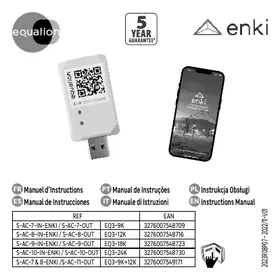
The Wi-Fi module requires the Enki application that you can download for free using the attached QR codes:


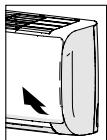
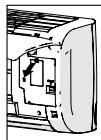
Access to the Wi-Fi module
1 - Open the front of the air conditioner
2 - Open the Wi-Fi module slot.
Pairing to the Enki network
- As soon as the air conditioner is turned on, the Wi-Fi module LED flashes slowly.
- Open the Enki application, access the "My objects" page, then click on the "+" sign to add an object.
- Choose the Equation brand and the corresponding air conditioner model and follow the instructions to select the AD-WMACKC-U1 network sent by the Wi-Fi module.
- The LED flashes rapidly during pairing then lights up when pairing is complete. The air conditioner is now controllable by the application.

Resetting the module
It may be necessary to reset the module in the following cases :
- Failed pairing attempt
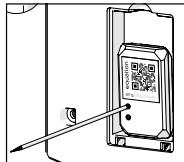
- Pairing completed a long time after the device is powered on. This operation is done using a pointed non-metallic object.
- With the tip, press the reset button located near the module LED for 6 seconds, then release the pressure.
After resetting, the LED on the module flashes quickly, then turns off, then returns to a slow flash indicating that it is ready again for pairing. - Repeat the pairing operation from the Enki application.
Attention!
- The WiFi module is covered by a 5 year warranty.
- Do not disassemble nor drop the Wifi module, otherwise this will avoid warranty.
- The module shall not be exposed to water nor naked flame sources, and is uniquely for an indoor use.
- Please keep the WiFi module away from children.
Common problems and solutions
| What is the requirements of wireless router and the location of the air conditioning? | Wireless router has a 2.4 GHz radio. Range is less than 10 meters. |
| I get a failure when adding air conditioner. | Check voltage supply to the unit. Perform a module reset |

Your WiFi module is marked with this symbol. This means that electrical and electronic products shall not be mixed with unsorted household waste. Do not try to dismantle the system yourself. WiFi module must be treated at a specialized treatment facility for reuse, recycling and recovery. By ensuring this product is disposed of correctly, you will help to prevent potential
negative consequences for the environment and human health. Please contact the After Sale Services for more information.
Declaration of Conformity
Hereby, Adeo Services declares that the radio equipment 85118618 is in compliance with Directive 2014/53/UE. The full text of the EU declaration of conformity is available at the following internet address: http://www.erp-equation.com/ac/
| Support Standards: | IEEE 802.11 b, IEEE 802.11 g, IEEE 802.11 n |
| Frequency Range: | 2412MHz à 2472MHz |
| Maximum EIRP: | 12.09 dBm max |
| Voltage | 5V => -1.5 W |


PAP

Brand : EQUATION
Model : EQ3-9K, EQ3-12K, EQ3-18K, EQ3-24K, EQ3-9K+12K
Category : Air-conditioner