BY-SH - Razor BE YOU - Free user manual and instructions
Find the device manual for free BY-SH BE YOU in PDF.


| Product Type | 3-head rotary shaver |
| Brand | BE YOU |
| Model | BY-SH |
| Power Supply | Rechargeable Ni-MH 600 mAh battery, DC input 5V/1A |
| Battery Life | Approximately 40 minutes |
| Charging Time | Approximately 8 hours (first charge 12 hours) |
| Main Functions | Dry shaving, integrated trimmer |
| Cleaning and Maintenance | Clean with the provided brush; do not immerse in water |
| Safety | Do not use if damaged, repair only at an authorized center |
| Spare Parts and Repairability | Blades and shaving heads available (not specified), have it repaired by a professional |
| Warranty | 2 years from the date of purchase, upon presentation of the receipt |
| Included Accessories | Protective cap, charging cable, cleaning brush |
| Charge Indicator | LED light on during charging |
| Intended Use | Facial shaving (beard and mustache) |
Frequently Asked Questions - BY-SH BE YOU
User questions about BY-SH BE YOU
0 question about this device. Answer the ones you know or ask your own.
Ask a new question about this device
Download the instructions for your Razor in PDF format for free! Find your manual BY-SH - BE YOU and take your electronic device back in hand. On this page are published all the documents necessary for the use of your device. BY-SH by BE YOU.
USER MANUAL BY-SH BE YOU
Thank you for choosing this BEYOU product. BEYOU products are chosen, tested, and recommended by ELECTRO DEPOT, so you can be sure you are getting a top-quality, easy-to-use product that won't let you down.
We're confident your new device will be a pleasure to use every day!
Welcome to ELECTRO DEPOT.
Table of Contents

Parts Specifications

Charge the device Using Your Shaver

Cleaning and maintenance Storage
Included With Your Device
One 3 Head Rotary Shaver with blade protection cover
One Charging Power Cord
One Cleaning Brush
Parts
A Blade
B Head release bottom
C Body
D ON/OFF Switch
LED indicator
F Outer Foil
G Inner blade
Side trimmer (back)
Trimmer release button
J Trimmer blade
K Charing Power Cord
L Cleaning Brush
Specifications
Input: DC5V/1A
Ni-MH Battery: 600mAh
Battery lifetime: About 40 minutes
Charging time: About 8 hours
B Product usage
Charge the device
Included with your shaver is a charging power cord which you can use to charge your shavers internal rechargeable battery. To do so, follow the steps below:
- Make sure that the ON/OFF Switch on your shaver is in the OFF position.
- Connect one end of the charging power cord into the appropriate charging port on your shaver, and connect the other end to a USB adapter (5V DC, 1.0A max).
- Once plugged in, the LED light on your shaver will illuminate, indicating that it is receiving a charge.
- Before using your shaver for the first time, charge the battery for a full 12 hours. All subsequent charges will only require charging the battery about for 8 hours.

NOTE: Once your shaver is fully charged, it can be used for about 7 days without having to be recharged. In order to best preserve the battery of your shaver, only charge it when it is completely drained of power, and stop charging once is fully charged.
Using Your Shaver
Using Your Shaver
In order to use your shaver to get a close shave, follow below:
- Remove the Protective Cover, and make sure your skin is dry for best results.
- Slide the ON/OFF Switch on your shaver to the ON position.
- Glide your shaver over your face with one hand, and use your other hand to keep the skin on your face stretched and taut.
- Use both straight and circular motions for best results.
- Your shaver has a built in trimmer. You can use this trimmer to cut harder to reach sections of hair that you want to cut more carefully such as a beard or a moustache.
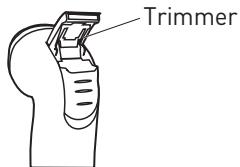
- When finished shaving, slide the ON/OFF Switch on your shaver to the OFF position.
Cleaning and maintenance

WARNING!
Please adhere to the safety precautions below in order to use your shaver safely. Failure to follow these steps may shorten the lifespan of your shaver and possibly cause personal harm or injury.
- DO NOT immerse your shaver in water or fluids.
DO NOT expose your shaver to excessive heat, flames, or direct sunlight. - DO NOT allow the net-blades of your shaver to be exposed to sharp objects or objects that are hard. Doing so could damage the blades and cause serious abrasions to your skin.
- If your shaver becomes damaged, be sure to have it repaired at an authorized repair center. NEVER attempt to repair a damaged unit yourself, as doing so may put you at risk of electric shock.
In order to keep your shaver running smoothly, you should clean it regularly. To do so, use the included cleaning brush to remove hairs and other debris that may get caught in your shaver.
- Start by brushing the hairs and debris off of the outside of your shavers foil cover.
- Next, lift off the foil cover so that you can brush off any hairs or debris caught underneath it. To lift off the foil cover, press on the foil cover release button on your shaver and carefully lift off the cover.
- With the foil cover still removed, you can also brush off dirt and debris that may get stuck in the blades of your shaver.
Storage
- Always unplug the unit before storing it.
- Store the unit in a fresh, dry and dust-free place, out of the reach of children and pets.
- Please retain the packaging and use it to store your unit when it is not in use for an extended period of time.
Merci!
This product is guaranteed against faults caused by defects in manufacturing or the materials used for a period of two years, starting from the date of purchase.* This warranty does not cover defects or damage caused by failure to install the device correctly, incorrect use of the product, or excessive wear and tear.
*proof of purchase required.
CONDITION DE GARANTIE
FR

Brand : BE YOU
Model : BY-SH
Category : Razor