STRIP LED 5 mètres avec télécommande - LED strip EDENWOOD - Free user manual and instructions
Find the device manual for free STRIP LED 5 mètres avec télécommande EDENWOOD in PDF.



| Product type | RGB LED Strip |
| Length | 5 meters |
| Number of LEDs | 150 SMD 5050 LEDs (30 LEDs/m) |
| Lighting angle | 120° |
| Power supply | 12V DC, 1.5A (power adapter included) |
| Maximum power consumption | 18 W |
| LED lifespan | 20,000 hours |
| Protection rating | IP44 (strip), IP20 (adapter) |
| Adhesive | 3M adhesive tape |
| Coating | Splash-proof resin coating |
| Dimmer | Non-dimmable |
| Remote control included | Yes, with color selection, 16 brightness levels, dynamic modes, and music synchronization |
| Usage | Indoor use only |
| Protection class | III |
| Light source | Non-replaceable (the strip must be replaced entirely) |
| Warranty | 2 years |
| Care and cleaning | Clean with a soft, dry cloth. Do not use abrasive products. |
| Safety | Do not immerse; do not plug in the strip while in its packaging; securely fasten the cable to prevent any risk of strangulation. |
| Spare parts and repairability | No detachable parts; the strip is not repairable. |
| Package contents | LED strip, IR control box, power adapter, remote control, user manual |
Frequently Asked Questions - STRIP LED 5 mètres avec télécommande EDENWOOD
User questions about STRIP LED 5 mètres avec télécommande EDENWOOD
0 question about this device. Answer the ones you know or ask your own.
Ask a new question about this device
Download the instructions for your LED strip in PDF format for free! Find your manual STRIP LED 5 mètres avec télécommande - EDENWOOD and take your electronic device back in hand. On this page are published all the documents necessary for the use of your device. STRIP LED 5 mètres avec télécommande by EDENWOOD.
USER MANUAL STRIP LED 5 mètres avec télécommande EDENWOOD
Thank you for choosing this EDENWOOD product. EDENWOOD products are chosen, tested, and recommended by ELECTRO DEPOT, so you can be sure you are getting a top-quality, easy-to-use product that won't let you down.
We're confident your new device will be a pleasure to use every day!
Welcome to ELECTRO DEPOT.
Table of Contents

Specifications

Installation procedure Connection diagram Remote control features
A Product overview
Thank you for your purchase. We hope that this product will bring you complete satisfaction. Please read this user's manual carefully before using the product to make a correct use of the functions and know well about the system connection and usage. Please keep this manual in a safe place for future reference.
Box content
Please make sure that the following items are in the packaging when you open it for the first time:
LED light strip
- IR controller box
Poweradapter
Remote controller
- User's manual
About IP44 waterproof resistance
The light strip is resistant to water splashes with IP44 standard. It cannot be submerged in water. The AC power adapter is classified IP20, it cannot be in contact at all with water or other liquids. This product is for interior use only.
LED strip specifications
| 3 meter strip: | 90 SMD 5050 LED (30 LED per meter) |
| 5 meter strip: | 150 SMD 5050 LED (30 LED per meter) |
| RGB Angle: | 120° |
| Input: | 12.0V = 1.5A |
| Consumption: | 18.0W max (3 meter version) 18.0W max (5 meter version) |
| LED lifetime: | 20.000h |
| Not dimmable | |
| 3M quality adhesive: | Apply to a smooth, clean and degreased surface |
| Resin protective coating: | For safe use, splash protection and easy cleaning |
| Remote control: | To select colors and intensity and different light modes |
| Protection class: | Class III |
| Indoor use only |
Installation procedure
- The light source of this luminaire is not replaceable. When the light source reaches its end of life, the whole luminaire shall be replaced.
- To reduce the risk of strangulation, the flexible wiring connected to this luminaire shall be effectively fixed to the wall if the wiring is within arm's reach.
- Do not connect the light strip to the supply while it is in the packing.
Please follow the below steps to install your light strip properly.
- Select a clean and flat surface for the installation of the strip. Make sure the surface is perfectly clean. It must be free of any dirt, dust or grease, otherwise the tape may come off after some time.
- Remove the 3M protection paper band from the strip and stick the strip carefully on the flat surface.
- If necessary, cut the part of the strip you may not need. Attention, cut the strip only on specific sections marked by a scissor logo on the strip. Such logo will appear between each series of 3 LED. Never cut the strip on any other location otherwise the strip will be unusable and the warranty will be void. See below the correct location to cut the strip.

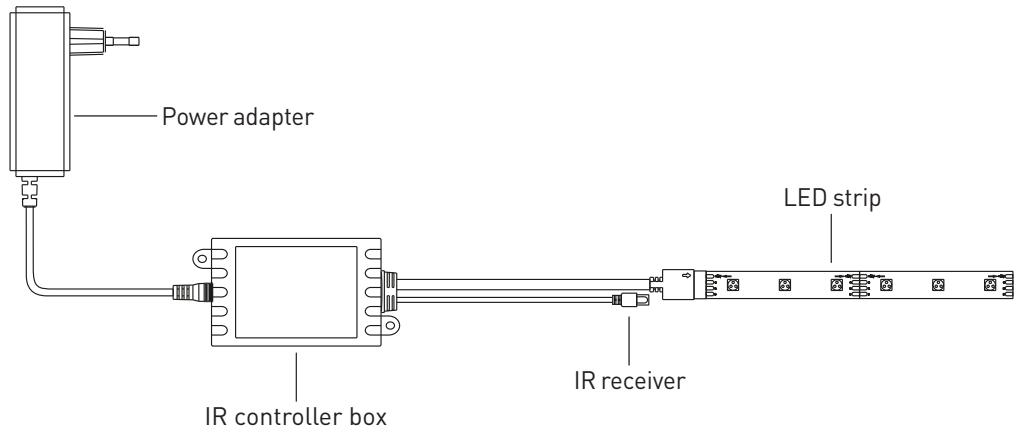
- Connect carefully the LED strip to the infrared (IR) controller box by respecting the polarity and then connect the IR controller box to the power adaptor.
- Connect the power adaptor to a power source of your house (wall socket).
- Press the ON button on the remote controller to power ON the light strip.
Connection diagram
Remote control features
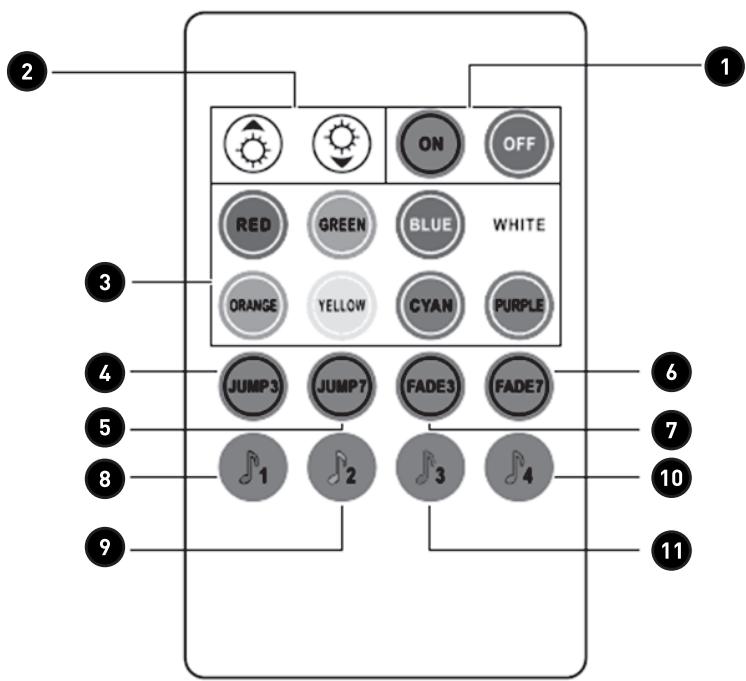
- Turn on/off the controller
- When in static mode (default): to adjust the brightness (16 grades)
When in jump 3, jump7, fade7 mode: to adjust the flashing rate (8 grades)
- To select corresponding static color
- 3 colors jump changing
- 7 colors jump changing
- 7 colors jump gradual changing
- 3 colors jump gradual changing
- Sound-control mode (general music), all colors will gradual or jump change following the music/sound rhythm. If no music/sound input or sensed, all colors will gradual change
- Sound-control mode (tenderness music), all colors will slow breathing or jump change following the music/sound rhythm. If no music/sound input or sensed all colors will slow breathing change
- Sound-control mode (DJ music), all colors will change following the music/sound rhythm. If no music/sound input or sensed, all colors are off
- Sound-control mode (active music), all colors will jump change following the music/sound rhythm, if no music/sound input or sensed, current colors keep lighting
Merci!
Procedure installation
LED strip specificities

LED strip specificities
This product is guaranteed against faults caused by defects in manufacturing or the materials used for a period of two years, starting from the date of purchase.* This warranty does not cover defects or damage caused by failure to install the device correctly, incorrect use of the product, or excessive wear and tear.
*proof of purchase required.
FR
CONDITION DE GARANTIE

Brand : EDENWOOD
Model : STRIP LED 5 mètres avec télécommande
Category : LED strip