USER MANUAL THEO22100MCB THOMSON
MANUEL D'INSTRUCTIONS
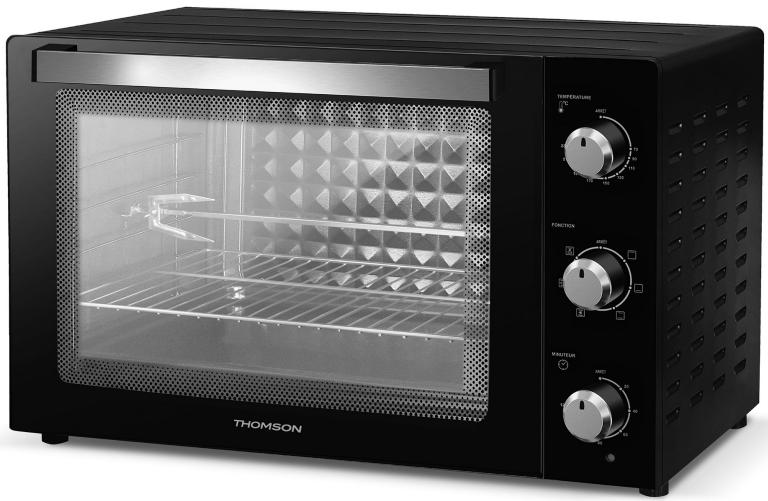
CONSIGNES DE SECURITE
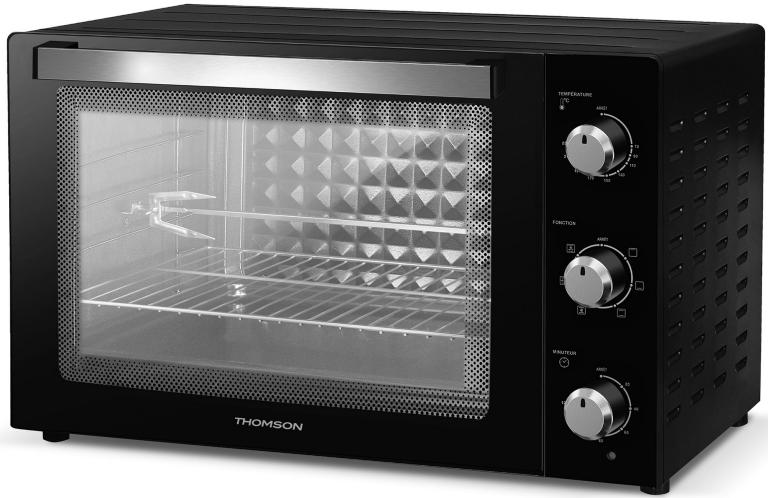
Multifunction electric oven 100L
THEO22100MCB
USER MANUAL
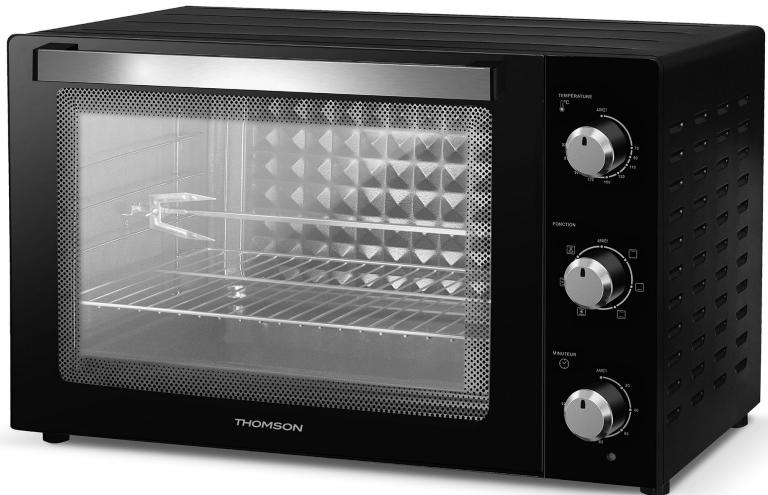
SAFETY INSTRUCTIONS
- This appliance works with high temperatures which can cause burns, do not touch exposed metal parts.
- Do not touch surfaces hot without gloves or protection.
- Do not leave the appliance running unsupervised or within the reach of children. This device should be used by responsible adults.
- This device is intended to be used in domestic applications.
- Do not use an extension cord to plug in the device.
- Place the device on a stable surface and do not let the cord hang down.
- Check that the mains voltage corresponds to that indicated on the device - alternating current only.
- Never plug in your device if:
-
The cord is defective or damaged.
-
The device fell.
-
It shows visible damage or malfunctions.
-
Never disassemble the device yourself.
- Do not operate the appliance near flammable materials or near an external heat source such as hot plates or a gas stove.
- This appliance is intended for household and indoor use only. Any professional use, not appropriate or not in accordance with the instructions for use, does not engage the responsibility or the guarantee of the manufacturer and the distributor.
- The appliance must be unplugged when not using the product or before cleaning it.
- Let the appliance cool down before cleaning.
- Do not use the device outside the home.
- Never move the device during
use.
- Use the device with enough space all around. Be sure to leave free space in front and on the left or right side of the device.
- Be careful not to block any air intakes or exhaust vents.
- After using the device, be sure to turn off your device properly after use.
- This appliance must be installed in compliance with national installation rules.
- The temperature of the door, exterior surface and accessible surfaces may be high when the appliance is in operation.
- Keep oven and cord out of reach of children under 8 years of age when powering up or cooling down.
- This device can be used by children over 8 years old and by people with reduced physical, sensory or mental abilities, or
people lacking experience or knowledge, if they have been able to benefit, through a person responsible for their safety, supervision or prior instructions concerning the use of the device.
- Never let children play with the device. Cleaning and maintenance operations must not be carried out by children unless they are over 8 years old and remain under supervision.
- Children should be supervised to ensure that they do not play with the device.
- If the power cable is damaged, it must be replaced by the manufacturer, its after-sales service or similarly qualified persons in order to avoid a hazard.
-
This device is not designed for be operated by means of an external timer or remote-control system.
-
When using the oven, ensure that there is a minimum of 12 ~cm free space all around the oven to allow adequate air circulation.
- To unplug the appliance, place all its buttons to their off position, then disconnect its plug from the wall outlet. Always grasp the plug, never pull the power cord.
- For details on how to clean food contact surfaces, refer to the "CARE AND CLEANING" section.

Suitable for cooking food
IMPORTANT
It is forbidden to replace the power cable by yourself. If damaged, it must be repaired by the local distributor's after-sales service, by the manufacturer or by a qualified person.
If the device has been dropped, please have a qualified person check it before using it again. Internal damage could lead to accidents. For any type of problems or repairs, please contact the after-sales service of the local distributor, the manufacturer or a qualified person, in order to avoid any risk of danger.
DISPOSAL AND ENVIRONMENTAL RESPONSIBILITY
In order to be respectful of the environment, we encourage you to dispose of the device correctly. You can contact local authorities or recycling centers for more information.
- Never immerse the plug or the appliance in water or any other liquid.
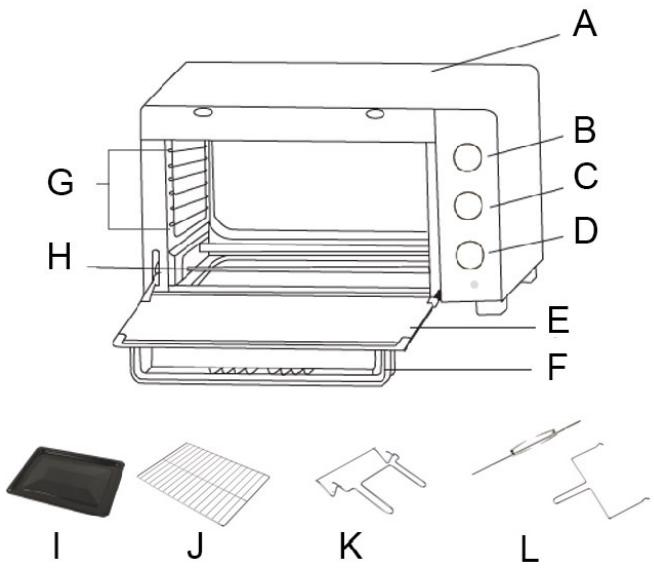
A. Machine body
B. Temperature control button
C. Heating and function control button
D. Time control button
E. Glass door
F. Door handle
G. Different stages of cooking levels
H. Heating Elements
1. Cooking plate
J. Wire grid
K. Tray handle
L. Rotisserie set
Buttons:Thermostat knob, function selector and timer knob.
Grid: For grilling, cooking and for loading the griddle.
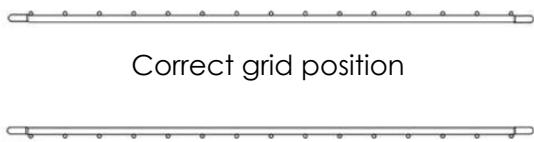
Incorrect grid position
WARNING : respect the direction of insertion of the grid and the maximum authorized weight of 3.5kg
Hob: For gratinating and roasting various foods that contain water or release water or oil during cooking.
Door handle: Cold handle avoiding burns.
Glass door: Clear tempered glass lets you easily monitor cooking.
CONTROL PANEL
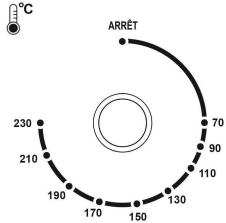
TEMPÉRATURE
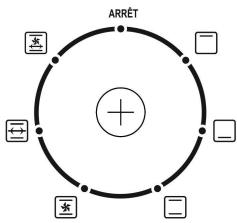
FONCTION

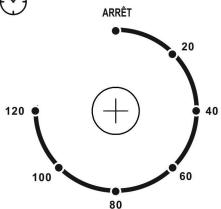
MINUTEUR

Thermostat knob: The temperature setting range is from 70^ to 230^ . Set the desired temperature according to the cooking.
Function selector: Select the operation mode.
ARRET
:Off

: Superior heat

: Lower heat

: Traditional cooking

: Convection function with upper and lower heat

: Rotisserie roaster with upper and lower heat

: Rotisserie and convection with upper and lower heat
Timer button: The button must always be positioned on "Off" when the oven is not in use.
Turn the knob clockwise to the desired time (120 minutes max.). The count starts automatically.
INSTALLATION
ESTABLISHMENT
WARNING! RISK OF FIRE!
- Never place the appliance under cupboards or next to curtains, cabinet walls or other flammable objects.
- Always ensure a minimum distance between the appliance and overhead cupboards, ceilings, side walls or the like of at least 12cm above the appliance and 12cm at the sides. This is why the device cannot be used, for example, in cupboards or the like. Otherwise there is probably insufficient ventilation of the apparatus, which could cause fire or damage.
- Always place the device on a heat-resistant surface. Failure to do so increases the risk of fire or damage. The area under the device may become discolored and damaged. Also, if placed on a soft top surface, the device may leave pressure marks due to its weight.

DANGER - ELECTRIC SHOCK!
-
Do not place the device immediately next to a source of water, e.g. sinks or basins, or a damp basement. Otherwise, there is a risk of electric shock.
-
Place the appliance on a sturdy, heat-resistant surface. Make sure there is sufficient ventilation around the device.
- Place the device against the wall, with its back side facing the wall. The spacers on the return must touch the wall. Make sure the wall is made of heat resistant material, eq. tiles, natural.
- Clean all components as described in the "CARE AND CLEANING" section.
BEFORE FIRST USE
- Remove all packaging materials from the device.
- Remove all accessories (grid, tray) from the appliance.
- Clean the oven and its accessories with a damp cloth, then dry them.
- Fully unwind the power cord, then plug it into an electrical outlet.
- Set the function selector to
- Set the thermostat knob to 230^ C .
- Set the timer knob to 15 minutes to operate the oven empty (without food or accessories) for this time.
WARNING: During its first use, the appliance may emit a slight odor and a little smoke. This phenomenon is normal and stops very quickly. Besure to use the device in a well-ventilated room.
USING YOUR DEVICE
Advice
When baking or grilling, it is best to always preheat the oven to the desired cooking temperature in order to obtain perfect cooking.
- Place the grease collection tray under the cooking grid to prevent grease from dripping onto the heating element and the bottom of the oven.
- If the food to be cooked is oily or greasy, you can use two sheets of aluminum foil. Place one on the grease tray and cover the food with the other. This prevents oil and fat from splashing during cooking.
START COOKING
- Place the removable rack in the desired position.
- Place the baking dish on the wire rack. Close the oven door.
- Turn the timer dial to the desired cooking time.
- Turn the heat and function switch knob to the position in step 2 to use TOP HEAT.
- Turn the thermostat dial to the desired temperature.
- When cooking is complete, turn the timer to the "OFF" position, to turn the oven off.
GRILL FUNCTION
- Insert the removable accessories necessary for the food.
- Turn the timer dial to the desired cooking time.
- Turn the function knob to the desired function.
- Turn the lower thermostat knob to the desired grilling time.
- When broiling is complete, turn the timer dial to the "OFF" position to turn the oven off.
TRADITIONAL KITCHEN
- Adjust the temperature control to the temperature according to your needs.
- Turn the heat and function switch knob to position 4 to use upper and lower heat.
- Place the food to be grilled on the grill or baking tray.
- Set the timer to the desired cooking time. The bell will ring to signal the end of the toast cycle.
- Once cooking is complete, turn the timer dial to the "OFF" position to turn the oven off.
- THE ROTISSEIRE FUNCTION
- Turn the knob to the rotisserie function.
- Set the function control to Rotisserie. Insert the pointed end of the skewer through the skewer, making sure the skewer tips are pointing in the same direction as the pointed end of the skewer.
- Slide to spindle square and secure with thumb screw.
- Place the food to be cooked on the spit by passing the spit directly through the center of the food.
- Place the second skewer in the other end of the poultry roast and secure the skewer with the knurled screw.
- Check that the food is centered on the SPIT.
- Insert the end of the spindle into the DRIVE BUSH
making sure the square end of the spindle rests on the spindle holder.
- Turn the time control to the desired cooking time.
- When you are finished, turn the TIME control to the STOP position.
CONVECTION FUNCTION
- Adjust the temperature control to the temperature according to your needs.
- Turn the heat and function switch knob to the 5 or 7 level position to use the convection function.
CARE AND CLEANING
- Allow your oven to cool completely before cleaning it.
Unplug the power cord from the wall outlet.
- The grid, drip pan and fat collection tray can be cleaned with soapy water.
- Always use a damp sponge to clean exterior surfaces. Avoid using abrasive products which could damage the coating. Make sure that water or soap does not get inside the oven through the air vents located on the top of the oven.
- Never immerse the oven in water or any other liquid.
- To clean the interior walls, do not use corrosive products (spray detergents) and never scratch the walls with sharp or pointed objects.
- If the device is not kept in a good state of cleanliness, its surface could deteriorate and affect the life of the device and lead to a dangerous situation.
The oven should be cleaned regularly and any food deposits should be removed.
Remove and clean the grease collection tray
- Remove the grease collection tray by pulling on its handle.
- Wash in soapy water then let it dry.
- Never use abrasive products.
- Put the grease collection tray back in place.
| Problem | Possible cause | Corrective Action |
| The device does not work. | The mains plug is not connected to the mains supply. | Insert the plug into a power outlet. |
| The power socket is faulty. | Use another AC outlet. |
| The device is defective. | Contact customer service. |
| Food cooking time seems very long | The glass door was opened often to check the cooking progress. | Do not open the glass door more often than necessary. |
| The wrong temperature level has been set. | Check the temperature settings. |
| Smoke and odor develop during use. | There is detergent or food residue on the heating elements. | Remove the food from the appliance and continue the cooking process with the glass door open until let the smoke stop. |
For any other problem with your appliance: contact the After-Sales Service.
TECHNICAL DESCRIPTION
- Voltage: 220 - 240V~
- Frequency: 50/60Hz
- Power: 2800W
- Capacity: 100L
- Temperature: 70^ C - 230^ C
Defects due to improper use of the device and damage due to intervention or repair by a third party or due to the installation of nonoriginal parts are not covered by the responsibility of the provider.
DISPOSAL AND RESPECT FOR THE ENVIRONMENT
If you want to get rid of your electrical appliance because it needs to be replaced or is no longer used, consider protecting the environment. Ask the local authorities for advice, as there are many environmentally friendly recycling centers.
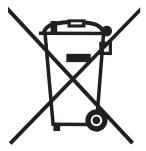

This logo affixed to the product means that it is a device whose treatment as waste falls within the scope of Directive 2012/19/EC of July 4, 2012, relating to waste electrical and electronic equipment. (WEEE).
The presence of hazardous substances in electrical and electronic equipment can have potential effects on the environment and human health
in the reprocessing cycle of this product.
Thus, at the end of the life of this device, it must not be disposed of with unsorted municipal waste.
As the end consumer, your role is essential in the cycle of reuse, recycling and other forms of recovery of this electrical and electronic equipment.
Recovery and collection systems are made available to you by local authorities (waste centres) and distributors.
You have the obligation to use the selective collection systems made available to you.
The warranty does not cover wear parts of the product, nor problems or damage resulting from:
(1) Surface deterioration due to normal product wear;
(2) Defects or deterioration due to contact with liquids and corrosion caused by rust or the presence of insects;
(3) Incident, abuse, misuse, alteration, disassembly or unauthorized repair
(4) Improper maintenance, improper use of the product or connection to incorrect voltage;
(5) Use of accessories not supplied or not approved by the manufacturer.
The warranty will be void if the product nameplate and/or serial number is removed.
THOMSON is a trademark of Technicolor SA used under license by SCHNEIDER CONSUMER GROUP.
This product is imported by: SCHNEIDER CONSUMER GROUP 12, rue Jules Ferry, 93110 Rosny-sous-Bois, FRANCE
THOMSON
Multifunctionelle elektrische oven 100L
THEO22100MCB
HANDLEIDING
VEILIGHEIDSINSTRUCTIES