Belly - Doorbell LOGICOM - Free user manual and instructions
Find the device manual for free Belly LOGICOM in PDF.


User questions about Belly LOGICOM
0 question about this device. Answer the ones you know or ask your own.
Ask a new question about this device
Download the instructions for your Doorbell in PDF format for free! Find your manual Belly - LOGICOM and take your electronic device back in hand. On this page are published all the documents necessary for the use of your device. Belly by LOGICOM.
USER MANUAL Belly LOGICOM
CHARACTERISTIQUES DU PRODUIT
https://www(logicom-europe.com/ce-doc
GARANTIE
Made in PRC © 2020 Logicom SA.
Logicom Home | User Manual
Model name: Belly
Wi-Fi Smart Camera
READ BEFORE USE
Thank you for buying a Logicom Home product. Please note that this user manual comes with your product and that you must read it entirely before use. Please note that you'll also be able to find an up-to-date PDF version of this manual online on our website:
www_logiccom-europe.com
A more comprehensive guide to use Tuya's app is also available on this website.
PRODUCT OVERVIEW
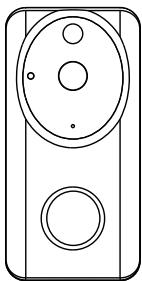
Logicom Home's Bally is a smart doorbell that can be controlled wirelessly over Wi-Fi thanks to the Tuya Automation cloud system. This way, users can see what happens night and day in their home from their phone or tablet effortlessly wherever they are. Users can also hear the surroundings of the doorbell and talk through the doorbell's camera. An embedded movement detection is also available for added security. Users can finally save the video recording locally
(on phone or on a micro SD card) or in the cloud (with a subscription).
PRODUCT FEATURES
Your new companion is full of useful features :
- Encrypted wireless Wi-Fi communication
- Bidirectional Audio (microphone & speaker)
- Save your recording locally or in the cloud
- Nocturnal vision
- Automatical Over The Air Firmware update
- Works like a regular doorbell
- Get notified of who's knocking directly on your phone or tablet
PACKAGE CONTENT
1x Smart Doorbell Belly (R4957)
1x French/English manual
4x Screws and dowels
2x Battery 18650
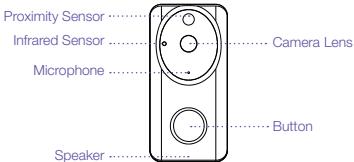
PRODUCT DESCRIPTION
EN
PRECAUTIONS FOR USE AND SAFETY INSTRUCTIONS
- Always respect usage conditions indicated in this manual.
- The product must strictly be used indoors.
-
Belly does not contain any part that requires customer manipulation. Never open the product and never try to unmount some internal elements or try to modify some parts in any way. If product shows signs of dysfunction, take it immediately out of the socket and have it checked by a qualified specialist.
-
Do not use Bally if it is broken, damaged (outside shell or any other part) or if it makes abnormal noise.
- Do no put any object, even light, over belly.
- Do not leave Belly close to any heat source, like heaters or warm elements.
- Do not let Jelly under the rain and do not use it near a water source or humid environment. Do not put any container nearby (like vases, bottle or glass) that contains liquid that could infiltrate through the bulb's apertures. If any liquid leaks into the product, take it immediately out of the socket and have it checked by a qualified specialist.
Only use the required voltage for this product which is indicated on the product and in this manual. - Do not try to remove belly from the socket with humid or wet hands.
- Do not connect Belly to an electrical dimmer.
- Verify regularly that the camera is in good condition. Only use a smooth cloth to clean
your product when cold.
- When not in use, keep Belly in a dry and fresh area.
- After a long period of non-use, always check your product's integrity and clean the product before powering it.
- This product is not a toy and must not be handled by children.
- When the product is powered, please always stay keep a distance of 20cm minimum from the device (radiofrequencies exposure).
INSTALLATION AND CONFIGURATION
Turning the product On and Off
To turn ON Billy, you need to plug the supplied batteries or plug in a USB connector.
Belly will keep the previous setting when powered on, otherwise it will blink in red
(configurationsmode).
When pushing the button of the device, the device will ring to let you know someone is at the door.
Resetting the product
To reset the product to the factory settings, you need to press the RESET button (in the back of the device) for several seconds until the LED turns red and starts blinking. The blinking red LED tell you it's ready to be reconfigured.
App download and account creation
Your Logicom Home smart product uses Tuya to let you remotely control it.
In order to use it, you have to use the Tuya software. This manual will only cover the Tuya's smartphone application. For other platforms, please go on Tuya's website (https://en.Tuya.com/) for more information.
To install the app on your phone, scan the QR code (Android and iOS).
You can also search on your device's application store "Tuya Smart" to download and install the app.
Once installed, start the APP and register an account with your email address or your mobile number and then log in APP with the registered account to start your connected home experience.
Note: The Tuya app visuals might be subject to change.

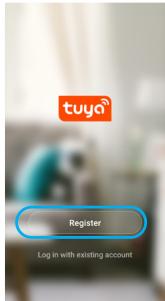
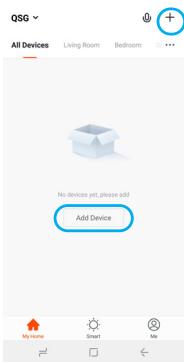
Add your device to your home
To add your device to your home, please click
Select the device type "Camera" or "Smart Doorbell".
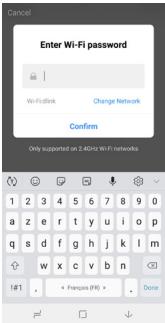
After selecting the "Smart Camera" in the list of device compatible with Tuya system, input the password of the designated Wi-Fi network to include the device to Cloud and make it remotely controllable from Tuya's cloud.
Then, the app will request that you scan a QrCode from the phone's screen. To do so, you need to put the device toward belly's lens at a distance of about 20cm. When belly recognize the QrCode, it will make a sound and you will be able to progress through the synchronization. Complete pairing of the product takes about 30s. A wheel will be displayed to show you the current state of pairing (please wait for it to reach 100%). During this time the LED will be flashing in red. After successful pairing, belly's LED will turn on fix red and Tuya will ask you to change the name of the device (useful to identify quickly
your product) and also to choose a room for the device (Tuya offers some default rooms, but more can be added if needed). Rooms are the Tuya's equivalent to a real room; meaning you will be able to control all Tuya's products within a room at the same time.
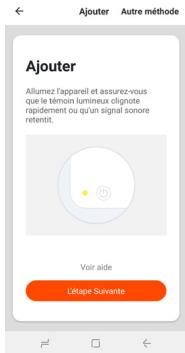
Once pairing is finished, rename the device and set it to a room.
Controlling the product remotely
Once paired and added to a room, you'll be able to find your product in the default screen of Tuya app. You can now tap on the product to open the control interface.
Once you paired your device to your TUYA account, you
will then be able to receive notifications on your device anytime someones pushes the doorbell button. You will then be able to see and to talk to them from your phone.
In the main interface :
Tap on the zoom icon to display a bigger, full-screen sized image.
Tap on the camera icon to take a picture (saved on your device or on SD card).
Tap on the video camera icon to record videos (saved on your device or on SD card).
You can talk through the doorbell by pressing the «microphone» icon. Keep it pressed as long as you are talking.
Finally, to hear belly's surroundings, press the speaker icon.
You can also see previous recordings (locally) by selecting «Album» in the action menu. You can also see selected recordings by date in order to retrieve a past event.
Your belly can also store the video online (requires a subscription). This way, when belly sees an event (such as a motion detection), belly will send the video to the cloud.
To benefit from this feature, tap on the «cloud» icon on the main screen and follow instructions.
There are a lot of offers to choose from, which
EN
depends on the type of recording (if available), the period of capture and the time of online availability.
You can also modify the motion detection settings from the belly's settings screen.
DEVICE SPECIFICATIONS
Please find below the specifications of your product:
| Model Name | Logicom Home Belly |
| Constructor Reference | R4957 |
| Power supply USB | 5V 1A |
| Nominal input voltage | 5V |
| Rated current | 1A |
| Wireless transmitting and receiving frequency (Wi-Fi) | IEEE802.11b, IEEE802.11g, IEEE802.11n |
| Emitted Radiowaves Frequencies | 802.11b/g/n20: 2412 MHz ~2472 MHz 802.11n40: 2422 MHz ~2462 MHz 433.92MHz |
| e.i.r.p. at 20cm | 29.5 dBm |
| Field of view | 166° |
The local specific absorption rate (SAR) quantifies the user's exposure to electromagnetic waves from the equipment concerned. The maximum authorized SAR is 2W / kg for the head and trunk and 4W / kg for the limbs. The reasonable use of this radio equipment being more than 20cm away from the user, this device is therefore not subject to a SAR value measurement.
ENVIRONMENTAL RESTRICTIONS
Use your product only under the following environmental restriction :
| Model Name | Logicom Home Balmy |
| Working temperature and storage | 0°C / 30°C |
| Relative humidity | Humidity less than 95% (non-condensing) |
SIGNAGE
Please find below all explanations regarding the symbols / logos:

- Conformity to European directives (CE)

- Green point, indicates adherence to a system of contribution to waste recycling

Conformity to Waste Electrical and Electronic Equipment (WEEE ou W3E) Directive 2012/19/EU product recycling guideline
BATTERY INFORMATION
EN
Your device comes with 2 rechargeable batteries (provided, recharge through the USB port) to run. Please find some additional informations below :
| Battery Kind | 18650 |
| Battery Technology | Lithium-Ion |
| Nominal Voltage | 3.65 V |
| Capacity | 2.6 Ah |
| Charging Time | 8 hours |
| Autonomy | 6 months |
| Batteries Required | 2 |
Please recharge your batteries fully before first use. Never recharge your batteries if the USB port is wet. Do not recharge for long periods of time.
Please recharge your device at least every six months.
Warning, not recharging the device for 6 months or longer can significantly impact the autonomy of the device and will void the warranty.
DATA PROTECTION
Tuya Smart App. complies with the General Data Protection Regulation (GDPR). More information on https://auth.Tuya.com/legal/.
TRADEMARKS
All brands and commercial brands are the sole properties of their owners.
Tuya, Tuya Smart, Tuya Smart logo are trademarks of Tuya Inc.
All screenshots of applications are not contractual and may need to be modified without prior notice, by their owners named hereafter: Tuya.
EN
SIMPLIFIED UE DECLARATION OF CONFORMITY
CE
We, LOGICOM SA - 55 rue de Lisbonne - 75008 PARIS, hereby declare that the model Baby (R4957) of electrical radio equipment type "WiFi smart doorbell" is in compliance with Directive 2014/53/UE.
The full text of the EU declaration of conformity is available at the following internet address:
https://www(logicom-europe.com/ce-doc
WARRANTY SCOPE
If you encounter any problems, a contact form and complete FAQ are available on our website:
www(logicom-europe.com
If none of these platforms does solve your problem, contact your retailer.
The LOGICOM supplier warranty is valid for normal use of the device as defined in the instructions for a period of 2 years for the product and limited to 1 year for the batteries. This warranty excludes damage caused by external circumstances.
Specifically, the warranty does not apply if the device is damaged as a result of a bump or drop, an operating error, a connection that does not comply with these instructions, lightning, a surge, or inadequate protection against heat, humidity, or freezing temperatures.
The warranty is applicable only in metropolitan
France.
- The warranty does not cover user manuals or applications, settings, content or data of any kind.
- The warranty does not cover normal usury of the product.
- The warranty does not cover damage to the product due to misuse, including in particular those caused by objects, a pressure drop.
- The warranty does not cover defects caused to the product with another product connected or used with an accessory or software not provided by LOGICOM.
- The warranty does not cover the product or its accessories if it has been disassembled or modified in any way.
- The warranty does not cover any damage done to the batteries.
- The warranty does not cover any unidentifiable product by serial number or batch number. If its elements have been removed, altered or
EN
defaced, the warranty does not apply.
- The warranty does not cover damage done to the product caused by exposure to moisture, extreme heat or cold conditions, corrosion, oxidation, with any liquid whatsoever.
The legal warranty for hidden defects applies in compliance with Articles 1641 et seq. of the French Civil Code.
Made in PRC © 2020 Logicom SA.
Veuiliez trouver notre manuel dans d'autres langues sur notre site internet / Please find your manual in other langages on our website / Encuentre su manual en autres idiomas en{nuestro sitio web / U vindt uw handleiding in andere talen op once website / Ihr Handbuch finden Sie in anderen Sprachen auf unserer Website :
https://www(logicom-europe.com/fr/296-smart-home