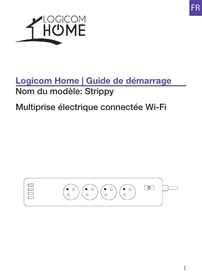
USER MANUAL HOME STRIPPY 4 + 4USB LOGICOM
CHARACTERISTIQUES DU PRODUIT
https://www(logicom-europe.com/ce-doc
MARQUES DEPOSEES
Made in PRC © 2019 Logicom SA.
Model name: Strippy
Wi-Fi Smart Power Strip

READ BEFORE USE
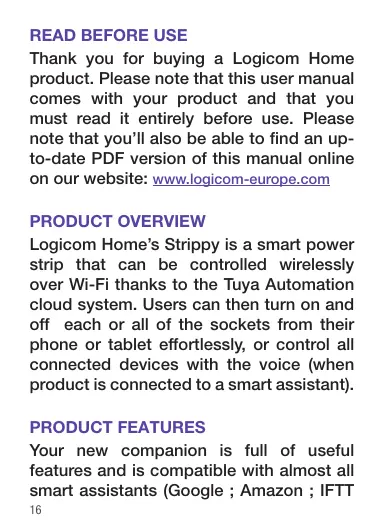
Thank you for buying a Logicom Home product. Please note that this user manual comes with your product and that you must read it entirely before use. Please note that you'll also be able to find an up-to-date PDF version of this manual online on our website: www_logicom-europe.com
PRODUCT OVERVIEW
Logicom Home's Strippy is a smart power strip that can be controlled wirelessly over Wi-Fi thanks to the Tuya Automation cloud system. Users can then turn on and off each or all of the sockets from their phone or tablet effortlessly, or control all connected devices with the voice (when product is connected to a smart assistant).
PRODUCT FEATURES
Your new companion is full of useful features and is compatible with almost all smart assistants (Google ; Amazon ; IFTT
and more to come).
Here's a list of your product's features :
- Amazon Alexa and Google Assistant compatible
- Encrypted Wi-Fi connection
- Timers and scheduled actions
- Automatical Over The Air Firmware update
Over-current protection supported
- 4 sockets an 4 USB ports
PACKAGE CONTENT
1x Strippy Smart Powerstrip (VZ-PS0444FR)
1x French/English/Dutch/Spanish User Manual
A more comprehensive guide to use your product is also available on our website.
PRODUCT DESCRIPTION
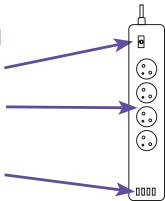
LED Power button
4 Power sockets
4 USB ports bloc
PRECAUTIONS FOR USE & SAFETY INSTRUCTIONS
Always respect usage conditions indicated in this manual.
- The product must strictly be used indoors.
- Strippy does not contain any part that requires customer manipulation. Never open the product and never try to unmount some internal elements or try to modify some parts in any way. If product shows signs of dysfunction, take it immediately out of the socket and have it checked by a qualified specialist.
- Do not use Strippy if it is broken, damaged (outside shell or any other part) or if it makes abnormal noise.
- Do no put any object, even light, over Strippy.
- Do not leave Strippy close to any heat source, like heaters or warm elements.
- Do not let Strippy under the rain and do not use it near a water source or humid environment. Do not put any
container nearby (like vases, bottle or glass) that contains liquid that could infiltrate through the plug's apertures. If any liquid leaks into the product, take it immediately out of the socket and have it checked by a qualified specialist.
- Only use the required voltage for this product which is indicated on the product and in this manual.
- Do not twist, bend or damage Strippy's base.
- Do not try to remove Strippy from the socket with humid or wet hands.
- Do not connect Strippy to other Strippys or any power strip, especially in cascade.
- Do not connect a power strip to Strippy.
- Verify regularly that the plug's pins and socket are in good condition, dust and clean your product afterwards. Only use a smooth and dry cloth to clean your product when cold.
-
When not in use, keep Strippy in a dry and fresh area.
-
After a long period of non-use, always check your product's integrity and clean the product before powering it.
- This product is not a toy and must not be handled by children.
- When the product is powered, please always keep a distance of 20cm minimum from the product (radiofrequencies exposure).
INSTALLATION AND CONFIGURATION
OFF-LINE USAGE
Turning the product On and Off
Short press on the power button to manually on/off control the device.
The green LED indicator embedded in the power button will light on/off when all sockets are on/off.
ON-LINE USAGE
App download and account creation
Your Logicom Home smart product uses Tuya to let you remotely control it.
In order to use it, you have to use the Tuya software. This manual will only cover the Tuya's smartphone application. For other platforms, please go on tuya's website (https://en.tuya.com/) for more information.
To install the app on your phone, scan the QR code below (Android and iOS) or search "TuyaSmart" in your device application store.

Add your device to your home
To add your device to your home, please click on the « add device » or the « + » icon in the top-right of the screen.
Connection to a product
The plug will blink fast in green when powered on for the first time.
After selecting the « Electrical Outlet » in the list of devices compatible with Tuya system, input the password of the designated Wi-Fi network to include the device to Cloud and make it remotely controllable from Tuya's cloud.
Complete pairing of the product takes about 30 seconds.
Controlling the product remotely
Once paired and added to a room, you'll be able to find your product in the default screen of Tuya app.
You can now tap on the product to open the control interface.
To switch any socket' state, tap on it's icon on the screen or tap the top icon to change all sockets at once.
« Timer » icon will let you start a countdown timer to switch plug's state.
“ Schedule ” will let you create some scheduled switches of the screen (like turn OFF everyday
NOTE:
- This product is intended for indoor use only in dry locations.
- Please ensure the security of electricity: Max. current load cannot be higher than 10A; Max. power load cannot be higher than 2400W.
- The LED indicator will blink in green and shut off in 10 seconds when current load is higher than 10.5A in 200-240V rated working voltage.
CONNECTION TO SMART SYSTEMS
To connect to smart systems, please refer to the user guide available on our website.
SPECIFICATIONS
Please find below the specifications of your product:
| Model Name | Logicom Home Strippy |
| Constructor Reference | VZ-PS0444FR |
| Power supply | AC 110-240V,50-60Hz |
| Nominal input voltage | AC 200-V |
| Standby power loss | ≤1W |
| Rated current | 10A max |
| Max USB output current | 2.4A single USB / 4A
all USB |
| Wireless transmitting
and receiving frequency
(Wi-Fi) | 2.412GHz – 2.484GHz |
| Network protocol
supported | IEEE802.11 b/g/n |
| Encryption type | WEP/TKIP/AES,WPS |
| Emission Levels (e.i.r.p.
at 20cm) | 17.62 dBm / 57,81mW |
ENVIRONMENTAL RESTRICTIONS
Use your product only under the following environmental restrictions :
| Model Name | Logicom Home Strippy |
| Working and storage temperature | 32°F to 95°F |
| Relative humidity | 8% to 80%RH |
TRADEMARKS
All brands and commercial brands are the sole properties of their owners.
Google, Google Home, Google Assistant, Google logo and Google Assistant logo are trademarks of Google LLC.
Amazon, Amazon Echo, Amazon Alexa and all associated logos are trademarks of Amazon. com, Inc. or its subsidiaries.
IFTTT and IFTTT logo are trademarks of IFTTT Inc.
Tuya, Tuya Smart, Tuya Smart logo are trademarks of Tuya Inc.
All screenshots of applications are not contractual and may need to be modified without prior notice, by their owners named hereafter: Tuya, Google, Amazon.
DATA PROTECTION
Tuya Smart App. complies with the general Data Protection Regulation (GDPR). More information on https://auth.tuya.com/legal/.
We, LOGICOM SA - 55 rue de Lisbonne - 75008 PARIS, hereby declare that the "WiFi smart powerstrip' electrical radio equipment type product Strippy (VZ-PS0444FR) is in compliance with Directive 2014/53/UE.
The full text of the EU declaration of conformity is available at the following internet address:
https://www(logicom-europe.com/ce-doc
WARRANTY SCOPE
If you encounter any problems, a contact form and complete FAQ are available on our website:
www_logiccom-europe.com
If none of these platforms does solve your problem, contact your retailer.
The LOGICOM supplier warranty is valid for normal use of the device as defined in the instructions. This warranty excludes damage caused by external circumstances.
Specifically, the warranty does not apply if the device is damaged as a result of a bump or drop, an operating error, a connection that does
not comply with these instructions, lightning, a surge, or inadequate protection against heat, humidity, or freezing temperatures.
The warranty is applicable only in metropolitan France.
- The warranty does not cover user manuals or applications, settings, content or data of any kind.
- The warranty does not cover normal usury of the product.
- The warranty does not cover damage to the product due to misuse, including in particular those caused by objects, a pressure drop.
- The warranty does not cover defects caused to the product with another product connected or used with an accessory or software not provided by LOGICOM.
- The warranty does not cover the product or its accessories if it has been disassembled or modified in any way.
- The warranty does not cover any unidentifiable product by serial number or batch number.
If its elements have been removed, altered or defaced, the warranty does not apply.
- The warranty does not cover damage done to the product caused by exposure to moisture,
that extreme heat or cold conditions, corrosion, oxidation, with any liquid whatsoever.
The legal warranty for hidden defects applies in compliance with Articles 1641 et seq. of the French Civil Code.
Made in PRC © 2019 Logicom SA.
BESCHRIJVING VAN HET PRODUCT
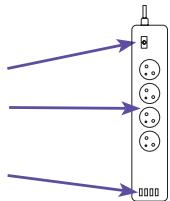
LED Power-knop
4 stopcontacten
4 USB-poortblok
VOORZORGSGMAATREGELEN EN
VEILIGHEIDSINSTRUCTIES
https://www(logicom-europe.com/ce-doc
GARANTIE
https://www(logicom-europe.com/ce-doc
GARANTÍA