
TAS162EC3 - Coffee maker BOSCH - Free user manual and instructions
Find the device manual for free TAS162EC3 BOSCH in PDF.
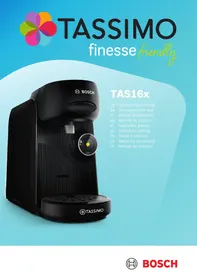



| Product type | Capsule coffee maker |
| Brand | Bosch |
| Model | TAS162EC3 |
| Voltage | 220-240 V ~ |
| Frequency | 50 Hz |
| Power | 1400 W |
| Water tank capacity | 1.3 L (estimated) |
| Dimensions (approx.) | 28 x 20 x 30 cm |
| Weight (approx.) | 2.5 kg |
| Main functions | IntensityBoost, automatic barcode reading, stop and prolong preparation |
| Percolation system | T DISC capsule piercing system |
| Control panel | On/Off, Start, IntensityBoost, Stop, Prolong buttons; status LED |
| Included accessories | Service T DISC, cup support, collection container |
| Cleaning | Dishwasher-safe parts (drip grid, container, tank); descaling program with Service T DISC |
| Safety | Automatic shut-off, overheat protection, percolation system lock, hot parts warning |
| Maintenance | Regular cleaning, descaling when calc LED lights up |
| Capsule type | Original Tassimo T DISC |
| Maximum altitude | 2000 m above sea level |
| Customer service | TASSIMO helpline, repairs by qualified personnel |
Frequently Asked Questions - TAS162EC3 BOSCH
User questions about TAS162EC3 BOSCH
0 question about this device. Answer the ones you know or ask your own.
Ask a new question about this device
Download the instructions for your Coffee maker in PDF format for free! Find your manual TAS162EC3 - BOSCH and take your electronic device back in hand. On this page are published all the documents necessary for the use of your device. TAS162EC3 by BOSCH.
USER MANUAL TAS162EC3 BOSCH
1.1 General information 19 1.2 Intended use 19 1.3 Restriction on user group 19 1.4 Safety information 19
2 Overall view 21 2.1 Control panel 21 3 Performing initial start-up 21 4 Operation 21 4.1 Preparing a drink 21 5 IntensityBoost. 21 6 Cleaning and servicing 22 6.1 Dishwasher-safe components 22 6.2 Cleaning the appliance 22 6.3 Descale the appliance 22 7 Troubleshooting 22 8 Technical specifications 23 9 Disposing of old appliance 23 10 Customer Service 24
Safety
- Read this instruction manual carefully.
- Keep the instruction manual and the product information safe for future reference or for the next owner.
- Do not connect the appliance if it has been damaged in transit.
Only use this appliance:
for preparing hot drinks. - in private households and in enclosed spaces in a domestic environment. up to an altitude of max. 2000 m above sea level.
This appliance may be used by children aged 8 or over and by people who have reduced physical, sensory or mental abilities or inadequate experience and/or knowledge, provided that they are supervised or have been instructed on how to use the appliance safely and have understood the resulting dangers.
Do not let children play with the appliance.
Children must not perform cleaning or user maintenance unless they are at least 8 years old and are being supervised.
Keep children under the age of 8 years away from the appliance and power cable.
- Keep packaging material away from children.
- Do not let children play with packaging material.
- Keep small parts away from children.
- Do not let children play with small parts.
- Connect and operate the appliance only in accordance with the specifications on the rating plate.
- Connect the appliance to a power supply with alternating current only via a properly installed socket with earthing.
- The protective conductor system of the domestic electrical installation must be properly installed.
- Never operate a damaged appliance.
- Never operate an appliance with a cracked or fractured surface.
- Never pull on the power cord to unplug the appliance. Always unplug the appliance at the mains.
- If the appliance or the power cord is damaged, immediately unplug the power cord or switch off the fuse in the fuse box. ▶ Call customer services. → Page 24
Safety
- Repairs to the appliance should only be carried out by trained specialist staff.
- Only use genuine spare parts when repairing the appliance.
- If the power cord of this appliance is damaged, it must be replaced by the manufacturer, the manufacturer's Customer Service or a similarly qualified person in order to prevent any risk.
- Never immerse the appliance or the power cord in water.
- Liquids must not be spilled on the appliance plug connection.
- Only use the appliance in enclosed spaces.
- Never expose the appliance to intense heat or humidity.
- Do not use steam- or high-pressure cleaners to clean the appliance.
- Ventilate the appliance adequately.
- Never operate the appliance in a cabinet.
- Never leave the appliance unattended while it is switched on.
- Do not use extension cables or multiple socket strips.
- Only use adapters and power cords approved by the manufacturer.
- If the power cord is too short and a longer one is not available, please contact an electrician to have the domestic installation adapted.
- Never open the brewing system during operation. Only use the original Tassimo T DISCs.
- Never use a damaged T DISC.
- Never use a drinks T DISC more than once.
- Never touch hot appliance parts. After use, allow hot appliance parts to cool down before touching. Leave drinks to cool down if necessary.
- Do not let escaping liquids or steam come into contact with your skin.
- To avoid injuries, only use the appliance for its intended purpose. Be careful of your fingers when inserting or cleaning the T DISC.
- People with electronic implants must stand at least 10 cm away from the appliance.
- This minimum distance of 10cm must also be observed for the water tank when removed.
- To ensure hygiene, follow the cleaning instructions for the appliance.
Overall view
You can find an overview of the parts of your appliance here.
Note: Individual details and colours may differ, depending on the appliance model.
→ Fig. 1
| 1 | Float |
| 2 | Calc mark |
| 3 | Max mark |
| 4 | Water tank |
| 5 | T DISC reading window |
| 6 | T DISC piercing unit |
| 7 | T DISC holder |
| 8 | Lock |
| 9 | Brewing system |
| 10 | Control panel |
| 11 | Storage compartment |
| 12 | Bowl |
| 13 | Cup stand |
| 14 | Drip grate |
| 15 | Brief cleaning / descending instruc-tions |
| 16 | Service T DISC |
Control panel
You can use the control panel to configure all functions of your appliance and to obtain information about the operating status.
| ○ | ■ Activate the appliance. ■ Start standard drinks dispens- ing. ■ Start IntensityBoost drinks dis- pensing. ■ Stop drinks dispensing. ■ Prolong drinks dispensing. |
| ○ | LED lights up yellow, appliance is ready for use. |
| ○ | LED flashes yellow, drinks dispensing is running. |
| ○ | LED lights up red, fill water tank. |
| ○ | LED lights up yellow, Intensity-Boost is activated. |
| calc○ | LED lights up or flashes red, appliance needs to be descaled or descaling programme is running. |
Performing initial start-up
Follow the pictorial instructions at the start of these instructions.
→Fig. 2 - 14
Note: You can prepare a wide range of hot beverages with the multiple hot drinks machine. When you insert a T DISC, the scanner reads the barcode and controls the flow of hot water automatically.
Operation
Preparing a drink
Find out how to prepare a drink of your choice. Follow the pictorial instructions at the start of these instructions.
→ Fig. 15 - 27
Note: Fill the water tank each day with fresh, cold, non-carbonated water.
Tips
- Do not use chemically decalcified water.
- To interrupt the dispensing process, briefly press ⊙.
- To prolong dispensing, press and hold until the required quantity is reached.
IntensityBoost
To obtain coffee with a stronger flavour, press button for 3 seconds. The LED lights up and your appliance automatically adjusts the brewing process.
Cleaning and servicing
To keep your appliance working efficiently for a long time, it is important to clean and maintain it carefully.
Dishwasher-safe components
Here you can find an overview of the components you can clean in the dishwasher.
→ Fig. 28
Cleaning the appliance
Follow the pictorial instructions at the start of these instructions.
→ Fig. 29 - 44
Descale the appliance
If the calc LED lights up, run the descaling programme. Follow the illustrated instructions at the beginning of this manual.
- Immediately perform the descaling process in accordance with the instructions.
- Do not use descaling agent with phosphoric acid.
→ Fig. 45 - 59
Troubleshooting
Repairs to the appliance should only be carried out by trained specialist staff. - Only use genuine spare parts when repairing the appliance. If the power cord of this appliance is damaged, it must be replaced by the manufacturer, the manufacturer's Customer Service or a similarly qualified person in order to prevent any risk.
The appliance is not working.
LEDs do not light up.
The appliance has no power supply.
Brewing process starts, drink is not dispensed.
Water tank was removed during brewing and inserted again or appliance has not been used for a long time.
- Start cleaning with the Service T DISC.
Float is stuck in the water tank.
- Descale the appliance.
→ "Descale the appliance", Page 22
- Reach into the water tank and move the float up and down.
Brewing process does not start, status display lights up red.
Water tank has not been sufficiently filled.
- Fill the water tank with fresh, cold water up to the mark max.
- Insert the water tank.
Brewing process does not start, status display flashes red.
T DISC has not been correctly inserted.
- Check whether the T DISC is inserted.
The T DISC bar code is not recognised.
- Clean the T DISC reading window with a soft, damp cloth. Smooth out the film of the T DISC.
- Remove the used T DISC.
- Contact the TASSIMO careline if the problem persists.
The appliance is not connected to the power supply when the T DISC was inserted.
Connect the appliance to the power supply before inserting the T DISC.
Brewing unit cannot be closed.
T DISC piercing unit or T DISC holder is not correctly inserted.
- Press the T DISC piercing unit into the holder until it clicks audibly into place.
- Check the position of the T DISC holder.
T DISC has not been correctly inserted.
- Insert the T DISC with the printed side facing downwards.
- Check whether the tab of the T DISC is in the recess.
Brewing unit cannot be opened.
Brewing unit is locked.
- Only open the brewing unit when the status display remains lit continuously. If the brewing unit remains locked, contact the TASSIMO careline.
Water is dripping from the brewing unit.
T DISC is damaged or not correctly inserted.
- Use a new T DISC. T DISC piercing unit is not correctly inserted. Press the T DISC piercing unit into the holder until it clicks audibly into place.
There is water under the cup stand.
Condensation has formed due to technical reasons or valves are clogged with limescale.
- Descale the appliance. → "Descale the appliance", Page 22
No LED is lit.
Appliance is in idle mode.
Press or open or close the brewing system.
All LEDs flashing.
There are problems with the power supply.
- Pull out the mains plug, wait 5 minutes and plug it back in. If the problem persists, contact the TASSIMO careline.

LED lights up red even though there is enough water in the water tank.
Float is stuck in the water tank.
- Descale the appliance. → "Descale the appliance", Page 22
- Reach into the water tank and move the float up and down.
calc LED lights up although softened water has been used.
Decalcified water still contains small amounts of lime.
- Descale the appliance. → "Descale the appliance", Page 22
LED and calc LED flash, brewing is not possible.
Appliance has a fault.
- Unplug the mains plug.
- Contact the TASSIMO careline.
Quality of beverages has deteriorated, e.g. crema or volume.
Beverage outlet is soiled.
Clean the beverage outlet. Clean the brewing unit with the T DISC.
Build-up of limescale in the appliance.
- Descale the appliance.
→ "Descale the appliance", Page 22
Drink volume has reduced.
Drink dispensing halts.
Water tank has not been sufficiently filled.
Technical specifications
| Voltage | 220–240 V ~ |
| Frequency | 50 Hz |
| Power rating | 1400 W |
Disposing of old appliance
- Unplug the appliance from the mains.
- Cut through the power cord.
- Dispose of the appliance in an environmentally friendly manner.
Information about current disposal methods is available from your specialist dealer or local authority.
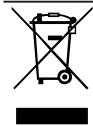
This appliance is labelled in accordance with European Directive 2012/19/EU concerning used electrical and electronic appliances (waste electrical and electronic equipment - WEEE).
The guideline determines the framework for the return and recycling of used appliances as applicable throughout the EU.
Customer Service
Customer Service
Detailed information on the warranty period and terms of warranty in your country is available from our after-sales service, your retailer or on our website.
The contact details for Customer Service can be found in the enclosed Customer Service directory or on our website.
Table of contents
1 Safety 26
Looking for help? You'll find it here.
Expert advice for your Bosch home appliances, need help with problems or a repair from Bosch experts.
Find out everything about the many ways Bosch can support you:
www.bosch-home.com/service
Contact data of all countries are listed in the attached service directory.
Visit tassimo.com for registration, accessories and more.

- SAFETY
- OVERALL VIEW
- CONTROL PANEL
- PERFORMING INITIAL START-UP
- OPERATION
- PREPARING A DRINK
- TIPS
- INTENSITYBOOST
- CLEANING AND SERVICING
- DISHWASHER-SAFE COMPONENTS
- CLEANING THE APPLIANCE
- DESCALE THE APPLIANCE
- TROUBLESHOOTING
- THE APPLIANCE IS NOT WORKING
- BREWING PROCESS STARTS, DRINK IS NOT DISPENSED
- BREWING PROCESS DOES NOT START, STATUS DISPLAY LIGHTS UP RED
- BREWING PROCESS DOES NOT START, STATUS DISPLAY FLASHES RED
- BREWING UNIT CANNOT BE CLOSED
- BREWING UNIT CANNOT BE OPENED
- WATER IS DRIPPING FROM THE BREWING UNIT
- THERE IS WATER UNDER THE CUP STAND
- NO LED IS LIT
- ALL LEDS FLASHING
- LED LIGHTS UP RED EVEN THOUGH THERE IS ENOUGH WATER IN THE WATER TANK
- CALC LED LIGHTS UP ALTHOUGH SOFTENED WATER HAS BEEN USED
- LED AND CALC LED FLASH, BREWING IS NOT POSSIBLE
- QUALITY OF BEVERAGES HAS DETERIORATED, E.G. CREMA OR VOLUME
- DRINK VOLUME HAS REDUCED
- TECHNICAL SPECIFICATIONS
- DISPOSING OF OLD APPLIANCE
- CUSTOMER SERVICE
- TABLE OF CONTENTS
Brand : BOSCH
Model : TAS162EC3
Category : Coffee maker