FJORD DOCK - Radio TANGENT - Free user manual and instructions
Find the device manual for free FJORD DOCK TANGENT in PDF.


| Product type | Clock radio with CD player, FM tuner, iPhone/iPod dock, AUX input |
| Brand | Tangent |
| Model | Fjord Dock (CD/FM) |
| Dimensions (W x H x D) | 170 mm x 180 mm x 170 mm |
| Weight | 3.20 kg (with power adapter) |
| Power supply | DC 12 V / 2 A (AC adapter included) |
| Output power | 2 x 7 W RMS (1% distortion) |
| Speakers | 2 full-range 3 inch (7.6 cm) speakers |
| Radio band | FM 87.5 – 108.0 MHz |
| Connectivity | AUX input (3.5 mm jack), DC power input |
| Display | VFD display 2 x 16 characters |
| Main features | FM radio with RDS, CD player, iPhone/iPod dock, AUX input, alarm, timer, remote control |
| Alarm | Adjustable with proximity sensor snooze |
| Proximity sensor | Auto power on by hand wave (can be disabled) |
| Remote control | Infrared provided |
| Care and cleaning | Disconnect the device before cleaning. Use a soft, dry cloth. Do not use abrasive or liquid products. |
| Safety | Do not expose to moisture, shocks, or extreme temperatures. Use only the provided adapter. |
| Spare parts and repairability | Contact Tangent customer service or an authorized dealer for any repair or parts. |
| General information | Specifications subject to change without notice. Keep the manual for future reference. |
Frequently Asked Questions - FJORD DOCK TANGENT
User questions about FJORD DOCK TANGENT
0 question about this device. Answer the ones you know or ask your own.
Ask a new question about this device
Download the instructions for your Radio in PDF format for free! Find your manual FJORD DOCK - TANGENT and take your electronic device back in hand. On this page are published all the documents necessary for the use of your device. FJORD DOCK by TANGENT.
USER MANUAL FJORD DOCK TANGENT
Design by Jacob Jensen
User manual
iPhone® and iPod® are trademarks of Apple Inc., registered in the U.S. and other countries.
"Made for iPod," and "Made for iPhone" mean that an electronic accessory has been designed to connect specifically to iPod or iPhone, respectively, and has been certified by the developer to meet Apple performance standards. Apple is not responsible for the operation of this device or its compliance with safety and regulatory standards.
FR - MANUEL D'UTILISATION
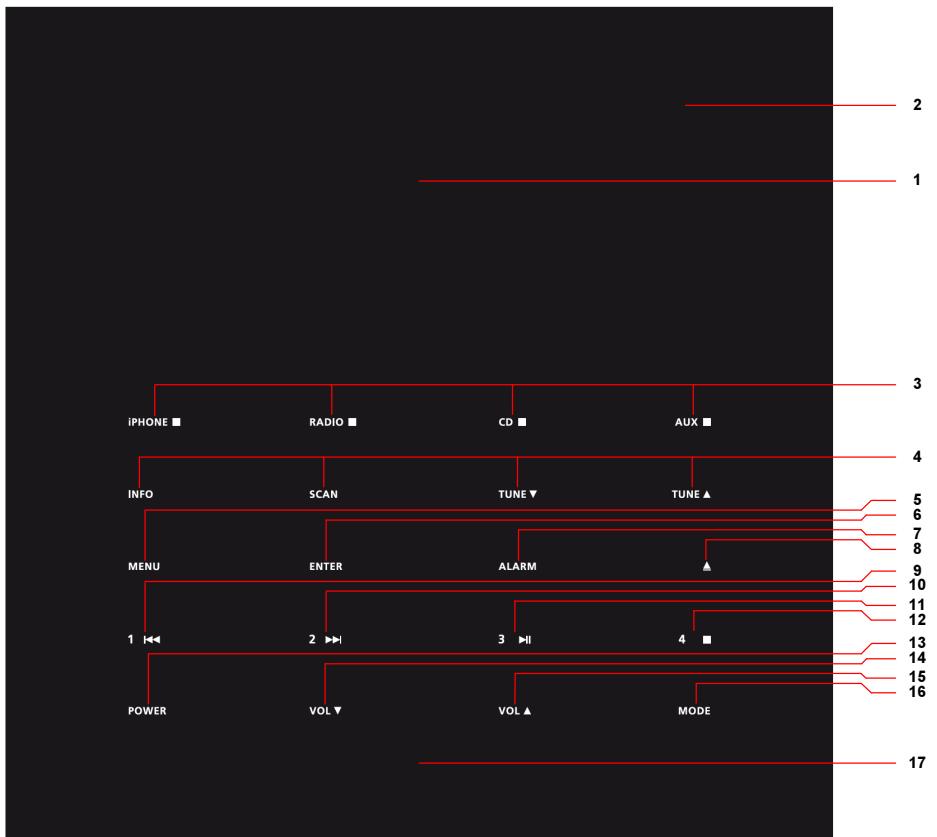
Vue du dessus
tangent fjord Design by Jacob Jensen
TANGENT FJORD CD/FM
Item No.: 21040
Batch No.: 01
Serial No.:
CAUTION:
TO REDUCE THE RISK OF ELECTRIC SHOCK, DO NOT REMOVE COVER (OR BACK).
NO USER-SERVICEABLE PARTS INSIDE.
REFER SERVICING TO QUALIFIED SERVICE PERSONNEL.
WARRANTY Void If UNIT OPENED

Made in China


POWER
12V DC=2.0A
AUX IN
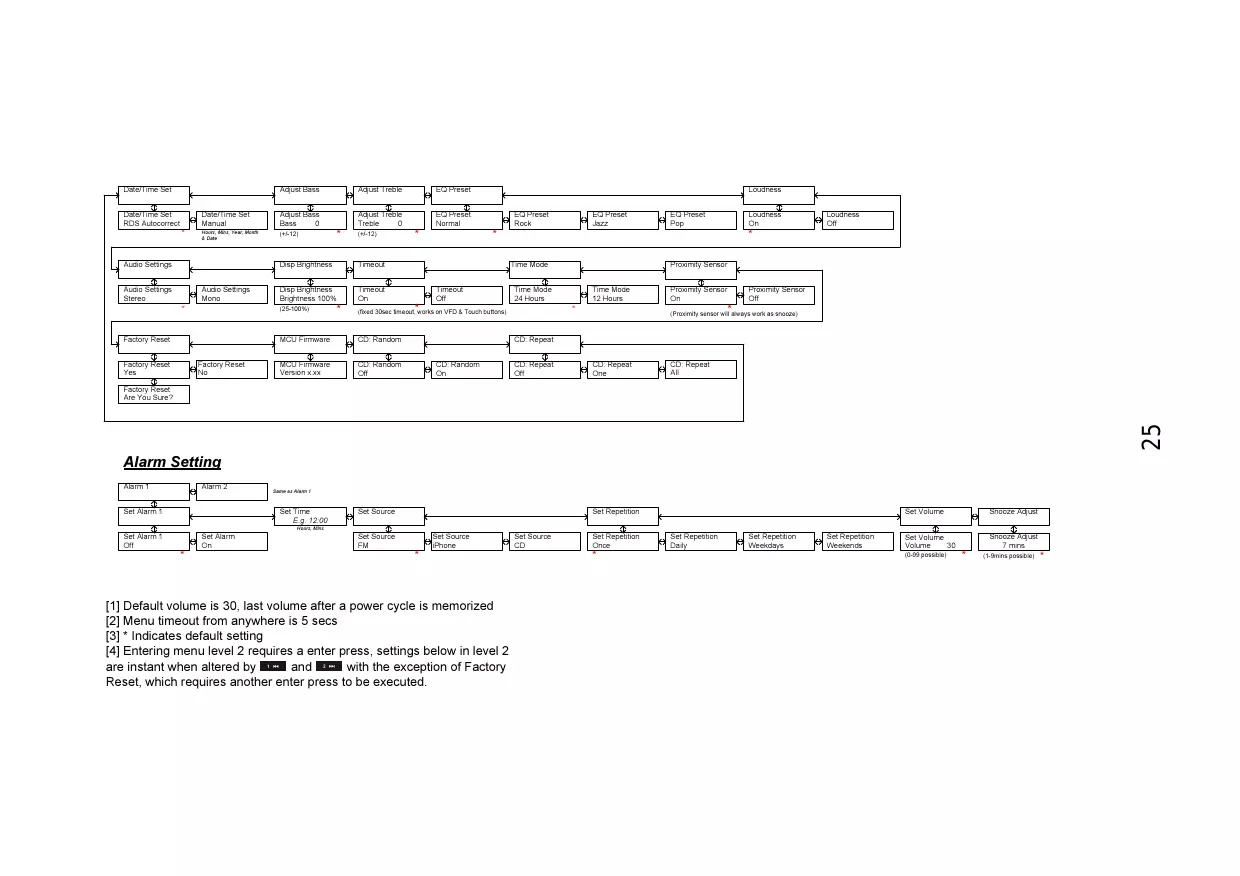
[1] Default volume is 30, last volume after a power cycle is memorized
[2] Menu timeout from anywhere is 5 secs
[3] * Indicates default setting
[4] Entering menu level 2 requires a enter press, settings below in level 2 are instant when altered by 1m and 1m with the exception of Factory Reset, which requires another enter press to be executed.
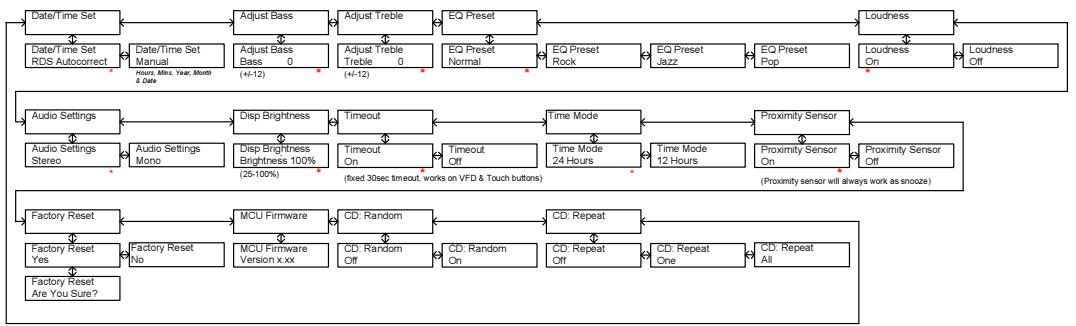
Description du menu – CD Mode
Alarm Setting

[1] Default volume is 30, last volume after a power cycle is memorized
[2] Menu timeout from anywhere is 5 secs
[3] * Indicates default setting
[4] Entering menu level 2 requires a enter press, settings below in level 2 are instant when altered by 1m and 1m with the exception of Factory Reset, which requires another enter press to be executed.
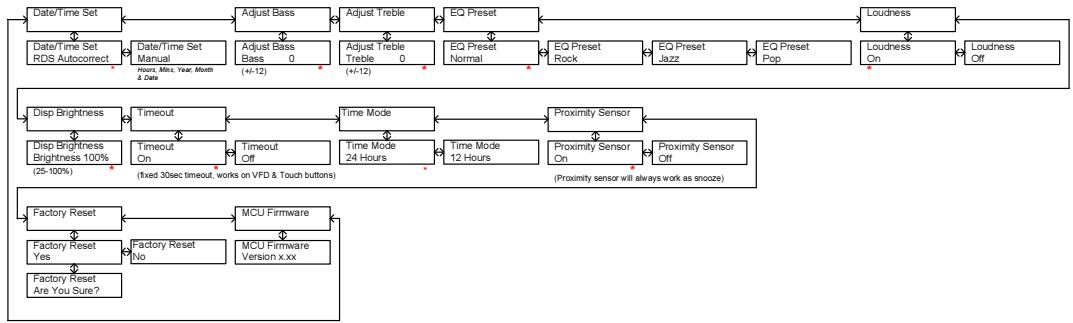
Alarm Setting

[1] Default volume is 30, last volume after a power cycle is memorized
[2] Menu timeout from anywhere is 5 secs
[3] * Indicates default setting
[4] Entering menu level 2 requires a enter press, settings below in level 2 are instant when altered by 1m and 1m with the exception of Factory Reset, which requires another enter press to be executed.
Design by Jacob Jensen
Choosing a radio for your home has until now often meant a compromise between technical features, acoustic performance, ease of operation, an aesthetic quality. With Tangent Fjord, this compromise is eliminated for the first time, allowing you to bring home a radio that satisfies demanding ears, critical eyes, and curious fingers.
Tangent Fjord is a small radio with a big sound. It appears as a minimalistic sculpture in the home, inviting operation all by itself. The high-quality materials and seductive finger-touch panel makes Tangent Fjord a physical expression for the satisfaction we experience, when quality in all aspects makes form and function unite on a higher level.

Brand : TANGENT
Model : FJORD DOCK
Category : Radio