TB-133PE - Hi-Fi System HOKAI - Free user manual and instructions
Find the device manual for free TB-133PE HOKAI in PDF.


User questions about TB-133PE HOKAI
0 question about this device. Answer the ones you know or ask your own.
Ask a new question about this device
Download the instructions for your Hi-Fi System in PDF format for free! Find your manual TB-133PE - HOKAI and take your electronic device back in hand. On this page are published all the documents necessary for the use of your device. TB-133PE by HOKAI.
USER MANUAL TB-133PE HOKAI
CLASS 1 LASER PRODUCT
ATTENTION PRODUIT LASER DE CLASSE 1 :
6 piles x LR-14 - 1.5V (piles non fournies)
9W
<0.5W
+5°C ~ +35°C
Approx. 232mm× 223mm× 109mm
0.99 kg
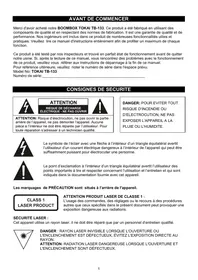
Thank you for purchasing the TOKAI TB-133 BOOMBOX. This is your assurance of quality, performance and value. This product was manufactured using the highest quality components and standards of workmanship. Our engineers have included many useful and convenient features in this product. Please be sure to read this instruction Manual completely to make sure you are getting the maximum benefit from each feature.
It was tested by inspectors and found to be in perfect working order before it left our factory. If, after reading this manual, you experience any problems with the operation of this product, please refer to the instructions for obtaining services at the end of this Manual.
For future reference, record the serial number in the space provided.
Model No: TOKAI TB-133
Serial Number:
IMPORTANT SAFETY INSTRUCTIONS
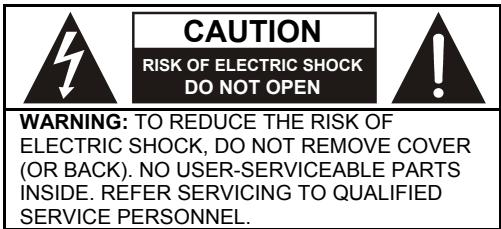
LASER SAFETY: This unit employs a laser. Only qualified service personnel should attempt to service this device due to possible eye injury.
CAUTION: USE OF CONTROLS, ADJUSTMENTS OR PERFORMANCE, PROCEDURE HEREIN MAY RESULT IN HAZARDOUS RADIATION EXPOSURE.
The CAUTION marking is located at the back of the unit.

DANGEROUS VOLTAGE
The lightning flash with arrowhead symbol, within an equilateral triangle, is intended to alert the user to the presence of uninsulated dangerous voltage within the product's enclosure that may be of sufficient magnitude to constitute a risk of electric shock to persons.

ATTENTION
The exclamation point within an equilateral triangle is intended to alert the user to the presence of important operating and maintenance (servicing) instructions in the literature accompanying the appliance.

DANGER:
Invisible and hazardous laser radiation when open and interlock failed or defeated. Avoid direct exposure to beam.
Dripping warning: The product shall not be exposed to dripping or splashing and that no objects filled with liquids, such as vases, shall be placed on the product.
Ventilation warning: The normal ventilation of the product shall not be impeded for intended use.
DANGER
Invisible laser radiation when open and interlock failed or defeated. Avoid direct exposure to beam.
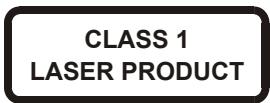
This compact disc player is classified as a CLASS 1 LASER PRODUCT. The CLASS 1 LASER PRODUCT label is located on the bottom exterior.
NOTE: The manufacturer is not responsible for any radio or TV interference caused by unauthorized modifications to this equipment. Such modifications could void the user's authority to operate the equipment.
This unit is designed to operate on an AC 100-240V~50/60Hz supply only. Connecting it to other power sources may damage it. Ensure that the supply corresponds to the information on the rating label on the bottom of the unit.
IMPORTANT SAFETY INSTRUCTIONS
- The apparatus shall not be exposed to dripping or splashing and that no objects filled with liquids, such as vases, shall be placed on the apparatus.
- When the AC/DC adapter is used as the disconnect device, the disconnect device shall remain readily operable. To be completely disconnected the power input, the AC/DC adapter shall be disconnected from the mains completely.
- No naked flame sources, such as lighted candles, should be placed on the apparatus.
- Minimum distances 2.0cm around the apparatus for sufficient ventilation. The ventilation should not be impeded by covering the ventilation openings with items, such as newspapers, table-cloths, curtains, etc.
- The use of apparatus is in tropical and/or moderate climates.
- Attention should be drawn to the environmental aspects of battery disposal.
- CAUTION: Danger of explosion if battery is incorrectly replaced. Replace only with the same or equivalent type.
- Battery shall not be exposed to excessive heat such as sunshine, fire or the like.
- The marking plate is located at the bottom of the apparatus.
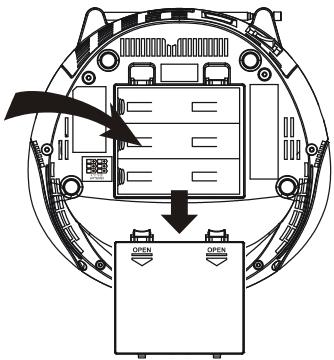
BATTERY OPERATION
- Remove the battery compartment cover gently.
- Install 6 x 'C' size 1.5 V. batteries (UM-2 or equivalent – batteries not supplied) while observing the correct polarities.
- Replace the battery compartment cover.
NOTE:
- The AC/DC adapter must be detached from the DC IN jack of the player for battery operation.
- Leaking batteries may damage the battery cabinet and the player as a whole, so they should be removed from the cabinet when becoming flat or when the player is not to be played on batteries for some time.
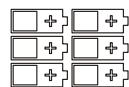
6 "C" SIZE BATTERIES
SAFETY PRECAUTIONS ON BATTERIES
- Use only the size and type of batteries specified.
- Be sure to follow the correct polarity when installing the batteries as indicated next to the battery compartment. Reversed batteries may damage to the device.
- Do not mix different types of batteries together (e.g. Alkaline and Carbon-zinc) or old batteries with fresh ones.
- If the device is not to be used for a long period of time, remove the batteries to prevent damage or injury from possible battery leakage.
- Do not try to recharge batteries not intended to be recharged; they can overheat and explode. (Follow battery manufacturer's direction.)
CONNECTING AC POWER
Plug the supplied adapter to the DC IN jack on the unit and to the main AC power.
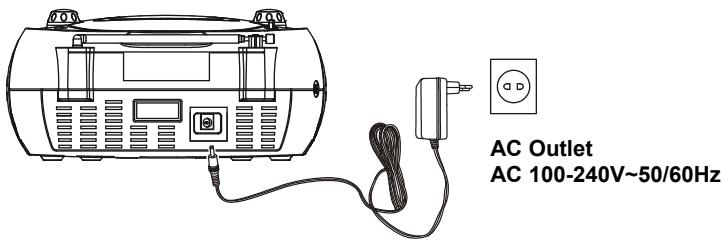
NOTE: If not any audio signal inputs to the unit in about one hour, the unit will enter to standby mode automatically (except at FM radio mode).
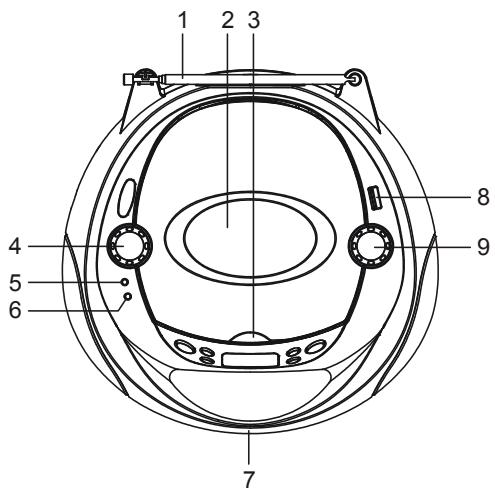
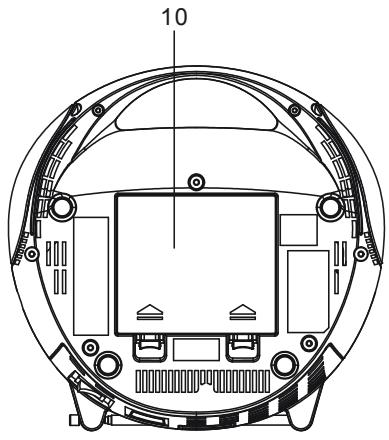
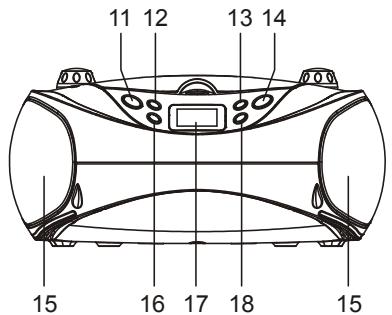
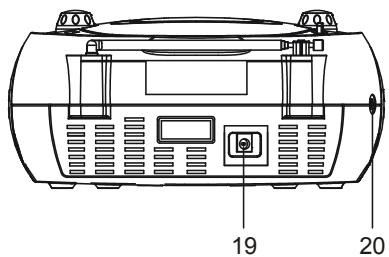
LOCATION OF CONTROLS
- FM TELESCOPIC ANTENNA
- CD DOOR
- CD DOOR OPEN AREA
- VOLUME CONTROL
- STANDBY INDICATOR
- FM ST. INDICATOR
- HANDLE
- USB PORT COMPATIBLE
- TUN+/- & NEXT/PREV CONTROL
-
BATTERY COMPARTMENT
-
SOURCE BUTTON
- PLAY/PAUSE/CH+ BUTTON
- MODE/PROG/MEM BUTTON
- POWER BUTTON
- SPEAKER
- STOP/CH-B BUTTON
- LCD DISPLAY
- +10/ALBUM BUTTON
- DC IN JACK
- AUX IN JACK
Switching ON for the first time
Plug into AC power or install batteries by following instructions on the previous Power Supply section. The standby indicator will light (on the top of the unit) once the unit is connected to the main power. Press the POWER button to turn the unit ON (the standby indicator will be OFF).
Switching between different sources (Radio / CD / USB / AUX)
After turning ON the unit, press the SOURCE button to select the different sound sources (each press will select : FM Radio mode, CD mode, USB mode, AUX mode).
Adjusting sound volume level
Turn the VOLUME knob to adjust the level of sound volume.
Adjusting the telescopic antenna
The telescopic antenna should be fully extended to ensure good reception in FM radio mode. It may be necessary to adjust the position of the unit and/or antenna to achieve the best signal reception.
FM RADIO OPERATION
The unit is designed to receive FM Radio band.
TUNING THE FM RADIO
- Press the POWER button to turn the unit ON (the standby indicator will be off).
- Press the SOURCE button repeatedly to switch the unit to the FM radio mode.
- To launch the auto-searching, Rotate and hold the TUN+/-&NEXT/PREV CONTROL several seconds and then release it.
- Rotate the TUN+/-&NEXT/PREV CONTROL to and fro shortly to tune the radio stations manually.
- Adjust the volume level to a comfortable listening level.
- Press the POWER button to turn OFF the unit.
NOTE:
- When FM (stereo) station is received, the FM ST. indicator will light on the top of the unit.
- The FM TELESCOPIC ANTENNA is directional. When you are receiving an FM broadcast, fully extend the TELESCOPIC ANTENNA and rotate it for the best reception.
STORING YOUR FAVORITE RADIO STATION
- Tune to your favorite station first; press the MODE/PROG/MEM button for storing the current station until memory cell number flashes on the screen.
- Use the STOP/CH- button or the PLAY/PAUSE/CH+ button to select the corresponding memory cell among P01-P20 for storing the station.
- Confirm your selection by pressing the MODE/PROG/MEM button.
Note: You can store up to 20 radio stations in the unit memory.
- During radio playback, press the STOP/CH- button or the PLAY/PAUSE/CH+ button repeatedly to recall the preset stations.
The unit is designed to play normal music CD disc or MP3 disc bearing the correct identification logo. If the disc does not conform to the standard, it may not be played back properly.


Caution:
- Playback of CD-R / CD-RW may depend on recording conditions.
- Do not attach a seal or label to either side (the recordable side or the labelled side) of a CD-R/ RW disc. It may cause malfunction.
- Do not load a blank CD-R/ RW disc. It will take over 1 minute to read the disc. The disc may be damaged if you try to open the CD Door while reading the disc.
- CD-ROM, CD-I, CDV, VCD, DVD or computer CDs are not possible to be read.
LOAD A DISC
- Open the CD door by the Door open area.
- Load a disc on the disc tray with the label side facing up.
- Close the CD door.
PLAY A DISC (CD/MP3)
- Press the POWER button to turn the unit ON (the standby indicator will be off).
- Press the SOURCE button repeatedly to switch to CD mode.
- Follow the steps above to load a disc.
- The player begins reading disc immediately.
- When the disc is successfully read, the total number of the tracks will be shown on the LCD display and playback will start with the first track. (If a MP3 disc is inserted into the unit, the total number of the albums will be shown in the LCD display first, and then the total number of tracks will be shown.)
- Press the PLAY/PAUSE/CH+ button once to pause music playback, the elapsed time flashes on the LCD display to indicate that the player is in Pause mode; press again same button to resume playback.
- Press the STOP/CH- button to stop music playback, the LCD display shows the total number of the tracks again.
Remark:
- If there is no disc in the unit, "NO" will be indicated on the display.
- If the CD cannot be read, "NO" will be indicated on the display.
USB OPERATION
The unit is designed to play MP3 file on the USB flash-drive. If the files on the USB device do not conform to the standard, they may not be played back properly.


EXTERNAL MEMORY MEDIA OPERATION (USB)
- Press the POWER button to turn the unit ON (the standby indicator will be off).
- Insert an USB external device to the USB port compatible.
- Press the SOURCE button repeatedly to switch to USB mode.
- When the inserted USB device is detected and read, the first track will be played automatically.
- Press the PLAY/PAUSE/CH+ button to pause and press again to resume the playback.
- Press the STOP/CH- button to cease the playback.
CD/MP3/USB COMMON OPERATION
SKIP TRACKS AND SEARCH FOR A SPECIFIC POINT TO PLAY (CD/MP3/USB)
- Rotate the TUN+/-&NEXT/PREV CONTROL shortly in music play to skip to the next track or go back to beginning of the current track, rotate the TUN+/-&NEXT/PREV CONTROL twice continuously to skip to the previous track.(While operating, it is necessary to observe the silkscreen beside the TUN+/-&NEXT/PREV CONTROL for operating correctly.)
- Rotate and hold the TUN+/-&NEXT/PREV CONTROL in music play to search at quick rate (high speed music search) for a specific point to play.
- Press the +10/ALBUM button once in play mode to skip to the track 10 tracks ahead, twice to skip to the track 20 tracks ahead. You can reach the last track of the disc using this button.
REPEAT PLAYBACK (CD/MP3/USB)
During playback, press the MODE/PROG/MEM button to repeat play a single track; press the button twice to repeat play all tracks; press the button three times to enter the introduction play mode; press the button four times to enter the random play mode; press the button five times to exit.
ALBUM SELECTING (MP3 disc / USB only)
- During MP3/USB playback, press and hold the +10/ALBUM button till an album number “F...” flashes on the screen.
- Rotate the TUN+/-&NEXT/PREV CONTROL repeatedly until the number of your desired album flashes on the screen, release the TUN+/-&NEXT/PREV CONTROL.
- Press the +10/ALBUM button again to start the playback from the first track of the selected album.
Remark:
10+/ALBUM --- this function is not available for normal music CD. (Only for MP3 disc / MP3 files on USB flash-drive)
PROGRAMMED PLAY (CD/MP3/USB)
-
At stop mode, press the MODE/PROG/MEM button once, the program's icon shows with a program sequence indication "P01" first, then a track number flickers on the LCD with the program's icon;
-
Select the first track to be programmed using the TUN+/-&NEXT/PREV CONTROL or +10/ALBUM button, and then press the MODE/PROG/MEM button again to store and advance to the next programming step (If there are several folders on the MP3 disc or USB, it is necessary to program folders first and then the tracks. The method of the folders programming is the same as the tracks programming.).
- Repeat the above steps to program more tracks. A maximum of 20 tracks for CD and 99 tracks for MP3 disc & USB can be programmed in memory in a preferred order. If the memory is full, the screen will show "FUL" for indicating.
- Press the PLAY/PAUSE/CH+ button to begin programmed play in the preferred order after you are done with programming. The player stops automatically after all programmed tracks are played.
- You may press the STOP/CH- button to terminate programmed playback. In program stop mode, press the PLAY/PAUSE/CH+ button to begin the programmed playback with the programming order identical with the previous one done; press the STOP/CH- button again to clear the programming.
AUX-IN OPERATION
AUX IN
- The AUX IN jack allows you to connect an external audio source on the unit, for example MP3 player.
- Use a 3.5mm audio cable (not supplied) to connect the external audio source to your unit.
- Power ON the external device and the main unit following the corresponding instructions.
- Press the SOURCE button repeatedly to switch to AUX mode.
- Use the native controls on the connected audio device to begin playing music through the connected unit.
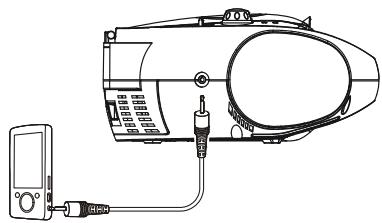
TO DEVICE PHONES OR AUX OUT (LINE OUT)
CARE AND MAINTENANCE
Handling and Maintenance of a Disc
Follow the instructions below to handle and maintain your disc in order that long time and trouble free performance can possibly be obtained:
- Ensure not to caress the rain bow side of the disc; handle the disc by the edge.
- Long time exposure to sunshine, high temperatures and humidity will damage the disc. And keep storage area clean.
- Avoid sticking labels on both sides of a disc. Writing with pointed articles on the disc should be strictly avoided.
- Clean the disc wiping the centre and then working out to the edge with a dry & soft cloth or a disc brush. Avoid any cleansing lotion or chemical eradicator.
- Store them in their cases when they are not to be used.

- To prevent fire or shock hazard, disconnect your unit from the AC power source when cleaning.
- The finish on your unit may be cleaned with a dust cloth and cared for as other furniture. Use caution when cleaning and wiping the plastic parts.
- Mild soap and a damp cloth may be used on the front panel.
To Clean the Lens
If the lens get dirty, your player may skip or may not play a CD
- Open the CD door.
- Use a camera lens blower/brush to blow on the lens once or twice, brush the dust or particles off the lens then blow again.
- To remove fingerprints, use a dry cotton swab to wipe from the middle to outer edge of the lens.
TROUBLE SHOOTING
If a fault occurs, first check the points listed below before taking the set for repair. If you are unable to remedy a problem by following these hints, consult you dealer or service center.
WARNING: Under no circumstances should you try to repair the set yourself, as this would invalidate the guarantee.
| PROBLEM | POSSIBLE CAUSE | REMEDY |
| No sound in general | Volume not adjusted. Mains supply is not correctly connected. | Adjust the Volume knob. Connect the mains supply properly. |
| The unit does reset to operation of any button | Under the influence of electrostatic phenomenon, the product may malfunction and require user to disconnect. | Turn off the unit, disconnect the mains plug, and reconnect after a few seconds. |
| Radio poor reception | Weak radio aerial signal. Interference caused by the vicinity of electrical equipment like TVs, video recorders, computer, thermostats, fluorescent lamps (TL) engines etc. | Aim the aerial for best reception. Fully extend the telescopic antenna. Keep the unit away from electrical equipment. |
| CD cannot read | The disc is dirty. The disc is upside down. The CD player is in Pause mode | Clean or replace the disc. Turn it over so that the label is face up. Release the Pause Mode by pressing the Play/Pause button. |
| No sound in USB mode | Volume at minimum. External device not connected properly. | Adjust the volume knob. Clear contact pins and connect again. |
TECHNICAL SPECIFICATIONS
GENERAL
Power Supply
Battery size
Power consumption in working mode
Standby power consumption
Operation temperature
Digital audio CD playback system
Programmable tracks
USB SECTION
USB compatible socket
Power Output
Speaker impedance
Auxiliary Input
DC 9V 1A (from the external adapter) /
AC 100-240V~50/60Hz
UM-2 or C-size batteries x 6 pcs (batteries not supplied)
9W
<0.5W
+5°C ~ + 35°C
Approx. (L) 232mm× W 223mm× H109mm
0.99 kg
FMST
FM:87.5-108MHz
up to 20 preset stations
Compact Disc Digital Audio System
Compatible with CD-R-RW/MP3
up to 20 in CD & up to 99 in MP3 disc and USB
Support USB 2.0 flash-drive
2 x 1.2 Watt (RMS)
8 Ohms
3.5 mm
IMPORTANT: Due to continual revision and improvement on our products design, specifications are subject to change without further notice.
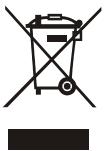
Warning! This logo set on the product means that the recycling of this apparatus comes within the framework of the Directive 2002/96/CE of January 27, 2003 concerning the Waste of Electrical and Electronic Equipment (WEEE).
This symbol means that used electrical and electronic products should not be mixed with general household waste. There is a separate collection system for these products.
If you want to dispose of this equipment, please do not use the ordinary dust bin!
- The presence of dangerous substances in the electrical and electronic equipments can have potential consequences on the environment and human health in the cycle of reprocessing this product.
- Therefore, at the end of its lifetime, this product shall not be disposed with other non-recycled waste. Used electrical and electronic equipment must be treated separately and in accordance with legislation that requires proper treatment, recovery and recycling of used electrical and electronic equipment.
- Local authorities and resellers have set special procedures for the purpose of collecting and recycling this product (please contact your local authority for further details). You have the obligation to use the selective waste collection systems put in place by your local authority.
- If your used electrical or electronic equipment has batteries or accumulators, please dispose of these separately beforehand according to local requirements.
- By disposing of this product correctly you will help ensure that the waste undergoes the necessary treatment, recovery and recycling and thus prevent potential negative effects on the environment and human health which could otherwise arise due to inappropriate waste handling.

This unit complies with European Council Directive 2006 / 95 CE (Electromagnetic Compatibility & Low Voltage Directives)
IMPORTER
This product was imported by the Company : LEMA S.A.S.
For any questions concerning the conformity of the product, than you to send your request to :
LEMA S.A.S.
CLASS 1 LASER PRODUCT
PRECAUCION PRODUCTO LASER CLASE 1:
Programmerbare tracks
maximaal 20 in CD & maximaal 99 in MP3-discs en USB