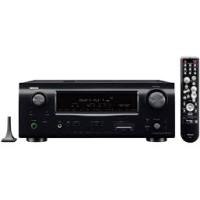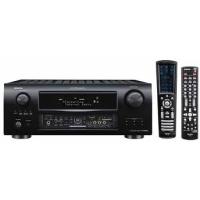
DENON AVR-3808SRE2 - AV amplifier

AVR-3808SRE2 - AV amplifier DENON - Free user manual and instructions

Find the device manual for free AVR-3808SRE2 DENON in PDF.

📄 87 pages English EN Download 💬 AI Question 10 questions ⚙️ Specs
Notice DENON AVR-3808SRE2 - page 2
View the manual : Français FR English EN
Pick your language and provide your email: we'll send you a specifically translated version.
Product type 7.1-channel audio-video amplifier
Dimensions (W x H x D) 434 x 171 x 420 mm
Weight 17.8 kg
Power supply AC 230 V, 50 Hz
Power consumption 550 W (on), 0.3 W (standby)
Output power (8 Ω) 130 W per channel (20 Hz – 20 kHz, 0.05 % THD)
HDMI inputs 4 inputs (version 1.3a, Deep Color)
HDMI outputs 1 output with video conversion
Digital audio inputs Optical (2), coaxial (2)
Analog inputs 7 (including PHONO), 1 front stereo AUX
Network connectivity Ethernet 100BASE-TX, Internet radio, PC playback
USB ports 2 (front and rear), for USB memory
Supported audio formats Dolby TrueHD, DTS-HD, PCM, DSD, MP3, WMA, FLAC
Acoustic equalization Audyssey MultEQ XT (setup microphone included)
Built-in tuner FM/AM with RDS
Multi-zone functions Zone 2 and Zone 3 (assignable preamp and amp)
Provided remote controls Main (RC-1068) and secondary (RC-1070)
Included accessories Setup microphone, FM/AM antennas, power cord, 4 batteries
Maintenance and cleaning Unplug before cleaning; use a soft, dry cloth
Safety Do not open the casing, avoid moisture, ensure proper ventilation
Spare parts / repairability Contact an authorized DENON service center for any repairs
General information 87-page user manual, PDF format available

Frequently Asked Questions - AVR-3808SRE2 DENON

Why is there no sound from the speakers?
Check the speaker and source connections, that the volume is not too low or mute is not activated. Make sure the correct input source is selected and that the input mode (digital/analog) matches the connection. If no digital signal is received, the 'DOLBY DIGITAL' indicator does not light up. See troubleshooting pages 83-85.
The remote control does not work or has reduced range. What should I do?
Replace the batteries with new ones (LR6/AA for the main, R03/AAA for the secondary). Check that nothing is blocking the sensor and that you are within 7 meters. Avoid direct sunlight or fluorescent lamps on the sensor. Also check the remote ID (pages 35, 63).
HDMI image does not appear on the monitor
Check that the HDMI cable is properly connected and that the monitor is HDCP compatible. Make sure the HDMI output resolution (HDMI Setup menu) is compatible with your screen. If the input signal is 1080p component, HDMI conversion is not possible. See pages 11 and 30.
How to use an iPod with the AVR-3808?
Connect a DENON control dock (ASD-1R, sold separately) to the DOCK CONTROL terminal. Connect the iPod to the dock. Select the default source 'VCR (iPod)'; you can reassign it via the 'Source Selection' menu - 'Assignment' - 'iPod Station' (page 39). Playback is via the GUI menu.
Unable to play Internet radio or network audio files
Check the Ethernet connection and network settings (Network Setup menu). Make sure the DHCP router is active or enter the IP address manually. Internet radio stations must be in MP3 or WMA format. Also check that the firewall is not blocking the connection (pages 20, 32-33).
How to reset the unit to factory settings?
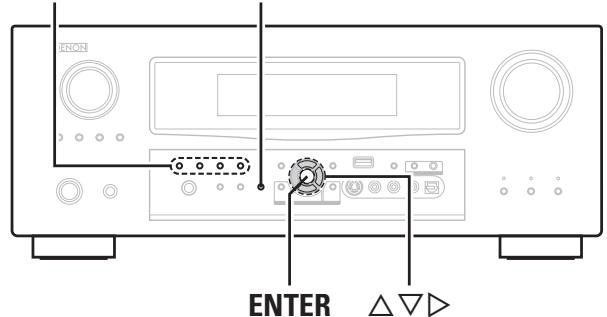
To reset the microprocessor, put the unit in standby, then simultaneously press and hold the 'STANDARD' and 'PURE DIRECT' buttons for at least 3 seconds. The display flashes then the unit returns to default settings (page 59).
The protection circuit activates and the power indicator blinks red
This is due to overheating or a short circuit. Turn off the unit, unplug the power cord, check that the speaker wires are not touching each other and that the speaker impedance is correct (6 to 16 Ω). Ensure good ventilation. If the problem persists, contact a DENON service center (page 10).
How to set up automatic speaker calibration?
Connect the supplied setup microphone to the SETUP MIC jack. In the GUI menu, select 'Auto Setup'. Follow the instructions: place the microphone at ear height at the main listening position, then move it to 5-7 other positions. Measurements are automatic; once complete, the settings (distance, level, equalization) are saved (pages 25-27).
Can I connect a turntable?
Yes, use the PHONO input. If the turntable has an MC cartridge, you will need an external MC head amplifier. Connect the ground wire to the SIGNAL GND terminal to reduce hum. Set the source to 'PHONO' (page 13).
The surround back speakers produce no sound
Check that the surround back speaker is enabled in the 'Speaker Setup' menu (option 'Surround back' set to something other than 'None'). Make sure the selected surround mode uses 6.1 or 7.1 channels (e.g., Dolby Digital EX, DTS-ES). Also check the amplifier assignment (page 69).

User questions about AVR-3808SRE2 DENON

0 question about this device. Answer the ones you know or ask your own.

Ask a new question about this device

The email remains private: it is only used to notify you if someone responds to your question.

No questions yet. Be the first to ask one.

Download the instructions for your AV amplifier in PDF format for free! Find your manual AVR-3808SRE2 - DENON and take your electronic device back in hand. On this page are published all the documents necessary for the use of your device. AVR-3808SRE2 by DENON.

USER MANUAL AVR-3808SRE2 DENON

Use this manual in combination with the operating guide displayed on the GUI screen.

GUI Menu Operation ( page 22, 23)

GUI Menu Map (page 24)

Language (page 36)

Remote Control Unit Operations ( page 60)

Deutsch

Tuner TV/CABLE 14
Tuner satellite 14

CD DVD HDP TV/CBL SAT VCR DVR V.AUX

CD DVD HDP TV/CBL SAT VCR DVR V.AUX

DVD HDP TV/CBL SAT VCR DVR V.AUX Source

DENON AVR-3808SRE2 - Deutsch - 1

DVD HDP TV/CBL SAT VCR DVR V.AUX

CDDVDHDPTV/CBLSATVCRDVRV.AUX
DVDHDPTV/CBLSATVCRDVRV.AUX
CDDVDHDPTV/CBLSATVCRDVRV.AUX
DVDHDPTV/CBLSATVCRDVRV.AUX
CDDVDHDPTV/CBLSATVCRDVRV.AUX
  • Sources Dolby Digital: "0 dB"
  • Films DTS: "0 dB"
  • Sources audio DTS: "−10 dB"

Centerer image

1 Informations signal

Windows Media Player Network Sharing Service
Windows Media DRM10

Installation de Windows Media Player ver. 11
DENON AVR-3808SRE2 - Installation de Windows Media Player ver. 11 - 1
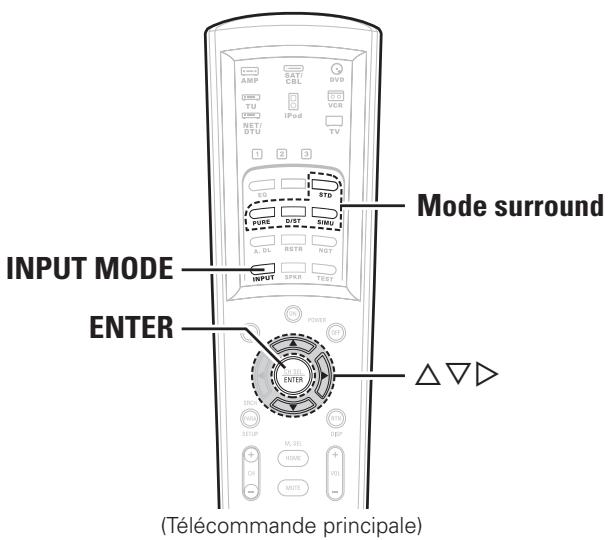
Mode surround INPUT MODE

DENON AVR-3808SRE2 - Installation de Windows Media Player ver. 11 - 2

DENON AVR-3808SRE2 - Installation de Windows Media Player ver. 11 - 3

CBL: Tuner satellite /TV câblée

:iPod

iPod

DTS Digital Surround

HDMI (High-Definition Multimedia Interface)

  • Bomes video standard

87,5 MHz ~ 108,0 MHz

Hz 1611~kHz

Sensibilité utile:

114 g (piles incluses)
Manual assistant
Powered by Anthropic
Waiting for your message
Product information

Brand : DENON

Model : AVR-3808SRE2

Category : AV amplifier