
SC3 EASY FiX PREM HOME - Steam cleaner KARCHER - Free user manual and instructions
Find the device manual for free SC3 EASY FiX PREM HOME KARCHER in PDF.


| Product Type | Steam Cleaner |
| Brand | KARCHER |
| Model | SC3 EASY FiX PREM HOME |
| Dimensions (L x W x H) | 360 x 236 x 252 mm |
| Weight (without accessories) | 3.2 kg |
| Voltage | 220-240 V |
| Frequency | 50-60 Hz |
| Heating Power | 1900 W |
| Protection Type | IPX4 |
| Protection Class | I |
| Maximum Operating Pressure | 0.35 MPa |
| Heating Time | 30 seconds |
| Continuous Steam Output | 40 g/min |
| Maximum Steam Boost | 100 g/min |
| Water Tank Capacity | 1.0 L |
| Included Accessories | Floor nozzle, hand suction tool, round brush (small and large), Power nozzle, pencil jet nozzle, extension tubes, microfibre cloths, carpet glider |
| Descaling Function | Integrated descaling cartridge with replacement indicator |
| Child Safety | Steam start selector (child safety) |
| Dry-run Protection | Yes, automatic pump shut-off |
| Maintenance | Rinse the tank, wash cloths at max 60°C, replace descaling cartridge according to indicator |
| Warranty | Manufacturer's warranty according to country conditions |
Frequently Asked Questions - SC3 EASY FiX PREM HOME KARCHER
User questions about SC3 EASY FiX PREM HOME KARCHER
0 question about this device. Answer the ones you know or ask your own.
Ask a new question about this device
Download the instructions for your Steam cleaner in PDF format for free! Find your manual SC3 EASY FiX PREM HOME - KARCHER and take your electronic device back in hand. On this page are published all the documents necessary for the use of your device. SC3 EASY FiX PREM HOME by KARCHER.
USER MANUAL SC3 EASY FiX PREM HOME KARCHER
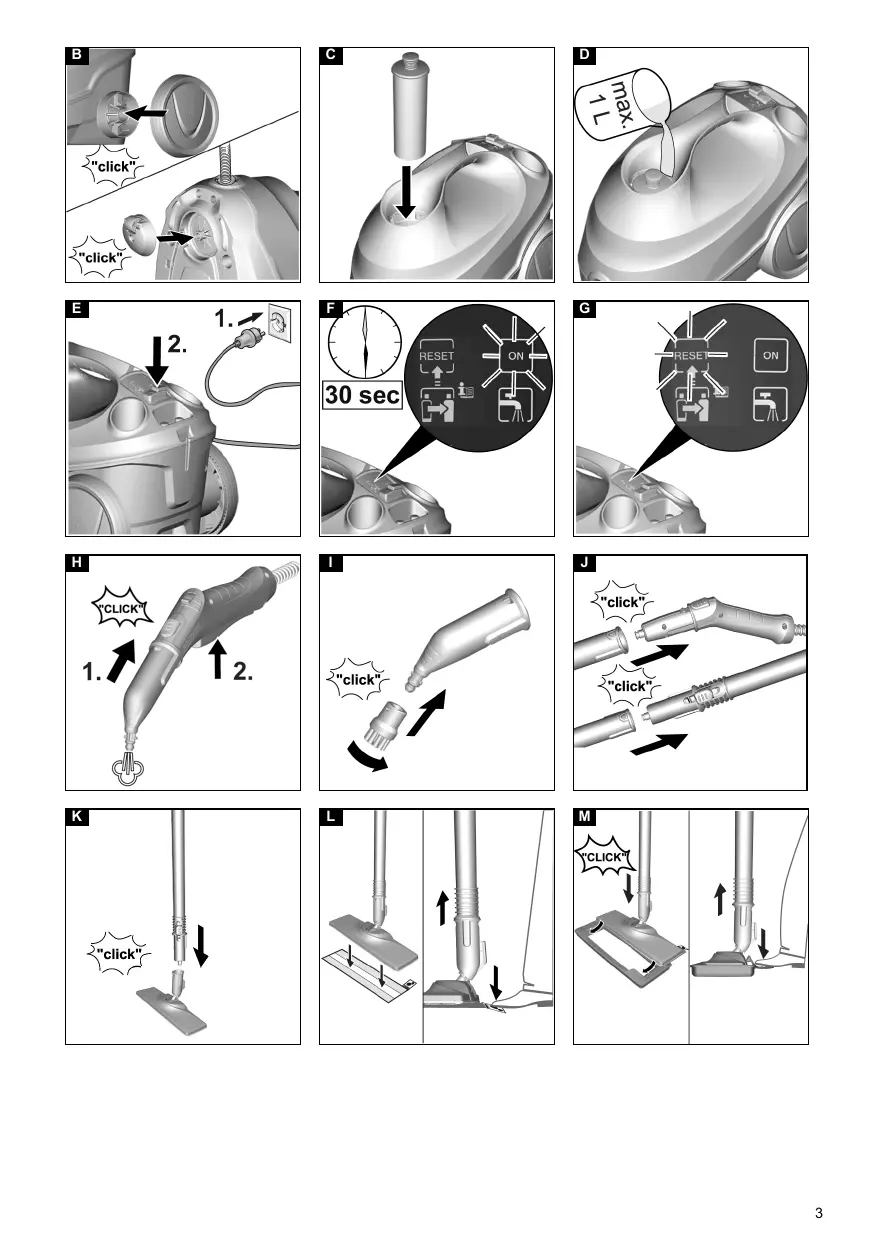
When the RESET key is pressed, the flash pulse for the water hardness level is not indicated.
- Release the RESET key.
The flash pulse for the set water hardness is indicated. - Repeat the process as necessary until the desired water hardness level has been achieved.
- Press and hold the RESET key for 3 seconds to save the setting for the water hardness level. The indicator light for the water hardness lights up.
Care of accessories
(Accessories - depending on scope of delivery) Note
The floor cleaning cloth and the cover for the manual nozzle have been washed beforehand and can be used immediately for working with the appliance. The micro fibre cloths are not suitable for dryer.
Note
When washing the cloths, observe the instructions on the washing tag. Do not use any liquid softeners as this will affect the ability of the cloths to pick up dirt.
- Wash the floor cleaning cloths and covers at a max. temperature of 60^ in the washing machine.
Troubleshooting guide
Malfunctions often have simple causes that you can remedy yourself using the following overview. When in doubt, or in the case of malfunctions not mentioned here, please contact your authorised Customer Service.
WARNING
Risk of electric shock and burns
Trying to eliminate faults while the appliance is connected to the mains or has not yet cooled down is always dangerous.
Remove the mains plug.
Allow the appliance to cool down.
The water shortage indicator light lights up constantly in red
No water in the water reservoir.
- Top up the water reservoir, see chapter Topping up the water.
The water shortage indicator light flashes red
The dry-run protection for the pump is deactivated.
- Switch the device off and back on again.
- Make sure that the decalcification cartridge has been inserted correctly and there is sufficient water in the reservoir.
The steam lever cannot be pressed
The steam lever is locked with the child lock.
- Set the child lock (selector switch for steam volume) to the front.
The steam lever is released.
No / little steam although there is water in the reservoir
The decalcification cartridge has not been inserted or has been inserted incorrectly.
- Insert the decalcification cartridge or insert it correctly.
The decalcification cartridge has been removed while topping up the water. - Leave the decalcification cartridge in the device when topping up.
New decalcification cartridge has been inserted. - Press and hold the steam lever constantly. The full steam output is reached after approximately 30 seconds.
Red indicator light "replace descaling cartridge" lights up / flashes
Run time of the decalcification cartridge ends soon.
- Insert the new decalcification cartridge and reset the maintenance indicator, see chapter Replacing the decalcification cartridge.
The RESET key was not pressed after replacement of the decalcification cartridge. - Press and hold the RESET key for 4 seconds after inserting the decalcification cartridge, see chapter Replacing the decalcification cartridge.
Device switches off automatically
Run time for the decalcification cartridge has expired
- Insert the new decalcification cartridge and reset the maintenance indicator, see chapter Replacing the decalcification cartridge.
The RESET key was not pressed after replacement of the decalcification cartridge. - Press and hold the RESET key for 4 seconds after inserting the decalcification cartridge, see chapter Replacing the decalcification cartridge.
Technical data
Electrical connection
Performance data
| Voltage | V | 220-240 |
| Phase | ~ | 1 |
| Frequency | Hz | 50-60 |
| Protection class | IPX4 | |
| Protection category | I |
| Heating capacity | W | 1900 |
| Maximum operating pressure | MPa | 0.35 |
| Heating-up time | Seconds | 30 |
| Continuous steaming | g/min | 40 |
| Maximum steam blast | g/min | 100 |
Filling quantity
| Water reservoir | I | 1.0 |
| Dimensions and weights | ||
| Weight (without accessories) | kg | 3.2 |
| Length | mm | 360 |
| Width | mm | 236 |
| Height | mm | 252 |
Subject to technical modifications.
Contenu
http://www.kaercher.com/dealersearch
71364 Winnenden (Germany)
Tel.: +49 7195 14-0
Fax: +49 7195 14-2212

Deutsch 3
English 8
Francais 12
Italiano 17
Nederlands 22
Espanol 27
Portugues 32
Dansk 37
Norsk 41
Svenska 45
Suomi 49
Eληνικα 53
Türkce 58
Pycckn 62
Magyar 68
Čestina 73
Slovenščina 77
Polski 81
Romaneeste 86
Slovencina 91
Hrvatski 96
Srpski 100
BbIrapckn 104
Eesti 109
Latviešu 113
Lietuviskai 117
YkpaIHcbKa 121
Ka3akwa 126
O'zbek 131
138
Manipulation friable
DANGER
http://www.kaercher.com/dealersearch
71364 Winnenden (Germany)
Tel.: +49 7195 14-0
Fax: +49 7195 14-2212
- Care of accessories
- Note
- Troubleshooting guide
- WARNING
- Risk of electric shock and burns
- The water shortage indicator light lights up constantly in red
- The water shortage indicator light flashes red
- The steam lever cannot be pressed
- No / little steam although there is water in the reservoir
- Red indicator light "replace descaling cartridge" lights up / flashes
- Device switches off automatically
- Technical data
- Contenu
- Manipulation friable
- DANGER
Brand : KARCHER
Model : SC3 EASY FiX PREM HOME
Category : Steam cleaner