
Optios - Digital Camera PENTAX - Free user manual and instructions
Find the device manual for free Optios PENTAX in PDF.


| Product type | Compact digital camera |
| Brand | PENTAX |
| Model | Optios (Optio S) |
| Sensor | CCD 1/2.5 inch 3.34 megapixels (total), 3.2 effective megapixels |
| Lens | 3x optical zoom (focal length 5.8-17.4 mm, equivalent 35-105 mm) |
| Digital zoom | 4x (max. 12x combined) |
| LCD screen | 1.6 inch TFT color |
| Recorded pixels (still image) | 2048×1536, 1600×1200, 1024×768, 640×480 |
| Recorded pixels (video) | 320×240 |
| Sensitivity | Auto, ISO 50, 100, 200 |
| Shooting modes | Standard, Program, Night Scene, Video, Panorama, 3D, Digital Filter, User |
| Power supply | Rechargeable lithium-ion battery D-Li8 |
| Battery life | Approx. 160 shots (with flash 50% of shots) |
| Dimensions | 83 (W) × 52 (H) × 20 (D) mm |
| Weight | 98 g (without battery or card), 113 g (with battery and card) |
| Storage media | Internal memory 11 MB, SD/MultiMediaCard |
| File formats | JPEG (Exif 2.2), AVI (Motion JPEG), WAV |
| Flash | Built-in, modes Auto, Forced, Red-eye reduction |
| Connections | USB 1.1, AV, DC input for AC adapter |
| Warranty | 12 months |
| Maintenance | Dust with a blower, do not use solvents, store in a ventilated place |
| Safety | Do not disassemble, avoid water, use specified battery, keep out of reach of children |
| Optional accessories | AC adapter D-AC8, USB/AV cables, case, strap, remote controls, charger |
Frequently Asked Questions - Optios PENTAX
User questions about Optios PENTAX
0 question about this device. Answer the ones you know or ask your own.
Ask a new question about this device
Download the instructions for your Digital Camera in PDF format for free! Find your manual Optios - PENTAX and take your electronic device back in hand. On this page are published all the documents necessary for the use of your device. Optios by PENTAX.
USER MANUAL Optios PENTAX
Lecture/effacement/edition 79
Lecture/effacement/édition
Batterie lithium-ion rechargeable (D-LI8)
For customers in USA STATEMENT OF FCC COMPLIANCE
This device complies with Part 15 of the FCC Rules. Operation is subject to the following two conditions: (1) This device may not cause harmful interference, and (2) this device must accept any interference received, including interference that may cause undesired operation. Changes or modifications not approved by the party responsible for compliance could void the user's authority to operate the equipment. This equipment has been tested and found comply with the limits for a Class B digital device, pursuant to part 15 of the FCC Rules.
These limits are designed to provide reasonable protection against harmful interference in a residential installation. This equipment generates, uses and can radiate frequency energy and, if not installed and used in accordance with the instructions, may cause harmful interference to radio communications. However, there is no guarantee that interference will not occur in a particular installation.
If this equipment does cause harmful interference to radio or television reception, which can be determined by turning the equipment off and on, the user is encouraged to try to correct the interference by one or more of the following measures:
- Reorient or relocate the receiving antenna.
Increase the separation between the equipment and receiver.
Connect the equipment into an outlet on a circuit different from that to which the receiver is connected. - Consult the dealer or an experienced radio/TV technician for help.
For customers in Canada
This Class B digital apparatus meets all requirements of the Canadian Interference - Causing Equipment Regulations.
The CE Mark is a Directive conformity mark of the European Community.
PENTAX Corporation 2-36-9, Maeno-cho, Itabashi-ku, Tokyo 174-8639, JAPAN (http://www.pentax.co.jp/)
PENTAX Europe GmbH (European Headquarters) Julius-Vosseler-Straße, 104, 22527 Hamburg, GERMANY (HQ - http://www.pentaxeurope.com) (Germany - http://www.pentax.de)
PENTAX U.K. Limited Pentax House, Heron Drive, Langley, Slough, Berks SL3 8PN, U.K. (http://www.pentax.co.uk)
PENTAX France S.A.S. 12/14, rue Jean Poulmarch, 95106 Argenteuil Cedex, FRANCE
PENTAX Benelux B.V. (for Netherlands)
Spinveld 25, 4815 HR Breda, NETHERLANDS (http://www.pentax.nl)
(for Belgium & Luxembourg)
Weiveldlaan 3-5, 1930 Zaventem, BELGIUM (http://www.pentax.be)
for yourprecious moments
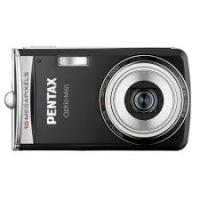
Brand : PENTAX
Model : Optios
Category : Digital Camera