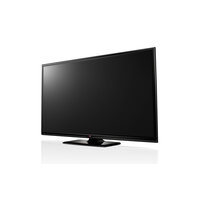
60PB690V - Television LG - Free user manual and instructions
Find the device manual for free 60PB690V LG in PDF.


User questions about 60PB690V LG
0 question about this device. Answer the ones you know or ask your own.
Ask a new question about this device
Download the instructions for your Television in PDF format for free! Find your manual 60PB690V - LG and take your electronic device back in hand. On this page are published all the documents necessary for the use of your device. 60PB690V by LG.
USER MANUAL 60PB690V LG
| Printing specification | Drawn | Checked | Approved | |||
| Signature MMM/DD/YYYY | Sungho.Jo Jan/29/2014 | Mira.Woo Jan/29/2014 | JongOk.Kim Jan/29/2014 | |||
| 1. Model Description | ||||||
| Model name: 50PB660V-ZD Brand name: LG Part number: MFL68026904 | ||||||
| 2nd, 3rd Suffix: EU Product name: 50PB660V-ZD (Revision number) (1402-REV00) | ||||||
| 2. Printing Specification | ||||||
| 1. Trim size (Format): 148 mm x 210 mm (A5) | ||||||
| 2. Printing colors | ||||||
| • Cover: 1 Color (Black) | ||||||
| • Inside: 1 Color (Black) | ||||||
| 3. Stock (Paper) | ||||||
| • Cover: Coated, Snow white paper 150 g/m² | ||||||
| • Inside: Uncoated, wood-free paper 60 g/m² | ||||||
| 4. Bindery: Perfect binding | ||||||
| 5. Language: ENG/GER/FRA/ITA/SPA/POR/NED/GRK/SLN (9) | ||||||
| 6. Number of pages: 260 | ||||||
| NOTE | "This part contains Eco-hazardous substances (Pb, Cd, Hg, Cr6+, PBB, PBDE, etc.) within LG standard level, Details should be followed Eco-SCM management standard[LG(56)-A-2524]. Especially, Part should be followed and controlled the following specification. (1) Eco-hazardous substances test report should be submitted when Part certification test and First Mass Production. (2) Especially, Don't use or contain lead(Pb) and cadmium(Cd) in ink. | |||||
| 3. Origin Notification | ||||||
| LGEAK: Printed in Kazakhstan LGEKR: Printed in Korea LGERS: Printed in Mexico | ||||||
| LGEAZ: Printed in Brazil LGEMA: Printed in Poland LGESY: Printed in China | ||||||
| LGEEG: Printed in Egypt LGEMX: Printed in Mexico LGETH: Printed in Thailand | ||||||
| LGEIL: Printed in India LGEND: Printed in China LGEVN: Printed in Vietnam | ||||||
| LGEIN: Printed in Indonesia LGERA: Printed in Russia LGEWR: Printed in Poland | ||||||
| LGEAS: Printed in Algeria | ||||||
| 4. Changes | ||||||
| 10 | ||||||
| 9 | ||||||
| 8 | ||||||
| 7 | ||||||
| 6 | ||||||
| 5 | ||||||
| 4 | ||||||
| 3 | ||||||
| 2 | ||||||
| 1 | ||||||
| Rev. Number: MMM/DD/YYYY Signature: ECO Number Change Contents | ||||||
| Front Cover P/No. | A-2 | ... | ... | A-17 | Blank |
| Front (ENG) | 2 | ... | 26 | ||
| Front (GER) | 2 | ... | 26 | ||
| Front (FRA) | 2 | ... | 26 | ||
| Front (ITA) | 2 | ... | 30 | ||
| Front (SPA) | 2 | ... | 26 | ||
| Front (POR) | 2 | ... | 26 | ||
| Front (NED) | 2 | ... | 26 | ||
| Front (GRK) | 2 | ... | 26 | ||
| Front (SLN) | 2 | ... | 26 |
OWNER'S MANUAL
PLASMA TV
Please read this manual carefully before operating your set and retain it for future reference.
PB66**
PB69**
TABLE OF CONTENTS
A-3 SETTING UP THE TV
A-3 Attaching the stand
A-4 MAKING CONNECTIONS
A-4 Antenna Connection
A-6 Satellite dish Connection
A-7 Euro Scart Connection
A-10 Other Connections
COMMON
LANGUAGE LIST
English
Deutsch
Français
Italiano
Espanol
Portugues
Nederlandst
Eλληνικα
Slovenskina
LANGUAGE
B-1 SPECIFICATIONS
COMMON
SETTING UP THE TV
Image shown may differ from your TV.
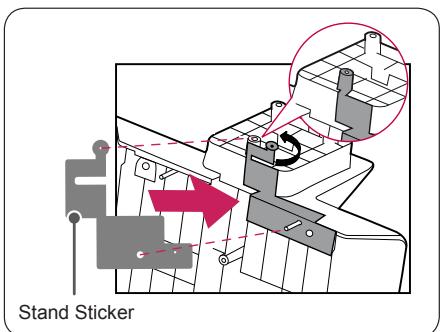
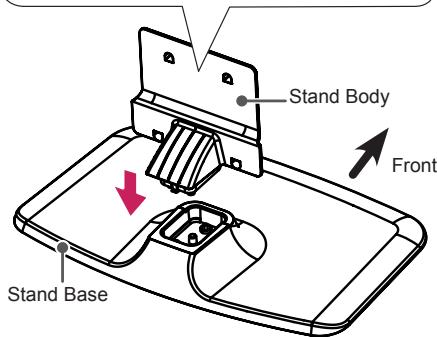
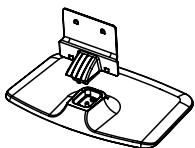
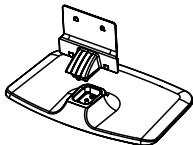
Attaching the stand
1
Before assembling, attach the stand sticker under the stand body to reduce the electromagnetic interference as shown below. (Depending upon model)

CAUTION
- When assembling the stand base and the stand body, press the stand body until you can hear a clicking sound in the hook.
2
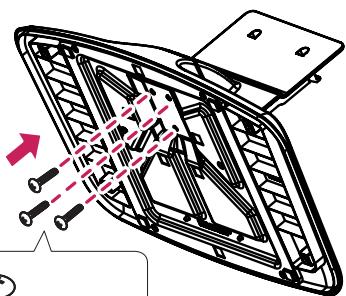

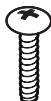
3 EA M5 x L25

CAUTION
- Tighten the screw fully, otherwise the set may lean or fall.
3
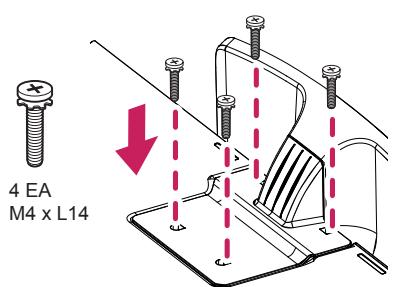
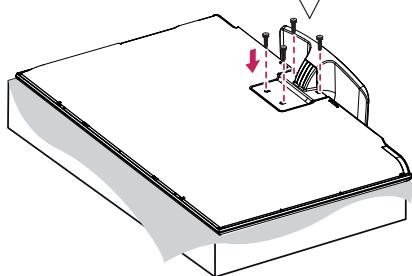

CAUTION
- When attaching the stand to the TV set, place the screen facing down on a cushioned table or flat surface to protect the screen from scratches.
MAKING CONNECTIONS
This section on MAKING CONNECTIONS mainly uses diagrams for the PB69** models.
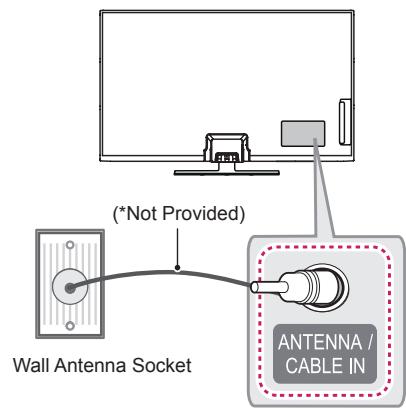
Antenna Connection
English
Connect the TV to a wall antenna socket with an RF cable (75 Ω).

NOTE
- Use a signal splitter to use more than 2 TVs.
- If the image quality is poor, install a signal amplifier properly to improve the image quality.
- If the image quality is poor with an antenna connected, try to realign the antenna in the correct direction.
- An antenna cable and converter are not supplied.
Supported DTV Audio: MPEG, Dolby Digital, Dolby Digital Plus, HE-AAC
Deutsch
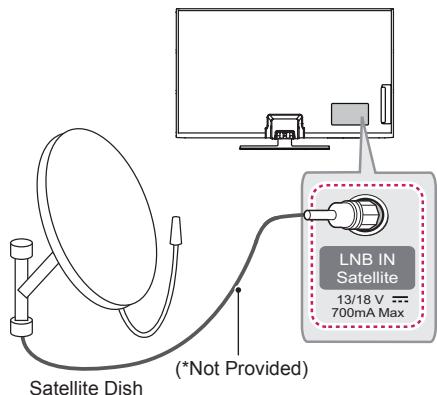
Satellite dish Connection
(Only satellite models)
English
Connect the TV to a satellite dish to a satellite socket with a satellite RF cable (75 Ω).
Deutsch
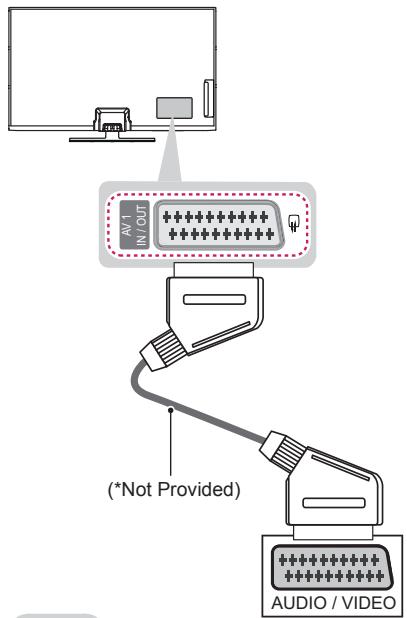
Euro Scart Connection
English
Transmits the video and audio signals from an external device to the TV set. Connect the external device and the TV set with the euro scart cable as shown.
| Output Type Current input mode | AV1 (TV Out1) |
| Digital TV | Digital TV |
| Analogue TV, AV | Analogue TV |
| Component | |
| HDMI |
1 TV Out : Outputs Analogue TV or Digital TV signals.

NOTE
- Any Euro scart cable used must be signal shielded.
- When watching digital TV in 3D imaging mode, only 2D out signals can be output through the SCART cable. (Only 3D models)
Deutsch
Connect your TV to external devices. For the best picture and audio quality, connect the external device and the TV with the HDMI cable as shown. Some separate cable is not provided.
Deutsch
Connect various external devices to the TV and switch input modes to select an external device. For more information on external device's connection, refer to the manual provided with each device.
Available external devices are: HD receivers, DVD players, VCRs, audio systems, USB storage devices, PC, gaming devices, and other external devices.

NOTE
- The external device connection may differ from the model.
- Connect external devices to the TV regardless of the order of the TV port.
- If you record a TV program on a DVD recorder or VCR, make sure to connect the TV signal input cable to the TV through a DVD recorder or VCR. For more information of recording, refer to the manual provided with the connected device.
Refer to the external equipment's manual for operating instructions. - If you connect a gaming device to the TV, use the cable supplied with the gaming device.
- In PC mode, there may be noise associated with the resolution, vertical pattern, contrast or brightness. If noise is present, change the PC output to another resolution, change the refresh rate to another rate or adjust the brightness and contrast on the PICTURE menu until the picture is clear.
- In PC mode, some resolution settings may not work properly depending on the graphics card.
Deutsch
Please read this manual carefully before operating your set and retain it for future reference.
LICENSES
Supported licenses may differ by model. For more information about licenses, visit www.lg.com.





OPEN SOURCE SOFTWARE NOTICE
To obtain the source code under GPL, LGPL, MPL and other open source licenses, that is contained in this product, please visit http://opensource.lge.com.
In addition to the source code, all referred license terms, warranty disclaimers and copyright notices are available for download.
LG Electronics will also provide open source code to you on CD-ROM for a charge covering the cost of performing such distribution (such as the cost of media, shipping and handling) upon email request to opensource@lge.com. This offer is valid for three (3) years from the date on which you purchased the product.
EXTERNAL CONTROL DEVICE SETUP
To obtain the external control device setup information, please visit www.lg.com
SAFETY INSTRUCTIONS
Please read these safety precautions carefully before using the product.


WARNING
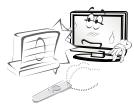
- Do not place the TV and/or remote control in the following environments:
- A location exposed to direct sunlight
- An area with high humidity such as a bathroom
- Near any heat source such as stoves and other devices that produce heat
- Near kitchen counters or humidifiers where they can easily be exposed to steam or oil
- An area exposed to rain or wind
- Near containers of water such as vases
Otherwise, this may result in fire, electric shock, malfunction or product deformation.
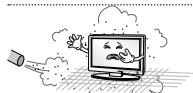
- Do not place the product where it might be exposed to dust.
This may cause a fire hazard.
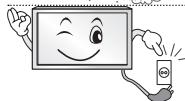
- Mains Plug is the TV connecting/disconnecting device to AC mains electric supply. This
plug must remain readily attached and operable when TV is in use.
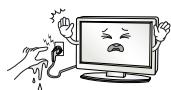
- Do not touch the power plug with wet hands. Additionally, if the cord pin is wet or
covered with dust, dry the power plug completely or wipe dust off.
You may be electrocuted due to excess moisture.
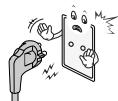
- Make sure to connect Mains cable to compliant AC mains socket with Grounded earth
pin. (Except for devices which are not grounded on earth.) Otherwise possibility you
may be electrocuted or injured.

- Insert power cable plug completely into wall socket otherwise if not secured completely
into socket, fire ignition may break out.
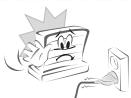
- Ensure the power cord does not come into contact with hot objects such as a heater.
This may cause a fire or an electric shock hazard.
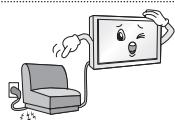
- Do not place a heavy object, or the product itself, on power cables.
Otherwise, this may result in fire or electric shock.
| ·Bend antenna cable between inside and outside building to prevent rain from flowing in. This may cause water damaged inside the Product and could give an electric shock. | |
| ·When mounting TV onto wall make sure to neatly install and isolate cabling from rear of TV as to not create possibility of electric shock/fire hazard. | |
| ·Do not plug too many electrical devices into a single multiple electrical outlet. Otherwise, this may result in fire due to over-heating. | |
| ·Do not drop the product or let it fall over when connecting external devices. Otherwise, this may result in injury or damage to the product. | |
| ·Keep the anti-moisture packing material or vinyl packing out of the reach of children. Anti-moisture material is harmful if swallowed. If swallowed by mistake, force the patient to vomit and visit the nearest hospital. Additionally, vinyl packing can cause suffocation. Keep it out of the reach of children. | |
| ·Do not let your children climb or cling onto the TV. Otherwise, the TV may fall over, which may cause serious injury. | |
| ·Dispose of used batteries carefully to ensure that a small child does not consume them. Please seek Doctor- Medical Attention immediately if child consumes batteries. | |
| ·Do not insert any metal objects/conductors (like a metal chopstick/cutlery/screwdriver) between power cable plug and input Wall Socket while it is connected to the input terminal on the wall. Additionally, do not touch the power cable right after plugging into the wall input terminal. You may be electrocuted. (Depending on model) | |
| ·Do not put or store inflammable substances near the product. There is a danger of combustion/explosion or fire due to careless handling of the inflammable substances. | |
| ·Do not drop metallic objects such as coins, hair pins, chopsticks or wire into the product, or inflammable objects such as paper and matches. Children must pay particular attention. Electrical shock, fire or injury can occur. If a foreign object is dropped into the product, unplug the power cord and contact the service centre. | |
| ·Do not spray water on the product or scrub with an inflammable substance (thinner or benzene). Fire or electric shock accident can occur. | |
| ·Do not allow any impact, shock or any objects to fall into the unit, and do not drop anything onto the screen. You may be injured or the product can be damaged. | |
| ·Never touch this product or antenna during a thunder or lighting storm. You may be electrocuted. | |
| ·Never touch the wall outlet when there is leakage of gas, open the windows and ventilate. It may cause a fire or a burn by a spark. | |
| ·Do not disassemble, repair or modify the product at your own discretion. Fire or electric shock accident can occur. Contact the service centre for check, calibration or repair. | |
| ·If any of the following occur, unplug the product immediately and contact your local service centre. - The product has been impacted by shock - The product has been damaged - Foreign objects have entered the product - The product produced smoke or a strange smell This may result in fire or electric shock. | |
| ·Unplug the TV from AC mains wall socket if you do not intend to use the TV for a long period of time. Accumulated dust can cause fire hazard and insulation deterioration can cause electric leakage/shock/fire. | |
| ·Apparatus shall not be exposed to dripping or splashing and no objects filled with liquids, such as vases, shall be placed on the apparatus. | |
| ·Do not install this product on a wall if it could be exposed to oil or oil mist. This may damage the product and cause it to fall. |

CAUTION
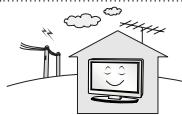
- Install the product where no radio wave occurs.
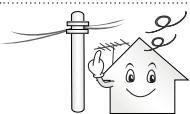
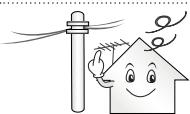
- There should be enough distance between an outside antenna and power lines to keep the former from touching the latter even when the antenna falls. This may cause an electric shock.
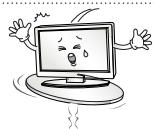
- Do not install the product on places such as unstable shelves or inclined surfaces. Also avoid places where there is vibration or where the product cannot be fully supported. Otherwise, the product may fall or flip over, which may cause injury or damage to the product.
-
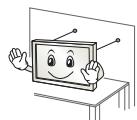
If you install the TV on a stand, you need to take actions to prevent the product from overturning. Otherwise, the product may fall over, which may cause injury.
-
If you intend to mount the product to a wall, attach VESA standard mounting interface (optional parts) to the back of the product. When you install the set to use the wall mounting bracket (optional parts), fix it carefully so as not to drop.
- Only use the attachments / accessories specified by the manufacturer.
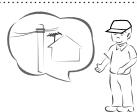
- When installing the antenna, consult with a qualified service technician. If not installed by a qualified technician, this may create a fire hazard or an electric shock hazard.
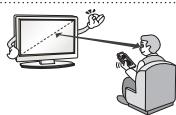
- We recommend that you maintain a distance of at least 2 to 7 times the diagonal screen size when watching TV. If you watch TV for a long period of time, this may cause blurred vision.
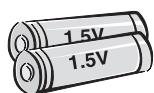
- Only use the specified type of battery.
This could cause damage to the remote control.
-
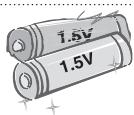
Do not mix new batteries with old batteries. This may cause the batteries to overheat and leak.
-
Batteries should not be exposed to excessive heat. For example, keep away from direct sunlight, open fireplace and electric heaters.
- Do not place non-rechargeable batteries in charging device.
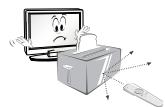
- Make sure there are no objects between the remote control and its sensor.
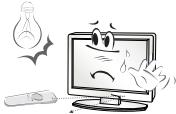
- Signal from Remote Control can be interrupted due to external/internal lighting eg Sunlight, fluorescent lighting.
If this occurs turn off lighting or darken viewing area.
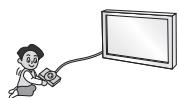
- When connecting external devices such as video game consoles, make sure the connecting cables are long enough.
Otherwise, the product may fall over, which may cause injury or damage the product.
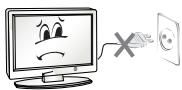
- Do not turn the product On/Off by plugging-in or unplugging the power plug to the wall outlet. (Do not use the power plug for switch.)
It may cause mechanical failure or could give an electric shock.
-
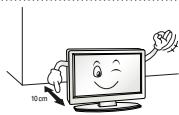
Please follow the installation instructions below to prevent the product from overheating.
-
The distance between the product and the wall should be more than 10cm
-
Do not install the product in a place with no ventilation (e.g., on a bookshelf or in a cupboard).
-
Do not install the product on a carpet or cushion.
-
Make sure the air vent is not blocked by a tablecloth or curtain.
Otherwise, this may result in fire.
-
Take care not to touch the ventilation openings when watching the TV for long periods as the ventilation openings may become hot. This does not affect the operation or performance of the product.
-
Periodically examine the cord of your appliance, and if its appearance indicates damage or deterioration, unplug it, discontinue use of the appliance, and have the cord replaced with an exact replacement part by an authorized servicer.
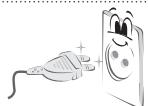
- Prevent dust collecting on the power plug pins or outlet.
This may cause a fire hazard.
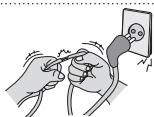
- Protect the power cord from physical or mechanical abuse, such as being twisted, kinked, pinched, closed in a door, or walked upon. Pay particular attention to plugs, wall outlets, and the point where the cord exits the appliance.
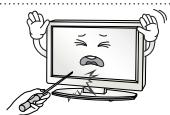
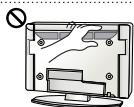
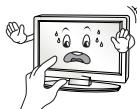
- Do not press strongly upon the panel with a hand or sharp object such as nail, pencil or pen, or make a scratch on it, as it may cause damage to screen.
-
Avoid touching the screen or holding your finger(s) against it for long periods of time. Doing so may produce some temporary or permanent distortion/damage to screen.
-
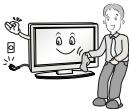
When cleaning the product and its components, unplug the power first and wipe it with a soft cloth. Applying excessive force may cause scratches or discolouration. Do not spray with water or wipe with a wet cloth. Never use glass cleaner, car or industrial shiner, abrasives or wax, benzene, alcohol etc., which can damage the product and its panel. Otherwise, this may result in fire, electric shock or product damage (deformation, corrosion or breakage).
-
As long as this unit is connected to the AC wall outlet, it is not disconnected from the AC power source even if you turn off this unit by SWITCH.
-
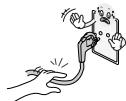
When unplugging the cable, grab the plug and unplug it, by pulling at the plug. Don't pull at the cord to unplug the power cord from the power board, as this could be hazardous.
-
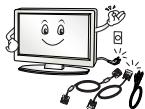
When moving the product, make sure you turn the power off first. Then, unplug the power cables, antenna cables and all connecting cables. The TV set or power cord may be damaged, which may create a fire hazard or cause electric shock.
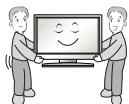
- When moving or unpacking the product, work in pairs because the product is heavy. Otherwise, this may result in injury.
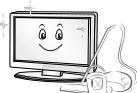
- Contact the service centre once a year to clean the internal parts of the product. Accumulated dust can cause mechanical failure.

- Refer all servicing to qualified service personnel. Servicing is required when the apparatus has been damaged in any way, such as power supply cord or plug is damaged, liquid has been spilled or objects have fallen into the apparatus, the apparatus has been exposed to rain or moisture, does not operate normally, or has been dropped.
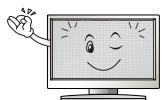
- If the product feels cold to the touch, there may be a small "flicker" when it is turned on. This is normal, there is nothing wrong with product.
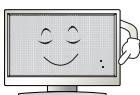
- The panel is a high technology display product with resolution of two million to six million pixels. You may see tiny black dots and/or brightly coloured dots (red, blue or green) at a size of 1 ppm on the panel. This does not indicate a malfunction and does not affect the performance and reliability of the product. This phenomenon also occurs in third-party products and is not subject to exchange or refund.
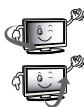
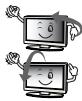
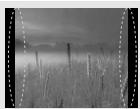
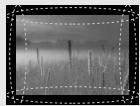
- You may find different brightness and colour of the panel depending on your viewing position(left/right/top/down).
This phenomenon occurs due to the characteristic of the panel. It is not related with the product performance, and it is not malfunction.
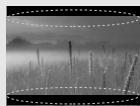
- Displaying a still image (e.g., broadcasting channel logo, on-screen menu, scene from a video game) for a prolonged time may cause damage to the screen, resulting in retention of the image, which is known as image sticking. The warranty does not cover the product for image sticking.
Avoid displaying a fixed image on your television's screen for a prolonged period (2 or more hours for LCD, 1 or more hours for Plasma).
Also, if you watch the TV at a ratio of 4:3 for a long time, image sticking may occur on the borders of the panel.
This phenomenon also occurs in third-party products and is not subject to exchange or refund.
- Generated Sound
"Cracking" noise: A cracking noise that occurs when watching or turning off the TV is generated by plastic thermal contraction due to tempera-ture and humidity. This noise is common for products where thermal deformation is required. Electrical circuit humming/panel buzzing: A low level noise is generated from a high-speed switching circuit, which supplies a large amount of current to operate a product. It varies depending on the product.
This generated sound does not affect the performance and reliability of the product.
Viewing 3D Imaging (Only 3D models)

WARNING
Viewing Environment
Viewing Time
- When watching 3D contents, take 5 - 15 minute breaks every hour. Viewing 3D contents for a long period of time may cause headache, dizziness, fatigue or eye strain.
Those that have a photosensitive seizure or chronic illness
- Some users may experience a seizure or other abnormal symptoms when they are exposed to a flashing light or particular pattern from 3D contents.
- Do not watch 3D videos if you feel nausea, are pregnant and/ or have a chronic illness such as epilepsy, cardiac disorder, or blood pressure disease, etc.
- 3D Contents are not recommended to those who suffer from stereo blindness or stereo anomaly. Double images or discomfort in viewing may be experienced.
- If you have strabismus (cross-eyed), amblyopia (weak eyesight) or astigmatism, you may have trouble sensing depth and easily feel fatigue due to double images. It is advised to take frequent breaks than the average adult.
- If your eyesight varies between your right and left eye, revise your eyesight prior to watching 3D contents.
Symptoms which require discontinuation or refraining from watching 3D contents
- Do not watch 3D contents when you feel fatigue from lack of sleep, overwork or drinking.
-
When these symptoms are experienced, stop using/watching 3D contents and get enough rest until the symptom subsides.
-
Consult your doctor when the symptoms persist. Symptoms may include headache, eyeball pain, dizziness, nausea, palpitation, blurriness, discomfort, double image, visual inconvenience or fatigue.

CAUTION
Viewing Environment
Viewing Distance
- Maintain a distance of at least twice the screen diagonal length when watching 3D contents. If you feel discomfort in viewing 3D contents, move further away from the TV.
Viewing Position
- Face the center of the screen at eye level with the head looking straight ahead. Otherwise, you may not be able to view 3D contents properly.
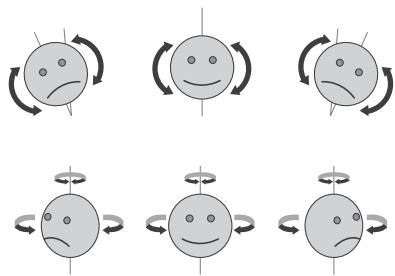
Viewing Age
-
Infants/Children
-
Usage/Viewing 3D contents for children under the age of 6 are prohibited.
- Children under the age of 10 may overreact and become overly excited because their vision is in development (for example: trying to touch the screen or trying to jump into it. Special monitoring and extra attention is required for children watching 3D contents.
-
Children have greater binocular disparity of 3D presentations than adults because the distance between the eyes is shorter than one of adults. Therefore they will perceive more stereoscopic depth compared to adults for the same 3D image.
-
Teenagers
-
Teenagers under the age of 19 may react with sensitivity due to stimulation from light in 3D contents. Advise them to refrain from watching 3D contents for a long time when they are tired.
Elderly
- The elderly may perceive less 3D effect compared to the youth. Do not sit closer to the TV than the recommended distance.
Cautions when using the 3D glasses
- Make sure to use LG 3D glasses. Otherwise, you may not be able to view 3D videos properly.
- Do not use 3D glasses instead of your normal glasses, sunglasses or protective goggles.
- Using modified 3D glasses may cause eye strain or image distortion.
- Do not keep your 3D glasses in extremely high or low temperatures. It will cause deformation.
- The 3D glasses are fragile and are easily scratched. Always use a soft, clean piece of cloth when wiping the lenses. Do not scratch the lenses of the 3D glasses with sharp objects or clean/wipe them with chemicals.
- When watching 3D videos under fluorescent lights or with three wave length lamps, you may experience the screen blinking. When this occurs, turn the light off or turn it down.
- Other electronic or communication devices should be turned off or put away from the TV because it can cause interference and prevent the 3D function from working properly.
- When you watch TV lying down, 3D images may look darker or invisible.

NOTE
- Image shown may differ from your TV.
- Your TV's OSD (On Screen Display) may differ slightly from that shown in this manual.
- The available menus and options may differ from the input source or product model that you are using.
- New features may be added to this TV in the future.
- The TV can be placed in standby mode in order to reduce the power consumption. And the TV should be turned off if it will not be watched for some time, as this will reduce energy consumption.
- The energy consumed during use can be significantly reduced if the level of brightness of the picture is reduced, and this will reduce the overall running cost.
ASSEMBLING AND PREPARING
Unpacking
Check your product box for the following items. If there are any missing accessories, contact the local dealer where you purchased your product. The illustrations in this manual may differ from the actual product and item.

CAUTION
- Do not use any unapproved items to ensure the safety and product life span.
- Any damages or injuries by using unapproved items are not covered by the warranty.
- Some models have a thin film attached on to the screen and this must not be removed.

NOTE
- The items supplied with your product may vary depending on the model.
- Product specifications or contents of this manual may be changed without prior notice due to upgrade of product functions.
- For an optimal connection, HDMI cables and USB devices should have bezels less than 10mm thick and 18 mm width. Use an extension cable that supports USB 2.0 if the USB cable or USB memory stick does not fit into your TV's USB port.
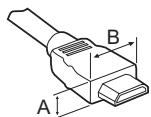
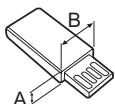
^*A 10 mm
^*B 18 mm
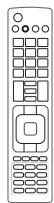

Remote Control,
Batteries (AAA)
(Only PB66**)
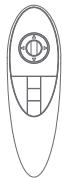

Magic remote control,
batteries (AA)
(Only PB69**)
Owner's manual
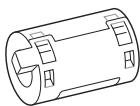
Ferrite core
Depending on model)
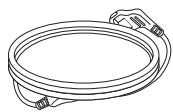
Power Cord
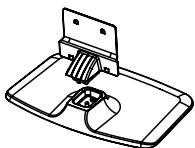
Stand Body / Stand
Base
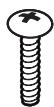
Stand Screws
3EA, M5 x L25

Stand Screws
4EA, M4 x L14
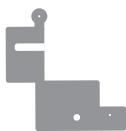
Stand Sticker
Depending on model)
! NOTE
- The items supplied with your product may vary depending on the model.
- Product specifications or contents of this manual may be changed without prior notice due to upgrade of product functions.
How to use the ferrite core
- If there are five ferrite cores, follow as shown in Figures 1 and 3.
- If there are six ferrite cores, follow as shown in Figures 1, 2 and 3.
1 Use the ferrite core to reduce the electromagnetic interference in the power cable. Wind the power cable on the ferrite core once.
Place the ferrite core close to the TV and a wall plug.
[to a wall plug]

[Figure 1]
2 Use the ferrite core to reduce the electromagnetic interference in the cable. Place the ferrite core close to the TV.
Wind the component Y, Pb, Pr, L, R cable on the ferrite core once.
[to an External device]

[Figure 2-1]
Gather and bind the component Y, Pb, Pr, L, R and scart cable with the ferrite core.
[to an External device]
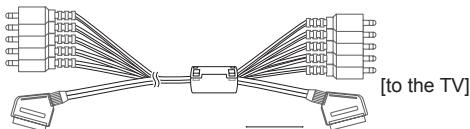
[Figure 2-2]

(Black)
[Cross Section of Ferrite Core]

(Black)
[Cross Section of Ferrite Core]
Wind the PC audio cable on the ferrite core once.
[to an External device]

[Figure 2-3]
3 Use the ferrite core to reduce the electromagnetic interference in the LAN cable. Wind the LAN cable once on the ferrite core B and thrice on the ferrite core A. Place the ferrite core close to the TV and an External device.

[Figure 3]
[Cross Section of Ferrite Core]
| A (Gray) | B (Gray) |
Separate purchase
Optional extras can be changed or modified for quality improvement without any notification.
Contact your dealer for buying these items.
These devices only work with certain models.
AG-S3**
3D Glasses
AN-MR500
Magic Remote
AN-VC5**
Video call camera
AN-WF500
Wi-Fi / Bluetooth Dongle
AN-TP300
Touch Pen, Cradle
AN-TD200
Touch Pen Dongle
LG Audio Device
AN-BL***
Wireless IR Blaster
With the Touch Pen, you can use the TV as a touch monitor with or without connecting it to your PC. You need to purchase the Touch Pen (including the cradle) together with the dongle.
| Compatibility | PB66** | PB69** |
| AG-S3** 3D Glasses | • | |
| AN-MR500 Magic Remote | • | • |
| AN-VC5** Video call camera | • | • |
| AN-WF500 Wi-Fi / Bluetooth Dongle | • | |
| AN-TP300 Touch Pen, Cradle | • | • |
| AN-TD200 Touch Pen Dongle | • | • |
| LG Audio Device | • | • |
| AN-BL*** Wireless IR Blaster | • (Depending on model) | • (Depending on model) |
The model name or design may be changed depending on the upgrade of product functions, manufacturer's circumstances or policies.
With the AN-WF500, you can use the Magic Remote, LG Audio Device(Wireless) and Wireless IR Blaster. You need to purchase the AN-WF500. (Only PB66*)
Parts and buttons
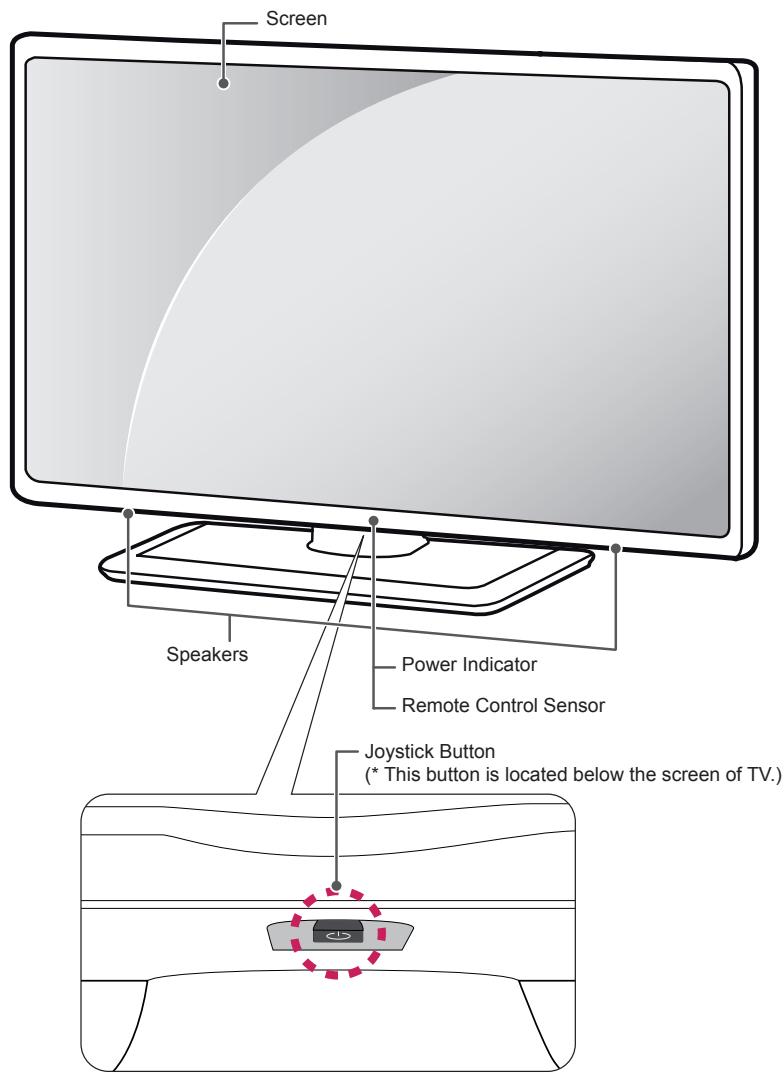

NOTE
- You can set the power indicator light to on or off by selecting OPTION in the main menus.
Using the joystick button
You can operate the TV by pressing the button or moving the joystick left, right, up, or down.
Basic Functions
| Power On | When the TV is turned off, place your finger on the joystick button and press it once and release it. |
| Power Off | When the TV is turned on, place your finger on the joystick button and press it once for a few seconds and release it. (However, if the Menu button is on the screen, pressing and holding the joystick button will let you exit the Menu.) |
| Volume Control | If you place your finger over the joystick button and move it left or right, you can adjust the volume level you want. |
| Programmes Control | If you place your finger over the joystick button and push it to the up or down, you can scrolls through the saved programmes what you want. |

NOTE
- When your finger over the joystick button and push it to the up, down, left or right, be careful not to press the joystick button. If you press the joystick button first, you can not adjust the volume level and saved programmes.
Adjusting the Menu
When the TV is turned on, press the joystick button one time.
You can adjust the Menu items (O, X, ) moving the joystick button up, down, left or right.
| ○ | TV Off | Turns the power off. | |
| Settings | Accesses the main menu. | ||
| × | Close | Cleared on-screen displays and returns to TV viewing. | |
| Input List | Changes the input source. |
Lifting and moving the TV
Please note the following advice to prevent the TV from being scratched or damaged and for safe transportation regardless of its type and size.

CAUTION
-
Avoid touching the screen at all times, as this may result in damage to the screen.
-
It is recommended to move the TV in the box or packing material that the TV originally came in.
- Before moving or lifting the TV, disconnect the power cord and all cables.
- When holding the TV, the screen should face away from you to avoid damage.
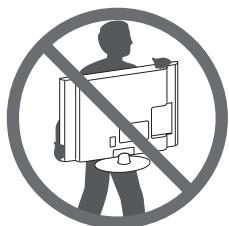
- Hold the top and bottom of the TV frame firmly. Make sure not to hold the transparent part, speaker, or speaker grill area.
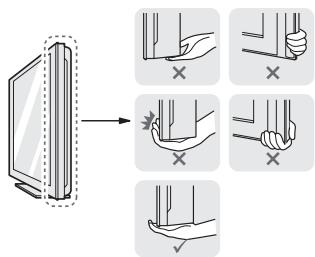
- When transporting a large TV, there should be at least 2 people.
- When transporting the TV by hand, hold the TV as shown in the following illustration.
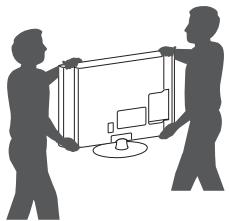
- When transporting the TV, do not expose the TV to jolts or excessive vibration.
- When transporting the TV, keep the TV upright, never turn the TV on its side or tilt towards the left or right.
- Do not apply excessive pressure to cause flexing / bending of frame chassis as it may damage screen.
Mounting on a table
1 Lift and tilt the TV into its upright position on a table. - Leave a 10cm (minimum) space from the wall for proper ventilation.
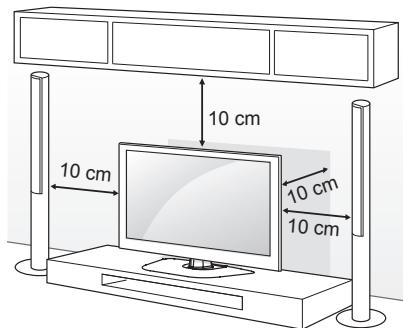
2 Connect the power cord to a wall outlet.

CAUTION
- Do not place the TV near or on sources of heat, as this may result in fire or other damage.
Securing the TV to a wall
(This feature is not available for all models.)
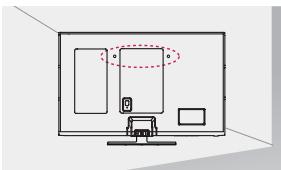
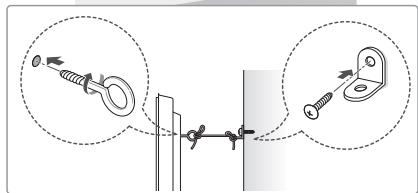
1 Insert and tighten the eye-bolts, or TV brackets and bolts on the back of the TV.
- If there are bolts inserted at the eye-bolts position, remove the bolts first.
2 Mount the wall brackets with the bolts to the wall. Match the location of the wall bracket and the eyebolts on the rear of the TV.
3 Connect the eye-bolts and wall brackets tightly with a sturdy rope.
Make sure to keep the rope horizontal with the flat surface.

CAUTION
- Make sure that children do not climb on or hang on the TV.

NOTE
- Use a platform or cabinet that is strong and large enough to support the TV securely.
- Brackets, bolts and ropes are not provided. You can obtain additional accessories from your local dealer.
Mounting on a wall
Attach an optional wall mount bracket at the rear of the TV carefully and install the wall mount bracket on a solid wall perpendicular to the floor. When you attach the TV to other building materials, please contact qualified personnel.
LG recommends that wall mounting be performed by a qualified professional installer.
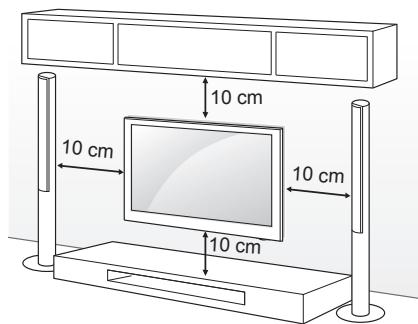
Make sure to use screws and wall mount bracket that meet the VESA standard. Standard dimensions for the wall mount kits are described in the following table.
Separate purchase (Wall Mounting Bracket)
| Model | 50/60PB66**50/60PB69** |
| VESA (A x B) | 400 x 400 |
| Standard screw | M6 |
| Number of screws | 4 |
| Wall mount bracket | PSW420BX |


CAUTION
- Disconnect the power first, and then move or install the TV. Otherwise electric shock may occur.
- If you install the TV on a ceiling or slanted wall, it may fall and result in severe injury. Use an authorized LG wall mount and contact the local dealer or qualified personnel.
- Do not over tighten the screws as this may cause damage to the TV and void your warranty.
- Use the screws and wall mounts that meet the VESA standard. Any damages or injuries by misuse or using an improper accessory are not covered by the warranty.

NOTE
- Use the screws that are listed on the VESA standard screw specifications.
- The wall mount kit includes an installation manual and necessary parts.
- The wall mount bracket is not provided. You can obtain additional accessories from your local dealer.
- The length of screws may differ depending on the wall mount. Make sure to use the proper length.
- For more information, refer to the manual supplied with the wall mount.
REMOTE CONTROL
This item is not included for all models.
The descriptions in this manual are based on the buttons on the remote control.
Please read this manual carefully and use the TV correctly.
To replace batteries, open the battery cover, replace batteries (1.5 V AAA) matching the and ends to the label inside the compartment, and close the battery cover.
To remove the batteries, perform the installation actions in reverse.
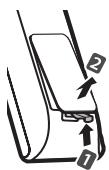

CAUTION
- Do not mix old and new batteries, as this may damage the remote control.
Make sure to point the remote control toward the remote control sensor on the TV.
(Only PB66**)
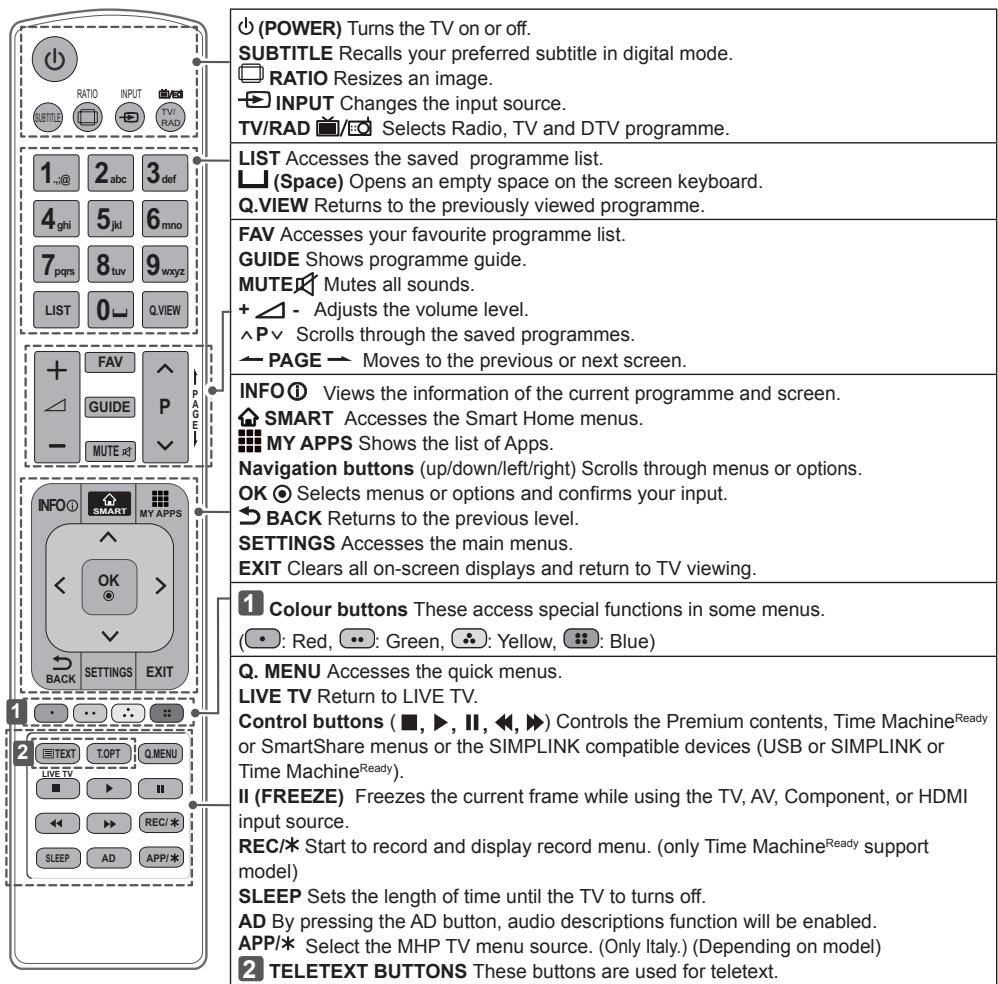
MAGIC REMOTE FUNCTIONS
This item is not included for all models.
When the message "Magic Remote battery is low. Change the battery." is displayed, replace the battery.
To replace batteries, open the battery cover, replace batteries (1.5 V AA) matching and ends to the label inside the compartment, and close the battery cover. Be sure to point the remote control toward the remote control sensor on the TV.
To remove the batteries, perform the installation actions in reverse.
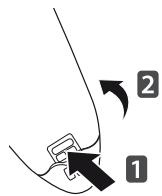

CAUTION
- Do not mix old and new batteries, as this may damage the remote control.
(Only PB69**)
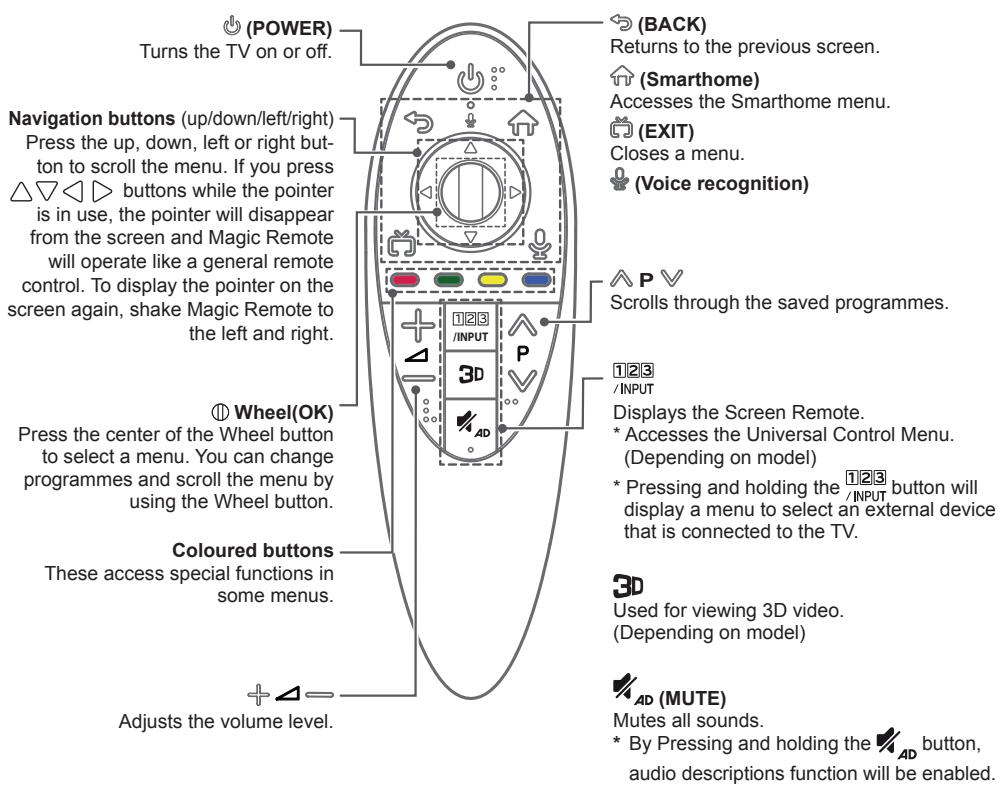
Voice recognition
Network connection is required to use the voice recognition function.
- Press the Voice recognition button.
-
Speak when the voice display window appears on the left of the TV screen.
-
The voice recognition may fail when you speak too fast or too slow.
Use the Magic remote control no further than 10 cm from your face. - The recognition rate may vary depending on the user's characteristics (voice, pronunciation, intonation and speed) and the environment (noise and TV volume).
Registering Magic Remote
It is necessary to 'pair' (register) the Magic Remote to your TV before it will work.
How to register the Magic Remote

(Wheel)
To use the Magic Remote, first pair it with your TV.
1 Put batteries into the Magic Remote and turn the TV on.
2 Point the Magic Remote at your TV and press the ① Wheel (OK) on the remote control.
* If the TV fails to register the Magic Remote, try again after turning the TV off and back on.
How to de-register the Magic Remote

(BACK)

(Smart-home)
Press the BACK) and (Smarthome) buttons at the same time, for five seconds, to unpair the Magic Remote with your TV.
- Pressing and holding the (EXIT) button will let you cancle and re-register Magic Remote at once.
How to use Magic Remote
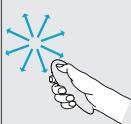
- Shake the Magic Remote slightly to the right and left or press (Smarthome), 1233 buttons to make the pointer appear on the screen.
(In some TV models, The pointer will appear when you turn the Wheel button.) - If the pointer has not been used for a certain period of time or Magic Remote is placed on a flat surface, then the pointer will disappear.
- If the pointer is not responding smoothly, you can reset the pointer by moving it to the edge of the screen.
- The Magic Remote depletes batteries faster than a normal remote due to the additional features.
Precautions to Take when Using the Magic Remote
- Use the Magic Remote within the maximum communication distance (10 m). Using the Magic Remote beyond this distance, or with an object obstructing it, may cause a communication failure.
- A communication failure may occur due to nearby devices. Electrical devices such as a microwave oven or wireless LAN product may cause interference, as these use the same bandwidth (2.4 GHz) as the Magic Remote.
- The Magic Remote may be damaged or may malfunction if it is dropped or receives a heavy impact.
Take care not to bump into nearby furniture or other people when using the Magic Remote. - Manufacturer and installer cannot provide service related to human safety as the applicable wireless device has possibility of electric wave interference.
- It is recommended that an Access Point (AP) be located more than 1m away from the TV. If the AP is installed closer than 1m , the Magic Remote may not perform as expected due to frequency interference.
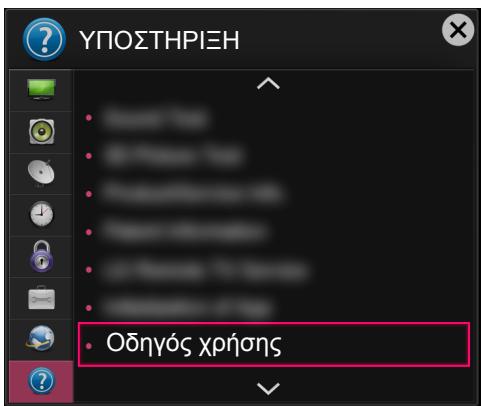
USING THE USER GUIDE
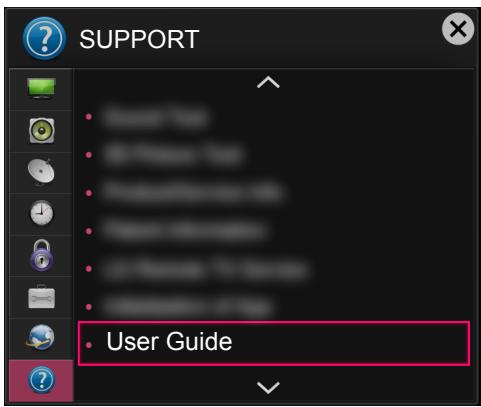
1 Press the SMART button to access the Smart Home menu.
2 Select SETTINGS SUPPORT.
3 Select User Guide and press Wheel(OK).
MAINTENANCE
Cleaning your TV
Clean your TV regularly to keep the best performance and to extend the product lifespan.

CAUTION
- Make sure to turn the power off and disconnect the power cord and all other cables first.
- When the TV is left unattended and unused for a long time, disconnect the power cord from the wall outlet to prevent possible damage from lightning or power surges.
Screen, frame, cabinet and stand
- To remove dust or light dirt, wipe the surface with a dry, clean, and soft cloth.
- To remove major dirt, wipe the surface with a soft cloth dampened in clean water or a diluted mild detergent. Then wipe immediately with a dry cloth.

CAUTION
- Avoid touching the screen at all times, as this may result in damage to the screen.
- Do not push, rub, or hit the screen surface with your fingernail or a sharp object, as this may result in scratches and image distortions.
- Do not use any chemicals as this may damage the product.
- Do not spray liquid onto the surface. If water enters the TV, it may result in fire, electric shock, or malfunction.
Power cord
Remove the accumulated dust or dirt on the power cord regularly.
TROUBLESHOOTING
| Problem | Solution |
| Cannot control the TV with the remote control. | ·Check the remote control sensor on the product and try again. ·Check if there is any obstacle between the product and the remote control. ·Check if the batteries are still working and properly installed (⊕ to ⊙, ⊙ to ⊙). |
| No image display and no sound is produced. | ·Check if the product is turned on. ·Check if the power cord is connected to a wall outlet. ·Check if there is a problem in the wall outlet by connecting other products. |
| The TV turns off suddenly. | ·Check the power control settings. The power supply may be interrupted. ·Check if the Automatic Standby (Depending on model) / Sleep Timer / Off Time feature is activated in the TIME settings. ·If there is no signal while the TV is on, the TV will turn off automatically after 15 minutes of inactivity. |
| When connecting to the PC (HDMI/DVI), ‘No signal’ or ‘Invalid Format’ is displayed. | ·Turn the TV off/on using the remote control. ·Reconnect the HDMI cable. ·Restart the PC with the TV on. |
SPECIFICATIONS
(Only PB69**)
| Wireless module (LGSBW41) specification | |||
| Wireless LAN | Bluetooth | ||
| Standard | IEEE 802.11a/b/g/n | Standard | Bluetooth Version 3.0 |
| Frequency Range | 2400 to 2483.5 MHz5150 to 5250 MHz5725 to 5850 MHz (for Non EU) | Frequency Range | 2400 to 2483.5 MHz |
| Output Power(Max.) | 802.11a: 13 dBm802.11b: 15 dBm802.11g: 14 dBm802.11n - 2.4GHz: 16 dBm802.11n - 5GHz: 16 dBm | Output Power(Max.) | 10 dBm or lower |
| · Because band channel used by the country could be different, the user can not change or adjust the operating frequency and this product is set for the regional frequency table. · This device should be installed and operated with minimum distance 20 cm between the device and your body. And this phrase is for the general statement for consideration of user environment. CE 0197① | |||
BENUTZERHANDBUCH
PLASMA-TV
Corps du support / Base du support
Corps du support / Base du support
Viti del supporto 3EA, M5 x L25
Mny toTOnTeTeTo Tpoiov Oe Mepn E TaPeBolc paBIOkuAtw.

[OE E\xiTEpiK] OuaKEun]
[Eikova 3]
[Eykapsigma tonnpurivaepit]
| A (Γκρι) | B (Γκρι) |
PpOaIepTeKαEgApTnμata
Tn 8eTiwon TnC TIOIOTnTc, Ta TPOaipetikk EApntmuata EvbexTeai va aAALsouv n va TpOITTOINoov Xwpi C TPOEIDOTIOInon. Ia va ayopaoete auta ta EApntmuata, ETIKoivWvnoTE μe Tov avITPiPoosTo oac. Ouokuec autc λeIToupyoov mOvo μe ouykepiEv aovteλa.
XPHESH TOY OADHFOY XPHES
1 Piahtote to koumu SMART yia va etaeite oTo evou Smart Home.
2 Eπλεξτ ΨYOMISEI Σ YNOSTHPIEH.
3 Eπiεξτe Oδnyos xρησns kai πατηοτe to kouμπi Wheel (OK).
ΣYNTHPH∑H
Product specifications may be changed without prior notice due to upgrade of product functions.
For the power supply and power consumption, refer to the label attached to the product.
| MODELS | 50PB66** | 60PB66** | |
| 50PB6600-ZA | 60PB6600-ZA | ||
| 50PB660V-ZA | 60PB660V-ZA | ||
| 50PB660V-ZD | 60PB660V-ZD | ||
| 50PB6609-ZD | 60PB6609-ZD | ||
| Dimensions(W x H x D) | With stand (mm) | 1172 x 756.7 x 315 | 1390.8 x 880.9 x 340 |
| Without stand (mm) | 1172 x 700.9 x 56 | 1390.8 x 823.7 x 56 | |
| Weight | With stand (kg) | 24.9 | 35.7 |
| Without stand (kg) | 23.3 | 33 | |
| MODELS | 50PB69** | 60PB69** | |
| 50PB6900-ZA | 60PB6900-ZA | ||
| 50PB690V-ZC | 60PB690V-ZC | ||
| 50PB6909-ZC | 60PB6909-ZC | ||
| Dimensions(W x H x D) | With stand (mm) | 1172 x 756.7 x 315 | 1390.8 x 880.9 x 340 |
| Without stand (mm) | 1172 x 700.9 x 56 | 1390.8 x 823.7 x 56 | |
| Weight | 24.9 | 35.7 | |
| With stand (kg) | 23.3 | 33 | |
| CI Module Size(W x H x D) | 100.0 mm x 55.0 mm x 5.0 mm | ||
| Environment condition | Operating Temperature | 0 °C to 40 °C | |
| Operating Humidity | Less than 80 % | ||
| Storage Temperature | -20 °C to 60 °C | ||
| Storage Humidity | Less than 85 % | ||
| Digital TV | Analogue TV | ||
| Television system | DVB-T/T2 | PAL/SECAM B/G/I/D/K | |
| DVB-C | SECAM L/L' | ||
| DVB-S/S2 | |||
| Programme coverage | VHF, UHF | VHF: E2 to E12, | |
| C-Band, Ku-Band | UHF: E21 to E69, | ||
| CATV: S1 to S20, | |||
| HYPER: S21 to S47 | |||
| Maximum number of storable pro- grammes | DVB-S/S2 : 6,000 DVB-T/T2/C & Analogue TV : 1,500 | ||
| External antenna impedance | 75 Ω | ||



LG
Life's Good
Record the model number and serial number of the TV.
Refer to the label on the back cover and quote this information to your dealer when requiring any service.
MODEL
SERIAL
DVB
Digital Video
Broadcasting
Please contact LG First.
If you have any inquiries or comments,
please contact LG customer information centre.
LG Customer Information Centre
| Country | LG Service | Country | LG Service |
| Österreich | 0 810 144 131 | Nederland | 0900 543 5454 |
| Belgienie | 015 200 255 | Norge | 800 187 40 |
| Luxembourg | 0032 15 200255 | Polska | 801 54 54 54 |
| Бulgaria | 07001 54 54 | Portugal | 808 78 54 54 |
| Česká Rep. | 810 555 810 | Romania | 031 228 3542 |
| Danmark | 8088 5758 | Slovensko | 0850 111 154 |
| Suomi | 0800 0 54 54 | Espana | 902 500 234 |
| France | 3220 dites LG ou tapez 54 | Sverige | 0770 54 54 54 |
| Deutschland | 01806 11 54 11 (0,20€ pro Anruf aus dem Festnetz der DTAG; Mobilfunk: max. 0,60€ pro Anruf) | Schweiz | 0848 543 543 |
| Ельдаа | 801 11 200 900, 210 4800 564 | United Kingdom | 0844 847 5454 |
| Russiya | 8 800 200 7676 | ||
| Magyarország | 06 40 54 54 54 | Eesti | 800 9990 |
| Éire | 0818 27 6955 | Ukrainna | 0 800 303 000 |
| Italia | 199600099 | Казх CTан | 8 8000 805 805, 2255(GSM) |
| Белар cumbersome | 8 820 0071 1111 | ||
| Latvija | 80200201 | Узбенистан | 8 800 120 2222 |
| Lietuva | 880008081 | Кырл BTstан | 8 0000 710 005 |
www/lg.com