
VEGA 150 - Range hood LOGICOM - Free user manual and instructions
Find the device manual for free VEGA 150 LOGICOM in PDF.



| Product type | Range hood |
| Brand | LOGICOM |
| Model | VEGA 150 |
| Power supply | 220-240 V ~ 50/60 Hz |
| Number of speeds | 3 (low, medium, high) |
| Lighting | 2 halogen lamps |
| Evacuation mode | External evacuation or recirculation with charcoal filter |
| Recommended duct diameter | 125 mm (minimum) / 150 mm (optimal) |
| Minimum distance to cooking surface | 70 cm |
| Filter type | Metal cassette filter (washable) + activated carbon filter (replaceable) |
| Cassette filter maintenance | Clean every 30 hours of use or once a month in the dishwasher |
| Charcoal filter replacement | Every 120 hours of use (about 1 year) |
| Exterior cleaning | Soapy water and soft cloth, avoid abrasive products |
| Lamp replacement | Remove the cover and replace the halogen lamp |
| Safety | Disconnect before maintenance; fuse 10 or 16 A; minimum distance 70 cm |
| Control | Push buttons with audible alarm for each selection |
| Accessories included | Suspension hook, plugs, screws, non-return valve |
| Compliance | Directive 2002/96/EC (WEEE), applicable electrical standards |
Frequently Asked Questions - VEGA 150 LOGICOM
User questions about VEGA 150 LOGICOM
0 question about this device. Answer the ones you know or ask your own.
Ask a new question about this device
Download the instructions for your Range hood in PDF format for free! Find your manual VEGA 150 - LOGICOM and take your electronic device back in hand. On this page are published all the documents necessary for the use of your device. VEGA 150 by LOGICOM.
USER MANUAL VEGA 150 LOGICOM
Campana extractora decorativa
Decorative Hood
Hotte décorative
ES 2
EN 18
FR 34
As part of our commitment to constantly improving our products, we reserve the right to make changes to them based on technical advances to their technical and functional features and appearance.
Warning :
Before installing and using your appliance, please carefully read this Guide to Installation and Use, which will allow you to quickly familiarise yourself with its operation
1 / NOTICES TO THE USER
Safety recommendations 20
- Environmental protection 21
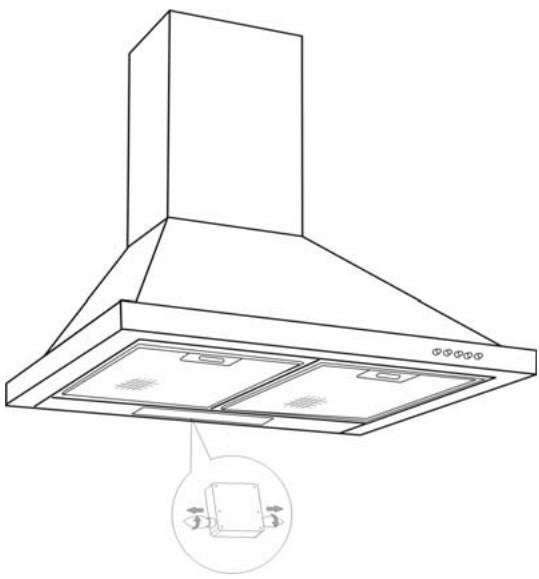
Description of your appliance 22
2 / INSTALLING YOUR APPLIANCE
- Using the evacuation mode 23
- Using the recycling mode 23
- Electrical connections 24
Assembling the hood 25
Assembling the ventilation shaft ^ Outdoor evacuation 26
^ Recycling 27
3 / USING YOUR APPLIANCE
Description of control panel 28
4 / CARING FOR AND CLEANING YOUR APPLIANCE
- Cleaning the filter cartridges 29
- Changing the carbon filter 29
- Cleaning the outer surfaces 30
- Changing the light bulb 30
- Maintaining your appliance 31
5/TROUBLESHOOTING 32
6/ AFTER-SALES SERVICE 33
As part of our commitment to constantly improving our products, we reserve the right to make changes to them based on technical advances to their technical and functional features and appearance.

Warning:
Before installing and using your appliance, please carefully read this Guide to Installation and Use, which will allow you to quickly familiarise yourself with its operation.

Attention
Keep this user guide with your appliance. If the appliance is ever sold or transferred to another person, ensure that the new owner receives the user guide. Please become familiar with these recommendations before installing and using your oven. They were written for your safety and the safety of others.
SAFETY RECOMMENDATIONS
- This oven was designed for use by private persons in their homes.
- This appliance is to be used by adults.
Make sure that children do not touch and that they do not treat it as a toy. Make sure that they do not touch the appliance's control panel.
- When you receive the appliance, unpack or have it unpacked immediately. Give it an overall general inspection. Make note of any concerns or reservations on the delivery slip and make sure to keep a copy of this form.
- Your appliance is intended for standard household use. Do not use it for commercial or industrial purposes or for any other purpose than that for which it was designed.
- Do not modify or attempt to modify any of the characteristics of this appliance. This would be dangerous to your safety.
- Repairs must only be carried out by an approved specialist.
- Always unplug the hood before cleaning it or performing other maintenance acts.
- Provide adequate ventilation for the room in the case of simultaneous use of the hood and other appliances powered by an energy source other than electricity. This will prevent the hood from aspirating the combustion gases.
- You should never "flambé" dishes under the hood or operate gas rings under the hood without placing cookware on them (the flames sucked up into the hood can damage the appliance).
- When frying food under the appliance, you
must carefully monitor the preparation at all times.
Oils and grease brought to very high temperatures can catch fire.
- Respect the recommended frequency of cleanings and filter replacements. The accumulation of grease deposits may cause a fire.
- The hood should never be used over a combustible fuel burning stove (wood, coal, etc.).
- Never use steam or high-pressure devices to clean your appliance (requirement imposed by electrical safety).
- With a view to constantly improving our products, we reserve the right to modify their technical, functional or aesthetic characteristics, making any changes to their features considered necessary or desirable in view of technical progress.
In order to easily locate the reference information for your appliance, we recommend that you note these data on the "After-Sales Service Department and Customer Relations" page.
(This page also explains to you where to find this information on your appliance.)
- This appliance is not intended to be used by persons (including children) with reduced physical, sensory or mental abilities, or persons lacking experience or awareness, unless using it with the help of a person responsible for their safety, or under supervision and with prior instruction in its use.

Warning
In the case of a kitchen heated by a device connected to a chimney (a stove, for example) the "recycling" version of the hood should be installed. Do not use the hood without metal filters.
Suitable ventilation should be provided in the room when the hood is used at the same time as appliances operated by gas or another combustible fuel.
ENVIRONMENTAL PROTECTION
- This appliance's packaging material is recyclable. Help recycle it and protect the environment by dropping it off in the municipal receptacles provided for this purpose.
- Your appliance also contains a great amount of recyclable material. It is marked with this label to indicate the used appliances that should not be mixed with other waste. This way, the appli
ance recycling organised by your manufacturer will be done under the best possible conditions, in compliance with European Directive 2002/96/EC on Waste Electrical and Electronic Equipment. Contact your town hall or your retailer for the used appliance collection points closest to your home.
- We thank you doing your part to protect the environment.

Warning
Installation should only be performed by installers and qualified technicians.

Warning
Remove the protective film from the cartridge filter before use.
DESCRIPTION OF YOUR APPLIANCE
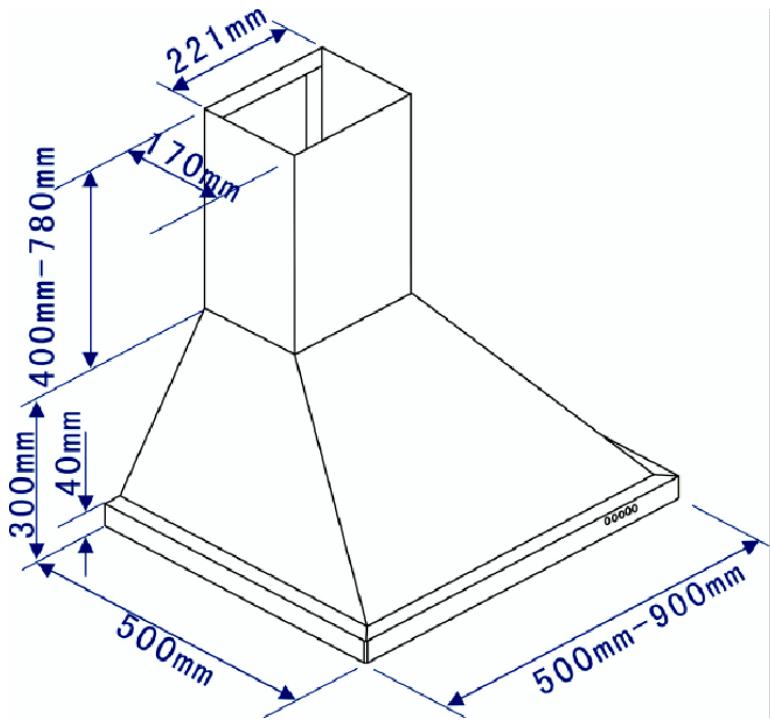
- The appliance must be unplugged during installation or when any repairs or maintenance work is being performed.
- Ensure that the network voltage corresponds to the voltage noted on the identification plate located inside the hood.
- If the electrical installation at your residence requires any changes in order to hook up your Appliance, call upon a professional electrician.
- If the hood is being used in evacuation mode, do not connect the appliance to a combustion gas exhaust duct (boiler, chimney, etc.) or to a CMV (controlled mechanical ventilation) system.
- Under no circumstances should the exhaust duct empty into the attic.
- Install the hood at a safe distance of at least 70~cm from an electric, gas or combined cooking hob.
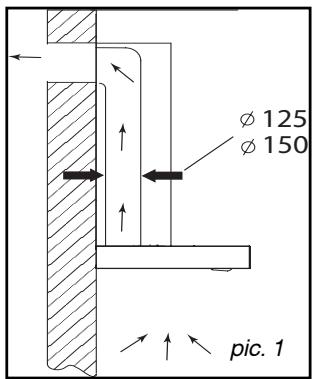
- USING THE EVACUATION MODE
If you possess an outlet to the exterior
(pic. 1)
Your hood can be connected to this outlet using a flue (minimum diameter mm that is enamelled, in aluminium, flexible or made of inflammable material). If your flue is less than 125mm in diameter, you must use the recycling mode.
- USING THE RECYCLING MODE
If you do not possess an outlet to the exterior
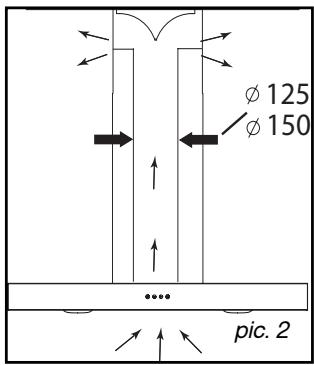
(pic. 2)
All of our appliances can be used in recycling mode.
In this case, you should add an active carbon filter which will keep in odours.
(See Chapter 4: Changing the carbon filter.)
ELECTRICAL CONNECTIONS
During installation and maintenance operations, the appliance must be unplugged from the electrical grid; fuses must be cut off or removed.
The electrical connections are made before the appliance is installed in its housing.
Ensure that:
- the electrical installation has sufficient voltage,
- the electrical wires are in good condition,
- the diameter of the wires complies with the installation requirements.

Warning
This appliance is delivered with a H 05 VVF power cord that has three- 0.75mm^2 conductors (neutral, phase and ground). It must be connected to the main power supply (which should be a 220-240 V single phase current) via a CEI 60083 standardised socket that should remain accessible after installation, in keeping with installation guidelines.
We cannot be held responsible for any accident resulting from an inexistent, defective or incorrect ground lead. The fuse for your installation must be 10 or 16A. If the power cable is damaged, call the after-sales service department in order to avoid danger.

Warning
If the electrical installation at your residence requires any changes in order to hook up your appliance, call upon a professional electrician.

Warning
If the hood displays any malfunctions, unplug the appliance or remove the fuse corresponding to the electrical socket where your appliance is plugged in.
ASSEMBLING THE HOOD

Warning
The hood must be installed in compliance with all applicable regulations concerning the ventilation of premises. In France these regulations are described in DTU 61.1 from the CSTB. In particular, the evacuated air should never be conveyed to a duct used to evacuate smoke from appliances that use gas or other combustible fuels. Unused ducts may only be used after approval from a competent specialist.
The minimum distance between the cooking surface and the lowest part of the hood must be 70~cm at least. If the instructions for the hob installed under the hood specify a distance of more than 70~cm , this requirement must be respected.
Fixing to the wall:
-Mark a vertical line on the wall centred on the cooktop.
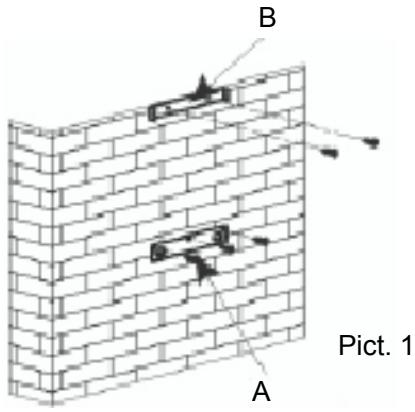
-Mark on the wall the three holes that have to be drilled, using the supplied hood suspension hook and observing the recommended distance. (part A Pic. 1)
-Drill the three 8 mm diameter holes in a suitable position and insert the plugs.
- Before fixing the hood, mount the non-return valve on the motor outlet
-Secure the hood's fixing support, ensuring that it is perfectly level. (part A Pic. 1)
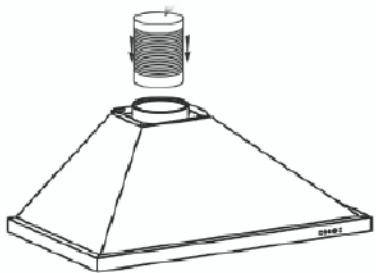
-Fix the extendable evacuation sleeve (not included) to the motor outlet without impeding the movement of the non-return valve.(Pic. 3)
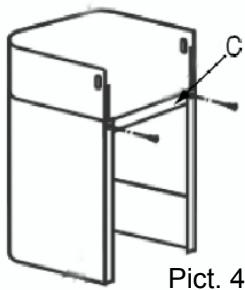
-Fit and secure the body of the hood on this support with the screws provided for this purpose.(Pic. 2)
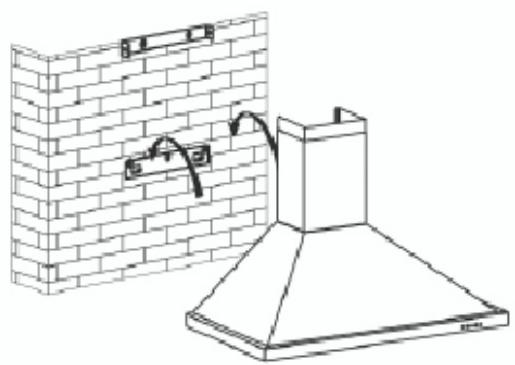
Pict. 2
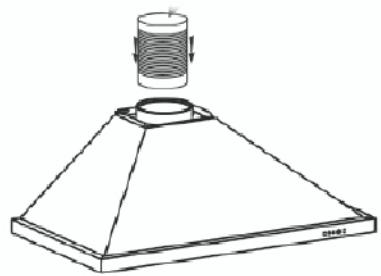
Pict 3
ASSEMBLING THE VENTILATION SHAFT
- Outdoor evacuation
- Calculate the final height for fixing the duct support U-bracket (part B Pic. 1)
- Mark the two holes accordingly
- Drill 8 mm diameter holes and secure the duct support bracket, ensuring that it is fixed on the same axis as the hood (part B Pic. 1)
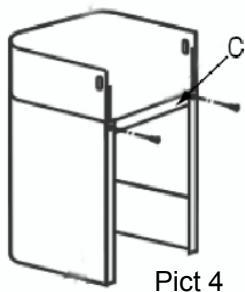
- Fix the flat bracket behind the lower duct.
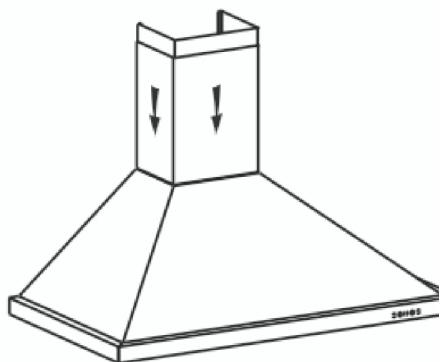
-Fix the two ducts to the hood.(Pic. 5) - Connect the sleeve to the air outlet to the outside.
- Make the electrical connection to the hood using the mains supply cable.
- Lift the upper duct up to the ceiling and fix it to the bracket using the screws.
Pict 5
Pict 3
Recycling
-Calculate the final height for fixing the duct support U-bracket.
-Mark the two holes.
-Drill 8 mm diameter holes and secure the duct support bracket, ensuring that it is fixed in the same axis as the hood.
-Fix the flat bracket behind the lower duct.
-Fit the sleeve adapter on the deflector (Pic. 8).
-Connect the extendable sleeve to the deflector.
-Fit the two parts of the duct on to the hood (Pic. 5).
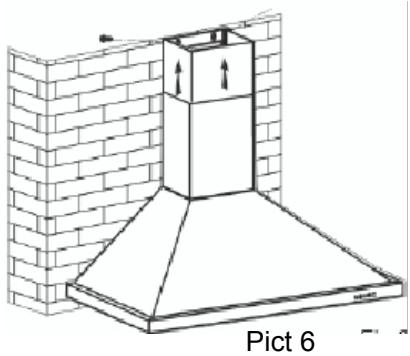
-Fit the deflector (Pic. 8) into the upper duct by the ventilation inlets (Pic. 6)
-Make the electrical connection to the hood using the mains supply cable.
-Lift the upper duct up to the ceiling and fix it to the bracket using the two screws.
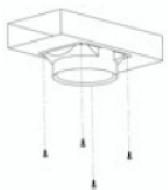
Pict.8
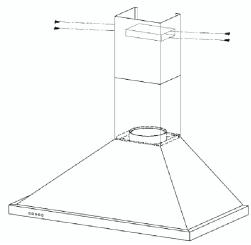
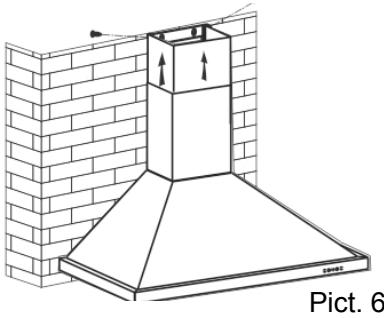
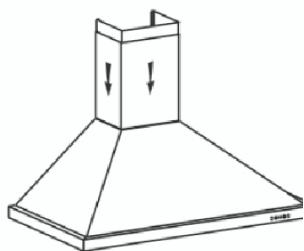
Fig.5

Tip
For optimal use of your appliance, we recommend that you connect the hood to a 150 mm-diameter flue (not delivered with the appliance). Minimise the number of angles and bends and the lengths of the flue. In the event that the hood will be operated using outdoor evacuation, you should ensure a sufficient inflow of fresh air to avoid a pressure deficiency in the room.

Warning
Do not use tools to remove the safety film of hood
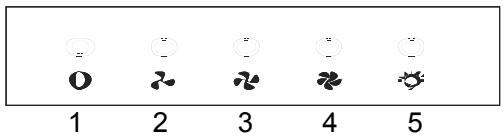
DESCRIPTION OF CONTROL PANEL
Push button
1.Push stop button, and the motor will stop
2.Push the Low button, the buzzer will buzz once, and the motor runs at low speed
3.Push the Mid button, the buzzer will buzz once, and the motor runs at mid speed
4.Push the High button, the buzzer will buzz once, and the motor runs at high speed.
5.Push the light button and the two lights will come on. Push it again and the light will turn off.

Warning
Always unplug the hood before cleaning it or performing other maintenance acts. Regular maintenance of your appliance is a guarantee of proper functioning, good performance and durability.

Warning
Failure to respect the guidelines for cleaning the appliance and filters may cause fires.
Please carefully adhere to the maintenance recommendations.
- CLEANING THE FILTER CARTRIDGES
They must be cleaned after approximately 30 hours of use or at least once a month. These filters can be cleaned in a vertical position in your dishwasher.
Use a brush, hot water and mild detergent. Rinse and dry them thoroughly before returning them to the hood.
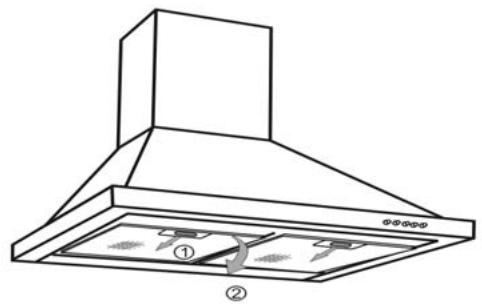
- Dismantling the filter cartridge
- Turn the built-in filter cartridge handle.
- Tilt the filter cartridge downward.
- CHANGING THE CARBON FILTER (optional)
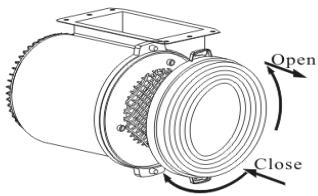
Replace it after approximately 120 hours of use.
- Remove the filter cartridge
- Turn the carbon filter to remove it
- Do the operation in the reverse order to put a new filter back
- Put the filter cartridges back
- CLEANING THE OUTER SURFACES
To clean the outside of your hood, use soapy water, but never use abrasive creams, corrosive detergents, scrubbing sponges or brushes. Wipe down with a soft, damp cloth.
CHANGING THE LIGHT BULB

Warning
Before carrying out any work, the power supply to the hood must be turned off, either by unplugging it or by using the circuit breaker switch.
Model with halogen bulb
- Remove the lighting port
- Change the halogen bulb.
-Replace the bulb by repeating these steps
in reverse order.

Warning
Before carrying out any work, the power supply to the hood must be turned off, either by unplugging it or by using the circuit breaker switch.
MAINTAINING YOUR APPLIANCE
| MAINTENANCE | WHAT TO DO | PRODUCTS/ACCESSORIES TO USE |
| Top surface and accessories | Never use metal scouring pads, abrasive products or excessively stiff brushes. | To clean the body and the light-ing port, you should use only commercial household cleaning products diluted in water and then rinse using clean water, drying with a soft cloth. |
| Filter cartridge | This filter traps fatty vapours and dust. This component plays an important role in ensuring the effectiveness of your hood. In the event of tough stains, use a non-abrasive cream, then rinse with clean water. | Use a commercial household cleaning product then rinse abundantly and dry. These filters can be cleaned in a vertical position in your dishwasher. (Do not allow them to touch dirty dishes or silverware.) |
| Activated carbon filter | This filter traps odours and must be changed at least once a year depending on your level of use. You should order these filters from your dealer (quoting the reference shown on the identification plate located inside the hood) and note the date the filter was changed. |
To preserve your appliance, we recommend that you use Clearit cleaning products.

Professional expertise serving individuals
Clearit offers you professional products and solutions designed for the daily care of your household appliances and kitchens.
They are on sale at your regular retailer, along with a complete line of accessories and consumable products.
| SYMPTOMS | SOLUTIONS |
| The hood is not working... | Ensure that: · The power is not cut off. · A speed has been selected. |
| The hood is not operating effectively... | Ensure that: · The selected motor speed is sufficient for the quantity of smoke and vapours to be cleared. · The kitchen is sufficiently ventilated to allow for fresh air intake. · The carbon filter is not worn (hood operating in recycling mode). |
| The hood stopped work- ing | Ensure that: · The power is not cut off. · The single-pole cut-off device was not activated. |
Any maintenance on your equipment should be undertaken by :
- either your dealer,
- or another qualified mechanic who is an authorized agent for the brand appliances.
When making an appointment, state the full reference of your equipment (model, type and serial number). This information appears on the manufacturer's nameplate attached to your equipment.