
MINERALE PLATE 800 - Range hood ROBLIN - Free user manual and instructions
Find the device manual for free MINERALE PLATE 800 ROBLIN in PDF.


| Product type | Extractor hood |
| Brand | ROBLIN |
| Model | MINERALE PLATE 800 |
| Width | 800 mm |
| Number of suction speeds | 3 speeds + intensive mode (6 minutes) |
| Lighting | Integrated LED |
| Anti-grease filter | Washable, 10-year lifespan, monthly cleaning in dishwasher (max 50°C) |
| Anti-odour filter | Washable or non-washable depending on model (non-washable ref.: 112.0158.515) |
| Filter saturation alarm | Yes (resettable) |
| Delayed shutdown | No |
| 24h mode | No |
| Cleaning of the bodywork | Damp cloth and mild detergent |
| Power supply voltage | 220-240 V ~ 50/60 Hz |
| Customer service | 04.88.78.59.93 |
| Spare parts | Anti-odour filter (112.0158.515), anti-grease filter (133.0368.902) |
| Repairs | Only by the manufacturer or customer service |
| Safety instructions | Do not flambé, monitor deep fryers, do not look at LEDs, do not use steam, wear protective gloves |
Frequently Asked Questions - MINERALE PLATE 800 ROBLIN
User questions about MINERALE PLATE 800 ROBLIN
0 question about this device. Answer the ones you know or ask your own.
Ask a new question about this device
Download the instructions for your Range hood in PDF format for free! Find your manual MINERALE PLATE 800 - ROBLIN and take your electronic device back in hand. On this page are published all the documents necessary for the use of your device. MINERALE PLATE 800 by ROBLIN.
USER MANUAL MINERALE PLATE 800 ROBLIN
MANUEL D'UTILISATION
natural_image
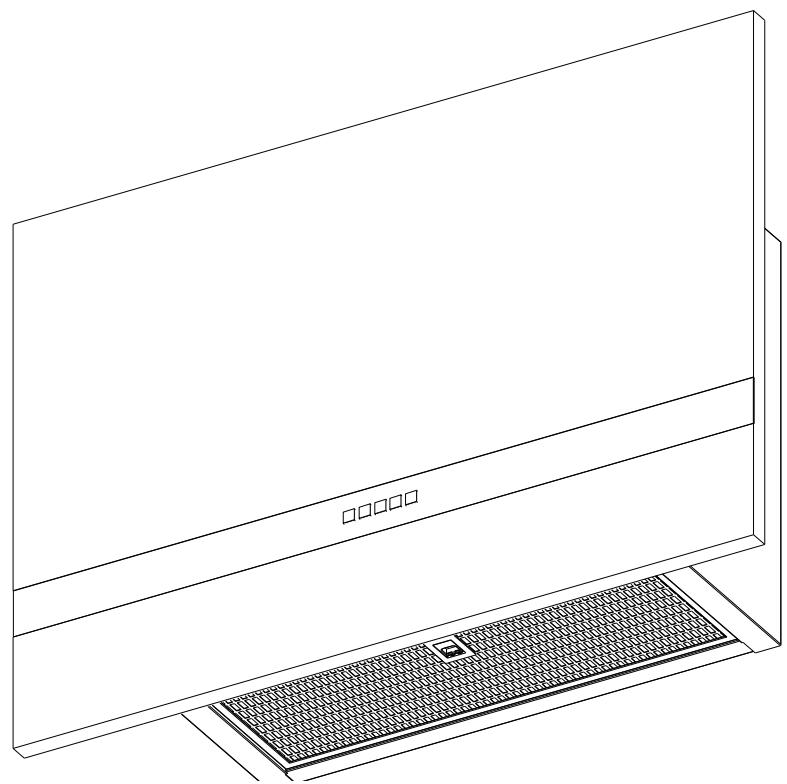
Line drawing of a flat-screen monitor with a textured base and control panel (no text or symbols)MINERALE 800 VERTICALE
Kitchen extractor hood
Küchenabzugshaube
Cappa aspirante
Campana extractora
natural_image
Technical line drawing of a monitor and keyboard assembly (no text or symbols)natural_image
Technical line drawing of a mechanical fan assembly with two separate views (no text or symbols)natural_image
Diagram of a computer monitor with a black arrow pointing to the screen (no text or symbols present)TABLE OF CONTENTS
About this manual 12
Intended use 12
Safety information 13
Overview 14
Operation 15
Lighting control 15
Extraction control 15
Extraction shutoff 15
Toggling the intensive setting 15
Ventilation mode 24 h 15
Shutoff delay 16
Filter saturation alarm 16
Alarm messages 16
Cleaning and care 17
Odour filter 17
Clean-air filter 17
Grease filter 18
Cleaning the surfaces of the hood 18
Lighting 18
Spare parts and accessories 18
Maintenance and repair 19
Disposal 19
Customer service 19
Technical data 19
ABOUT THIS MANUAL
This user manual applies to several models of the device. Thus it may be possible that some of the described features and functions are not available on your specific model.
▷ Carefully read the user manual before using the device.
▷ Keep the user manual.
▷ Use the device described in this user manual only according to the intended use.
| Symbol | Meaning |
| Warning symbol. Warning against risks of injury. | |
| ▷ | Actions in safety and warning notes to avoid injury or damage. |
| ▶ | Action step. Specifies an action to be done. |
| ■ | Result. Result of one or more action steps. |
| √ | Precondition that has to be fulfilled before performing the following action. |
INTENDED USE
The hood was developed exclusively for domestic use to eliminate cooking vapours.
The hood, which is equipped with a grease filter and an odour filter, removes vapours forming over a stove top via an air circulation or an air exhaust system.
SAFETY INFORMATION
The manufacturer can not be made liable for possible damage which may occur due to incorrect installation and incorrect, improper or unreasonable use of the device.
The hood can not support heavy loads.
Do not climb, stand or sit on the hood.
Do not place heavy objects on the hood.
Children and persons with restricted physical, sensory or mental abilities, or with limited experience or knowledge, may not use or clean the device, except they are supervised and instructed by a person responsible for their safety.
Children under 8 years may not use or clean the device even if supervised.
This device is not a toy.
▷ Keep children away from the device and the packaging material.
Do not leave children near the device unattended.
Do not let children play with the device.
▷ When using the hood, observe the manuals of the stove top and of the cooking devices that are used beneath the hood or while the hood is running.
Fire hazard and risk of injury due to open flame!
Deposits in the grease filter may catch fire.
Do not use open flames near the device (e.g. flambéing).
▷ Always clean or change all filters at the specified intervals.
When using deep fat fryers, overheated oil can burst into flames.
▷ Continuously monitor fryers during use.
Risk of eye injury due to LED light!
The LED light is very bright and may damage the eyes.
Do not look directly into the LED light for a prolonged time.
Risk of electric shock due to damaged device!
▷ Do not switch on a damaged device.
▷ Switch off the fuse in the fuse box.
▷ Contact the customer service.
Risk of electric shock due to entering liquid!
The device contains electrical components.
▷ Make sure that no liquid enters the interior of the device.
Do not use pressurised steam to clean the device.
Do not use a wet cloth to clean the operating elements.
Risk of burns due to hot surfaces!
Accessible metallic parts of the hood may become very hot when used with cooking appliances, that emit great amounts of heat (e.g. gas hobs).
Do not touch hot surfaces.
▷ Be careful when opening or closing the fold-out panel.
▷ Wear heat-resistant gloves.
OVERVIEW
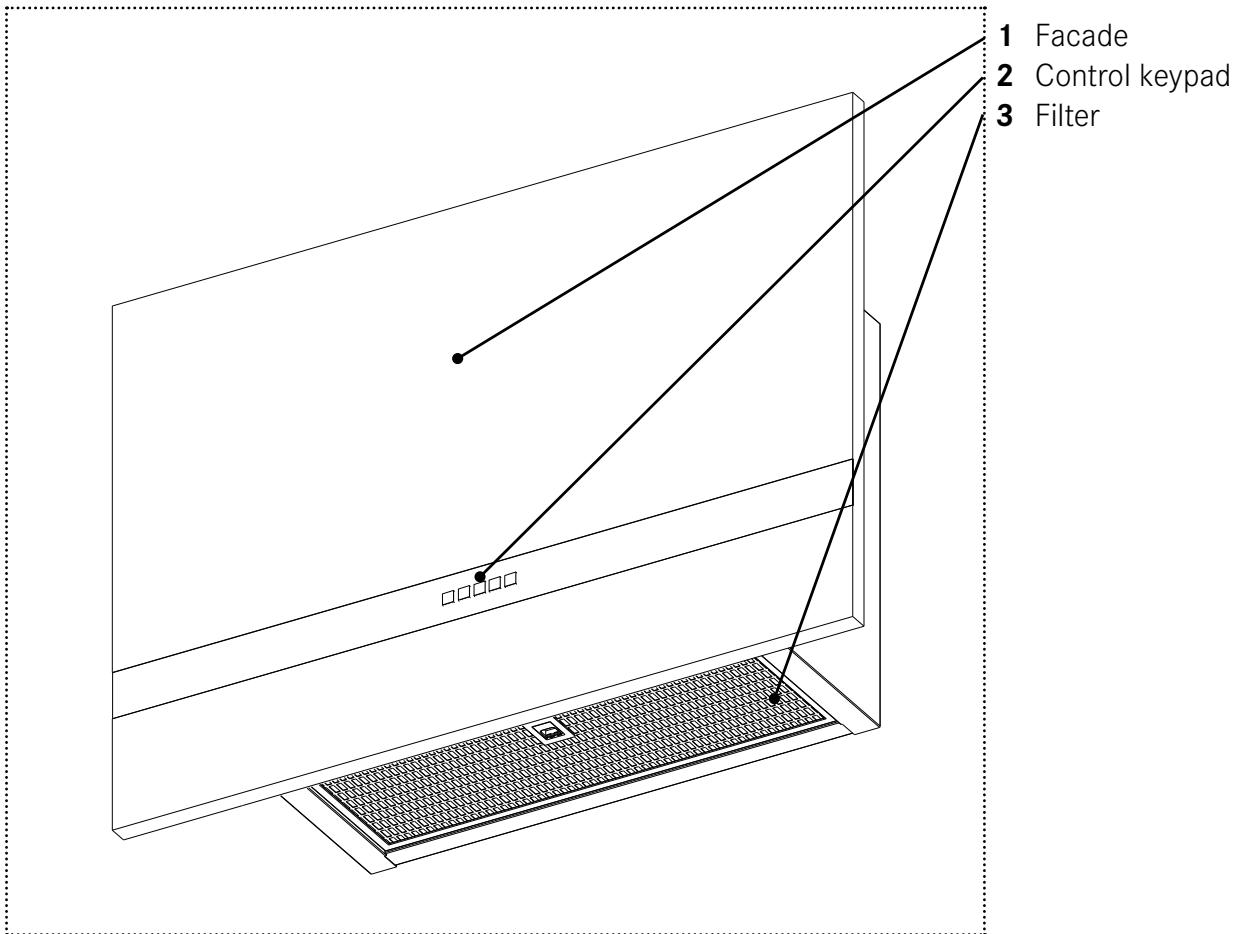
Keybords Function
0
1
2
3 >>

Off button
First speed of extraction
Second speed of extraction
Third speed and Intensive speed of extraction
Lighting On/Off button
Locking and unlocking the keys of the operating panel
▶ Non-existent function.
Lighting control
Main lighting
▶ Briefly press
■ Turns the lighting on/off used
■ Lighting on = button permanently on.

Secondary lighting
▶ Non-existent function.
Extraction control
Extraction level
Low speeds are recommended for low heat cooking and for sauces, simmering, etc.
Intermediate speeds are recommended for medium to fast cooking, grilling and frying.
High speeds are recommended for cooking that creates a lot fat and vapour.
Extraction start
▶ Briefly press. 1
■ Turn on the vacuum motor at first speed of use.
■ Fixed light button.
▶ Briefly press. 2
■ Turn on the vacuum motor at second speed of use.
■ Fixed light button.
▶ Briefly press. 3 >>
■ Turn on the vacuum motor at third speed of use.
■ Fixed light button.
Extraction shutoff
▶ Briefly press. 0
■ Switches the extraction motor off.
Toggling the intensive setting
The intensive extraction mode is recommended if the vapours and fumes occasionally become excessive.
Switching on
▶ Long press (2s) . 3 »
■ Activates the intensive extraction mode, even with the motor off, for 6 minutes and then return to the speed used previously.
■ Flashing button lit.
Ventilation mode 24 h
This function allows you to remove all the unpleasant and persistent smells in your room by renewing the air.
Switching on
▶ Non-existent function..
Switching off
▶ Non-existent function.
Shutoff delay
This function allows you to temporarily continue filtering and extracting residual smoke after the cooking has stopped.
Switching on
▶ Non-existent function.
Switching off
▶ Non-existent function.
Filter saturation alarm
The alarm tells you when the grease filters and the odour filters need to be cleaned or replaced (for the non-washable odour filters).
Activating the alarm „filter saturation“
Depending on the type of control keyboard, the „Filter saturation“ alarm may need to be activated if your appliance is a recycling or clean-air type.
▶ Non-existent function.
Deactivating the alarm „filter saturation“
▶ Non-existent function.
Resetting the alarm „filter saturation“
▶ Non-existent function.
Alarm messages
▶ Non-existent function.
CLEANING AND CARE
Before performing any cleaning and maintenance:
▷ Switch off the device.

Les grFire hazard! Risk of injury!
Deposits in the grease filter may catch fire.
Filters that are not cleaned or changed regularly may catch fire if open flames or extensive heat are handled beneath the hood.
▷ Always clean or change all filters at the specified intervals.
Odour filter
There are two types of odour filter: washable and non-washable.
Non-washable odour filter
Do not wash or reuse a non-washable odour filter.
▷ Replace non-washable odour filters at least every 3 months, or more often if the hood is used for more than 3 hours per day.
▷ Grease filters should always be cleaned at the same time as replacing non-washable odour filters.
Washable odour filter
▷ Clean washable odour filters in a dishwasher at high temperature (without other kitchen utensils) every 2 months. Dry odour filters with the dishwasher or in the open air for approximately 30 minutes.
▶ Reactivate the washed and dried washable odour filters by placing them in an oven for 10 minutes at 100^ C maximum. Z Grease filters should always be cleaned at the same time as cleaning washable odour filters.
Clean-air filter
Clean-air filters are fitted to hoods fitted with the

recycling system
CLEAN-R
▷ Only replace a clean-air filter if the associated ultra violet lamp needs to be replaced. The service life of an ultra violet lamp is approximately 6000h or 3years.
Replacing washable odour filters
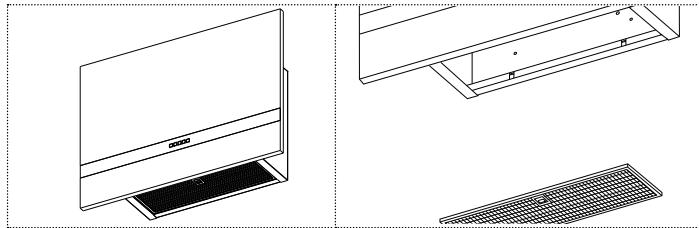
▶ Remove the grease filter.
natural_image
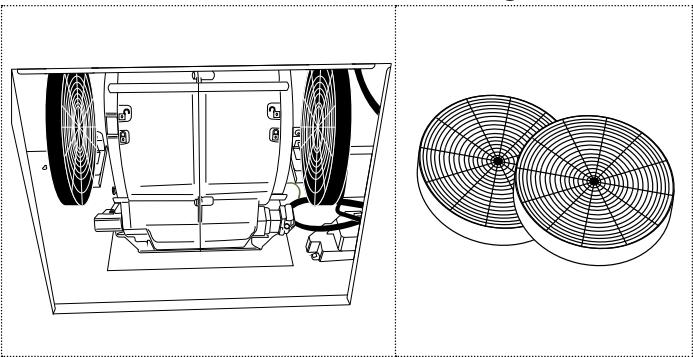
Technical line drawing of a flat-screen monitor and its internal structure, shown from top and side views (no text or symbols)▶ Remove the odor filters from the engine.
natural_image
Technical line drawing of a mechanical fan assembly with two separate fan profiles (no text or symbols)▶ Repeat the procedure in the reverse order to reposition the odour filter (in blue) on the appliance.
▶ Re-initialize the „filter saturation“ alarm if necessary.
Grease filter
These filters have a service life of 10 years and should be cleaned once a month with normal use.
▷ Clean grease filters in a dishwasher at a maximum temperature of 50^ C.
▷ Let the filters dry in the open air.
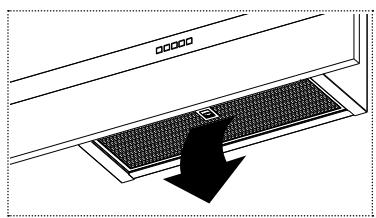
Cleaning the grease filter
▶ Remove the grease filter.
natural_image
Diagram of a kitchen appliance with a black arrow pointing to a textured panel (no text or symbols)▶ Remove the grease filters.
▶ Clean the grease filter.
▶ Fit the the grease filter.
▶ Close the perimetric extraction panel.
▶ Re-initialize the „filter saturation“ alarm if necessary.
Cleaning the surfaces of the hood
We recommend a damp cloth and a mild detergent.
▶ Do not use any scouring agents or chemical detergents, which could corrode or scratch the surfaces of the device.
Lighting
▷ Make sure that the LED in the spotlights are changed only by the customer service.
SPARE PARTS AND ACCESSORIES
Spare parts (+33 (0)1.30.28.94.00).
Accessories (+33 (0)1.30.28.94.00).
| Component | Type, item no. | Remark |
| Odour filter | 112.0158.515 | not washable |
| Grease filter | 133.0368.902 | washable |
MAINTENANCE AND REPAIR
Repairs if carried out incorrectly may cause serious injury, damage to the device and fittings, as well as affect the functioning of the device.
▷ Make sure that maintenance on electrical components and on the smoke vent is carried out only by the manufacturer or the customer service.
▷ Make sure that damaged cables are changed only by the manufacturer or the customer service.
SCRAPPING
The symbol on the product or on the packaging indicates that the device must not be disposed of in the domestic waste.
By disposing of the device in a proper way you help to avoid harmful consequences to environment and health.
▷ Please find out about the local system of sorting for electrical and electronic waste.
▷ Please act according to the local regulations and do not dispose of your used product with general household waste.
▷ Disposing of your end-of-life product correctly will help prevent potentially negative consequences for the environment and human health.
CUSTOMER SERVICE
▶ Refer to the contact address for your country on the back page or www.roblin.fr
TECHNICAL DATA
▶ Refer to the type plate placed on the product. Further information on technical data is available on www.roblin.fr
www.roblin.fr

INHALTSVERZEICHNIS
natural_image
Technical line drawings of a laptop and keyboard assembly (no text or symbols)natural_image
Technical line drawing of a mechanical fan assembly with two circular fan blades (no text or symbols)natural_image
Diagram of a computer monitor with a black arrow pointing to the screen area (no text or symbols present)INDICE
natural_image
Line drawing of a computer monitor with a grid base and screen, showing no text or symbolsnatural_image
Technical line drawings of a laptop and keyboard, showing front, side, and top views (no text or symbols)natural_image
Technical line drawing of a mechanical fan assembly with two circular fan blades (no text or symbols)natural_image
Diagram of a computer monitor with a black arrow pointing to the screen area (no text or symbols present)ÍNDICE
natural_image
Technical line drawing of a flat-screen monitor and its internal panel, shown from top and side views (no text or symbols)natural_image
Technical line drawing of a mechanical fan assembly with two circular fan blades (no text or symbols)natural_image
Diagram of a door handle with a black arrow pointing to the grille (no text or symbols)INHOUDSOPGAVE
met clean-air filters
natural_image
Technical line drawings of a laptop and keyboard, showing front, side, and top views (no text or symbols)natural_image
Technical line drawing of a mechanical fan assembly with two circular fan blades (no text or symbols)natural_image
Diagram of a computer monitor with a black arrow pointing to the screen area (no text or symbols present)Franke France S.A.S.
B.P 13 - Avenue Aristide Briand
60230 Chambly (France)
- MANUEL D'UTILISATION
- MINERALE 800 VERTICALE
- TABLE OF CONTENTS
- ABOUT THIS MANUAL
- INTENDED USE
- SAFETY INFORMATION
- Fire hazard and risk of injury due to open flame!
- Risk of eye injury due to LED light!
- Risk of electric shock due to damaged device!
- Risk of electric shock due to entering liquid!
- Risk of burns due to hot surfaces!
- OVERVIEW
- Keybords Function
- Locking and unlocking the keys of the operating panel
- Lighting control
- Main lighting
- Secondary lighting
- Extraction control
- Extraction level
- Extraction start
- Extraction shutoff
- Toggling the intensive setting
- Switching on
- Ventilation mode 24 h
- Switching off
- Shutoff delay
- Filter saturation alarm
- Activating the alarm „filter saturation“
- Deactivating the alarm „filter saturation“
- Resetting the alarm „filter saturation“
- Alarm messages
- CLEANING AND CARE
- Odour filter
- Non-washable odour filter
- Washable odour filter
- Clean-air filter
- Replacing washable odour filters
- Grease filter
- Cleaning the grease filter
- Cleaning the surfaces of the hood
- Lighting
- SPARE PARTS AND ACCESSORIES
- MAINTENANCE AND REPAIR
- SCRAPPING
- CUSTOMER SERVICE
- TECHNICAL DATA
- INHALTSVERZEICHNIS
- INDICE
- ÍNDICE
- INHOUDSOPGAVE
Brand : ROBLIN
Model : MINERALE PLATE 800
Category : Range hood