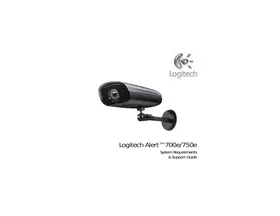
USER MANUAL ALERT 750E LOGITECH
System Requirements 3
Product Information 4
Contact Us 4
FCC Compliance & Advisory Statement 5
Important Safety Information 6
AC Powered Product Precautions 6
Power Supply Precautions 7
Infrared Illumination LED Notes & Warnings 8
Logitech Hardware Product Warranty 9
System Requirements
Software installation requires an Internet connection.
Remote viewing requires a PC or Intel-based Mac running Flash® Player, which is a free download.
| CPU Speed: | 2 GHz |
| Memory (GB): | 1 |
| Display Resolution: | 1024 x 720 or higher |
| Hard Drive (MB): | 100 MB for software and minimum of 500+ for video storage |
| Operating System: | Microsoft* Windows* Vista*, XP Home Edition, XP Pro, or XP Media Center Edition, Windows* 7 |
PC is not required to record video. The camera includes a 2 GB microSD™ card. The amount of video that can be stored on a 2 GB card is subject to the amount of motion. We calculate an average one week using cameras in typical home locations. Upgrade to a larger microSD card (not included) to get months of on-camera video recording.
Command Center Help: For Software and Product help, setting features or troubleshooting tips, press [F1].
User Guide: Additional software manuals are available online at www.Logitech.com/Support/Downloads.
Knowledge Base: Browse Tips & Tricks, FAQs, or access the Knowledge Base at www.Logitech.com/Support.
Logitech Alert website: www.Logitech.com
Customer forums: forums.Logitech.com
Email support: Visit www.Logitech.com and select Support > Contact Us. Fill out our online email form. You will receive a reply within one business day.
Phone support: Call our toll-free support number 1 888.469.4543.
If you need to return a product, either for refund or repairs, contact Logitech Technical Support first and obtain an RMA number. Please see the contact information above.
FCC Compliance and Advisory Statement
This hardware device complies with Part 15 of the FCC Rules. Operation is subject to the following two conditions: 1) this device may not cause harmful interference, and 2) this device must accept any interference received, including interference that may cause undesired operation. This equipment has been tested and found to comply with the limits for a Class B digital device, pursuant to Part 15 of the FCC Rules. These limits are designed to provide reasonable protection against harmful interference in a residential installation. This equipment generates, uses, and can radiate radio frequency energy and, if not installed or used in accordance with the instructions, may cause harmful interference to radio communications. However, there is no guarantee that interference will not occur in a particular installation. If this equipment does cause harmful interference to radio or television reception, which can be determined by turning the equipment off and on, the user is encouraged to try to correct the interference by one or more of the following measures: 1) reorient or relocate the receiving antenna; 2) increase the separation between the equipment and the receiver; 3) connect the equipment to an outlet on a circuit different from that to which the receiver is connected; 4) consult the dealer or an experienced radio/TV technician for help. Any changes or modifications not expressly approved by the party responsible for compliance could void the user's authority to operate the equipment. Where shielded interface cables have been provided with the product or specified additional components or accessories elsewhere defined to be used with the installation of the product, they must be used in order to ensure compliance with FCC regulations.
IC Statement. Corded product: This Class B digital apparatus complies with Canadian ICES-003.
UL Testing. Your product is UL tested; use it only with UL tested devices. For Product Safety, EMC and RF related verbiage, go to http://www.Logitech.com/compliance.
Compliance. For compliance information, go to http://www.Logitech.com/compliance.
CAUTION ELECTRIC SHOCK HAZARD
- To prevent injury, this camera must be securely mounted in accordance with the installation instructions.
- Mount the camera high and out of reach so the angle of the front of the camera tilts down, allowing the sun-shield to shade the sensor, thus providing the best quality picture.
- Mount the camera out of reach of water sprinklers to avoid water spotting the lens cover and degrading the image quality.
- If you want to relocate the mounted camera, be sure to turn off the power before moving and remounting it.
- Do not install near any heat sources such as radiators, heat registers, stoves, or other device that produce heat.
- Maintain a minimum distance of at least 6 inches around device for sufficient ventilation.
- Please always use a soft, dry cloth when cleaning it.
- Protect the power cord and cable from being walked on or pinched particularly at plugs, convenience receptacles, and the point where they exit from the apparatus.
- Refer all servicing to qualified service personnel. Servicing may be required when the device has been damaged in any way, such as power-supply cord or plug is damaged, objects have fallen into the device, the device does not operate normally, or has been dropped.
UL Safety: Your product has been UL tested. It should only be used with other UL listed devices.
POWER SUPPLY WARNING
Your product has a power supply. The power supply is weatherproof and can be installed outdoors. Use these tips to ensure reliable power supply usage. Make sure the outdoor outlet is weatherproof.
Please follow these safety guidelines
- To maintain proper cooling and minimize water exposure, Do NOT mount the power supply so that it lays horizontally or flat.
- Do NOT mount the power supply upside down. Keep the cable connector port on the bottom.
- Avoid direct sunlight.
Caution: If left in the sunlight, surface may become hot to the touch.
- Use the power supply that comes with your product; do not use any other power supply.
- Do not use power supply with any other product except the Alert camera.
- Do not use a damaged power supply or attempt to repair one that is damaged.
- Do not immerse the power supply in water or subject it to physical abuse.
- Inspect the power supply regularly for damage to its cable, plug, and body.
- Do not route in an area where the plug is exposed to moisture.
- Plug the power supply to the nearest power outlet.
- Do not plug your power supply into a surge protector or UPS.
Infrared Illumination LED Notes & Warnings
- Your camera contains a built-in infrared (IR) filter. In low-light conditions, the built-in IR illuminators turn on and the filter is removed. Without the IR filter, colors have a different appearance. Green foliage in sunlit outdoor scenes may appear grayish-green in comparison to the IR filter used in the standard lens. During illuminated dark scenes, images will appear to be black and white. Some materials reflect and absorb IR light differently than visible light, so some illuminated objects may appear lighter or darker than expected. The LEDs used in the camera are "class 1" infrared radiating devices and comply with the International Standards EN 60825-1. Users should follow the proper use rules below. Usage other than specified here may cause hazardous radiation exposure.
- Do not look directly into the camera for extended periods of time. Be aware that the beam is invisible light and cannot be seen.
- Keep it out of reach of children.
- Do not try to replace or repair the camera. The LED components are not user-replaceable.
- Do not scratch the lens.
- Wipe the protective glass shield over the lens and LEDs periodically with a clean, soft cloth.
- Dispose of the camera according to the laws and regulations of your region. For example, at a recycling center that accepts electronic devices.
Logitech Alert Product Limited Warranty
Logitech warrants that your Logitech hardware product shall be free from defects in material and workmanship for one (1) year, beginning from the date of purchase. Except where prohibited by applicable law, this warranty is nontransferable and is limited to the original purchaser. This warranty gives you specific legal rights, and you may also have other rights that vary under local laws.
Remedies
Logitech's entire liability and your exclusive remedy for any breach of warranty shall be, at Logitech's option, (1) to repair or replace the hardware, or (2) to refund the price paid, provided that the hardware is returned to the point of purchase or such other place as Logitech may direct with a copy of the sales receipt or dated itemized receipt. Shipping and handling charges may apply except where prohibited by applicable law. Logitech may, at its option, use new or refurbished or used parts in good working condition to repair or replace any hardware product. Any replacement hardware product will be warranted for the remainder of the original warranty period or thirty (30) days, whichever is longer or for any additional period of time that may be applicable in your jurisdiction.
This warranty does not cover problems or damage resulting from (1) accident, abuse, misapplication, or any unauthorized repair, modification or disassembly; (2) improper operation or maintenance, usage not in accordance with product instructions or connection to improper voltage supply; or (3) use of consumables, such as replacement batteries, not supplied by Logitech except where such restriction is prohibited by applicable law.
How to Obtain Warranty Support
Before submitting a warranty claim, we recommend you visit the support section at www.logitech.com for technical assistance. Valid warranty claims are generally processed through the point of purchase during the first thirty (30) days after purchase; however, this period of time may vary depending on where you purchased your product - please check with Logitech or the retailer where you purchased your product for details. Warranty claims that cannot be processed through the point of purchase and any other product related questions should be addressed directly to Logitech. The addresses and customer service contact information for Logitech can be found in the documentation accompanying your product and on the web at www.logitech.com/support.
Limitation of Liability
LOGITECH SHALL NOT BE LIABLE FOR ANY SPECIAL, INDIRECT, INCIDENTAL OR CONSEQUENTIAL DAMAGES WHATSOEVER, INCLUDING BUT NOT LIMITED TO LOSS OF PROFITS, REVENUE OR DATA (WHETHER DIRECT OR INDIRECT) OR COMMERCIAL LOSS FOR BREACH OF ANY EXPRESS OR IMPLIED WARRANTY ON YOUR PRODUCT EVEN IF LOGITECH HAS BEEN ADVISED OF THE POSSIBILITY OF SUCH DAMAGES. Some jurisdictions do not allow the exclusion or limitation of special, indirect, incidental or consequential damages, so the above limitation or exclusion may not apply to you.
Duration of Implied Warranties
EXCEPT TO THE EXTENT PROHIBITED BY APPLICABLE LAW, ANY IMPLIED WARRANTY OR CONDITION OF MERCHANTABILITY OR FITNESS FOR A PARTICULAR PURPOSE ON THIS HARDWARE PRODUCT IS LIMITED IN DURATION TO THE DURATION OF THE APPLICABLE LIMITED WARRANTY PERIOD FOR YOUR PRODUCT. Some jurisdictions do not allow limitations on how long an implied warranty lasts, so the above limitation may not apply to you.
National Statutory Rights
Consumers have legal rights under applicable national legislation governing the sale of consumer goods. Such rights are not affected by the warranties in this Limited Warranty.
No Other Warranties
No Logitech dealer, agent, or employee is authorized to make any modification, extension, or addition to this warranty.
Logitech Address
Logitech Europe S.A., Z.I. Moulin du Choc D, 1122 Romanel/Morges, Switzerland
© 2010 Logitech. All rights reserved. Logitech, the Logitech logo, and other Logitech marks are owned by Logitech and may be registered. All other trademarks are the property of their respective owners. Logitech assumes no responsibility for any errors that may appear in any manual or on this website. Information contained herein is subject to change without notice.

Logitech
www.logitech.com
© 2010 Logitech. All rights reserved. Logitech, the Logitech logo, and other Logitech marks are owned by Logitech and may be registered. All other trademarks are the property of their respective owners. Logitech assumes no responsibility for any errors that may appear in this manual. Information contained herein is subject to change without notice.
620-002455.003