
ROLLER TEMPO - Bluetooth speaker NGS - Free user manual and instructions
Find the device manual for free ROLLER TEMPO NGS in PDF.



| Product type | Portable bluetooth speaker |
| Brand | NGS |
| Model | ROLLER TEMPO |
| Bluetooth version | 5.0 with TWS |
| Output power | 20 W |
| Frequency response | 100 Hz - 20 kHz |
| Battery capacity | 1500 mAh |
| Battery life | 3 hours (at 70% volume) |
| USB input | Yes (MP3 playback) |
| Micro SD input | Yes (MP3 playback) |
| Auxiliary input | Yes (3.5 mm jack) |
| Charging port | Micro USB |
| Functions | Play/Pause, Volume, Mode, TWS |
| Weight | Approximately 500 g |
| Dimensions | Approximately 20 x 8 x 8 cm |
| Material | Plastic |
| Battery warranty | 12 months (consumable) |
| Playback modes | Bluetooth, USB, Micro SD, AUX |
| Care and cleaning | Clean with a soft dry cloth. Do not use abrasive products. |
| Safety | Do not expose to water or moisture. Do not open the device. |
| Spare parts | Contact NGS after-sales service |
Frequently Asked Questions - ROLLER TEMPO NGS
User questions about ROLLER TEMPO NGS
0 question about this device. Answer the ones you know or ask your own.
Ask a new question about this device
Download the instructions for your Bluetooth speaker in PDF format for free! Find your manual ROLLER TEMPO - NGS and take your electronic device back in hand. On this page are published all the documents necessary for the use of your device. ROLLER TEMPO by NGS.
USER MANUAL ROLLER TEMPO NGS
PORTABLE SPEAKER COMPATIBLE WITH BLUETOOTH
ENGLISH I FRANÇAIS I ESPÁNOL I DEUTSCH
ITALIANO I PORTUGUES I POLSKI I NEDERLANDS
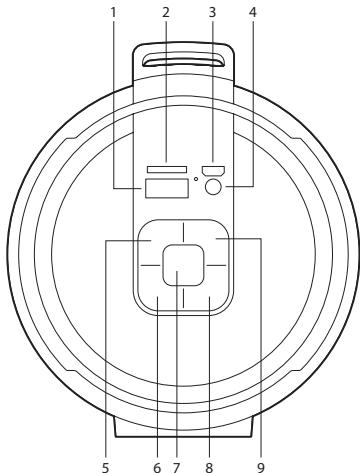
1 USB port
2 Micro SD slot
3 Micro USB charging port
4 AUX input
5 Back /Volume up
6 Mode (select between Bluetooth, USB, Micro SD and AUX-IN)
7 On/Off
8 Play/Pause/TWS
9 Next/Volume up
MODES
BLUETOOTH/USB/MICROSD CARD
To switch between modes, press the Mode key. If the device is not connected to a Micro SD card or USB memory, it will skip these modes when the Mode key is pressed.
BLUETOOTH SPEAKER CONTROL FUNCTION
- In playing music, press button to pause music, press it once again to play.
- In Bluetooth mode, if you press this button briefly, you return to the previous track. Press down to lower the volume.
- In Bluetooth mode, if you press this button briefly, you move to the next track. Press down to increase the volume.
MICRO SD CARD MODE
- Insert the Micro SD card into the slot.
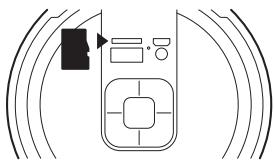
- The device will automatically play any music in MP3 format on the card.
USER'S MANUAL
CHARGING THE BLUETOOTH SPEAKER
- Connect the Micro USB cable to the speaker.
- The charging LED will turn ON in red light; the rechargeable battery is in charging.
- The charging LED red light will turn OFF when the rechargeable battery is fully charged.
- Disconnect the USB cable.
BLUETOOTH MODE
- Press and hold the ON/OFF button for 3 seconds, a message sound; "beep" will announce from speaker and the mode LED will blinking in blue; the device is turned ON and goes into searching mode.
- Search for "ROLLER TEMPO" on your mobile device and select it to begin pairing.
-
The Bluetooth speaker will be reconnecting automatically if your mobile phone has been paired (Depend on the of mobile phone's type and configuration, manual reconnection may require on some devices).
-
If the pairing is successful, a beep is heard from the speaker and the blue LED flashes slowly.
USB MODE
- Insert a USB flash drive into the slot.
- The device will automatically play any music in MP3 format on the flash drive.
TWS MODE
- Turn on 2 identical devices and make sure both are in Bluetooth mode.
- Press the PLAY/PAUSE button of a loudspeaker for 5 seconds to enter/exit TWS mode. You'll hear one beep and after a short time three further beeps, indicating that the pairing has been successful.
- Connect your mobile device via Bluetooth to either of the 2 speakers and increase the volume.
SPECIFICATIONS
Bluetooth 5.0 TWS
Power output: 20W
USB input
MicroSD input
AUX input
Frequency response: 100Hz-20kHz
Battery capacity: 1500mAh
Operating time at 70% : 3 hours
Battery warranty
The battery is a consumer product, and as such it is under warranty for 12 months.

If at any time in the future you should need to dispose of this product please note that:
Waste electrical products should not be disposed of with household waste. Please recycle where facilities exist.
Check with your Local Authority or retailer for recycling advice.
(Waste Electrical and Electronic Equipment Directive)
APERCU GENERAL
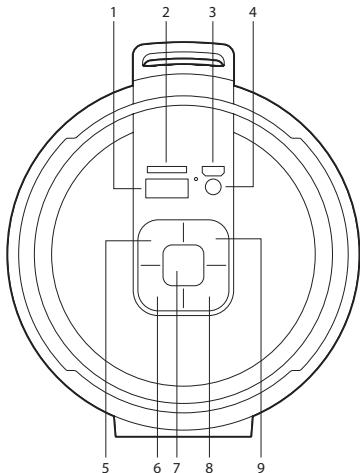
1 Port USB
2 Fente micro SD
3 Port de charge micro USB
4 Entrée auxiliaire
5 Precedent/Augmenter le volume
6 Mode (selection entre Bluetooth, USB, Micro SD et AUX-IN)
7 Marche/Arret
8 Lecture/Pause/TWS
9 Suivant/Augmenter le volume
MODES
BLUETOOTH/USB/CARTEMICROSD
HAS BEEN TESTED AND FOUND IN CONFORMITY WITH THE FOLLOWING HARMONIZED EUROPEAN STANDARDS:
HA SIDO TESTADO EN CONFORMIDAD CON LAS SIGUIENTES NORMAS STANDARD EUROPEAS ARMONIZADAS:
ETSI EN 301 489-1 V 2.1.1 (2017-02) IEC 62321-4:2013
ETSI EN 301 489-17 V 3.1.1 (2017-02) IEC 62321-5:2013
ETSI EN 300 328 V 2.1.1 (2016-11) IEC 62321-7-1:2015
ETSI EN 303 345 V 1.1.7 (2017-03) IEC 62321-7-2:2017
EN 62479:2010 IEC 62321-6:2015
EN 60065:2014
AND THEREFORE COMPLY WITH THE ESSENTIAL REQUIREMENTS AND PROVISIONS OF THE FOLLOWING DIRECTIVES OF THE EUROPEAN PARLIAMENT AND EUROPEAN COUNCIL:
technical support: www.ngs.eu/support
www.ngs.eu
Brand : NGS
Model : ROLLER TEMPO
Category : Bluetooth speaker