VISION 7839 - Range hood NOVY - Free user manual and instructions
Find the device manual for free VISION 7839 NOVY in PDF.


User questions about VISION 7839 NOVY
0 question about this device. Answer the ones you know or ask your own.
Ask a new question about this device
Download the instructions for your Range hood in PDF format for free! Find your manual VISION 7839 - NOVY and take your electronic device back in hand. On this page are published all the documents necessary for the use of your device. VISION 7839 by NOVY.
USER MANUAL VISION 7839 NOVY
natural_image
Line drawing of a cabinet or enclosure with a grid-patterned vent and mounting bracket (no text or symbols)EN Operating and installation Instructions p. 14
Vision
7838 - 7839
7848 - 7849
7858 - 7859
1. ALGEMENE INFORMATIE
text_image
Diagram showing a mechanical device with labeled components A and B, indicating rotation and connection points.text_image
Diagram showing a mechanical device with labeled components A and B, indicating rotation or assembly process.Dimensions: p. 17-19
text_image
Diagram showing a mechanical device with labeled components A and B, indicating rotation or assembly process.- Please read these operating instructions carefully. They contain information about installation, operation, safety and maintenance you need to be aware of.
• This hood is for domestic use only. - Check the condition of the hood and the installation material before installing. Carefully remove the hood out of the packaging. Be careful not to use sharp knives to open the box.
- Please keep these instructions to pass on to future users.
- Disposal of transport packaging and old appliance. Your new appliance was sent to you in protective packaging. All utilised materials are environmentally safe and recyclable. Please help us by disposing of the packaging in an environmentally friendly manner.
- Old appliances are not worthless rubbish. Valuable raw materials can be reclaimed by recycling old appliances. This appliance is identified according to the European Directive 2002/96/EC on waste electrical and electronic equipment. Please ask your dealer or inquire at your local authority about current means of disposal.
This manual makes use of a number of symbols. The meaning of these symbols are given below.
| Symbol | Meaning | Action |
| Indication | Explanation of an indication on the hood | |
| Warning | This symbol indicates an important tip or a dangerous situation. |
Follow this instruction to avoid injury and material damage.
2. SAFETY
2.1 Precautions before using
- Do not change or alter the appliance.
- The appliance must be grounded and connected conforming to local standards.
- Do not use any extension cable to connect it.
2.2 Using the appliance
- ⚠️ Under no circumstances is it allowed to flambé under the hood
- Deep frying under the hood is only allowed under constant supervision.
• In case of fire always switch off the hood. - Never extinguish burning fat or oil with water. Cover the pot with a well fitting lid or a burnblanket.
• This appliance can be used by children aged from 8
years and above and persons with reduced physical, sensory or mental capabilities or lack of experience and knowledge if they have been given supervision or instruction concerning use of the appliance in a safe way and understand the hazards involved
- Activate the hood a few minutes prior to cooking.
- Switch the hood off 30 minutes after cooking is finished. The delay function is set to 30 minutes. Use the delay function.
- Avoid drafts under the hood surface.
- When cooking make sure pots are positioned properly under the hood surface.
- When using induction: adapt the intensity of both hob and hood to the lowest possible level in order to avoid excessive creation of damp fumes.
- Attention, certain accessible parts of the hood can become hot while cooking.
2.3 Precautions not to damage the appliance
- The mounting instructions describe the correct way of mounting. Carefully read these instructions.
- Check the distance between the cooking surface and the hood. The minimum and maximum heights are indicated in the mounting instructions.
- Never use the hood without the fat filters in order to prevent dirt and fat from further entering the hood, which will eventually affect the performance and functioning of the hood.
- Always stay around when you are frying, roasting, grilling of deep-frying. Overheated oil and fat may-catch fire and damage the hood.
2.4 Air supply
When using a hood sufficient air flow is necessary. However large your kitchen may be, there is only so much air available in that space. Opening a door or window or the installation of a ventilation grid close to the hood insures a good quality of air flow.
Insufficient air flow will impair the extraction efficiency of your hood immensely.
Insufficient air flow can cause reflux from other air ducts such as chimneys or combustion appliances.
When using a cooker hood and appliances using energy other than electrical in the same space, the pressure in the room may not surpass 4 Pa (= 0.04mBar).
3. OPERATION
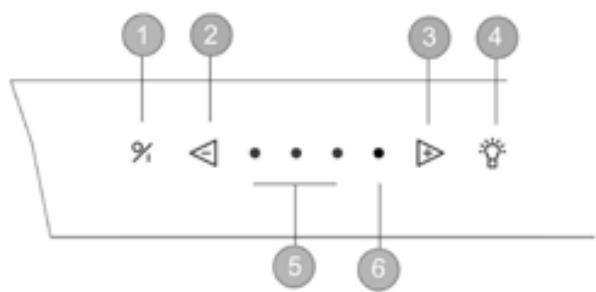
You can control the hood by the switch on the hood or by the remote control supplied.
text_image
1 2 3 4 % ◀ △ • • • ▶ ● 5 6Control on the hood:
① switch on / off
② decrease speed levels
③ increase speed levels
④ illumination
⑤ Speed 1,2,3 indicator lamps
⑥ Powerspeed indicator lamp
3.1 Extraction
Switch on – switch off
To switch the motor on push button ①.
The hood will always resume the level it was previously switched off in.
Switch off with 30 minute delay:
Press button ① once. The first green Speed indicator lamp blinks, the other Speed indicator lamps remain lit up according to the level in use. After 30 minutes motor and illumination switch off automatically.
Switch off without delay:
Push button ① twice.
Auto-Stop
To avoid that the hood will function during a too long period, it will switch off automatically after 3 hours (when no changes to the controls have been made). Only the motor will turn off automatically. The lighting will stay on.
Motor speed
To decrease speed levels push button ②. To increase speed levels push button ③.
Three green Speed indicator lamps ⑤ indicate level 1 to 3, one red Speed indicator lamp ⑥ indicates the level 'POWER'.
‘POWER’ is only used in case of excessive formation of smoke, fumes or odours. Taking into account the large volume of air which is extracted from the room at this level, it’s use should be limited.
‘POWER’ automatically reverts to level 3 after 6 minutes.
A self-rectifying thermal contact makes sure that the motor is switched off when overheated. The motor will switch on again after is has cooled down. The cause of the overheating needs to be determined. This may be, for example, that the contents of the pan have caught fire, the motor fan is blocked or an object is (partly) closing off the exhaust opening.
3.2 Ilumination
To activate the lights press button ④. The lights will switch on at full power.
Lighting can be activated independently from the motor.
4 MAINTENANCE
4.1 Grease filter
Maintenance of the grease filter
The hood contains two metal filters which should be cleaned twice a month.
Grease filter indication

Indication: 4 flashing indicator lamps
After 20 cooking hours, the 4 indicator lamps will start to blink during 5 minutes, this indicates that the grease filter has to be cleaned.
Access to the filter
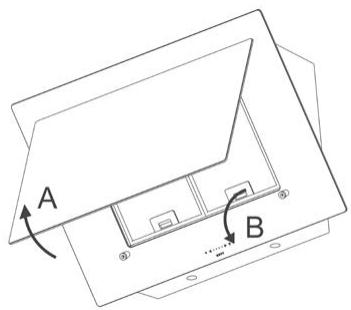
Grip the glass plate (A) at the bottom left and right and pull it forwards. Open the glass plate so that the grease filter is visible. You can remove the metal grease filter (B) from the hood.
text_image
A BCleaning the filter
- in the dishwasher
- manually: in a hot solution of water and a liquid detergent.
Rince and allow to dry completely

The previous instructions need to be followed. If an increased fire hazard may occur.
Reset grease filter indication
When replacing the cleaned filter, you have to reset the hood by pushing the [-] button during 5 seconds. If you don't reset, the indicator lamps will continue blinking.
We advise you to clean your filter twice a month for an optimal operation.
4.2 Recirculation
The hood has one monoblock filter. Use only the Novy monoblock filter in the hood.
Cleaning indication

Indication: red indicator lamp lights up
The red indicator lamp will light up after 200 working hours (time to regenerate the Monoblock recirculation filter). The recirculation filter is to be found behind the grease filter.
Remove the Monoblock recirculation filter
The Monoblock filter is located on the top of the hood. The grille on top of the hood can be opened by pulling it towards the wall. The Monoblock filter is located in the cutout and you can remove it from there.
Regenerate the Monoblock recirculation filter
- The Monoblock can be regenerated up to 12 times. This is done in the oven.
- Place the filter in the oven for 1 hour at 120^ . Provide sufficient fresh air in the room where the oven has been placed, as smells can be released. Smells can be released when baking certain kinds of fish. In this case it is best to immediately regenerate the filter in the oven.
Reset the Monoblock recirculation filter

The cooker hood (motor) must be running
Simultaneously press [+] and [-] for 5 sec. until the red indicator lamp flashes 3 times for confirmation. If the programming is not carried out, the programming is automatically set after the chimney hood has been switched on 10 times.
After a reset, the cleaning indication will be set to 200 hours.
Place the Monoblock recirculation filter
Replace the Monoblock filter at the top of the hood and close the grille.
Programming en deactivate the recirculation program
• The motor must be switched off.
- Simultaneously press the [+] and the [-] keys on the hood for 5 seconds until the third green LED flashes 3 times.
4.3 Maintenance of the hood
Please allow the lights to cool down sufficiently before cleaning the hood. Use a soft, wet cloth and a mild detergent to clean the hood.
Never use aggressive, abrasive detergents or sponges. Bleach will damage stainless steel.
The stainless steel surfaces can be treated with Novy Inoxcleaner (906.060) after cleaning.
4.4 Led lighting
Replacing the led lighting

First, remove the power supply from the hood and / the lighting to cool down sufficiently.
Open the glass plate and remove the grease filters from the hood. You can reach the 2 LED spotlights at the bottom of the hood with your hand.
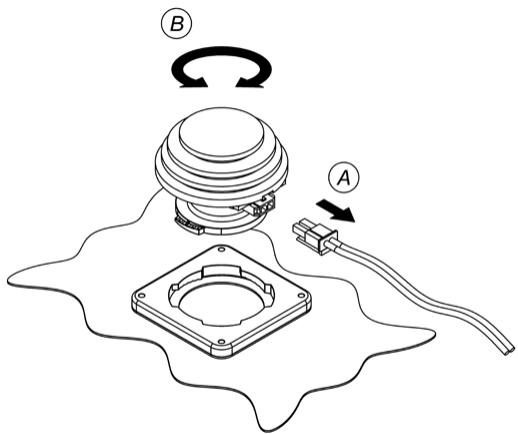
Removing the LED lamp
First disconnect the cable to the LED to be replaced. Disconnect by means of releasing the lock, by applying light pressure while at the same time pulling away.
Next, remove the LED to be replaced by making a gentle rotating movement to the left.
text_image
Diagram showing a mechanical device with labeled components A and B, indicating rotation and connection points.Mounting the new LED
Place the new LED light into the locking ring. Make a rotating movement to the right until the LED light is locked. Connect the power cable.
4.5 Technical problem
In case of technical problems please contact Novy Service Department:
• For Belgium: Tel.: 056/36.51.02
• For France: Tel.: 03.20.94.06.62
• For Germany: Tel.: 0511.54.20.771
For all other countries: your local installer or Novy Belgium: +32 (0)56/36.51.02
Please supply us with the model number of your hood.

The model number can be found on the engraved plaque behind the filter.
You can make a note of the number here:
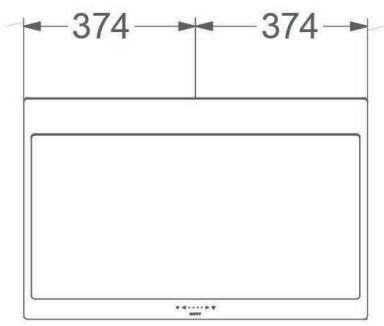
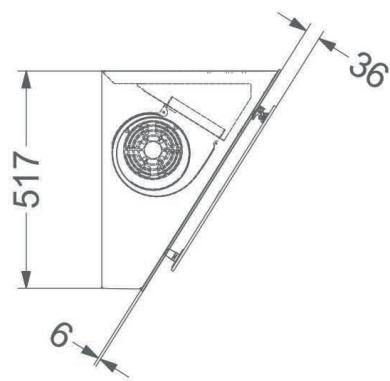
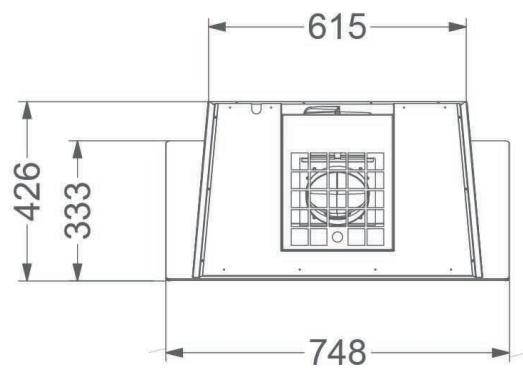
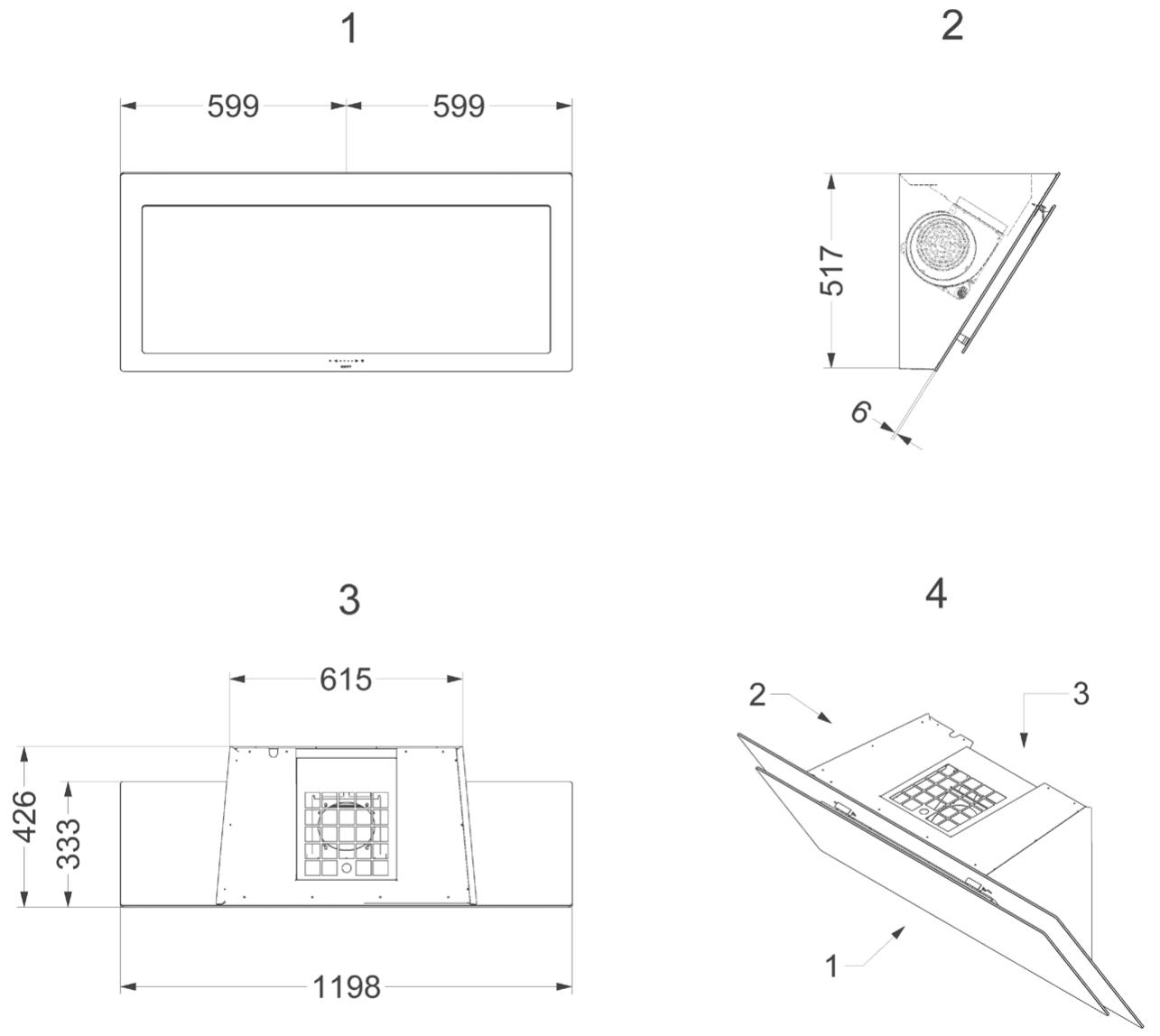
Dimensions: p. 17-19
Electrical scheme: p. 20
1
text_image
374 3742
text_image
517 36 63
text_image
615 426 333 748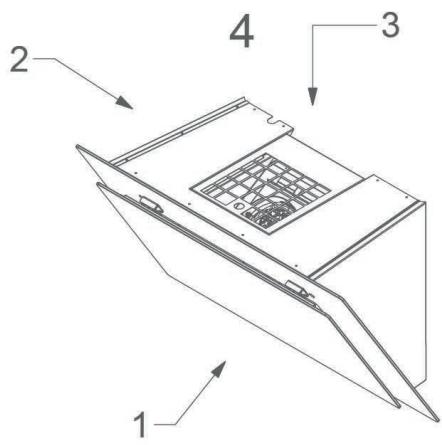
text_image
1 2 3 4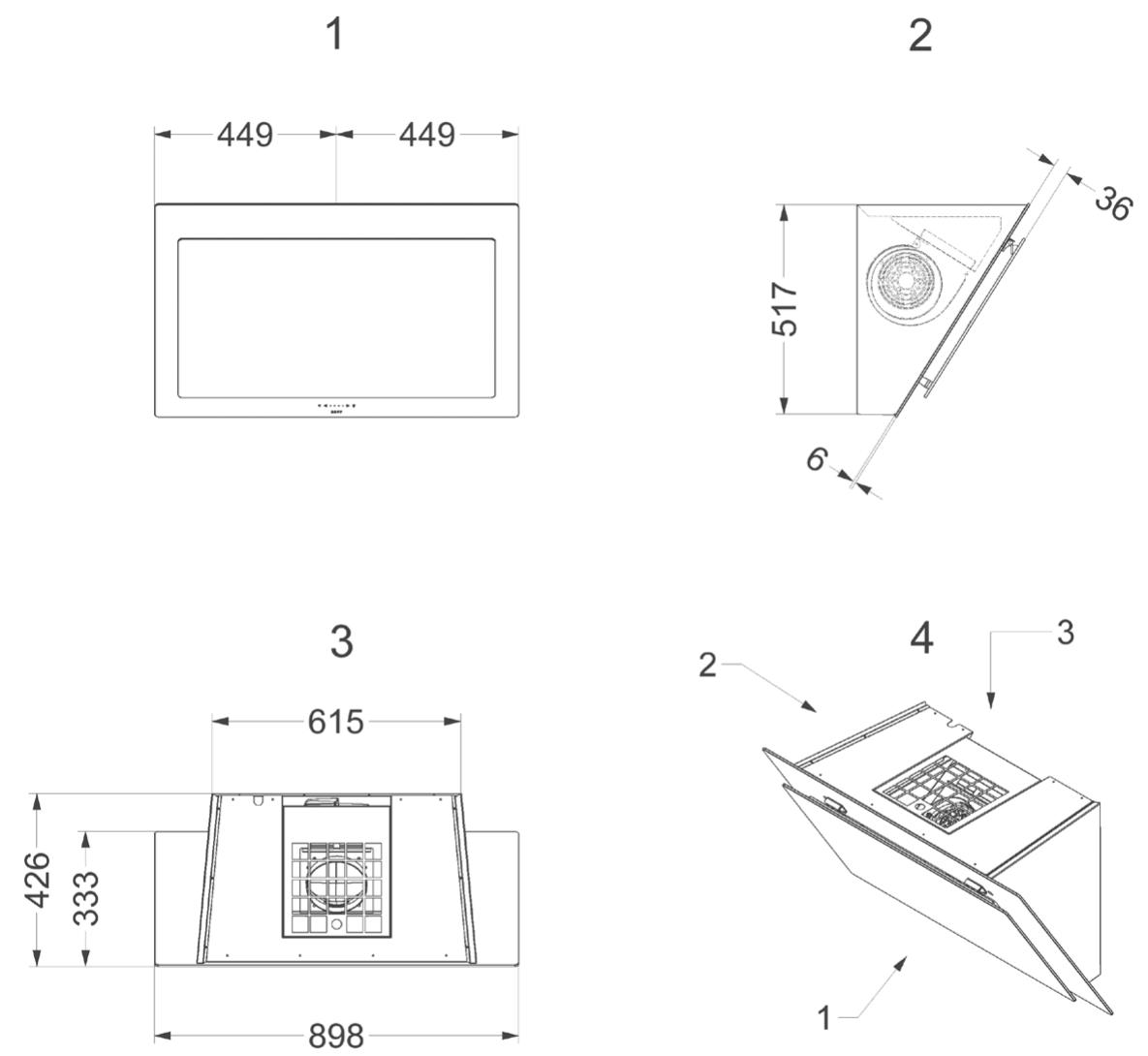
NOVY nv reserves the right to change the construction and prices of its products at all times and without notice.
NOVY nv
Noordlaan 6
B - 8520 KUURNE
Tel. 056/36.51.00 - Fax 056/35.32.51
E-mail : novy@novy.be
http://www.novy.be
France: Tél: 0320.940662
Warrenty certificate NOVY hoods
Naam/Nom/Name/Name: