
BOLT JR - Tablet ARCHOS - Free user manual and instructions
Find the device manual for free BOLT JR ARCHOS in PDF.



| Product type | Electric scooter |
| Dimensions (L x W x H) | 82 x 111,7 x 14,8 cm |
| Weight | 8 kg |
| Maximum load | 80 kg |
| Recommended age | 14 years and over |
| Maximum speed | 10 to 12 km/h |
| Range | 4 to 5 km |
| Charging time | 1 to 2 hours |
| Battery type | Lithium-ion (Li-ion) |
| Battery capacity | 2 Ah, 7 cells |
| Removable battery | No |
| Charging voltage | 90-240 V, 50-60 Hz |
| Motor | 250 W |
| Tire size | 5 inches |
| Kickstand | Yes |
| Frame material | Aluminum alloy |
| Maximum climbing angle | Approximately 15° |
| Braking system | Rear brake |
| Lighting | Not specified (check manual) |
Frequently Asked Questions - BOLT JR ARCHOS
User questions about BOLT JR ARCHOS
0 question about this device. Answer the ones you know or ask your own.
Ask a new question about this device
Download the instructions for your Tablet in PDF format for free! Find your manual BOLT JR - ARCHOS and take your electronic device back in hand. On this page are published all the documents necessary for the use of your device. BOLT JR by ARCHOS.
USER MANUAL BOLT JR ARCHOS
Congratulations for the purchase of an ARCHOS device! This quick start guide helps you to start using your device properly. If you have more questions concerning the use of your device, visit us at:

twitter.com/archos

www.facebook.com/archos
Blog
https://blog.archos.com/

http://faq.archos.com/

www.archos.com, click Support > After-sales support

www.archos.com, click Support > Downloads > Declaration of conformity
This notice is a translation of the original version.
Description of your ARCHOS Bolt Jr
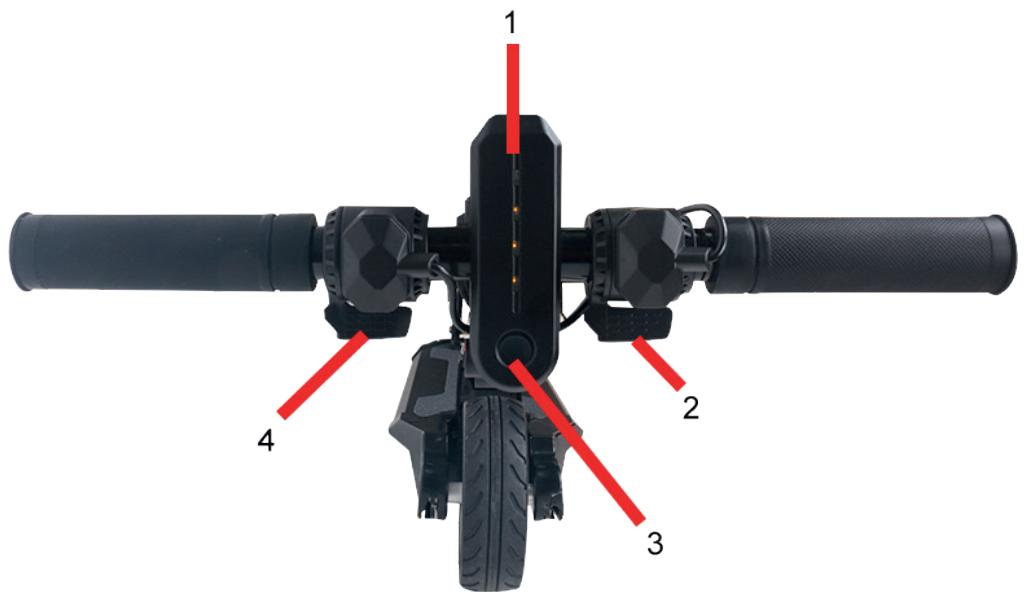
- Power Indication
-
Speed Control
-
Power button
- Brake
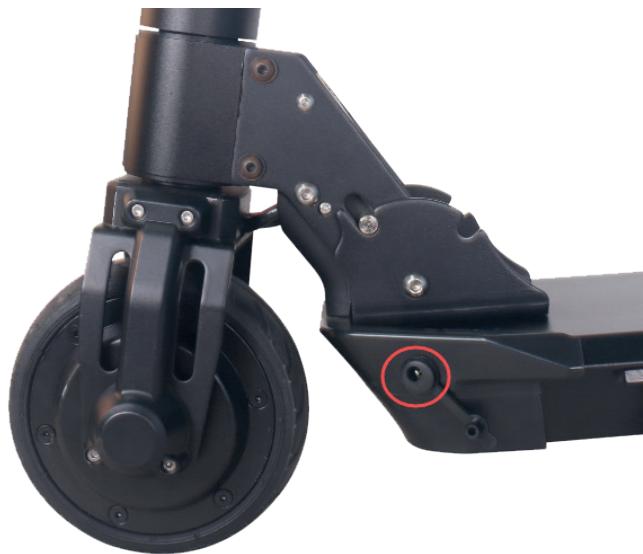
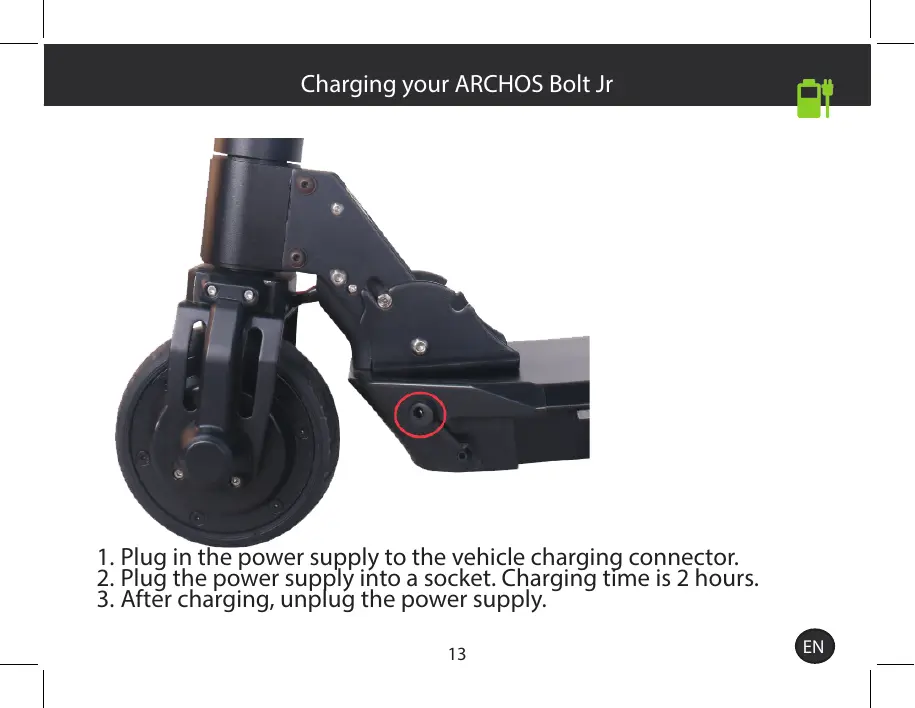
- Plug in the power supply to the vehicle charging connector.
- Plug the power supply into a socket. Charging time is 2 hours.
- After charging, unplug the power supply.
Unfolding
Folding
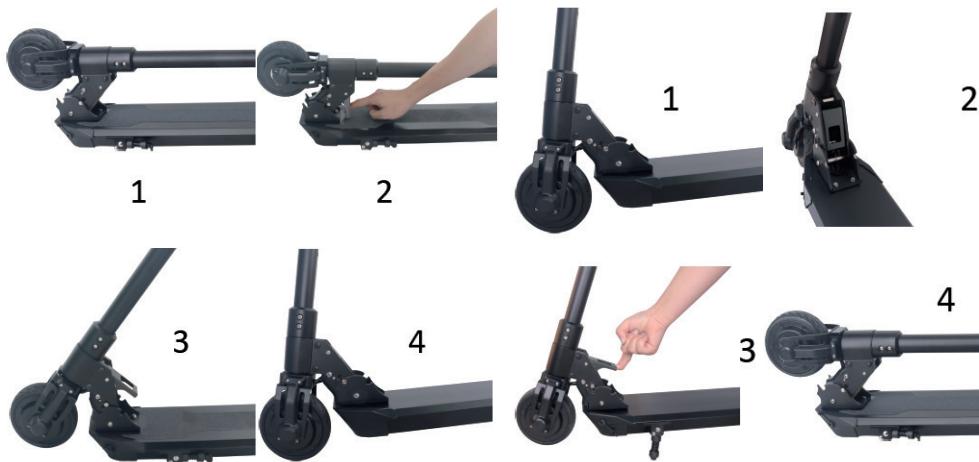
When unfolding or folding, do not handle it abruptly. Use your finger to pull the unlock key as shown in the pictures above. Don't try to force the opening otherwise you could damage your ARCHOS Bolt Jr. Make sure to push back the lever in order to lock it properly.
Using the ARCHOS Bolt Jr
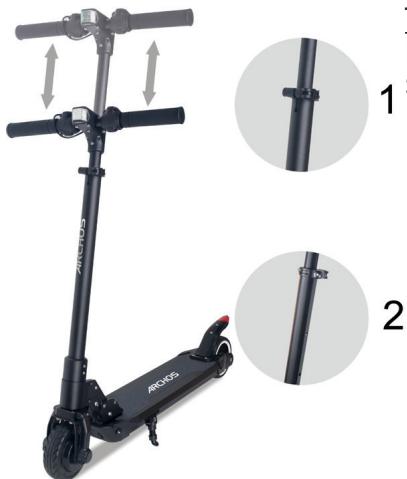
Installing the Handle bar
The handle bar is already assembled. Unlock the latch. Press the pin and adjust the height. You must tighten each wrist in the correct direction (Right and Left).
Turning On
Push the power switch about 3 seconds to start and turn off the vehicle.

Charging & Maintenance
Charging
During the charging process:
-
A red light indicates that the battery is charging.
-
A green light means the battery is fully charged.
Do not leave the device connected to the power supply for longer than needed for charging. Remember to use only the provided power supply. Before and during the charging the device temperature should be between 10^ and 30^ . This ensures most charging efficiency and battery life.
Auto turn off
The vehicle will turn off automatically and goes into sleep mode, if it has no input about 5 minutes after turning on.
To turn on the vehicle from sleep mode, only need to press the power button again.
Maintenance
Check for abnormalities in the wheels, break, motor and light each time you want to ride in order to prevent any accident.
WARNING
The rider should:
- check the limitation of use according to regulations of road safety;
- ride on flat, clean, dry surfaces and keep away from automobile's road;
- wear at least the following protective equipment: helmet, wrist, knee, head and elbow protections;
- check and ensure the steering system is correctly adjusted and all connection components are firmly secured without any damage before riding.
- put hands on the handlebar, one foot on the deck and the other foot ready to use the rear mechanical break
- avoid any pitching or entrapment. . Must be aware and cautious of the surroundings.
- never ride bare foot. Appropriate shoes are required.
- never ride in the night or on a highway.
- not go downhill or do stunts and jumps.
- have its hands on the handlebar while riding
- step on the wheel cover to brake
- not touch the brake system right after braking as it might get hot
- check the quick-release mechanism and other self-screwed bolts to make sure that they are locked properly. Failure of properly locking can cause accident.
- be at least 14 years old.
-
weigh 80kgs or less
-
take great caution in order to avoid collisions with another person or object
-
ask for help to assemble the product if not an adult.
Range varies greatly depending on the weight of the user, the speed and altitude of the course.
Servicing and Maintenance
If dirt appears on the scooter, use a soft cloth soaked in water.
The bearings are maintenance free. If a bearing fails, it should be replaced completely by qualified personnel.
If it is necessary to change wheels, select certified wheels recommended by the manufacturer or its representative and replace them according to the instructions. Stamp the brake flap with certain force to make it contact the rear wheel and let the rear wheel stop turning to reach brake effect.
No modifications other than to the manufacturer's instructions shall be made, otherwise it can impair safety.
Check the self-locking hinge system and make sure that it is well locked and firmly secured before each use. Riding with a loose self-locking hinge is risky and can alter its effectiveness.
Willkommen
- KhoIIka XINBJIeHHa
- RaIbMo
-
MaTn BIK ⅢOHaMmE HsE 14 pOKiB;
-
Baxkntn He 6iNbwe 80 Kr;
-6yTN OBepeKHM, 106 yHnKHyTN 3iTKHeHb 3 iHsOIO OC6oIO YN 06'EKTOM;
- npocntn Dopocnix npo donomory, 06 3i6paTn npoynk; Texhiue OocnyrobyBaHHra Ta dOgrJa
- 6bITb He mlaJe 14 JeT;
-BeCnTbdo80Kr;
- 6bITb OCTOPOXHbIM, UTO6bl N36eRaTb CTOJIKHOBENC CДpyrIMN JIOBmN IINO6beKTaM;
-ó6paatabca IJIY NOMOUI B c6OpKe K B3pocIbIM.
Диапазон ВарьноруETСВ 3aBUCMOCTN OТ Beca NOЛьзOBaTeJI, CKОРOSTИ NBbICOTbl Kypca.
CepBucn oOcbnyKbHaHne
Ecn Ha CkyTepe NoBJIeTcrg3b,NCIOJb3yIte MraKyIO TpIKNy, CMOueHHyIO B OBe.
IoiuHnHK He Tpe6yOT TexHnueCKOrO 6cnyXnBaHnJ. Ecln IOnuHnHK BbIXoHT N3 CToP, eRo CNeDyET PONHOCTbIO 3aMeHNTb KBaJINoHnIPOBaHHbIM NepCOHaIOM.
Ecnn Heo6xOJIMo 3aMeHnTb KOleca, Bbl6epnte cepTnOuNtpoBaHHbIe KOJecA, peKOMeHIOBAHHbIe n3rTOBUTeJIem IINI eR oIpeIcTaBHTeJIem, IN 3aMeHnTe IN B COOTBeTCTBn C INHCTpyKUJMaM. 3aONKCUpyIte TOPMO3HYO 3ACNOHKY C ONPeJeIeHNHO CNJIoN, YTObI OHa'KOCHyIacb 3aJHeRo KOJecA, INo3BOJbTe 3aDHemy KOJecy OCTaHOBUTbcra, YTObI IOCTNUb 3ΦΦeKTA TOPMOXeHnH.
HnkaKnx n3MeHeHn, KpOME npEpyCMOTpeHHbIX INHCTpyKcneu n3rOToBnteJIa, He dOnyckaetc. B IpOTNBHom cIyuae 3TO MOKeT yXyDUnTb 6e30NaChOCTb.
IpoBepbTe cAmO6JIOKpyUOyUoC PeTnU y6eAnTEcB, YTO OHa Xopo70 3aNepTa N HaJeXHO 3aKpePJIeHa NepeD KaXdbIM NCIOJb3OBAHNEM. E3da CO CBO6OJNbIM cAmO6JIOKpyUOuMcR WaHnPOM YBnETCr PnCKOBaHHOn I MOxET N3MeHNTb CHN3NTb eRO HaJeXHOCTb.
www.archos.com, click Support > After-sales support

www.archos.com, click Support > Downloads > Declaration of conformity
The Declaration of Conformity can be downloaded on our website:
https://www.archos.com/products/conformity.html
This product follows the EN 14619:2015 regulation.
(Class A): 80kg max.
Model: ACBOLTJR


C E
Declaration of Conformity
We, the undersigned (Manufacturer / The manufacturers authorized representative established within EEA):
| Company | ARCHOS S.A. | |||
| Address | 12, rue Ampere 91430 Igny | |||
| Country | France | |||
| Telephone number | +831 69 33 16 90 | |||
| Telefax number | +331 69 33 16 99 | |||
| wu@archos.com | ||||
| Certify and declare under our responsibility that the following product: | ||||
| Product Description | e-Scooter | |||
| Manufacturer | ARCHOS S.A. | |||
| Brand Name | ARCHOS | |||
| Model/Type | M8, ACBOLTJR | |||
| Is tested to and conforms with the essential test suites included in the following standards, which are in force within the EEA: | ||||
| Standard | Issue date | Reference to report/file | ||
| EN 60204-1 | 2006+A12009+AC:2010 | CTL1712213031-MD01/02 | ||
| EN ISO 12100 | 2010 | CTL1712213031-MD01/02 | ||
| EN 60335-1 | 2012 + A11:2014 | CTL1711013031-S | ||
| EN 55014-1 | 2017 | CTL1712263021-E | ||
| EN 55014-2 | 2015 | CTL1712263021-E | ||
| EN 61000-3-2 | 2014 | CTL1712263021-E | ||
| EN 61000-3-3 | 2013 | CTL1712263021-E | ||
| And therefore complies with the essential requirements of the following directives: | ||||
| Directive Name | Directive number | Further identification | ||
| Machinery Directive | 2006/42/EC | |||
| EMC Directive | 2014/30/EU | |||
| LVD Directive | 2014/35/EU | Year of affixing the CE Marking: 2017 | ||
| RoHS Directive | 2011/65/EU | |||
| Battery Directive | 2006/66/EC | |||
| The device utilizes a Lithium-ion Battery, Brand Iris, Model AR5751P, Capacity 51.8Wh | ||||
| The technical documentation as required by the conformity assessment procedure is kept at the following address for a period ending at least 10 years after the last product has been manufactured at the disposal of the relevant national authorities of any Member State for inspection: | ||||
| Company | ARCHOS S.A. | |||
| Address | 12, rue Ampere 91430 Igny | |||
| Country | France | |||
| Telephone number | +86(755)-83734678 | |||
| Telefax number | +86(755)-83734621 | |||
| wu@archos.com | ||||
| Product is CE-marked in | Europe | |||
| CE | Name of authorized officer: | Jacky Wu | Title of authorized officer | General Manager |
| Drawn up in | ||||
| Date | 2017.12.28 | |||
ARCHOS SA
11.10.2017 10:00 PM
2017-10-14 10:00 PM
10.10.2017 10:00 PM10.10.2017 10:00 PM | ||||
| Signature and Company Stamp | ||||