
SENCEINTE DOCKINGHELLO 7 - Tablet ARCHOS - Free user manual and instructions
Find the device manual for free SENCEINTE DOCKINGHELLO 7 ARCHOS in PDF.


| Product type | Tablet |
| Brand | ARCHOS |
| Model | Hello 7 (DOCKING SPEAKER HELLO 7) |
| Dimensions (estimated) | Approximately 19 x 11 x 1 cm |
| Weight (estimated) | Approximately 300 g |
| Power | Rechargeable battery, charging via DC-in port |
| Screen | 7-inch touchscreen |
| Storage | Micro SD card slot |
| Connectivity | Wi-Fi, Micro USB port |
| Camera | Front camera (with privacy cover) |
| Audio | Front speaker, microphone (with mute) |
| LED indicator | Red (microphone muted), Yellow (low battery) |
| Physical buttons | ON/OFF, Volume +/-, Microphone mute |
| Main functions | Web browsing, apps, media playback, voice assistant |
| Maintenance and cleaning | Clean with a soft, dry cloth. Avoid liquids. |
| Security | Camera cover, microphone mute, screen lock |
| Reset | Hold ON/OFF for 10 s or Reset button, or via Settings > Backup |
| Spare parts and repairability | Not specified. Contact ARCHOS after-sales service. |
| General information | Manufactured by ARCHOS SA. Compliant with RED Directive 2014/53/EU. |
Frequently Asked Questions - SENCEINTE DOCKINGHELLO 7 ARCHOS
User questions about SENCEINTE DOCKINGHELLO 7 ARCHOS
0 question about this device. Answer the ones you know or ask your own.
Ask a new question about this device
Download the instructions for your Tablet in PDF format for free! Find your manual SENCEINTE DOCKINGHELLO 7 - ARCHOS and take your electronic device back in hand. On this page are published all the documents necessary for the use of your device. SENCEINTE DOCKINGHELLO 7 by ARCHOS.
USER MANUAL SENCEINTE DOCKINGHELLO 7 ARCHOS
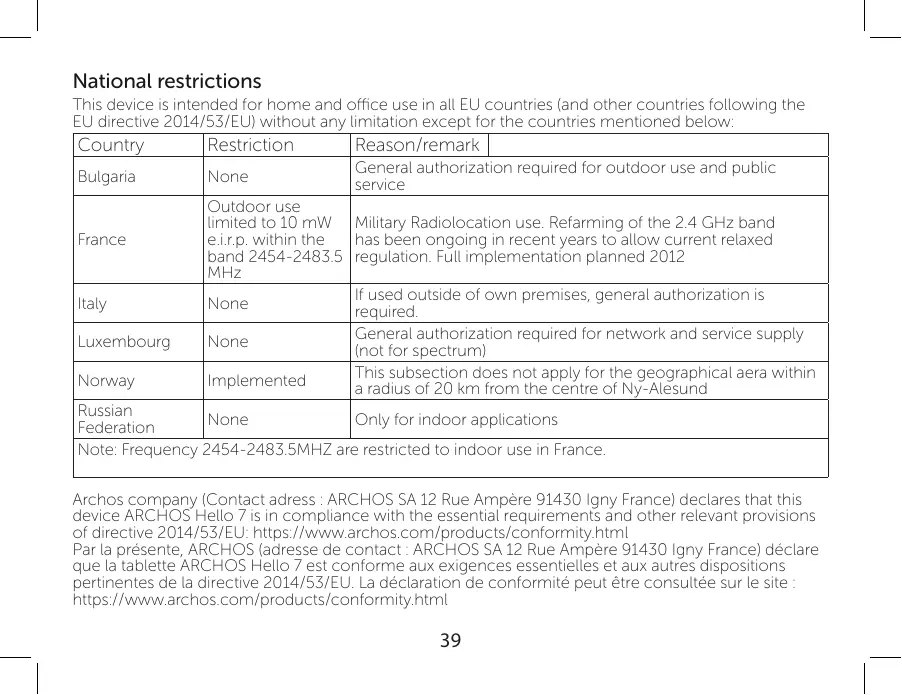
National restrictions
This device is intended for home and office use in all EU countries (and other countries following the EU directive 2014/53/EU) without any limitation except for the countries mentioned below:
| Country | Restriction | Reason/remark | |
| Bulgaria | None | General authorization required for outdoor use and public service | |
| France | Outdoor use limited to 10 mW e.i.r.p. within the band 2454-2483.5 MHz | Military Radiolocation use. Refarming of the 2.4 GHz band has been ongoing in recent years to allow current relaxed regulation. Full implementation planned 2012 | |
| Italy | None | If used outside of own premises, general authorization is required. | |
| Luxembourg | None | General authorization required for network and service supply (not for spectrum) | |
| Norway | Implemented | This subsection does not apply for the geographical aera within a radius of 20 km from the centre of Ny-Alesund | |
| Russian Federation | None | Only for indoor applications | |
| Note: Frequency 2454-2483.5MHZ are restricted to indoor use in France. | |||
Enjoy all Google services! For more information, go to:
Google Play https://www.android.com/play/
Youtube https://www.youtube.com/
Google Maps https://support.google.com/
Gmail https://support.google.com/email
Google Drive https://www.google.com/drive/
Google, Google Play, Android, and related marks and logos are trademarks of
Google LLC.
| WLAN | ||
| Standard | Frequency | Max EIRP (dBm) |
| 802.11b/g | 2412 ~ 2472 MHz | 9.65 |
| 802.11n – HT20 | 2412 ~ 2472 MHz | 9.66 |
| 802.11n – HT40 | 2422 ~ 2462 MHz | 9.62 |
| Bluetooth | ||
| Bluetooth Version | Frequency Range | Max EIRP (dBm) |
| BDR | 2402 ~ 2480 MHz | 5.57 |
| BLE | 2402 ~ 2480 MHz | 5.20 |
Declaration of Conformity
We, the undersigned (Manufacturer / The manufacturers authorized representative established within EEA):
| Company | ARCHOS S.A. | |||
| Address | 12.1ue Ampere 91430 Irgy | |||
| Country | France | |||
| Telephone number | +3331 69 33 16 90 | |||
| Telefax number | +3331 69 33 16 90 | |||
| wu@archos.com | ||||
| Certify and declare under our responsibility that the following product: | ||||
| Product Description | Hello 70 | |||
| Manufacturer | ARCHOS S.A. | |||
| Brand Name | ARCHOS | |||
| Model/Type | AC70HELLO | |||
| Is tested to and conforms with the essential test suites included in the following standards, which are in force within the EEA: | ||||
| Standard | Issue date | Reference to report/file | ||
| EN 301 489-1 V2.2.0 | 2017-03 | RSZ180806002-02 | ||
| EN 301 489-17 V3.2.0 | 2017-03 | RSZ180806002-01 | ||
| EN 300 328 V2.1.1 | 2016-11 | RSZ180806002-22A/Z2B/ Z2C | ||
| EN 62479 | 2010 | RSZ180806002 | ||
| EN 55032 | 2015 | RSZ180806003-01 | ||
| EN 55035 | 2017 | RSZ180806003-01 | ||
| EN 61000-3-2 | 2014 | RSZ180806003-01 | ||
| EN 61000-3-3 | 2013 | RSZ180806003-01 | ||
| EN 60950-1 | 2006+A11:2009+A1:2010+A1:2011+A2:2013 | RSZ180806002-SF | ||
| And therefore complies with the essential requirements of the following directives: | ||||
| Directive Name | Directive number | Further identification | ||
| RED Directive | 2014/63/EU | |||
| LVD Directive | 2014/35/EJ | Year of affixine the CE Markine: 2018 | ||
| ERP Directive | 2009/125/EJ | |||
| RoHS Directive | 2011/65/EJ | |||
| Battery Directive | 2006/66/EJ | |||
| The following Notified Bodies have been consulted in the Conformity Assessment procedure of RED Directive (whenever applicable): | ||||
| The NOTIFIED BODY: Bay Area Compliance Laboratories Corp. | ||||
| Bay Area Compliance Laboratories Corp. | ||||
| 1274 Avilwood Ave., Sunnyvale, CA 94089, USA | ||||
| http://ec.europa.eu/uropathools-database/mand/index.cfm?hsassociation&directive.nbbref=cd-EPOS_S0193 | ||||
| The technical documentation as required by the conformity assessment procedure is kept at the following date for a period ending at least 10 years after the last product has been manufactured at the disposal of the relevant national authorities of any Member State for inspection: | ||||
| Company | ARCHOS S.A. | |||
| Address | 12.1ue Ampere 91430 Irgy | Title of authorized officer | General Manager | |
| Country | France | |||
| Telephone number | +8(6)75583734678 | |||
| Telefax number | +8(6)75583734621 | |||
| wu@archos.com | ||||
| Product is CE-marked in | Europe | |||
| CE | Name of authorized officer: Jacky Wu | Title of authorized officer | ||
| Drawn up in | 2018.09.04 | |||
| Date | ||||
| ARCHOS SA 21.12.2018, An Open License, Frangois du Toit et le Comité de la Société à l'Indeau des Reprises d'Avenir et des Produits de l'Indeau des Reprises d'Avenir et des Produits de l'Indeau des Reprises d'Avenir et des Produits de l'Indeau des Reprises d'Avenir et des Produits de l'Indeau des Reprises d'Avenir et des Produits de l'Indeau des Reprises d'Avenir et des ProduITS de l'IndeAU | ||||
| Signature and Company Stamp | ||||
www.archos.com