
TV 4E GENERATION - Streaming box APPLE - Free user manual and instructions
Find the device manual for free TV 4E GENERATION APPLE in PDF.

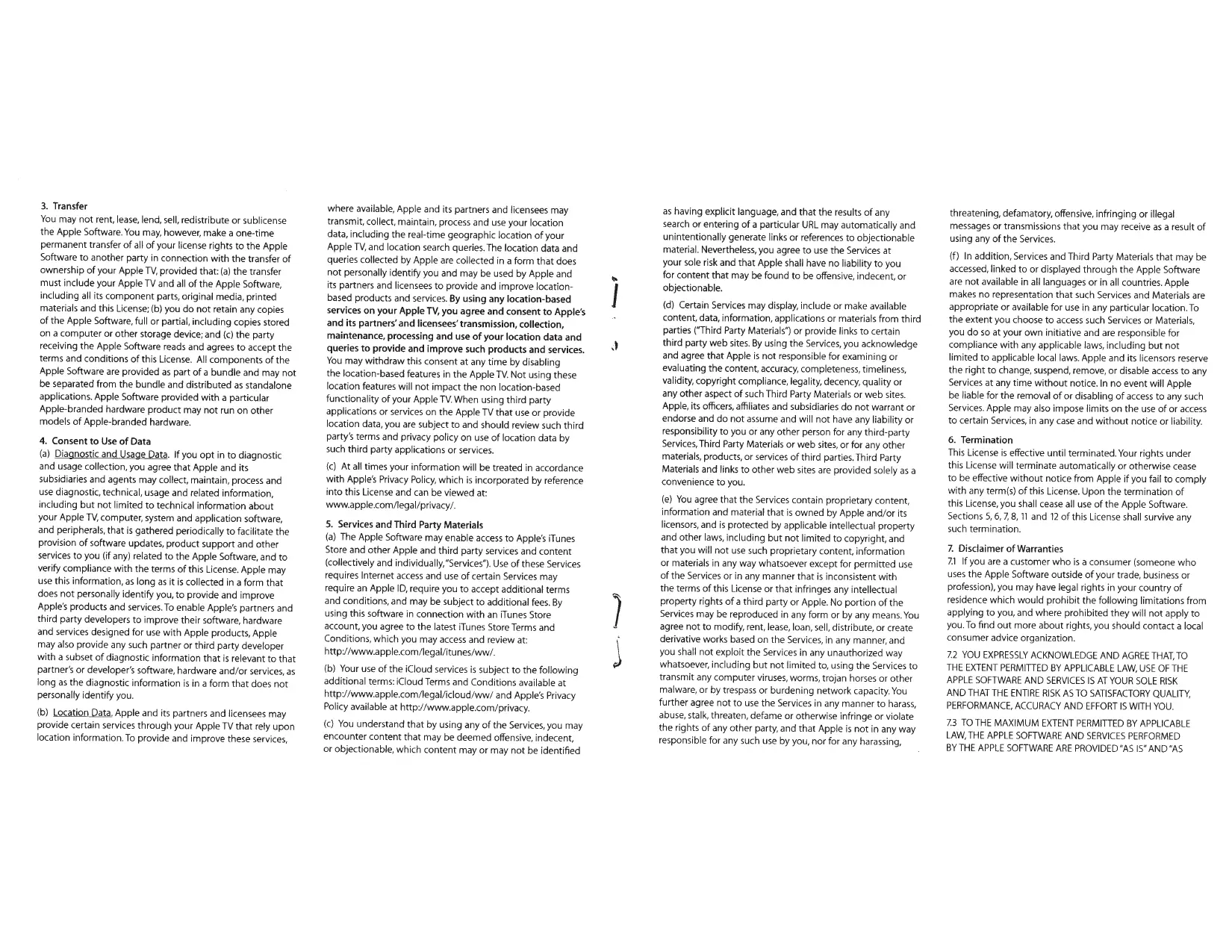

| Product Type | Media streaming box |
| Brand | Apple |
| Model | TV 4th generation (A1625) |
| Dimensions (L x W x H) | 98 mm x 98 mm x 33 mm |
| Weight | 425 g |
| Power Supply | AC adapter 100-240 V AC, 50-60 Hz, 0.3 A |
| Power Consumption | 6 W (typical), 0.3 W standby |
| Processor | Apple A8 64-bit |
| Storage | 32 GB or 64 GB depending on model |
| Connectivity | Wi-Fi 802.11a/b/g/n/ac, Bluetooth 4.0, Ethernet 10/100BASE-T |
| Video Output | HDMI 1.4 (1080p, 720p, 480p) |
| Audio Output | HDMI, optical (via adapter) |
| Main Features | Video and music streaming, AirPlay, App Store, Siri, parental controls |
| Remote Control | Apple Remote (Bluetooth and IR, with Siri) |
| Maintenance and Cleaning | Unplug the device, clean with a soft dry cloth. Do not use liquids or aerosols. |
| Safety | Use indoors only. Do not expose to moisture or extreme temperatures. Do not open the device. |
| Spare Parts and Repairability | Sealed device, no user-replaceable parts. Contact Apple or an authorized repair center. |
| General Information | Compliant with CNR standards and directive 1999/5/EC. Dispose of via an approved waste treatment center. |
Frequently Asked Questions - TV 4E GENERATION APPLE
User questions about TV 4E GENERATION APPLE
0 question about this device. Answer the ones you know or ask your own.
Ask a new question about this device
Download the instructions for your Streaming box in PDF format for free! Find your manual TV 4E GENERATION - APPLE and take your electronic device back in hand. On this page are published all the documents necessary for the use of your device. TV 4E GENERATION by APPLE.
USER MANUAL TV 4E GENERATION APPLE
Welcome. You're watching Apple TV.
This guide contains all the information you need to get from setup to your sofa.
Contents
Chapter 1: Connect.
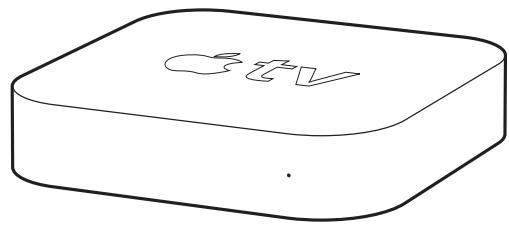
7 What's in the box
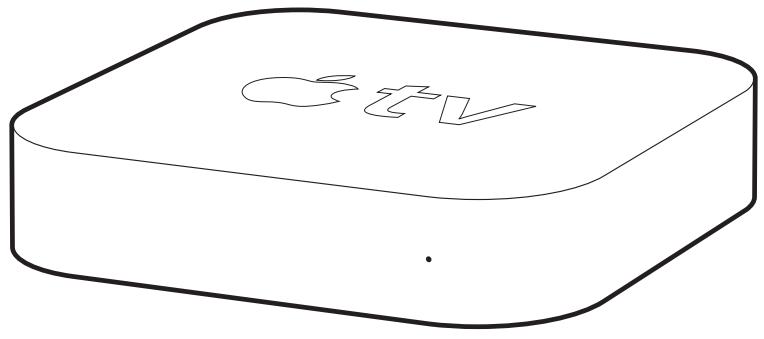
8 Apple TV at a glance
10 What you need
11 Setting up Apple TV
Chapter 2: Configure.
16 Configuring your Apple TV
17 Connecting to iTunes
Chapter 3: Watch.
20 Using your Apple remote
21 Basic remote functions
21 Pairing Apple TV with a remote
22 Unpairing Apple TV from a remote
23 Changing the remote battery
24 Renting movies and purchasing TV shows
Chapter 4: Problem? No Problem.
26 Troubleshooting
31 Resetting all the settings on your Apple TV
32 Restoring your Apple TV
33 Service and support
33 Serial and model numbers
34 Care and cleaning
1
Connect.
www.apple.com/support/appletv
Use Apple TV to watch high-definition movies and TV shows directly from the iTunes Store on your widescreen TV. Play content from Netflix, view live and archived sports and news, and enjoy podcasts, YouTube, Vineo, and Internet radio. Stream your music and photos from iCloud, or play your iTunes content wirelessly from a Mac or PC. View full-screen photo slideshows from the comfort of your couch. And with AirPlay, wirelessly display your iPhone, iPad, and iPod touch screen on Apple TV, or mirror your iPhone 4S or iPad screen.
Note: Content availability varies by region. AirPlay requires a compatible iOS device and version.
| For information about | See |
| What you need to get started | "What you need" on page 10 |
| Setting up Apple TV | "Setting up Apple TV" on page 11 |
| Setting up your network connection | "Configuring your Apple TV" on page 16 |
| Using the Apple Remote | "Using your Apple remote" on page 20 |
| Troubleshooting Apple TV | "Troubleshooting" on page 26 |
| Apple TV safety information and warranty | The included Apple TV Important Product Information Guide |
What's in the box

AC power cord
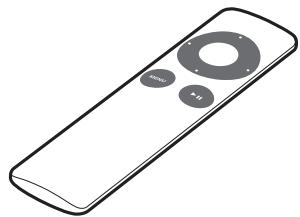
Apple Remote
Note: Your power cord may look different from the one pictured here.
Apple TV at a glance
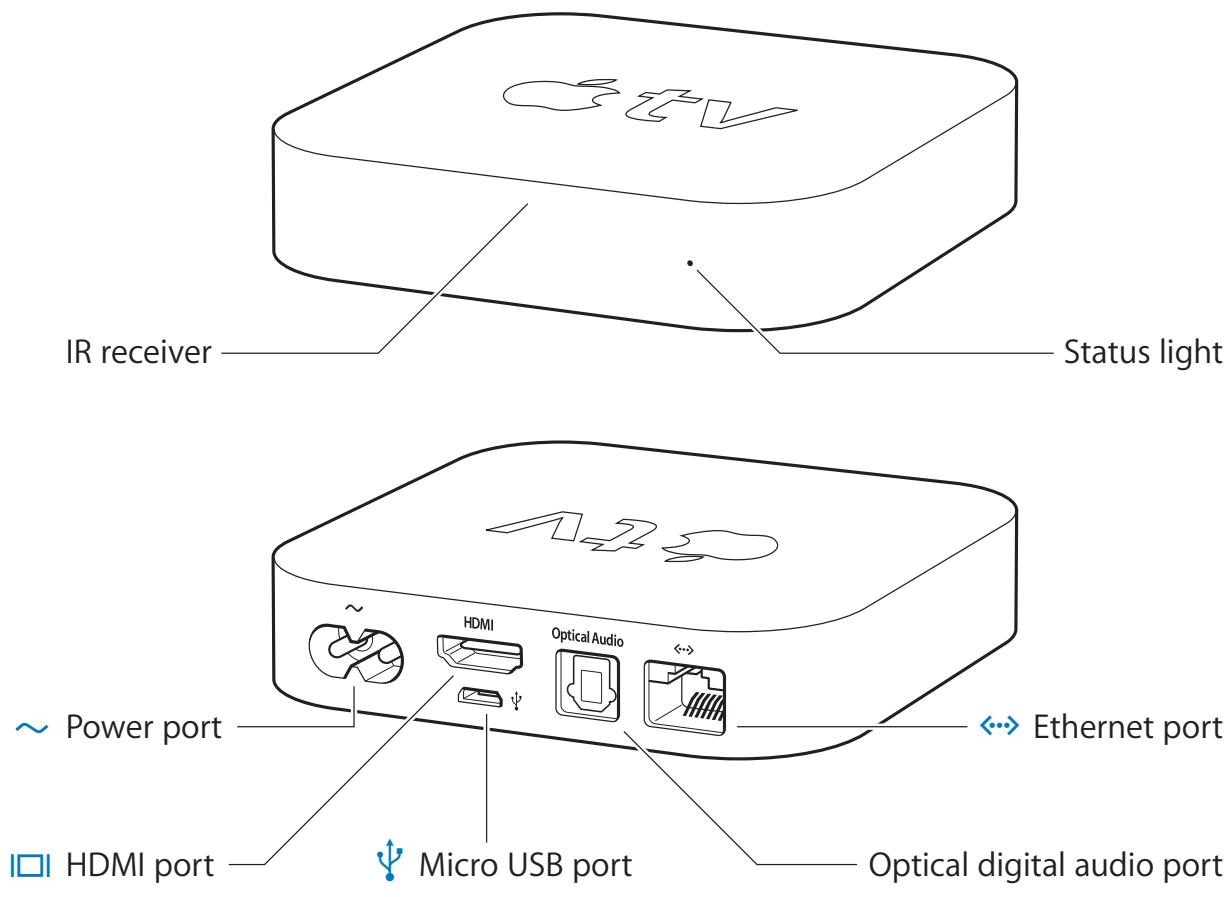
| IR receiver Use with the included Apple Remote to control Apple TV. | |
| Status light The status light flashes slowly when Apple TV starts up. When Apple TV is on, the status light glows. See “Status light” on page 27. | |
| ~ | Power port Connect the included AC power cord to the power port on Apple TV. |
| I□I | HDMI port Connect Apple TV to the HDMI port of a high-definition TV using an HDMI cable. |
| ψ | Micro USB port For service and diagnostics. |
| Optical digital audio port Connect Apple TV to a home theater receiver that has an optical digital audio port, using an optical digital audio (also called S/PDIF or TOSLINK) cable. | |
| ←→ | Ethernet port If your network is Ethernet-based, connect an Ethernet cable. |
| Built-in 802.11n Wi-Fi technology Connect Apple TV to your wireless network. |
What you need
To start using Apple TV, you need the following:
High-definition TV
A high-definition TV (HDTV) that can display 720p or 1080p video
Cables
- An HDMI cable to connect Apple TV to your TV
- An optical digital audio cable (optional)
Network
- An 802.11a, b, g, or n Wi-Fi wireless network (wireless video streaming requires 802.11a, g, or n), or 10/100Base-T Ethernet network
- A broadband Internet connection (DSL, cable, or LAN)
- Your wireless network name and password (if you use one)
Software and accounts
To play content from a Mac or PC on Apple TV, you need:
iTunes 10.5 or later
- An Apple ID to rent movies or purchase TV shows from the iTunes store, and to use Home Sharing to stream content from a Mac or PC
- A Netflix account to stream content. Other accounts may be required for full access to some Internet content.
Setting up Apple TV
Apple TV connects to your TV through an HDMI port that delivers both audio and video. Before you set up Apple TV, look at the ports on the back of your TV to make sure you have the right cables:
- An HDMI cable: You can connect Apple TV to an HDTV or home theater receiver that has an HDMI port, using an HDMI cable for both video and audio.
- An optical digital audio cable (optional): Use this cable if you want to connect Apple TV to a receiver for audio.
Important: Before you connect Apple TV to a power outlet, carefully read these installation instructions and the safety information in the included Apple TV Important Product Information Guide.
Step 1: Connecting the cables
1 Connect one end of the HDMI cable to the back of your TV.
2 Connect the other end of the cable to the HDMI port on the back of Apple TV.
3 If you're using an optical digital audio cable for audio, connect one end of the cable to the audio input port on your receiver or TV, and the other end to the optical digital audio port on the back of Apple TV.
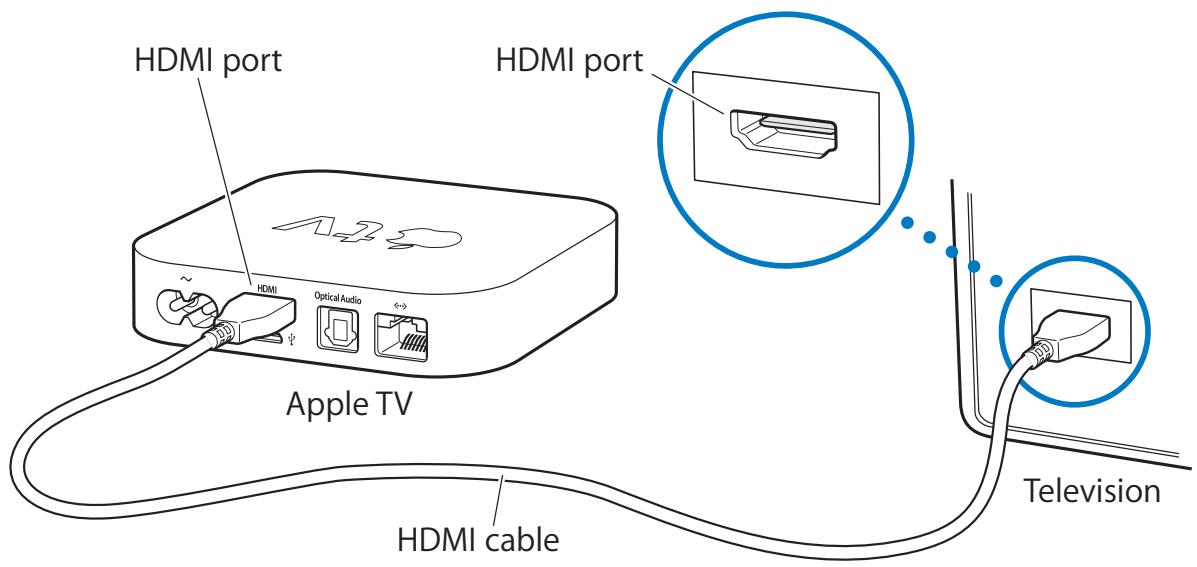
Note: The built-in 802.11 Wi-Fi technology connects Apple TV to your wireless network. If your network is Ethernet-based, connect Apple TV to your network using an Ethernet cable.
Step 2: Connect the power cord
Connect one end of the power cord to the power port on the back of Apple TV and the other end to a power outlet.
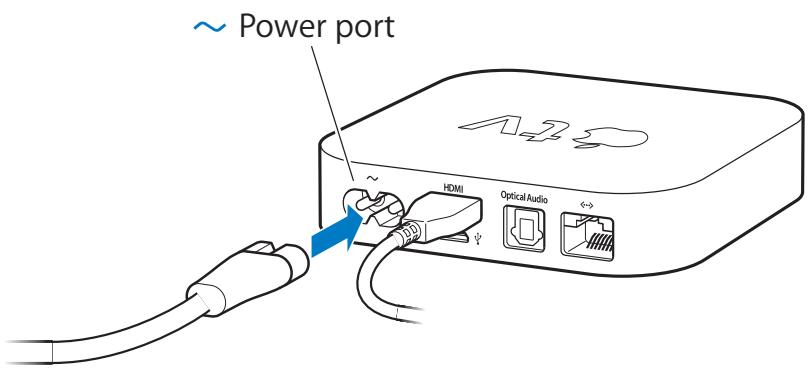
Important: Don't place anything on top of Apple TV. Objects placed on top may interfere with the wireless signal. Don't place Apple TV on top of other electronic equipment in a media cabinet.
Step 3: Turn on your TV and select the input
The first time you use Apple TV, it helps you choose a language and select a network. See Chapter 2, "Configure." on page 15.
If you see just a black screen the first time you use Apple TV, make sure the input setting you've selected on your TV matches the input you connected the cables to on your TV or home theater receiver. See Chapter 4, "Problem? No Problem." on page 25, and refer to the documentation that came with your TV for information about its inputs.
2
Configure.
www.apple.com/support/appletv
Apple TV helps you select and configure your wireless network connection, and connect to iTunes on your computer if you want to watch or listen to the contents of your iTunes library.
Configuring your Apple TV
Have your network name and password (if you use one) and your Apple Remote handy when you configure Apple TV. Make sure there are no obstructions between the remote and Apple TV. For information about using your remote, see Chapter 3, "Watch." on page 19.
If you:
- Use a wired Ethernet network to connect, Apple TV automatically detects your network.
- Use a wireless network to connect, Apple TV helps you select and configure your network connection.
Connecting to your wireless network
Apple TV helps you connect to your wireless network. If you use a name and password to access your network, have them ready.
Use the Apple Remote to:
1 Select your network from the list, or enter your network name if the network is hidden.
2 Enter your network password (if you use one).
If you don't connect using DHCP, you may need to enter your IP address, subnet mask, router address, and DNS address.
To complete the network connection, follow the onscreen instructions.
Connecting to iTunes
To access the content of your iTunes library on Apple TV, you need iTunes 10.5 or later installed on your computer. For a list of system requirements, see "Software and accounts" on page 10.
Updating your iTunes software
You should update to the latest version of iTunes:
- On a Mac, use Software Update to update to the latest version of iTunes. To use Software Update, choose Apple (♂) > Software Update.
- On a Windows-based computer, go to iTunes Help to update to the latest version of iTunes. Open iTunes, and then choose Help > Check for Updates.
Setting up Home Sharing
After you set up your network connection, you need to set up iTunes and Apple TV to share the contents of your iTunes library. Use Home Sharing in iTunes and on Apple TV to share the iTunes library of any computer on your local network that has Home Sharing set up.
To set up Home Sharing in iTunes:
1 Open iTunes on your computer.
2 Choose Advanced > Turn On Home Sharing.
3 Enter your Apple ID and password, and then click Create Home Share.
4 Repeat steps 1 through 3 on each computer you want to use for Home Sharing. For information about iTunes, open iTunes and choose Help > iTunes Help.
To set up Home Sharing on Apple TV:
1 On Apple TV, choose Settings > Computers.
2 Choose Turn On Home Sharing, and then enter the same Apple ID and password you entered on your computer.
3
Watch.
www.apple.com/support/appletv
Read on to learn about using your Apple Remote with Apple TV.
Using your Apple remote
Use the Apple Remote to control Apple TV settings and navigate your content.
Make sure there are no obstructions between the remote and Apple TV.
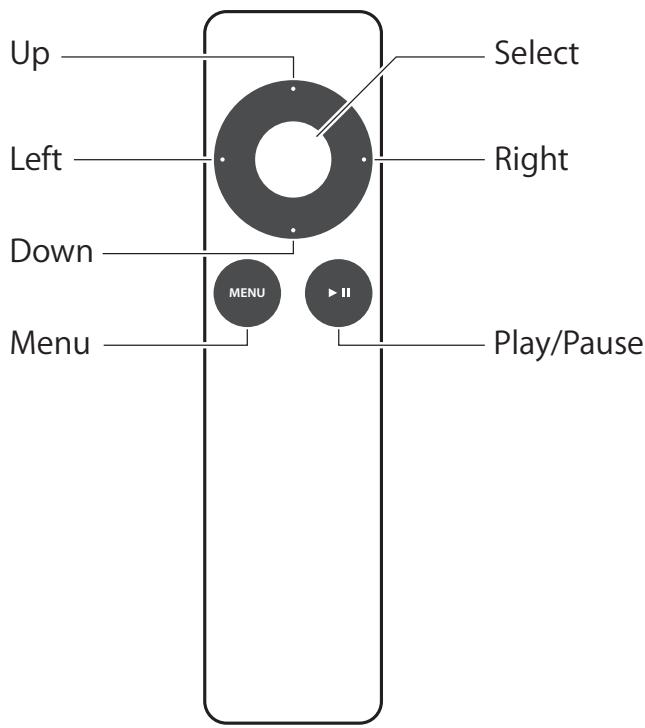
Basic remote functions
Here's how to use your Apple Remote:
| To | Do this |
| Move through the menu options | Press Up, Down, Left, or Right |
| Select an option from a menu | Press Select |
| Return to a previous menu | Press Menu |
| Pause or resume current playback | Press Play/Pause (▶) |
| Return to the main menu | Hold down Menu |
| Reset Apple TV | Hold down Menu and Down, until the Apple TV status light blinks rapidly |
Up and Down on the Apple Remote don't control the volume on your TV or receiver. Use the remote that came with your TV or receiver to change the volume.
Pairing Apple TV with a remote
The Apple Remote works with the built-in IR receiver on Apple TV. To set Apple TV to work with only the included remote, pair Apple TV and the remote.
To pair Apple TV with the included remote:
1 Keep the remote pointed directly at Apple TV.
2 Hold down Menu and Right for 6 seconds.
Or, you can:
1 Choose Settings from the Apple TV main menu.
2 Choose General > Remotes > Pair Apple Remote.
When you successfully pair your Apple Remote, Apple TV displays a chainlink symbol () above a picture of a remote. Apple TV now works with only the paired remote.
Unpairing Apple TV from a remote
If you lose the Apple Remote that you paired Apple TV with, you can use another Apple Remote to unpair Apple TV from the lost remote.
To unpair Apple TV from a paired remote:
1 Keep the remote pointed directly at Apple TV.
2 Hold down Menu and Left for 6 seconds.
Or, you can:
1 Choose Settings from the Apple TV main menu.
2 Choose General > Remotes > Unpair Apple Remote.
When you successfully unpair the lost remote, Apple TV displays a broken chainlink symbol ( ) above a picture of a remote. You can now pair Apple TV with a different remote.
Changing the remote battery
When the battery charge in your Apple Remote is low, Apple TV displays a picture of a remote and a warning symbol (▲). Replace the battery with a CR2032 battery.
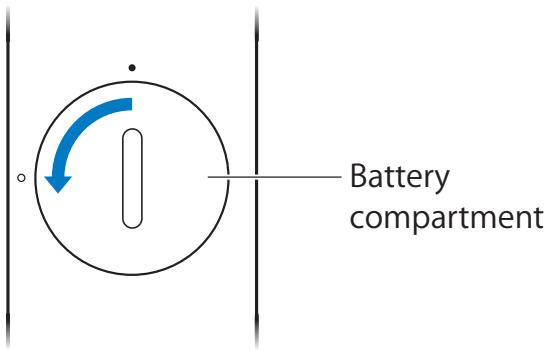
To replace the battery:
1 Use a coin to remove the battery compartment cover.
2 Remove the battery.
3 Insert a CR2032 battery with the positive side (+) facing up.
4 Replace the battery compartment cover and use a coin to tighten it.
Important: Dispose of the used battery according to your local environmental laws and guidelines.
Renting movies and purchasing TV shows
You can rent standard or high-definition movies and purchase TV shows directly on Apple TV (where available). Follow the onscreen instructions to find out when a rented movie expires. Purchased TV shows don't expire.
When a rented movie expires, it's no longer available for playback. To watch it again, you can rent it again from iTunes.
4
Problem? No Problem.
www.apple.com/support/appletv
Most problems with Apple TV can be solved quickly by following the advice in this chapter. For additional tips and troubleshooting information, see the Apple TV Support page at www.apple.com/support/appletv.
Troubleshooting
If you have a problem with Apple TV, there's usually a quick and simple solution.
First steps
If Apple TV isn't responding, first make sure:
- The cables between Apple TV and your TV are pushed all the way in.
- The power cords for Apple TV and your TV are securely connected to a working power source.
- Your TV is turned on and set to the correct input.
- Apple TV is connected to your network. Choose Settings > General > Network, and see if Apple TV has an IP address.
- Your network and Internet connections are on and working properly.
If you still have trouble, try resetting your equipment by disconnecting Apple TV, your TV, your wireless networking equipment or base station, and your router from the power outlet. Wait 30 seconds, and then reconnect everything.
Status light
The status light on the front of Apple TV indicates what's happening.
| If Apple TV is | The status light |
| On | Glows |
| Off or in standby | Is off |
| Starting up | Flashes slowly |
| Accepting a command from the remote | Flashes once |
| Rejecting a command from the remote (you paired a remote with Apple TV, but you’re using a remote that’s not paired) | Flashes three times |
| Having problems | Flashes quickly |
Additional steps
If Apple TV doesn't respond to the previous steps, try the following.
If you can't hear sound
- If Apple TV is connected to a receiver, make sure the receiver is turned on.
- Make sure the input setting you selected on your TV or receiver matches the input your audio cable is connected to. For more information, see the documentation that came with your receiver.
-
Make sure the volume on your TV or receiver is turned up and isn't muted.
-
Make sure you're using the correct audio cable and that it's connected firmly to Apple TV and to your TV or receiver.
- If you're using the HDMI port for audio, make sure your TV supports audio through its HDMI port. The HDMI ports on some older TVs support only video.
If there's noise coming from your TV speakers
- If your TV or speakers support Dolby Digital audio, make sure the Dolby Digital Out setting is correct for the TV and speakers. On Apple TV, choose Settings > Audio & Video > Dolby Digital, and select On or Off.
If you're having trouble viewing content from your iOS device using AirPlay
- On Apple TV, go to Settings > AirPlay and make sure AirPlay is enabled.
- Make sure your iOS device and Apple TV are on the same Wi-Fi network.
- Make sure your iOS device is running iOS 4.3 or later.
- If you're trying to use AirPlay Mirroring to show the screen of your iOS device on Apple TV, check that your device supports that feature.
If Apple TV isn’t playing your photo albums or slideshows
- Make sure you have photos in your photo library or in a folder on your computer.
- Make sure Apple TV and the computer you're using are set up for Home Sharing. See "Connecting to iTunes" on page 17.
-
Make sure the photos you want to share are selected. In iTunes, choose Advanced > "Choose Photos to Share," and then select the photos you want to share.
-
Make sure Apple TV and your computer are on the same local network.
- Make sure Apple TV and your computer are using the same Home Sharing account.
If you don't see your iTunes library under Computers on Apple TV
- Make sure Apple TV and your computer are on the same local network.
- Make sure Apple TV and iTunes are using the same account name and password.
If the remote isn't working
- Point the remote directly at Apple TV.
- If you paired Apple TV with an Apple Remote, make sure you're using the paired remote.
- If the Apple TV status light flashes once when you press a button on the paired remote, the problem isn't with the remote. See "If you can see a picture but Apple TV isn't responding" on page 31.
- If you're using an unpaired remote, the Apple TV status light flashes three times.
- If you paired Apple TV with an Apple Remote and you can't find the paired remote, set Apple TV to work with any Apple Remote by holding down Menu and Left for 6 seconds on another remote.
- Make sure the front of Apple TV isn't blocked.
- If Apple TV displays a picture of a remote and a warning symbol () , you need to replace the battery in the remote. See "Changing the remote battery" on page 23.
If Apple TV can't access the network
- Check for any obstructions, and adjust the location of the base station or Apple TV.
- If your network has security enabled, make sure you enter the correct password.
- If security is enabled on the network, temporarily disable it on the base station and try connecting again.
- Check the IP address Apple TV is using. If it starts with 169.x.x.x, the router or base station may not be configured properly. Check to see if DHCP access is available, or configure Apple TV with a manual IP address.
- Apple TV cannot connect to a wireless network that contains high (extended) ASCII or double-byte (Unicode) characters (such as Japanese, Korean, or Chinese) in the name or password.
If your TV screen appears fuzzy or black
- Make sure your HDTV supports 720p or 1080p video.
- Make sure you're using the correct HDMI cable and that it's firmly connected to Apple TV and to your TV.
- Make sure the input setting on your TV matches the input port the HDMI cable is connected to. For information, see the documentation that came with your TV.
If you can see a picture but Apple TV isn’t responding
- Hold down Menu on the Apple Remote to return to the Apple TV main menu.
- Make sure your TV is turned on and working properly. For information, see the documentation that came with your TV.
- If you paired an Apple Remote with Apple TV, make sure you're using the paired remote. See "Pairing Apple TV with a remote" on page 21.
-
Reset Apple TV by doing one of the following:
-
Hold down both Menu and Down on the Apple Remote until the Apple TV status light blinks rapidly.
- Disconnect Apple TV from the power outlet, wait about five seconds, and then reconnect it.
Resetting all the settings on your Apple TV
You can reset all of the settings on your Apple TV to factory values.
Important: This requires you to reenter all of your network and account information.
To reset all settings:
Choose Settings > General > Reset > Reset All Settings.
Restoring your Apple TV
If Apple TV doesn't respond to any of the previous steps, or if you want to reset Apple TV to its default settings, you can restore your Apple TV software.
To restore Apple TV:
Choose Settings > General > Reset, and then select Restore.
Restoring Apple TV can take some time, so be patient.
If restoring doesn't work or if Apple TV still doesn't respond, you can restore it using iTunes:
To restore Apple TV using iTunes:
- Disconnect the power and HDMI cables from Apple TV and take it to your computer.
- Connect one end of a micro USB cable (sold separately) to the back of Apple TV, and the other end to your computer.
- Connect one end of the Apple TV power cord to the power port on the back of Apple TV and the other end to a power outlet.
- Open iTunes on your computer, select Apple TV in the Source list, and then click Restore.
Service and support
There's more information about using Apple TV in iTunes onscreen help and on the web. This table describes where to get software and service information.
| To learn about | Do this |
| Service and support, discussions, tutorials, and Apple software downloads | Go to: www.apple.com/support/appletv |
| Using iTunes in Mac OS X | Open iTunes and choose Help > iTunes Help. For an onscreen iTunes tutorial (available in some areas only), go to: www.apple.com/support/ iTunes |
| Using iPhoto in Mac OS X | Open iPhoto and choose iPhoto > iPhoto Help. |
| Safety and regulatory compliance information | See the included Apple TV Important Product Information Guide. |
Serial and model numbers
Your Apple TV serial number is printed on the bottom of Apple TV. You can also find the serial and model numbers in the Apple TV Settings menu. On Apple TV, choose Settings > General > About.
Care and cleaning
NOTICE: Failure to follow these care and cleaning instructions could result in damage to Apple TV or other property.
Using connectors and ports
Never force a connector into a port. Check for obstructions on the port. If the connector and port don't join with reasonable ease, they probably don't match. Make sure that the connector matches the port and that you have positioned the connector correctly in relation to the port.
Keeping Apple TV within acceptable temperatures
Operate Apple TV in a place where the temperature is always between 0^ and 40^ C (32° to 104°F).
Keeping the outside of Apple TV clean
To clean Apple TV, unplug the power cord and all cables. Then use a soft, lint-free cloth. Avoid getting moisture in openings. Don't use window cleaners, household cleaners, aerosol sprays, solvents, alcohol, ammonia, or abrasives to clean Apple TV.
Disposing of Apple TV properly
For information about the proper disposal of Apple TV, and for other important regulatory compliance information, see the Apple TV Important Product Information Guide.
Apple Inc.
© 2012 Apple Inc. All rights reserved.
Under the copyright laws, this manual may not be copied, in whole or in part, without the written consent of Apple.
Every effort has been made to ensure that the information in this manual is accurate. Apple is not responsible for printing or clerical errors.
Apple
1 Infinite Loop
Cupertino, CA 95014
408-996-1010
www.apple.com
The Apple logo is a trademark of Apple Inc., registered in the U.S. and other countries. Use of the "keyboard" Apple logo (Option-Shift-K) for commercial purposes without the prior written consent of Apple may constitute trademark infringement and unfair competition in violation of federal and state laws.
Apple, the Apple logo, AirPlay, Apple TV, iPad, iPhone, iPhoto, iPod touch, iTunes, Mac, and Mac OS are trademarks of Apple Inc., registered in the U.S. and other countries.
Apple Store, iCloud, and iTunes Store are servicemarks of Apple Inc., registered in the U.S. andother countries.
IOS is a trademark or registered trademark of Cisco in the U.S. and other countries and is used under license.
Manufactured under license from Dolby Laboratories. "Dolby," "Pro Logic," and the double-D symbol are trademarks of Dolby Laboratories. Confidential Unpublished Works, © 1992-1997 Dolby Laboratories, Inc. All rights reserved.
Other company and product names mentioned herein may be trademarks of their respective companies. Mention of third-party products is for informational purposes only and constitutes neither an endorsement nor a recommendation. Apple assumes no responsibility with regard to the performance or use of these products.
www.apple.com
034-6146-A
Printed in China

Apple TV
Important Product Information Guide
This Important Product Information Guide contains safety, handling, disposal and recycling, regulatory, and software license information, as well as the one-year limited warranty for Apple TV.

Read all safety information below and operating instructions before using Apple TV to avoid injury. For detailed operating instructions, including any updates to the safety and regulatory information, see the Apple TV Setup Guide at: www.apple.com/support/manuals/appleTV
Important Safety Instructions
WARNING: Failure to follow these safety instructions could result in fire, electric shock, or other injury or damage to Apple TV or other property.
Read and follow these instructions to use Apple TV safely.
- Read these instructions.
- Keep these instructions.
Heed all warnings. - Follow all instructions.
- Do not use Apple TV near water.
Clean only with a dry cloth. - Do not install near any heat sources such as radiators, heat registers, stoves, or other devices (including amplifiers) that produce heat.
- Protect the power cord from being walked on or pinched, particularly at plugs and at the point where they exit from Apple TV.
- Only use attachments/accessories specified by the manufacturer.
- Unplug Apple TV during lightning storms or when unused for long periods of time.
- Do not place naked flame sources, such as lighted candles, on or near Apple TV.
WARNING: To reduce the risk of fire or electric shock, do not expose Apple TV to rain, liquid, moisture, excessive heat, or naked flame.
Refer all servicing to qualified service personnel. Servicing is required when Apple TV has been damaged in any way, such as when the power-supply cord or plug is damaged, liquid has been spilled or objects have fallen into Apple TV, or Apple TV has been exposed to rain or moisture, does not operate normally, or has been dropped.
- Apple TV has no on/off switch. To disconnect Apple TV from power, you must disconnect the connect power cord. Make sure the power cord is always easily accessible.
- When connecting or disconnecting Apple TV, always hold the plug by its sides. Keep fingers away from the metal part of the plug.
- Do not use Apple TV outdoors. Apple TV is an indoor product.
- Do not move Apple TV if another device such as a TV, computer, or other electronic device is connected to it.
- Do not expose Apple TV to dripping or splashing, and do not place any object filled with liquid, such as a vase, on Apple TV.
Information such as model number, electrical rating, and other classifications is located on the bottom of Apple TV.
Do Not Make Repairs Yourself
WARNING: Do not attempt to open Apple TV or disassemble it. You run the risk of electric shock and voiding the limited warranty. No user-serviceable parts are inside.
About Handling
Your Apple TV may be damaged by improper storage or handling. Be careful not to drop Apple TV when transporting the device.
About Operating and Storage Temperatures
When you're using Apple TV, it's normal for the case to get warm. The Apple TV case functions as a cooling surface that transfers heat from inside the unit to the cooler air outside.
Regulatory Compliance Information
FCC Compliance Statement
This device complies with part 15 of the FCC rules. Operation is subject to the following two conditions: (1) This device may not cause harmful interference, and (2) this device must accept any interference received, including interference that may cause undesired operation. See instructions if interference to radio or television reception is suspected.
Radio and Television Interference
This computer equipment generates, uses, and can radiate radio-frequency energy. If it is not installed and used properly—that is, in strict accordance with Apple's instructions—it may cause interference with radio and television reception.
This equipment has been tested and found to comply with the limits for a Class B digital device in accordance with the specifications in Part 15 of FCC rules. These specifications are designed to provide reasonable protection against such interference in a residential installation. However, there is no guarantee that interference will not occur in a particular installation.
You can determine whether your computer system is causing interference by turning it off. If the interference stops, it was probably caused by the computer or one of the peripheral devices.
If your computer system does cause interference to radio or television reception, try to correct the interference by using one or more of the following measures:
- Turn the television or radio antenna until the interference stops.
- Move the computer to one side or the other of the television or radio.
- Move the computer farther away from the television or radio.
- Plug the computer in to an outlet that is on a different circuit from the television or radio. (That is, make certain the computer and the television or radio are on circuits controlled by different circuit breakers or fuses.)
If necessary, consult an Apple Authorized Service Provider or Apple. See the service and support information in the
Apple TV Setup Guide. Or consult an experienced radio/ television technician for additional suggestions.
Important: Changes or modifications to this product not authorized by Apple Inc. could void the EMC compliance and negate your authority to operate the product.
This product has demonstrated EMC compliance under conditions that included the use of compliant peripheral devices and shielded cables (including Ethernet network cables) between system components. It is important that you use compliant peripheral devices and shielded cables between system components to reduce the possibility of causing interference to radios, television sets, and other electronic devices.
Responsible party (contact for FCC matters only):
Apple Inc. Corporate Compliance
1 Infinite Loop, MS 26-A
Cupertino, CA 95014
Wireless Radio Use
This device is restricted to indoor use when operating in the 5.15 to 5.25 GHz frequency band.
Exposure to Radio Frequency Energy
The radiated output power of the Wi-Fi technology is below the FCC radio frequency exposure limits. Nevertheless, it is advised to use the wireless equipment in such a manner that the potential for human contact during normal operation is minimized.
Canadian Compliance Statement
This device complies with Industry Canada license-exempt RSS standard(s). Operation is subject to the following two conditions: (1) this device may not cause interference, and (2) this device must accept any interference, including interference that may cause undesired operation of the device.
Industry Canada Statement
Complies with the Canadian ICES-003 Class B specifications. Cet approuille numerique de la classe B est conforme a la norme NMB-003 du Canada.This device complies with RSS 210 of Industry Canada.
Europe-EU Declaration of Conformity

BbIapKrApple Inc.eknapaipa,YeToBAApple TV e B cBoTBeCTBnE CbC bIeCTBeHNTE uNcKBaHnY uDpyTIne npINOxIMnpabinaHa NdIpeKTbVA 1999/5/EC.
Cesky Spolecznost Apple Inc. timto prohlasuju, ze tento Apple TV je ve shodé se základnimi pozadavyk a dalsimi príslušnymi ustanoveniimi směnice 1999/5/ES.
English Hereby, Apple Inc. declares that this Apple TV is in compliance with the essential requirements and other relevant provisions of Directive 1999/5/EC.
A copy of the EU Declaration of Conformity is available at: www.apple.com/euro/compliance
This equipment can be used in the following countries:
| AT | BG | BE | CY | CZ | DK | EE | FI | FR | DE | GR | HU |
| IE | IT | LV | LT | LU | MT | NL | PL | PT | RO | SK | SL |
| ES | SE | GB | IS | LI | NO | CH |
VCCI Class B Statement
情報处理裝置等電波障害自主規制にて
As an ENERGY STAR partner, Apple has determined that this product meets the ENERGY STAR guidelines for energy efficiency. The ENERGY STAR program is a partnership with electronic equipment manufacturers to promote energy-efficient products. Reducing energy consumption of products saves money and helps conserve valuable resources.
This product is shipped with automatic power management enabled.
For more information about ENERGY STAR®, visit: www.energystar.gov
Apple and the Environment
Apple Inc. recognizes its responsibility to minimize the environmental impact of its operations and products.
More information is available on the web at: www.apple.com/environment
Disposal and Recycling Information

This symbol indicates that your product must be disposed of properly according to local laws and regulations. When your product reaches its end of life, contact Apple or your local authorities to learn about recycling options.
For information about Apple's recycling program, go to: www.apple.com/recycling
www.apple.com/jp/environment/
European Union—Disposal Information

The symbol above means that according to local laws and regulations your product should be disposed of separately from household waste. When this product reaches its end of life, take it to a collection point designated by local authorities. Some collection points accept products for free. The separate collection and recycling of your product at the time of disposal will help conserve natural resources and ensure that it is recycled in a manner that protects human health and the environment.
Battery Disposal Information
Dispose of batteries according to your local environmental laws and guidelines.
California: The coin cell battery in the Apple Remote contains perchlorates. Special handling and disposal may apply. Refer to www.dtdsc.ca.gov/hazardouswaste/perchlorate.
APPLE TV ("APPLE TV")
SOFTWARE LICENSE AGREEMENT
Single Use License
PLEASE READ THIS SOFTWARE LICENSE AGREEMENT ("LICENSE") CAREFULLY BEFORE USING YOUR APPLE TV. BY USING YOUR APPLE TV, YOU ARE AGREEING TO BE BOUND BY THE TERMS OF THIS LICENSE, UNLESS YOU RETURN THE APPLE TV IN ACCORDANCE WITH APPLE'S RETURN POLICY. IF YOU DO NOT AGREE TO THE TERMS OF THIS LICENSE, DO NOT USE THE APPLE TV. IF YOU DO NOT AGREE TO THE TERMS OF THE LICENSE, YOU MAY RETURN THE APPLE TV WITHIN THE RETURN PERIOD TO THE APPLE STORE OR AUTHORIZED DISTRIBUTOR WHERE YOU OBTAINED IT FOR A REFUND, SUBJECT TO APPLE'S RETURN POLICY FOUND AT http://www.apple.com/legal/sales_policies/.
1. General
(a) The software (including Boot ROM code and other embedded software), documentation, interfaces, content, fonts and any data that came with your Apple TV, whether on disk, in read only memory, on any other media or in any other form (collectively the "Apple Software") are licensed, not sold, to you by Apple Inc. ("Apple") for use only under the terms of this License. Apple and/or Apple's licensor(s) retain ownership of the Apple Software itself and reserve all rights not expressly granted to you.
(b) Apple, at its discretion, may make available future updates to the Apple Software for your Apple TV. The Apple Software updates, if any, may not necessarily include all existing software features or new features that Apple releases for newer or other models of Apple TV. The terms of this License will govern any software upgrades provided by Apple that replace and/or supplement the original Apple Software on your Apple TV, unless such upgrade is accompanied by a separate license in which case the terms of that license will govern.
2. Permitted License Uses and Restrictions
(a) Subject to the terms and conditions of this License, you are granted a limited non-exclusive license to use the Apple Software on a single Apple-branded Apple TV. You
agree not to install, use or run the Apple Software on any non-Apple-branded device, or to enable others to do so. This License does not allow the Apple Software to exist on more than one device at a time, and you may not make the Apple Software available over a network where it could be used by multiple devices or multiple computers at the same time. This License does not grant you any rights to use Apple proprietary interfaces and other intellectual property in the design, development, manufacture, licensing or distribution of third party devices and accessories, or third party software applications, for use with the Apple TV.
(b) You may not and you agree not to, or to enable others to, copy (except as expressly permitted by this License), decompile, reverse engineer, disassemble, attempt to derive the source code of, decrypt, modify, or create derivative works of the Apple Software or any services provided by the Apple Software, or any part thereof (except as and only to the extent any foregoing restriction is prohibited by applicable law or to the extent as may be permitted by licensing terms governing use of open-sourced components included with the Apple Software). Any attempt to do so is a violation of the rights of Apple and its licensors of the Apple Software.
(c) The Apple Software may be used to reproduce materials so long as such use is limited to reproduction of noncopyrighted materials, materials in which you own the copyright, or materials you are authorized or legally permitted to reproduce. Title and intellectual property rights in and to any content displayed by or accessed through the Apple Software belongs to the respective content owner. Such content may be protected by copyright or other intellectual property laws and treaties, and may be subject to terms of use of the third party providing such content. This License does not grant you any rights to use such content nor does it guarantee that such content will continue to be available to you.
(d) You agree to use the Apple Software and the Services (as defined in Section 5 below) in compliance with all applicable laws, including local laws of the country or region in which you reside or in which you download or use the Apple Software and Services.
3. Transfer
You may not rent, lease, lend, sell, redistribute or sublicense the Apple Software. You may, however, make a one-time permanent transfer of all of your license rights to the Apple Software to another party in connection with the transfer of ownership of your Apple TV, provided that: (a) the transfer must include your Apple TV and all of the Apple Software, including all its component parts, original media, printed materials and this License; (b) you do not retain any copies of the Apple Software, full or partial, including copies stored on a computer or other storage device; and (c) the party receiving the Apple Software reads and agrees to accept the terms and conditions of this License. All components of the Apple Software are provided as part of a bundle and may not be separated from the bundle and distributed as standalone applications. Apple Software provided with a particular Apple-branded hardware product may not run on other models of Apple-branded hardware.
4. Consent to Use of Data
(a) Diagnostic and Usage Data. If you opt in to diagnostic and usage collection, you agree that Apple and its subsidiaries and agents may collect, maintain, process and use diagnostic, technical, usage and related information, including but not limited to technical information about your Apple TV, computer, system and application software, and peripherals, that is gathered periodically to facilitate the provision of software updates, product support and other services to you (if any) related to the Apple Software, and to verify compliance with the terms of this License. Apple may use this information, as long as it is collected in a form that does not personally identify you, to provide and improve Apple's products and services. To enable Apple's partners and third party developers to improve their software, hardware and services designed for use with Apple products, Apple may also provide any such partner or third party developer with a subset of diagnostic information that is relevant to that partner's or developer's software, hardware and/or services, as long as the diagnostic information is in a form that does not personally identify you.
(b) Location Data. Apple and its partners and licensees may provide certain services through your Apple TV that rely upon location information. To provide and improve these services,
where available, Apple and its partners and licensees may transmit, collect, maintain, process and use your location data, including the real-time geographic location of your Apple TV, and location search queries. The location data and queries collected by Apple are collected in a form that does not personally identify you and may be used by Apple and its partners and licensees to provide and improve location-based products and services. By using any location-based services on your Apple TV, you agree and consent to Apple's and its partners' and licensees' transmission, collection, maintenance, processing and use of your location data and queries to provide and improve such products and services. You may withdraw this consent at any time by disabling the location-based features in the Apple TV. Not using these location features will not impact the non location-based functionality of your Apple TV. When using third party applications or services on the Apple TV that use or provide location data, you are subject to and should review such third party's terms and privacy policy on use of location data by such third party applications or services.
(c) At all times your information will be treated in accordance with Apple's Privacy Policy, which is incorporated by reference into this License and can be viewed at: www.apple.com/legal/privacy/.
5. Services and Third Party Materials
(a) The Apple Software may enable access to Apple's iTunes Store and other Apple and third party services and content (collectively and individually, "Services"). Use of these Services requires Internet access and use of certain Services may require an Apple ID, require you to accept additional terms and conditions, and may be subject to additional fees. By using this software in connection with an iTunes Store account, you agree to the latest iTunes Store Terms and Conditions, which you may access and review at: http://www.apple.com/legal/ iTunes/www/.
(b) Your use of the iCloud services is subject to the following additional terms: iCloud Terms and Conditions available at http://www.apple.com/legal/icloud/www/ and Apple's Privacy Policy available at http://www.apple.com/privacy.
(c) You understand that by using any of the Services, you may encounter content that may be deemed offensive, indecent, or objectionable, which content may or may not be identified
as having explicit language, and that the results of any search or entering of a particular URL may automatically and unintentionally generate links or references to objectionable material. Nevertheless, you agree to use the Services at your sole risk and that Apple shall have no liability to you for content that may be found to be offensive, indecent, or objectionable.
(d) Certain Services may display, include or make available content, data, information, applications or materials from third parties ("Third Party Materials") or provide links to certain third party web sites. By using the Services, you acknowledge and agree that Apple is not responsible for examining or evaluating the content, accuracy, completeness, timeliness, validity, copyright compliance, legality, decency, quality or any other aspect of such Third Party Materials or web sites. Apple, its officers, affiliates and subsidiaries do not warrant or endorse and do not assume and will not have any liability or responsibility to you or any other person for any third-party Services, Third Party Materials or web sites, or for any other materials, products, or services of third parties. Third Party Materials and links to other web sites are provided solely as a convenience to you.
(e) You agree that the Services contain proprietary content, information and material that is owned by Apple and/or its licensors, and is protected by applicable intellectual property and other laws, including but not limited to copyright, and that you will not use such proprietary content, information or materials in any way whatsoever except for permitted use of the Services or in any manner that is inconsistent with the terms of this License or that infringes any intellectual property rights of a third party or Apple. No portion of the Services may be reproduced in any form or by any means. You agree not to modify, rent, lease, loan, sell, distribute, or create derivative works based on the Services, in any manner, and you shall not exploit the Services in any unauthorized way whatsoever, including but not limited to, using the Services to transmit any computer viruses, worms, trojan horses or other malware, or by trespass or burdening network capacity. You further agree not to use the Services in any manner to harass, abuse, stalk, threaten, defame or otherwise infringe or violate the rights of any other party, and that Apple is not in any way responsible for any such use by you, nor for any harassing,
threatening, defamatory, offensive, infringing or illegal messages or transmissions that you may receive as a result of using any of the Services.
(f) In addition, Services and Third Party Materials that may be accessed, linked to or displayed through the Apple Software are not available in all languages or in all countries. Apple makes no representation that such Services and Materials are appropriate or available for use in any particular location. To the extent you choose to access such Services or Materials, you do so at your own initiative and are responsible for compliance with any applicable laws, including but not limited to applicable local laws. Apple and its licensors reserve the right to change, suspend, remove, or disable access to any Services at any time without notice. In no event will Apple be liable for the removal of or disabling of access to any such Services. Apple may also impose limits on the use of or access to certain Services, in any case and without notice or liability.
6. Termination
This License is effective until terminated. Your rights under this License will terminate automatically or otherwise cease to be effective without notice from Apple if you fail to comply with any term(s) of this License. Upon the termination of this License, you shall cease all use of the Apple Software. Sections 5, 6, 7, 8, 11 and 12 of this License shall survive any such termination.
7. Disclaimer of Warranties
7.1 If you are a customer who is a consumer (someone who uses the Apple Software outside of your trade, business or profession), you may have legal rights in your country of residence which would prohibit the following limitations from applying to you, and where prohibited they will not apply to you. To find out more about rights, you should contact a local consumer advice organization.
7.2 YOU EXPRESSLY ACKNOWLEDGE AND AGREE THAT, TO THE EXTENT PERMITTED BY APPLICABLE LAW, USE OF THE APPLE SOFTWARE AND SERVICES IS AT YOUR SOLE RISK AND THAT THE ENTIRE RISK AS TO SATISFACTORY QUALITY, PERFORMANCE, ACCURACY AND EFFORT IS WITH YOU.
7.3 TO THE MAXIMUM EXTENT PERMITTED BY APPLICABLE LAW, THE APPLE SOFTWARE AND SERVICES PERFORMED BY THE APPLE SOFTWARE ARE PROVIDED "AS IS" AND "AS
AVAILABLE,"WITH ALL FAULTS AND WITHOUT WARRANTY OF ANY KIND, AND APPLE AND APPLE'S LICENSORS (COLLECTIVELY REFERED TO AS "APPLE" FOR THE PURPOSES OF SECTIONS 7 AND 8) HEREBY DISCLAIM ALL WARRANTYES AND CONDITIONS WITH RESPECT TO THE APPLE SOFTWARE AND SERVICES, EITHER EXPRESS, IMplied OR STATUTORY, INCLUDING, BUT NOT LIMITED TO, THE IMPLIED WARRANTYES AND/OR CONDITIONS OF MERCHANTABILITY, SATISFACTORY QUALITY, FITNESS FOR A PARTICULAR PURPOSE, ACCURACY, QUIET ENJOYMENT, AND NON-INFRINGEMENT OF THIRD PARTY RIGHTS.
7.4 APPLE DOES NOT WARRANT AGAINST INTERFERENCE WITH YOUR ENJOYMENT OF THE APPLE SOFTWARE AND SERVICES, THAT THE FUNCTIONS CONTAINED IN OR SERVICES PERFORMED BY THE APPLE SOFTWARE WILL MEET YOUR REQUIREMENTS, THAT THE OPERATION OF THE APPLE SOFTWARE AND SERVICES WILL BE UNINTERRUPTED OR ERROR-FREE, THAT ANY SERVICE WILL CONTINUE TO BE MADE AVAILABLE, THAT DEFECTS IN THE APPLE SOFTWARE OR SERVICES WILL BE CORRECTED, OR THAT THE APPLE SOFTWARE WILL BE COMPATIBLE OR WORK WITH ANY THIRD PARTY SOFTWARE, APPLICATIONS OR THIRD PARTY SERVICES. INSTALLATION OF THIS SOFTWARE MAY AFFECT THE USABILITY OF THIRD PARTY SOFTWARE, APPLICATIONS OR THIRD PARTY SERVICES.
7.5 YOU FURTHER ACKNOWLEDGE THAT THE APPLE SOFTWARE AND SERVICES ARE NOT INTENDED OR SUITABLE FOR USE IN SITUATIONS OR ENVIRONMENTS WHERE THE FAILURE OR TIME DELAYS OF, OR ERRORS OR INACCURACIES IN, THE CONTENT, DATA OR INFORMATION PROVIDED BY THE APPLE SOFTWARE OR SERVICES COULD LEAD TO DEATH, PERSONAL INJURY, OR SEVERE PHYSICAL OR ENVIRONMENTAL DAMAGE, INCLUDING WITHOUT LIMITATION THE OPERATION OF NUCLEAR FACILITIES, AIRCRAFT NAVIGATION OR COMMUNICATION SYSTEMS, AIR TRAFFIC CONTROL, LIFE SUPPORT OR WEAPONS SYSTEMS.
7.6 NO ORAL OR WRITTEN INFORMATION OR ADVICE GIVEN BY APPLE OR AN APPLE AUTHORIZED REPRESENTATIVE SHALL CREATE A WARRANTY. SHOULD THE APPLE SOFTWARE OR SERVICES PROVE DEFECTIVE, YOU ASSUME THE ENTIRE COST OF ALL NECESSARY SERVICING, REPAIR OR CORRECTION. SOME JURISDICTIONS DO NOT ALLOW THE EXCLUSION OF
IMPLIED WARRANTYES OR LIMITATIONS ON APPLICABLE STATUTORY RIGHTS OF A CONSUMER, SO THE ABOVE EXCLUSION AND LIMITATIONS MAY NOT APPLY TO YOU.
8. Limitation of Liability
TO THE EXTENT NOT PROHIBITED BY APPLICABLE LAW, IN NO EVENT SHALL APPLE BE LIABLE FOR PERSONAL INJURY, OR ANY INCIDENTAL, SPECIAL, INDIRECT OR CONSEQUENTIAL DAMAGES WHATSOEVER, INCLUDING, WITHOUT LIMITATION, DAMAGES FOR LOSS OF PROFITS, CORRUPTION OR LOSS OF DATA, FAILURE TO TRANSMIT OR RECEIVE ANY DATA, BUSINESS INTERRUPTION OR ANY OTHER COMMERCIAL DAMAGES OR LOSSES, ARISING OUT OF OR RELATED TO YOUR USE OF OR INABILITY TO USE THE APPLE SOFTWARE AND SERVICES, OR ANY THIRD PARTY SOFTWARE OR APPLICATIONS IN CONJUNCTION WITH THE APPLE SOFTWARE, HOWEVER CAUSED, REGARDLESS OF THE THEORY OF LIABILITY (CONTRACT, TORT OR OTHERWISE) AND EVEN IF APPLE HAS BEEN ADVISED OF THE POSSIBILITY OF SUCH DAMAGES. SOME JURISDICTIONS DO NOT ALLOW THE LIMITATION OF LIABILITY FOR PERSONAL INJURY, OR OF INCIDENTAL OR CONSEQUENTIAL DAMAGES, SO THIS LIMITATION MAY NOT APPLY TO YOU. In no event shall Apple's total liability to you for all damages (other than as may be required by applicable law in cases involving personal injury) exceed the amount of fifty dollars ($50.00). The foregoing limitations will apply even if the above stated remedy fails of its essential purpose.
9. Export Control
You may not use or otherwise export or re-export the Apple Software except as authorized by United States law and the laws of the jurisdiction(s) in which the Apple Software was obtained. In particular, but without limitation, the Apple Software may not be exported or re-exported (a) into any U.S. embargoed countries or (b) to anyone on the U.S. Treasury Department's list of Specialty Designated Nationals or the U.S. Department of Commerce Denied Person's List or Entity List. By using the Apple Software, you represent and warrant that you are not located in any such country or on any such list. You also agree that you will not use the Apple Software for any purposes prohibited by United States law, including, without limitation, the development, design, manufacture or production of missiles, nuclear, chemical or biological weapons.
10. Government End Users
The Apple Software and related documentation are "Commercial Items", as that term is defined at 48 C.F.R. §2.101, consisting of "Commercial Computer Software" and "Commercial Computer Software Documentation," as such terms are used in 48 C.F.R. §12.212 or 48 C.F.R. §227.7202, as applicable. Consistent with 48 C.F.R. §12.212 or 48 C.F.R. §227.7202-1 through 227.7202-4, as applicable, the Commercial Computer Software and Commercial Computer Software Documentation are being licensed to U.S. Government end users (a) only as Commercial Items and (b) with only those rights as are granted to all other end users pursuant to the terms and conditions herein. Unpublished-rights reserved under the copyright laws of the United States.
11. Controlling Law and Severability
This License will be governed by and construed in accordance with the laws of the State of California, excluding its conflict of law principles. This License shall not be governed by the United Nations Convention on Contracts for the International Sale of Goods, the application of which is expressly excluded. If you are a consumer based in the United Kingdom, this License will be governed by the laws of the jurisdiction of your residence. If for any reason a court of competent jurisdiction finds any provision, or portion thereof, to be unenforceable, the remainder of this License shall continue in full force and effect.
12. Complete Agreement; Governing Language
This License constitutes the entire agreement between you and Apple relating to the Apple Software and supersedes all prior or contemporaneous understandings regarding such subject matter. No amendment to or modification of this License will be binding unless in writing and signed by Apple. Any translation of this License is done for local requirements and in the event of a dispute between the English and any non-English versions, the English version of this License shall govern, to the extent not prohibited by local law in your jurisdiction.
13. Third Party Acknowledgements
A. Portions of the Apple Software utilize or include third party software and other copyrighted material. Acknowledgements, licensing terms and disclaimers for such material are contained in the "online" electronic documentation for the
Apple Software, and your use of such material is governed by their respective terms.
B. Use of MPEG-4. This product is licensed under the MPEG-4 Visual Patent Portfolio License for the personal and non-commercial use of a consumer for (i) encoding video in compliance with the MPEG-4 Visual Standard ("MPEG-4 Video") and/or (ii) decoding MPEG-4 video that was encoded by a consumer engaged in a personal and non-commercial activity and/or was obtained from a video provider licensed by MPEG LA to provide MPEG-4 video. No license is granted or shall be implied for any other use. Additional information including that relating to promotional, internal and commercial uses and licensing may be obtained from MPEG LA, LLC. See http://www.mpgla.com.
C. H.264/AVC Notice. To the extent that the Apple Software contains AVC encoding and/or decoding functionality, commercial use of H.264/AVC requires additional licensing and the following provision applies: THE AVC FUNCTIONALITY IN THE APPLE SOFTWARE IS LICENSED HEREIN ONLY FOR THE PERSONAL AND NON-COMMERCIAL USE OF A CONSUMER TO (i) ENCODE VIDEO IN COMPLIANCE WITH THE AVC STANDARD ("AVC VIDEO") AND/OR (ii) DECODE AVC VIDEO THAT WAS ENCODED BY A CONSUMER ENAGED IN A PERSONAL AND NON-COMMERCIAL ACTIVITY AND/OR AVC VIDEO THAT WAS OBTAINED FROM A VIDEO PROVIDER LICENSED TO PROVIDE AVC VIDEO. INFORMATION REGARDING OTHER USES AND LICENSES MAY BE OBTAINED FROM MPEG LA L.L.C. SEE HTTP://WWW.MPEGLA.COM.
14. Use of YouTube Service
Use of the YouTube service is subject to the following additional terms: YouTube's Terms of Use available at http://www.youtube.com/t/terms and YouTube's Privacy Policy available at http://www.youtube.com/t/privacy.
15. Use of Flickr Service
Use of the Flickr service is subject to the following additional terms: Yahoo's Terms of Service available at http://flickr.com/terms.gne, Yahoo's Flickr Privacy Policy available at http://flickr.com/privacy_policy.gne and Yahoo's Copyright and Intellectual Property Policy available at http://docs.yahoo. com/info/copyright/copyright.html.
16. Use of Netflix Service
Use of the Netflix service is subject to the following additional terms: Netflix's Terms of Use available at http://wwwNetflix.com/TermsOfUse and Netflix's Privacy Policy available at http://www. Netflix.com/PrivacyPolicy.
NOTICES FROM APPLE
If Apple needs to contact you about your product or account, you consent to receive the notices by email. You agree that any such notices that we send you electronically will satisfy any legal communication requirements.
FA0801
Rev.9/14/1
Apple One (1) Year Limited Warranty-Mac For Apple Branded Products Only
HOW CONSUMER LAW RELATES TO THIS WARRANTY. THIS WARRANTY GIVES YOU SPECIFIC LEGAL RIGHTS, AND YOU MAY HAVE OTHER RIGHTS THAT VARY FROM STATE TO STATE (OR BY COUNTRY OR PROVINCE).OTHER THAN AS PERMITTED BY LAW, APPLE DOES NOT EXCLUDE, LIMIT OR Suspend OTHER RIGHTS YOU MAY HAVE, INCLUDING THOSE THAT MAY ARISE FROM THE NONCONFORMITY OF A SALES CONTRACT. FOR A FULL UNDERSTANDING OF YOUR RIGHTS YOU SHOULD CONSULT THE LAWS OF YOUR COUNTRY,PROVINCE OR STATE.
WARRANTY LIMITATIONS THAT MAY AFFECT CONSUMER LAW. TO THE EXTENT PERMITTED BY LAW, THIS WARRANTY AND THE REMEDIES SET FORTH ARE EXCLUSIVE AND IN LIEU OF ALL OTHER WARRANTY, REMEDIES AND CONDITIONS, WHETHER ORAL, WRITTEN, STATUTORY, EXPRESS OR IMPLIED. APPLE DISCLAIMS ALL STATUTORY AND IMPLIED WARRANTY, INCLUDING WITHOUT LIMITATION, WARRANTY OF MERCHANTABILITY AND FITNESS FOR A PARTICULAR PURPOSE AND WARRANTY AGAINST HIDDEN OR LATENT DEFECTS, TO THE EXTENT PERMITTED BY LAW. IN SO FAR AS SUCH WARRANTY CANNOT BE DISCLAIMED, APPLE LIMITS THE DURATION AND REMEDIES OF SUCH WARRANTY TO THE DURATION OF THIS EXPRESS WARRANTY AND, AT APPLE'S OPTION, THE REPAIR OR REPLACEMENT SERVICES DESCRIBED BELOW. SOME STATES (COUNTRIES AND PROVINCES) DO NOT ALLOW LIMITATIONS ON HOW LONG AN IMPLIED WARRANTY
(OR CONDITION) MAY LAST, SO THE LIMITATION DESCRIBED ABOVE MAY NOT APPLY TO YOU.
WHAT IS COVERED BY THIS WARRANTY? Apple warrants the Apple-branded hardware product and accessories contained in the original packaging ("Apple Product") against defects in materials and workmanship when used normally in accordance with Apple's published guidelines for a period of ONE (1) YEAR from the date of original retail purchase by the end-user purchaser ("Warranty Period"). Apple's published guidelines include but are not limited to information contained in technical specifications, user manuals and service communications.
WHAT IS NOT COVERED BY THIS WARRANTY? This warranty does not apply to any non-Apple branded hardware products or any software, even if packaged or sold with Apple hardware. Manufacturers, suppliers, or publishers, other than Apple, may provide their own warranties to you but Apple, in so far as permitted by law, provides their products "AS IS: Software distributed by Apple with or without the Apple brand (including, but not limited to system software) is not covered by this warranty. Please refer to the licensing agreement accompanying the software for details of your rights with respect to its use. Apple does not warrant that the operation of the Apple Product will be uninterrupted or error-free. Apple is not responsible for damage arising from failure to follow instructions relating to the Apple Product's use.
This warranty does not apply: (a) to consumable parts, such as batteries, unless failure has occurred due to a defect in materials or workmanship; (b) to cosmetic damage, including but not limited to scratches, dents and broken plastic on ports; (c) to damage caused by use with another product; (d) to damage caused by accident, abuse, misuse, liquid contact, fire, earthquake or other external cause; (e) to damage caused by operating the Apple Product outside Apple's published guidelines; (f) to damage caused by service (including upgrades and expansions) performed by anyone who is not a representative of Apple or an Apple Authorized Service Provider ("AASP"); (g) to an Apple Product that has been modified to alter functionality or capability without the written permission of Apple; (h) to defects caused by normal wear and tear or otherwise due to the normal aging of the Apple Product, or (i) if any
serial number has been removed or defaced from the Apple Product.
YOUR RESPONSIBILITIES. IF YOUR APPLE PRODUCT IS CAPABLE OF STORING SOFTWARE PROGRAMS, DATA AND OTHER INFORMATION, YOU SHOULD MAKE PERIODIC BACKUP COPIES OF THE INFORMATION CONTAINED ON THE STORAGE MEDIA TO PROTECT THE CONTENTS AND AS A PRECAUTION AGAINST POSSIBLE OPERATIONAL FAILURES.
Before receiving warranty service, Apple or its agents may require that you furnish proof of purchase details, respond to questions designed to assist with diagnosing potential issues and follow Apple's procedures for obtaining warranty service. Before submitting your Apple Product for warranty service you should maintain a separate backup copy of the contents of its storage media, remove all personal information that you want to protect and disable all security passwords.
DURING WARRANTY SERVICE IT IS POSSIBLE THAT THE CONTENTS OF THE APPLE PRODUCT'S STORAGE MEDIA WILL BE LOST, REPLACED OR REFORMATTED. IN SUCH AN EVENT APPLE AND ITS AGENTS ARE NOT RESPONSIBLE FOR ANY LOSS OF SOFTWARE PROGRAMS, DATA OR OTHER INFORMATION CONTAINED ON THE STORAGE MEDIA OR ANY OTHER PART OF THE APPLE PRODUCT SERVICED.
Following warranty service your Apple Product or a replacement product will be returned to you as your Apple Product was configured when originally purchased, subject to applicable updates. You will be responsible for reinstalling all other software programs, data and information. Recovery and reinstallation of other software programs, data and information are not covered under this warranty.
WHAT WILL APPLE DO IN THE EVENT THE WARRANTY IS BREACHED? If during the Warranty Period you submit a valid claim to Apple or an AASP, Apple will, at its option, (i) repair the Apple Product using new or previously used parts that are equivalent to new in performance and reliability, (ii) replace the Apple Product with a product that is at least functionally equivalent to the Apple Product and is formed from new and/or previously used parts that are equivalent to new in performance and reliability, or (iii) exchange the Apple Product for a refund of your purchase price.
Apple may request that you replace certain user-installable parts or products. A replacement part or product, including a user-installable part that has been installed in accordance with instructions provided by Apple, assumes the remaining warranty of the Apple Product or ninety (90) days from the date of replacement or repair, whichever provides longer coverage for you. When a product or part is replaced or a refund provided, any replacement item becomes your property and the replaced or refunded item becomes Apple's property.
HOW TO OBTAIN WARRANTY SERVICE? Please access and review the online help resources described below before seeking warranty service. If the Apple Product is still not functioning properly after making use of these resources, please contact an Apple representative or, if applicable, an Apple owned retail store ("Apple Retail") or AASP, using the information provided below. An Apple representative or AASP will help determine whether your Apple Product requires service and, if it does, will inform you how Apple will provide it. When contacting Apple via telephone, other charges may apply depending on your location.
Online information with details on obtaining warranty service is provided below.
WARRANTY SERVICE OPTIONS. Apple will provide warranty service through one or more of the following options:
(i) Carry-in service. You may return your Apple Product to an Apple Retail or AAPS location offering carry-in service. Service will be performed at the location, or Apple Retail or an AAPS may send your Apple Product to an Apple Repair Service ("ARS") location to be serviced. Once you are notified that service is complete, you will promptly retrieve the Apple Product from the Apple Retail or AAPS location, or the Apple Product will be sent directly to your location from the ARS location.
(ii) Mail-in service. If Apple determines that your Apple Product is eligible for mail-in service, Apple will send you prepaid waybills and if applicable, packaging material, so that you may ship your Apple Product to an ARS or AASP location in accordance with Apple's instructions. Once service is complete, the ARS or AASP location will return the Apple Product to you. Apple will pay for shipping to and from your location if all instructions are followed.
(iii) Do-it-yourself (DIY) parts service. DIY parts service allows you to service your own Apple Product. If DIY parts service is available in the circumstances, the following process will apply.
(a) Service where Apple requires return of the replaced product or part. Apple may require a credit card authorization as security for the retail price of the replacement product or part and applicable shipping costs. If you are unable to provide credit card authorization, DIY parts service may not be available to you and Apple will offer alternative arrangements for service. Apple will ship a replacement product or part to you with installation instructions, if applicable, and any requirements for the return of the replaced product or part. If you follow the instructions, Apple will cancel the credit card authorization, so you will not be charged for the product or part and shipping to and from your location. If you fail to return the replaced product or part as instructed or return a replaced product or part that is ineligible for service, Apple will charge your credit card for the authorized amount.
(b) Service where Apple does not require return of the replaced product or part. Apple will ship you free of charge a replacement product or part accompanied by instructions on installation, if applicable, and any requirements for the disposal of the replaced product or part.
(c) Apple is not responsible for any labor costs you incur relating to DIY parts service. Should you require further assistance, contact Apple at the telephone number listed below.
Apple reserves the right to change the method by which Apple may provide warranty service to you, and your Apple Product's eligibility to receive a particular method of service. Service will be limited to the options available in the country where service is requested. Service options, parts availability and response times may vary according to country. You may be responsible for shipping and handling charges if the Apple Product cannot be serviced in the country it is in. If you seek service in a country that is not the country of purchase, you will comply with all applicable import and export laws and regulations and be responsible for all custom duties, V.A.T. and other associated taxes and charges. For international service, Apple may repair or replace products and parts
with comparable products and parts that comply with local standards.
LIMITATION OF LIABILITY, EXCEPT AS PROVIDED IN THIS WARRANTY AND TO THE MAXIMUM EXTENT PERMITTED BY LAW, APPLE IS NOT RESPONSIBLE FOR DIRECT, SPECIAL, INCIDENTAL OR CONSEQUENTIAL DAMAGES RESULTING FROM ANY BREACH OF WARRANTY OR CONDITION, OR UNDER ANY OTHER LEGAL THEORY, INCLUDING BUT NOT LIMITED TO LOSS OF USE; LOSS OF REVENUE; LOSS OF ACTUAL OR ANTICIPATED PROFITS (INCLUDING LOSS OF PROFITS ON CONTRACTS); LOSS OF THE USE OF MONEY; LOSS OF ANTICIPATED SAVINGS; LOSS OF BUSINESS; LOSS OF OPPORTUNITY; LOSS OF GOODWILL; LOSS OF REPUTATION; LOSS OF, DAMAGE TO, COMPROMISE OR CORRUPTION OF DATA; OR ANY INDIRECT OR CONSEQUENTIAL LOSS OR DAMAGE HOWSOEVER CAUSED INCLUDING THE REPLACEMENT OF EQUIPMENT AND PROPERTY, ANY COSTS OF RECOVERING, PROGRAMMING, OR REPRODUCING ANY PROGRAM OR DATA STORED IN OR USED WITH THE APPLE PRODUCT OR ANY FAILURE TO MAINTAIN THE CONFIDENTIALITY OF INFORMATION STORED IN THE APPLE PRODUCT.
THE FOREGOING LIMITATION SHALL NOT APPLY TO DEATH OR PERSONAL INJURY CLAIMS, OR ANY STATUTORY LIABILITY FOR INTENTIONAL AND GROSS NEGLIGENT ACTS AND/OR OMISSIONS. APPLE DISCLAIMS ANY REPRESENTATION THAT IT WILL BE ABLE TO REPAIR ANY APPLE PRODUCT UNDER THIS WARRANTY OR REPLACE THE APPLE PRODUCT WITHOUT RISK TO OR LOSS OF INFORMATION STORED ON THE APPLE PRODUCT.
SOME STATES (COUNTRIES AND PROVINCES) DO NOT ALLOW THE EXCLUSION OR LIMITATION OF INCIDENTAL OR CONSEQUENTIAL DAMAGES, SO THE ABOVE LIMITATION OR EXCLUSION MAY NOT APPLY TO YOU.
PRIVACY. Apple will maintain and use customer information in accordance with the Apple Customer Privacy Policy available at www.apple.com/legal/warranty/privacy.
GENERAL. No Apple reseller, agent, or employee is authorized to make any modification, extension, or addition to this warranty. If any term is held to be illegal or unenforceable, the legality or enforceability of the remaining terms shall not
be affected or impaired. This warranty is governed by and construed under the laws of the country in which the Apple Product purchase took place. Apple is identified at the end of this document according to the country or region in which the Apple Product purchase took place. Apple or its successor in title is the warrantor under this warranty.
ONLINE INFORMATION. More information of the following is available online:
| International Support Information | www.apple.com/support/country |
| Apple Authorized Service Providers | http://support.apple.com/kb/HT1434 |
| Apple Retail Store | http://www.apple.com/retail/storelist/ |
| Apple Support and Service | http://support.apple.com/kb/HE57 |
| Apple Complimentary Support | http://www.apple.com/support/country/index.html?dest=complimentary |
Warranty Obligor for Region or Country of Purchase
| Region/Country of Purchase | Address |
| Americas | |
| Brazil | Av. Cidade Jardim 400, 2 Andar, Sao Paulo, SP Brasil 01454-901 |
| Apple Computer Brasil Ltda | |
| Canada | 7495 Birchmount Rd.; Markham, Ontario, Canada; L3R 5G2 Canada |
| Apple Canada Inc. | |
| Mexico | Prolongacion Paseo de la Reforma #600, Suite 132, Colonia Peña Blanca, Santa Fe, Delegation Alvaro Obregón, México D.F., CP 01210, Mexico |
| Apple Operations Mexico, S.A. de C.V. | |
| United States and Other Americas Countries | 1 Infinite Loop; Cupertino, CA 95014, U.S.A. |
| Apple Inc. |
Europe, Middle East and Africa
| All Countries | Hollyhill Industrial Estate Hollyhill, Cork, Republic of Ireland |
| Apple Sales International |
| Region/Country of Purchase | Address |
| Asia Pacific | |
| Australia; New Zealand; Fiji, Papua New Guinea; Vanuatu Apple Pty. Ltd. | PO Box A2629, Sydney South, NSW 1235, Australia |
| Hong Kong | 2401 Tower One, Times Square, Causeway Bay; Hong Kong |
| Apple Asia Limited | |
| India | 19th Floor, Concorde Tower C, UB City No 24, Vittal Mallya Road, Bangalore 560-001, India |
| Apple India Private Ltd. | |
| Japan | 3-20-2 Nishishinjuku, Shinjuku-ku, Tokyo, Japan |
| Apple Japan Inc. | |
| Korea | 3201, ASEEM Tower; 159, Samsung-dong, Gangnam-Gu; Seoul 135-798, Republic of Korea |
| Apple Korea Ltd. | |
| Afghanistan, Bangladesh, Bhutan, Brunei, Cambodia, Guam, Indonesia, Laos, Singapore, Malaysia, Nepal, Pakistan, Philippines, Sri Lanka, Vietnam | 7 Ang Mo Kio Street 64 Singapore 569086 |
| Apple Computer South Asia PTE Ltd | |
| People's Republic of China | Room 1815, Tower Building, No. 1, Ji Long Road, Wai Gao Qiao Free Trade Zone, Shanghai, P.R.C.. |
| Apple Computer Trading (Shanghai) Co. Ltd. | |
| Taiwan | 16A, No. 333 Tun Hwa S. Road. Sec. 2, Taipei, Taiwan 106 |
| Apple Asia LLC | |
| Thailand | 25th Floor, Suite B2, Siam Tower,989 Rama 1 Road, Pataumwan, Bangkok, 10330 |
| Apple South Asia (Thailand) Limited | |
| Other Asian Pacific Countries | 1 Infinite Loop; Cupertino, CA 95014, U.S.A. |
| Apple Inc. |
Mac Warranty v2 070511
Regulatory Certification for Model Number A1427
| Country | Certification Number |
| Australia | DoC N122 |
| Austria, Belgium, Bulgaria, Cyprus, Czech Republic, Denmark, Estonia, Finland, Germany, Greece, Hungary, Iceland, Ireland, Italy, Latvia, Liechtenstein, Lithuania, Luxembourg, Malta, Netherlands, Norway, Poland, Portugal, Romania, Slovakia, Slovenia, Spain, Sweden, Switzerland, United Kingdom | CE ➀ |
| Canada | IC: 579C-A1427 |
| France | CE ➁ Usage en interieur uniquement. Consultez l'ARCEP pour connaître les restrictions d'utilisation des canaux 1 à 13. www.arcep.fr |
| New Zealand | DoC Z844 |
| United States (including Puerto Rico) | FCC ID: BCGA1427 |
A copy of the European Declaration of Conformity is available at: http://www.apple.com/euro/compliance
© 2012 Apple Inc. All rights reserved.
Apple, the Apple logo, Apple TV, and Mac are trademarks of Apple Inc., registered in the U.S. and other countries. Apple Store, iCloud, and iTunes Store are service marks of Apple Inc., registered in the U.S. and other countries. ENERGY STAR® is a U.S. registered trademark. Other company and product names mentioned herein may be trademarks of their respective companies.
034-6145-A
Printed in China