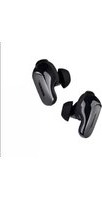
SOUNDSPORT - Wireless Earbuds BOSE - Free user manual and instructions
Find the device manual for free SOUNDSPORT BOSE in PDF.


| Product type | In-ear wireless headphones |
| Brand | Bose |
| Model | SoundSport |
| Dimensions (earbud) | 27 x 30 x 22 mm |
| Weight (per earbud) | 10 g |
| Power | Rechargeable lithium-ion battery, charging via micro-USB |
| Battery life | Up to 6 hours |
| Connectivity | Bluetooth 4.1 |
| Bluetooth range | 9 m (30 ft) |
| Water resistance | IPX4 certification (sweat and splash resistant) |
| Main features | Sound and call control, voice assistant compatibility, passive noise reduction technology |
| Built-in controls | Multi-function button, volume buttons |
| Microphone | Built-in microphone for calls and voice assistant |
| Earbud type | StayHear+ Sport eartips |
| Included accessories | Micro-USB charging cable, joint cable, three sizes of eartips |
| Care and cleaning | Wipe with a soft, dry cloth. Do not use abrasive products. |
| Safety | Use at moderate volume to protect hearing. Keep out of reach of children. |
| Spare parts and repairability | Eartips available separately. Battery not user-replaceable. |
| General information | Country of origin: China. Warranty: 1 year. |
Frequently Asked Questions - SOUNDSPORT BOSE
User questions about SOUNDSPORT BOSE
0 question about this device. Answer the ones you know or ask your own.
Ask a new question about this device
Download the instructions for your Wireless Earbuds in PDF format for free! Find your manual SOUNDSPORT - BOSE and take your electronic device back in hand. On this page are published all the documents necessary for the use of your device. SOUNDSPORT by BOSE.
USER MANUAL SOUNDSPORT BOSE
Please read and keep all safety and use instructions.
Important Safety Instructions
- Only use attachments/accessories specified by the manufacturer.
WARNING/CAUTIONS
- To avoid accidental ingestion, keep the earbuds away from small children and pets. The earbuds contain a lithium-ion battery, and may be hazardous if swallowed. If ingested, seek immediate medical attention. When not in use, store the earbuds in the charging case with the lid closed, and keep out of reach of small children and pets.
-
Do NOT use the earbuds at a high volume for any extended period.
-
To avoid hearing damage, use your earbuds at a comfortable, moderate volume level.
-
Turn the volume down on your device before placing the earbuds in/on your ears, then turn the volume up gradually until you reach a comfortable listening level.
-
Use caution and follow applicable laws regarding mobile phone and headphone use if using the earbuds for phone calls while driving. Some jurisdictions impose specific limitations, such as single ear piece configuration, on the use of such products while driving. DON'T use the earbuds for any other purpose while driving.
- Focus on your safety and that of others if you use the earbuds while engaging in any activity requiring your attention, e.g., while riding a bicycle or walking in or near traffic, a construction site or railroad and follow applicable laws regarding headphone use, etc. Remove the earbuds or adjust your volume to ensure you can hear surrounding sounds, including alarms and warning signals.
- Do NOT allow small children to use the earbuds.
- Do NOT submerge or expose the earbuds for extended period to water, or wear while participating in water sports, e.g., swimming, waterskiing, surfing, etc.
-
When using this product, basic precautions should always be followed, including the following:
-
Read all the instructions before using the charging case.
- To reduce the risk of injury, close supervision is necessary when the charging case is used near children.
- Do not expose charging case to water, rain, liquids or snow.
- Use of a power supply or charger not recommended or sold by power pack manufacturer may result in a risk of fire or injury to persons.
- Do not use the charging case in excess of its output rating.
- Do not use a charging case that is damaged or modified. Damaged or modified batteries may exhibit unpredictable behavior resulting in fire, explosion or risk of injury to persons.
- Do not disassemble the charging case. Incorrect reassembly may result in risk of fire or injury to persons.
- Do not open, crush, or expose a charging case to fire, or excessive temperature. Exposure to fire or temperature above 212^ F, 100^ C may cause explosion.
- Have servicing performed by a qualified repair person using only identical replacement parts.

Contains small parts which may be a choking hazard. Not suitable for children under age 3.

This product contains magnetic material. Consult your physician on whether this might affect your implantable medical device.
- Do NOT make unauthorized alterations to this product.
- Use this product only with an agency approved power supply which meets local regulatory requirements (e.g., UL, CSA, VDE, CCC).
- Do not expose products containing batteries to excessive heat (e.g. from storage in direct sunlight, fire or the like).
- Wipe off sweat from the earbuds and the charging case before charging.
- IPX4 is not a permanent condition, and resistance might decrease as a result of normal wear.
NOTE: This equipment has been tested and found to comply with the limits for a Class B digital device, pursuant to Part 15 of the FCC Rules. These limits are designed to provide reasonable protection against harmful interference in a residential installation. This equipment generates, uses and can radiate radio frequency energy and, if not installed and used in accordance with the instructions, may cause harmful interference to radio communications. However, there is no guarantee that interference will not occur in a particular installation. If this equipment does cause harmful interference to radio or television reception, which can be determined by turning the equipment off and on, the user is encouraged to try to correct the interference by one or more of the following measures:
- Reorient or relocate the receiving antenna.
- Increase the separation between the equipment and receiver.
- Connect the equipment into an outlet on a circuit different from that to which the receiver is connected.
- Consult the dealer or an experienced radio/TV technician for help.
Changes or modifications not expressly approved by Bose Corporation could void the user's authority to operate this equipment.
This device complies with part 15 of the FCC Rules and with Industry Canada license-exempt RSS standard(s). Operation is subject to the following two conditions: (1) This device may not cause harmful interference, and (2) this device must accept any interference received, including interference that may cause undesired operation.
This device complies with FCC and Industry Canada radiation exposure limits set forth for general population. It must not be co-located or be operating in conjunction with any other antennas or transmitters.
FCC ID: A94BL1R / FCC ID: A94BL1L / IC: 3232A-BL1R / IC: 3232A-BL1L
Model: BL1R, BL1L
CANICES-3 (B)/NMB-3(B)
Management Regulation for Low-power Radio-frequency Devices
Article XII
According to "Management Regulation for Low-power Radio-frequency Devices" without permission granted by the NCC, any company, enterprise, or user is not allowed to change frequency, enhance transmitting power or alter original characteristic as well as performance to an approved low power radio-frequency devices.
Article XIV
The low power radio-frequency devices shall not influence aircraft security and interfere legal communications; if found, the user shall cease operating immediately until no interference is achieved. The said legal communications means radio communications operated in compliance with the Telecommunications Act.
The low power radio-frequency devices must be susceptible with the interference from legal communications or ISM radio wave radiated devices.

Bose Corporation hereby declares that this product is in compliance with the essential requirements and other relevant provisions of Directive 2014/53/EU and all other applicable EU directive requirements.
The complete declaration of conformity can be found at: www.Bose.com/compliance
For Europe:
Frequency band of operation 2400 to 2483.5 MHz:
- Bluetooth: Maximum transmit power less than 20 dBm EIRP.
- Bluetooth Low Energy: Maximum power spectral density less than 10 dBm/MHz EIRP.
DON'T attempt to remove the rechargeable lithium-ion battery from this product. Contact your local Bose retailer or other qualified professional for removal.

廢電池請回收


Please dispose of used batteries properly, following local regulations. Do not incinerate.
This symbol means the product must not be discarded as household waste, and should be delivered to an appropriate collection facility for recycling. Proper disposal and recycling helps protect natural resources, human health and the environment. For more information on disposal and recycling of this product, contact your local municipality, disposal service, or the shop where you bought this product.
Removal of the rechargeable lithium-ion battery in this product should be conducted only by a qualified professional. Please contact your local Bose retailer or see products.bose.com/static/compliance/index.html for further information.

China Restriction of Hazardous Substances Table
| Names and Contents of Toxic or Hazardous Substances or Elements | ||||||
| Toxic or Hazardous Substances and Elements | ||||||
| Part Name | Lead (Pb) | Mercury (Hg) | Cadmium (Cd) | Hexavalent (CR(VI)) | Polybrominated Biphenyl (PBB) | Polybrominated diphenylether (PBDE) |
| PCBs | X | 0 | 0 | 0 | 0 | 0 |
| Metal Parts | X | 0 | 0 | 0 | 0 | 0 |
| Plastic Parts | 0 | 0 | 0 | 0 | 0 | 0 |
| Speakers | X | 0 | 0 | 0 | 0 | 0 |
| Cables | X | 0 | 0 | 0 | 0 | 0 |
| This table is prepared in accordance with the provisions of SJ/T 11364. O: Indicates that this toxic or hazardous substance contained in all of the homogeneous materials for this part is below the limit requirement of GB/T 26572. | 5 | |||||
| X: Indicates that this toxic or hazardous substance contained in at least one of the homogeneous materials used for this part is above the limit requirement of GB/T 26572. | ||||||
Taiwan Restriction of Hazardous Substances Table
| Equipment name: Bose® Soundsport® Free, Type designation: 423729 | ||||||
| Restricted substances and its chemical symbols | ||||||
| Unit | Lead (Pb) | Mercury (Hg) | Cadmium (Cd) | Hexavalent chromium (Cr+6) | Polybrominated biphenyls (PBB) | Polybrominated diphenyl ethers (PBDE) |
| PCBs | - | ○ | ○ | ○ | ○ | ○ |
| Metal Parts | - | ○ | ○ | ○ | ○ | ○ |
| Plastic Parts | ○ | ○ | ○ | ○ | ○ | ○ |
| Speakers | - | ○ | ○ | ○ | ○ | ○ |
| Cables | - | ○ | ○ | ○ | ○ | ○ |
| Note 1: “○” indicates that the percentage content of the restricted substance does not exceed the percentage of reference value of presence. Note 2: The “-” indicates that the restricted substance corresponds to the exemption. | ||||||
Date of Manufacture: The eighth digit in the serial number indicates the year of manufacture; "8" is 2008 or 2018.
China Importer: Bose Electronics (Shanghai) Company Limited, Part C, Plan 9, No. 353 North Riying Road, China (Shanghai) Pilot Free Trade Zone
EU Importer: Bose Products B.V., Gorslaan 60, 1441 RG Purmerend, The Netherlands
Taiwan Importer: Bose Taiwan Branch, 9F-A1, No.10, Section 3, Minsheng East Road, Taipei City 104, Taiwan Phone Number: +886-2-2514 7676
Mexico Importer: Bose de Mexico, S. de R.L. de C.V., Paseo de las Palmas 405-204, Lomas de Chapultepec, 11000 Mexico, D.F. Phone Number: +5255 (5202) 3545
The Bluetooth® word mark and logos are registered trademarks owned by Bluetooth SIG, Inc. and any use of such marks by Bose Corporation is under license.
Apple, the Apple logo, iPad, iPhone and iPod are trademarks of Apple Inc., registered in the U.S. and other countries. The trademark "iPhone" is used in Japan with a license from Aiphone K.K. App Store is a service mark of Apple Inc.
Use of the Made for Apple badge means that an accessory has been designed to connect specifically to the Apple product(s) identified in the badge, and has been certified by the developer to meet Apple performance standards. Apple is not responsible for the operation of this device or its compliance with safety and regulatory standards. Please note that the use of this accessory with an Apple product may affect wireless performance.
Android, Google Play and the Google Play logo are trademarks of Google LLC.
Bose Corporation Headquarters: 1-877-230-5639
©2018 Bose Corporation. No part of this work may be reproduced, modified, distributed or otherwise used without prior written permission.
Bose Connect App
What can I do with the Bose Connect app? 8
What's in the Carton?
Contents 9
Sweat and Weather Resistance
Headphones 10
Headphone Controls
Headphones 11
Charging case 11
Open charging case 12
Power on. 13
Standby timer 13
Power off 14
Headphone functions 15
Media playback and volume functions 15
Call functions 16
Secure Fit
Choose the correct StayHear ^ 圆 + Sport tips 17
Fit the earbud to your ear 17
Change the StayHear®+ Sport tips 18
Battery Charging
Charge the headphones 19
Charging time 20
Check the headache battery level. 20
Charge the case 21
Charging time 21
Check the case battery level. 22
Status Indicators
Bluetooth indicators 23
Charging case battery indicators 24
Headphone charging indicators 25
Voice Prompts
Pre-installed languages 26
Check for additional languages 26
Change the language 26
Bluetooth Connections
Connect your mobile device using the Bose® Connect app (recommended) 27
Connect using the Bluetooth menu on your mobile device 28
Disconnect a mobile device 29
Reconnect a mobile device 29
Multiple Bluetooth Connections
Connect an additional mobile device 30
Identify connected mobile devices 31
Reconnect a mobile device stored in the headphone pairing list 31
Clear the headache pairing list 31
Care and Maintenance
Clean the headphones and charging case 32
Find your lost earbuds. 32
Replacement parts and accessories 32
Limited warranty. 32
Troubleshooting
Common solutions 33
Download the Bose Connect app to keep your software up to date, personalize your headache settings, easily manage Bluetooth connections and access new features.
What can I do with the Bose Connect app?
- Enable the Find My Buds feature
-
Customize your headphone experience:
-
Name your headphones
- Select a voice prompt language or disable voice prompts
- Adjust the standby timer.
Find answers to frequently asked questions
- Keep headphones up to date with the latest software

Download on the
App Store

GET IT ON
Google Play
Contents
Confirm that the following parts are included:
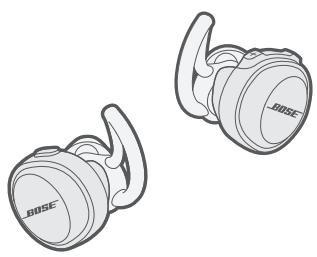
Bose® SoundSport® Free wireless headphones
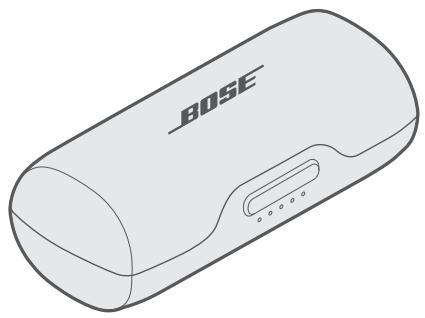
Portable charging case
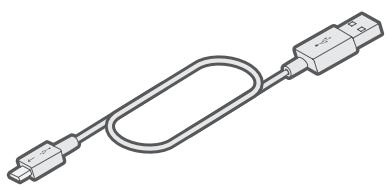
USB cable
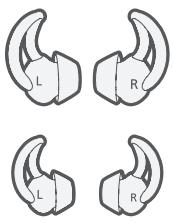
StayHear® + Sport tips: Large (black) and small (white)
Note: Medium (gray) tips are attached to the earbuds.
Note: If any part of your product is damaged, do not use it. Contact your authorized Bose dealer or Bose customer service. Visit global.Bose.com/Support/SSF
Headphones
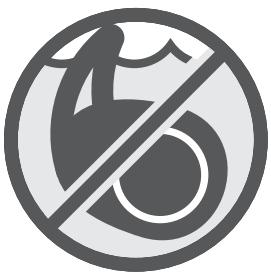
These headphones are rated IPX4. This means they are sweat and weather resistant. They are not meant to be submerged under water.
CAUTION: Do NOT swim or shower with the headphones. Do NOT submerge the headphones.

Notes:
- To prevent rusting, regularly clean the charging pins on the earbuds with a dry, soft cotton swab or equivalent.
- IPX4 is not a permanent condition, and resistance might decrease as a result of normal wear.
Headphones
Charging case
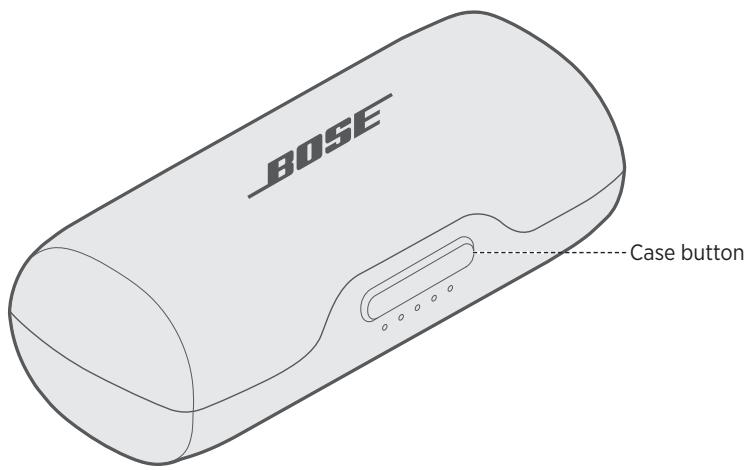
Open charging case
Firmly press the button on the front of the case.
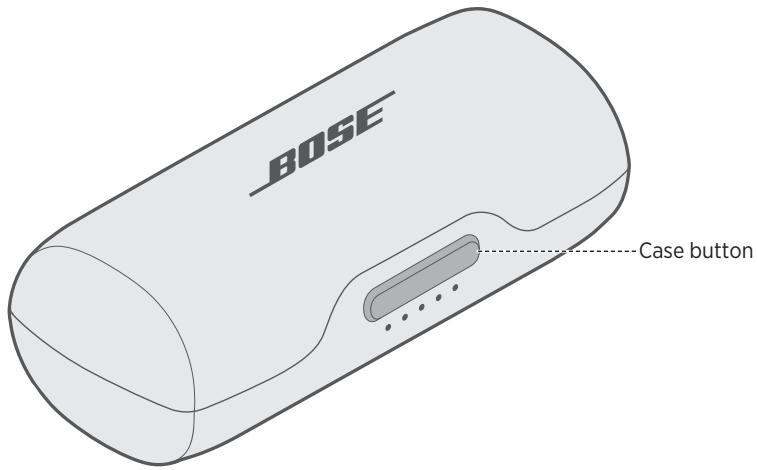
Note: When you press the case button, the front indicators glow according to the current battery level (see "Charging case battery indicators" on page 24).
Power on
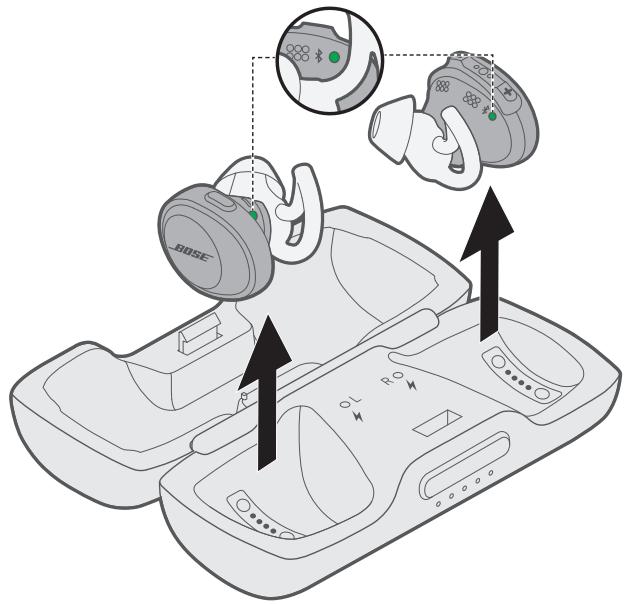
To power on, remove the headphones from the charging case.
A voice prompt from the right earbud announces the battery level and the Bluetooth indicator on each earbud blinks blue.
Note: To hear the voice prompts, make sure you are wearing the headphones.
Standby timer
The standby timer conserves the battery when the headphones are out of the charging case and not being used. The headphones switch to standby when audio has stopped and you have not pressed any buttons for 20 minutes.
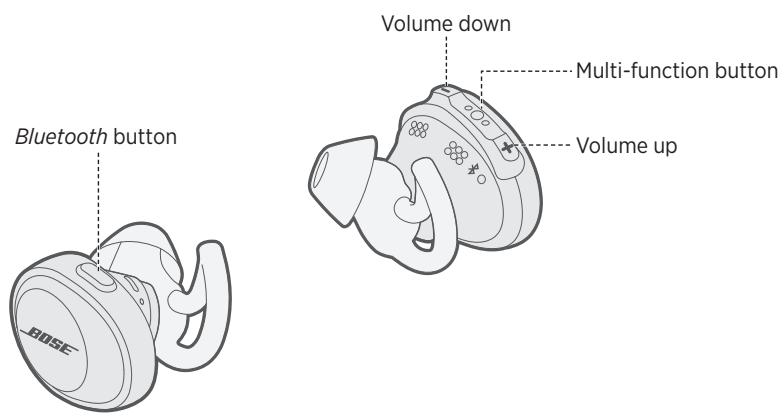
To wake the headphones, press the Bluetooth button on the left earbud and press any button on the right earbud.
Note: To disable the timer or change the number of minutes it takes for your headphones to switch to standby, use the Bose® Connect app.
Power off
To power off, place the headphones in the charging case.
For information on how to properly store the earbuds, see "Charge the headphones" on page 19.
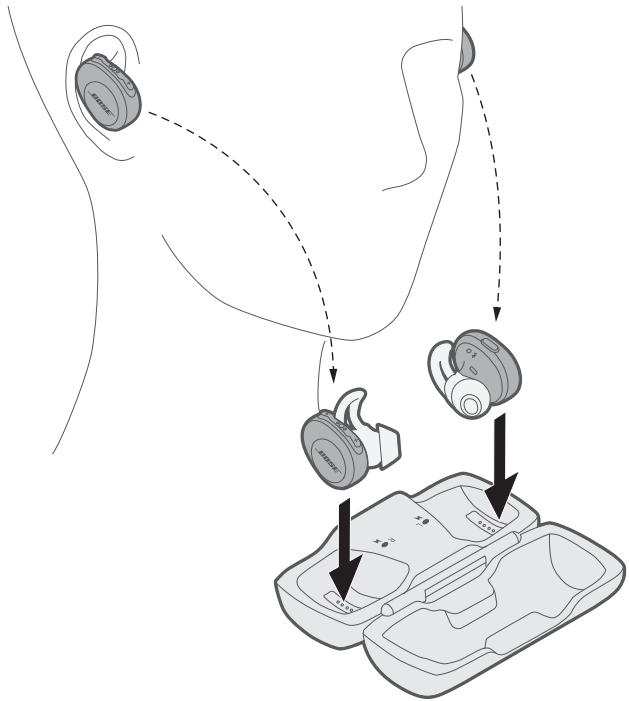
When an earbud is stored, its corresponding charging indicator glows according to charging status (see "Headphone charging indicators" on page 25).
Headphone functions
The headphone controls are located on the top of the right earbud.
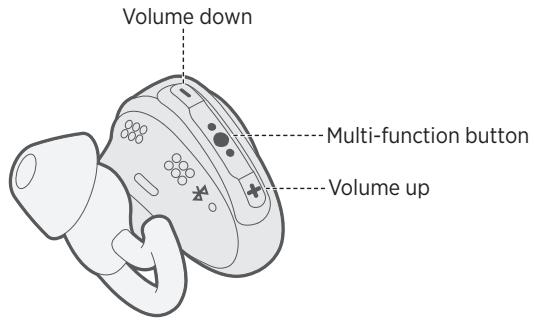
Media playback and volume functions
| Function | What to do |
| Play/pause | Press • ⋅ ⋅ . |
| Skip forward | Double press • ⋅ ⋅ . |
| Skip backward | Triple press • ⋅ ⋅ . |
| Volume up | Press + . |
| Volume down | Press - . |
Call functions
The right earbud is used as a single headphone for phone calls. This lets you take calls and still hear surrounding sounds.
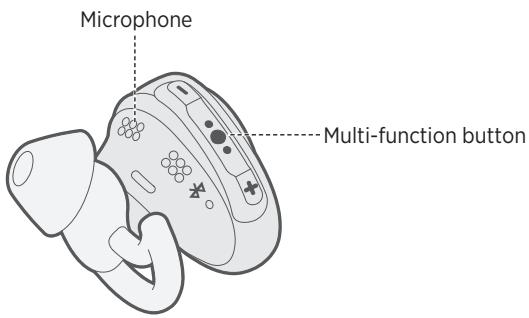
| Function | What to do |
| Answer a call | Press ⋅ ⋅ . |
| End a call | Press ⋅ ⋅ . |
| Decline an incoming call | Press and hold ⋅ ⋅ ⋅ for one second. |
| Answer a second incoming call and put the current call on hold | While on a call, press ⋅ ⋅ ⋅ once. |
| Decline a second incoming call and stay on current call | While on a call, press and hold ⋅ ⋅ ⋅ for one second. |
| Switch between two calls | With two active calls, double press ⋅ ⋅ ⋅ . |
| Create a conference call | With two active calls, press and hold ⋅ ⋅ ⋅ for one second. |
| Activate voice control | While not on a call, press and hold ⋅ ⋅ ⋅ for one second.Refer to your mobile device owner's guide for compatibility and usage information about this feature. |
| Mute/unmute a call | While on a call, press + and - simultaneously. |
Choose the correct StayHear®+ Sport tips
For optimal audio performance, it is important to choose the correct size StayHear+ Sport tip. Select the size that gives you the best comfort and fit in each ear. To determine the best fit, you may need to try all three sizes. You may need a different size for each ear.
Note: To test the fit, try speaking aloud. Your voice should sound muffled in both ears; if not, select another tip size.
Each StayHear+ Sport tip and earbud is marked with either an L or an R. Be sure to attach the left tip to the left earbud and the right tip to the right earbud.
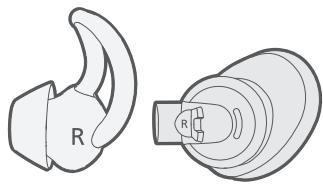
Fit the earbud to your ear
The StayHear+ Sport tip lets the earbud rest comfortably and securely in your ear. The tip wing fits just under your ear ridge.
- Insert the earbud so the StayHear+ Sport tip gently rests in the opening of the ear canal.
- Tilt the earbud back and tuck the tip wing under the ear ridge until it is secure.
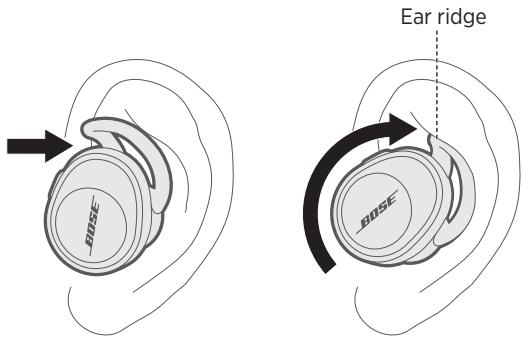
Change the StayHear®+ Sport tips
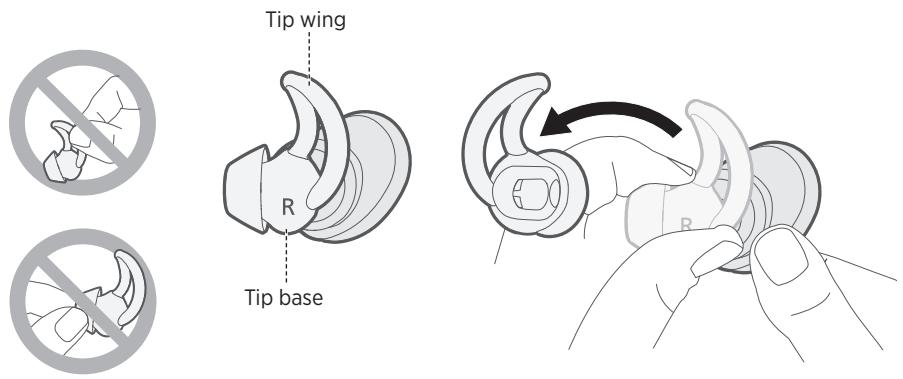
- Holding the earbud, gently grasp the attached StayHear+ Sport tip and peel it away from the earbud.
CAUTION: To prevent tearing, grasp the StayHear+ Sport tip by its base. Do not pull on the tip wing.
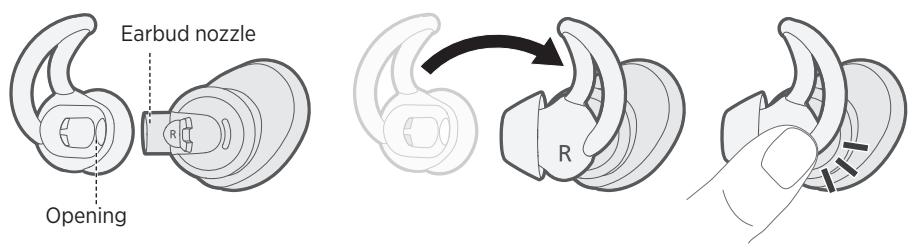
- Align the opening of the new StayHear+ Sport tip with the earbud nozzle and rotate the tip onto the nozzle, then press the base of the tip until it clicks securely into place.
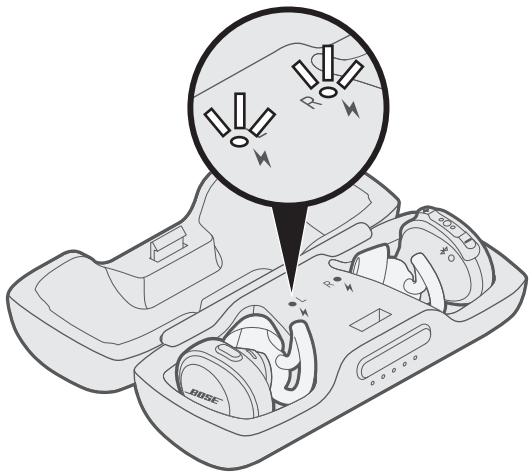
Charge the headphones
The headphones charge while they are in the case.
- Align the charging pins on the left earbud with the charging pins on the left side of the case.
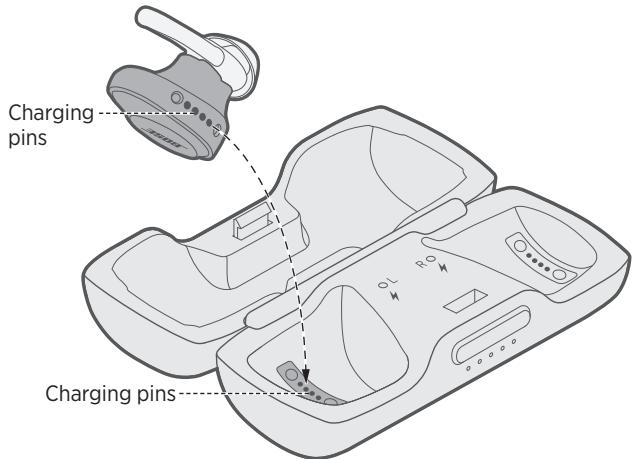
- Place the earbud in the case until it magnetically snaps into place, and the left charging indicator blinks white.
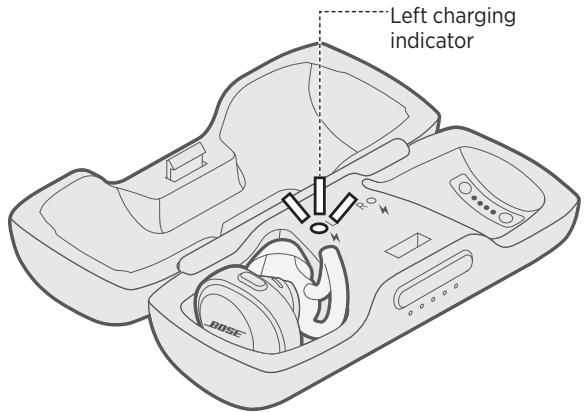
- Repeat steps 1 - 2 to charge the right earbud.
Charging time
Allow up to two hours to fully charge the headphones.
Note: A full charge of the headphones allows up to five hours of use.
Check the headphone battery level
While using the headphones
- Each time you remove the headphones from the charging case, a voice prompt from the right earbud announces the battery level.
Note: While using the headphones, a voice prompt announces if the battery needs to be charged.
- Check the bottom right corner of the home screen in the Bose Connect app.
- If connected to an Apple device, the device displays the headphone battery level near the upper right corner of the screen and in the notification center.
While charging the headphones
When an earbud is inserted, its corresponding charging indicator glows according to charging status (see "Headphone charging indicators" on page 25).
Charge the case
The portable case stores and charges the headphones when not in use.
CAUTION: Use this product only with an agency approved power supply which meets local regulatory requirements (e.g., UL, CSA, VDE, CCC).
- Connect the small end of the USB cable into the USB connector.
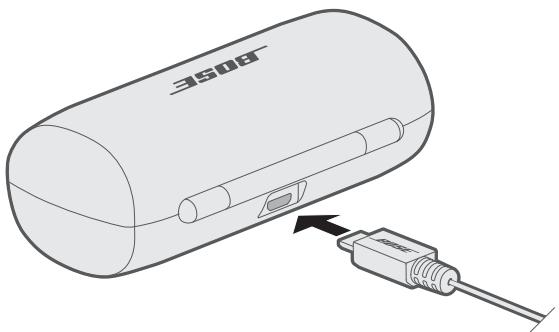
- Connect the other end into a USB wall charger (not provided) or computer that is powered on.
Note: Before charging, be sure the headphones are at room temperature, between 41^ F (5^ C) and 104^ F (40^ C).
Charging time
Allow up to two hours to fully charge the case. When the headphones are inside of the case, charging time varies.
Note: When the case is fully charged, you can charge the headphones up to two times.
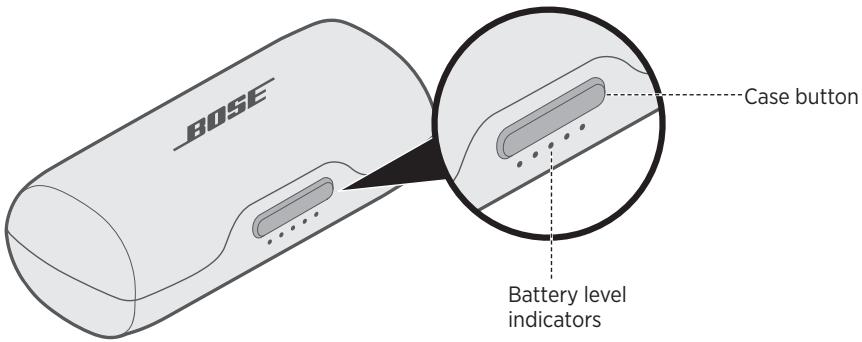
Check the case battery level
Press the button on the front of the case. The battery level indicators glow for three seconds.
The indicators glow according to the battery level as follows:
- If five indicators glow solid, the battery is fully charged.
- If only one indicator glows solid, the battery is low. Charge the battery (see page 19).
Bluetooth indicators
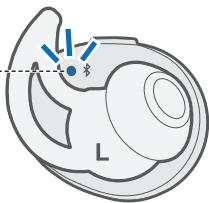
Shows the connection status of a mobile device. Each earbud has a Bluetooth indicator located on the inside surface.
Bluetooth indicator
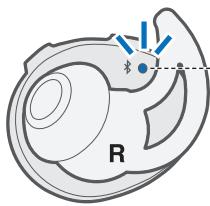
Bluetooth indicator
| Indicator activity | System state |
| Blinking blue | Ready to connect |
| Blinking white | Connecting |
| Solid white | Connected Note: Once connected, the Bluetooth indicators turn off after 10 seconds. |
| Solid or Blinking red | Error - contact Bose customer service |
Charging case battery indicators
Shows the battery charge level of the charging case. Five battery indicators are located on the front of the charging case.
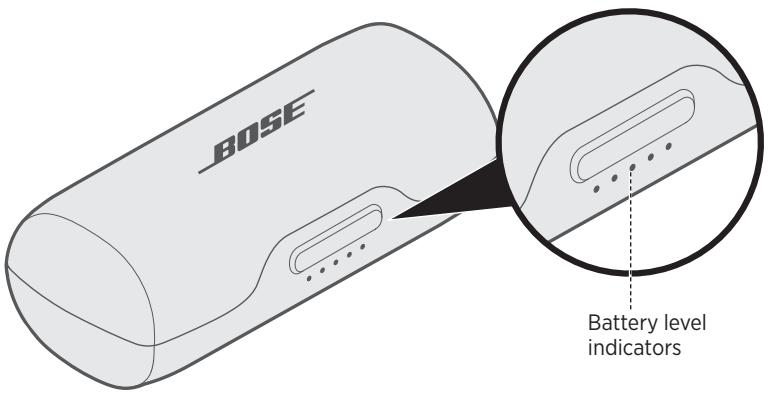
| Indicator activity | Charging percentage |
| ●○○○○ | 0% - 20% |
| ●●○○○ | 20% - 40% |
| ●●●○○ | 40% - 60% |
| ●●●●○ | 60% - 80% |
| ●●●●● | 80% - 100% |
| ●○○● | Charging error - contact Bose customer service |
| ○●○●○ | Battery error - contact Bose customer service |
Note: When charging, the last lit battery indicator blinks white. When the charging case is fully charged, all battery indicators glow solid white.
Headphone charging indicators
Shows the charging status of each earbud. Each earbud has a charging indicator located on the front of the charging case and on the inside of the case.
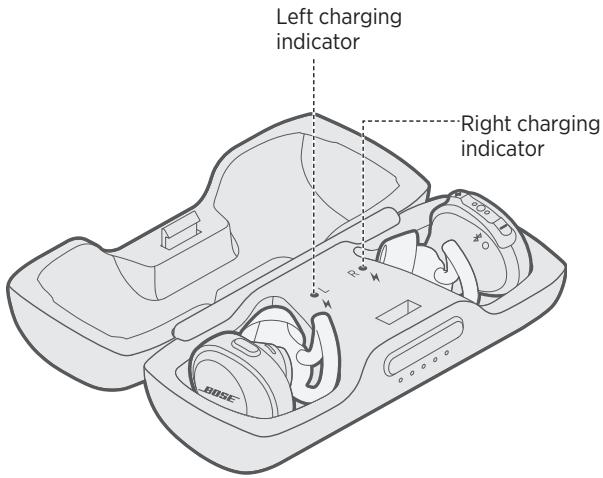
| Indicator activity | System state |
| Slow blinking white | Charging |
| Solid white | Fully charged Note: When fully charged, the charging indicators glow solid for a few seconds, then turn off. |
| Fast blinking white | Error - contact Bose customer service |
Voice prompts from the right earbud guide you through the Bluetooth connection process, announce the battery level and identify connected devices. You can customize voice prompts using the buttons on the right earbud.
Tip: You can also manage voice prompts using the Bose Connect app.
Pre-installed languages
The following languages are pre-installed on your headphones:
-
English
-
German
Korean
Swedish
-
Spanish
-
Mandarin
Italian
Dutch
-
French
-
Japanese
Portuguese
Check for additional languages
Additional languages may be available. To check for language updates, download the Bose Updater.
Visit: btu.Bose.com
Change the language
When you turn on the headphones for the first time, the voice prompts are in English. To select a different language:
- Press and hold + and - simultaneously until you hear the voice prompt for the first language option.
- Press + or - to move through the list of languages.
- When you hear your language, press and hold to select.
Bluetooth wireless technology lets you stream music from mobile devices such as smartphones, tablets and laptop computers. Before you can stream music from a device, you must connect the device with your headphones.
Connect your mobile device using the Bose® Connect app (recommended)
- Power on the headphones (see page 13).
- Download the Bose Connect app and follow the on-screen instructions.
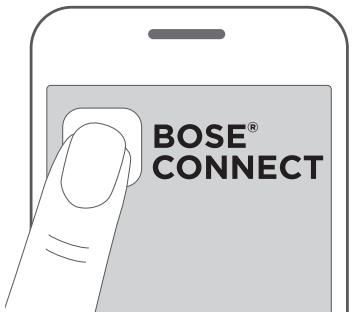
Once connected, a voice prompt from the right earbud announces "Connected to
Note: To hear the voice prompt, make sure you are wearing the headphones.
Connect using the Bluetooth menu on your mobile device
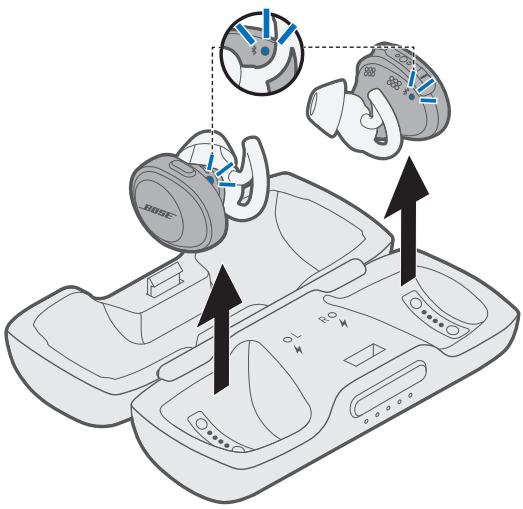
- Remove the headphones from the charging case.
A voice prompt from the right earbud announces "Battery level percent. Ready to connect" and the Bluetooth indicator on each earbud blinks blue.
Note: To hear the voice prompt, make sure you are wearing the headphones.
- On your mobile device, turn on the Bluetooth feature.
Tip: The Bluetooth feature is usually found in the Settings menu.
- Select your Bose headphones from the device list.
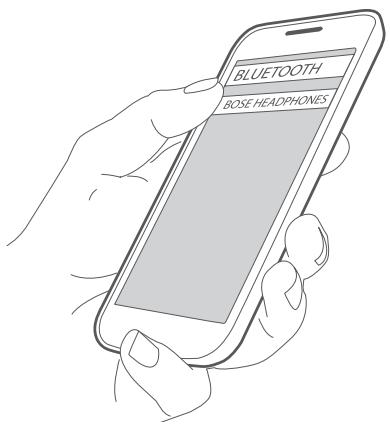
Once connected, a voice prompt from the right earbud announces "Connected to
Disconnect a mobile device
Turn off the Bluetooth feature on your mobile device.
Tip: You can also disconnect your mobile device using the Bose Connect app
Reconnect a mobile device
When you remove the headphones from the charging case, they try to reconnect with the most recently connected mobile device.
Note: The mobile device must be powered on and within range (30 ft. or 9 m).
Connect an additional mobile device
You can store up to seven connected devices in the headphones pairing list.
Note: You can only connect and play audio from one device at a time.
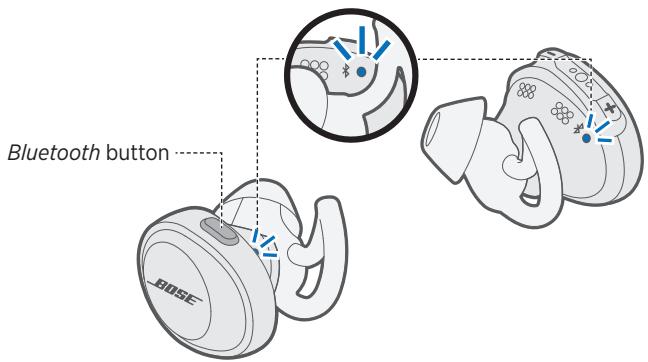
- On the left earbud, press and hold the Bluetooth button until the Bluetooth indicator on each earbud blinks blue or until you hear "Ready to connect."
Note: To hear the voice prompt, make sure you are wearing the headphones.
- On your mobile device, turn on the Bluetooth feature.
Tip: The Bluetooth feature is usually found in the Settings menu.
- Select your Bose headphones from the device list.
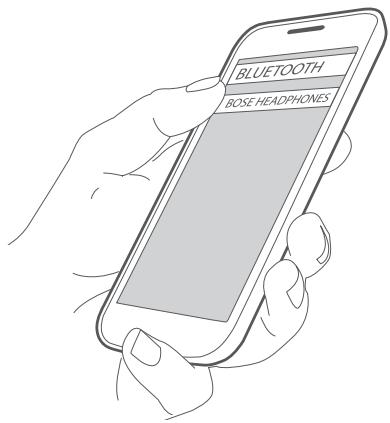
Once connected, a voice prompt from the right earbud announces "Connected to
Identify connected mobile devices
Press the Bluetooth button to hear which mobile device is currently connected.
Reconnect a mobile device stored in the headphone pairing list
- Press the Bluetooth button to hear which mobile device is connected.
- Press the Bluetooth button again within three seconds to connect to the next mobile device in the headphone pairing list. Repeat until you hear the correct mobile device name.
- Play audio on the connected mobile device.
Clear the headphone pairing list
- Press and hold the Bluetooth button for 10 seconds, until you hear "Bluetooth device list cleared."
- Delete your headphones from the Bluetooth list on your mobile device.
All devices are cleared and the headphones are ready to connect.
Clean the headphones and charging case
The headphones and charging case may require periodic cleaning.
| Component | Cleaning procedure |
| StayHear®+ Sport tips | Remove the tips from the earbuds and wash them with a mild detergent and water. Note: Make sure you thoroughly rinse and dry the tips before re-attaching them to the earbuds. |
| Earbud nozzles | Clean only with a dry, soft cotton swab or equivalent. Note: Never insert any cleaning tool into the nozzle. |
| Charging pins (on earbuds and case) | To prevent rusting, regularly clean with a dry, soft cotton swab or equivalent. |
| Charging case | Clean only with a dry, soft cotton swab or equivalent. |
Find your lost earbuds
Use the Bose Connect app to help locate your lost earbuds.
Note: The Find My Buds setting must be enabled in the Bose Connect app before the earbuds are lost.
Replacement parts and accessories
Replacement parts and accessories can be ordered through Bose customer service. Visit: global.Bose.com/Support/SSF
Limited warranty
Your headphones are covered by a limited warranty. Visit our website at global.Bose.com/warranty for details of the limited warranty.
To register your product, visit global.Bose.com/register for instructions. Failure to register will not affect your limited warranty rights.
Common solutions
If you experience problems with your headphones or charging case:
- Check the state of the status indicators (see page 23).
- Charge the battery (see page 19).
- Increase the volume on your headphones, mobile device and music app.
- Try connecting another mobile device (see page 30).
If you could not resolve your issue, see the table below to identify symptoms and solutions to common problems. If you are unable to resolve your issue, contact Bose customer service.
Visit: global.Bose.com/Support/SSF
| Symptom | Solution |
| Headphones don't power on | ·Place the headphones in the charging case to initiate charging. ·Make sure the headphones are not in standby mode. To wake the headphones, press the Bluetooth button on the left earbud and press any button on the right earbud. |
| Headphones don't connect with mobile device | ·Make sure your mobile device supports Bluetooth technology. ·On your mobile device: - Turn the Bluetooth feature off and then on. - Delete your Bose® SoundSport® Free wireless headphones from the Bluetooth list on your mobile device. Connect again. ·Move your mobile device closer to the headphones and away from any interference or obstructions. ·Connect a different mobile device (see page 30). ·Visit global.Bose.com/Support/SSF to see how-to videos. ·Clear the headphone pairing list (see page 31) and connect again. |
| Headphones don't charge | ·Make sure the headphones are properly placed in the charging case (see page 19). ·Make sure the charging case battery is not depleted (see page 24). ·Make sure there is no dirt or debris covering the charging conductors within the case or on the earbuds. ·If your headphones have been exposed to high or low temperatures, let the headphones return to room temperature and then try charging again. |
| Charging case doesn't charge | ·Check the case battery level by gently pressing the button on the front of the case (see page 22). If needed, charge the case with the supplied USB cable (see page 19). ·Secure both ends of the USB cable. ·If your charging case has been exposed to high or low temperatures, let the case return to room temperature and then try charging again. |
| No sound | ·Press play on your mobile device to make sure the audio track is playing. ·Place the headphones in the charging case to check the headphone charging status (see page 25). If needed, charge the headphones (see page 19). ·Increase the volume on the headphones and mobile device. ·Press the Bluetooth button to hear the connected mobile device. Make sure you are using the correct device. ·Move your mobile device closer to the headphones (30 ft. or 9 m) and away from any interference or obstructions. ·Use a different music source. ·Connect a different mobile device (see page 30). |
| No sound from one earbud | Place both earbuds in the charging case until they magnetically snap into place, and the charging indicators blinks white. Then, remove earbuds. |
| Poor sound quality | ·Make sure that both headphones fit securely in your ear (see page 17). ·Use a different music source. ·Try connecting another mobile device (see page 30). ·Move your mobile device closer to the headphones (30 ft. or 9 m) and away from any interference or obstructions. ·Clear any debris or wax buildup from the earbuds and headphone nozzles. ·Make sure your headphones are connected over the correct Bluetooth profile: Stereo A2DP. Check your device's Bluetooth/audio settings menu to make sure the correct profile is selected. |
| StayHear®+ Sport tips falling off | Securely attach the tips to the earbuds (see page 18). |
| Find your lost earbuds | Use the Bose® Connect app to help locate your lost earbuds. Note: The Find My Buds setting must be enabled in the Bose Connect app before the earbuds are lost. |