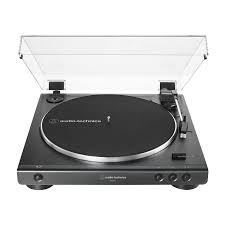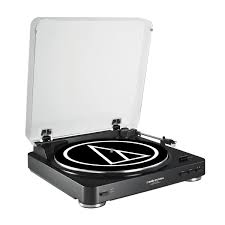
AT-LP60 - Turntable AUDIO TECHNICA - Free user manual and instructions
Find the device manual for free AT-LP60 AUDIO TECHNICA in PDF.



| Product Type | Fully automatic belt-drive stereo turntable |
| Brand | Audio-Technica |
| Model | AT-LP60 |
| Speeds | 33 1/3 RPM and 45 RPM |
| Phono cartridge | Integral Dual Magnet™ stereo cartridge with replaceable stylus |
| Pre-amplifier | Built-in, switchable phono/line (gain 36 dB, RIAA equalized) |
| Platter | Professional-grade aluminum |
| Motor | DC servo-controlled |
| Signal-to-noise ratio | >50 dB (DIN-B) |
| Output level (PHONO) | 2.5 mV nominal at 1 kHz, 5 cm/s |
| Output level (LINE) | 150 mV nominal at 1 kHz, 5 cm/s |
| Wow and flutter | Less than 0.25% (WTD) at 3 kHz (JIS) |
| Power supply | 120 V AC, 60 Hz, 3 W |
| Dimensions (WxHxD) | 36 cm x 9.75 cm x 35.6 cm |
| Net weight | 2.98 kg |
| Included accessories | RCA to 3.5 mm male adapter cable, RCA to 3.5 mm female adapter cable, 45 RPM adapter |
| Replacement stylus | ATN3600L |
| Warranty | 1 year limited (USA) |
| Automatic functions | Start, stop, arm return, pause via lift button |
| Compatible disc sizes | 30 cm (12") and 17 cm (7") |
| Dust cover | Removable |
| Maintenance | Clean the stylus with a soft brush from back to front; clean the cabinet and dust cover with a soft cloth and mild detergent |
| Safety | Do not open the unit (no user-serviceable parts); refer servicing to qualified personnel |
| Note | Use genuine Audio-Technica replacement stylus |
Frequently Asked Questions - AT-LP60 AUDIO TECHNICA
User questions about AT-LP60 AUDIO TECHNICA
0 question about this device. Answer the ones you know or ask your own.
Ask a new question about this device
Download the instructions for your Turntable in PDF format for free! Find your manual AT-LP60 - AUDIO TECHNICA and take your electronic device back in hand. On this page are published all the documents necessary for the use of your device. AT-LP60 by AUDIO TECHNICA.
USER MANUAL AT-LP60 AUDIO TECHNICA
Installation and Operation Pages 2-8
AT-LP60
Turntable belt needs to be attached or turntable will not operate. See page 4 for instructions.
For assistance, contact our Audio Solutions
Department at 330-686-2600 x5000 or
audio-solutions@atus.com.
Safety instructions
- Read these instructions.
- Keep these instructions.
- Heed all warnings.
- Follow all instructions.
- Do not use this apparatus near water.
- Clean only with a dry cloth.
- Do not block any of the ventilation openings. Install in accordance with the manufacturer's instructions.
- Do not install near any heat sources such as radiators, heat registers, stoves, or other apparatus (including amplifiers) that produce heat.
- Do not defeat the safety purpose of the polarized or grounding plug. A polarized plug has two blades with one wider than the other. A grounding plug has two blades and a third grounding prong. The wide blade or the third prong is provided for your safety. If the provided plug does not fit into your outlet, consult an electrician for replacement of the obsolete outlet.
- Protect the power cord from being walked on or pinched particularly at plugs, convenience receptacles, and the point where they exit from the apparatus.
- Only use attachments/accessories specified by the manufacturer.
- Use only with a cart, stand, tripod, bracket or table specified by the manufacturer, or sold with the apparatus. When a cart is used, use caution when moving the cart/apparatus combination to avoid injury from tip-over.
- Unplug this apparatus during lightning storms or when unused for long periods of time.
- Refer all servicing to qualified service personnel. Servicing is required when the apparatus has been damaged in any way, such as power-supply cord or plug is damaged, liquid has been spilled or objects have fallen into the apparatus, the apparatus has been exposed to rain or moisture, does not operate normally, or has been dropped.
- Where a main plug is used as the disconnect device, the disconnect device shall remain readily operable.
- Please keep the unit in a good ventilation environment.
- Apparatus shall not be exposed to dripping or splashing and no objects filled with liquids, such as vases, shall be placed on apparatus.
Warning: To reduce the risk of fire or electric shock, do not expose this apparatus to rain or moisture. The apparatus shall not be exposed to dripping or splashing and that no objects filled with liquids, such as vases, shall be placed on the apparatus.

CAUTION
RISK OF ELECTRIC SHOCK DO NOT OPEN

Caution: To reduce the risk of fire or electric shock, do not expose this apparatus to rain or moisture. The apparatus shall not be exposed to dripping or splashing, and no objects filled with liquids, such as vases, shall be placed on the apparatus.
The lightning flash with arrowhead symbol within the equilateral triangle is intended to alert the use to the presence of uninsulated "dangerous voltage" within the product's enclosure that may be of sufficient magnitude to constitute a risk of electric shock.

The exclamation point within the equilateral triangle is intended to alert the user to the presence of important operation and maintenance (servicing) instructions in the literature accompanying this appliance.
Caution: To prevent electric shock, do not use this polarized plug with an extension cord, receptacle or other outlet unless the blades can be fully inserted to prevent blade exposure.
Introduction
Thank you for purchasing the AT-LP60 automatic stereo turntable. Audio-Technica has been a leading manufacturer of innovative stereo phonograph products for more than 40 years. We are pleased to provide this turntable, with its excellent performance and many convenient features, for your enjoyment.
The AT-LP60 stereo turntable features:
-
Fully automatic operation
-
Two speeds: 33^1 / 3 RPM and 45 RPM
Professional aluminum turntable platter - Integral Audio-Technica Dual Moving Magnet™ phono cartridge with replaceable diamond stylus
- Built-in switchable stereo phono/line level pre-amplifier. Permits use of turntable with stereo systems having either magnetic-phono inputs or "AUX" (line-level) inputs; also allows convenient use of turntable with most powered speakers
- Damped lift/cueing mechanism with front-panel control
- Removable dust cover
To assure maximum satisfaction from this product, please read the information and follow the instructions presented in this manual. Please keep the manual in an accessible location for future reference.
We suggest that you save all the packaging materials for possible future storage, moving or shipping.
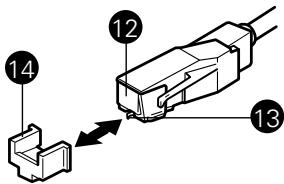
CAUTION: To avoid stylus damage, make certain the included stylus guard is in place whenever the turntable is being installed, moved or cleaned.
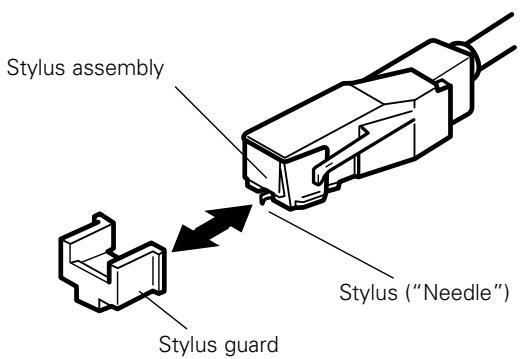
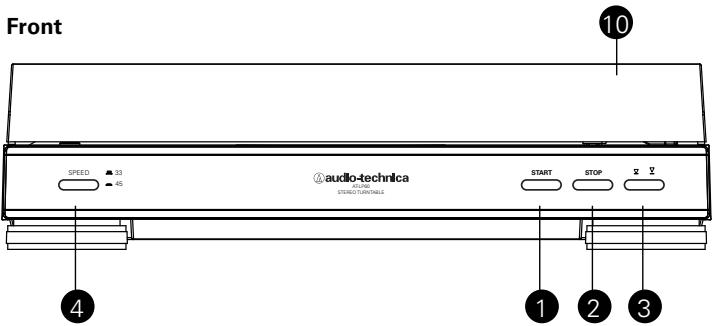
Figure 1
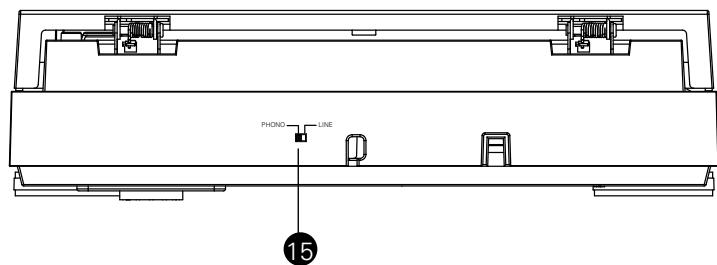
Back
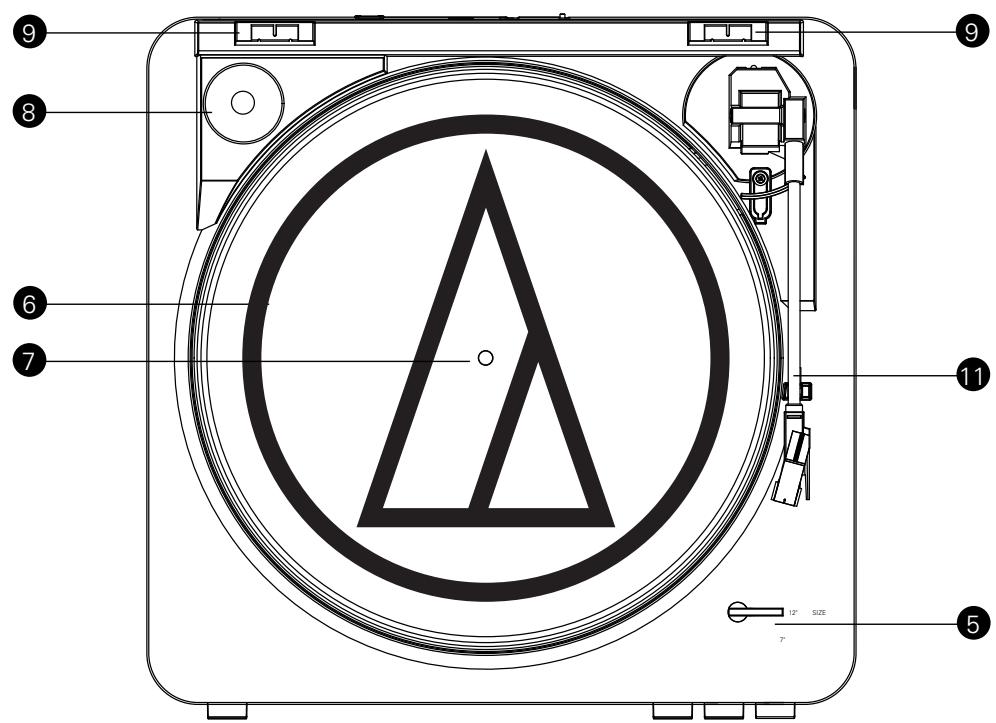
- START BUTTON
Engages the motor/platter and begins automatic operation.
- STOP BUTTON
Disengages the motor/platter and returns tone arm to rest.
- TONE ARM LIFT BUTTON
Lifts and lowers tone arm for manual selection.
- PLATTER SPEED BUTTON
Select 33 RPM (button in high position) or 45 RPM (button in low position) platter speed.
- SIZE SELECTOR
Select the size of the record: 12^ or 7^ .
- PLATTER
Aluminum platter mounts directly to center spindle/ motor shaft.
- CENTER SPINDLE
Centering pin for record positioning.
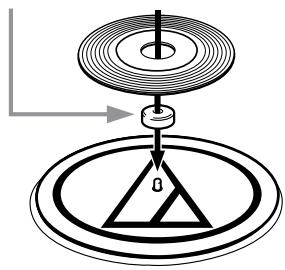
- 45-RPM ADAPTER (Shown in receptacle)
Adapts 7^ records with large center holes to fit center spindle.
- DUST COVER HINGE HOLDERS
Attachment points for removable hinged dust cover.
-
DUST COVER
-
TONE ARM/HEADSHELL ASSEMBLY
Tone arm is permanently attached to the headshell assembly.
-
STYLUS ASSEMBLY
-
STYLUS ("NEEDLE")
-
STYLUS GUARD
-
PRE-AMP SELECTOR SWITCH (PHONO/LINE)
(On back of turntable) Use PHONO setting when you connect to the phono input on your home stereo. Use the LINE level when you connect to CD/TAPE/AUX inputs of your home stereo.
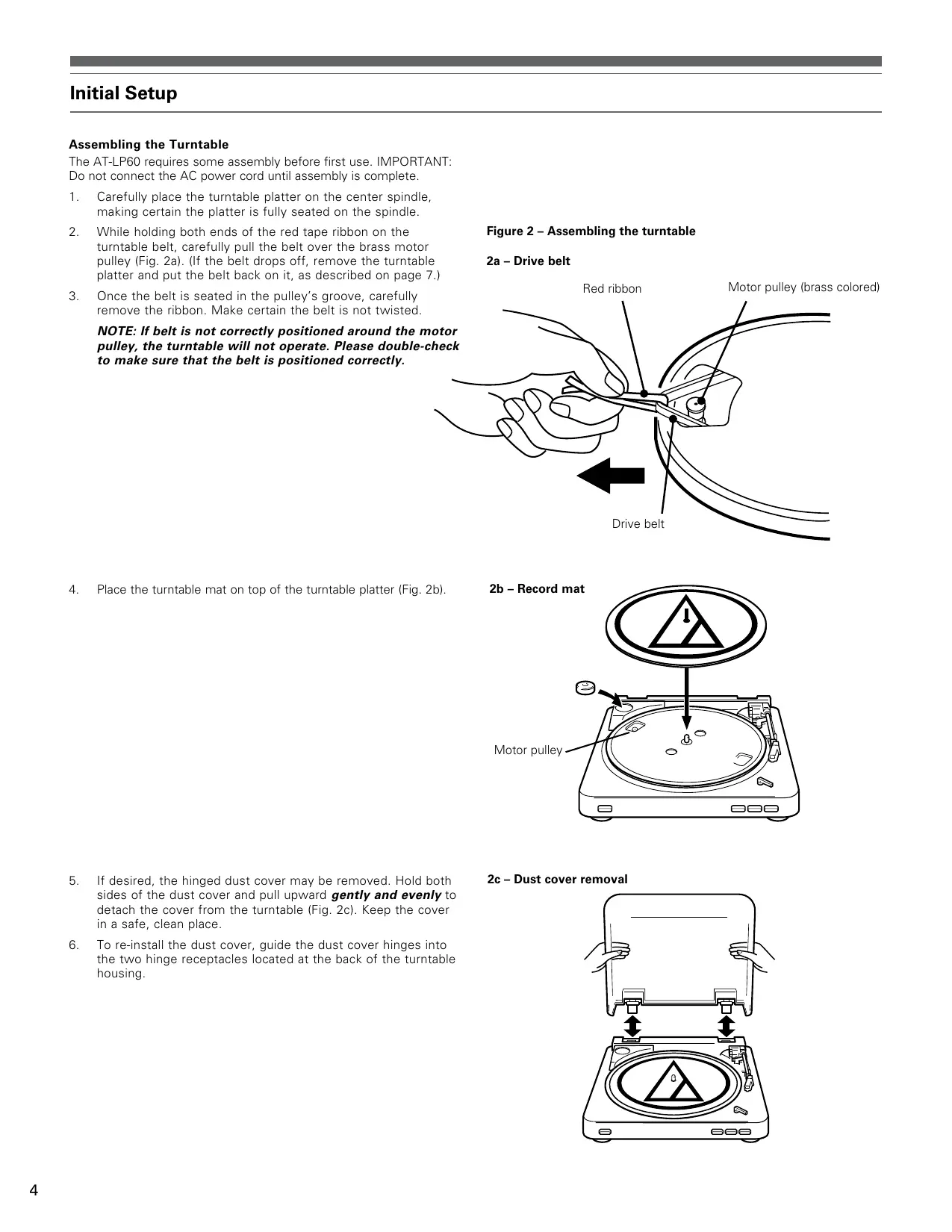
Assembling the Turntable
The AT-LP60 requires some assembly before first use. IMPORTANT: Do not connect the AC power cord until assembly is complete.
- Carefully place the turntable platter on the center spindle, making certain the platter is fully seated on the spindle.
- While holding both ends of the red tape ribbon on the turntable belt, carefully pull the belt over the brass motor pulley (Fig. 2a). (If the belt drops off, remove the turntable platter and put the belt back on it, as described on page 7.)
- Once the belt is seated in the pulley's groove, carefully remove the ribbon. Make certain the belt is not twisted.
NOTE: If belt is not correctly positioned around the motor pulley, the turntable will not operate. Please double-check to make sure that the belt is positioned correctly.
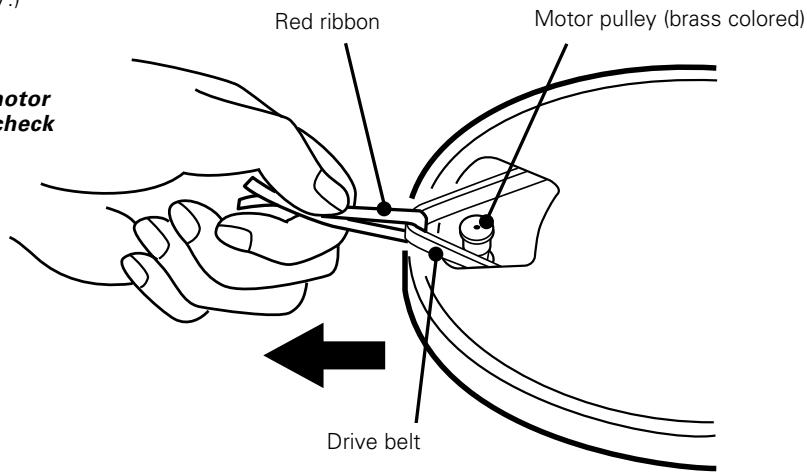
Figure 2 - Assembling the turntable
2a - Drive belt
- Place the turntable mat on top of the turntable platter (Fig. 2b).
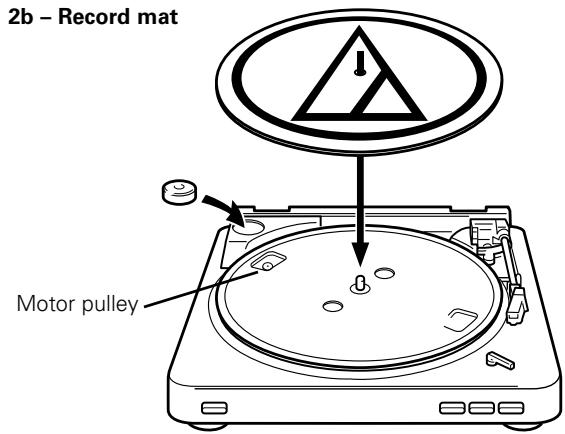
- If desired, the hinged dust cover may be removed. Hold both sides of the dust cover and pull upward gently and evenly to detach the cover from the turntable (Fig. 2c). Keep the cover in a safe, clean place.
- To re-install the dust cover, guide the dust cover hinges into the two hinge receptacles located at the back of the turntable housing.
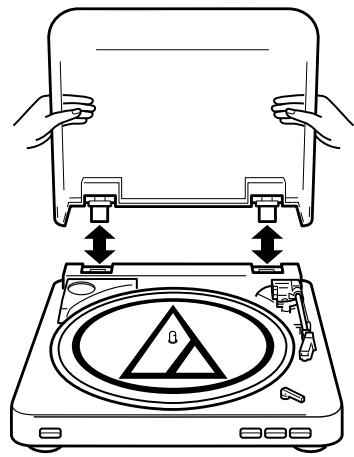
2c - Dust cover removal
Setting the Pre-amp (Phono/Line) Switch
For increased flexibility of use, this turntable has an internal stereo phono pre-amplifier. The Pre-amp Selector (Phono/Line) Switch is located on the back of the turntable. If the stereo system you are using has a PHONO input, set the Pre-amp Selector Switch to the "PHONO" position. If your stereo system does not have a PHONO input, set the Pre-amp Selector Switch to the "LINE" position and connect the turntable's output cables to the AUX or other high-level input on your stereo system (described later) (Fig. 3).
Connecting to Stereo System
- Connect the red RCA-type pin-plug to the right channel input and the white RCA-type pin-plug to the left channel input of your stereo system (Fig. 3).
- With the tone arm still fastened to the tone arm rest, slowly turn the turntable platter clockwise ten times, to make certain the automatic mechanism is fully cycled.
- Remove the vinyl tie that holds the tone arm on its rest.
- Connect the power cord plug to an AC outlet. Make sure the AC outlet supplies the proper voltage for the AT-LP60 you are using.
Connecting to Computers or Audio Devices with 3.5mm Input
The AT-LP60 connects without adapters to devices equipped with RCA connectors. For maximum flexibility, we have included two adapter cables to fit other popular audio inputs.
The first of these adapter cables-dual RCA to stereo 3.5 mm mini-plug (male)-is designed to fit most popular computer* audio inputs. It may also be used to connect the turntable's RCA output to other equipment, including:
- a stereo/boombox* equipped with a 3.5 mm mini input
- powered speakers* equipped with a 3.5 mm mini input
- a mixer or PA system equipped with a 3.5 mm mini jack
The second included adapter cable-dual RCA to stereo 3.5 mm miniplug (female)-permits connection of the turntable output to amplified speakers* or similar devices. The 3.5 mm stereo mini-jack on the cable adapter accepts stereo mini-plugs.
To use either adapter cable, connect the turntable's red and white RCA-type plugs to the cable adapter's RCA-type jacks.
- When using either cable adapter, always set the AT-LP60 turntable's Pre-amp Selector Switch to the "LINE" position. (Switch is located on the back of the turntable.)
NOTE: If connection is desired to a mono amplifier/speaker, make certain to use a stereo-to-mono adapter, available from your dealer or an electronic parts store. Inserting a mono plug in the stereo jack will disable one of the stereo channels. Other adapter cable configurations will be available from dealers and parts stores for connecting to devices needing different terminations.
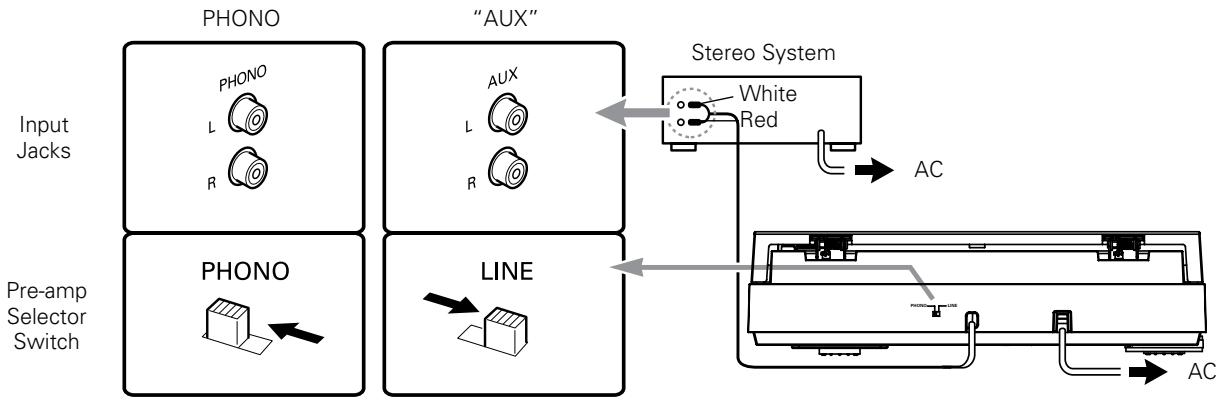
Figure 3
Operation
Automatic Operation
- Remove the stylus guard from the stylus assembly (Fig. 4).
- Put a record on the turntable. If needed, use the 45 RPM adapter (Fig. 5).
- Select the size of record: 12^n or 7^n (Fig. 6).
- Select the speed: 33^1 / 3 RPM or 45 RPM (Fig. 7).
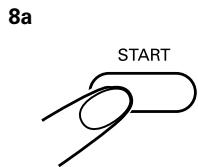
- Start: Gently push the START button (Fig. 8a). The turntable will start and the tone arm automatically will move to the lead-in groove. When the record has finished playing, the tone arm automatically will return to the tone arm rest and the turntable will shut off.
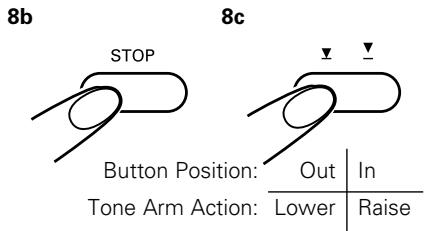
- Stop: To stop playing the record before it reaches the end, press the STOP button (Fig. 8b). The tone arm will lift and return to the tone arm rest, and the turntable will shut off.
- Pause: To pause the record before it has completed playing, press the tone arm Lift button (Fig. 8c). Press the Lift button again to continue playing the record.
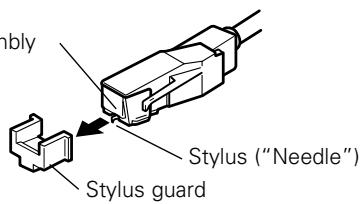
Figure 4
Stylus assembly
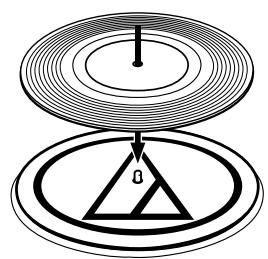
Figure 5
45 RPM adapter
Operation (continued)
Caution: When the tone arm reaches the end of the record, it will lift and return to the tone arm rest automatically. When this happens, do not interfere with the tone arm's motion, or damage to the mechanism may occur.
If the tone arm does not return automatically to the tone arm rest after the record has finished playing, simply press the STOP button to complete operation.
Manual Operation
- Remove the stylus guard from the stylus assembly (Fig. 4).
- Put a record on the turntable. If needed, use the 45 RPM adapter (Fig. 5).
- Select the size of record: 12^ or 7^ (Fig. 6).
- Select the speed: 33^1 / 3 RPM or 45 RPM (Fig. 7).
- Press the Lift button IN to raise the tone arm (Fig. 8c).
- Gently move the tone arm so the stylus is over the point on the record where play is desired to begin.
- Press the Lift button again to gently lower the tone arm and play record.
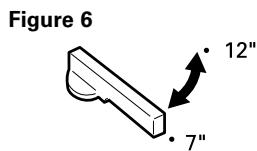
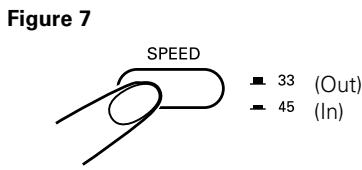
Figure 8
Replacing the Stylus
While holding the head of the tone arm, rotate the front of the stylus assembly in a forward and down motion to remove it (Fig. 9). (As you remove the old assembly, note its position and "feel," to aid in properly installing the new one.)
Install the new stylus assembly as shown in Figures 10a/10b, being careful not to touch the actual stylus. Make certain that the projection at the back of the assembly is fully seated in the cartridge body first (Fig. 10a), and that the assembly "clicks" up into place, with no gap between its top edge and the front of the black plastic tone arm head (Fig. 10b). Replace the stylus after 400 hours of use.
To maintain original performance, insist upon a genuine Audio-Technica brand replacement stylus. Look for the Audio-Technica trademark (A) on the front of the stylus assembly and on the packaging.
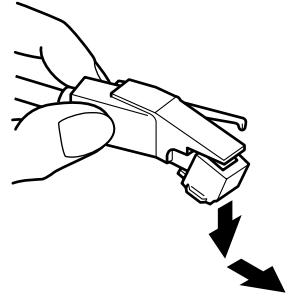
Figure 9 - Removing the stylus
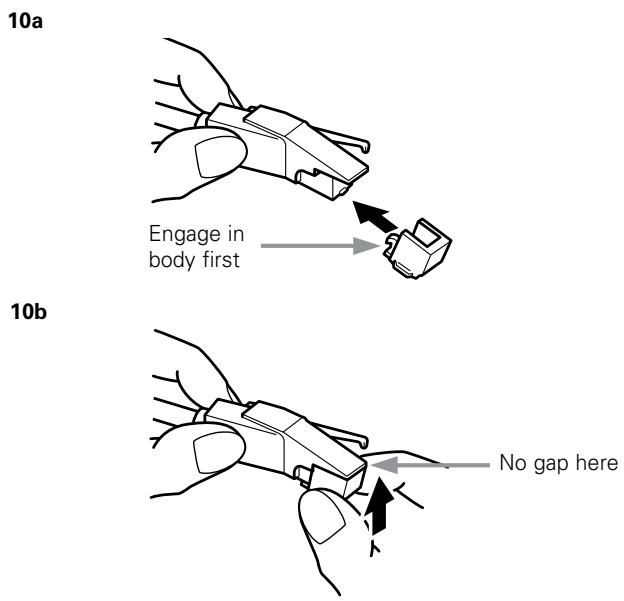
Figure 10 - Installing a new stylus
Turntable does not operate
- Make certain the turntable's AC cord is plugged into an AC outlet, and that the AC outlet is "live."
- Check the drive belt to make certain it is on correctly. (See Figure 11.)
A) Remove the record mat from the turntable platter (Fig. 11a). Place the mat in the cardboard packaging sleeve for safekeeping. Through an opening in the turntable platter, visually inspect to see if the drive belt is around the brass motor pulley (Fig. 11b).
NOTE: If belt is not correctly positioned around the motor pulley, the turntable will not operate. Please double-check to make sure that the belt is positioned correctly.
B) If the drive belt is not around the motor pulley: Lift and remove the turntable. Place a thumb into each of the left and right openings on the turntable platter; and, using the fingers to press down on the turntable housing's surface, pull the platter straight up (Fig. 11c). Avoid pressing on the tone arm.
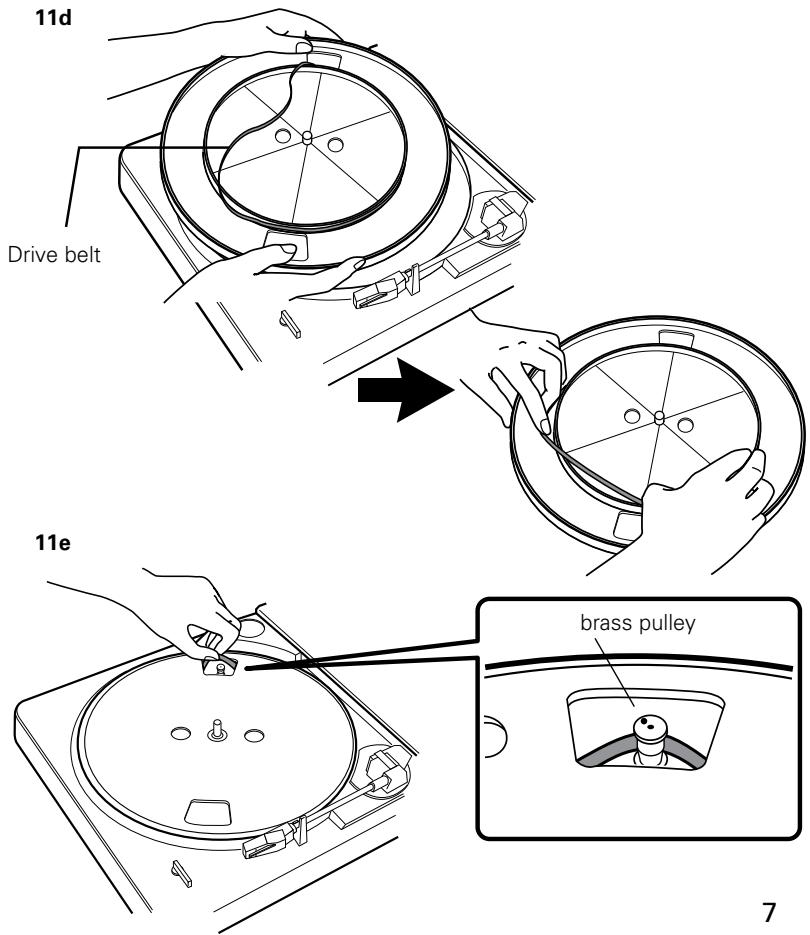
C) With the turntable platter bottom side up, place the belt along the outside wall of the turntable platter's drive rim, making certain that the belt is smooth and flat all the way around (Fig. 11d).
D) Put the turntable back on the center spindle, make certain it is fully seated, and align one of its openings over the motor pulley position.
E) Through the opening, carefully hook the turntable belt with a finger or with the original red ribbon (never use a sharp object) and pull the belt over the brass motor pulley (Fig. 11e). Make certain the belt is not twisted between the pulley and the platter's drive rim.
F) Put the record mat back on the platter.
G) While holding the tone arm in its rest position, slowly turn the platter by hand clockwise at least 10 rotations to clear the mechanism's automatic cycle.
Turntable operates, but no sound at all
- The stylus guard is still in place.
- The tone arm Lift button is pressed in.
- Amplifier controls set incorrectly: wrong input selected, tape monitor on, speakers switched off, etc.
- Check the stylus on phono cartridge for correct placement. Refer to the instructions for replacing the stylus on page 6.
Turntable operates, but no sound, or sound not loud enough
- If the turntable is connected to an AUX (high-level) input: The Pre-amp Selector Switch may be set to the "PHONO" position (phono-input level). Move switch to "line" position.
- The input gain of the amplified speaker or similar device may be too low.
- The stylus assembly may not be fully seated in the cartridge body. (See Fig. 10 on page 6.)
Sound is very distorted
- Turntable connected to an amplifier's PHONO input: If the pre-amp switch is set to the "LINE" position (AUX high-level output), a phono input will be overloaded.
Record/Tone Arm moves slightly up and down
- Usually this is a normal condition and not a problem. If this causes the turntable to be unable to track the record, please contact your dealer or our service department. Make very certain the surface upon which the turntable is resting is not picking up vibrations from the floor or walls, or from direct speaker sound.
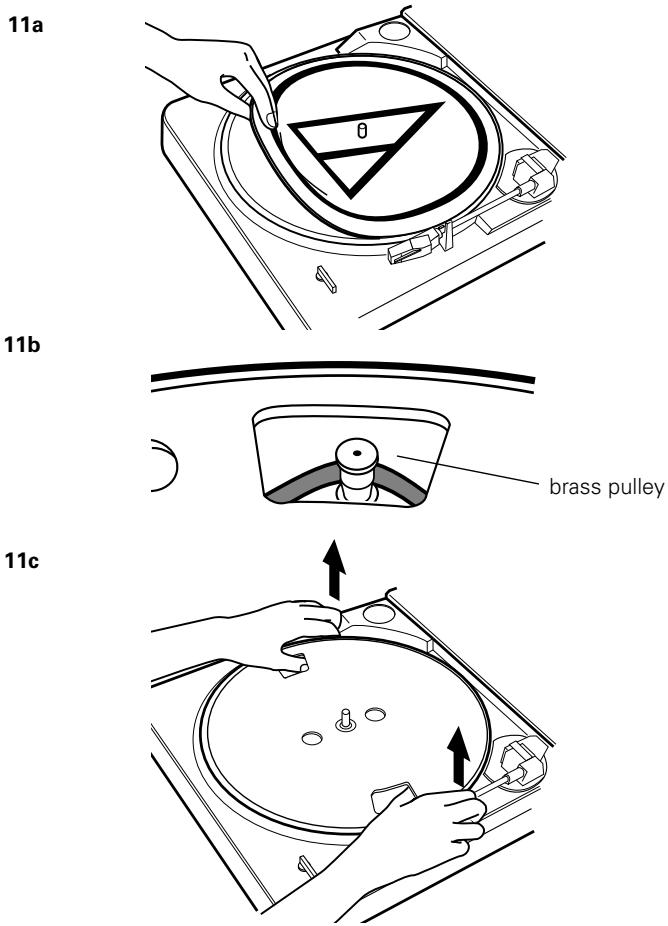
Figure 11 - Checking the drive belt
Tips For Better Performance
Tips For Better Performance
- When opening or closing the turntable cover, handle it gently, moving it either at the center or equally from both sides.
- Do not touch the stylus tip with your fingers; avoid bumping the stylus on the turntable mat or a record's edge.
- Clean the stylus tip frequently, using a soft brush with a back-to-front motion only.
If you use a stylus cleaning fluid, use it very sparingly. - Wipe the dust cover and turntable housing gently with a soft cloth. Use only a small amount of mild detergent solution to clean the turntable and dust cover.
- Never apply harsh chemicals or solvents to any part of the turntable.
- Prior to moving the turntable, always unplug it from the AC outlet and fasten the tone arm on the tone arm rest with the vinyl twist-tie.
Specifications
| Type | Belt drive turntable, fully automatic |
| Platter | Aluminum |
| Motor | DC servo-controlled |
| Speeds | 331/3 RPM, 45 RPM |
| Wow and flutter | Less than 0.25% (WTD) @ 3 kHz (JIS) |
| Signal-to-noise ratio | >50 dB (DIN-B) |
| Cartridge | Integral Dual Moving Magnet™ stereo cartridge with diamond stylus |
| Output level | |
| Pre-amp "PHONO" | 2.5 mV nominal at 1 kHz, 5 cm/sec |
| Pre-amp "LINE" | 150 mV nominal at 1 kHz, 5 cm/sec |
| Phono pre-amp gain | 36 dB nominal, RIAA equalized |
| Power | 120V AC, 60 Hz, 3W (U.S. and Canada) |
| Dimensions | 360.0 mm (14.17") W x 97.5 mm (3.84") H x 356.0 mm (14.02") D |
| Net weight | 2.98 kg (6.6 lbs.) |
| Furnished accessories | Dual RCA (female) to 3.5 mm ('/8") mini-plug (male) stereo adapter cable; dual RCA (female) to 3.5 mm ('/8") mini-plug (female) stereo adapter cable; 45 RPM adapter |
| Replacement stylus | ATN3600L |
One-Year Limited Warranty
Audio-Technica brand products purchased in the U.S.A. are warranted for one year from date of purchase by Audio-Technica U.S., Inc. (A.T.U.S.) to be free of defects in materials and workmanship. In event of such defect, product will be repaired promptly without charge or, at our option, replaced with a new product of equal or superior value if delivered to A.T.U.S. or an Authorized Service Center, prepaid, together with the sales slip or other proof of purchase date. Prior approval from A.T.U.S. is required for return. This warranty excludes defects due to normal wear, abuse, shipping damage, or failure to use product in accordance with instructions. This warranty is void in the event of unauthorized repair or modification, or removal or defacing of the product labeling.
For return approval and shipping information, contact the Service Dept., Audio-Technica U.S., Inc., 1221 Commerce Drive, Stow, Ohio 44224.
Except to the extent precluded by applicable state law, A.T.U.S. will have no liability for any consequential, incidental, or special damages; any warranty of merchantability or fitness for particular purpose expires when this warranty expires.
This warranty gives you specific legal rights, and you may have other rights which vary from state to state.
Outside the U.S.A., please contact your local dealer for warranty details.