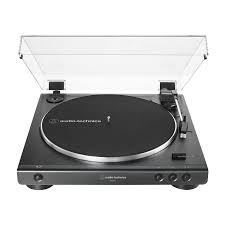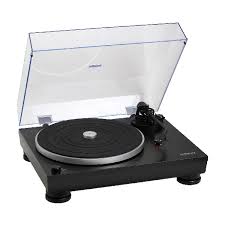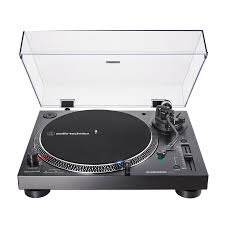
AT-LP5 - Turntable AUDIO TECHNICA - Free user manual and instructions
Find the device manual for free AT-LP5 AUDIO TECHNICA in PDF.



User questions about AT-LP5 AUDIO TECHNICA
0 question about this device. Answer the ones you know or ask your own.
Ask a new question about this device
Download the instructions for your Turntable in PDF format for free! Find your manual AT-LP5 - AUDIO TECHNICA and take your electronic device back in hand. On this page are published all the documents necessary for the use of your device. AT-LP5 by AUDIO TECHNICA.
USER MANUAL AT-LP5 AUDIO TECHNICA
Installation and Operation Pages 2-7
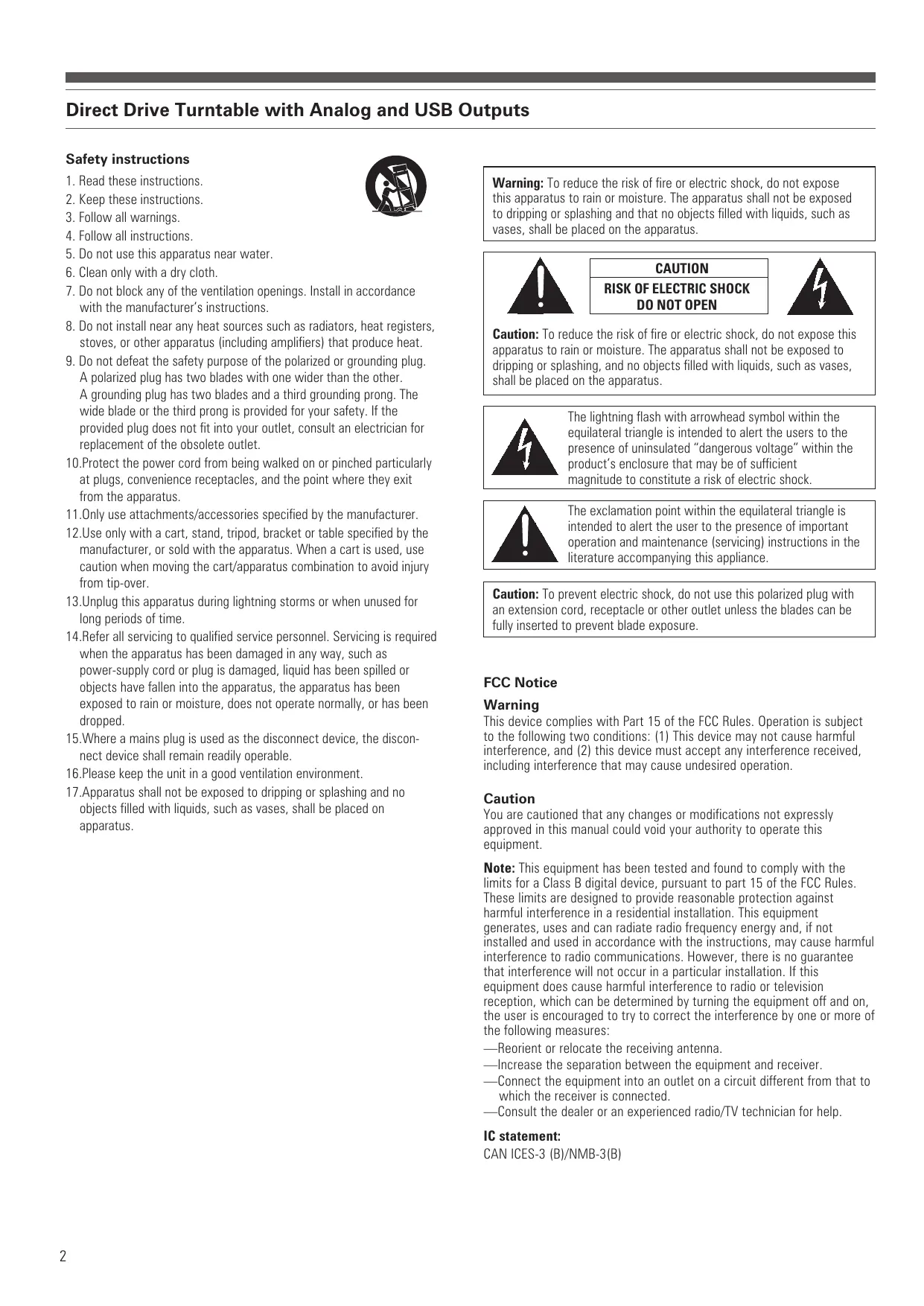
Direct Drive Turntable with Analog and USB Outputs
Safety instructions
- Read these instructions.
- Keep these instructions.
- Follow all warnings.
- Follow all instructions.
- Do not use this apparatus near water.
- Clean only with a dry cloth.
- Do not block any of the ventilation openings. Install in accordance with the manufacturer's instructions.
- Do not install near any heat sources such as radiators, heat registers, stoves, or other apparatus (including amplifiers) that produce heat.
- Do not defeat the safety purpose of the polarized or grounding plug. A polarized plug has two blades with one wider than the other. A grounding plug has two blades and a third grounding prong. The wide blade or the third prong is provided for your safety. If the provided plug does not fit into your outlet, consult an electrician for replacement of the obsolete outlet.
- Protect the power cord from being walked on or pinched particularly at plugs, convenience receptacles, and the point where they exit from the apparatus.
11.Only use attachments/accessories specified by the manufacturer. - Use only with a cart, stand, tripod, bracket or table specified by the manufacturer, or sold with the apparatus. When a cart is used, use caution when moving the cart/apparatus combination to avoid injury from tip-over.
- Unplug this apparatus during lightning storms or when unused for long periods of time.
14.Refer all servicing to qualified service personnel. Servicing is required when the apparatus has been damaged in any way, such as power-supply cord or plug is damaged, liquid has been spilled or objects have fallen into the apparatus, the apparatus has been exposed to rain or moisture, does not operate normally, or has been dropped.
15.Where a mains plug is used as the disconnect device, the disconnect device shall remain readily operable. - Please keep the unit in a good ventilation environment.
- Apparatus shall not be exposed to dripping or splashing and no objects filled with liquids, such as vases, shall be placed on apparatus.

Warning: To reduce the risk of fire or electric shock, do not expose this apparatus to rain or moisture. The apparatus shall not be exposed to dripping or splashing and that no objects filled with liquids, such as vases, shall be placed on the apparatus.

CAUTION RISK OF ELECTRIC SHOCK DO NOT OPEN

Caution: To reduce the risk of fire or electric shock, do not expose this apparatus to rain or moisture. The apparatus shall not be exposed to dripping or splashing, and no objects filled with liquids, such as vases, shall be placed on the apparatus.

The lightning flash with arrowhead symbol within the equilateral triangle is intended to alert the users to the presence of uninsulated "dangerous voltage" within the product's enclosure that may be of sufficient magnitude to constitute a risk of electric shock.

The exclamation point within the equilateral triangle is intended to alert the user to the presence of important operation and maintenance (servicing) instructions in the literature accompanying this appliance.
Caution: To prevent electric shock, do not use this polarized plug with an extension cord, receptacle or other outlet unless the blades can be fully inserted to prevent blade exposure.
FCC Notice
Warning
This device complies with Part 15 of the FCC Rules. Operation is subject to the following two conditions: (1) This device may not cause harmful interference, and (2) this device must accept any interference received, including interference that may cause undesired operation.
Caution
You are cautioned that any changes or modifications not expressly approved in this manual could void your authority to operate this equipment.
Note: This equipment has been tested and found to comply with the limits for a Class B digital device, pursuant to part 15 of the FCC Rules. These limits are designed to provide reasonable protection against harmful interference in a residential installation. This equipment generates, uses and can radiate radio frequency energy and, if not installed and used in accordance with the instructions, may cause harmful interference to radio communications. However, there is no guarantee that interference will not occur in a particular installation. If this equipment does cause harmful interference to radio or television reception, which can be determined by turning the equipment off and on, the user is encouraged to try to correct the interference by one or more of the following measures:
—Reorient or relocate the receiving antenna.
—Increase the separation between the equipment and receiver.
- Connect the equipment into an outlet on a circuit different from that to which the receiver is connected.
—Consult the dealer or an experienced radio/TV technician for help.
IC statement:
CANICES-3(B)/NMB-3(B)
Introduction
Thank you for purchasing this AT-LP5 Direct Drive Analog and USB Turntable. Audio-Technica brings its legendary quality and audio fidelity to the authentic home-use turntable. In the box, you'll find everything you need to transfer your classic LP collection to digital files: Audio-Technica's AT-LP5 stereo turntable, complete with USB output that allows direct connection to your computer; Audacity recording software for MAC or PC; USB cable and an RCA / RCA stereo adapter cable. This turntable also includes an integral dual-magnet Audio-Technica exclusive AT95EX cartridge, sophisticated J-shaped tonearm, and offers a built-in switchable phono/line pre-amplifier that provides connection to a stereo system equipped with either phono or line-level inputs.
The AT-LP5 Direct Drive Turntable has the following features:
- Audio-Technica AT95EX Dual Moving Magnet stereo cartridge with replaceable stylus
- Exclusive Audio-Technica AT-HS10 Lightweight Headshell
- Cast aluminium record platter with rubber mat
- Selectable internal stereo phono pre-amplifier
- Stereo RCA analog outputs
J-shaped tonearm assembly with:
- Adjustable counterweight
- Anti-skate adjustment
- Tonearm lift with hydraulic action and lift lever
- Tonearm rest with locking mechanism
- USB output—no special drivers required for direct connection to your computer
- Direct drive high-torque motor
- Selectable 33/45 RPM speeds
- Adjustable feet for leveling
- Hinge mounting points with screws for optional removable hinged dust cover
To assure maximum satisfaction from this product, please read the information and follow the instructions presented in this manual. Please keep the manual in an accessible location for future reference. We suggest that you save all packaging materials for possible future storage, moving, or shipping.
Caution: To avoid stylus damage, make certain the included stylus guard is in place whenever the turntable is being installed, moved, or cleaned.
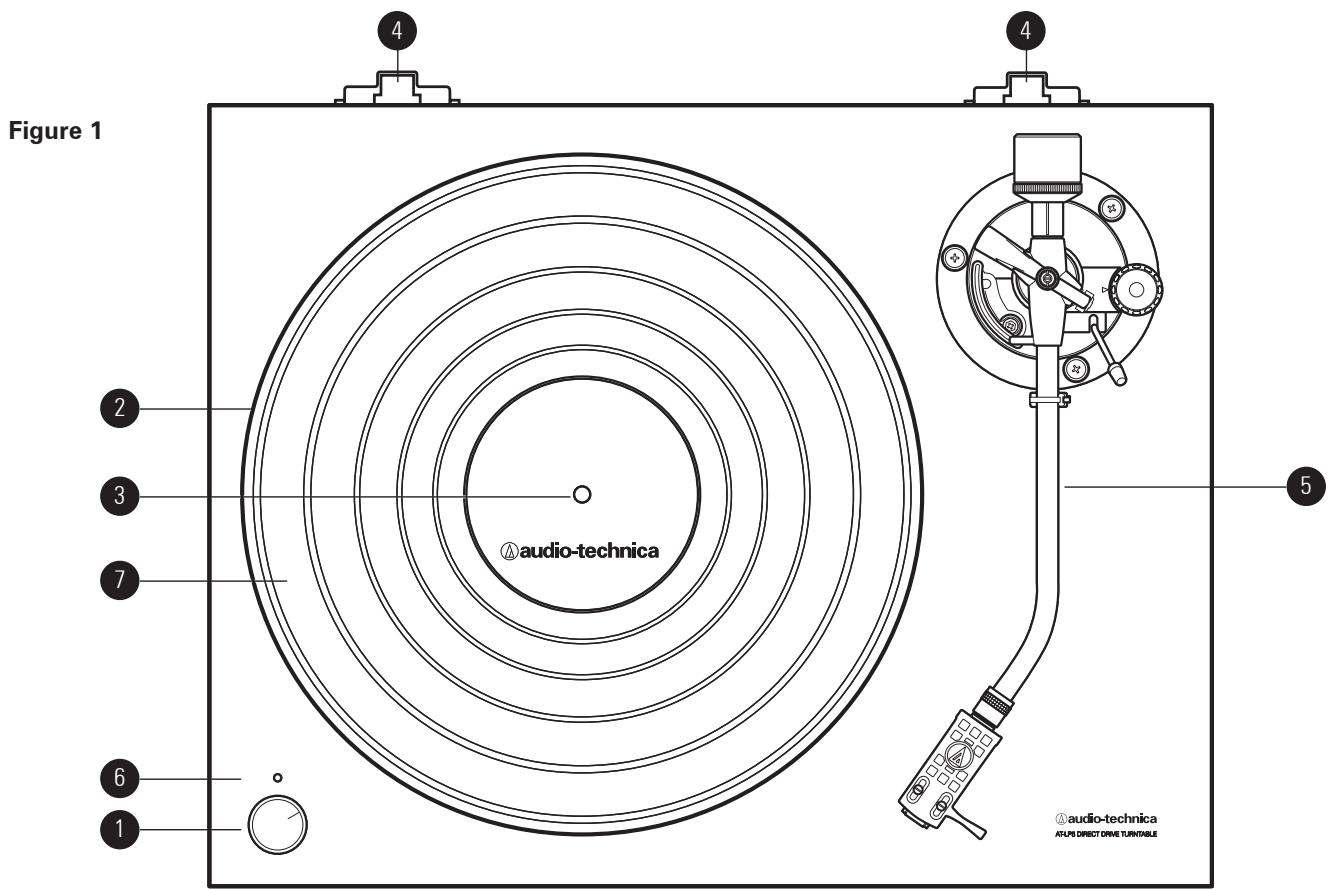
- 33 / STOP / 45 STANDBY AND SPEED SELECTOR KNOB Selects 33 or 45 RPM platter speed and starts/stops the motor.
- PLATTER Cast aluminium platter mounts directly to center spindle/motor shaft.
-
CENTER SPINDLE Precision-machined platter mount on motor shaft.
-
DUST COVER HINGE HOLDERS Attachment points for removable hinged dust cover.
- TONEARM ASSEMBLY Refer to Figure 2 on page 4 for details.
- ON/OFF INDICATOR LIGHT
- RUBBER MAT
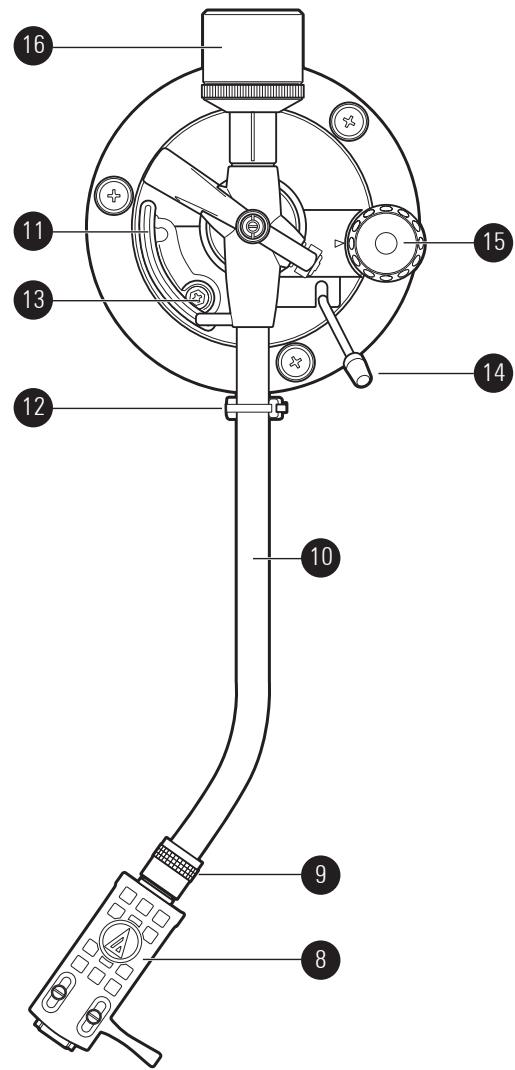
Tonearm Assembly Diagram
Figure 2
- HEADSHELL and CARTRIDGE
Exclusively high performance AT95EX cartridge is mounted with headshell.
AT-HS10 light weight headshell suits perfectly with J-shaped tonearm.
- HEADSHELL LOCKING RING
Rotate counter-clockwise (to the left) to draw the inserted.
headshell firmly into its seated, locked position. Rotate the ring a full turn to the right to permit removal of the headshell.
- TONEARM
J-shaped tonearm geometry reduces tracking error.
- TONEARM LIFT
Elevates tonearm above record surface.
- TONEARM REST WITH LOCKING CLAMP
Locking clamp secures tonearm during transport.
Used to set the amount of tonearm lift.
Controls action of tonearm lift. (Note: Lift mechanism is hydraulically
damped to slow tonearm descent.)
- ANTI-SKATE CONTROL
Applies a small outward force to the tonearm, counteracting the tendency
of the tonearm to move inward toward the center of the record when
- COUNTERWEIGHT
Balances the tonearm and provides adjustment for proper downward
tracking force on the stylus.
Rear View Diagram
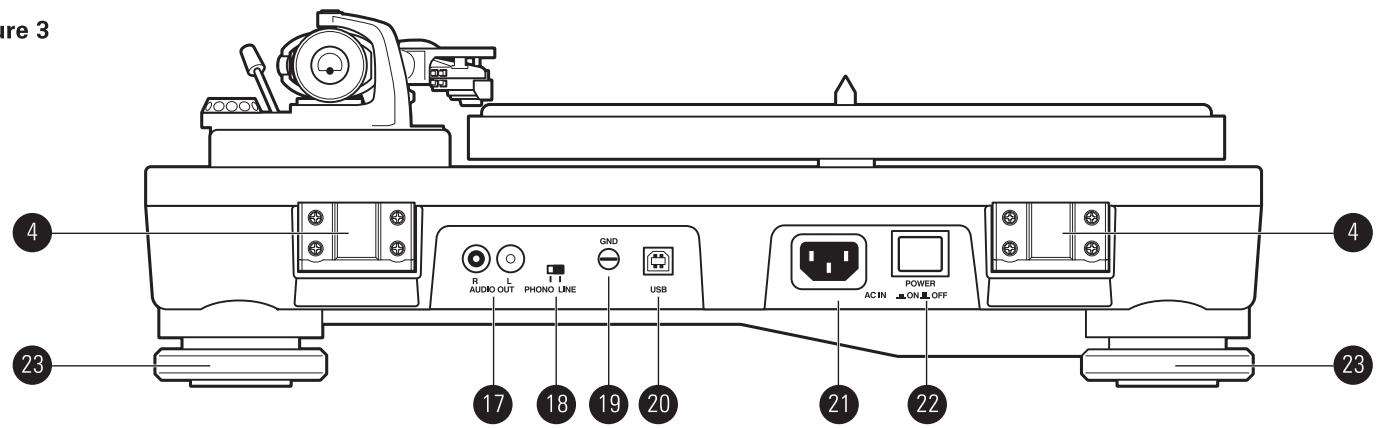
Figure 3
- RCA STEREO ANALOG OUTPUT
Use these terminals to connect the RCA stereo cable with attached
grounding to the phono input terminals or line input of your amplifier.
- PRE-AMPLIFIER SELECTOR SWITCH
Allows the internal stereo phono pre-amplifier to be bypassed when the
turntable is used with amplifiers having magnetic phono inputs.
- GROUND TERMINAL
Use this terminal to connect the grounding line of the RCA cables to the
ground terminal of the amplifier.
- USB OUTPUT
Use this output to connect your turntable to the USB input of your
computer.
- AC INLET
To connect the power cord supplied with the unit.
- ON/OFF SWITCH
Use this switch to switch on / off power to the turntable.
- ADJUSTABLE FEET FOR LEVELING
Rotate feet to adjust leveling.
Unpacking
Carefully unpack the turntable and verify that the following parts are included and intact:
Rubber mat
- Dust cover (above the turntable)
- Platter (under the turntable)
- Counterweight (accessory section)
- AT-HS10 headshell with pre-mounted AT95EX Dual Moving Magnet stereo cartridge (accessory section)
Exclusive AT-HS10 Lightweight Headshell
Power cable
USB cable
- Dual RCA male to dual RCA male cable with grounding line
Audacity software (CD)
WE RECOMMEND THAT YOU SAVE ALL PACKAGING MATERIALS FOR POSSIBLE FUTURE STORAGE, MOVING OR SHIPPING.
Assembling the Turntable
The AT-LP5 requires some assembly before first use.
IMPORTANT: Do not connect the AC power cable until assembly is complete.
Setting the Pre-amplifier Selector Switch
For increased flexibility of use, this turntable has an internal stereo phono pre-amplifier. The pre-amplifier selector switch located in the rear panel of the turntable [See Figure 3, page 4, #18], selects the internal stereo pre-amplifier (LINE), or bypasses the pre-amplifier (PHONO OUT) for use with systems having specialized magnetic phono input sockets. The audio output cable's Red RCA-type plug is the Right channel; the White plug is the Left channel.
If the system you are using has a phono input, set the pre-amplifier selector switch to the PHONO position and connect the turntable's output cables to the phono inputs on your system, observing Red for Right channel and White for Left channel, in addition connect the grounding line attached to the stereo RCA / RCA cables to the ground terminals.
If your system does not have a magnetic phono input, set the pre-amplifier selector switch to LINE and connect the turntable's output to the Auxiliary (AUX) or other high-level inputs on your system, observing Red for Right channel and White for Left channel.
When using the turntable with a computer sound card, set the switch to LINE and connect the turntable's stereo output to the audio line input on the computer sound card. Note: An audio adapter (not included) may be required to interface the two RCA outputs (L + R) of the turntable to the computer sound card input.
Assembling the Tonearm
- Remove the nylon tie used to secure the tonearm during shipment. Temporarily secure the tonearm in the tonearm rest with the locking clamp. [Figure 2, page 4, #12].
- Attach the headshell/cartridge assembly by inserting it into the socket at the front of the tonearm [See Figure 4]. It is good practice to hold the headshell assembly by the left and right edges of the headshell to reduce the possibility of damaging the stylus or disrupting the cartridge wiring.

Figure 4 - Headshell with fitted cartridge
- While holding the headshell in position, rotate the headshell locking ring counter-clockwise (to the left). As the ring turns, it pulls the headshell into its seated position (rotate the ring a full turn to the right to permit removal of the headshell).
- With the black dial toward the front, use a screwing motion to attach the counterweight to the arm extending back from the tonearm pivot [Figure 2, page 4, #16]; the counterweight will engage the spiral groove in the rear arm section and move forward.
Assembling the Turntable Platter and Rubber Mat
- Carefully place the turntable platter on the center spindle, making certain the platter is fully seated on the spindle.
- Place the rubber mat on top of the platter.
Assembling the Dust Cover
- Insert the T-shaped ends of the dust cover hinges into the two hinge receptacles located at the back of the turntable housing. When properly installed, the flat part of the cover hinges should be facing away from the turntable housing at about a 45^ angle.
- Holding the dust cover over the turntable, carefully guide the cover hinges into the two slots molded into the rear of the dust cover. The springs in the hinges allow the cover to be held open at about a 45^ angle if desired. (Note: There is only one "open" position; the hinges do NOT permit the cover to stand "straight up.")
- To remove the dust cover from the turntable, gently disengage the hinges from the slots in the cover. This is usually easier when the cover is in the "closed" position. Slowly and carefully lift straight up until the cover is clear of the unit. The hinges may then be removed from the turntable base, if desired.
Setting Tonearm Balance and Tracking Force
To ensure the cartridge tracks properly in a record, the tonearm balance and tracking force must be carefully set to the cartridge manufacturer's specifications. Failure to properly set up the tonearm assembly can cause damage to the cartridge stylus and/or records.
Note: Once the stylus protective cover has been removed and the tonearm locking clamp has been released, take extreme care not to damage the stylus. Do not allow it to drag or scrape across the rubber mat nor the record.
Tonearm Setup
- Set the anti-skate adjustment to "0". [Figure 2, page 4, #15].
- Remove the clear protective stylus cover, carefully sliding it straight forward, off the front of the cartridge.
- Continuing to gently hold the headshell to stabilize the tonearm, release the tonearm locking clamp. At this point, the tonearm is unbalanced and free to swing.
- Continuing to gently hold the headshell, carefully rotate the counterweight until the tonearm is horizontally balanced and hovers freely just above the platter without touching the cartridge on the platter surface.
- Lock the tonearm back into the tonearm rest.
- While holding the counterweight steady, and without any rotation, carefully rotate only the black stylus force gauge ring (which turns independently of the counterweight) until the "0" on the gauge ring lines up with the centerline marked along the top of the rear arm.
- Refer to the cartridge manufacturer's specifications for recommended tracking force. Rotate the entire counter-weight counterclockwise without touching the black gauge ring, moving the counterweight forward, until the desired value on gauge ring lines up with the centerline marked on the rear arm. Refer to the specifications section for tracking force value for the cartridge that shipped with the turntable, typically 2 g for the AT95EX.
Initial Setup (continued)
Setting Anti-skate
A small outward "anti-skating" force can be applied to the tonearm to compensate for the "skating" force that pulls the arm toward the center of the record when rotating. For best performance during normal turntable use, set the anti-skate control knob [Figure 2, page 4, #15] to the same setting as the tracking force dial. Refer to the specifications section for tracking force value of the cartridge that shipped with the turntable.
Analog Audio Connections
Connect the audio output cable to the appropriate input sockets on your amplifier, receiver, powered speakers, soundcard or other device based on the setting of the pre-amplifier selector switch.
Digital Audio USB Connection to Computers with USB Input
The USB cable (included) connects your AT-LP5 turntable to your computer without need for special drivers.
Your Audio-Technica AT-LP5 turntable is supplied with Audacity recording software for your convenience. Please note that other third-party software packages are also compatible with this turntable.
Audacity
Audacity is free software, distributed under the GNU General Public License (GPL). More information and open source code is on the included Audacity CD and on the Audacity website : http://audacity.sourceforge.net
* When using USB output always set the AT-LP5 turntable's Pre-amplifier Selector Switch to the "LINE" position (switch is located on the back of the turntable).
Finally, after all audio connections are made, attach the included AC power cord to the turntable. Then connect the power cord's plug to a convenient AC outlet.
For best results, do not install or operate this unit near conditions of heat, moisture, dust, or heavy vibrations.
Preparing to Play
- Remove the stylus guard from the stylus assembly and unlock the tonearm rest if it is locked.
- Place a record on the rubber mat, lining up its center hole with the center spindle. For 45 RPM records, place the 45 RPM adapter on the center spindle before placing the record on the platter.
Playing a Record
- Press the power button on the rear panel to switch on.
- Set the platter rotation speed (33/45) to match that of the record, the platter begins to rotate.
- Raise the tonearm by lifting the tonearm lift control lever to the UP position.
- Position the tonearm over the desired location (groove) on the record.
-
Lower the tonearm by moving the tonearm lift control lever to the DOWN position. The tonearm descends slowly onto the record and play begins.
-
or - (skipping 2 - 3 - 4)
Use the finger-lift on the headshell assembly to position the tonearm over the desired location on the record. Carefully lower the tonearm to the record surface.
Suspending or Ending Play
- To suspend play, lift the tonearm with the tonearm lift control lever.
- When play is finished, raise the tonearm lift control lever, move the tonearm to the rest position and secure the tonearm with the tonearm locking clamp.
- Turn the speed selector to "Stop" to apply the brake and stop the platter rotation.
- Press the power button on the rear panel to switch off.
Installing a new Cartridge
Mechanical Assembly
- Unpack the cartridge and carefully remove its stylus assembly. Place the stylus assembly out of harm's way. Mount the new cartridge to the headshell assembly. Use the mounting hardware supplied with the new cartridge. Tighten the mounting screws until just snug. Replace the stylus assembly briefly to check for mechanical interference with the mounting hardware. The stylus assembly should click into place. Make certain the new cartridge is properly positioned in the headshell assembly per the manufacturer's instructions. Again remove the stylus assembly for safekeeping.
Electrical Connections
- Four terminals at the rear of the cartridge are colour coded to match standard wiring in stereo tonearms. Connect the cartridge with the slip-on lugs provided on the headshell wiring. NEVER SOLDER TO CARTRIDGE TERMINALS! Heat applied to the terminals will damage the internal cartridge wiring.
- Finally, gently push the stylus onto the cartridge body being careful not to damage the stylus. The stylus assembly should click into place. Replace the headshell assembly onto the tonearm taking care not to damage the stylus assembly.
(Note: After replacing the cartridge, reset the tonearm balance, stylus force and anti-skate based on the cartridge's specifications.)
Using a MC (moving coil cartridge)
- Note that the built-in phono pre-amplifier has a 36 dB gain with an input impedance of 47k ohms and is intended to be used exclusively with moving magnet cartridges such as the supplied AT95EX. When using a moving coil cartridge it is essential to bypass the built in pre-amplifier section switch (Figure 3, page 4, #18) by setting to the phono position. In this case the turntable stereo phono output needs to be connected to an external phono pre-amplifier featuring MC (moving coil) inputs, in order to guarantee the proper gain and the proper impedance load necessary when using an MC cartridge (refer to the specifications of your MC cartridge).
Troubleshooting
Turntable operates but emits no sound or not enough sound.
- Amplifier (system) controls are set incorrectly: wrong input selected, tape monitor on, speakers switched off, etc. Verify proper control settings.
- Stylus is broken or missing. Check the stylus assembly and replace if necessary.
- The stylus assembly may not be fully seated in the cartridge body. Check the cartridge and adjust if necessary.
- The pre-amplifier selector switch of the AT-LP5 is set in the wrong position. Verify that it is set to the correct output to match amplifier input.
- No sound/very weak sound: Phono Out setting into an Aux/Line input.
-
Very loud/distorted sound: Line Out setting into a Phono input.
-
The tracking force is set too heavy (stylus assembly is bottoming out on record). Set tracking force per cartridge manufacturer's recommendation.
- Turntable is picking up excessive vibrations from floor, walls, or nearby speakers. Reduce vibrations or place turntable on sturdy/solid surface.
Turntable operates but stylus "skirts" across record.
- The stylus guard is still in place. Remove the stylus guard.
- The tracking force is set too light. Set tracking force per cartridge manufacturer's recommendation.
- The anti-skate control is set improperly. Verify anti-skate is set for same value as cartridge tracking force.
Record sounds too fast or too slow.
- Turntable is set for wrong speed. Make proper speed selection for record type being played with platter speed selector.
Tips to avoid damage
- Do not touch the stylus tip with your fingers; avoid bumping the stylus on the turntable mat or a record's edge.
- Clean the stylus tip frequently, using a soft brush and a back-to-front motion.
- If you use a stylus cleaning fluid, use it sparingly.
- Never apply harsh chemicals or solvents to any part of the turntable system.
- Prior to moving the turntable, always unplug it from the AC outlet and lock the tonearm on the tonearm rest.
Specifications*
Turntable Specifications
| Type | 2-Speed, fully manual operation |
| Motor | DC motor |
| Drive method | Direct drive |
| Speeds | 33-1/3 RPM, 45 RPM |
| Turntable platter | Die-cast aluminium |
| Starting torque | >1.6 kgf.cm |
| Braking system | Electronic brake |
| Wow and flutter | < 0.2% WRMS (33 RPM) |
| Signal-to-noise ratio | >50 dB |
| Outputs levels | |
| "PHONO" (Pre-amp bypassed) | 4 mV nominal at 1 kHz, 5 cm/sec |
| "LINE" (Pre-amp engaged) | 150 mV nominal at 1 kHz, 5 cm/sec |
| Phono Pre-amp gain | 36 dB nominal, RIAA equalized |
| USB function | |
| A/D, D/A | 16 bit 44.1 kHz or 48 kHz USB selectable |
| Computer interface | USB 2.0 Compliant Windows XP, Vista or MAC OSX |
Tonearm Specifications
| Type | Static balance J-shaped tonearm |
| Effective length | 247 mm |
| Overhang | 17 mm |
| Maximum tracking error angle | Less than 2.5° |
| Stylus pressure adjustment range | 0 to 2.5 g |
| Applicable cartridge weight range (including headshell) | 15 to 20g |
Cartridge and Headshell Specifications
| Cartridge Model | AT95EX |
| Cartridge Type | VM Design Stereo Dual Moving Magnet |
| Recommended load impedance | 47,000 Ohms |
| Output voltage | 4 mV (at 1 kHz, 5 cm/sec) |
| Stylus | 0.3 x 0.7 mil elliptical |
| Tracking force range | 1.5 to 2.5 g (standard 2 g) |
| Cartridge weight | (AT95Ex) 5.7 g |
| Headshell model | AT-HS10 |
| Headshell weight | 10 g |
| Headshell overhang adjustment | ± 5 mm |
General Specifications
| Power supply requirements | 120V AC, 60 Hz (U.S.A) |
| 240V AC, 50 Hz (Australia) | |
| Power consumption | 6W |
| Dimensions | 450.0 mm (17.72") W x 352.0 mm (13.86") D x 157.0 mm (6.1") H |
| Weight | 8.5 kg (18.74 lbs) |
| Accessories included | AT95EX Dual Moving Magnet stereo cartridge with replaceable stylus; Exclusive AT-HS10 Lightweight Headshell; AC line cord; dual RCA (male) to dual RCA (male) stereo cable; 45 RPM adapter; USB cable; recording software |
Audacity :
| System requirements | PC or Mac with an available USB port (USB 2.0 or higher) Mac running OS X 10.4 to 10.10 or PC running Windows (XP and above) |
| Installation | CD-R or CD-RW writer for burning CDs & software installation Includes Audacity software for PC & Mac users |
*Specifications are subject to change without notice.
One-Year Limited Warranty
Audio-Technica brand products purchased in the U.S.A. are warranted for one year from date of purchase by Audio-Technica U.S., Inc. (A.T.U.S.) to be free of defects in materials and workmanship. In event of such defect, product will be repaired promptly without charge or, at our option, replaced with a new product of equal or superior value if delivered to A.T.U.S. or an Authorized Service Center, prepaid, together with the sales slip or other proof of purchase date. Prior approval from A.T.U.S. is required for return. This warranty excludes defects due to normal wear, abuse, shipping damage, or failure to use product in accordance with instructions. This warranty is void in the event of unauthorized repair or modification, or removal or defacing of the product labeling.
For return approval and shipping information, contact the Service Dept., Audio-Technica U.S., Inc., 1221 Commerce Drive, Stow, Ohio 44224. Except to the extent precluded by applicable state law, A.T.U.S. will have no liability for any consequential, incidental, or special damages; any warranty of merchantability or fitness for particular purpose expires when this warranty expires. This warranty gives you specific legal rights, and you may have other rights which vary from state to state.
Outside the U.S.A., please contact your local dealer for warranty details.