
MBC500UV ULTRAVORTEX MATELAS - Mattresses HOOVER - Free user manual and instructions
Find the device manual for free MBC500UV ULTRAVORTEX MATELAS HOOVER in PDF.


User questions about MBC500UV ULTRAVORTEX MATELAS HOOVER
0 question about this device. Answer the ones you know or ask your own.
Ask a new question about this device
Download the instructions for your Mattresses in PDF format for free! Find your manual MBC500UV ULTRAVORTEX MATELAS - HOOVER and take your electronic device back in hand. On this page are published all the documents necessary for the use of your device. MBC500UV ULTRAVORTEX MATELAS by HOOVER.
USER MANUAL MBC500UV ULTRAVORTEX MATELAS HOOVER
This appliance should only be used for domestic cleaning, as described in this user guide. Please ensure that this guide is fully understood before operating the appliance.
Always switch off and remove the charger from the socket before cleaning the appliance or any maintenance task.
This appliance can be used by children aged from 8 years and above and persons with reduced physical, sensory or mental capabilities or lack of experience and knowledge if they have been given supervision or instruction concerning use of the appliance in a safe way and understand the hazards involved. Children shall not play with the appliance. Cleaning and user maintenance shall not be made by children without supervision.
If the power cord is damaged stop using the appliance immediately. To avoid a safety hazard, an authorised Hoover service engineer must replace the power cord.
Never touch the charger with wet hands.
Use only the original charger supplied with the appliance.
Check that your supply voltage is the same as that stated on the charger.
Never charge the batteries in temperatures above 37^ C or below 0^ C .
Plug the charger in to suitable socket outlet and connect the charger cable to the [H] Charger Base. Ensure the product on/off switch button is at the "OFF" position, place the cleaner into the charger base, ensuring the shroud covers the back of the product.
For the cleaner with LED Display . The charging LED indicator* will flash to advise that the product is charging. When the product is fully charged and is still positioned on the charger base, the icon will stop flashing and remain lit.
For the cleaner without LED Display. The charging LED indicator* will illuminate red all the time to advise that the product is charging. When the product is fully charged and is still positioned on the charger base, the red led will remain on.
Before first use, charge your cleaner for at least 24 hours. Do return the appliance to the charger base after use to recharge the batteries. When charging the cleaner, the power switch must be off. If the operating time reduces after repeated use, let the cleaner run until it stops, then recharge for 24 hours and repeat this monthly for best results.
It is normal for the charger to become warm to the touch when charging.
Use only attachments, consumables or spares recommended or supplied by Hoover.
Do not pick up hard or sharp objects, matches, hot ashes, cigarette ends or other similar items.
Do not spray with or pick up flammable liquids, cleaning fluids, aerosols or their vapours.
Do not continue to use your appliance or charger if it appears faulty.
Hoover service: To ensure the continued safe and efficient operation of this appliance we recommend that any servicing or repairs are only carried out by an authorised Hoover service engineer.
Do not use the appliance to clean animals or people.
Keep hands, feet, loose clothing and hair away from rotating brushes.
Do frequently clean the dust cup and filter assembly.
Do not unplug the charger by pulling on the power cord.
Unplug the charger in the event of prolonged absence (holidays, etc.). Recharge appliance again before use as batteries may self discharge over increased periods of storage.
Static electricity: Some carpets can cause a small build up of static electricity. Any static discharge is not hazardous to health.
Do not use your appliance out of doors or on any wet surface or for wet pickup.
Do not replace the batteries with non-rechargeable batteries.
End of Product Life Battery Disposal
If the appliance is to be disposed of the batteries must first be removed. The appliance must be disconnected from the supply mains when removing the battery. Dispose of the batteries safely. Used batteries should be taken to a recycling station and not disposed of with household waste. To remove the batteries, please contact the Hoover Customer Centre or proceed according to the following instructions.
IMPORTANT: Always fully discharge the batteries before removal.
Run the cleaner until the batteries are completely empty.
Remove the front cover and top cover from the unit. Unscrew 7 screws and open the unit. Unscrew 6 screws and open the battery pack. Disconnect the cables and remove the batteries. Remove the wires which connect to the batteries one by one to make sure no short circuit.
NOTE: Should you experience any difficulty in dismantling the unit or for more detailed information on treatment, recovery and recycling of this appliance, please contact your local city office or your household waste disposal service.
FEATURES
A On/Off Switch
B LED Display*
C LED Charging Indicator
D Removable Crevice Tool
E Suction Inlet
F Power Nozzle*
G Dust Bin Flap
H Charger Base
I Cardboard Ruler
J Charger
K Dust Brush
L Dust Bin Open Trigger
M Flexible Hose
N Crevice Brush
STORAGE/CHARGING
UNIT STORAGE
The product is designed to sit in the charging base on a flat surface or vertically if wall mounted. [1] For tidy storage wrap excess cord on the back of the charging base and exit either side or bottom.
To Wall Mount (Tools required: Screwdriver and drill)
- Place the cardboard ruler against the mounting surface. Mark the centres of the holes.
- Move base then drill 4.8mm holes.
- Fit wall plugs.
- Position base into the insert screws, and move down to ensure the base is fixed firmly to the wall.
CHARGING & LED INDICATOR**
Ensure the product on/off switch** button is at the "OFF" position, then place the cleaner into the base, ensuring the shroud covers the back of the product.
For the cleaner with LED Display . The charging LED indicator* will flash to advise that the product is charging. When the product is fully charged and is still positioned on the charger base, the icon will stop flashing and remain lit.
For the cleaner without LED Display . The charging LED indicator* will illuminate red all the time to advise that the product is charging. When the product is fully charged and is still positioned on the charger base, the red led will remain on.
NOTE: Use only the charger supplied with your cleaner to recharge the unit.
IMPORTANT: Before first use, charge your cleaner for at least 24 hours. When charging the cleaner, the power switch must be off. It is normal for the charger to become warm to the touch when charging. If the operating time reduces after repeated use, let the cleaner run until it stops, then recharge for 24 hours and repeat this monthly for best results. Never charge the batteries in temperatures above 37^ or below 0^ .
HOW TO USE
- Remove the cleaner from the storage base.
- Push the switch to 'ON' position to begin cleaning and to turn off move the switch to the 'OFF' position.
- For the cleaner with Power Nozzle, push the switch to "1" position to begin cleaning and to turn off move the switch to the "0" position, push the switch* to "Power Nozzle Icon" to turn on the power nozzle.
- Empty and clean the unit and filter after each use.
- To empty the bin pull the bin open trigger, the dust bin flap will open and stop about 45^ position for debris to empty easily. [2]
IMPORTANT: For best results clean the filter after each use.
LED DISPLAY*
This cleaner is equipped with a LED display. When the product is on, the display will report following information:
Battery Level Indicator*:
4 bars = 100% charge
3 bars = 75% charge
2 bars = 50% charge
1 bar = 25% charge
- 0 bar <= 5% charge
*certain models only ** May vary according to model
ATTACHMENTS
Removable Crevice Tool
Fit the crevice tool onto the dust cup to clean corners and hard to reach areas. [3]
Dust Brush
Fit the dust brush onto the dust cup to clean keyboards and other delicate areas. [4]
Power Nozzle*
To use fit onto the container. Ideal for deep cleaning textile surfaces (i.e. sofas) and pet hair removal. Move it steadily backwards and forwards. Do not keep the power nozzle stationary while the brush is rotating. [5]
To clean - Detach nozzle from the container and then remove hair/threads collected on the brush with scissors if necessary.
Crevice Brush*
Insert one end of flexible hose into the Suction Inlet, and attach the Crevice Brush to the other end of the flexible hose. [6]
FILTER MAINTENANCE
- Pull the trigger and the dust bin flap will open automatically. [7]
- Rotate and remove the filter. [8]
- The container may be cleaned using a wet cloth.
- The filter should be washed in hand warm water DO NOT USE DETERGENTS. Make sure all are completely dry before replacing in your cleaner.
- Replace the filter into the dust container and close the dust container flap.
End of Product Life Battery Disposal
If the cleaner is to be disposed of the batteries should be removed. Used batteries should be taken to a recycling station and not disposed with household waste.
IMPORTANT: Always fully discharge the batteries before removal.
Battery removal [9]
Remove the front cover and top cover from the unit. Unscrew 7 screws and open the unit. Unscrew 6 screws and open the battery pack. Disconnect the cables and remove the batteries.
NOTE: Should you experience any difficulties in dismantling the unit or for more detailed information about treatment, recovery and recycling of this product, please contact your local city office, your household waste disposal service.
IMPORTANT INFORMATION
Hoover spares and Consumables
Always replace parts with genuine Hoover spares. These are available from your local Hoover dealer or direct from Hoover. When ordering parts always quote your model number.
Cloth Filter S103 35601645
Microfiber Filter S105 35601646
The Environment:
The symbol on the product indicates that this product may not be treated as household waste. Instead it shall be handed over to the appliance collection point for recycling of electrical and electronic equipment. Disposal must be carried out in accordance with the local environmental regulations for waste disposal. For more detailed information about treatment, recovery and recycling of this product, please contact your local city office, your household waste disposal service or the shop where you purchased the product.
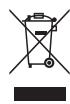

This product complies with the European Directives 2006/95/EC, 2004/108/EC and 2011/65/EC.
HOOVER Limited Pentrebach, Merthyr Tydfil, Mid Glamorgan CF48 4TU
YOUR GUARANTEE
The guarantee conditions for this appliance are as defined by our representative in the country in which it is sold. Details regarding these conditions can be obtained from the dealer from whom the appliance was purchased. The bill of sale or receipt must be produced when making any claim under the terms of this guarantee.
Subject to change without notice.
INSTRUCTIONS DE SECURITE D'UTILISATION
OPLADEN & LED INDICATOR**
He paçnbjIyTe nIi He co6bpaIte ropUoyne JxNdkOCTn, YnCTaIuene cpeIcTBA, a3p03oJI nn npoune napbl.
He nCnoJIb3yIte np6Op nn 3apJdHoe yCTpojCTBO, ecn OHN HeNCnPpABHbl.
CepBucnacny6a Hoover:Дя obecneueHn npoJoxTeIbHO, 6e3OpacHO n 3OfKeTnBHO pa60tI daHHoro 6bITOBORo 3JeKTPoPnp6Opa IIO6o BnD peMOHTa peKOMeHdyetc npoN3BOuNTb TOnbKO CpeuaJIncTOM ABTOPn3OBaHHoro cepBucnco zentpa Hoover.
He npb3yntecb npi6opom dIra OUcTkn XJNBOTbIx IJIIN JIOJe.
He npn6njaTe Bpaaiouiecra 9 pykaM,Horam,6oTaioeierC Odekne BOLOcam.
YacTo OuyuTaIe TbJInc6OpHnK nΦnIbTp Bc6ope.
Hnkorga He OTKlouaIte 3apJdHOe yCTPOIcTBO,NOTAHyB 3a Ka6eJIb.
Ötklouhyte 3apädHoe yctpoiCTBO B Cnyuae ДпnteIbHORO OTCyTCTBnA (kaHkynbl i T.d.) Перзардite nbIeCOC CHOBa NepeДИСПОЛБ3OBaHnEM, TaK KaK aKKymJYrTOP MOKeT CaMOPa3PraNTbCRA 3a NepeNOD XpaHeHnIA.
Ctataueckoe 3neKtpnuecTBO: HeKOToPbI TINbI KOBpObBIX NOKpbITN cnoc6hbl HaKaanlNaBaTb He6oBbWOn 3apRd CtaTuueckoTO 3neKtpnueCTBa. Pa3pRd CTAuueckoTO 3neKtpnueCTBa He npEcdTabJrEt ONaCHOCTn DnI 3DOpOBbY.
HnkOrda He nCnoIb3yIte BaI NbIeCOC BHe IOMa, Ha BJaXHbIX NOBepxHOCTaX nn n dJa c6opajnKoCTe.
3aMeHy MoXHO IpOIN3BOIDnTb TOLbKO Ha aKKyMylTOpHbIe 6aTapei.
Ytuln3aunno nocne konca cpoka cnxkbia kkymnylTopa
Pn Heo6xOJIMOCtynyTIN3aunnp6opB, BbInbTe n3 Hero aKKymJrTOpbl. BbHmaj aKKymJrTOpbl, OTKIOUHTpe np6op OT 3eKTPocETn. CObIOaJIte npabnla texnkn 6eONacHOCTn npn yTIN3aunn aKKymJrTOpOB. NcnoIb3OBaHHbIe aKKymJrTOpbl Heo6xOJIMo cDaBaTb B CneuaJIbHbI pyHKT npnemHa HcmeuHBaTb C obUYHbIMN 6bITOBbIMN OTXODAMn. YTo6bl N3BJeCb aKKymJrTOpbl, CBJXTEcB C KIneHTCKoN CnyX6BoHo Hoover nnn cNeDuYnte npnbDeEHbIM dAlee nHCTpyKUIm.
BHIMAHHE! Npeed Tem KaK n3Bney 6aTapeu n3 nbIneCOca, OHN DoJXHbI 6bITb NOJIHOCTbIO pa3PRAKeHbl.
BkIIOUHTe nbIEcOC Do nOJIHO pa3PraKn aKKymyIaTOPOB.
ChHIMTepeHIOUBNBEXHOOKpbIiKcCpN6opa.OTBepHnTe7BnHTOBnOTKpoTne pblncoc.OTBnHTte 6 BnHTOB n OTkpoTne akKymyJrTOphbI OTceK.OTcoEHNHTb PPOBOa n I3BLeu b AkKymyJrTOphbI 6aTapeN. PO OndHomO tCOeHNHTb PPOBOa, POnBeHeHHbI K AkKymyJrTOpaM, YTo6bI He DoNyCTnTb KOPOTKO 3aMbKaHIn.
PIMMEUHNE: B clyuae BO3HNKHOBENNAKHX-Jn60 CLOXHOCTeCpa36bOPKO 6Ioka nI npn Heo6xOJIMOCNTI ONyueHNA 6OJIe NOIPO6HOIHΦOpMaun O6ObcLyXNBaHNN, yTNIIN3aUN I nepepa6OTKe DaHHOROnp60pa, o6paITecb B MeCTHbE OprAHbI BnactN INN B MeCTHyIO ClyX6y NoyTIIN3aUN 6bITOBbIX OTXODOB.
OCHOBHbIe 3JIEMEHTbl
A IpekeKluOaTeIb BkN/BbIKl(On/Off)
B CBeToaNoAdHbI dncnnei*
C CBeToDnOHyBnHnDnKaTop 3apJKn
D CbeHna ⅢeBbHa hacdaKa
E Bcabsbaiooee OTBepctne
F MmHn Tpy6o 9eTka*
G OTKnDna KpbIka KOHTeHepa dna c6opa nbiln
H 3APJHHA8BA3A
I KpoHtEIN DnI KpeJIeHnHa CTeHy
J 3apdHoe yctpoiCTBO
K 电TkaIydaJIeHnIbIIN
L Khonka oTKpbBaHn KpbIuK KOHTeHepa dIy c6opa nbinn
M Tn6kn WJaanr*
N 电eBaaHacaKa*
XPAHEHNE/3APRAKA
XPAHEHNEI3DEJIIN
CbeMHaJueIeBaHaHacaKa
UctaHOBtue eJeEbyu Hacaiky Ha nbIe6OpHnK, UTO6bI npOnbIeocOtsb yrIbI n TpydHDoCTynHbIe MeTa. [3]
UeTka dnydaneHn blin
UctaHOBITE KNTOCHy dIy ydaneHnI IyIeNc6OpHNK, YTO6bI pOnbJIeocCtB KlaIBaNAtpy N DpyrIe ChvBCTBnteHbIe MeCTa. [4]
MmHn Typ6o ueTka*
ДуИ ИСЮЛБЗОВАЙУСТАНБОЛЕ HA KОТЕнHep.ИДeЯЛБН OПДXОДNТ ДЯ OЧТК N T EKTДЛБНБИ X NOBEPHXOCTE (HANPIMEP, DAHAHOB) И ydALENH WIEPCTN JIWBOTBHy. Плавно НЕ релемець Впебеди и НAZд. Рп Bрашени N IETKIN He DeprжITE HACAKY NOБИБЕНО MоUCHOSTN Ha ODOM MeCEМ. [5]
Длг OчNTК -СнIMITE Hacdky C KOHTeHepa, a 3atem ydANITE BONcB/HITK, co6paHbIte Ha icTe, c nOmoIbIO HOxMHU (pnp Heo6XDMIOCTH).
UeBbHaHacdKa*
BCTaBbTe OINKoHeu r6KOTo 1nAHaRa BO BCaCbBaOoOee OTBepCTne, IN3akpeNITe 1eJeByU HacaIky Ha npyrom KOHcE r6KOTo 1nAHaRa. [6]
OBCLYJXUBAHNEΦNJbTPA
- Notarynte 3a KhoNky, n OTKnDnaK pblka KOhteHepa IJIc6Opa nbIIN OTKpoETcABTOMaTneckn. [7]
- ПовернITE И ВьибTe ФильТр. [8]
- OuICTNb KOHTeHep npn nOMOUs BnaJxHO TKAHN.
- Cneyet npombyt fnoiTp tenno BDOIO c tempeatypo yenobueckoro TeJA. 3a npeaetcN cnoIb3OBaTb uCTraJeMoIOuune cpeCTBa.Cneyet y6eNTBCRA,TO BCE DeTALIN NOLHOCTBIO BbcOXNI, IpexJe Yem OH 6yDy TcAtoHOBHeHa MeCTO.
- 3aMeHInTe ΦnIbTp B KOHTeHHepe dIra c6Opa nbIIN 3aKpOte OTKnIDHyIO KpbIiKy.
Yttnn3aunno nocne KOHc a cpoKa cnjKbIakkymyIraTopa
Bcnyae ytni3aunn nbIeocca, aKKymyIaTOhpHbIe 6batape nOJXhbl 6bIb N3BLeueHbI. IcNoJIb3OBaHNbIe aKKymyIaTOhpHbIe 6batape nOJXhbl 6bIb nepeDaHbI Ha cTAHcHIO nepepa6OTKn, 3aPepaTcR bbl6paCbIBaTb 6batape BmecTe C 6blTObbMycopom.
BHIMAHHE! Npeed Tem KaK n3Bnueb 6aTapeu n3 nbInecoca, OOn dOJIxHbI 6bITb NOINHOCTbIO pa3pJxHebl.
U3BneueHne aKKymyIaTOPHO6aTapeu [9]
CHMNITe nepeHIOI u BepxHIOI KpbIuKc n c pIbn6opA. OTBEPHTe 7 BNHTOB u OTKPOITE PbJIeOC. OTBUNHTe 6 BNHTOB u OTKPOTE aKKyMylTOpHbI OTeK. OTcoEduHNTb IpoBOa Iu3BLeuek AkyMlyTOpHbI 6aTaPeI.
PIMMEUHHE: B cnuea Tpydnoctei npn pa36opke bnyleocasa nnn IyraonnyuHenn 6olee noDpO6Hou HOpmaunn no yxody, BOCCTaHOBLeHENIO INpepea60Te DaHHoro yCtpoiCTBa, cneuyet o6paTntbca K rOPOdckm BlaTcA, B cnjXbY tnuIImaunn 6blTOBbX OTOXOB.
BAXHAR MHOPMALU
3anachbte yactn npacxohbte matepnaIbI KOMnHn Hoover
Pn 3aeme He cuaet HcnoNb3yte ToIbKO opnHnAbHbIe 3anaChbIe Chactn n paXoJHbIe MaTePnAbIy bKOMnAHmHo Hoover. Ix MoKHO npIO6pctn y Baawero MeCTHO nepa KOMnAHmHo Hoover iI neHcnOpedcTBeHNO B KOMnAHmHo Hoover. Pn oΦopMneHm 3aka3aHa 3anaChbIe Chactn O6h3aTeBHO YkA3bBaIYe HomeR moDeI nbIeNEcoA.
MaTepuTaBbI NlbTp S103 35601645
MnKpoΦn6pObBmΦnIbTp S105 35601646
Okpykaioza cpea:
KneMo Ha daHmO yCTPOiCtBe O3Haayet, YTO erO HeJIb3aYyTNIm3nPObaTb KAK 6bITOBIe OTxOdbI. Ero HeoXoIMo DocABTb B COOTBETCTBYIOU pNHTK TYTNIm3aUN eNKePTnCeHEKORO I NKeTPOHORO 60pOBOAHINr YTNImaun DOnJHn PNOBOIDtBC B COOTBETCTBN C MeCThBM 3AKOHDAteJIbCTBOM NO TYTNImaun OTXoDB. IInI NaOpYEHHa 60nee npodpOHOH INOpOPMaUN NO xyDOy, BOcCTAHOBNEHIO INpepeA60Te DAHOHOYrOCTOBA 6opATNTceB K rOpOdCKMn BnactR, B cLny6y yTNImaUNs 6bTobBIX OTXoDBIN M BAar3IN, B KOTOPOM 6bINO KynIHeo n3dJeHme.

