DIGITAL 2 - TV Accessories MELICONI - Free user manual and instructions
Find the device manual for free DIGITAL 2 MELICONI in PDF.



User questions about DIGITAL 2 MELICONI
0 question about this device. Answer the ones you know or ask your own.
Ask a new question about this device
Download the instructions for your TV Accessories in PDF format for free! Find your manual DIGITAL 2 - MELICONI and take your electronic device back in hand. On this page are published all the documents necessary for the use of your device. DIGITAL 2 by MELICONI.
USER MANUAL DIGITAL 2 MELICONI
natural_image
Close-up of a black plastic electronic component with four cylindrical batteries inserted (no visible text or symbols)Thank you for choosing a Meliconi remote control.
Keep this booklet for future reference.
The spare remote control Meliconi Personal 2 is ideal to replace the original remote control of LG television sets with built-in digital decoder.
After inserting the batteries the remote control is ready to use, without any setup required.
WARNING: Do not expose the remote control to sources of excessive heat.
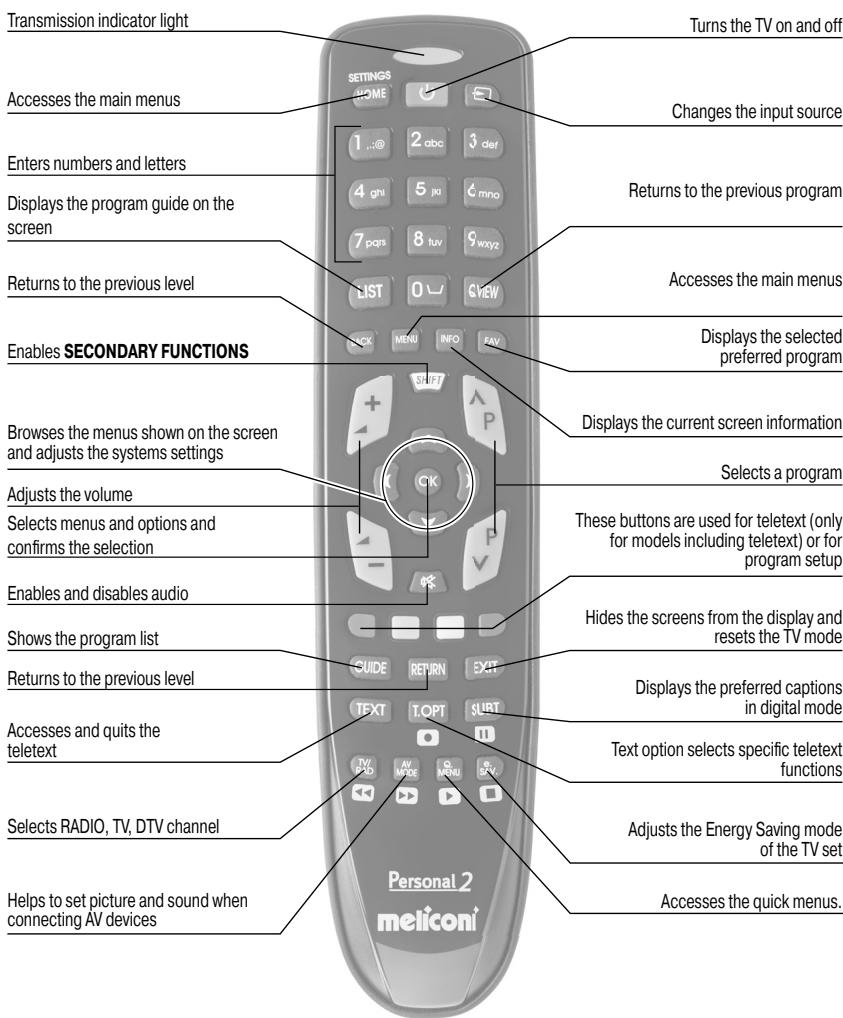
BUTTON AND FUNCTION USE
text_image
Transmission indicator light Turns the TV on and off Accesses the main menus Changes the input source Enters numbers and letters Returns to the previous program Displays the program guide on the screen 7 pqs 8 tuv 9 wxyz Returns to the previous level Accesses the main menus Enables SECONDARY FUNCTIONS Displays the selected preferred program Browsers the menus shown on the screen and adjusts the systems settings Displays the current screen information Selects a program Adjusts the volume These buttons are used for teletext (only for models including teletext) or for program setup Selects menus and options and confirms the selection Enables and disables audio Hides the screens from the display and resets the TV mode Shows the program list Returns to the previous level Displays the preferred captions in digital mode Accesses and quits the teletext Text option selects specific teletext functions Selects RADIO, TV, DTV channel Adjusts the Energy Saving mode of the TV set Helps to set picture and sound when connecting AV devices Personal 2 meliconiFITTING THE BATTERIES
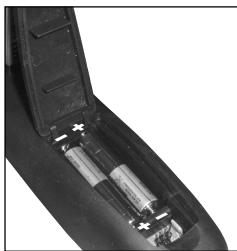
The remote control requires 2 new 1.5 V AAA/LR03 alkaline batteries. Fit them as shown.
Try pressing a number and check that the indicator light remains on continuously until the button is released. If the light blinks, the inserted batteries are low, therefore they need replacement.
natural_image
Close-up of a black plastic electronic component with four cylindrical batteries inserted (no visible text or symbols)Do not leave exhausted batteries in the remote control. They may leak, damaging the remote control
SECONDARY FUNCTIONS
Secondary functions are functions that are used only occasionally or are of minor significance.
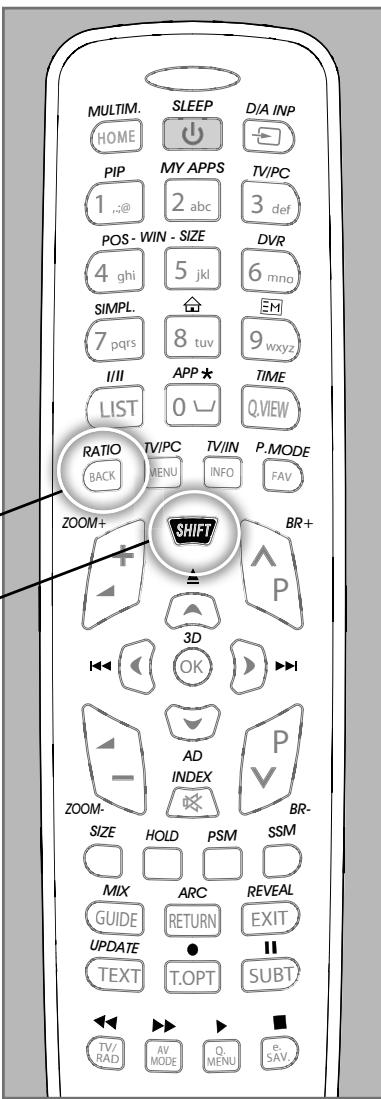
To enable them, press the SHIFT button and, at the same time, press the button corresponding to the desired function, which can be identified by the drawing.
For example, to enable the RATIO function, press the SHIFT button and press the BACK button at the same time, aiming the remote control towards the TV set.
text_image
MULTIM. HOME SLEEP ↓ D/A INP PIP MY APPS TV/PC 1 ,:@ 2 abc 3 def POS - WIN - SIZE 4 ghi 5 jkl 6 mno SIMPL. 7 pqrs 8 tuv 9 wxyz I/II APP * TIME LIST 0 ∪ Q.VIEW RATIO TV/PC TV/IN P.MODE BACK MENU INFO FAV ZOOM+ SHIFT BR+ 3D OK ►►►►►►►►►►►►►►►►►►►►►►►►►►►►►►►►►►►►►►►►►►►►►►►►►►►►►►►►►►►►►►►►►►►►►►►►►►►►►►►►►►►►►►►►►►►►►►►►►►►►►◄ AD INDEX BR- SIZE HOLD PSM SSM MIX ARC REVEAL GUIDE RETURN EXIT UPDATE ● || TEXT T.OPT SUBT ←→ → → ←→ TV/RAD AV MODE O.MENU e.SAV.If you need assistance, please contact us by e-mail: telecomandi@meliconi.com
The EC declaration of conformity is available on the Internet at www.meliconi.com/doc/gbpersonal2
2-year WARRANTY
Keep the purchase docket to validate the warranty. The warranty ceases to be valid if the product is tampered with or used incorrectly.
Remote control model Personal 2
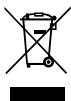
The symbol of a bin crossed out on the appliance indicates that the product at the end of its life cycle should be disposed of separately from other refuse. The user will, therefore, have to hand over the appliance at the end of its life cycle to a proper recycling centre for electronic and electrotechnical refuse, or give it over to the seller each time a new, similar appliance is purchased. Proper separate refuse collecting for the later initiation of the appliance sent for recycling, treatment and environmentally friendly disposal, contributes to the negative disposal of the product by the user with health and encourages the recycling of the material used to make it. Illegal disposal of the product by the user will result in the application of sanctions imposed by the Legislative Decree 22/1997 (article 50 and those following to the Legislative Decree 22/1997).