
JERRY MAX - Smartphone WIKO - Free user manual and instructions
Find the device manual for free JERRY MAX WIKO in PDF.
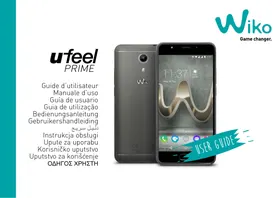


| Product type | Smartphone |
| Brand | WIKO |
| Model | JERRY MAX |
| Dimensions | Approximately 145 x 72 x 10 mm |
| Weight | Approximately 160 g |
| Screen | 5-inch touch screen |
| Power | Rechargeable 2200 mAh lithium-ion battery (non-removable) |
| Charger | 5V/1.55A power adapter |
| SIM cards | Dual SIM (micro-SIM) |
| Memory | microSD card up to 64 GB |
| Main functions | Calls, SMS, 4G, Wi-Fi, Bluetooth, GPS, camera, fingerprint reader, airplane mode |
| Connectivity | 4G, 3G, EDGE, GPRS |
| Camera | Rear camera with LED flash, front camera |
| Maintenance and cleaning | Dry cloth, no solvent |
| Safety | Instructions: avoid shocks, humidity, extreme temperatures; use approved accessories |
| Spare parts and repairability | Non-removable battery; repair by authorized technician |
| General information | WIKO SAS, 1 rue Capitaine Dessemond, 13007 Marseille, France |
Frequently Asked Questions - JERRY MAX WIKO
User questions about JERRY MAX WIKO
0 question about this device. Answer the ones you know or ask your own.
Ask a new question about this device
Download the instructions for your Smartphone in PDF format for free! Find your manual JERRY MAX - WIKO and take your electronic device back in hand. On this page are published all the documents necessary for the use of your device. JERRY MAX by WIKO.
USER MANUAL JERRY MAX WIKO
USER GUIDE
ufeel
PRIME
User guide
The contents of this manual may differ in certain respects from the description of your phone depending on its software version and your telephone operator.
CONGRATULATIONS!
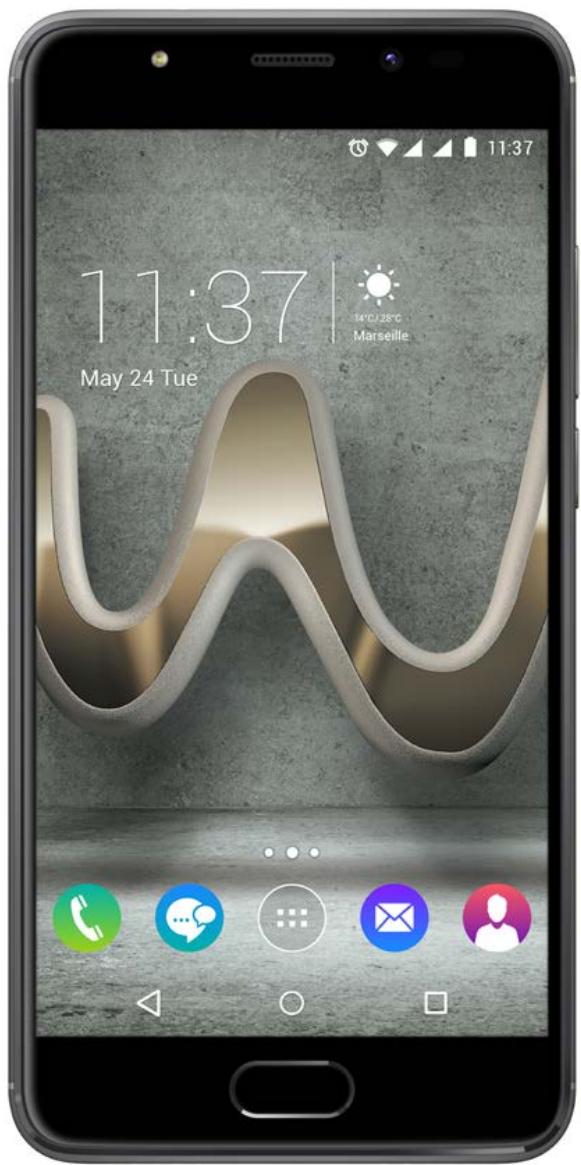
You have just purchased your WIKO U FEEL PRIME mobile phone. This guide contains all the information needed to use the phone so that you can quickly familiarise yourself, we hope, with the world of WIKO.
Copyright © 2016 WIKO
The information contained in this manual may not be disclosed to third parties or reproduced in any form whatsoever without the express written consent of WIKO.
Trademarks
WIKO is a registered trademark of WIKO SAS.
Disclaimer
This manual has been prepared with the utmost care and attention and is designed to guide you through the functions and features of your device. However, the information and recommendations contained herein do not constitute a guarantee under the Applicable law. WIKO reserves the right to change or modify the information contained in this manual at any time
Limitation of Liability
All content and services accessible through this device are the exclusive property of third parties and are protected by the relevant laws (copyright, patent, licence and/or other intellectual property laws). These services are for your own personal non-commercial use. It is not permitted to use any content or services without prior written permission of the content owner. You may not copy, publish, transfer, sell, create derivative works or exploit in any manner or medium any content or services displayed through this device.
THIRD PARTY CONTENT AND SERVICES ARE PROVIDED "AS IS." WIKO DOES NOT GUARANTEE THE CONTENT OR SERVICES SO PROVIDED, EITHER EXPRESSLY OR IMPLIEDLY, FOR ANY PURPOSE WHATSOEVER. WIKO EXPRESSLY DISCLAIMS ANY WARRANTIES OF MERCHANTABILITY OR FITNESS FOR A PARTICULAR PURPOSE. WIKO DOES NOT GUARANTEE THE ACCURACY, VALIDITY, LEGALITY, OR COMPLETENESS OF ANY CONTENT OR SERVICES MADE AVAILABLE THROUGH THE DEVICE.
WIKO has no control over the content and services provided by third parties via networks or transmission devices. Moreover, third-party services may be terminated or interrupted at any time without notice. Therefore, WIKO makes no representation or warranty whatsoever as to the availability of any third party content or service and expressly declines any responsibility for such termination or interruption.
WIKO cannot in any way be held responsible for the processing and/or monitoring of third party content and services accessible through this device. Any
question or request relating to the content or services should be addressed directly to the respective content or service provider.
An independent third party operator provides the SIM card and the network or system (mobile or other) on which this device operates. WIKO expressly declines any responsibility in respect of the function, availability, coverage, services, or network or system capacity (mobile or other). The responsibility of WIKO and its authorised after-sales service is limited only to the cost of repair and/or replacement of the unit during the warranty period.
WIKO IS NOT LIABLE IN THE CASE OF NEGLIGENCE, WHETHER CONTRACTUAL OR BASED ON TORT, FOR ANY DIRECT, INDIRECT, INCIDENTAL OR SPECIAL DAMAGE, LEGAL FEES, EXPENSES, OR ANY OTHER DAMAGES RESULTING FROM THE USE BY YOU OR ANY THIRD PARTY OF THE CONTENT OR SERVICES ACCESSIBLE THROUGH THIS DEVICE.
SOME JURISDICTIONS MAY NOT ALLOW THE EXCLUSION OF IMPLIED WARRANTIES OR THE LIMITATION OF THE CONSUMER'S LEGAL RIGHTS, THEREFORE THIS STATEMENT MAY NOT APPLY TO YOU.
What's in the Box:
- WIKO U FEEL PRIME mobile phone
- AC adaptor
- Micro USB cable
- Hands-free kit
- User guide Non-removable battery
Getting to Know Your Phone
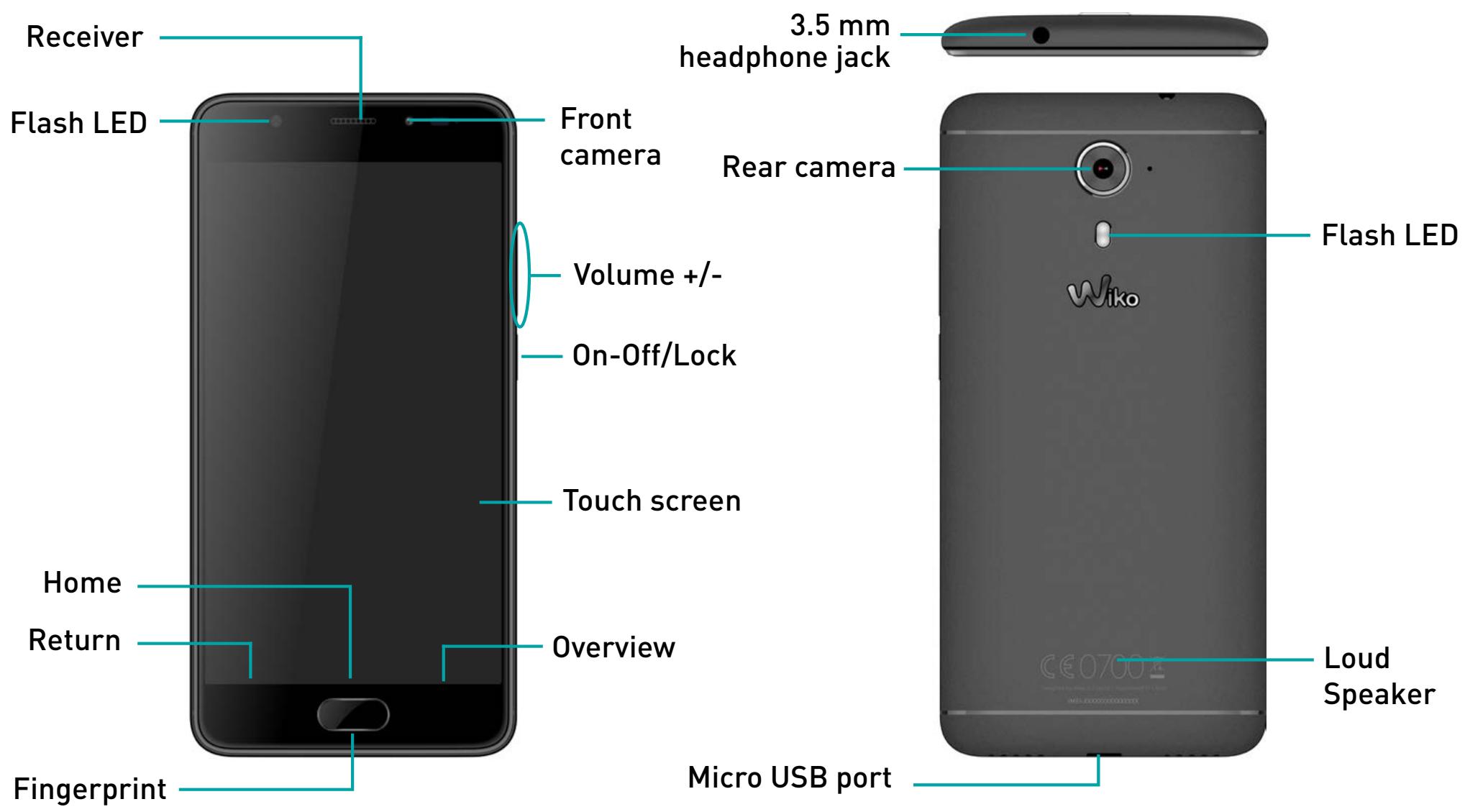
~ The buttons on your phone
| Button | Function |
On/Off  | Press and hold the button to turn the phone on or off. Press the button lightly to lock the touch screen. |
| Home [x470s] | Returns to the home screen and opens Google NOW (press and hold the button). |
| Overview [3x78] | Opens the list of recent applications. |
| Return [4503] | Returns to the previous screen. Closes the onscreen keyboard. |
| Volume [xATH] | Increases or decreases the call volume, the ringtone, music, games and other audio functions. Switch the ringtone to silent mode when the phone rings. Press and hold on Volume- to enable the meeting profile. |
Getting Started
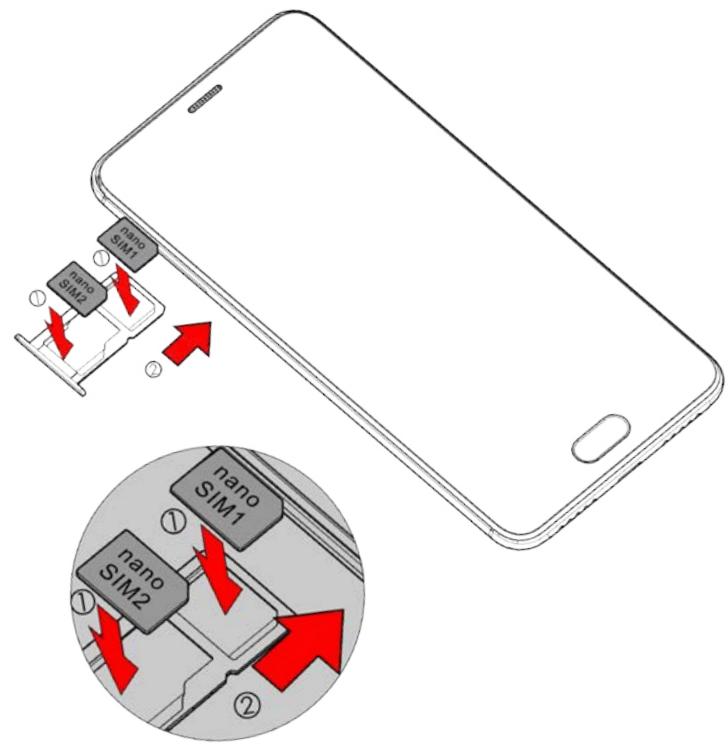
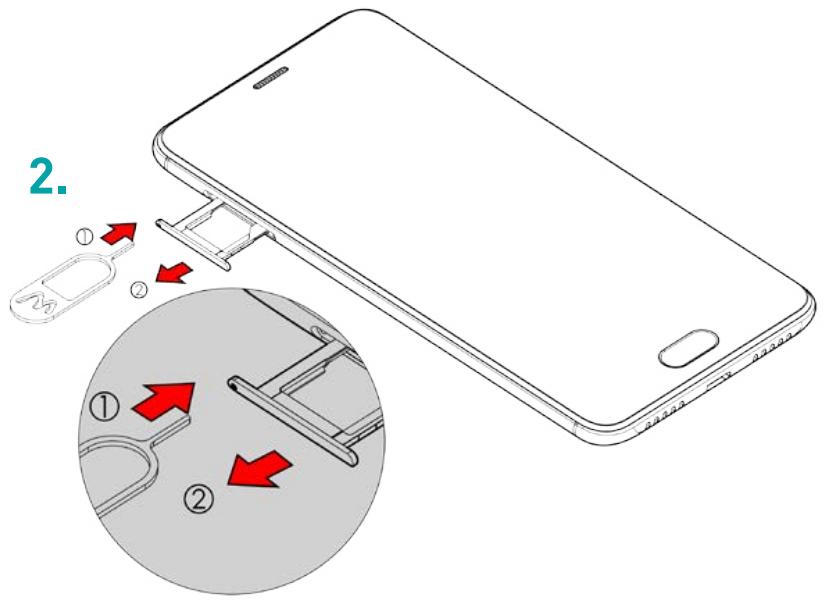
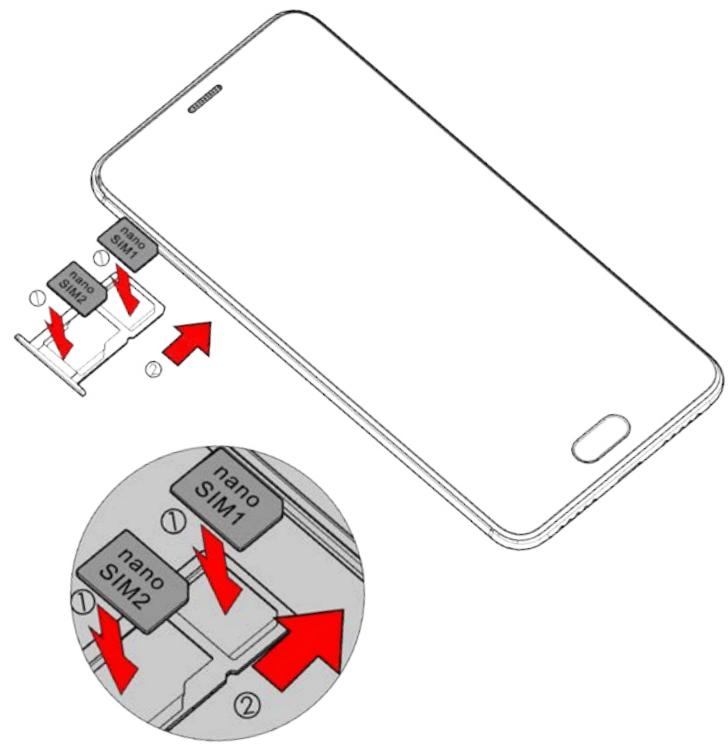
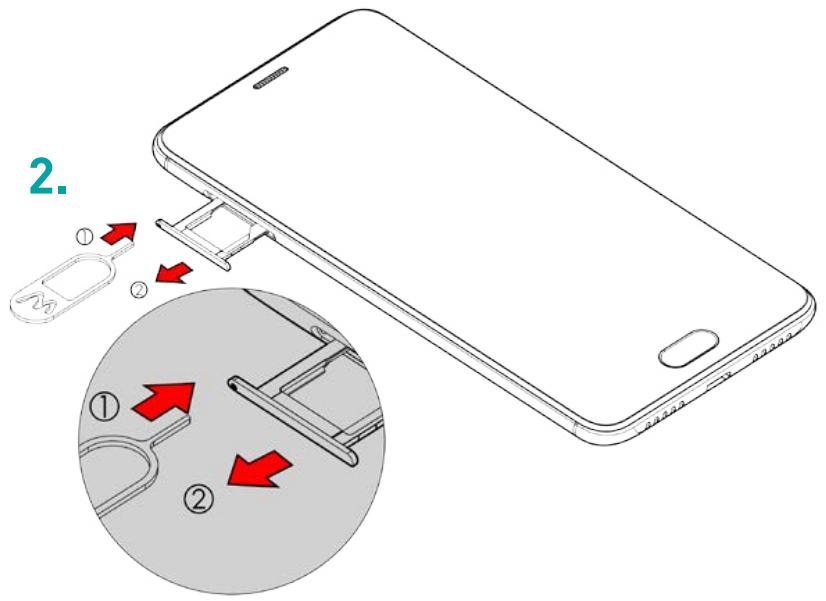
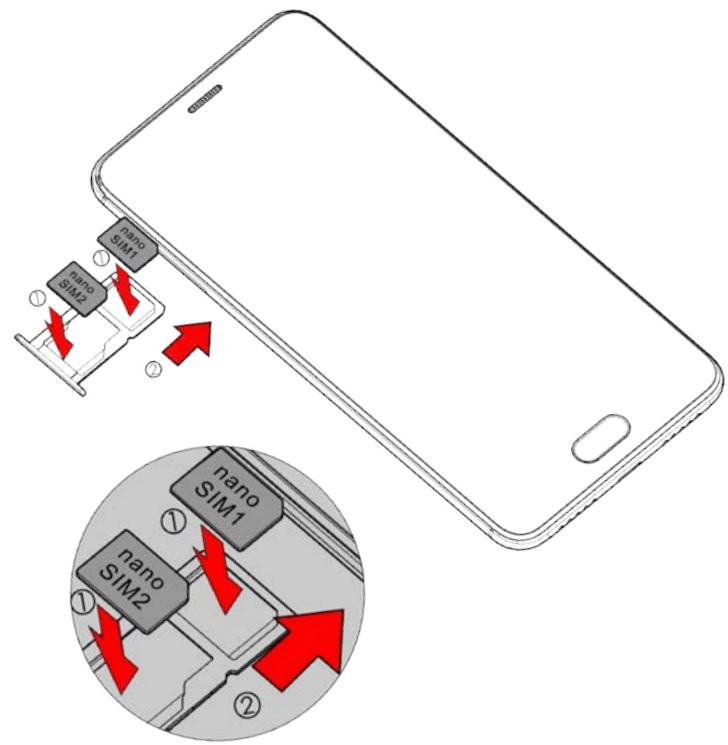
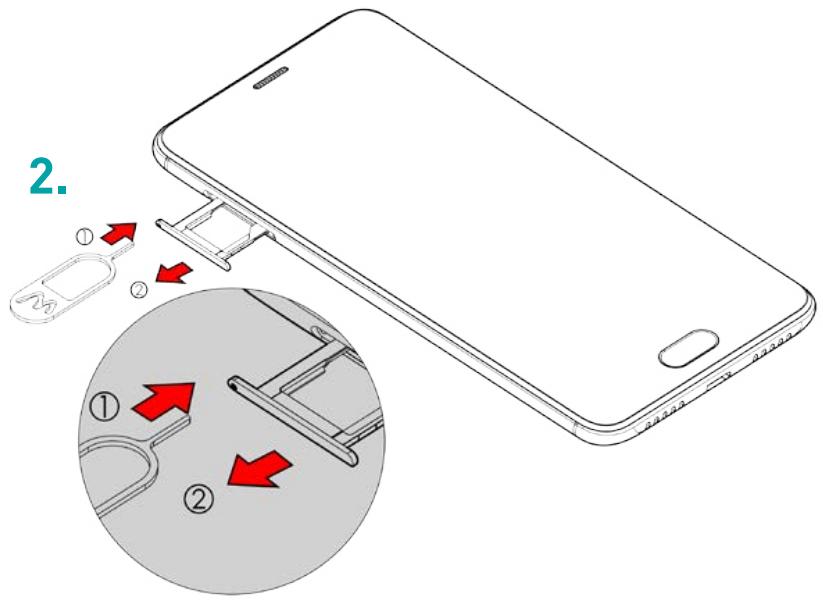
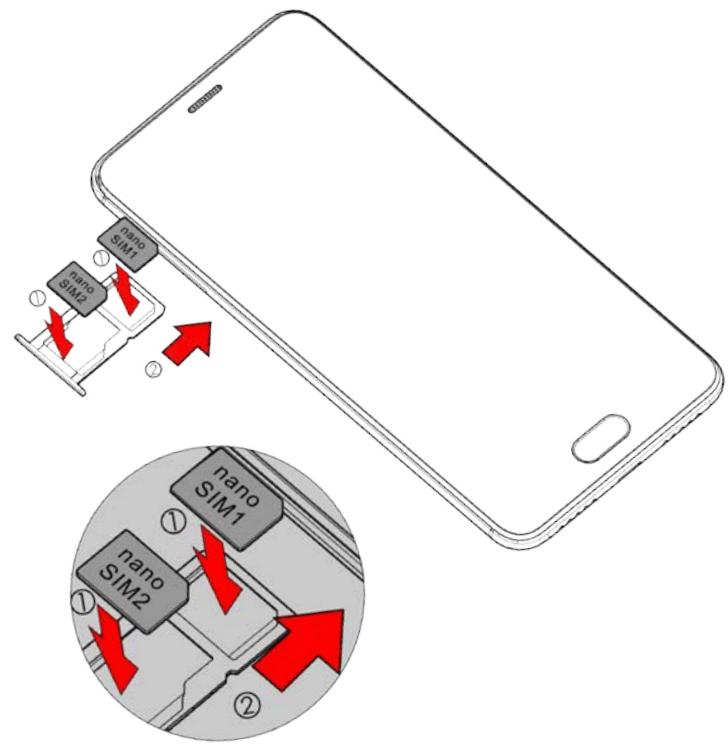
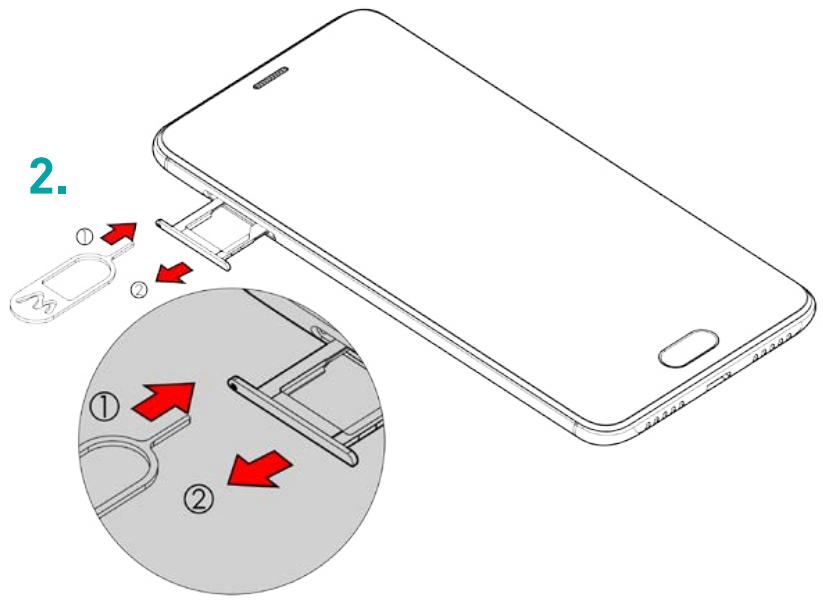
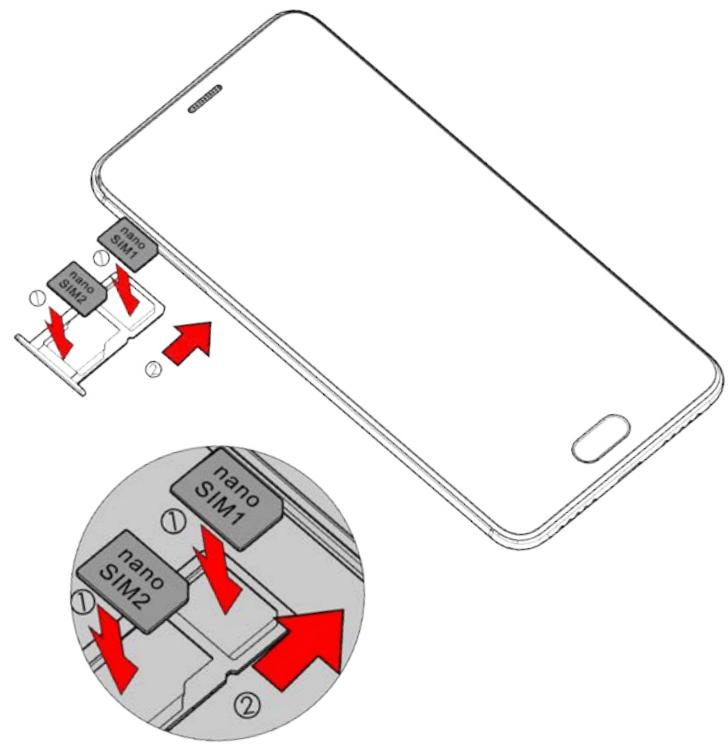
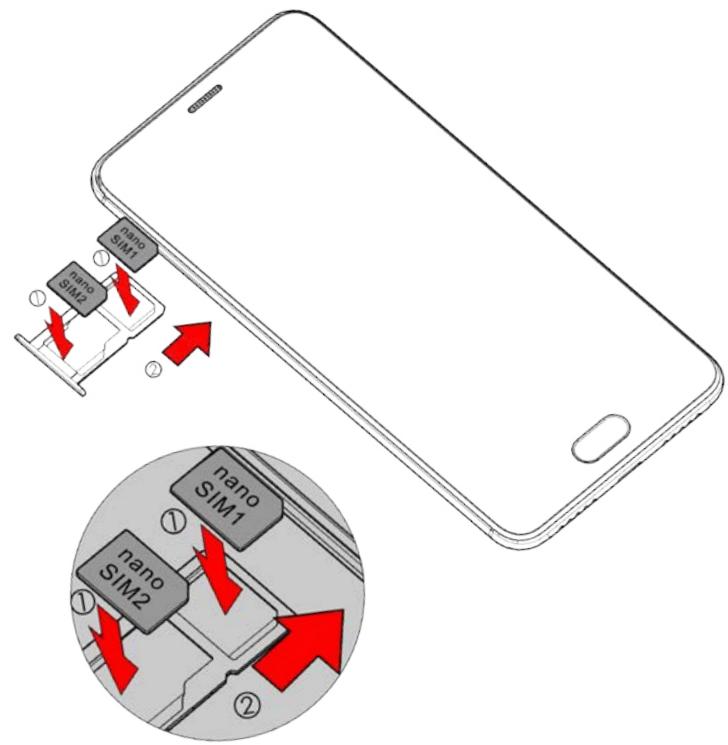
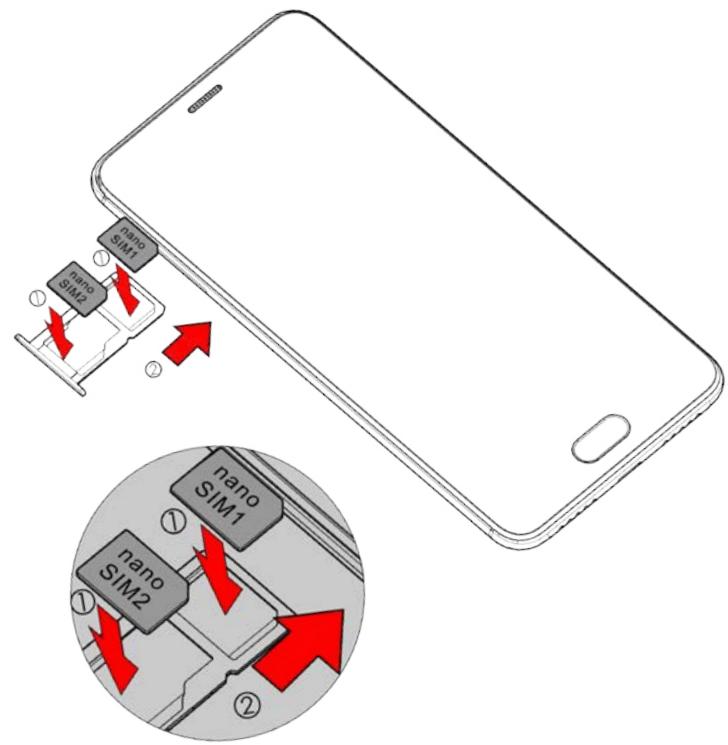
Inserting the SIM cards
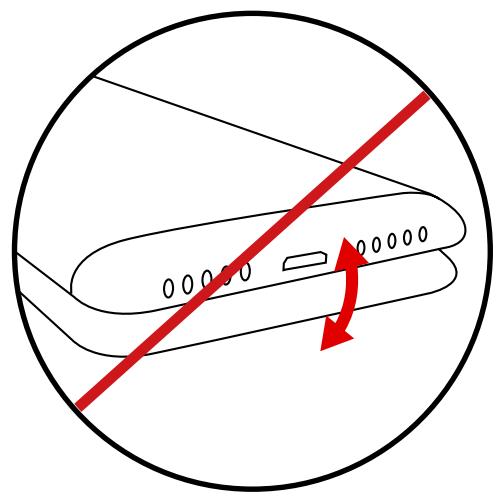
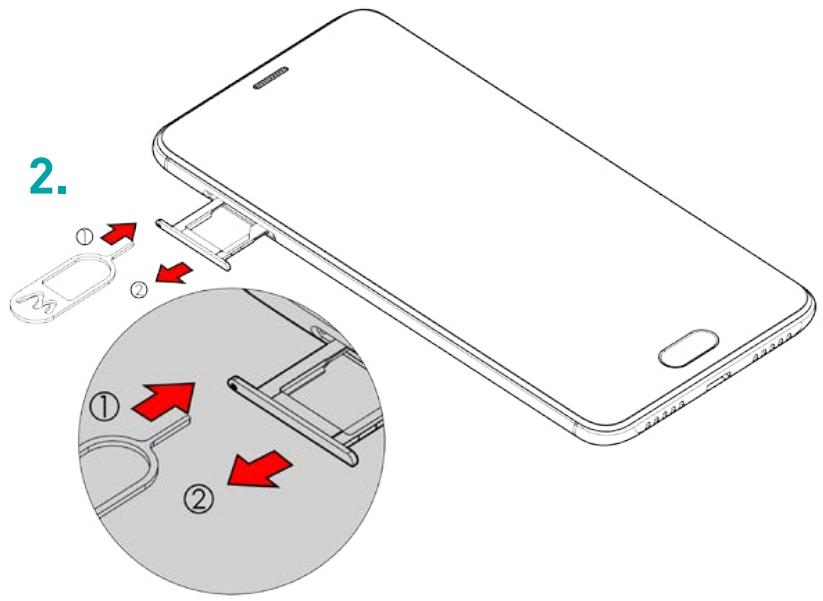
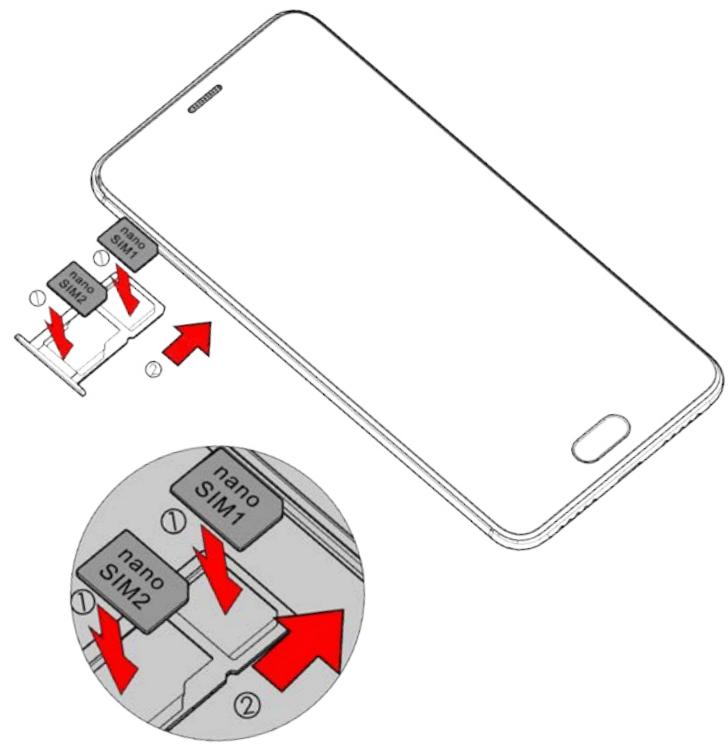
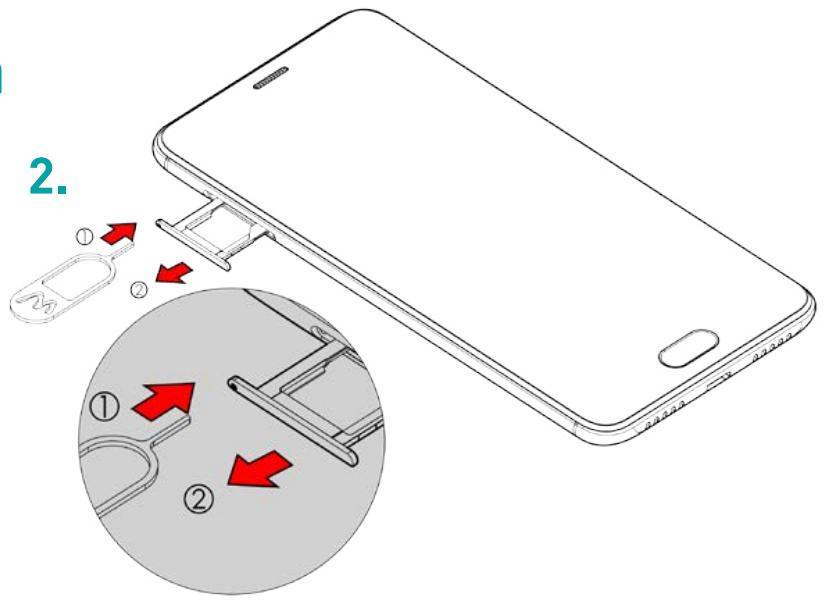
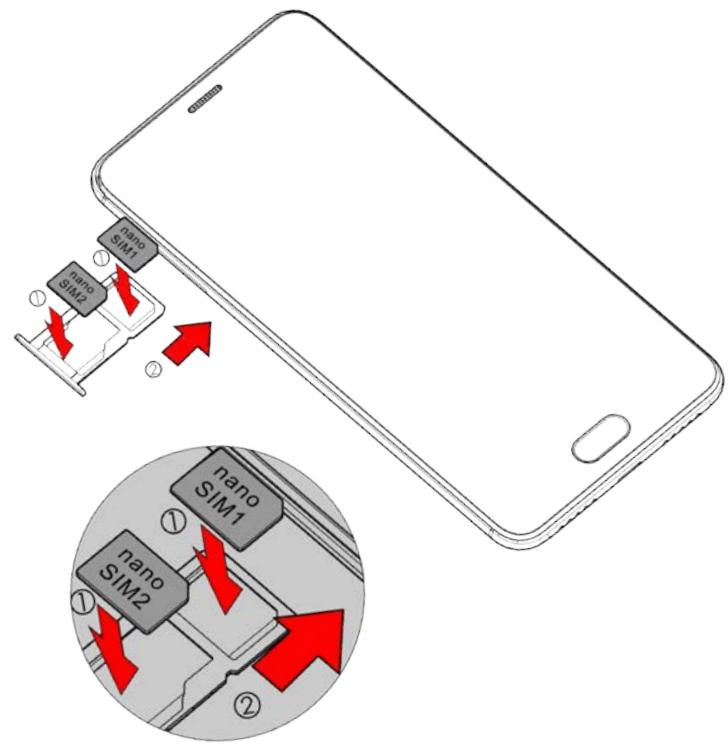
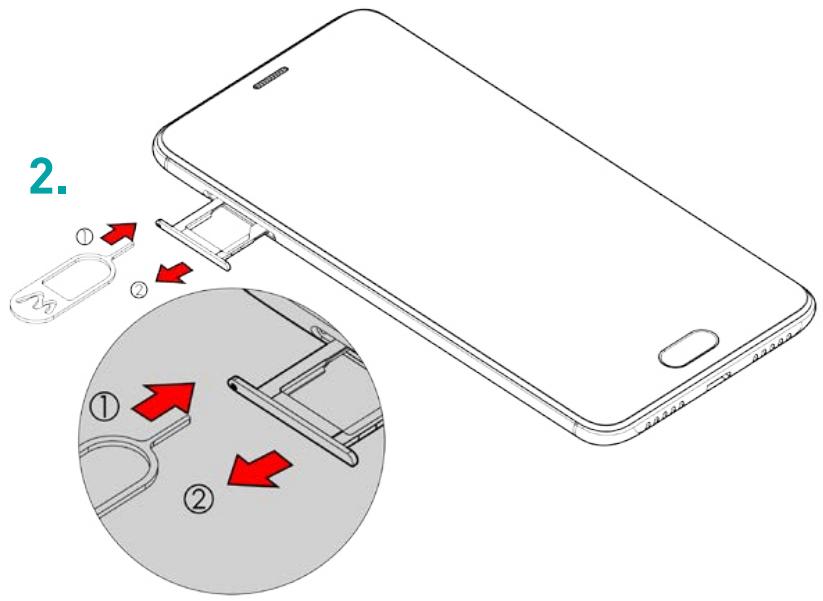
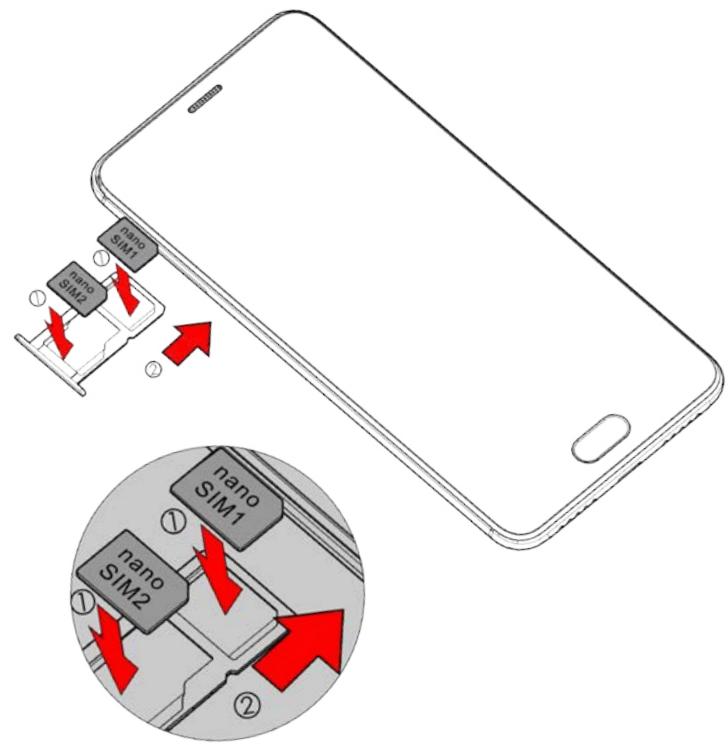
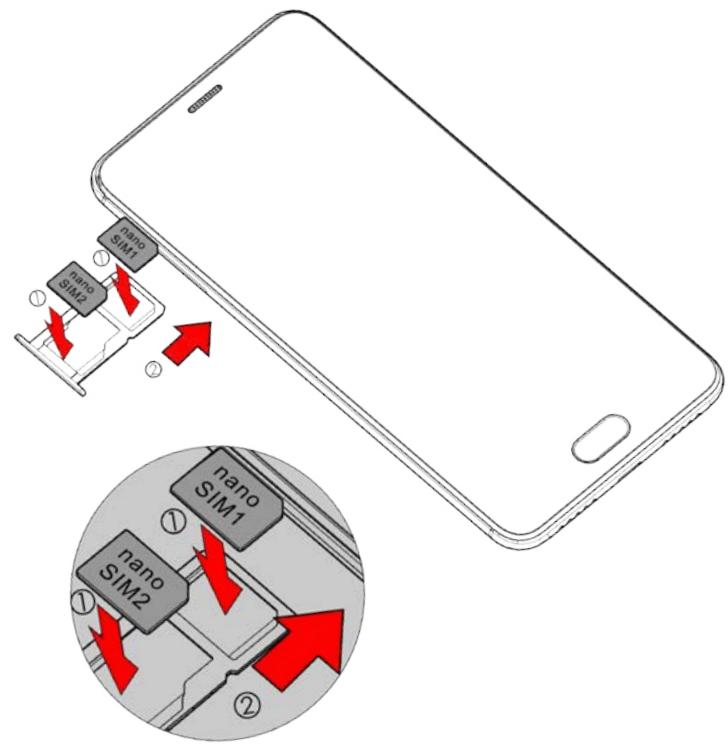
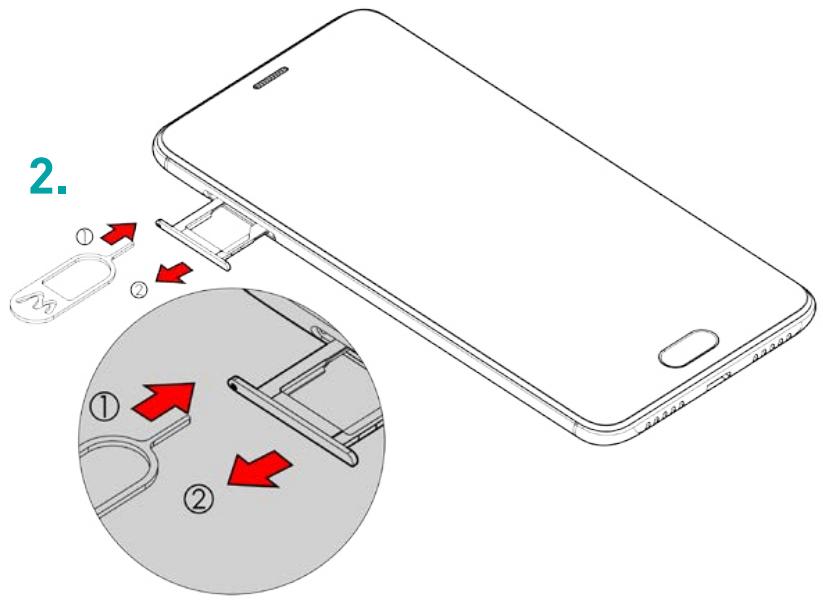
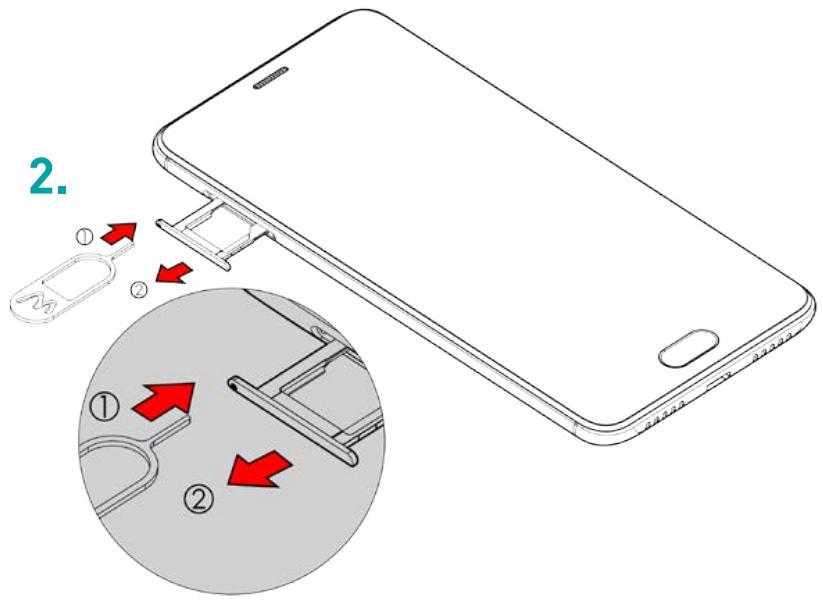
In order to use your telephone, you need to insert your SIM Card. The back cover of the phone is clipped on. Please unclip it using the notch on the cover, following the contour of the phone. Insert the SIM cards following the diagrams below.
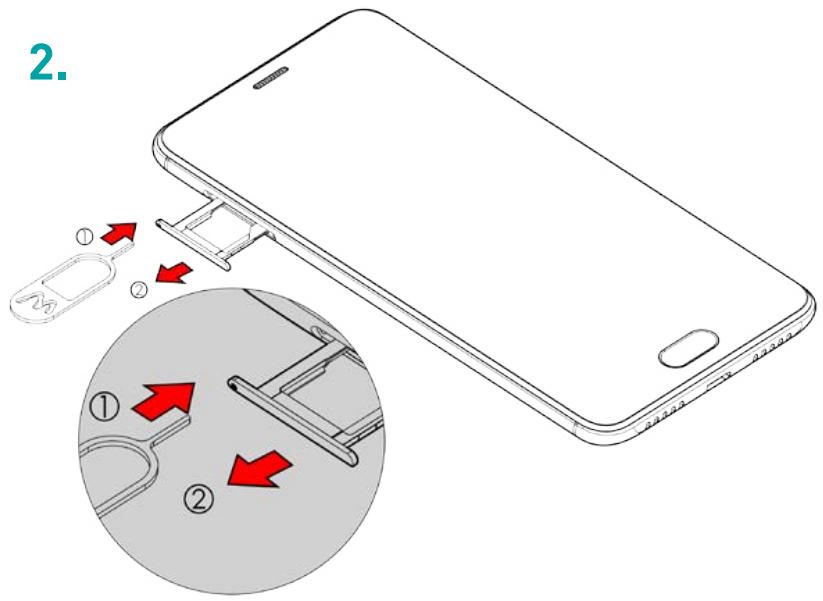
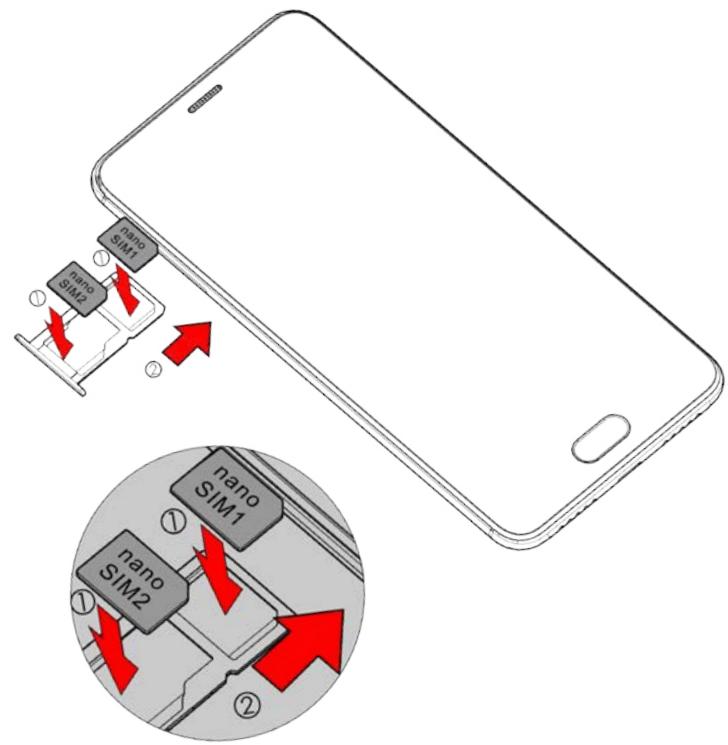
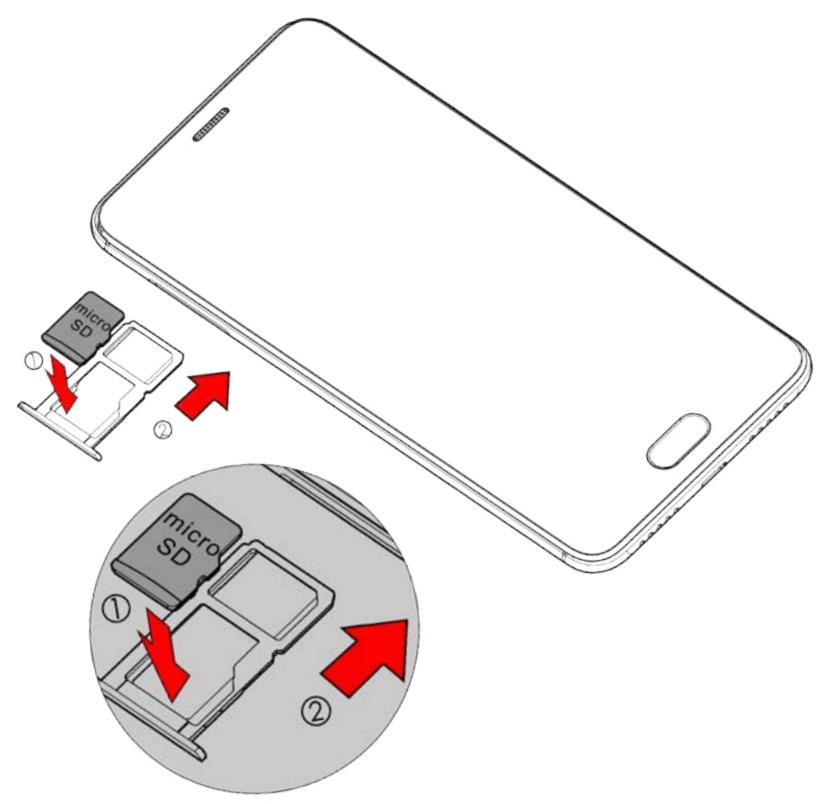
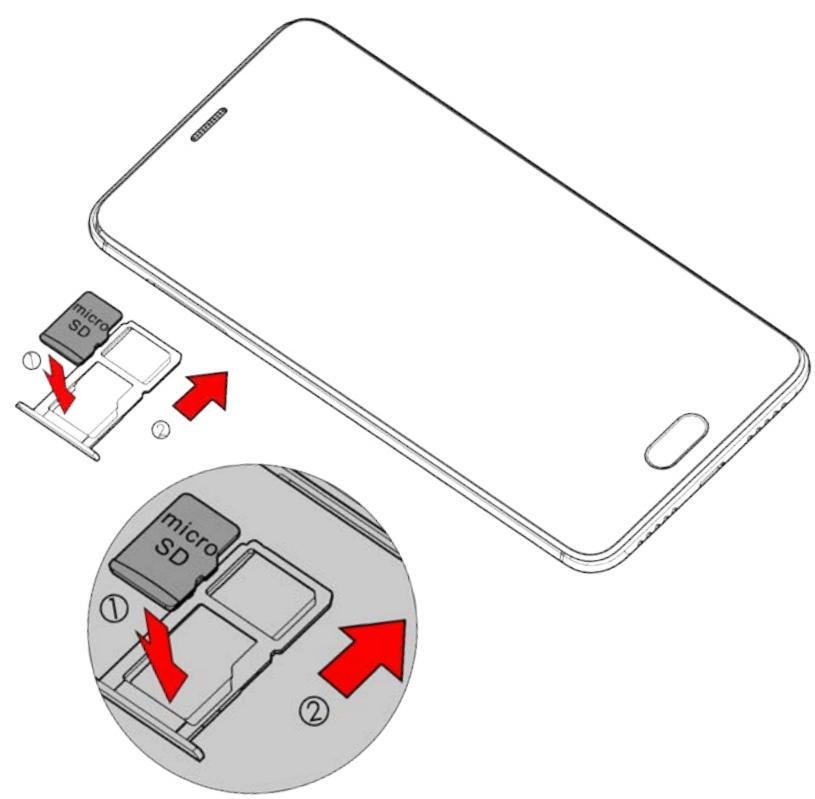
Installing Memory Card
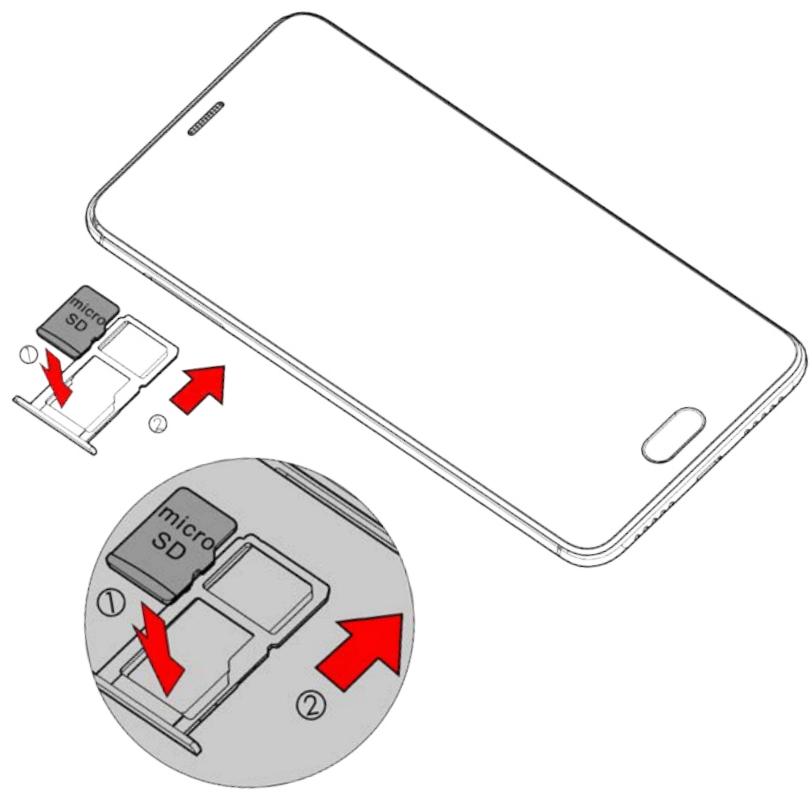
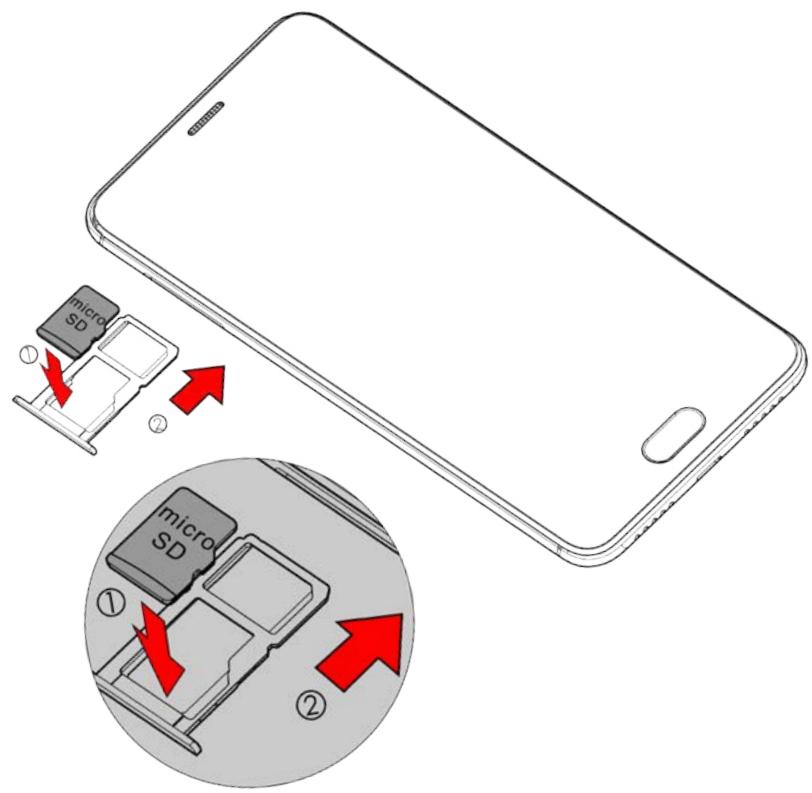
Your phone takes a MicroSD memory card of up to 64 GB. Insert the microSD memory card following the diagram below.
Charging the Battery
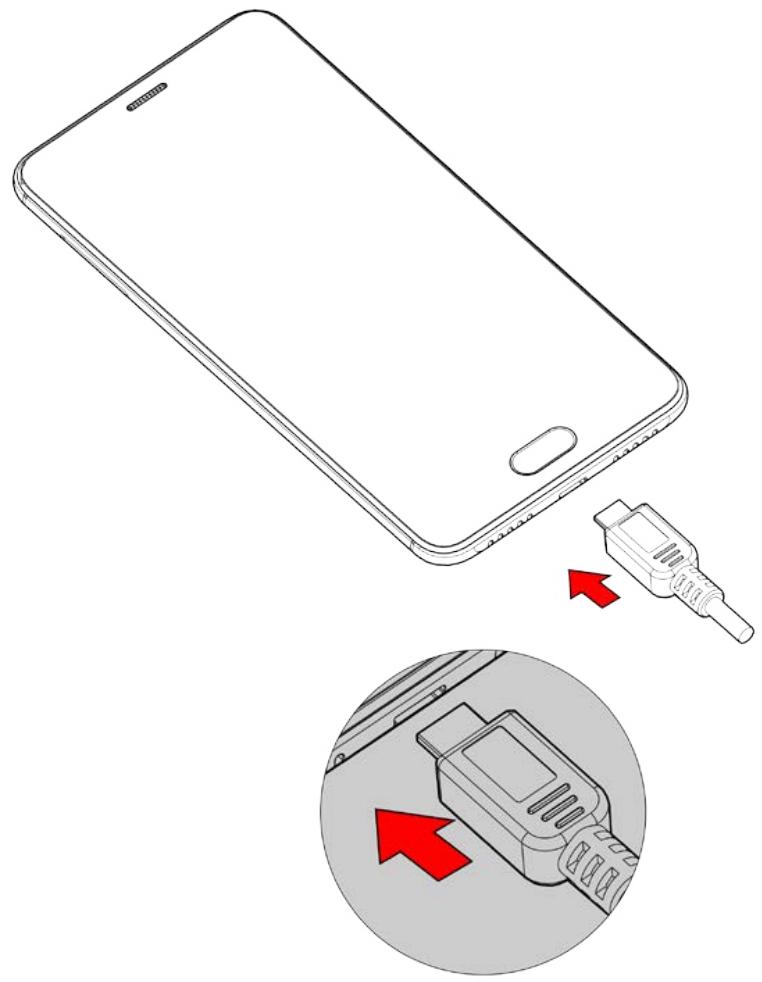
A flashing red light indicates that the battery level is very low: the battery should be recharged because, if the level is too low, it may shorten the life of the battery. Connect the charger to a power outlet and the micro USB connector to the phone's USB port.
The phone's status indicator changes to red, indicating that the device is charging.
Once the phone has finished charging, the status indicator changes to green and you should unplug the charger.
For more information, refer to the Safety Information section.
Turning the Phone On and Off
To turn the phone on, press on the ON/OFF button and hold it down until the phone turns on.
If your SIM card is locked, you must enter the correct PIN code to unlock the SIM card when the phone is powered up. Your PIN is supplied by your operator; if you did not receive it or have lost it, please contact them.
When the PIN is entered incorrectly three times, the mobile phone is blocked and has to be unblocked using your PUK (this is supplied with the SIM card; if this is not the case, you should contact your phone operator). To turn the phone off, press and hold the ON-OFF button until the menu opens, then press on Power Off.
Now press OK to confirm.
The phone vibrates when it is completely shut down.
Basic Operations
SIM Management
When you turn on your phone for the first time, various items of information about the SIM card(s) are displayed. You are asked whether you want to modify the settings for calls, messages, and the internet data connection. SIM1 is configured as the default SIM card for data connection.
Now you can:
- Set the default SIM for voice and video calls, SMS/MMS, and internet data connection. The background color serves to differentiate the two SIMs.
- You can still choose a different SIM when performing an action, such as before making a call or sending an SMS/MMS, by selecting "Ask every time".
Network Connection
APN Not Available
If your operator does not appear in the list or the list is empty, ask your operator how to configure the APN manually. To do this, go to Settings → Wireless & networks → More → Mobile networks → SIM1 or SIM2 → Access Point Names, press on the ⊕ button and enter the information provided by your operator. Return to the previous menu, then choose the APN that you have just saved.
Enabling Data Connection
To check your data connection settings:
- Go to Settings → Wireless & networks → More → Mobile networks → SIM 1 or SIM 2 → Access Point Names, then enable the access point according to your operator/package.
- To activate Mobile data, drag the notification panel downward with two fingers and enable data connection by clicking on ▶.
- You can choose with which SIM card you will enable data connection in Settings → Wireless & network → SIM cards → Preferred SIM for → Mobile data, then press on the SIM card you want to activate.
When you activate Data Connection for one SIM card, the 4G network can only be activated for this SIM card.
- Data Roaming
Note that for roaming SIM cards, you must enable the data roaming in the Settings → Wireless & networks → More → Mobile networks → SIM 1 or SIM 2 → Activate Data roaming. Otherwise, the internet connection will be disabled by default.
\~ Notifications
Notification icons on the status bar

Signal strength
4G
Connected to 4G
H+
Connected to HSPA+ (3G++)
H
Connected to HSPA (3G+)
3G
Connected to 3G
E
Connected to EDGE
G
Connected to GPRS

No signal
R
Roaming

Wi-Fi available

Connected to Wi-Fi

Bluetooth enabled

GPS in use

Voice call in progress

Call waiting

Missed call

Synchronising

New mail

Alarm on
Silent mode on

New voicemail

Downloading
Connected to computer
Battery level
New SMS or MMS
Airplane mode on
SIM card modified
No SIM card
Depending on the application, notifications may be accompanied by a beep, vibration, or a flashing LED.
Notifications Panel
Drag the status bar downwards to see details of all your notifications. Information about new messages received, upcoming calendar events, download status, etc. will then be displayed.
Press on 📄 to clear all temporary notifications (applications that are running are still listed).
Drag a notification to the left or right to clear it.
To close the panel, drag it upwards or press RETURN ◀.
To access the settings panel, press .
Shortcut: pull the notification downwards with two fingers.
Safety Information
Please read this safety information carefully so that you can use your phone in complete safety:
- Children: Be very careful with children and your phone.
A mobile phone contains a number of spare parts. Exercise great care when children are in close proximity to the phone. The phone contains small parts that could be swallowed or cause choking.
If your phone is equipped with a camera or lighting device, do not use it too near children or animals.
- Hearing: Prolonged listening at full power using a lightweight headset or headphones can damage your hearing. Reduce the volume to the lowest possible level when listening to music or conversations. Avoid high volumes over extended periods.
- Driving: Exercise care when driving. Driving requires maximum attention at all times in order to minimise the risk of accidents. Using a mobile phone can distract the user and result in an accident. You must fully comply with the local regulations and laws in force regarding
the use of cell phones whilst driving. You are not allowed to use the phone whilst driving. A hands-free kit should not be regarded as an alternative solution.
- Flying: Turn your phone off when flying.
Remember to turn your phone off when you are in a plane (GSM + Bluetooth) as it may cause interference.
- Hospitals: Turn your phone off near any medical devices.
It is extremely dangerous to leave a phone switched on near medical devices as it may cause interference. You must observe any instructions or warnings in hospitals and treatment centres.
- Remember to turn your phone off in service stations. Do not use your device in a petrol station near fuel.
It is dangerous to use your phone inside a professional garage.
- Electronic implants and pacemakers: Users who wear a pacemaker or who are fitted with an electronic implant must hold the phone on the opposite side to their implant as a precaution when making a call.
If you notice that your phone is causing interference with
a pacemaker, switch it off immediately and contact the manufacturer of the pacemaker for advice on what action to take.
- Fire hazard: Do not leave your device near heat sources such as radiators or cookers. Do not leave your phone charging near flammable materials as there is a real risk of fire.
- Contact with liquid: Do not expose the phone to liquid or touch it with wet hands: any damage caused by water may be irreparable.
- Use only WIKO-approved accessories. The use of unauthorised accessories may damage your phone or cause a safety risk.
- Do not destroy the batteries and chargers.
Never use a battery or charger that has been damaged. Keep batteries away from magnetic objects as the latter might cause a short-circuit between the positive and negative terminals of your batteries and permanently destroy the battery or phone.
As a general rule, you should not expose the batteries to very high or low temperatures (below 0°C or above 45°C). Differences in temperature may reduce battery autonomy and service life. 12. Shocks and impact: Handle and use your phone with the utmost care.
Protect your phone: shocks and impact may damage it. Some parts of your phone are made from glass and might break if the phone is dropped or is subject to severe impact. Avoid dropping your phone. Do not touch the screen with sharp objects.
- Electric shock: Do not try to dismantle your phone as there is a very real risk of electric shock.
- Maintenance: If you want to clean your handset, use a dry cloth (do not use a solvent, such as benzene, or alcohol).
- Recharge your phone in a well ventilated area. Do not recharge your device when it is resting on a soft surface.
- Damage to magnetic strips: Keep your phone away from credit cards as they may damage the data on the magnetic strips.
- Do not use the mobile phone in an environment at too high or too low temperature, never expose the mobile phone under strong sunshine or too wet environment. The suitable temperature for the phone is -10°C to +45°C, the maximum charging temperature declared by the manufacturer is +40°C.
- Due to the used enclosure material, the GSM mobile phone shall only be connected to a USB Interface of version 2.0 or higher. The connection to so called power USB is prohibited.
- The power adapter is the disconnect device for this equipment. The socket-outlet shall be near the equipment and easily accessible.
- This charger is for indoor use only, the charger type is:
| AREA | COUNTRIES | CHARGER TYPE |
| Area 1 | France, Germany, Italy, Portugal, Spain, Belgium, Netherlands, Switzerland, Luxembourg, Poland, Algeria, Croatia, Serbia, Slovenia | TN-050155E1, output voltage/current is 5.0V/1.55A |
| Area 2 | UAE, Saudi Arabia, Nigeria, Kenya | TN-050155B1, output voltage current is 5.0V/1.55A |
~ Important operating guidelines
Batteries - SIM - Emergency calls - SAR - Repairs
- To increase the life of your battery, only use WIKO chargers and batteries. Replacing the battery with a non-compliant model may result in the latter exploding.
- Never throw batteries on a fire and follow the guidelines in force for recycling used batteries and phones.
- Be careful not to crush or damage the battery, as this could cause an internal short circuit and overheating.
- Do not take the battery apart.
- The battery can be recharged several hundred times before needing to be replaced. When it shows signs of losing its power, it can be replaced.
- If you do not use your mobile phone for an extended period, remember to recharge the battery to optimise its use time.
- Do not throw batteries away with household waste: recycle them in accordance with the manufacturer's guidelines. If the battery is damaged, contact the after-sales service or the nearest authorised WIKO dealer.
- Unplug the charger from the wall socket when the
battery is fully charged in order to reduce your energy consumption.
- Do not leave the battery being charged for more than a week as this might result in an overload and reduce the life of the product.
- Handle the SIM cards with care: wipe them with a soft cloth if they appear dirty.
- Emergency calls: the emergency numbers may not be accessible on all mobile telephone networks, in isolated areas or areas where there is no coverage; check first with your operator.
- Radio Frequency Exposure:
Your mobile phone has been designed and manufactured in accordance with the international guidelines (ICNIRP 1 ) on exposure to radio frequencies. These guidelines, which are based on various studies and research, have been developed by independent scientific organisations to ensure the safety of everyone who uses a mobile phone.
The safety information on exposure to radio waves uses a unit of measurement known as SAR (Specific Absorption Rate). The international guidelines have set this limit at 2W/kg*. The phone is used in standard operating positions when being tested for its SAR.
1 International Commission on Non-Ionising Radiation Protection
Although the SAR is determined using the highest power level, the phone's real rate of specific absorption whilst in operation may be well below the maximum value.
A phone is designed to operate at different power levels so that it only uses the power it needs to be connected to the network.
In addition, all models of phone must undergo tests before being marketed to ensure compliance with the European R&TTE directive.
This directive publishes strict rules for guaranteeing the safety of users and for preventing any risks to health.
The maximum SAR value tested on this device when used in its normal position at the ear is 0.989 W/kg and 0.803 W/kg when used close to the body, at a minimum distance of 5 mm. It complies with the rules on exposure to radio frequencies when used in its normal position at the ear or at a minimum distance of 5 mm from the body.
The device uses a high-quality network connection for transmitting files, data and messages. On occasion, the transmission of files or messages may be delayed until the connection is available. When this is the case, be sure to follow the instructions regarding the separation distance for establishing the transmission. If you use a case, belt-clip or holder for carrying the phone, it must not contain any metal and should be kept at a minimum distance of 5 mm from your body.
*The SAR limit for mobile devices is 2.0 watts / kilogram (W/kg) averaged over ten grams of body tissue. SAR values may vary according to the standards for reporting information that are in force in different countries.
Tips for Reducing Exposure Levels
We recommend that you use your phone in good reception conditions in order to reduce the amount of radiation received. It is advisable to limit the amount of time you use the phone in underground car parks and when travelling by car or train, etc.
Reception conditions are indicated by the bars that are displayed on your phone: the more bars there are, the better the reception quality.
We recommend that you use the hands-free kit to reduce exposure to radiation.
To reduce the adverse effects of prolonged radiation exposure, we advise teenagers to hold the phone away from their lower abdomen, and that pregnant women hold the phone at a distance from their stomach.
- Only qualified service personnel should repair your device. If you give your device to non-qualified personnel for repair, the phone will not be covered by WIKO's warranty.
- The IMEI code is the serial number used to identify your device and for After-Sales support. There are several ways of finding your IMEI code:
- Type * # 06 # on your mobile telephone's keypad.
- Refer to the packaging box that your telephone came in.
- Remove the battery from your device: on the back, you will see a label with your IMEI code. (For non-removable batteries, refer to the IMEI engraved on the telephone's rear casing).
NOTE
WIKO's warranty does not cover normal wear and tear (batteries, screens, keyboards, camera lenses, etc.).
Data Use Agreement
Registering your WIKO phone is a free service offered by WIKO that allows our engineers to connect to your phone's physical data so that they can tell what your model and hardware specifications are in real time. In return, the engineers can keep you informed of updates that are available for your system and warn you in case of a recognised technical failure on a model or series. In addition, this service allows us to alert you instantly if there is a malfunction so that we can provide a technical solution as soon as possible. It is necessary to gather this data in order for WIKO to propose appropriate updates for your mobile phone.
By registering your phone, you acknowledge that WIKO and its engineers are able to collect, store, analyse and use diagnostic, technical and usage data (and related
data) including, without limitation, data
regarding your WIKO device, your software system and your applications. We will collect this information on a regular basis to facilitate the provision of software updates and product support and miscellaneous services offered to customers (where applicable) relating to the software on your device.
WIKO may use this information without revealing the identity of the customer in order to offer and improve its products or services for the user.
This service will not give us access to your content and personal files.
You need to be connected to the mobile internet network for a short time to register your WIKO phone. This may result in connection costs, at your expense, depending on the nature of your contract with your mobile operator. We recommend that you use a Wi-Fi connection, as with this type of connection there is no data limit (if your phone service limits the exchange of data) and the connection is quicker.
The information obtained is processed electronically in order to access the physical data on your phone.
They will be kept by WIKO in a dedicated, secure location for a maximum of three years from the date of collection, depending on the nature of the data. The data recipient is WIKO SAS.
You have the right to access, modify, rectify or delete your personal data submitted upon registration. You may exercise this right by writing to WIKO SAS, 1 rue Capitaine Dessemond, 13007 MARSEILLE, FRANCE.
Recycling
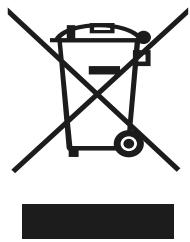
The symbol of a crossed-out wheelie-bin, as found in this manual, indicates that the item is subject to European Directive 2002/96/EC, which states that electrical and electronic equipment, batteries, accumulators and accessories must undergo selective waste management.
Make sure that, when your phone is no longer usable, you put it in a suitable waste bin or return it to a mobile phone retailer. In this way you will help to reduce environmental and health hazards.
Local councils, retailers and national manufacturing associations will give you the necessary information on how to dispose of your old device.
The details and conditions of our manufacturer warranty are available at www.wikomobile.com
STATEMENT OF COMPLIANCE
We, WIKO SAS - 1, rue Capitaine Dessemond - 13007 - Marseille - FRANCE, hereby declare that the U FEEL PRIME mobile phone complies with the standards and provisions of the Directives.
SAFETY: EN 60950-1: 2006+A11:2009+A1:2010+A12:2011+A2:2013; EN 50332-1:2013; EN50332-2:2013; IEC62471:2006/EMC: EN 301 489-1 V1.9.2; EN 301 489-3 V1.6.1; EN 301 489-7 V1.3.1; EN 301 489-17 V2.2.1; EN 301 489-24 V1.5.1/SAR: EN50360:2001+A1:2012; EN 62209-1: 2006; EN 62209-2: 2010; EN50566:2013/AC2014; EN 62479: 2010/RADIO:EN 301 511 V12.1.1; EN 301 908-1 V7.1.1; EN 301 908-2 V6.2.1; EN301 908-13 V6.2.1; EN 300 328 V1.9.1; EN 300 440-1 V1.6.1; EN 300 440-2 V1.4.1
The procedure for the Statement of Compliance, set out in Article 10.5 of Directive 1999/5/EU, was conducted under the supervision of the following organisation:
PHOENIX TESTLAB GmbH, Königswinkel 10
D-32825 Blomberg, Germany
www.phoenix-testlab.de
Phone +49(0)5235-9500-0 / Fax +49(0)5235-9500-10
CE 0700
The full text of the device's Statement of Compliance is available on written request to the following address or www.wikomobile.com : WIKO SAS - 1, rue Capitaine Dessemond - 13007 - Marseille - FRANCE
30/08/2016
(Date)
Michel ASSADOURIAN / CEO
(Name and signature of the authorised official)
Wiko
Game changer.
Customer service information
KENYA
http://ke.wikomobile.com/d4687-customer-care
MALTA
http://mt-en.wikomobile.com
UNITED ARAB EMIRATES
http://ae-en.wikomobile.com/customer-care
KINGDOM OF SAUDI ARABIA
http://sa-en.wikomobile.com/c5-contact-after-sales-service
NIGERIA
WIKO SAS
Prolonged listening to the music player at full power may damage the user's hearing.

ufeel
PRIME
User Guide
Copyright © 2016 WIKO
www.wikomobile.com
Download
DECLARATION OF CONFORMITY
D-32825 Blomberg, Germany
www.phoenix-testlab.de
Phone +49(0)5235-9500-0 / Fax +49(0)5235-9500-10
CE 0700
Michel ASSADOURIAN / CEO
(Date)
serviceclients@wikomobile.com
ufeel
PRIME
User manual
Copyright © 2016 WIKO
Download
Michel ASSADOURIAN / CEO
(Date)
ufeel
PRIME
User guide
Copyright © 2016 WIKO
es.wikomobile.com
Download in progress
Michel ASSADOURIAN / CEO
Wikomobile Logistic S.L.
(+34) 947 59 39 79
sat@wikomobile.es
ufeel
PRIME
User guide
Copyright © 2016 WIKO
Turning on and off
Downloading
D-32825 Blomberg, Germany
www.phoenix-testlab.de
Phone +49(0)5235-9500-0 / Fax +49(0)5235-9500-10
CE 0700
Michel ASSADOURIAN / CEO
PRIME
User Manual
Copyright © 2016 WIKO
Download
Michel ASSADOURIAN / CEO
(Date)
ufeel
PRIME
Copyright © 2016 WIKO
New voicemail message

Downloads
Connected to
Battery level
SMS or MMS
Airplane mode on
SIM card changed
No SIM card
Michel ASSADOURIAN / CEO
(Date)
ufeel
PRIME
Michel ASSADOURIAN / CEO
30/08/2016
(Date)
KINGDOM OF SAUDI ARABIA
http://sa-en.wikomobile.com/c5-contact-after-sales-service
WIKO SAS
ufeel
PRIME
User manual
Copyright © 2016 WIKO
Data download
Michel ASSADOURIAN / CEO
ufeel
PRIME
User manual
The content of this manual may differ from your phone in some features depending on the software version installed on it and your mobile operator.
CONGRATULATIONS!
Copyright © 2016 WIKO
It is forbidden to disclose the information contained in this user manual to third parties, as well as to reproduce it in any form, without the express written consent of WIKO.
Trademarks
WIKO is a registered trademark of WIKO SAS.
Disclaimer
This manual has been compiled with the utmost care and attention, with the aim of guiding you through the functions and features of your device. However, the information and recommendations in this manual shall not be considered a guarantee in accordance with applicable legal provisions. WIKO reserves the right to modify the information contained in this manual at any time.
Limitation of liability
All content and services available to you through this device are the exclusive property of third parties and are protected by relevant laws (copyright laws, patent laws, licenses and/or other intellectual property rights). These services are intended solely for personal, non-commercial use. It is prohibited to use any content or service without obtaining prior written approval from the owner of that content. It is prohibited to copy, publish, transmit, sell content or services, as well as to create derivative works from content or services available through this device, and to use them in any way or by any means.
CONTENT AND SERVICES PROVIDED BY THIRD PARTIES ARE PROVIDED "AS IS". WIKO DOES NOT PROVIDE WARRANTIES, EITHER EXPRESS OR IMPLIED, REGARDING SUCH CONTENT OR SERVICES, FOR ANY PURPOSE. WIKO EXPRESSLY DISCLAIMS ANY LIABILITY REGARDING THE PROVISION OF
WARRANTIES OF MERCHANTABILITY OR FITNESS FOR A PARTICULAR PURPOSE. WIKO DOES NOT PROVIDE WARRANTIES FOR THE ACCURACY, VALUE, LEGALITY OR COMPLETENESS OF ANY CONTENT OR SERVICES MADE AVAILABLE TO THE USER THROUGH THE DEVICE.
~ Installing the memory card
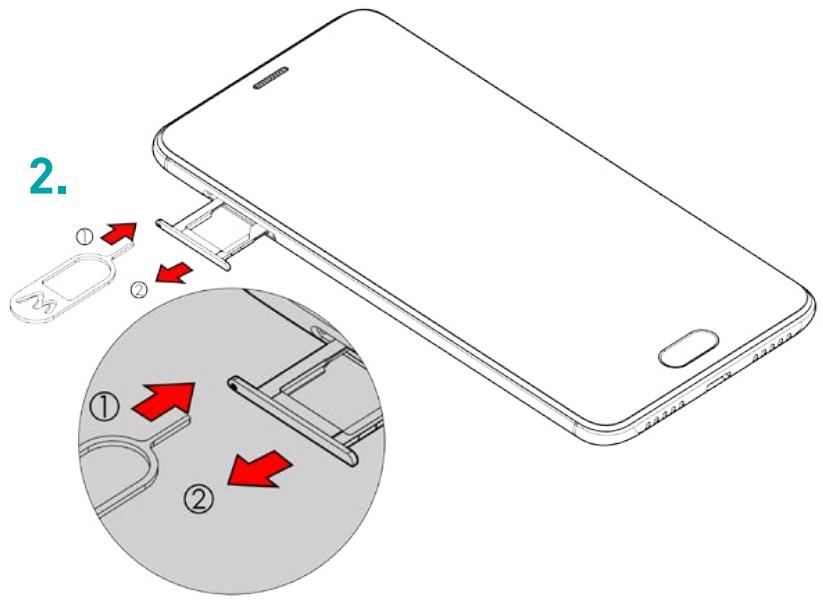
Your phone accepts a micro SD memory card up to 64 GB.
Insert the micro SD memory card according to the instructions in the chart below.
~ Changing the battery
A red light indicates that the battery is low: the battery should be recharged because using the battery at a low charge level can shorten its lifespan.
Connect the charger to the outlet, and the micro USB connector to the USB port on the phone.
The phone's status indicator light will glow red, meaning the device is charging.
When charging is complete, the indicator light will glow green again, and you should unplug the phone from the charger.
Download in progress
Connected to computer
Battery charge level
New SMS or MMS message
The symbol of a crossed-out waste bin, as you will see in this manual, means that this product is subject to the provisions of Directive 2002/96/EC, according to which electrical and electronic equipment, batteries, accumulators, and
accessories must be disposed of as recycling waste.
After you stop using the phone, make sure to dispose of it in an appropriate container or return it to the phone retailer. In this way, you help reduce harmful impacts on the environment and public health.
Local institutions, retailers, and national manufacturers' associations can provide you with the necessary information on the proper disposal of your old phone.
Michel ASSADOURIAN / CEO
"Prolonged use of the device with the volume set to maximum may lead to hearing damage"
ufeel
PRIME
User manual
Copyright © 2016 WIKO
\~ Installing the memory card
Your phone accepts a Micro SD memory card up to 64 GB.
Insert the Micro SD memory card according to the instructions in the diagram below.
\~ Replacing the battery
Download in progress
D-32825 Blomberg, Germany
www.phoenix-testlab.de
Tel: +49(0)5253-9500-0 / Fax: +49(0) 5235-9500-10
CE 0700
Michel ASSADOURIAN / CEO
ufeel
PRIME
Copyright © 2016 WIKO
It is forbidden to disclose the information contained in this user manual to third parties, as well as to reproduce it in any form, without the express written consent of WIKO.
Trademarks
WIKO is a registered trademark of WIKO SAS.
Disclaimer
This manual has been compiled with the utmost diligence and care in order to guide you through the functions and features of your device. However, the information and recommendations in this manual shall not be construed as a warranty in accordance with applicable law. WIKO reserves the right to modify the information contained in this manual at any time.
Limitation of liability
All content and services available through this device are the exclusive property of third parties and are protected by relevant laws (copyright, patent, license, and/or other intellectual property rights). These services are intended solely for personal, non-commercial use. It is prohibited to use any content or service without obtaining prior written approval from the owner of that content. It is prohibited to copy, publish, transmit, sell content or services, create derivative works from content or services available through this device, and exploit them in any way or by any means.
THIRD-PARTY CONTENT AND SERVICES ARE PROVIDED "AS IS." WIKO MAKES NO WARRANTIES, EITHER EXPRESS OR IMPLIED, REGARDING SUCH CONTENT OR SERVICES,
FOR ANY PURPOSE. WIKO EXPRESSLY DISCLAIMS ANY WARRANTY OF MERCHANTABILITY OR FITNESS FOR A PARTICULAR PURPOSE. WIKO MAKES NO WARRANTIES REGARDING THE ACCURACY, VALIDITY, LEGALITY, OR COMPLETENESS OF ANY CONTENT OR SERVICE MADE AVAILABLE TO THE USER THROUGH THE DEVICE.
WIKO has no control over content and services provided by third parties through networks or data transmission devices. Moreover, third-party services may be completely discontinued or interrupted at any time without notice. Therefore, WIKO makes no representations or warranties regarding the availability of any third-party content or services and expressly disclaims liability for such discontinuation or interruption of services or content.
WIKO will not be liable for the processing and/or monitoring of third-party content and services accessible through this device. Any questions or requests regarding content or services should be directed directly to
the provider of such content or services.
~ Installing the memory card
Your phone accepts a Micro SD memory card up to 64 GB.
Insert the Micro SD memory card according to the instructions in the diagram below.
Downloading
Connected to computer
The symbol of a crossed-out waste bin, as seen in this manual, means that this product is subject to the provisions of Directive 2002/96/EC, according to which electrical and electronic equipment, batteries, accumulators, and accessories must be disposed of as selective waste.
After you stop using the phone, make sure to dispose of it in an appropriate container or return it to the phone retailer. In this way, you help reduce harmful impacts on the environment and public health.
Local authorities, retailers, and national manufacturers' associations can provide you with the necessary information on the proper disposal of your old phone.
D-32825 Blomberg, Germany
www.phoenix-testlab.de
Tel: +49(0)5253-9500-0 / Fax: +49(0) 5235-9500-10
CE 0700
You can obtain the Serbian version of the Declaration of Conformity for the product upon written request sent to the following address or www.wikomobile.com: WIKO SAS – 1, rue Capitaine Dessemond – 13007 – Marseille - France
30/08/2016
(Date)
Michel ASSADOURIAN / CEO
"Prolonged listening to the device at maximum volume may damage your hearing."
ufeel
PRIME
User Guide
Copyright © 2016 WIKO
Download in progress
Michel ASSADOURIAN / CEO


- UFEEL
- PRIME
- USER GUIDE
- CONGRATULATIONS
- COPYRIGHT © 2016 WIKO
- TRADEMARKS
- DISCLAIMER
- LIMITATION OF LIABILITY
- WHAT'S IN THE BOX
- GETTING TO KNOW YOUR PHONE
- THE BUTTONS ON YOUR PHONE
- GETTING STARTED
- INSERTING THE SIM CARDS
- INSTALLING MEMORY CARD
- CHARGING THE BATTERY
- TURNING THE PHONE ON AND OFF
- BASIC OPERATIONS
- SIM MANAGEMENT
- NETWORK CONNECTION
- APN NOT AVAILABLE
- ENABLING DATA CONNECTION
- DATA ROAMING
- NOTIFICATIONS
- NOTIFICATION ICONS ON THE STATUS BAR
- NOTIFICATIONS PANEL
- SAFETY INFORMATION
- IMPORTANT OPERATING GUIDELINES
- TIPS FOR REDUCING EXPOSURE LEVELS
- NOTE
- DATA USE AGREEMENT
- RECYCLING
- STATEMENT OF COMPLIANCE
- WIKO
- CUSTOMER SERVICE INFORMATION
- WIKO SAS
- DECLARATION OF CONFORMITY
- USER MANUAL
- ES.WIKOMOBILE.COM
- TURNING ON AND OFF
- INSTALLING THE MEMORY CARD
- CHANGING THE BATTERY
- REPLACING THE BATTERY
Brand : WIKO
Model : JERRY MAX
Category : Smartphone