
P550S - Telephone ENERGIZER - Free user manual and instructions
Find the device manual for free P550S ENERGIZER in PDF.



| Product type | Mobile phone |
| Brand | ENERGIZER |
| Model | P550S |
| Power supply | Removable lithium-ion battery, 5V mains charger included |
| Main functions | Dual SIM, camera, FM radio, Bluetooth, Wi-Fi, music player, SMS/MMS messaging, Internet browsing, contact management |
| Maintenance and cleaning | Clean with a soft, dry cloth. Do not use chemical products. |
| Safety | Follow the instructions: turn off in airplanes and hospitals, do not use while driving, avoid exposure to moisture and extreme temperatures, do not disassemble, use only certified accessories. |
| Spare parts and repairability | Removable battery. Do not disassemble or repair yourself. Use only the supplied charger. |
| General information | User manual and quick start guide included. Complies with European standards. Maximum SAR: 0.302 W/kg (body). |
Frequently Asked Questions - P550S ENERGIZER
User questions about P550S ENERGIZER
0 question about this device. Answer the ones you know or ask your own.
Ask a new question about this device
Download the instructions for your Telephone in PDF format for free! Find your manual P550S - ENERGIZER and take your electronic device back in hand. On this page are published all the documents necessary for the use of your device. P550S by ENERGIZER.
USER MANUAL P550S ENERGIZER
INFORMATIONS RELATIVES À LA SÉCURITÉ
(1616 NW, 84TH Ave. Miami, Florida U.S.A. 33126)
BAY AREA COMPLIANCE LABORATORIES CORP.
1274 Anvilwood Ave. Sunnyvale, CA 94089. USA
www.baclcorp.com
Phone: +1 408 732 9162 Fax: +1 408 732 9164
(1616 NW, 84TH Ave. Miami, Florida U.S.A. 33126)
BAY AREA COMPLIANCE LABORATORIES CORP.
1274 Anvilwood Ave. Sunnyvale, CA 94089. USA
www.baclcorp.com
Phone: +1 408 732 9162 Fax: +1 408 732 9164
Please remember to obey relevant rules and regulations whenever use your phone. This will prevent bad effect from you and the environment.
General security
| When driving, riding your bike or walking, do not use headphones or earphones. Your attention could be diverted, which may cause an accident and be against the law in certain geographical areas. For safety precautions do not use your phone while driving, always stay aware of your surroundings. Follow all safety instructions and regulations relating to the use of your device when you are driving a vehicle. | |
| Don't use at petrol stations. | |
| Keep your phone at least 15 mm away from your ear or body while making calls. | |
| Your phone may produce a bright or flashing light. | |
| Small parts may cause a choking. | |
| Don't dispose of your phone in fire. | |
| To avoid any hearing damage, do not listen to high volume levels for an extended. Excessive sound pressure from earphones and headphones can cause hearing loss. | |
| Avoid contact with anything magnetic. | |
| Keep away from pacemakers and other electronic medical devices. | |
| Avoid extreme temperatures. | |
| Switch off when asked to in hospitals and medical facilities. | |
| Avoid contact with liquids. Keep your phone dry. |

| Switch off when told to in aircrafts and airports. |
| Don't take your phone apart. |
| Switch off when near explosive materials or liquids. |
| Only use approved accessories. |
| Don't rely on your phone for emergency communications. |
Look at the adapter regularly, specifically at the plug and the layer to detect any damages. If the adapter is damaged, you can't use it until it's fixed.
Plug in the adapter to a power outlet which is easily accessible. Always unplug the adapter after using it.
Use only the adapter provided with the device.

Warning electrical hazard
To avoid serious injury, do not touch the plug of the charger!
Disconnect the charger when you do not use it.
To disconnect a charger or an accessory, pull the plug, not the power cable.
The power module is the element that allows you to disconnect the product.
The power plug must stay easily accessible.
Do not expose your device to direct sunlight, like on your car's dashboard, for example.
In case of overheating do not use the device.
Be careful when using the device while walking.
Do not subject the device to severe impact or drop it from high position, it could cause damages or malfunctions.
Do not disassemble, modify or fix the device by yourself.
To clean the device use a clean and soft rag. Do not use any chemical product or detergent.

Learn about your mobile phone's layout, keys, display and icons.
Unpacking
Check the product box for the following items:
- Mobile phone
Battery - Travel adapter (charger)
USB Cable - Headset
- User manual
Quick start guide
The supplied accessories perform best for your phone.
Phone layout
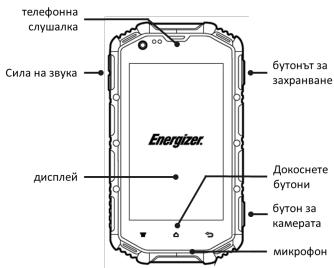
From the front view of your phone you will observe the following elements:
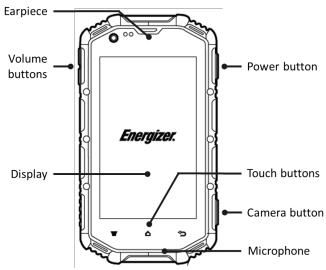
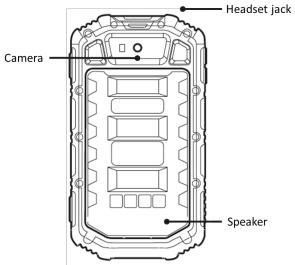
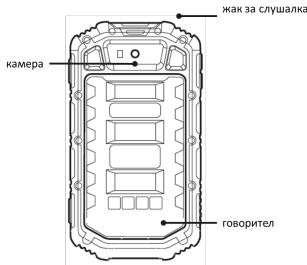
From the back view of your phone you will observe the following elements:
Keys
The following table offers you a quick description about the phone's keys:
| Key | Function |
| Power button | Allow you to turn on/off the device and to lock the screen. |
| Volume | Allow you to adjust the volume of ringing and notifications. Also allows you to adjust the volume of multimedia content playback. |
| Back | Allow you to return to the previous menu or screen. Also allow you to close some applications. |
| Home | It takes you directly to the home screen, leaving any application open. |
| Menu | Allow you to access to the functions menu of the application or screen you are. |
Screen
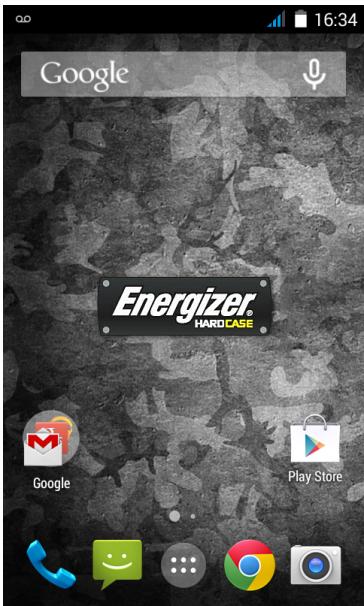
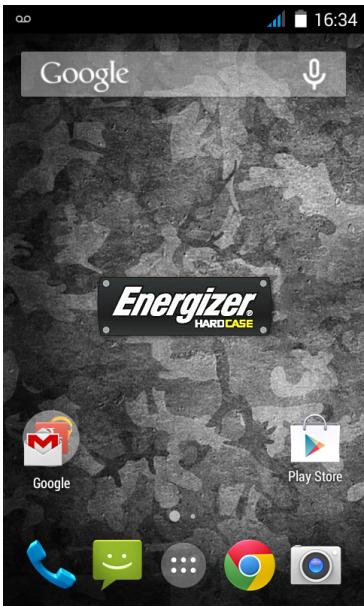
The screen of your mobile phone is designed as follows:
Icons
Learn about the icons that are displayed on the top of the screen, indicating the status of the phone:
| Signal strength | Wi-Fi connection | ||
| G | GPRS connected | W | EDGE connected |
| 3G | 3G connected | H | HSPA connected |
| B | Bluetooth On | New message | |
| PS | USB connected | New email | |
| Battery meter | Alarm active | ||
| Vibration profile | Silent profile | ||
| R | Roaming indicator | Headset connected |
Get started setting up your mobile phone for its first use.
Install the SIM card and battery
When you subscribe to a cellular service, you will receive a Subscriber Identity Module (SIM) card, with subscription details, such as your personal identification number (PIN) and optional services.
To install the SIM card and battery,
- Remove the battery cover.
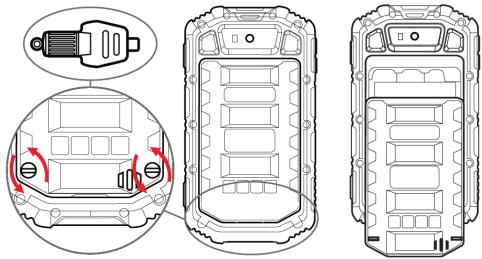
- Insert the SIM card.
Your phone has 2 SIM card slots to allow you use 2 SIM cards and switch between them.
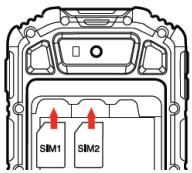
- Place the SIM card in the phone with the gold-colored contacts facing down.
-
Without inserting a SIM card, you can use your phone's non-network services and some menus.
-
Insert the battery.
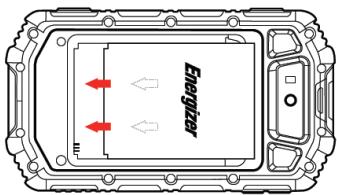
- Replace the battery cover.
Insert a memory card (optional)
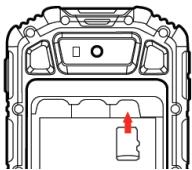
To store additional multimedia files, you must insert a memory card.
- Formatting the memory card on a PC may cause incompatibility with your phone. Format the memory card only on the phone.
- Remove the battery cover.
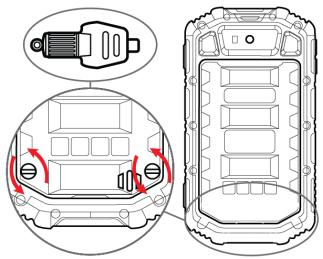
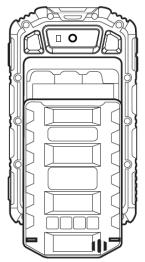
- Insert a memory holder with the label side facing up.
Assembly diagram for the European charger
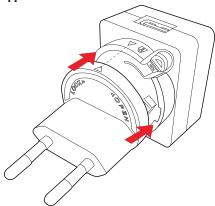
1.
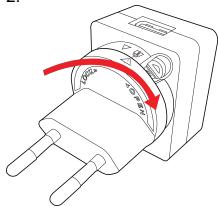
2.
Disassembly diagram for the European charger
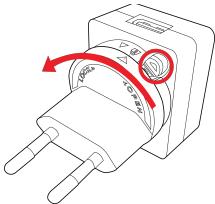
1.
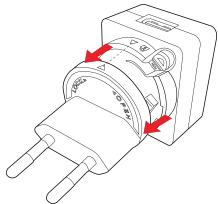
2.
Assembly diagram for the UK charger
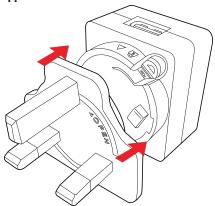
1.
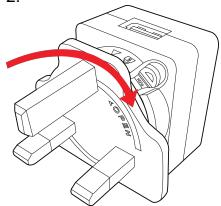
2.
Disassembly diagram for the UK charger
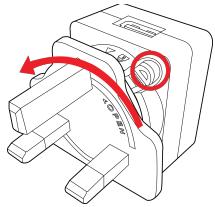
1.
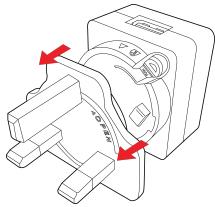
2.
Learn how to perform basic operations of your mobile phone.
Turn your phone on and off
To turn your phone on,
- Long press the power button.
- Type in your PIN number and press OK (if it is needed).
To shut down your phone, go to step 1 above.
Access menus and applications
To get access to the Menu and Applications,
- At the home screen, touch the button [ ] on the screen to pop up the list of Installed Applications in your phone.
- Slide your finger to the right or left to access other pages of apps.
- Touch any icon to enter to the application.
- To exit the application, press Back or Home at the bottom of the screen.
Use basic call functions
Learn to make or answer calls in this section
Make a call:
- At the home screen or applications menu, touch the Phone icon [ ]
- Dial the area code and phone number.
- Touch [ ] to start the call.
- To end a call, touch [ ]
To answer a call:
- When you receive a call, slide the phone icon to the right to answer it or slide it to the left to reject it [ ]
- To end the call, touch [ ]
Send and view messages
In this section, learn how to send and receive:
- Text Messages (SMS).
- Multimedia Message (MMS).
Steps to send Text and Multimedia Messages:
- Touch [ ] Messages at the application list, then touch [ ] on the left bottom corner.
- Type in the phone number or contact name on the field or touch [ ] to access to Contacts.
- Type in your message.
To send as text message go to step 5.
To attach a multimedia object (audio, image, etc.) continue to step 4.
- Touch [ ] on the top right corner, select the attach type then choose the item.
- Touch [ ] to send the message.
Add contacts
Learn the basics of using the phonebook feature.
Add a new contact:
- In the application list touch Contacts, then touch [ ] on the bottom right corner to add a new contact.
- Fill the contact information (Name, Last name and phone number). You can add more fields such as, email, address, etc.
- Touch [√] on the top of the screen to save.
Search for a contact
- In the application list touch [ ] Contacts.
- Slide your finger from bottom to top to scroll the list or touch the search button [ ] and type in the first letters of the name or last name.
- To see the contact details touch the name or the picture of the contact.
If you want to call a contact touch the phone number.
Listen to music
Learn how to listen to music via the music player or FM radio.
Listen to the FM radio:
- Plug in the earphones in your phone.
- In the application list touch [FM Radio.
- Use the tool bar at the bottom to change of station.
Listen to music files:
First, copy the music files into your phone internal memory or a MicroSD card.
- In the application list, touch [ ] Music.
- Select an order at the top of the screen and touch the song that you want to listen to.
- You can Pause, Loop, or change of song using the tool bar at the bottom.
Browse the web
Learn how to access to your favorites Web Sites.
- In the application list, touch [ ] Browser.
- Touch the address bar and type in the address of the web site you want to go and touch Go.
Learn the basics to capture and view photos.
Capture pictures
- In the applications list, touch [ ] Camera.
- Adjusts the lens at the photo target and make the desired adjustments by touching the settings button [ ]
- Touch the shot button [ ] on the screen to capture the picture. It will be saved automatically.
See the captured pictures
In the applications list, touch [ ] Gallery and then select the Camera folder [ ] to access and visualize all the pictures captured by your phone.
Learn the basics to configure your phone and connect to Internet.
Add a new connection
- In the applications list, touch [ ] Settings to access to the device configuration.
- Touch the option "More...," then touch Mobile networks and touch APN. Now select the SIM Card that you want to configure.
- Touch the Menu key and select New APN then, type in the parameters according with your Carrier.
The basic parameters are:
Name
APN
-Username
- Password
Some carriers use Proxy Servers, refer to your carrier configuration for more information.
- When you finish typing in the parameters needed, touch Menu then Save.
If you have multiples APN Configurations for the same SIM card, choose which one you want to use touching the radio button [ ] at the right side of the name.
To add another connection, repeat from step 3.
Switch between carriers (SIM cards)
If you use multiple SIM cards and want to switch to another one, follow these steps:
- In the applications list, touch [ ] Settings to access to the device configuration.
- Touch SIM management [ ]
- Choose the option Data Connection and select the SIM Card that you want to use.
Learn about your phone's ability to connect to other wireless devices for exchanging data.
Turn on the Bluetooth wireless feature
- In the applications list, touch [ ] Settings to access to the device configuration.
- Touch the Bluetooth option [Bluetooth].
- To turn the Bluetooth touching the button [ ] on the right top corner.
Find and pair with other Bluetooth enabled devices
- When you turn the Bluetooth on, the list will show all the available devices near you.
- Touch the device that you want to pair with your phone.
- Enter a PIN for the Bluetooth wireless feature or the other device's Bluetooth PIN, if it has one, and press OK.
When the owner of the other device enters the same code or accepts the connection, the pairing will be complete.
Send images using the Bluetooth wireless feature
-
Open Gallery [ ]
-
Choose a picture and press Share [ ] on the top right corner of the screen and select Bluetooth [Bluetooth].
- Touch the device that you want to send the picture then accept the file in the receiver.
Receive images using the Bluetooth wireless feature
- Turn on the Bluetooth at System Settings.
- Type in the Bluetooth PIN or accept it (if it is needed).
- Accept the receiving file if you want to receive data from the other device.
When the transferring is finished you can see the picture using the Gallery Application [ ]
Learn to use the phone's wireless capabilities to connect to any wireless local area network compatible.
Connect to a wireless network
- In the applications list, touch [ ] Settings to access to the device configuration.
- Touch the Wi-Fi option [Wi-Fi].
- To turn the On the Wi-Fi touching the button [ ] on the right top corner.
- Choose a wireless network and enter the security password if it is needed.
Disconnect from a wireless network
- In the applications list, touch [ ] Settings to access to the device configuration.
- Touch the Wi-Fi option [Wi-Fi].
- To turn the Wi-Fi off touch the button [ ] on the right top corner.
View the technical details of a wireless network
-
In the applications list, touch [ ] Settings to access to the device configuration.
-
Touch the Wi-Fi option [Wi-Fi].
- Touch the active wireless network to see details such as Link Speed, Signal strength and more.
Information to consumers in application of EU WEEE.

When the phone reaches its end of life, please remove the battery before discarding the phone.
This product is subject to European Union regulations that promote the re-use and recycling of used electrical and electronic equipment. This product required the extraction and use of natural resources and may contain hazardous substances. The symbol above, on the product or its packaging, indicates that this product must not be disposed of with your other household waste. Instead, it is your responsibility to dispose of your waste equipment by handling it over to a designated collection point for the recycling of waste electrical and electronic equipment.
The separate collection and recycling of your waste equipment at the time of disposal will help to conserve natural resources and ensure that it is recycled in a manner that protects human health and the environment.
For more information about where you can drop of your waste equipment for recycling, please contact your local city office, your household waste disposal service, or the store from which you purchased the product.
Recommendations:
- Do not disassemble, open or tear up the device or the batteries.
- Do not expose the product or the battery to heat or fire. Avoid storage the device directly to the sunlight.
- Do not short-circuit a battery. Do not stock batteries in a drawer where it could short-circuit between each other or get in contact by any other metallic objects.
- Do not cause mechanical shocks to batteries.
- In case of the leak, do not let the liquid get in contact with your eyes or skin. If that happens wash with clear water the affected zone and seek medical advice.
- Follow the marks plus (+) and minus (-) on the battery and the device and ensure that the use is correct.
- Do not use any accessories or batteries that are not made to be used with the device.
Monitor the use of batteries by children. - Consult a doctor immediately in case of ingestion of an element or a battery.
Always buy the battery recommended by the manufacturer of the device.
Always maintain the product and the battery clean and dry. -
Wipe the terminals of the product or the battery, if it became dirty, with a clean and dry rag.
-
It is necessary to charge the battery before its use. Always use the charger and read the manufacturer instructions or the manual of the device for the instructions regarding charging.
- Do not leave a battery charged when it's not going to be used.
- After long periods of storage, it may be necessary to charge and discharge the battery several times in order to achieve maximum performance.
Always keep the original documentation of the device, you might need it later for future reference. - If it's possible, take out the battery of the device when it's not used.
- Do not store your device in extremely hot or cold places like inside of a car during the summer. It might damage the device and cause explosion of the battery. It's recommended to use the device in a range of temperatures between 5ircC and 35ircC .
Prevention of hearing loss
There are irreversible risks of hearing loss if the receiver, the earphones, the loudspeaker or the hands-free kit are used at a high volume. Adjust the volume to a level that does not present danger. Over time, you may accustomed to using a higher volume, but this may cause damage to your hearing. If you hear buzzing or muffled speech, stop using the devices and consult a specialist.
The higher the volume, the more quickly your hearing may be damaged. Specialists give the following recommendations:
-
Minimize using high volume of headphones, the speaker or handset.
-
Avoid increasing the volume to cover a noisy environment.
-
Decrease the volume if you cannot hear people speaking near you.
Please take time to read this important section.
RADIO WAVES
Proof of compliance whit international standards (ICNIRP) or with European Directive 1999/5/EC (R&TTE) is required of all mobile phone models before they can be put on the market. The protection of the health and safety for the user any other person is an essential requirement of these standards or this directive.
THIS DEVICE MEETS INTERNATIONAL GUIDELINES FOR EXPOSURE TO RADIO WAVES
Your mobile device is a radio transmitter and receiver. It is designed not to exceed the limits for exposure to radio waves (radio frequency electromagnetic fields) recommended by international guidelines. The guidelines were developed by an independent scientific organization (ICNIRP) and include a substantial safety margin designed to assure the safety of all persons, regardless of age and health.
The radio wave exposure guidelines use a unit of measurement known as the Specific Absorption Rate, or SAR. The SAR limit for mobile devices is 2W / kg
Tests for SAR are conducted using standard operating positions with the device transmitting at its highest certified power level in all tested frequency bands.
Body-worn SAR testing has been carried out at a separation distance of 1.0 cm to meet RF exposure guidelines during body
worn operation, the device should be positioned at least this distance away from the body. If you are not using an approved accessory ensure that whatever product is used is free of any metal and that it positions the phone the indicated distance away from the body.
For more information you can go to www.energizerphones.com
Additional information about electromagnetic fields and public health are available on the following site. http://www.who.int/peh-emf.
Your telephone is equipped whit a built-in antenna. For optimal operation, you should avoid touching it or degrading it.
As mobile devices offer a range of functions, they can be used in positions other than against your ear. In such circumstances the device will be compliant whit the guidelines when used with headset or USB data cable. If you are using another accessory ensure that whatever product is used is free of any metal and that it positions the phone at least 1.0cm away from the body.
LICENSES
The Bluetooth word mark and logos are owned by Bluetooth SIG, Inc. and any use of such marks by DDM Brands LLC and its affiliates is under license. Other trademarks and trade names are those of their respective owners.
Please take time to read this important section.
RADIO WAVES
Proof of compliance whit international standards (ICNIRP) or with European Directive 1999/5/EC (R&TTE) is required of all mobile phone models before they can be put on the market. The protection of the health and safety for the user any other person is an essential requirement of these standards or this directive.
THIS DEVICE MEETS INTERNATIONAL GUIDELINES FOR EXPOSURE TO RADIO WAVES
Your mobile device is a radio transmitter and receiver. It is designed not to exceed the limits for exposure to radio waves (radio frequency electromagnetic fields) recommended by international guidelines. The guidelines were developed by an independent scientific organization (ICNIRP) and include a substantial safety margin designed to assure the safety of all persons, regardless of age and health.
EU Regulatory Conformance
Hereby, this device is in compliance with the essential requirements and other relevant provisions of Directive 1999/5/EC.
For the declaration of conformity, visit the Web site www.energizerphones.com/certifications.
Notice: Observe the national local regulations in the location where the device is to be used. This device may be restricted for
use in some or all member states of the European Union (EU)
Notes:
-
Due to the used enclosure material, the mobile phone shall only be connected to a USB Interface of version 2.0 or higher. The connection to so called power USB is prohibited.
-
The adapter shall be installed near the equipment and shall be easily accessible.
-
Do not use the mobile phone in the environment at too high or too low temperature, never expose the mobile phone under strong sunshine or too wet environment. The suitable temperature for the phone and accessories is -10°C-55°C.
-
When charging, please place the phone in an environment that has a normal room temperature and good ventilation. It is recommended to charge the phone in an environment with a temperature that ranges from 5ircC 25ircC . Please ensure to use only the charger offered by the manufacturer. Using unauthorized charger may cause danger and violate the authorization of the phone and the guarantee article.
-
CAUTION: RISK OF EXPLOSION IF BATTERY IS REPLACED WITH AN INCORRECT TYPE. DISPOSE USED BATTERIES ACCORDING TO THE INSTRUCTIONS
-
Excessive sound pressure from earphones and headphones can cause hearing loss.
For more information you can go to www.energizerphones.com
Additional information about electromagnetic fields and public health are available on the following site. http://www.who.int/pehem!.
Your telephone is equipped whit a built-in antenna. For optimal operation, you should avoid touching it or degrading it.
As mobile devices offer a range of functions, they can be used in positions other than against your ear. In such circumstances the device will be compliant whit the guidelines when used with headset or USB data cable. If you are using another accessory ensure that whatever product is used is free of any metal and that it positions the phone at least 1.5cm away from the body.
LICENSES
Bluetooth SIG, Inc. owns the Bluetooth word mark and logos and any use of such marks by DDM Brands LLC and its affiliates is under license. Other trademarks and trade names are those of their respective owners.
We. DDM BRANDS LLC
(1616 NW, 84TH Ave. Miami, Florida U.S.A. 33126)
Hereby declares that:
ENERGIZER compiles with the standards and provisions of the directives. The certificate of conformity procedure defined in article IV of directive 1999/5/EC has been under the control of the following organization:
BAY AREA COMPLIANCE LABORATORIES CORP.
1274 Anvilwood Ave. Sunnyvale, CA 94089. USA
www.baclcorp.com
Phone: +1 408 732 9162 Fax: +1 408 732 9164
The full text of the certificate of conformity of the device is available upon request by mail at the following address: DDM BRANDS LLC - 1616 NW 84TH Ave. Miami, Florida U.S.A. 33126.
2015/01/27
(Date)
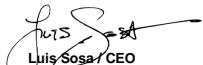
(Name and signature of authorized person)
| Maximum SAR for this model and conditions under which it was recorded: | |
| EGSM 900 | 0.233 W/kg 10g Head | 0.302 W/kg 10g Body |
| DCS 1800 | 0.095 W/kg 10g Head | 0.204 W/kg 10g Body |
| WCDMA 900 | 0.071 W/kg 10g Head | 0.095 W/kg 10g Body |
| WCDMA 2100 | 0.064 W/kg 10g Head | 0.123 W/kg 10g Body |
During use, the actual SAR values for this device are usually well below the values stated above. This is because, for purposes of system efficiency and to minimize interference on the network, the operating power of your mobile device is automatically decreased when full power is not needed for the call. The lower the power output of the device, the lower its SAR value.

Usar as functionalities sociales de chamadas
BAY AREA COMPLIANCE LABORATORIES CORP.
1274 Anvilwood Ave. Sunnyvale, CA 94089. USA
www.baclcorp.com
Phone: +1 408 732 9162 Fax: +1 408 732 9164
| Maximum SAR for this model and conditions under which it was recorded: | |
| EGSM 900 | 0.233 W/kg 10g Head | 0.302 W/kg 10g Body |
| DCS 1800 | 0.095 W/kg 10g Head | 0.204 W/kg 10g Body |
| WCDMA 900 | 0.071 W/kg 10g Head | 0.095 W/kg 10g Body |
| WCDMA 2100 | 0.064 W/kg 10g Head | 0.123 W/kg 10g Body |
The supplied accessories perform best for your phone.
Learn the basics of using the phonebook feature.
Adauga un prieten:
Adauga o cenexiune noua
(1616 NW, 84TH Ave. Miami, Florida U.S.A. 33126)
Declaram ca:
BAY AREA COMPLIANCE LABORATORIES CORP.
1274 Anvilwood Ave. Sunnyvale, CA 94089. USA
www.baclcorp.com
Phone: +1 408 732 9162 Fax: +1 408 732 9164
Ave., Miami, Florida
U.S.A. 33126.
2015/01/27
(Data)
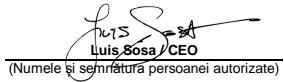
| Valoarea maximà indicelui SAR pentru acest model Şi conditièn in care a fost inregistrar. | |
| EGSM 900 | 0.233 W/kg 10g Head | 0.302 W/kg 10g Body |
| DCS 1800 | 0.095 W/kg 10g Head | 0.204 W/kg 10g Body |
| WCDMA 900 | 0.071 W/kg 10g Head | 0.095 W/kg 10g Body |
| WCDMA 2100 | 0.064 W/kg 10g Head | 0.123 W/kg 10g Body |
BHHMaHHe: onaCHOCT OT TOKOB yIap
3a da n36bHETe ceproHO hapaHBAhe, He doKocBaIte 7eICenca Ha 3apdHOTo yCTPOiCTBO!
Izhknojehe 3apdHoto yctpohtBO, Katohe Iro hN0N3BATE.
3a Na pekcbchete Bp3kata Ha zapdno UcTpoCTBO mIa daeH akcecoap, DpbNHTeUcnCena, a He Kabena.
3aXbaBauINrM Odye eIeMEHbT, KOIO BV N03BONRA Da IaIKNQHTe PNOyDcTA.
UeIcenbT Tp6BaDa octaHe neCHO doCTbHEn.
PeOBOHIO npOBeRBAIte aAnTepea,ocObeHO npi ounCenA nCNOA,3a DAOTKPIeTE EEBHTyAnHn NOBpeIN. Ako aAnTePbT e NOBeH e MoKe Da ro n3NON3BaTe,doKaTo HE bSe nonPabeH.
BKnIOUeTe aIaNTepa KbM enEKeTPrueCeNK KOHTAK, KOTo e IecNo DOctbNeH. BuaHn m3KIOuBaTte aIaNTepa CneI n3NO3BaHToM.
Иножимразе сима заимпета, релюстavenс устрийства.
He nIanaIaIte YcTPOiECTBOTo Ha npRka CbIhYeBa CBETnHa, hApIMpeBbpx TaBIoTo Ha BaIina ABtomO6bn
B cnuya n perepahe, he nnoon3baeT yctpoTcBTO.
BHIMABAITE, koroTIO n3NOBATE yctPOICTBOTO, KOtO ce paXOXOATE.
He noIpaIaIe TycpOCTBTO H a CIneH yIap IINn He nCIOKTo, Tb KaT OTO MOKe da DoBede Do NOBpeD INI HEN3npAHOCTN.
He pa3rno68aBaire, MoqdiuPnapeRte nnI nonpaBairey cYCTPOICTBOTo CAMi.
3a da noquCTITE yTOCTBTO nIIOON3BAITE cyxa I MEKA kbpna.
He n3no13BaIte XmUneCKn npOdyKt nn npenapat.
Hayute Noche 3a npinoXeHnIra, KIOHOBeTae, DcNpner MIOKHTHe BA BaaIN TepeFOh.
Pa3onakObaHe
PpOBepeTe KytTnTa Ha npOdykTa 3a cNeDnHe apTnKynI:
MoBnHnTeTneΦoN
Batepna
3apraHNO (aanTep)
USBKa6eJ
Cnyuankn
PbKOBOcTBo 3a ynotpe6a
PbkoBOCTBO3a6bp3cTAP
PpIIOXeHNTe akcecoapn ca hai-dobpn 3a Baunr TeJeΦoH.
N3rneHaTepeoHa
Ha npednnaen ha Bauin TeneoH ca paanonoXeHH cnDHNTE ENEMTNI:
Ha 3aJnnaHen Ha Baunra Tenefoh ca pa3nnonoxhen cneHnenteHn:
KnaBn
Cnepnata TaBnIa Cn npEtnra 6bPc0 onncanhe Na knaBnWnte HnTepepona:
| Клавиш | Функция |
| Клавиш за вклочвае /在其лочвае | Позьolyва Ви да вклочITE и在其лочichte устрийстого и за зakлочichte ekрANA. |
| Клавиш за сILA на 3ыкa | Позьolyва Ви да ретулирate сILAота на 3ынке, на сьбшиени и мелтимедята. |
| Клавиш „назад" | Позьolyва Ви да сьрнete на predecessorпото мени на ekрANA. Ресеню сьцо се застаргт Няков пиножевеля. |
| Клавиш „начало" | Врьба Ви на чалочь ecpan, кato застар ССКО оТвореньо пиножевеля. |
| Мени | Позьolyва Ви досъп до мени с Функциente на ринложевенeto и роберрава Камки onци са налочни. |
EkpaH
Iи3aHbT Ha BaWnTeNefoH n3rJnExJa nTO3nHaunH:
IKOHN
Hayete nootee 3a IOKHNTe, NORABAAuCi e B rOpHna KpHa na TefenoHa, INDIAKKPAaSi 3a cTstya My:
OcTbI Do MeHOTa I npHIOXeHHA
3a da nonyuHte doctbI do MeHIOta n npInloXeHna,
- Ot hauhniH en ekpan H aTinchete KnaBnii [ ] ha ekpaHa, 3a da n3BnKate cInncbKa C nHctanipaHn pinnIOKeHHa H Baunia TeneFOH
- IpnokapaiTe pntcbsta cn naHraCIO nIIN HNAIBO, 3a da DOCTNIHETe DpyrTc stpAHnHa npriNOXEOHNTA.
- HatncheTe npOn3B0Ha IKoHa 3a DoctbI Do npInIOKeHne.
4.3a nXoD o npnOxKeHnTo, HATCNHe TKnAHIuB Back IIM Home BduHOTo HA ekpHa.
N3noJ3BaHe Ha OCHOBnФyHKmHa nOBNKBaHe
Haye Ta npobekdaTe n OTROBaPte Ha NOBKBAHIN B TO3n paaden.
N3BbPbBaHe Ha NOBnBaHe:
- Ot hyaHnHa ekpaH mnn MeHIOTo c npInIOKeHnA, HATNCHeTe NkOHaTa [ ]
- HabepeTe KoJa n TeNefoHHnH oHemep.
- HatincheTe [ ] 3a 3anOuBaHe Ha pa3roBop.
4.3a nipkKIOUbaHe Na o6axdAHeTo,doKoCHete [ ]
3a da OTROBOpTe Ha o6aXdaHe:
- Korato noJyUHTe obaXdHe, npmIIb3Hete IKoHata nAdACHO 3a da OTROBOPITE INI HANBAO 3a da ro OTXBpNIte [ ]
2.3a da npnkiHOnHe obaXdaHTo,doKoCHete [ ]
U3npaansHe n pnerneHa cbo6eHnra
B Ta3n Cekzna Hayte KaK da nonyuaBaTe n 3npaatae:
- Tekctobu Cb06eHnA (SMS).
-Мултимедин CBобшени (MMS).
Ctbnk 3a nnpaunhe Ha TeKCTOBn MyTNMeDNHn Cbo6EHHN:
1.Дokochete 6byToHa 3a cBo6eHnI [ ] B CnMCbKa C npInIOKeHnI, cIeL TOBa KnaBnI [ ] B IЯBaTа YacH NaHaHeHa.
- HanuTe Te nefoHHn Hmep nI mHe Ha KOHTaKTHn IIN HATNCHE [ ]3a Da BNe3eTe B KOHTaKTH.
- Hanme Te BaTeo cbo6eHne.
3a da n3npaTne TeKCTOBO CbOBeHHe, npemHeTe KbM CTbNka 5.
3aДа пларкOTМУПТМЕДИЕОБКТ (38yK,CHMМК ИИ ДР.)npOДЛЖETe KмсТьКЯ.
- HATINCHETe [ ] B ropnna Decen bIbn, nIa6peTe Tnna I CAMOTO prrnoKeHne.
- HatncheTe [ ] 3a da n3npatme Cb6eHneTo.
Добаян He KaHTaKTH
Hayute OCHOBITE Ha n3non3BaHe KaKoTHaTHa TKHira.
Добаяне Ha HOB KOHTAKT:
1.BnCTa C npuIOxEHnHaHtCHETe KOHTAKn, CneI TOBa [ ]B roPHN DEceH bYbI, 3a da DoabbITE HOB KOHTAKT.
2. Поньн electe Котахтпата Иформачи (Имe, Фамлmaи и тelenфоенн Номр).Можеда польнгte и дугни поета кат email, adpecи t.H.
3. Hatnchete [√] B rohpata qact Ha tenefoha, 3a da 3ana3te BbBeDeHOTo.
TbpcHe Ha KOHTaKT
- B li ncta c npinnoxhenia hatachete [ ] KOHTaKtN.
- Ppnnb3Hete npbcta cn OT dbHOTo Do Bbpxa 3a Da
npeBpnte nCTa nn HATNCHTe 6yToHa 3a TbpcHe [ ] n HAniWte Te bPNTe 6yKbN OTO C6cbTeHOTo nn fAmnIHOTO IME.
- 3a Da BIVIITE detaIIIN 3a KOHTAKTA, HATNCHETE IMETO INH CHMKMATA HA KOHTAKTA.
Ako nckate da npoBeTebe 06kdahe, HATcHete Homepa Ha KONTAKTA.
CnyuhaheHaMy3nka
Hayete KaK da cnyuatae M3nka Ype3 MyzikaneH nIeBp Hn FM
pado.
CnyuhaheHaFMpaHNo:
- NocTabete cnlywankn BvB Baunr Tepeoh.
2.B liucta c npinloxekena hataichete [ ] FM padno.
3.Иил�зВатЕНТАСИНСТРУМЕNTИВДБНОТа 3aДпримЕпгг.TA.
Cnyuhahe Ha My3nkaJHn paJIObe:
PbBoO, KOnPiRatye MzAnKJInHe ΦaIIOHe NbBtpeUHata nAMet HBa BaaNteOpHn IN bPyXy Kaprtata NAMet.
- B li ncta c npinloxekhenia,doKoCHete [ ] My3nka.
2.ИЗбетере релот bьрха на ekрани докochete neceHTA, KORTO nckate di cityuatae.
3.Bme NOKBeAaDatNtCKaTNaBya,LoQIINbCMeHrTe NcHHTe, INoON3BAkUeNHeTATCnHCHTPymEHTBInBbHOTO.
Cbpfnpahe BMpexkata
Hayute KaK Da BIn3aTe B IIO6bIMnTe cn Web caTObe.
1.Bnmtca c npinoxeHnaHTNCheTe [ ]bpay3bpt.
2.Дokocheteдадес Башишетададеса на сaitа,В КОТо nckateда ве�етe нанатс悔Енанр徳.
HayeTe OchoBETa3aChemaHe n pperIeXdahe Ha CHIMKn.
3aChemaHe Ha CHIMKIN
- B nucta c npnIOxKeHna, IOKoCHete [ ] KaMepa.
- Hanpabete XeJahHATE HAcTpoIKn Ha BIm3bopa,HaTtckaIKn 6byToHa 3a HAcTpoIKn [ ]
3.Дokochete6byToHa3a3achemaHe[5]HaekpaHa,3aDaHapabiteCHMka.TaIe ce 3anaaABTOMATuHO.
IperJeHa 3aCHeHTe CHmKn
B Jncta c npinoKHeHnaNCTe [ ] Tanepe n 36peTe naNa ha KaMePata [ 93] 3a da nOnyUteOoTbI n BvAayinupate BCMKN zachetNI ot Baunu TEneOpCHMkN.
HaycheOcHOBnTe 3a CbIp3BaHe Ha BaIIINa TeneΦOH Do nHTePHeT.
Добаян He Na HOBA Bpb3ka
- B nucta c npnIOKeHnI,doKOChETe [ ] HactpoiK,3a da KOHNpynpate yctpoNCTBOTO.
- Hatnche Oonmu "Oue..." cneT TOBA 366epete MoBnHn Bp3kn APN.Cera 366epete SIM Kaprata, kOaTo nckate da KOhFpynpate.
3.ДokocheteКлавишМehnoИЗбетeHOBAPN,спд koTeO bБbeTe BnA nnapaMetpnte,pedoctabEHOT BaWna DOCTABuHK.
OchOBHnTe npaMeTpnc ca:
- Me
APN - Iotpe6nteJcKO nme
- Napona
HKnO DcTbHNi HnON3BAT npOKC CpbPbR. 3a NOBHe HnΦopMaun OTHOCHO BnA N KOHmYpauNraTa Ce o6pbuaTe KbM BaIIuN DaCTbKN.
- Korato CbBpIme C bBBeJxDeta HA HeO6XoDMIMTE napamETP, i36epete MeHIO, cneI KOTo 3AnIHc.
Ako imate MHoxeCTBO APN KOHpIpyaun 3a eHa n Cbua SIM
IpeoTbpaTaBaHe Ha 3ary6aTa Ha cnyx
Uma pncokbe 3a Heo6patnma 3a hya, Ako npneMHknt, cnyuankite 3a yun, BscOKOBOPnTeHIT NmC nyuankite ce nno3N3BAT C BVcOKA cnHa na 3bYka. PerynmuTte cnHATA ha 3bYa do HnBO, KOETe He npdeTaNBA onAOCT. C TeHene Ha bPemeto, Bne Moke da npnbukhte KbM no-BcOKa cnHa na 3bYka, kOToIe mnrEzda HOpMaHna, Ho e BpndHa 3a Baunin
cnyx. Ako yceTHe 6bMHeNE IINI pRnYUeH ROBc, BcBTBeMa Bn da ce KOHCyTNHpate csc CneuaJIaNtCT No cnyx. KonKOTO noBnCoka e cnilata Ha 3bYa, TOnKOba ONo-BncO e PmCKt, Ye cnyxbT Bn Moxe da ce nobPei b3pO. CneuaJIaNtCTe no cnyxa npndarAe cneHNHTe npenopbK:
- OrpamHneTepoDbIaKHTeHOCCTaHa I3NpO3BaHe Ha BVCoka CnlaHa 3BykaB CnyuAaKNITE, BVCOKOROBOpTeYnn CnuAaKnata
- N36B8aTyeBENMBAHABeHTo Na CnNTa Ha 3ByKa, 3a Da ce NOKPKe UShMa CpeDa.
- Hamanete cnata Na 3bya, ako He YybaTe Xopata, KOITO roboartokono Bac.
SAR
Mon, otndeJeTe BpeMe da npooyTeTo3n BaKeH pa3deJ.
PAДИNOВьЛHIN
M3NCKBAe CdoKaatEnCTBO 3a CbOTBETCTBNE C MEXyHApOHNITE CTaNDPaTI (MexdyapOHa KOMCn 3a 3aIHTa CpeSy HeIOHN3npaUHTe lyheni) INIc EbponeKcATA mpeKtNbIA 1999/5/EO (pAdno-HABMaunHO 6OpDyBaHe n daJeKOcBooShTeNo KpAHO OOpdyBaHe) 3a BCNUK moJIn MObINu TneFOnH npDe Ia 6bDat Npychat H na3apa. OnaBaBHeto Ha 3dPaBETO 6E3OnaNCHoCTTA Ha nopTeBnTeN a BCKO dpyro Ine e OChOBHO m3NCKBaHe Na Te3n CTaNdPAPr INI Ta3N mpeKtNbIA.
TOBA YCTPOCTBO TOPTABPA H MEXDYMAPODHITE YKA3AH3A ⅢNIAFAHE H PADIOMBJIHN
Baueto MobinHIO yctpoIcSTBO npedctabnraBA pado npedeabaten INpneMnHt.Ke npoeKTHaPO Taka, ye Na He naDnBaAbaRpaHNNHTe CTOHNCTa 3a NsIaranaHe Ha paNDobbHn (paDNOCETOTN ENEKTPOMaTHnTNI noneta), npenOpBuAnHn OT MeKdynapODNTe YkazAHnHa. Yka3AHnTa ca p3ap6oTeHn OT He3ABNCIMHa NayHu Oprahna3aJn (MeKdynapODHa KOMCNs3a 3aZaUHTpeSy HNeOHN3PauuTIbYeuHn) BKNQOBVTB 3hAuHTepePB 3a 6e30NaCHOT, npdH3aHauHn Da rapaHTnpa 6e30NaCHOCTHa BAUCmXopa, He3ABNCIMO OT TReXHata Bb3pact N3dPaBOCNHO CbCTORHe.
B yka3aHnraTa 3a nIaraneHa paMIObIhne cIe mIOnI3Ba MepHa eIMHua 3a I3MePBAhe, I3BeCTHa KATO CTeUcHmH NKeOcHmEHT H aNOrTbIaHe Na CKn. TpaHnHata CToHoc H cKtI 3a MoBnHn yctpoiCTBa e 2 BAt/kr.
Tectobete 3a CKI ce npobexkat KaTo ce n3nON3Bat cTaHdarpHTHe EeknloatauOnHHN No3nCm, Kato yctpoiCTBOTO npedaba C hai-BcOKOTc n rapaHTnpaHO HMOBa MOUHOCT Ha BCHNY IN3NTBAHN YCtOTHN NEHTN.
TecBaHETo Ha CKI OT rnaBata ce n3BbpuBa Ha pa3dennenH0 pa3ctOTHNe O T 1,0cm, 3a Da OTROBApHa yka3aHHa 3a 4paIOUcTeHTO O6bIbHAe. DOKato CE HocN Do TAIOTO yCTPOIcTBOTo Tp8bDa 4a 6bDe NoCTabEHO Ha NaiMaKIO TOBA p3actOTHne O TAIOTO.AKO He n3nON3BATE OdoBepek AHCeCaOPA, yBepete Ce YBCEN IpOyKT, KOITo CE h3nON3B HAma MetaIIu N Ye TeneDFOHTe E NOCTABeH NAOCOHeTO PA3ctOTHne O TAIOTO.
3a noobene nHΦopMaua MoKTe Da nocetHTe www.energizerphones.com
Довлбнгелна ИФОМАЦА 3a eNEKTPOMAHTHNTHE NOENTA N OБ上诉сBEHOTO 3драве можeteда наимерпerte Н сnéднату INHTEPET CTРANUHA http://www.who.int/peh-emf.
Bauimr tenefoeh o6opuydahc Brpaedeha anthe.3a onTmAlna pa6ba Tpr6ba da n36bRbate da JdoKocBaTe nnHAManBaTe.
Tbky KATO MO6JIHNHE yCTPOCTCBVA pIeJANAT folnM h6OpOT
fynKU,Te MOrat dA b6dtaH n3IOJ3BAH B dpyu NIOJUNC,OCBHeB
Ta3N B KOYTO E Do YXOTo B.Ipn TAKBa B 6cTOrETCbTA
yCTPOCTBOTo OJe OTTOBAPa HA yK3A3AHNTa, Ako CE n3IOJ3Ba cbc
CnyJAMNK INI USB Ka6en.AKO n3IOJ3BATE Dpyr AxCeCCaP
yBepeTe CeYe BceKN IpOdyKT, KOIto CE n3IOJ3Ba HMA MetaIIIN
Ye TeNEpOHbTe nOCTABeH Ha pa3ctOJHMe HAI-MANKoOT 1,0CMOT
TJANTO.
OcBEN TOBA ce npenopbYBa da ce I3NOJ3Ba Bb3MOXHO Hai-MHORO cnlyaIaNkata. Bbnpekn TOBA, Tp6Ba da CE bHIMABA B To3N cnuyai, da Ce IbPxM MoBNIgna TeNePOH naCtOHNe OTO KOPMa Hb6peMeHHn JKeHH mAnKn Ta3 Na Deu n IOHOM.
CbpeMeHnata Hayna HnpOpMaHna He NocOyBa,Ye Hn0n3BaHeto Ha MobunHn TeneoHn Hana RbEmaHe Ha npEbnHaNepKm. BbIpKeu ToB, TbI Kato HKn Ca 3aqrNkExe Ha 3a BbMOXHnTe pCKOBe, CbpaHn c PekomePahy nUtoP6ba Ha teneoHn, Hne m CbTBaMde Da n3nON3BAT CnyAankata, 3a da DbPkat MobUnHnTeneoHn PaactOthne O rTaBata nTrlOTo.
JIULEH3N
Mapkata n lorata Ha Bluetooth ca co6btehoct Ho Bluetooth SIG, Inc. and 3n03ahe Ha Teu mapr on DDMBrands LLC and Herobite napThbOpin oIopEnxHa liueHImpeAne.ДурtnTbProBcKm MapKn TbProBcKn HAMMeHOBaHaN Ca Te3n Ha cTbEThNTe IM npTtKeTenn.
Mon, otndeJeTe BpeMe da npooyTeTo3n BaKeH pa3deJ.
PAДИNOВьЛHN
Jokaa3aTeTc7O 3a cBoTBeTCTBne C MekdyHapoNDHTe CTaHdAPtn (ICNIRP) nme EcbPoneKcata DpeKtna1995/EO (R&TTE) e 3aBbLnKtNeIHO 3a BCuHn MOeHN MoBuHn TeneFOHn, npEe da Morat Da bBdAT yncHATn Ha na3apa. Ona3BaHETo HA dpabeto n CnHyPoCTHa NaTpe6tEna H a BCNuH octaHn Iua e OCHBOH NsickBaHe Na Te3i CTaHdAPtn Inu Tae3n DpeKtNaB.
TO3H MOBUNIEH TEJIeFOH OTROABAP HA MEKdyHAPOHNTE N3NCKBAHIN, C BbP3AH C IN3IAGAHTHO PAJIO BbJHIN
Bauimr MboiHEn Tepeoepaedopnpabatenn npadopnnpemHNI. To npoeKtpanHa nhe npebuWaba nparObeTe 3a nanahe Ra paOBbTHn (paDIOeCTOTHN eNEKTPOAMHTNHn noTeta), npenOpbVAHN OT MeKdyHApOdHnite NsCKBAHnna. NcckBaHnra ca cb3daENOn t He3aBCmHa HayHa oprahn3aun (ICNIRP) n BkNUOvBt 3hAHTeHNO none Ha be3oNaOCHOT, pdeHa3haHeo 3a OcInpyBaHE 63oNAChOCTTa Ha BCyKN Xopa, He3aBCmHO OT TExHATA B3pact mI h 3dpabOCBOHO cbCTOHME.
CbOTBETCTBNE C HOpMaTHBHNTE N3NCKBaHnHa EC
C haactoIeTO,ToBA yCTPOBCTBO e B CbOTBECTBNE cbc CbIeCTBeHIne m3NCKBaHnI nDpyTHe npINIOKIMn pa3npopeD6n Ha DInpeKtNA 1999/5/EO.
3a DeKlapaunra 3a CbOTBeTCTBne, nocTeTe INThepHET
CTpaHncaTa www.energizerphones.com/certifications.
3a6eNeKka: CnaBaBte NaHIOHaJIHnITE MeCHNTApeNaOpEbn HA MCTOTO, KbDETo CE pIeDBNJaD yCTPOBtBO Da 6bDe n3IO3BAHO.Toja UcTpoIcTBO MoKe DA b6 De orpaHueNo 3a yOnTOpeBa B HKOIO INI BCNUKIN DpbXaBn-UIeHNKn H EAePoneckKcb03(EC).
3a6eJIeKkI:
-Поради Истоньаня Матерпал 3a заграхдени, моблингт
Телегон Травьда се Сврзва само C USB Исторфесс
Версан 2.0 INи по-bиска.СврзbaHETO Кьм T. Нар.Зхараз
USB e 3a6paheho.
-
AdanantbT pr8Ba da 6bIe IHCTanipb B 6bn30cT do 6obpydHaeta no D bde Iecno Doctbnie.
-
He 3mnpo3aIte Mo6uHnHry Tenefoh B cpea C npkeAneho BnOka IInn PnpekAneHO HnKcA TeMeHpatya, NKORA he Ntnaarai Te nOuHnHa NaHnA cnBbYeBa CBETNHa IInn PnpeAneHO BnAkhna cpea. DnoXdoRaata Temepatya 3a TeneFOHa Nkcecoapitre e- 10ircC - 55ircC
-
Ito BVPe Ha 3aepxdaHeto, MoIa, NoctabeTe TenefoBa H cpeDa, KoTTo e C HopmAlna TcAHa TemeNepaTpaNu i DoBpa BeHTnauJa. IpenOpbTuHEnHO e da 3apExdate TeTefoDa H cpeDa c TemeNepaTya, KoTBo TaBipra O t 5ircC 25ircC .MoIa, YbEpere Ce, ye IINON3BaTe camo 3apJHOTo UyctpOCTBO, npEIOXeHO O nPOn3BDoNTe. IInON3BaHETO Ha Hepa3peUHe O3apNo YoCTpBO ToMe Jo Da oBoDe Zo O nOAnCHOT i NApHu7BaHae paoeeuHEnHo H aTeFonoHa UynHea 3ra RaupHnau.
-BHIMAHHE: PICK OT EKCPIIO3N, AKO BATEPNIYTA BbDE 3AMEHECA HENOIXOJIA. N3XBpIJIYE INTOIN3BAHNTE BATEPNI B CbOTBETCTBNE C IHCTPYKLIMTE
BAY AREA COMPLIANCE LABORATORIES CORP.
1274 Anvilwood Ave. Sunnyvale, CA 94089. USA
www.baclcorp.com
Phone: +1 408 732 9162 Fax: +1 408 732 9164


- INFORMATIONS RELATIVES À LA SÉCURITÉ
- BAY AREA COMPLIANCE LABORATORIES CORP.
- General security
- Warning electrical hazard
- Unpacking
- Phone layout
- Keys
- Screen
- Icons
- Install the SIM card and battery
- Insert a memory card (optional)
- Assembly diagram for the European charger
- Disassembly diagram for the European charger
- Assembly diagram for the UK charger
- Disassembly diagram for the UK charger
- Turn your phone on and off
- Access menus and applications
- Use basic call functions
- Make a call:
- To answer a call:
- Send and view messages
- Steps to send Text and Multimedia Messages:
- Add contacts
- Add a new contact:
- Search for a contact
- Listen to music
- Listen to the FM radio:
- Listen to music files:
- Browse the web
- Capture pictures
- See the captured pictures
- Add a new connection
- Switch between carriers (SIM cards)
- Turn on the Bluetooth wireless feature
- Find and pair with other Bluetooth enabled devices
- Send images using the Bluetooth wireless feature
- Receive images using the Bluetooth wireless feature
- Connect to a wireless network
- Disconnect from a wireless network
- View the technical details of a wireless network
- When the phone reaches its end of life, please remove the battery before discarding the phone.
- Recommendations:
- Prevention of hearing loss
- RADIO WAVES
- THIS DEVICE MEETS INTERNATIONAL GUIDELINES FOR EXPOSURE TO RADIO WAVES
- LICENSES
- EU Regulatory Conformance
- Notes:
- Usar as functionalities sociales de chamadas
- Adauga un prieten:
- Adauga o cenexiune noua
- BHHMaHHe: onaCHOCT OT TOKOB yIap
- Pa3onakObaHe
- N3rneHaTepeoHa
- KnaBn
- EkpaH
- IKOHN
- OcTbI Do MeHOTa I npHIOXeHHA
- N3noJ3BaHe Ha OCHOBnФyHKmHa nOBNKBaHe
- N3BbPbBaHe Ha NOBnBaHe:
- 3a da OTROBOpTe Ha o6aXdaHe:
- U3npaansHe n pnerneHa cbo6eHnra
- Ctbnk 3a nnpaunhe Ha TeKCTOBn MyTNMeDNHn Cbo6EHHN:
- Добаян He KaHTaKTH
- Добаяне Ha HOB KOHTAKT:
- TbpcHe Ha KOHTaKT
- CnyuhaheHaMy3nka
- CnyuhaheHaFMpaHNo:
- Cnyuhahe Ha My3nkaJHn paJIObe:
- Cbpfnpahe BMpexkata
- 3aChemaHe Ha CHIMKIN
- IperJeHa 3aCHeHTe CHmKn
- Добаян He Na HOBA Bpb3ka
- IpeoTbpaTaBaHe Ha 3ary6aTa Ha cnyx
- SAR
- PAДИNOВьЛHIN
- JIULEH3N
- PAДИNOВьЛHN
- CbOTBETCTBNE C HOpMaTHBHNTE N3NCKBaHnHa EC
- 3a6eJIeKkI:
Brand : ENERGIZER
Model : P550S
Category : Telephone