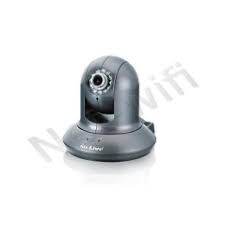
WL-2600CAM - IP Camera AIRLIVE - Free user manual and instructions
Find the device manual for free WL-2600CAM AIRLIVE in PDF.



| Product type | IP Camera |
| Brand | AIRLIVE |
| Model | WL-2600CAM |
| Video resolution | 640 × 480 pixels (VGA) |
| Viewing angle | Approximately 60° |
| Night vision | Yes, with infrared LED |
| Network connection | Ethernet RJ-45 10/100 Mbps |
| Power supply | 5V DC power adapter included |
| Power consumption | 5 W maximum |
| Dimensions (L × W × H) | 100 × 60 × 40 mm |
| Weight | 200 g |
| Housing material | Plastic |
| Audio features | Built-in microphone input, speaker output |
| Motion detection | Yes, software |
| Storage | On server via network (NVR or PC) |
| Installation | On desk or ceiling (mount included) |
| Maintenance | Clean the lens with a soft, dry cloth |
| Security | Password protection (default admin/airlive), HTTPS connection |
| Warranty | 2 years in the European Union, 1 year elsewhere |
| Package contents | IP camera, power adapter, installation CD, lens, mounting bracket, quick installation guide |
| Default settings | IP: 192.168.1.100, subnet mask: 255.255.255.0, login: admin, password: airlive |
Frequently Asked Questions - WL-2600CAM AIRLIVE
User questions about WL-2600CAM AIRLIVE
0 question about this device. Answer the ones you know or ask your own.
Ask a new question about this device
Download the instructions for your IP Camera in PDF format for free! Find your manual WL-2600CAM - AIRLIVE and take your electronic device back in hand. On this page are published all the documents necessary for the use of your device. WL-2600CAM by AIRLIVE.
USER MANUAL WL-2600CAM AIRLIVE
Powered by OvisLink Corp.
www.airlive.com
WL-2600CAM
1/4 CMOS Wireless IP Pan Tile IP Carema
Quick Setup Guide
Table of Contents
List of Languages
English 1 Italiano 50
Cesky 10 Magyar. 58
Deutsch. 18 Polski 66
Espanol 26 Portugues
Eληνικός 34 Pycckn 82
42 Slovensky. 90
Declaration of Conformity
We, Manufacturer/Importer
OvisLink Corp.
5F., NO.6, Lane 130, Min-Chuan Rd., Hsin-Tien City, Taipei County, Taiwan
Declare that the products
Wireless IP Pan Tile IP Carema
AirLive WL-2600CAM
is in conformity with
In accordance with 89/336 EEC-EMC Directive and 1999/5 EC-R & TTE Directive
Clause
EN 300 328 v1.7.1 (2006-10)
EN 301 489-1 V1.6.1 (2005-09)
EN 301 489-17 V1.2.1 (2002-08)
EN 50385:2002
EN 60950-1:2006
CE marking
Description
Electromagnetic compatibility and Radio spectrum Matters (ERM); wideband transmission equipment operating in the 2.4GHz ISM ban and using spread spectrum modulation techniques; Part 1: technical Characteristics and test Conditions Part2: Harmonized EN covering essential requirements under article 3.2 of the R&TTE Directive Electromagnetic compatibility and Radio spectrum Matters (ERM); Electromagnetic compatibility(EMC) standard for radio equipment and services; Part 17: Specific conditions for wideband data and HIPERLAN equipment Product standard to demonstrate the Compliance of radio base stations and Fixed terminal stations for wireless Telecommunication system with the Basic restrictions or the reference levels related to human exposure to Radio Frequency electromagnetic fields (110 MHz - 40 GHz) - General public
Safety for information technology equipment including electrical business equipment

Signature :
Name :
Position/ Title :
Date:

Note on the FCC standard
This equipment has been tested and found to comply with the limits for a Class B digital device pursuant to Part 15 of the FCC Rules. These limits are designed to provide reasonable protection against harmful interferences when the equipment is operating in a commercial area. This equipment generates, uses and may radiate radio frequency energy, and if not installed in accordance with the user guide, may cause interference in the transmission of radio communications. If operating in a residential area, it is probable this equipment will cause harmful interference, in which case the user will be required to try to correct this interference using his own means.
Note on CE Marking
This is a Class B product. In a residential area this product may cause radio interference, in which case the user can be required to take the appropriate measures. OvisLink Corp. hereby declares that AirLive WL-2600CAM meets the basic requisites of directive 99/05/CE, and is therefore liable for the accuracy of these data:
OvisLink Corp.
5F, No.6 Lane 130
Min-Chuan Rd, Hsin-Tien City,
Taipei, Taiwan
TEL: +886-2-2218-6888
Warranties
This product has undergone various quality controls to ensure proper operation.
This product is covered by a two-year warranty for countries inside European Union. For other countries, the warranty period is one year only. In the event of any manufacturing fault or breakdown, it will be repaired by OvisLink Corp. Please contact your supplier for details on the procedure to follow. This warranty shall not be applicable in the event of damage caused by improper use of the product, accidents, faulty handling or manipulation nor any future incompatibility with third party products.
Important Information
Default Setting:
IP Address:
192.168.1.100
Login:
admin
- Subnet Mask:
255.255.255.0
- Password:
airlive
Package Content
| Item | Description |
| IP Camera | AirLive WL-2600CAM IP Camera |
| Power Adapter | Country-specific |
| CD | User Manual / IP Installer and Document |
| Lens | Camera Lens |
| Camera Stand | Supplied with mounting screw |
| Printed Document | Quick Installation Guide |
Camera Installation
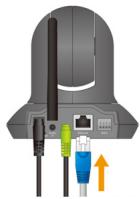
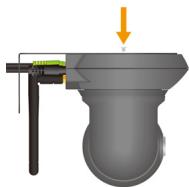
- Install Ethernet Cable
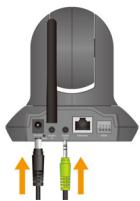
- Install Speaker
- Install Stand
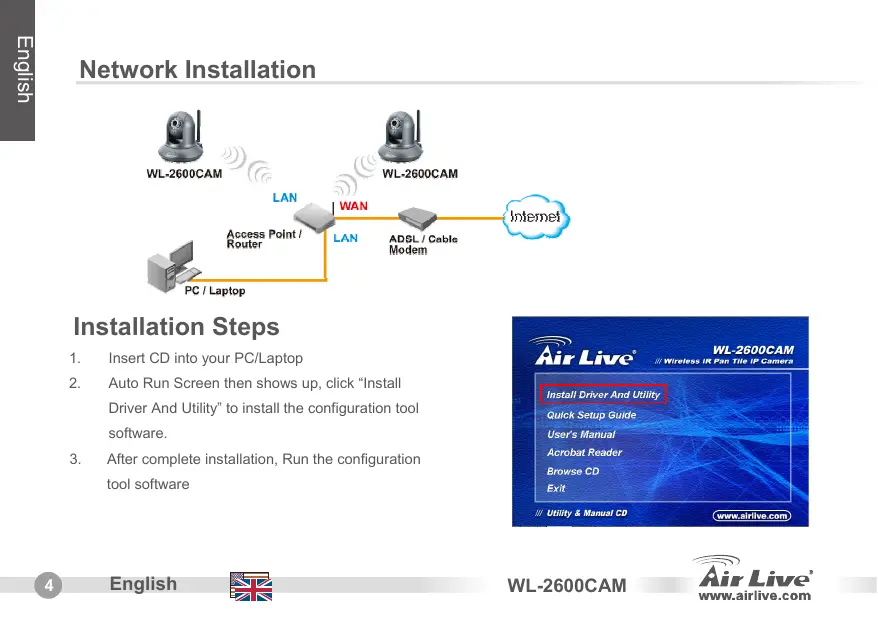
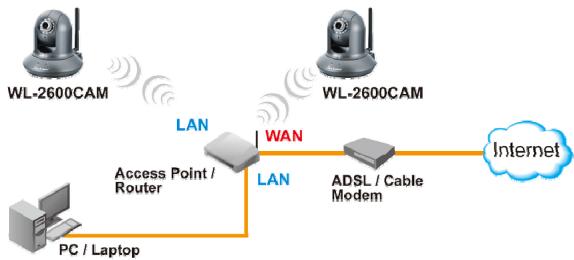
Network Installation
Installation Steps
- Insert CD into your PC/Laptop
- Auto Run Screen then shows up, click "Install Driver And Utility" to install the configuration tool software.
-
After complete installation, Run the configuration tool software
-
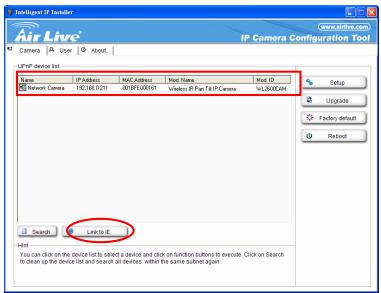
The Software scans the network and finds the IP Camera, then list in the dialog box.
-
If the Camera's IP address is in the same IP segment as your LAN, select the founded IP Camera and click "Link to IE" to proceed.
-
If the IP is not in your IP segment, select the founded IP Camera and click "Setup"
Note that the text color of the listed IP Camera is red if it is not in same the IP segment with your PC.
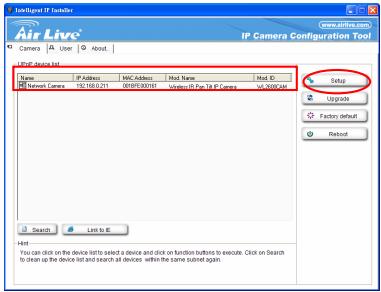
- Follows setup instruction to change the IP address of the IP Camera.
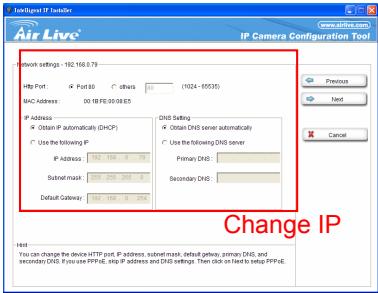
- At the end of the setup instruction, the IP Camera Reboots
- Click the Search button to search again
- Click "Link to IE" to proceed.
- The tool launch your Internet Explorer and prompts up the login dialog
- Enter default user name and password: admin / airlive
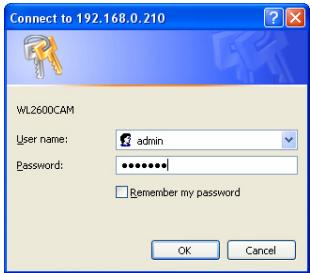
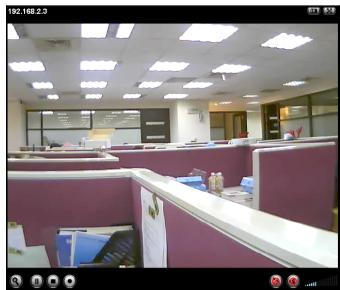
- After a successful login, the browser asks for ActiveX installation.

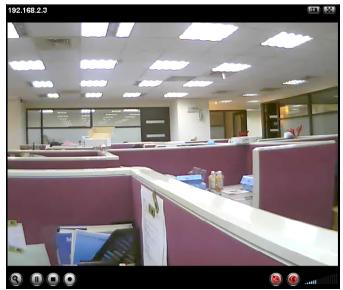
- Install the ActiveX, and the browser shows the video stream.
View Video from Internet
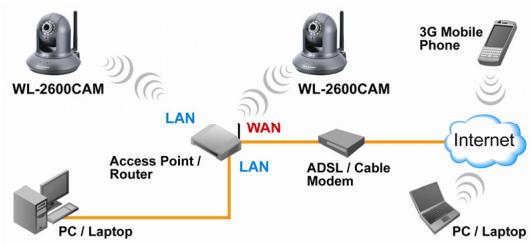
You can also view the on-line video from internet.
Please refer to the User's Manual for instruction.
Note
If you need a public IP for your Router, please contact your ISP for the service.
FCC Standard - upozornéni
Min-Chuan Rd, Hsin-Tien City,
Taipei, Taiwan
TEL: +886-2-2218-6888
Záruka
Min-Chuan Rd, Hsin-Tien City,
Taipei, Taiwan
TEL: +886-2-2218-6888
Garantiebestimmungen
Min-Chuan Rd, Hsin-Tien City,
Taipei, Taiwan
TEL: +886-2-2218-6888
Garantías
Alternatively, you can use the following instructions.
Nota:
Min-Chuan Rd, Hsin-Tien City,
Taipei, Taiwan
TEL: +886-2-2218-6888
Eyyunoeic
AutoToTPOIOvEXeI UTOBnOe Odiapopous TIOIOTKouc ELeVxoug YIA TIV EEAOPaIaON TNS OwOtN LEIToupyiac. AutoToTPOIOvKAUUTETAI TOIa (2)EtH Nyyunon YIA TIG XWpeC EVTOS EupWtaIKNC EvwnC. Tia Tc AALc Xwpe, N TEPIODOs Eyyunong Eiva EA (1) Etoc. SE TEPiTTOW ONTOIAOHTOTE ELATTWATOS N DIAKOTN KATAKEUNG, O ETIaOKeuAote IAO TNY OvisLink Corp. NapakawEATE OE EITAPN ME Tov TPOJNeUT OAC YA TIG AETIOUEPEIEOT DIAIDkAIAO TU AOKAUOEITAI. H EyyunON DEXuXei OE TEPiTTWAN Znmuac TOn BA tPOKAnE I ATOTN AVAPAOOT XpONTOU TPOIOTVC, TAVUATXNUATW, TU EATWATIKOU XEIPIOU N TOU XEIPIOU OUTE OTIOUHTOTE MELOVTKO AouuBiTaOTU PE TPOIOVTa TPitWv.
Baoike TnIpoopopie
Apxikespuθioeis:
IP Address:
192.168.1.100
Subnet Mask:
255.255.255.0
Login:
- Password:
admin
airlive
Min-Chuan Rd, Hsin-Tien City,
Taipei, Taiwan
TEL: +886-2-2218-6888
Garanties
Min-Chuan Rd, Hsin-Tien City,
Taipei, Taiwan
TEL: +886-2-2218-6888
Garanzia
Min-Chuan Rd, Hsin-Tien City,
Taipei, Taiwan
TEL: +886-2-2218-6888
Jotallas
Min-Chuan Rd, Hsin-Tien City,
Taipei, Taiwan
TEL: +886-2-2218-6888
Gwarancje
Min-Chuan Rd, Hsin-Tien City,
Taipei, Taiwan
TEL: +886-2-2218-6888
Garantias
Min-Chuan Rd, Hsin-Tien City,
Taipei, Taiwan
TEL: +886-2-2218-6888
TapaHTnHbIe 06a3aTeJIbCTBa
VCTPOIbTO pOoHNO pAaMnUHbIe TcTbI KauCTBa,HTo6bl rapaHTIOPOBAt HOpMaJIbHOe ΦYHKUNHOpOBaHHe. Ha npOdyKT npEOCTABNIEcTBA rOgaRanTHIN dAnrCtpan-ueHneOC.ДЯ cTpan He BxOJaUe BC - rapaTnIa Odnr.oD. B CnyaIpePON3BOdCTBENHOrO 6paKa IIN NOnOMKn, OvisLink Corp pON3BeTe pEMONT
n3dien. Ioxanycta, CnoCTabuikom dnn nonyehn 60one noDpOboH nHOpmaun o npoedype rapaHTNHO OBOcynKbAHn. Ipnso3BOInTeJ He MoeT HcNt OBtCTBHeHocb 3a yuepe Bo3NHkUm B pe3yIbTaHEaJIeXaJero hCnloB3OBAHn, HecactHOrO cnuay an HnpaBnHbO opauehner. Ipnso3BOInTeB TaKke He Hecet OBtETCBHeHOCb 3a daNbHeuYIO HeCOBMeCTMocb C yCTPOJCTBAMn OT cTOPOHHx PNO3BOInTeJeN.
OchobhajnHΦopMaçuia
Hacrpoyn no ymouanhio:
IP aDpc:
192.168.1.100
Macka noDceT:
255.255.255.0
IMRA NOJb3OBaTeJIa
admin
- Napohl Password:
airlive
CoepexHmoe ynaKOBKn
Min-Chuan Rd, Hsin-Tien City,
Taipei, Taiwan
TEL: +886-2-2218-6888
Záruky
OvisLink Corporation declares that this device is in compliance with the essential requirements and other relevant provisions of directive 1999/5/EC.
RU
Kompanha OvisLink Corporation 33A1B8T, CTO 370 UCTPOJTHO OBTBEAET OCHOBHBM TPEBOBAHIMN IPOVCHM POJCTBENHBM YCLOBHBM, HJIOKHEHN B M DIPHKTHE 1999/EC.
SK
OviLink Corporation potvrdzuje, ze toto zariadenie vyhovju poziadavkam a'dalsim predispom smerince 1999/5/EC.
FR
5F, NO.6, LANE 130, MIN CHUAN RD., HSIEN-TIEN CITY, TAIPEI COUNTY, TAIWAN
This equipment may be used in AT, BE, CY, CZ, DK, EE, FI, FR, DE, GR, HU, IE, IT, LV, LT, LU, MT, NL,PL,PT, SK, SI, ES, SE, GB, IS, LI, NO, CH, BG, RO, TR

OvsLink Corporation declares that this device is in use and has been used for the first time in any other relevant provisions of directive 1999/5/EC.

Tested To Comply With the Requirements FOR HOME OR OFFICE USE



- Table of Contents
- Declaration of Conformity
- Clause
- Description
- Note on the FCC standard
- Note on CE Marking
- Warranties
- Important Information
- Default Setting:
- Camera Installation
- Network Installation
- Installation Steps
- View Video from Internet
- Note
- FCC Standard - upozornéni
- Záruka
- Garantiebestimmungen
- Garantías
- Nota:
- Eyyunoeic
- Baoike TnIpoopopie
- Garanties
- Garanzia
- Jotallas
- Gwarancje
- Garantias
- TapaHTnHbIe 06a3aTeJIbCTBa
- OchobhajnHΦopMaçuia
- CoepexHmoe ynaKOBKn
- Záruky
- RU
- SK
- FR
Brand : AIRLIVE
Model : WL-2600CAM
Category : IP Camera