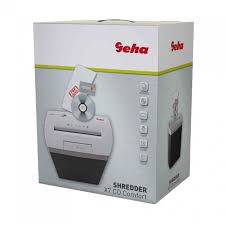
X7 CD - Shredder GEHA - Free user manual and instructions
Find the device manual for free X7 CD GEHA in PDF.



| Brand | GEHA |
| Model | X7 CD |
| Product type | Document shredder |
| Cut format | Particle cut |
| Cut size (paper) | 4 x 40 mm |
| Cut size (CD/DVD) | 4 pieces |
| Paper capacity | 7 sheets (A4, 70 g/m²) |
| CD/DVD capacity | 1 CD/DVD or credit card |
| Paper insertion width | 220 mm |
| CD/DVD insertion width | 120 mm |
| Power supply | 220-240 V AC, 50 Hz, 0.8 A |
| Dimensions (W x D x H) | 330 x 200 x 430 mm |
| Bin capacity | 18 liters |
| Max continuous operation time | 2 minutes |
| Overload protection | Yes, with automatic motor stop |
| Jam protection | REV function to reverse cutting direction |
| Separate cutting tool for CD | Yes, with dedicated inner bin |
| Usage | Indoor only, intermittent use |
| Maintenance | Empty bin frequently, clean with a dry cloth |
| Warranty | 24 months |
Frequently Asked Questions - X7 CD GEHA
User questions about X7 CD GEHA
0 question about this device. Answer the ones you know or ask your own.
Ask a new question about this device
Download the instructions for your Shredder in PDF format for free! Find your manual X7 CD - GEHA and take your electronic device back in hand. On this page are published all the documents necessary for the use of your device. X7 CD by GEHA.
USER MANUAL X7 CD GEHA
Thank you for choosing this Geha quality product. Before using the device for the first time, carefully read this manual. Please pay special attention to the safety instructions.
- Keep all loose objects, such as clothing, ties, jewellery, hair and other small objects, away from the feeder slot to prevent injury and damage.
- If the document shredder is not used for a prolonged period of time, set the switch to OFF.
- Before inserting paper, remove all staples and paper clips. While the device is able to shred staples, we nevertheless recommend removing them.
- Always keep your fingers and hands well away from the feeder slot to prevent injury.
- Continuous shredding should not exceed two minutes. If the device needs to be operated continuously, we recommend limiting shredding to periods of two minutes and allowing the motor of the device to cool down before shredding again.
- Install the device as closely as possible to an easily accessible mains socket.
- Before moving, transporting or cleaning the device and prior to emptying the bin, switch off the document shredder and disconnect it from the power mains.
- Empty the bin frequently to prevent jamming of paper in the cutting unit.
- Never leave the document shredder unattended, especially when there are children and pets in the vicinity.
- Never open the device housing. If you encounter problems, please contact your dealer.
- It is forbidden to operate the device with a damaged power cord.
INSTALLING DOCUMENT SHREDDER
- First insert the inner container (for CDs/DVDs) into the paper bin.
- Place the document shredder on a paper bin. Ensure that it is stable. Take care not to squeeze your fingers between the upper edge of the bin and the cutting unit.
IMPORTANT:
The document shredder can only be placed on the bin in one direction.
Ensure that the shredder is properly positioned on the paper bin.
- Connect the power plug to a standard 220-240V AC socket.
STARTING DOCUMENT SHREDDER
The sliding switch at the top of the device can be set to three (3) positions.
- AUTO: The shredding process is started automatically as soon as the paper to be shredded is inserted into the feeder slot. After shredding is completed, the device is automatically switched off.
- REV is used for two purposes:
a) Eliminating paper jams. Before the shredding cycle is completed, the cutting unit is set to reverse mode to free the shredder blades. If you become aware that too much paper has been fed into the shredder so that the shredding process is slowed down, immediately set the switch to REV position. Also do this, if you have inadvertently inserted paper that is not to be shredded.
b) Shredding CDs/DVDs and credit cards: Insert CDs/DVDs or credit cards individually into the feeder slot provided
- To empty the bin or to switch off the device as it will not be used for a prolonged period of time, set the switch to OFF and disconnect the shredder from the power socket.
The device is exclusively designed for use in enclosed rooms and for short-time operation not exceeding two minutes. Do not operate the document shredder outdoors.
SHREDDER CAPACITY
The X7 CD cuts up to seven sheets of paper (DIN A4, 70g/m²) at a time.
The maximum permissible paper width is 22 cm. To cut small pieces of paper such as envelopes and credit card receipts, insert them at the centre of the feeder slot.
Please ensure that the permissible number of sheets to be processed at any time by the cutting unit is not exceeded, as the device might otherwise be damaged.
SEPARATE CUTTING UNIT FOR CDs AND CREDIT CARDS
Your document shredder is equipped with a separate cutting unit for CDs/DVDs and credit cards. CDs/DVDs are cut into four pieces. As the material tends to shatter, keep your face away from the slot when inserting CDs/DVDs. The destroyed CDs/DVDs and credit cards are collected in a separate container for environmentally friendly disposal!
PREVENTING PAPER JAMS AND OVERLOADING
The X7 CD is equipped with a motor overload circuit breaker. A normal operating cycle for shredding at maximum load takes two minutes, which must be followed by a break in operation. The power supply to the shredder motor is automatically interrupted in the following cases:
- Continuous operation of the document shredder at maximum capacity over a prolonged period of time, i.e. for more than two minutes without interruption.
- Simultaneous insertion of more than seven sheets of paper (DIN A4, 70g / m2 ) or feeding of paper in a direction other than longitudinal.
Under the above conditions, the automatic overload circuit breaker of the motor is triggered, interrupting the power supply to the device. If this occurs, proceed as follows:
- Disconnect the power plug from the mains socket and wait for a minimum of 60 minutes until the overload circuit breaker is automatically reset. Remove the paper by pulling it upwards out of the cutting unit and tear off any excess paper.
- Reconnect the power plug to the mains socket and set the sliding switch to REV. Remove the remaining paper from the shredder blades. Set the sliding switch to AUTO. If necessary, repeat this procedure.
- When the feeder slot is again unblocked, continue shredding by setting the sliding switch to AUTO.
TECHNICAL DATA
Model:
Shredder X7 CD
Cutting type:
Cross-cutting
Cutting performance:
4 x 40 mm (paper), 4 pieces (CDs/DVDs and credit cards)
Shredding capacity:
7 sheets (A4, 70g/m²), 1 CD/DVD or credit card
Feed width:
220mm
Feed width for CDs/DVDs:
120mm
Rated voltage:
220-240VAC/50Hz, 0.8 A
Dimensions:
330 × 200 × 430 mm
Paper bin:
18 litres
Short time operation:
2 minutes
DISPOSAL
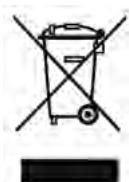
The waste bin symbol indicates that electrical devices must not be disposed of with normal household waste. Please take your device to a collection centre for electrical appliances for recycling and proper disposal.
WARRANTY
The warranty period for your device is 24 months.
For warranty claims, you need your sales receipt. Please also keep the original packaging. If you encounter any problems with your document shredder, please contact your dealer.
INTRODUZIONE
AaBaaallll aai 1 (a) OFF Jcclalb0.2
1 3
y j 4
5
y 1
a 6
Ae 7
8
1 9
y10
11
Caiuunall gbi jy
(DVDabgallal
yagallal ydakol jalpaegjaoa aai jayal jai aai g ciaaii 2
∴ p a
Egao Clllall gai jai jai jai jai jai jai jai jai jai jai
3.3.3.3.3.3.3.3.3.3.3.3.3.3.3.3.3.3.3.3.3.3.3.3.3.3.3.3.3.3.3.3.3.3.3.3.3.3.3.3.3.3.
240 220
jLd 100000000000000000000000000000000000000000000000000000000000000000000
aill yalee 1
()REV.2
y 1
e 1
aaiy aiai iiai jiaia jia jia jia jia
j 3
3.1.11
g 1
31
7 70 4A 7 X7 CD 224 224 224 224 224 224 224 224 224 224
JnH 1
yLs aia galsill ygill sll ygill ygill
24
CnΦpOBoB BnDcOaNc KJI N KpeiTHaJ KapToUka
220 MM
120 MM
220-240B nepem.Toka/50Γu,0,8A
330 × 200 × 430 MM
YTNIN3AUJIA
CmboJcpeepckHytbIM Mycopoc6bOpHnKOM yka3bIbaeT Ha To, YTO 3JeKtpuueckne yctpoiCTBa He NpOJIeKaT yCTpaHeHIO BMeCTe C HOpMaJIbHbIM DomaSHHM MycOpOM. JIJIa 3KOLOrUeCKN uCToT O yTIN3aUNI npOCIM cdaBaTb 3TO yCTpoiCTBO B DONyUeHHB IyHKT c6Opa CEHHbIX MaTePnaIaOB.
TAPAHNTY
TapaHTnHbI cPoK Ha BaWe yCTpoiCTBO coCTaBlaTe 24 Meca.
063aTeIbHO COxpaHnTe KBtAnuO NOKynke N ynaKOBky 3aBOda-n3rOToBnTeJI.
Ppi npo6nemax c yctpoinCTBOM o6paaainTecb K CBOemy TopROBOMy areHTy.
INLEDNING
1 CD/DVD sau card de credit
Lâtime alimentare: 220 mm

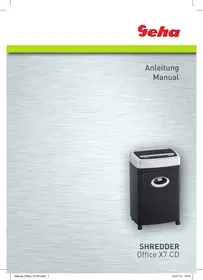
Brand : GEHA
Model : X7 CD
Category : Shredder