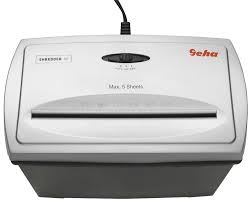
X5 - Shredder GEHA - Free user manual and instructions
Find the device manual for free X5 GEHA in PDF.



| Product type | Document shredder |
| Brand | GEHA |
| Model | X5 |
| Cutting format | Particles 4 x 40 mm |
| Feed capacity | 5 sheets (A4, 70 g/m²) |
| Insertion slot width | 220 mm |
| Duty cycle | 2 minutes on, 15 minutes off |
| Power supply | 220-240 V, 50 Hz, 0.8 A |
| Overload protection function | Automatic motor protection |
| Safety protection | Safety switch on the cutting bin |
| Switch positions | Auto, Off (OFF), Reverse (REV) |
| Automatic start | Yes, by sensor in the insertion slot |
| Cleaning and maintenance | Unplug before cleaning; do not use solvents or sprays; empty the bin regularly |
| Warranty | 24 months |
| Disposal | Do not dispose of with household waste; take to an approved recycling center |
Frequently Asked Questions - X5 GEHA
User questions about X5 GEHA
0 question about this device. Answer the ones you know or ask your own.
Ask a new question about this device
Download the instructions for your Shredder in PDF format for free! Find your manual X5 - GEHA and take your electronic device back in hand. On this page are published all the documents necessary for the use of your device. X5 by GEHA.
USER MANUAL X5 GEHA
ENTSORGUNG
Thank you for choosing this Geha quality product. Before using the device for the first time, carefully read this manual. Please pay special attention to the safety instructions.
IMPORTANT SAFETY NOTES
Before using the document shredder for the first time, please read the operating instructions. When operating an electrical device, you should always take basic safety measures to eliminate the risk of injury from electric shock. Therefore please follow the following basic rules.
- When the shredder is not in operation, before emptying the bin, clearing a paper jam or cleaning the device, always disconnect its plug from the power mains.
- Proceed with extreme care when operating the shredder near children or people with an intellectual disability!
- Protect yourself against damage from electric shock. Never immerse the power cord, the power plug or the device in water or any other liquid.
- Do not operate the device in the vicinity of water (shredder suitable only for use in dry rooms).
- Never insert metal objects, jewellery, hair, fingers, cloths, etc. into the paper feeder of the shredder.
- Before shredding a document, remove paper clips and staples.
- Regularly empty the paper bin to prevent paper jams.
- Do not switch on the device if its plug or power cord is damaged or if the shredder does not work properly or is otherwise damaged.
- In the event of an emergency, disconnect the shredder from the power supply by pulling the plug.
- Where possible, install the device near a power socket and ensure that the socket remains freely accessible.
- Do not clean the shredder with cloth or detergents containing aerosols or solvents.
- Do not spray the device with liquids. Do not treat with oil spray.
INSTALLING SHREDDER
- Operate the device only if it stands on a level floor.
- Check the cutting unit to ensure that it is properly placed on the bin. The shredder is equipped with a safety switch interrupting the power supply as soon as the cutting unit is removed from the bin or when it is not correctly placed on it.
- Insert the plug of the power cord into a standard power socket.
STARTING SHREDDER
The X5 is operated by means of a sliding switch located at the top of the shredder.
This switch can be set to three positions: AUTO, OFF, REV.
Set the sliding switch to AUTO to activate automatic paper intake as soon as a document is placed in the feeder slot, triggering the release switch in the feeder opening.
If the sliding switch is set to OFF, the shredder does not automatically start up when a document is placed in the feeder opening. We recommend setting the switch to this position when the shredder is not in use. Set the sliding switch to REV, if you wish to operate the shredder continuously in reverse mode. This is required to clear a paper jam in the feeder.
PREVENTING PAPER JAMS AND OVERLOADING
The X5 can shred up to 5 sheets (DIN A4, 70g/m 2 ) at a time and can handle documents of up to 220mm in width.
If you wish to shred smaller pieces of paper such as envelopes and sales receipts, insert them at the centre of the feeder slot to ensure that the switching sensor is triggered.
The X5 is equipped with a motor overload circuit breaker. A normal operating cycle for shredding at maximum load takes 2 minutes, which must be followed by a break in operation. The power supply to the shredder motor is automatically interrupted in the following cases:
- Continuous operation of the document shredder at maximum capacity over a prolonged period of time, i.e. for more than 2 minutes without interruption.
- Simultaneous insertion of more than 5 sheets of paper (DIN A4, 70g/m 2 ) or feeding of paper in a direction other than longitudinal.
Under the above conditions, the automatic overload circuit breaker of the motor might be triggered, interrupting the power supply to the device. If this occurs, proceed as follows:
- Disconnect the power plug from the mains socket and wait for a minimum of 60 minutes until the overload circuit breaker is automatically reset. Remove the paper by pulling it upwards out of the cutting unit and tear off any excess paper.
- Reconnect the power plug to the mains socket and set the sliding switch to REV. Remove the remaining paper from the shredder blades. Set the sliding switch to AUTO If necessary, repeat this procedure.
- When the feeder slot is again unblocked, continue shredding by setting the sliding switch to AUTO.
In the event of a minor short paper jam, the power supply is interrupted only temporarily.
This means that the device can be restarted as soon as the jam is removed.
TECHNICAL DATA
| Model: | Shredder X5 |
| Shredding performance: | cross-cutting: 4 x 40 mm |
| Shredder capacity: | 5 sheets of paper (A4, 70g/m2) |
| Feeder slot width: | 220mm (paper feed) |
| Operating cycle: | 2 minutes ON, 15 minutes OFF |
| Power supply: | 220~240V AC, 50Hz, 0.8A |
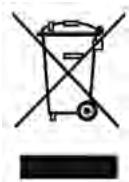
DISPOSAL
The waste bin symbol indicates that electrical devices must not be disposed of with normal household waste. Please take your device to a collection centre for electrical appliances for recycling and proper disposal.
WARRANTY
The warranty period for your device is 24 months.
For warranty claims, you need your sales receipt. Please also keep the original packaging.
If you encounter any problems with your document shredder, please contact your dealer.
INTRODUZIONE
SMALTIMENTO
INTRODUCTION
ÉLIMINATION
MONTEREN VAN HET APPARAAT
AFVALVERWIJDERING
الضمان
INLEDNING
AVFALLSHANTERING
GARANTI
GARANTIE
GWARANCJA
保修
您的设备保修期为24个月。
请您务必保管好购买凭证和原厂包装。


Brand : GEHA
Model : X5
Category : Shredder