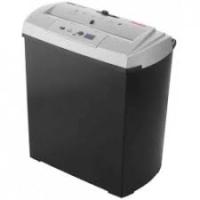
S7 CD - Shredder GEHA - Free user manual and instructions
Find the device manual for free S7 CD GEHA in PDF.



| Product type | Document shredder |
| Brand | GEHA |
| Model | S7 CD |
| Cutting format | Strip cut |
| Cutting size (paper) | 7 mm |
| Cutting size (CD/DVD, credit card) | 4 mm |
| Sheet capacity (paper) | 7 sheets of DIN A4 (70 g/m²) |
| Sheet capacity (CD/DVD, credit card) | 1 piece |
| Feed width (paper) | 220 mm |
| Feed width (CD/DVD) | 120 mm |
| Power supply | 220-240 VAC, 50 Hz, 0.7 A |
| Dimensions (W × D × H) | 297 × 183 × 339 mm |
| Bin capacity | 13 L |
| Duty cycle | 2 min on / 60 min off |
| Separate bin for CD/DVD | Yes |
| Functions | Auto start, reverse (REV), Clear button, overload protection |
| Safety | Motor overload protection, automatic shut-off in case of overload |
| Maintenance | Empty bin frequently, unplug before cleaning |
| Warranty | 24 months |
| Intended use | Closed offices, short-term operation |
Frequently Asked Questions - S7 CD GEHA
User questions about S7 CD GEHA
0 question about this device. Answer the ones you know or ask your own.
Ask a new question about this device
Download the instructions for your Shredder in PDF format for free! Find your manual S7 CD - GEHA and take your electronic device back in hand. On this page are published all the documents necessary for the use of your device. S7 CD by GEHA.
USER MANUAL S7 CD GEHA
Thank you for choosing this Geha quality product. Before using the device for the first time, carefully read this manual. Please pay special attention to the safety instructions.
- Keep all loose objects, such as clothing, ties, jewellery, hair and other small objects, away from the feeder slot to prevent injury and damage.
- If the document shredder is not used for a prolonged period of time, set the switch to OFF.
- Before inserting paper, remove all staples and paper clips. While the device is able to shred staples, we nevertheless recommend removing them.
- Always keep your fingers and hands well away from the feeder slot to prevent injury.
- Continuous shredding should not exceed two minutes. If the device needs to be operated continuously, we recommend limiting shredding to periods of two minutes and allowing the motor of the device to cool down before shredding again.
- Install the device as closely as possible to an easily accessible mains socket.
- Before moving, transporting or cleaning the device and prior to emptying the bin, switch off the document shredder and disconnect it from the power mains.
- Empty the bin frequently to prevent jamming of paper in the cutting unit.
- Never leave the document shredder unattended, especially when there are children and pets in the vicinity.
- Never open the device housing. If you encounter problems, please contact your dealer.
- It is forbidden to operate the device with a damaged power cord.
INSTALLING DOCUMENT SHREDDER
- First insert the inner container (for CDs/DVDs) into the paper bin.
- Place the document shredder on a paper bin. Ensure that it is stable. Take care not to squeeze your fingers between the upper edge of the bin and the cutting unit.
IMPORTANT:
The document shredder can only be placed on the bin in one direction. Ensure that the shredder is properly positioned on the paper bin.
- Connect the power plug to a standard 220-240V AC socket.
STARTING DOCUMENT SHREDDER
The sliding switch at the top of the device can be set to three (3) positions.
- AUTO: The shredding process is started automatically as soon as the paper to be shredded is inserted into the feeder slot. After shredding is completed, the device is automatically switched off.
- REV is used for two purposes:
a) Eliminating paper jams. Before the shredding cycle is completed, the cutting unit is set to reverse mode to free the shredder blades. If you become aware that too much paper has been fed into the shredder so that the shredding process is slowed down, immediately set the switch to REV position. Also do this, if you have inadvertently inserted paper that is not to be shredded.
b) Shredding CDs/DVDs and credit cards: Insert CDs/DVDs or credit cards individually into the feeder slot provided
- To empty the bin or to switch off the device as it will not be used for a prolonged period of time, set the switch to OFF and disconnect the shredder from the power socket.
The device is exclusively designed for use in enclosed rooms and for short-time operation not exceeding two minutes. Do not operate the document shredder outdoors.
The shredder features a "Clear" button. Please press this button if you wish to terminate shredding or if all paper has been shredded before the two-minute cycle is completed. When the "Clear" button is pressed, all paper is pulled into the bin.
SHREDDER CAPACITY
The S7 CD cuts up to seven sheets of paper (DIN A4, 70g / m2 ) at a time.
The maximum permissible paper width is 22 cm. To cut small pieces of paper such as envelopes and credit card receipts, insert them at the centre of the feeder slot.
Please ensure that the permissible number of sheets to be processed at any time by the cutting unit is not exceeded, as the device might otherwise be damaged.
SEPARATE CUTTING UNIT FOR CDs AND CREDIT CARDS
Your document shredder is equipped with a separate cutting unit for CDs/DVDs and credit cards. CDs/DVDs are cut into four pieces. As the material tends to shatter, keep your face away from the slot when inserting CDs/DVDs. The destroyed CDs/DVDs and credit cards are collected in a separate container for environmentally friendly disposal!
PREVENTING PAPER JAMS AND OVERLOADING
The S7 CD is equipped with a motor overload circuit breaker. A normal operating cycle for shredding at maximum load takes two minutes, which must be followed by a break in operation. The power supply to the shredder motor is automatically interrupted in the following cases:
- Continuous operation of the document shredder at maximum capacity over a prolonged period of time, i.e. for more than two minutes without interruption.
- Simultaneous insertion of more than seven sheets of paper (DIN A4, 70g / m2 ) or feeding of paper in a direction other than longitudinal.
Under the above conditions, the automatic overload circuit breaker of the motor is triggered, interrupting the power supply to the device. If this occurs, proceed as follows:
- Disconnect the power plug from the mains socket and wait for a minimum of 60 minutes until the overload circuit breaker is automatically reset. Remove the paper by pulling it upwards out of the cutting unit and tear off any excess paper.
- Reconnect the power plug to the mains socket and set the sliding switch to REV. Remove the remaining paper from the shredder blades. Set the sliding switch to AUTO. If necessary, repeat this procedure.
- When the feeder slot is again unblocked, continue shredding by setting the sliding switch to AUTO.
TECHNICAL DATA
Model:
Shredder S7 CD
Cutting type:
Strip cutting
Cutting performance:
7mm strips (paper), 4 pieces (CDs/DVDs and credit cards)
Shredding capacity:
7 sheets (A4, 70g/m²), 1 CD/DVD or credit card
Feed width:
220mm
Feed width for CDs/DVDs:
120mm
Rated voltage:
220-240VAC/50Hz, 0.7 A
Dimensions:
297 x 183 x 339mm
Paper bin:
13 litres
Operating cycle:
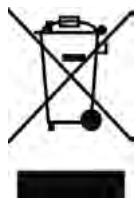
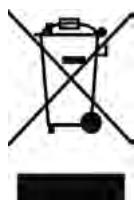
The waste bin symbol indicates that electrical devices must not be disposed of with normal household waste. Please take your device to a collection centre for electrical appliances for recycling and proper disposal.
WARRANTY
The warranty period for your device is 24 months.
For warranty claims, you need your sales receipt. Please also keep the original packaging. If you encounter any problems with your document shredder, please contact your dealer.
INTRODUZIONE
ylll lllllllllllllllllllllllllllllllllllllllllllll
g 15
j 1
Auta 1
REV
a 1
a 1
Jy 1
aill sai jdi aaiiaai ai iie
OFF 1
A
J 1
Aaiaai jaii
g j 10000000000000000000000000000000000000000000000000000000000000000
Cclear
chinall 1
S7CD
jlll laii iie aie 1511 sicaiy 1111 1111
J 1
aay ciay y g ay jaiy aai
y
1 1
Aaill gai jiai jaiil aie Jauan aaiy iagaa
a 120
1
y
g 1
∴ a1 + a2 + a3 = 6
y 1 y
0gjgl jgl jgl jgl jgl jgl jgl jgl jgl jgl jgl jgl jgl jgl jgl jgl jgl jgl jgl jgl jgl jgl jgl jgl jgl jgl jgl jgl jgl jgl jgl jgl jgl jgl jgl jgl jgl jgl jgl jgl jgl jgl jgl jgl jgl jgl jgl jgl jgl jgl jgl
1 1
Auta
AutaO Aae aee ae aee
A. = , = , =
Shredder S7 CD
1
()
152/52 14
Aslaic 1
( xt2 - x) t + xy2 = ( x) f
- 5g g/5g
A. Hz /VAC
T
115
OFF 1ON
1
:
∴ √3x2 + 9/2x + 3 = 0
∴ SΔOBC = SΔCOD + SΔBOC
3x 即 3n = 1 可以
aal aal aal aal aal aal aal aal aal aal aal aal aal aal aal aal aal aal
aill be bilna 1n jalil n jaiiaia 1s jll a
A11c11
1
jlll llll 1
J 1
BBEDEHNE
BlaarOaapm Bac 3a NOKyKky 3Toro KaueCTBeHHORo 13JeNn MapKn Geha. Nepei BBOOM B DeIcTBnE ChauAna BHNMaTeJbHO IpOuHTaJIte HaCTOJaee pyKOBoDCTBO. Oco6oe BHNMaHne 6paTIte Ha yka3AHn IIO TexHnke 6e30NaChocTn.
BAXHbIe YKA3AHnI NO TEXHnke B3OnACHOCTN


1.Bo n36eXaHne TpaBmnpoBaHn Heo6xOAnMo BceIa DepeXaTb BCE He3aKpePnIeHHbIe PpeMTebl, TaKHe KaK PpeMTebl OdeJbI, RaJIcTkyKn, YkpaWeHnA, BOLOCb IIN DpyrVe MeIknE PpeMTebl IOdaJIbIe OT OTBepCTnA DJIa BBOJa.
2. YctaHOBntb nepeKJIouaTeIb B nOLOXeHne BblKI, KOrda MaunHa dIy HnHToXeHna DeIObIb6ymar He nCnOJb3yeTcA nnITeJIbHOe BpeMra.
3. Пець Ввдом 6умаги Heo6xOДМоУДaЛNTb BCE KaHцeЯрСКсpeпк. XOTy yCtpoIcTBO MOKET ИЗMeЛьчaТ b CKePENK, HO 3TOrO DeIaTb He peKOMeHdyeTcR.
4.Bo n36eXaHHe cepbe3HbIX TpaBm BceIa DepeXnTe naIbIy I pyKn IoaJIbWe OT OTBepCTnI yI BVOda.
5. HenpepbIbHbI npoecc pe3aHn He dOJxHe npoOJIkaTbCdoJIbWe 2 MNHyT. B cIyueae ecn yCTpoiCTBO doJXHO kCNlyaTnpOBaTcB He npepepbIBHO, peKOMeHNdyETcOrpaHnUbaTb CnkPpe3aHn 2 MNHyTaMn, daBaJ DBnraTeJIu OCTPOICTBa OXJaIDNbCBy B nay3e.
6. YcTpoIcTBO DOJXHOb yCTaHaBJIbBaTbCk KaK MoXHO 6JInxKe K IeRKO DoCTyHNO HaCTeHHo WTeNCEbHOB pO3eTke.
7. Перед перемшеним, Трансортураовим и чстков машиндлу унчтоженя.DeLOвьх 6уmar Или перао на пооженем рпимного Контейнарmaшини Heo6xODIMO BCeгда BblKlIOUaTb C pa3beINHeHem OTЭлькт pineckо сети.
8. Heo6xoJIMO qacto onopoxHraTb pnpHbI KOHTeHep dJa 6yMar. Ihaue MoKeT 3acOpTuBcpeKyuM MeXaHn3M.
9. He octablajte MaunHy dny yHnTuKeHna DeNoBbix 6yMar 6e3 HaD3Opa, HapnpemKorda B6n3n HaxoJrTcI deTn nn DomaHne KJBOTHbIe.
10. HnKoRda He OTKpbIbAaTe KOpnyc, npn npo6IeMax o6paauTecb K ToproBOMy aReHtY, y KOToporo Bbl Kynnn DaHHyu MaunHy.
11. C noBpeJxHbIM TOKOIOBDOaIIM Ka6eJIeM 3KcIIyATnpoBaTb MaunHy HeIb3I.
YCTAHOBKA MAUINHbI IJIy YHNUTOXEHNJa DEJOBbIX byma
- ChaçaIa BCTaBbTe B KOHTeHep DЯ 6yMaRn BHyTpEHHN IprneMHbIKOHTeHep (Дяla3ePbIX DInCKOB/цифрOBbIX BnDEoDInCKOB).
- HadejHo yctaHOBnTe MaunHy dIy hnHTOKeHn IeIOBbIX 6ymar Cbepy Ha npneMhbl KOHTeHep dIy 6ymarI. Ppi 3TOM cIeInte 3a TeM, YTObI He 3aUeMnTB pIaNbCbl Mekdy BepxHnM Kpaem npneMHoro KOHTeHepa dJIy 6ymarN IN pexkyuIm MexaHn3MOM.
Baxhoe yka3aHne:
MaunHa dIyHnTuToxKeHn DeIOBbIX 6ymaT MoXeY cTaHaBnBaTcR ToJIbKO Ha OJHO CTOpOHe npEmHoro KOHTeHepa. CneITb 3a TeM, YTO6bl MaunHa 6bla npabInbHO NOOrHaHa K npEmHOMy KOHTeHepy.
- BCTaBbTe CeTeBOI WTeNCeIb B O6bIuHyIO WTeNCeJIbHyIO PO3eTKy CeTINepemEnHOrO ToKa 220-240 B.
BBOI MAUNHbI JIIA YHNUTOXEHN IENIOBbIX BUMAR B DEICTBVE
Pa3pe3aHHe Ha noIocbl
7 MM (6ymara), 4 chaTn (KOMNaKT-ДиСК /
UΦpOBOB BnDeOndc Nnn KpeDHTha KapToUka)
7 JIINCTOB DIN A4 (DIN A4, 70 r/M2), 1 KOMnAaKT-ДИСК / UHΦPBOBON BUNDeOДNCK IJI N KpeiTHNaKapTOUka
220 MM
120 MM
220-240Bперм.Toka/50Γι,0,7A
297 x 183 x 339 MM
13π
2 MIn BkI, 60 MIn BblKJI.
YTNIN3AUH
CmboJcpeepckHytbIM Mycopoc6bOpHnKom yka3bIbaeT Ha To, YTO 3JeKtpuueckne yCTpOInCTBa He NOJIeKaT yCTpaHeHHIO BMeCTe C HopMaJIbHbIM DomaunHM MycOpOM. JIra 3KOLOrueckn uHCToYtIN3aUNI npOCIM cdaBaT 3TO yCTpOInCTBO B DONyUeHHbI PyHKT c6Opa CEHHbIX MaTePnaIIOB.
TAPAHNTY
INLEDNING
7 Kagi DIN A4 (DIN A4, 70g/m²),
1 CD/DVD ya da kredi karti
220 mm
120 mm
220-240VAC/50 Hz, 0,7 A
297 × 183 × 339 mm
13L
1 CD/DVD sau card de credit
Lâtime alimentare: 220 mm


- INSTALLING DOCUMENT SHREDDER
- IMPORTANT
- STARTING DOCUMENT SHREDDER
- SHREDDER CAPACITY
- SEPARATE CUTTING UNIT FOR CDS AND CREDIT CARDS
- PREVENTING PAPER JAMS AND OVERLOADING
- TECHNICAL DATA
- WARRANTY
- INTRODUZIONE
- BBEDEHNE
- BAXHBIE YKA3AHNI NO TEXHNKE B3ONACHOCTN
- YCTAHOBKA MAUINHBI IJIY YHNUTOXEHNJA DEJOBBIX BYMA
- BAXHOE YKA3AHNE
- BBOI MAUNHBI JIIA YHNUTOXEHN IENIOBBIX BUMAR B DEICTBVE
- YTNIN3AUH
- TAPAHNTY
- INLEDNING
Brand : GEHA
Model : S7 CD
Category : Shredder