BT-1629563 - Air-conditioner BASETECH - Free user manual and instructions
Find the device manual for free BT-1629563 BASETECH in PDF.



| Product type | Monoblock portable air conditioner |
| Brand | BASETECH |
| Model | BT-1629563 |
| Power supply | 220-240 V~, 50 Hz, 785 W |
| Cooling capacity | 7000 BTU/h (2.05 kW) |
| Air flow | 320 m³/h |
| Dehumidification | 0.8 L/h (at 30°C, 80% RH) |
| Temperature range | 16-31 °C |
| Refrigerant | R290 (propane), 0.14 kg |
| Recommended area | < 22 m² |
| Fan speeds | 2 (high/low) |
| Timer | 24 h |
| Exhaust hose length | 1.5 m |
| Cable length | 1.8 m |
| Remote control | Yes, 2 AAA batteries |
| Casters | Yes |
| Filters | 2 washable filters (clean every 2 weeks) |
| Drainage | Manual, W.F indicator |
| Cleaning | Dry, lint-free cloth |
| Safety | Minimum distance 30 cm, do not cover, do not use tilted |
| Repairability | Entrust to a qualified technician |
Frequently Asked Questions - BT-1629563 BASETECH
User questions about BT-1629563 BASETECH
0 question about this device. Answer the ones you know or ask your own.
Ask a new question about this device
Download the instructions for your Air-conditioner in PDF format for free! Find your manual BT-1629563 - BASETECH and take your electronic device back in hand. On this page are published all the documents necessary for the use of your device. BT-1629563 by BASETECH.
USER MANUAL BT-1629563 BASETECH
GB Operating Instructions
Air conditioner
Item No. 1629563
Page 14 - 25
F Notice d'emploi
Climatiseur
- Introduction....15
- Description of symbols....15
- Intended use....16
- Delivery content....16
- Features and functions....16
- Safety instructions ....17
a) General....17
b) (Rechargeable) batteries....18
- Operating elements ....19
- Installation....20
- Remote control 20
- Mains connection....21
- Operation....21
a) Switching on/off 21
b) Control keys....21
c) Indicator lamps 21
d) Cooling 22
e) Dehumidifying....22
f) Ventilation....22
g) Timer 22
- Emptying the water tank....23
- Cleaning and care....23
a) General....23
b) Filter....23
- Warning messages 23
- Troubleshooting....24
- Disposal....24
a) Product....24
b) (Rechargeable) batteries....25
- Technical data....25
a) Air conditioner....25
b) Remote control 25
1. Introduction
Dear customer,
Thank you for purchasing this product.
This product complies with the statutory national and European requirements.
We kindly request the user to follow the operating instructions, to preserve this condition and to ensure safe operation!

These operating instructions relate to this product. They contain important notices on commissioning and handling. Please take this into consideration when you pass the product on to third parties. Please keep these operating instructions for further reference!
If there are any technical questions, please contact:
International:
www.conrad.com/contact
United Kingdom:
www.conrad-electronic.co.uk/contact
2. Description of symbols

The symbol with a flash in a triangle indicates health risks e.g. due to electric shock.

The symbol with an exclamation mark in a triangle indicates important instructions contained in these operating instructions that must be followed.

The arrow symbol alerts the user to the presence of important tips and notes on using the device.
3. Intended use
The product is designed for air conditioning, dehumidification and ventilation of privately used spaces.
The product is not intended for commercial, technical or industrial use. Using the product in business establishments, workshops or industrial companies, or for any similar applications will void the warranty.
It is intended for indoor use only. Do not use it outdoors. Contact with moisture, e.g. in bathrooms, must be avoided under all circumstances.
For safety and approval purposes, you must not rebuild and/or modify this product. If you use the product for purposes other than those described above, the product may be damaged. In addition, improper use can cause hazards such as short circuiting, fire, electric shock etc. Read the instructions carefully and keep them. Make this product available to third parties only together with its operating instructions.
All company names and product names are trademarks of their respective owners. All rights reserved.
4. Delivery content
- Air conditioner
- Exhaust hose
- 2x hose connectors
-
Window adapter
-
Remote control
- 2 x AAA batteries
- Operating instructions
Up-to-date operating instructions
Download the latest operating instructions from our website www.conrad.com/downloads or scan the printed QR code. Follow the instructions on the website.

5. Features and functions
• 3 in 1: air conditioning, dehumidification and ventilation
• LED display with soft touch control panel
• Incl. wheels for simple transportation
- 24-hour timer
- 2 fan speeds
Read the operating instructions carefully and especially observe the safety information. If you do not follow the safety instructions and information on proper handling in this manual, we assume no liability for any resulting personal injury or damage to property. Such cases will invalidate the warranty/guarantee.
a) General
- The device is not a toy. Keep it out of the reach of children and pets.
- Do not leave packaging material lying around carelessly. These may become dangerous playing material for children.
- Protect the product from extreme temperatures, direct sunlight, strong jolts, high humidity, moisture, flammable gases, vapours and solvents.
- Do not place the product under any mechanical stress.
-
If it is no longer possible to operate the product safely, take it out of operation and protect it from any accidental use. Safe operation can no longer be guaranteed if the product:
-
is visibly damaged,
- is no longer working properly,
- has been stored for extended periods in poor ambient conditions or
- has been subjected to any serious transport-related stresses.
- Please handle the product carefully. Jolts, impacts or a fall even from a low height can damage the product.
- The mains outlet must be located near to the device and be easily accessible.
- Never pull the cable when disconnecting from the mains. Always pull holding the designated grip surfaces.
- Unplug the mains plug from the mains socket if you do not use the device for an extended period of time.
- For safety reasons, always unplug the device in case of a thunderstorm.
- Make sure that the mains cable is not squeezed, bent, damaged by sharp edges or put under mechanical stress. Avoid excessive thermal stress on the mains cable from extreme heat or cold. Do not modify the mains cable. Otherwise the mains cable may be damaged. A damaged mains cable can cause a deadly electric shock.
- Do not touch the mains cable if damaged. First, power down the respective mains socket (e.g. via the respective circuit breaker) and then carefully pull the mains plug from the mains socket. Do not operate the device with a damaged power cable.
- To prevent risks, damaged power cables may only be replaced by the manufacturer, a professional workshop appointed by the manufacturer, or a similarly qualified person.
- Never plug in or unplug the mains plug when your hands are wet.
- In order to fully disconnect the device from the mains, disconnect the mains plug from the wall socket. Never disconnect the mains plug while the device is still switched on. Only use the keys on the remote control or operating panel for switching off the device.
- Disconnect the mains plug from the wall socket before cleaning or moving the device.
- Check whether the mains voltage conforms to the specifications on the rating plate. Connect the device to an isolated ground receptacle. Do not use any extension cable or multiple outlet sockets.
- Do not open the device. Do not insert any objects into the openings.
- Do not cover the device. Ensure sufficient ventilation. Leave a distance of at least 30 cm to around the device in order to ensure sufficient ventilation.
• Always transport or use the device in upright position. Never use the device when tilted. - Do not sit on the device, and do not put any objects on the device.
- Do not operate the device with wet hands or while standing on a wet floor.
- Do not move the device during operation.
- Protect the device from getting in contact with chemicals.
- Do not use spray containers near the device.
- Do not use the device near gas or inflammable materials such as alcohol, pesticides, fuel, etc.
- Warning – risk of electric shock! Never attempt to repair the device yourself. In case of malfunctions, have it repaired by experts only.
- The device is not intended to be used by persons (including children) with reduced physical, sensory or mental abilities or lack of experience and / or lack of knowledge unless they are supervised by a person responsible for their safety or have received instructions on how to use the device.
• Children should be supervised to ensure they do not play with the device. - Do not use the device if it has fallen down or shows any visible damage.
- Consult a professional if you require assistance with product operation, safety or connection.
- Maintenance, modifications and repairs are to be performed exclusively by an expert or at a qualified shop.
- If you have questions which remain unanswered by these operating instructions, contact our technical support service or other technical personnel.
b) (Rechargeable) batteries
- Correct polarity must be observed while inserting the (rechargeable) batteries.
- (Rechargeable) batteries should be removed from the device if it is not used for a long period of time to avoid damage through leaking. Leaking or damaged (rechargeable) batteries might cause acid burns when in contact with skin, therefore use suitable protective gloves to handle corrupted (rechargeable) batteries.
- (Rechargeable) batteries must be kept out of reach of children. Do not leave (rechargeable) batteries lying around, as there is risk, that children or pets swallow them.
- All (rechargeable) batteries should be replaced at the same time. Mixing old and new (rechargeable) batteries in the device can lead to (rechargeable) battery leakage and device damage.
- Rechargeable batteries must not be dismantled, short-circuited or thrown into fire. Never recharge non-rechargeable batteries. There is a risk of explosion!
7. Operating elements
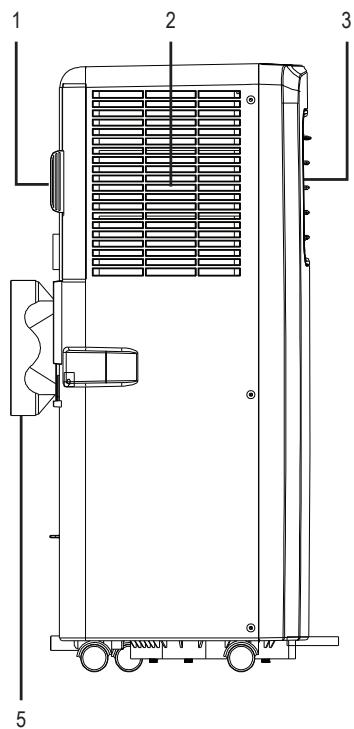
text_image
1 2 3 51 Filter
2 Air inlet
3 Air outlet
4 Control panel
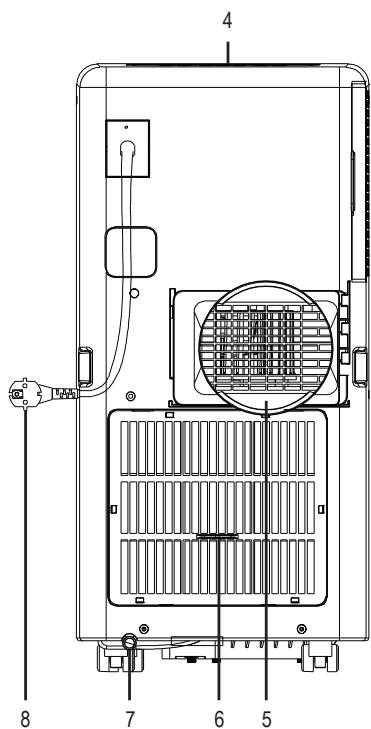
text_image
4 8 7 6 55 Exhaust hose adapter
6 Filter
7 Drain opening
8 Power plug
8. Installation
- Choose a suitable installation spot.
- Pull apart the air outlet hose by pulling slightly on both ends.
- Screw both adapters clockwise onto the ends of the air outlet hose.
- Place the window mount into the window. The circular opening must face inward.
The window mount is designed exclusively for use with sliding windows (horizontal + vertical).
The length of the window mount is min. 67.5 cm and max. 123 cm.
- Close the window as far as possible to fasten the window mount.
- Install the air outlet hose adapter (5) on the back of the product. The oblong bracket on the left side of the adapter fits into the oblong opening. Slide the adapter down to secure the connection.
- Pull apart the air outlet hose to the required length.
→ Guide the exhaust hose as straight as possible during installation. Do not bend the exhaust hose. - Attach the other end of the air outlet hose to the opening on the window mount. The adapter clicks into place.
→ You may also guide the exhaust hose through the window without using a window mount. Close the window as tight as possible. Make sure not to squeeze the hose or hence damaging it.
9. Remote control
- Remove the battery compartment lid.
- Insert 2 AAA batteries and heed correct polarity. Heed correct polarity as indicated in the battery compartment.
- Close the battery compartment.
→ Change the batteries when the product no longer responds to commands from the remote control.
Always point the remote control at the IR receiver below the display.
The button with no label has no function.
10. Mains connection
- Connect the power plug to a common household power outlet.
- A signal sounds. The product is then in standby mode.
11. Operation
a) Switching on/off

The product must remain in upright position for at least 2 hours prior to switching it on, in order for the coolant to flow through the respective pipes.
When having switched off the product, wait for at least 3 minutes before turning the product on again. The compressor could get damaged otherwise.
Press the POWER button on the device or remote control to switch the device on or off.
b) Control keys
| Button | Function |
| POWER | Switching on/off |
| TEMP+ | Increase the temperature |
| TEMP- | Reduce the temperature |
| MODE | Select mode (air conditioning, dehumidification, ventilation) |
| SPEED | Set fan speed (high, low) |
| TIMER | Timer mode |
c) Indicator lamps
| Light | Meaning |
| W.F | Water tank full |
| HIGH | High fan speed |
| LOW | Low fan speed |
| TIMER | Timer mode |
| COOL | Cooling mode |
| DEHUM | Dehumidifying mode |
| FAN | Fan mode |
d) Cooling
- Select a temperature between 16 and 31^ .
- In this mode, the fan speed can be freely selected.
e) Dehumidifying
- Fan speed and temperature are set automatically and cannot be changed.
• The fan runs at low speed. - The automatically set temperature is 2^ below the current room temperature.
f) Ventilation
- In this mode, the fan speed can be freely selected.
• The temperature cannot be set.
g) Timer
→ Using the timer function, the product can be turned on or off after a certain countdown has elapsed.
Switching the product on or off manually before the countdown has elapsed will cause the timer function to be deactivated.
Turning on the player
- The product must be in standby mode.
- Press the button TIMER.
- Set the countdown timer (1 to 24 hours) using the TEMP+/- buttons.
• To confirm, press the button TIMER. - Select the operating mode.
• After the countdown has elapsed, the product will turn on automatically.
Switch off
• The product must be switched on.
- Press the button TIMER.
- Set the countdown timer (1 to 24 hours) using the TEMP+/- buttons.
• To confirm, press the button TIMER.
• After the countdown has elapsed, the product will turn off automatically
12. Emptying the water tank

Empty the water tank as soon as the W.F indicator lights up or if you plan to not use the product for an extended period.
- Disconnect the mains plug from the mains.
- Remove the black rubber cover from the drain opening (7).
- Remove the semitransparent rubber plug from the drain opening. The water will pour out immediately.
• Install a suitable drain hose (not included) where required. - Divert the water outside or into a suitable drain.
13. Cleaning and care
a) General

Under no circumstances use aggressive cleanings agents, cleaning alcohol or other chemical solutions since these can penetrate the housing or impair functionality.
- Disconnect the product from the power supply before cleaning.
- Clean the product with a dry, fibre-free cloth.
b) Filter
- Clean the filters once every 2 weeks.
- Remove both filters (1+6).
- Rinse the filters under lukewarm water.
- Let the filters dry thoroughly before replacing them.
14. Warning messages
| Display | Cause | Solution |
| E0 | Temperature sensor defective | Repair by expert required. |
| E2 | Water tank full | Empty the water tank. |
15. Troubleshooting
| Problem | Cause | Solution |
| The product does not turn on. | The water tank is full (W.F indicator flashes). | Empty the water tank. |
| The room temperature is lower than the temperature set in air conditioning mode. | Reset the temperature. | |
| Not cool enough. | Doors and/or windows are open. | Close all doors and windows. |
| There are heat sources in the room | Where possible, remove all heat sources or turn them off. | |
| Air outlet hose not connected or blocked. | Connect the air outlet hose and/or remove the blockage. | |
| The set temperature is too high. | Reset the temperature. | |
| Air inlets are blocked. | Clean the filter. | |
| Too loud. | The product is on an uneven surface. | Place the product on an even, stable surface. |
| Coolant is running through the tubes. | This sound is normal. |
16. Disposal
a) Product

Electronic devices are recyclable waste and must not be disposed of in the household waste. At the end of its service life, dispose of the product in accordance with applicable regulatory guidelines. Remove any inserted (rechargeable) batteries and dispose of them separately from the product.
b) (Rechargeable) batteries

You as the end user are required by law (Battery Ordinance) to return all used (rechargeable) batteries. Disposing of them in the household waste is prohibited.
Contaminated (rechargeable) batteries are labeled with this symbol to indicate that disposal in the domestic waste is forbidden. The designations for the heavy metals involved are: Cd = Cadmium, Hg = Mercury, Pb = Lead (name on (rechargeable) batteries, e.g. below the trash icon on the left).
Used (rechargeable) batteries can be returned to collection points in your municipality, our stores or wherever (rechargeable) batteries are sold.
You thus fulfill your statutory obligations and contribute to the protection of the environment.
17. Technical data
a) Air conditioner
Operating voltage 220 - 240 V/AC, 50 Hz
Power consumption....785 W
Cooling power....7000 BTU/h (2.05 kW)
Airflow....approx. 320 m³/h
Refrigerant/filling volume....R290A / 0.14 kg
Dehumidifying capacity....approx. 0.8 L/ hours (at 30 °C / 80 % RH)
Temperature setting range....16 – 31 °C
Designed for rooms ....../<22 m ^2
Exhaust hose length....approx. 1.5 m
Cable length ....approx. 1.8 m
Operating conditions....+16 to +35 °C, max. 90 % RH
Storage conditions....+5 to +40 °C, max. 90 % RH
Dimensions (W x H x D) 330 x 680 x 280 mm
Weight ....approx. 18 kg
b) Remote control
Power supply....2 x 1.5 V batteries, type AAA
Dimensions (W x H x D) 45 x 22 x 125 mm
Weight ....approx. 42 g
Page
France (email): technique@conrad-france.fr
Dimensions (L x H x P)....330 x 680 x 280 mm
Poids....env. 18 kg
b) Télécommande
Dimensions (L x H x P)....45 x 22 x 125 mm
Poids....env. 42 g
Bladzijde
Copyright 2019 by Conrad Electronic SE.
GB This is a publication by Conrad Electronic SE, Klaus-Conrad-Str. 1, D-92240 Hirschau (www.conrad.com).
All rights including translation reserved. Reproduction by any method, e.g. photocopy, microfilming, or the capture in electronic data processing systems require the prior written approval by the editor. Reprinting, also in part, is prohibited. This publication represents the technical status at the time of printing.
Copyright 2019 by Conrad Electronic SE.
Copyright 2019 by Conrad Electronic SE.
Copyright 2019 by Conrad Electronic SE.