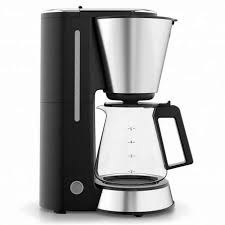
COUP VERRE MINI - Electric coffee maker WMF - Free user manual and instructions
Find the device manual for free COUP VERRE MINI WMF in PDF.



User questions about COUP VERRE MINI WMF
0 question about this device. Answer the ones you know or ask your own.
Ask a new question about this device
Download the instructions for your Electric coffee maker in PDF format for free! Find your manual COUP VERRE MINI - WMF and take your electronic device back in hand. On this page are published all the documents necessary for the use of your device. COUP VERRE MINI by WMF.
USER MANUAL COUP VERRE MINI WMF
Set-up of the coffee machine
1 Opening button on the filter lid
2 Filter insert
3 Water tank (removable)
4 Aroma glass jug
5 On/Off button with ring light
6-9 Start buttons (1-4)
Important safety information
- These appliances can be used by children older than eight years of age as well as by people with limited physical, sensory or mental capabilities and persons lacking experience and/or lacking knowledge, if they are supervised or have received instructions on how to use the appliance safely and have understood the resulting risks. Children must not play with the appliance. Children must not clean or maintain the appliance unless they are older than eight years of age and are supervised.
- Keep the appliance and its cable out of the reach of children under eight years of age.
- Do not immerse the appliance in water.
- If the appliance's connection cable is damaged it must be replaced by the manufacturer's central customer service department or by a similarly qualified person. Improper repairs may result in a serious risk to users.
-
This appliance is designed for use in households and similar environments such as:
-
in kitchens – for employees in shops, offices and other commercial areas;
- on agricultural property;
- by customers in hotels, motels and other residential facilities;
- in bed-and-breakfast establishments.
The appliance is not intended for purely commercial use.
Before use
Congratulations on the purchase of your coffee machine.
The coffee machine may only be used for its intended purpose according to this instruction manual. Therefore, carefully read the instruction manual before use as it provides instructions for using, cleaning and caring for the appliance. We accept no liability for any damages caused if this manual is not observed. Keep the operating manual in a safe place and pass it on to any subsequent user together with the appliance. Also note the warranty information at the end of the instruction manual.
There is no guarantee for glass breakage.
Observe the safety instructions during use.
Decorations (e. g. cup) are not included in the scope of delivery.
Technical data
Rated voltage: 220-240 V~ 50-60 Hz
Power consumption: 900 W
Protection class:
Additional safety instructions
- Only connect the appliance to earthed wall sockets that have been installed in accordance with the regulations. The cable and plug must be dry.
- Do not pull or clamp the connecting cable over sharp edges. Do not leave it dangling and protect it from heat and oil.
- Only use an extension cable that is in perfect condition.
- Never pull the mains plug out of the socket by the cable or with wet hands.
- Do not carry the appliance by the cable.
- Do not place the automatic coffee machine on hot surfaces, such as hot plates or similar, or near open flames, as the casing could melt.
- Do not place the appliance on water-sensitive surfaces. Water spray may damage them.
- Fill the fresh water tank with cold water no higher than the MAX marker.
- Caution, the appliance gets hot. Risk of scalding through hot water and steam. During the brewing cycle, never remove the filter insert or open the lid.
If the appliance is not being used, pull out the mains plug. -
Stop using the appliance and/or pull out the mains plug immediately if:
-
the appliance or mains cable is damaged.
- you suspect that there is a defect after the appliance has fallen or suffered a similar incident.
In such cases, arrange for the appliance to be repaired.
- Only operate the appliance under supervision.
- Descale the appliance regularly.
- The glass jug is not suitable for use in the microwave.
- We accept no liability for damages caused as a result of misuse, incorrect operation, improper repairs or non-observance of the descaling instructions. Claims under warranty are also excluded in such cases.
Use
The WMF COUP AromaOne filter coffee machine is a space-saving and energy-efficient kitchen appliance.
You can use the appliance to prepare up to four cups of freshly brewed aromatic coffee. The WMF COUP AromaOne filter coffee machine is easy and convenient to use thanks to the intuitive WMF One Touch function.

33% Space savings*
25% Resource savings*
44% Energy savings*
100% Performance
- Compared to WMF LONO filter coffee maker. Confirmed by technikzuhause.de. Resource savings refer to material usage and transportation volume.
Measurement of energy savings by brewing 4 cups until the device automatically switches off.
Overview of indicator lights
| Ring light On/Off button (5) | Action coffee machine |
| Lights up white | Ready for brewing |
| Rinse cycle | |
| Flashes white | Initial use |
| Programming cup fill quantity | |
| Flashes blue/white | Scaling indicator |
| Flashes blue | Programming water hardness level |
| Lights up blue | Dscaling programme active |
| Start buttons (6-9) | Action coffee machine |
| Lights up white | 1 cup of coffee is brewed |
| Water tank is filled for 1 cup of coffee | |
| Lights up white | 2 cups of coffee are brewed |
| Water tank is filled for 2 cups of coffee | |
| Lights up white | 3 cups of coffee are brewed |
| Water tank is filled for 3 cups of coffee | |
| Lights up white | 4 cups of coffee are brewed |
| Water tank is filled for 4 cups of coffee |
Before using for the first time
Set-up
- Insert the remaining non-required cable into the base of the appliance.
- Place the appliance on a stable water-resistant surface.
- Connect the mains plug to an earthed wall socket.
Starting up the appliance
- Switch on the appliance at the On/Off button (5); it starts to flash white.
- Fill the water tank (3) with cold tap water up to the MAX marker. The MAX marker is located inside the water tank (3).
To remove the water tank (3) easily, pull the integrated carrying handle upwards.
Never fill with warm water, carbonated water or other fluids such as milk.
- Place the water tank (3) on the appliance. The start buttons (6-9) now light up white and the On/Off button (5) continues to flash white.
Note: To commence the initial start-up, the water tank (3) must be filled up to the MAX -marker, and the start buttons (6-9) must light up. Otherwise the initial start-up will not commence. - Make sure that no filter paper is inserted and that there is no coffee powder in the filter insert (2).
- Insert the Aroma glass jug (4) inside the appliance.
- Press both start buttons (6) and (7) at the same time until the appliance starts up.
- Once the start-up procedure is complete, the appliance turns itself off automatically.
- Empty the Aroma glass jug (4) and water tank (3) and rinse them and the filter insert (2) thoroughly.
Appliance settings
Setting the water hardness
Your appliance has an automatic scaling indicator. To protect against too much limescale, the default factory setting of the appliance is for very hard water. Ask your local waterworks or local authorities about the water hardness of your tap water. Change the setting when the water hardness is less than 21^ .
- Connect the mains plug to an earthed wall socket.
- Press the On/Off button (5) to switch on the appliance.
- Press down and hold the On/Off button (5) for approx. 3 seconds. The start buttons (6) and 3 (8) now light up.
- Now press the button (6) to change the water hardness; the On/Off button (5) flashes blue.
- You can use the start buttons (6), (7), 3 (8) or 4 (9) to select the water hardness level.
| Hardness range | Hardness | Start button |
| 1 soft | 0-7 dH | □ (6) |
| 2 medium | >7-14 dH | □ (7) |
| 3 hard | >14-21 dH | □ (8) |
| 4 very hard | >21 dH | □ (9) |
1^ corresponds to approx. 0.18 mmol/l Ca and Mg ions
Note: The lit start button (6, 7, 8 or 9) indicates the water hardness level that is currently set.
- Press the appropriate start button to change the water hardness level. Then press and hold the On/Off button (5) for at least 3 seconds to save the change. The appliance switches itself off automatically.
Note: If you wait longer than approximately 10 seconds before entering or saving the water hardness level, the appliance switches off automatically.
Changing the coffee quantity
You can set the cup filling quantity to one of three levels depending on your taste. If you want to change the coffee quantity to a level other than the default factory setting of approx. 125 ml, proceed as follows.
- Connect the mains plug to an earthed wall socket.
- Press the On/Off button (5) to switch on the appliance.
- Press down and hold the On/Off button (5) for approx. 3 seconds. The start buttons (6) and 3 (8) now light up.
- Now press button (3) (8) to change the cup filling quantity; the On/Off button (5) flashes white.
- You can use the start buttons (6), (8) or (9) to change the coffee quantity.
(6) for approx. 125 ml coffee
37 (8) for approx. + 5% coffee
49 (9) for approx. - 5% coffee
Press the appropriate start button to change the coffee quantity. Then press and hold the On/Off button (5) for at least 3 seconds to save the change. The appliance switches itself off automatically.
Note: If you wait longer than approximately 10 seconds before entering or saving the coffee quantity, the appliance switches off automatically.
Setting coffee powder grinding degree
The WMF COUP AromaOne filter coffee machine is set by default to use caffeinated, medium-fine ground coffee.
If you wish to use finely ground or decaffeinated coffee with a rich aroma, you can adjust the processing time accordingly.
- Connect the mains plug to an earthed wall socket.
- Press the On/Off button (5) to switch on the appliance.
-
Press down and hold the On/Off button (5) for approx. 3 seconds. The start buttons (6) and 3 (8) now light up.
-
Now press button [3] (8) to change the processing time; the On/Off button (5) flashes white.
- The start button (7) indicates whether the process is set for caffeinated or decaffeinated coffee.
| Indicator light | Setting for | |
| □(7) | off | for caffeinated, medium-fine ground coffee (factory setting) |
| □(7) | off | for decaffeinated or finely ground coffee |
To change the setting, press the start button (7). Then press and hold the On/Off button (5) for at least 3 seconds to save the change. The appliance switches itself off automatically.
Note: If you wait longer than approximately 10 seconds before entering or saving the grinding degree, the appliance switches off automatically.
Coffee preparation
Preparation
- Only pour cold water into the water tank (3). Depending on the fill level in the water tank (3), the corresponding start buttons (6-9) light up. You can remove this in order to easily fill the water tank (3).
Note: The WMF COUP AromaOne filter coffee machine has an intelligent water capacity display. Depending on the fill level in the water tank (3), the relevant start buttons (6-9) light up white.
If the relevant start button (6-9) does not light up white, there is too little water in the water tank (3) and you cannot start the desired brewing process. Fill the water tank (3) up to the MAX marker.
- Open the filter lid by pressing the opening button (1). Fold the stamped edge on a size 2 paper filter and then insert it into the filter insert (5). The paper filter should not protrude over the edge of the filter, therefore you must push it down slightly with your hand.
Note: Instead of using a paper filter (size 2) you can use the permanent filter that is available as an accessory.
- Fill with the required amount of ground coffee. Depending on your personal taste, use approx. 5-7 g of medium-fine ground coffee per cup. If it is ground too finely, the filter can overflow.
- Close the filter lid. It will audibly click into place.
Note: When preparing coffee directly into a cup, we recommend that you warm the cup first. Briefly rinse the cup in hot water before starting the brewing process. This keeps the brewed coffee hot for longer.
Brewing coffee
With the WMF AromaOne filter coffee machine you can brew coffee directly into your cup or in the Aroma glass jug (4).
- Prepare the coffee machine as described above and place a cup or the Aroma glass jug (4) in the appliance.
- Insert the mains plug into the socket and press the On/Off button (5).
-
Once the start buttons (6-9) light up you can begin the brewing process.
-
Press the appropriate start button (6-9) depending on the desired coffee quantity; the preparation process begins:
1 cup of coffee 6
2 cups of coffee
3 cups of coffee 31 (8)
4 cups of coffee 49 (9)
- After the brewing cycle, the start button goes out, the appliance switches off automatically and you can remove the cup or the Aroma glass jug (4). A drip-stop valve effectively prevents coffee from dripping.
Note: You can cancel the brewing cycle at any time by pressing the On/Off (5) button.
In this case, leave the cup or the Aroma glass jug (4) in the appliance until the remaining coffee in the filter has flowed through.
WMF Aroma Perfection
If you would like to prepare a stronger aromatic coffee, you can activate the aroma function WMF Aroma Perfection for the respective brewing cycle.
To activate the function, press the appropriate start button for the brewing cycle (6-9) a second time. The start button (6-9) flashes briefly three times to confirm your selection and the preparation begins.
Note: If you wait longer than approximately 2 seconds before pressing the start button for a second time, a normal brewing cycle starts.
Cleaning and care
Cleaning
Unplug the mains plug and allow the appliance to cool down.
Do not immerse the appliance in water, but instead just use a damp cloth and a little washing-up liquid to clean its exterior.
Do not use any sharp and abrasive cleaning agents.
Clean the filter insert (5), Aroma glass jug (4) and water tank (3) under running water.
Rinse cycle
Perform a rinse cycle to clean the appliance if the anti-limescale programme has been out of operation or not been used for a long period of time.
Also perform a rinse cycle if you notice that the cup fill quantities vary a lot.
- Connect the mains plug to an earthed wall socket and press the On/Off button (5) to switch the appliance on.
- Fill the water tank (3) up to the MAX marker.
Note: The rinse cycle can only be started if there is enough water in the water tank (3) for 4 cups; the start buttons (6-9) must light up.
- Make sure that no filter paper is inserted and that there is no coffee powder in the filter.
- Insert the Aroma glass jug (4) inside the appliance.
- To start the rinse cycle, press buttons (6) and (7) at the same time; the On/Off button (5) lights up white.
- Once the rinse cycle is complete, the appliance turns itself off automatically.
- Empty the Aroma glass jug (4) and water tank (3) and rinse them and the filter insert (5) thoroughly.
Scaling indicator
Scale deposits result in an extended brewing time and lower quality coffee. Limescale deposits also lead to energy losses and impair the service life of the appliance.
The automatic scaling indicator determines the time for the next descending cycle. Depending on the coffee consumption, the On/Off button (5) will flash blue/ white to prompt you to descale the appliance after 4 to 6 weeks.
Dscaling - Anti-limescale program
Dscaling agent
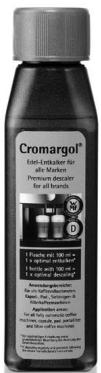
We recommend using Cromargol®. This product is highly effective, food safe and is neutral in taste and smell. Thanks to its special care formula with six high-quality and protective additives, Cromargol® is also very gentle on materials.
You can usually purchase Cromargol® from the store where you purchased your appliance or from your chosen dealer.
You can also use a commercially available descaling agent that is suitable for filter coffee machines.
Do not use vinegar or vinegar concentrate, as this can damage materials in the appliance.
When using descalers based on citric acids, precipitates could form during.
descaling that seal the limescale layer or clog the lines in the appliance. Descaling with citric acids also takes too long, and therefore complete descending cannot be guaranteed.
Damage caused by the use of an unsuitable descaling agent or through noncompliance with the descaling instructions is not covered by our warranty claim.
7 Handle the descending agent carefully to ensure that no furniture or clothing is damaged.
Dscaling programme
Your coffee machine has an automatic descaling programme.
Note: Once the descending programme has started you must not interrupt it. This is for the safety of all users. It prevents coffee from being brewed accidentally while the descending solution has not yet
been fully rinsed away. In case of emergency, you can interrupt the descending programme by pressing the On/Off button (5). In this case you should
rinse out the water tank (3) and then perform a rinse cycle (see "Rinse cycle" section).
- Connect the mains plug to an earthed wall socket and press the On/Off button (5) to switch the appliance on.
- Insert the paper filter and place the Aroma glass jug (4) in the machine. Any more substantial amounts of limescale residue collect on the filter paper and thus prevent the outlet valve from clogging.
- Fill the water tank (3) with one portion (100ml) of Cromargol® and fill with tap water up to the MAX marker.
Note: The descending programme can only be started if there is enough water in the water tank (3) for 4 cups; the start buttons (6-9) must light up.
-
Dose other descending agents according to the manufacturer's instructions.
-
To start the descending programme, press buttons 3 (8) and 4 (9) at the same time; the On/Off button (5) lights up blue during the descending programme.
- The descending programme stops automatically after approx. 35 minutes and the appliance switches off automatically.
Note: The appliance will switch on and off several times during the descending process.
- Empty the water tank (3) and the Aroma glass jug (4). Rinse the filter insert (2), water tank (3) and Aroma glass jug (4) thoroughly with fresh tap water.
- Important: Now perform another rinse cycle (see the "Rinse cycle" section) with fresh tap water.
For UK use only
- This product is supplied with a 13 A plug conforming to BS 1363 fitted to the mains lead. If the plug is unsuitable for your socket outlets or needs to be replaced, please note the following. If the plug is a non-rewireable one, cut it from the mains lead and immediately dispose of it. Never insert it into a socket outlet as there is a very great risk of an electric shock.
- The replacement of the plug at the mains lead has to be done according to the following instructions:
Warning - This appliance must be earthed
Important: The wires in this mains lead are coloured in accordance with the following code:
green/yellow Earth
blue Neutral
brown Live
As the colours of the wires in the mains lead of this appliance may not correspond with the coloured markings identifying the terminals in your plug, proceed as follows:
- the wire which is coloured green and yellow must be connected to the terminal which is marked with the letter E or by the earth symbol 12 , or coloured green or green and yellow,
- the wire which is coloured blue must be connected to the terminal which is marked the letter N or coloured black,
-
the wire which is coloured brown must be connected to the terminal which is marked with the letter L or coloured red.
-
If a 13 A (BS 1363) plug is used it must be fitted with a 13 A fuse conforming to BS 1362 and be ASTA approved. If any other type of plug is used, the appliance must be protected by a 10 A fuse either in the plug or adapter or at the distribution board.
If in doubt - consult a qualified electrician.
- Never use the plug without closing the fuse cover.
CE
The appliance complies with European directives 2006/95/EC, 2004/108/EC and 2009/125/EC.
At the end of its life, this product must not be disposed of in normal household waste but must instead be delivered to a collection point for recycling electric and electronic appliances.
The materials are recyclable in accordance with their labelling. The reuse, recycling and or other use of old appliances makes an important contribution to protecting our environment.
Please ask your local administration for the appropriate disposal point.
Subject to alterations
Overblick over lysindikatorer