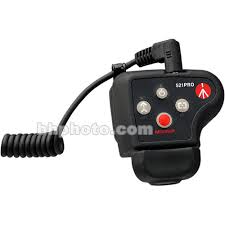
521PRO - Photo accessory MANFROTTO - Free user manual and instructions
Find the device manual for free 521PRO MANFROTTO in PDF.



| Product type | Zoom remote control integrated with a pan lever |
| Brand | Manfrotto |
| Model | 521PRO |
| Category | Photo accessory / Camcorder remote control |
| Compatibility | Camcorders equipped with a 2.5 mm stereo mini jack LANC socket |
| Power supply | Via the camcorder (LANC socket), 5.3 V - 6 V |
| Power consumption | 0.07 W maximum |
| Mounting on square/rectangular tubes | Height from 5 mm to 30 mm |
| Mounting on round tubes/bars | Diameter from 12 mm to 35 mm |
| Main functions | Zoom with 8 variable speed steps, manual/automatic focus, record/stop, standby, progressive and fixed zoom modes, zoom and focus direction adjustment |
| Cable | Removable spiral cable 90 cm |
| Indicator lights | Main indicator (power/connection), zoom speed indicator, mode indicator (P/F), blinking recording indicator |
| Internal memory | Internal flash to save zoom direction, limit speed, focus direction (min. 1,000,000 cycles) |
| Operating temperature | -20°C to +70°C |
| Storage temperature | -30°C to +80°C |
| Humidity | Up to 95% without condensation |
| Maintenance and cleaning | Avoid exposure to rain, humidity >95%, temperatures >70°C; clean with a dry cloth |
| Safety | Never plug into any socket other than LANC; do not disconnect the cable when the camcorder is on (risk of short circuit) |
| Spare parts and repairability | Easy-to-replace removable cable |
| General information | Manual available in several languages; independent control system, cannot operate multiple LANC systems simultaneously |
Frequently Asked Questions - 521PRO MANFROTTO
User questions about 521PRO MANFROTTO
0 question about this device. Answer the ones you know or ask your own.
Ask a new question about this device
Download the instructions for your Photo accessory in PDF format for free! Find your manual 521PRO - MANFROTTO and take your electronic device back in hand. On this page are published all the documents necessary for the use of your device. 521PRO by MANFROTTO.
USER MANUAL 521PRO MANFROTTO
Verify that you received the following items:

This manual
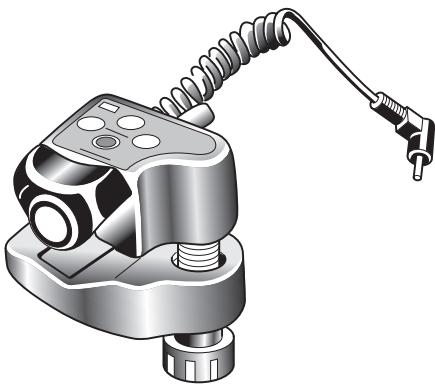
Basic Videocamera Remote Control
DEVICE OVERVIEW - model 521
Remote Controller is a video camera remote control system designed to work with all video cameras having the 2.5 mm stereo LANC jack.
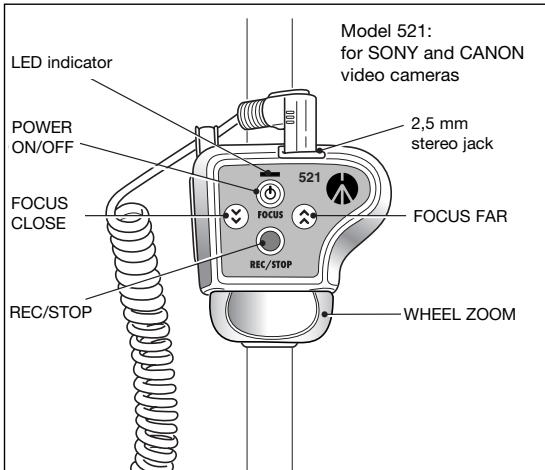
Features - model 521
Eight step, ultra-precise variable speed zoom
- Clamp range: square or rectangular tube of flat surfaces: 5mm (0.19^ ) - 30mm (1.18^ ) height
- Clamp range: round tube/pipe/bar: 12mm (0.47") to 35 mm (1.38") diameter
- Smooth zoom speed progression
- Standby / On switch
- Record start/stop switch
- Manual focus far / close
- Customisable zoom direction
- LED indicator
90 cm spiral cable
- Recording indication
DEVICE OVERVIEW - model 521P
Panasonic remote zoom control is designed to control Panasonic AG-DVX100, AG-DVC80 camcorders.
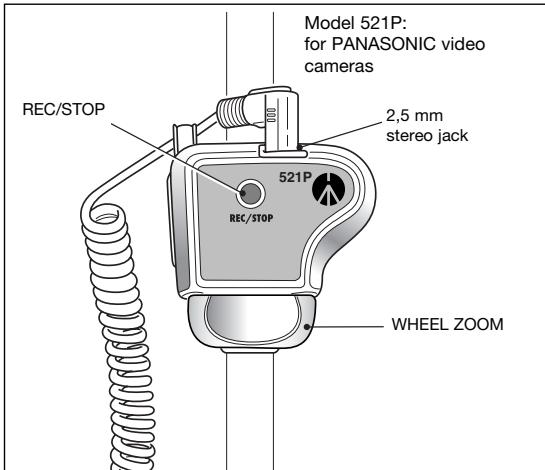
Features - model 521P
- Stepless variable speed zoom
- Clamp range: square or rectangular tube of flat surfaces: 5mm (0.19^ ) - 30mm (1.18^ ) height
- Clamp range: round tube/pipe/bar: 12mm (0.47") to 35 mm (1.38") diameter
- Record start/stop switch
90 cm spiral cable
DEVICE OVERVIEW - model 521PRO
The controller is a remote pan bar controller for all video cameras having the LANC jack.
The controller is designed as a standalone control system for video cameras - it is not designed to work simultaneously with other LANC control systems.
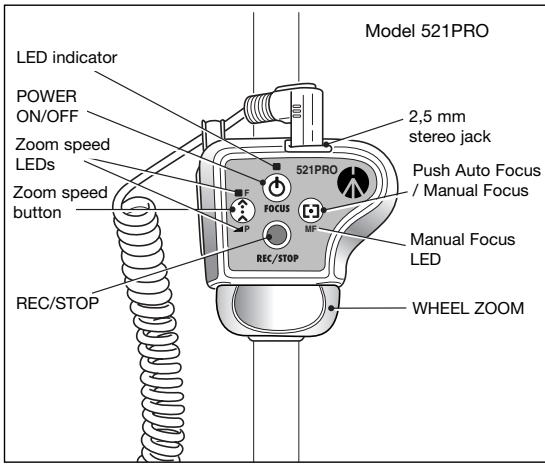
Features - model 521PRO
Eight step, ultra-precise variable speed zoom
- Smooth zoom speed progression
- Standby / On switch
- Push Auto Focus function
- Manual Focus
- Customizable zoom speed limit mode
- Fixed or progressive zoom mode
- Customisable zoom direction
- Customisable focus direction
- LED indicator
90 cm spiral cable
- Recording indication
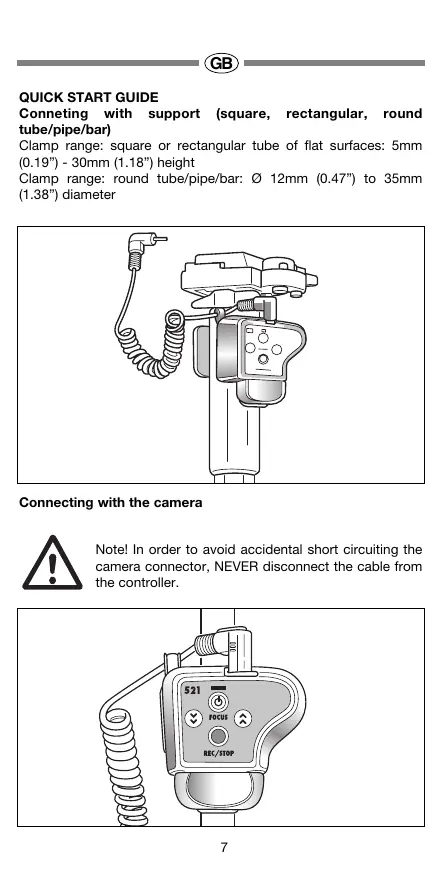
QUICK START GUIDE
Conneting with support (square, rectangular, round tube/pipe/bar)
Clamp range: square or rectangular tube of flat surfaces: 5mm (0.19") - 30mm (1.18") height
Clamp range: round tube/pipe/bar: 0.12mm (0.47") to 35mm (1.38") diameter
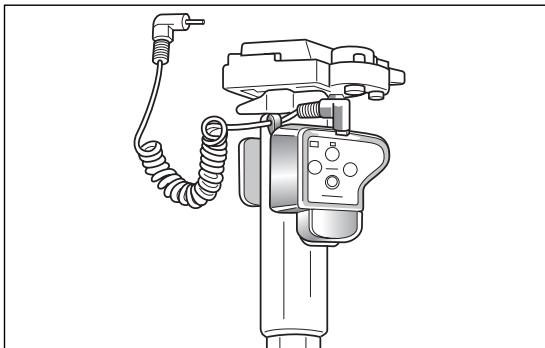
Connecting with the camera

Note! In order to avoid accidental short circuiting the camera connector, NEVER disconnect the cable from the controller.
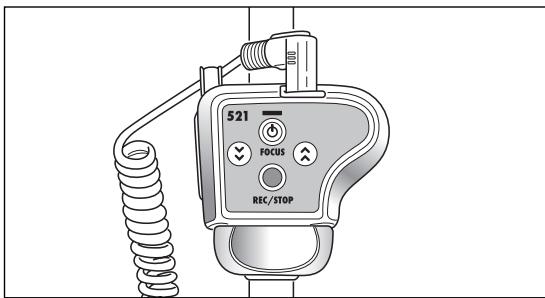
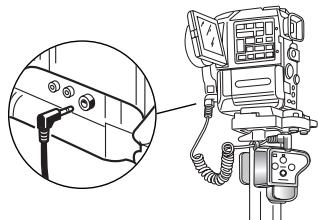
Model 521
- Switch the camera off
- Connect the other end of the cable to the camera LANC plug
- Switch the camera - now you may start using the controller After switching the camera on, the LANC controller LED indicator should light continuously.
LED indicator not lighting at all means problem with power supply of the controller.
LED indicator blinking means problem with LANC communication. In either case check the LANC cable connections to camera and controller.
Controller is designed to work only with video cameras having the 2.5 mm stereo LANC jack. Never connect controller to any other jack, which does not have the LANC logo. It may even result in permanent controller and/or camera damage!
LANC controller is designed as a standalone control system for video cameras - it is not designed to work simultaneously with other LANC control systems
Model 521P
- Switch the camera off
- Connect the other end of the cable to the camera REMOTE plug
- Switch the camera - now you may start using the controller Remote Zoom Controller is designed to work only with PANASONIC AG-DVX100 and AG-DVC80 video cameras, which have the 2.5 mm stereo jack marked "CAM REMOTE".
Never connect the controller to any other jack. It may even result in permanent controller and/or camera damage!
Model 521PRO
- Switch the camera off
- Connect the other end of the cable to the camera LANC plug
- Switch the camera - now you may start using the controller
After switching the camera on, the LANC controller LED indicator should light continuously. The last used zoom speed mode will be set - the current setup will be indicated by one of zoom speed LEDs. LED indicator not lighting at all means problem with power supply of the controller. LED indicator blinking every two seconds means problem with LANC communication. In either case check the LANC cable connections to camera and controller. Controller is designed to work only with video cameras having the 2.5mm stereo LANC jack. Never connect controller to any other jack, which does not have the LANC logo. It may even result in permanent controller and/or camera damage! Controller is designed as a standalone control system for video cameras - it is not designed to work simultaneously with other LANC control systems.
Rotate the knob right (or left, dependent on the zoom direction) to zoom tele. The more angle the knob is rotated the faster zoom speed is. Rotate the knob left (or right, dependent on the zoom direction) to zoom wide. The more angle the knob is rotated the faster zoom speed is.
Customizing zoom direction
To change the zoom direction keep pressed simultaneously "focus far" and "focus close" buttons until the LED indicator will light off. The buttons must be kept pressed for at least 3 seconds. The new zoom direction information will be permanently stored in the controller's internal flash memory and restored after each power off.

Standby mode
Press the button once to switch camera into standby mode. While camera in standby mode press the button again to switch camera back into normal operation mode.
Pressing this button while camera is switched off will have no effect on camera operation.

Focus close
Keep the button pressed to adjust the focus for close objects.
Works only, if camera in manual focus mode.

Focus far
Keep the button pressed to adjust the focus for far objects.
Works only, if camera in manual focus mode.
REC/STOP
Record start/stop
Press the button once to start recording.
Press the button again to stop recording.
The LED indicator will blink when the camera is recording.
Rotate the knob right (or left, dependent on the zoom direction) to zoom tele.
The more angle the knob is rotated the faster zoom speed is.
Rotate the knob left (or right, dependent on the zoom direction) to zoom wide.
The more angle the knob is rotated the faster zoom speed is.
REC/STOP

Record start/stop
Press the button once to start recording.
Press the button again to stop recording.
NOTE: Not all function may be available depending on camera working mode e.g. if using Sony camera Memory mode the "Record start/stop" functions are not working.

Selecting zoom speed limit mode
Press the zoom speed button. The zoom mode LED should light below or above the button indicating zoom speed limit mode.
Selecting zoom mode
To choose between zoom modes, press the zoom speed button. When you press the button for the first time, the "P" LED below the button will go on, indicating that you work in progressive mode with zoom speed limit. Pressing the button for the second time will make the "F" LED above the button to go on and the "P" LED to go off, indicating that you work in fixed zoom speed mode with zoom speed limit. Pressing the button for the third time, will make the LEDs to go off, indicating that you work in default mode - progressive zoom speed mode with no zoom speed limit.
Progressive mode zoom
Rotate the knob right (or left, dependent on the zoom direction) to zoom tele. The more angle the knob is rotated the faster zoom speed is. If the LED "P" is on, maximum zoom speed is limited to the pre-set zoom speed.
Rotate the knob left (or right, dependent on the zoom direction) to zoom wide. The more angle the knob is rotated the faster zoom speed is. If the LED "P" is on, maximum zoom speed is limited to the pre-set zoom speed.
Fixed mode zoom
Works only, if fixed zoom mode is selected.
Rotate the knob right (or left, dependent on the zoom direction) to zoom tele. Zoom speed is always constant, limited to the pre-set speed indicated by LED. Rotate the knob left (or right, dependent on the zoom direction) to zoom wide. Zoom speed is always constant, limited to the pre-set speed indicated by LED.
Customizing zoom speed limit
Rotate the zoom wheel and zoom with any speed you prefer. Press the zoom speed button. While zooming, keep it pressed for approx. 1 sec, until the LED indicator will light off. The new speed limit will be saved in microcontroller internal flash memory and restored after each power off.
You may always reset the zoom speed to predefined factory setup (see. Resetting zoom speed buttons).
Custom speed reprogramming may be done practically unlimited number of times (min. 1.000.000, - times).
Resetting zoom speed limit
The zoom speed button is factory pre-set to the slowest speed possible with LANC protocol. To reset the zoom speed button to factory pre-sets stop zooming (release the zoom knob) and press the button. Keep it pressed for approx. 1 sec, until the LED indicator will light off. The factory pre-set speed limit will be restored.
Customizing zoom direction
To change the zoom direction, switch the controller off. Press the "Zoom speed" button, do not release it, and switch the controller on. Wait for Main Led to go on and that to go off. Release the button. The controller will now work with new zoom direction.
The whole operation takes about 6 seconds.
The new zoom direction information will be permanently stored in the controller's internal flash memory and restored after each power off.


Standby mode
Press the button once to switch camera into standby mode. While camera in standby mode, press the button again to switch camera back into normal operation mode. Pressing this button while camera is switched off will have no effect on camera operation.
Manual Focus
Press the button, to put the controller into manual focus mode. When in this mode, the "Manual Focus LED" is on. Rotate zoom wheel right to focus close (standard focus direction), or far (reversed focus direction). Rotate the zoom wheel left to focus far (standard focus direction), or close (reversed focus direction). To leave the mode, press the button again. NOTE! You are not able to zoom in focus mode.
Push Auto Focus
Keep the button pressed, for at least half a second, to put the camera temporarily into Auto Focus mode. As soon as you release the button the camera returns into manual focus mode. This button has no effect, if the camera is already working in Auto Focus mode. Note: this function does not work with Canon XL1, XL1s, XL2 and Sony VX1000 camcorders.
Customizing focus direction
To change the focus direction, switch the controller off. Press the "Push Auto Focus" button, do not release it, and switch the controller on. Wait for Main Led to go on and that to go off. Release the button. The controller will now work with new focus direction. The whole operation takes about 6 seconds. The new focus direction information will be permanently stored in the controller's internal flash memory and restored after each power off.
REC/STOP

Record start/stop
Press the button once to start recording.
Press the button again to stop recording.
The LED indicator will blink when that the camera is recording.
PRECAUTIONS
Water resistivity
We put a lot of attention on making the controller to be as much water resistant as possible, while maintaining its reasonable price. However we cannot guarantee 100% water resistance under all circumstances and you should avoid using the controller under heavy environment conditions like rain and over 95% humidity level.
High temperature
Avoid temperatures exceeding +70^ - especially do not leave the controller exposed for direct contact with heavy sun shines, e.g. in the car parked in sunny place.
Electrical precaution
The cable is always one of the most easy breakable element of any electronic system, especially when as exposed to mechanical wear off. Therefore to extend the life of your controller and make the basic "repair" as cheap as possible we decided to allow easy cable exchange. However, to avoid accidental short circuiting the camera connection, you must remember to always plug the cable to the controller first. We advise you to not to remove the cable from the controller, if it is not necessary.
OPERATING SPECIFICATIONS
Operation temperature range -20° - +70°
Storage temperature range -30° - +80°
Humidity rel. (non condensing) max. 95%
Model 521 - power consumption 0,07 W (max)
Model 521 - power supply from the camera 5,3V-6V
DISCLAIMER
The information contained in this document is subject of change without notice.
Manfredto makes no warranty and shall not be liable for any errors on information contained in this document.
LANC stands for Local Application Control Bus System and is a trade mark of SONY corp.
AG DVX-100 and AG DVC-80 and Panasonic name are trademarks of Matsuchita corp.
All other trademarks are the property of their respective owners.