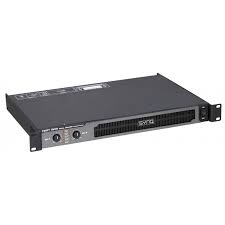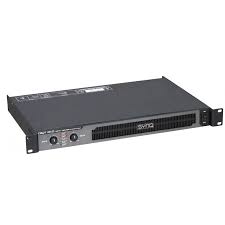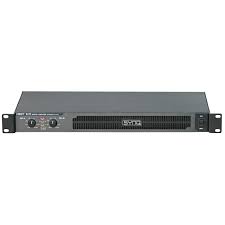
DIGIT 1K0 - Audio Amplifier SYNQ AUDIO RESEARCH - Free user manual and instructions
Find the device manual for free DIGIT 1K0 SYNQ AUDIO RESEARCH in PDF.

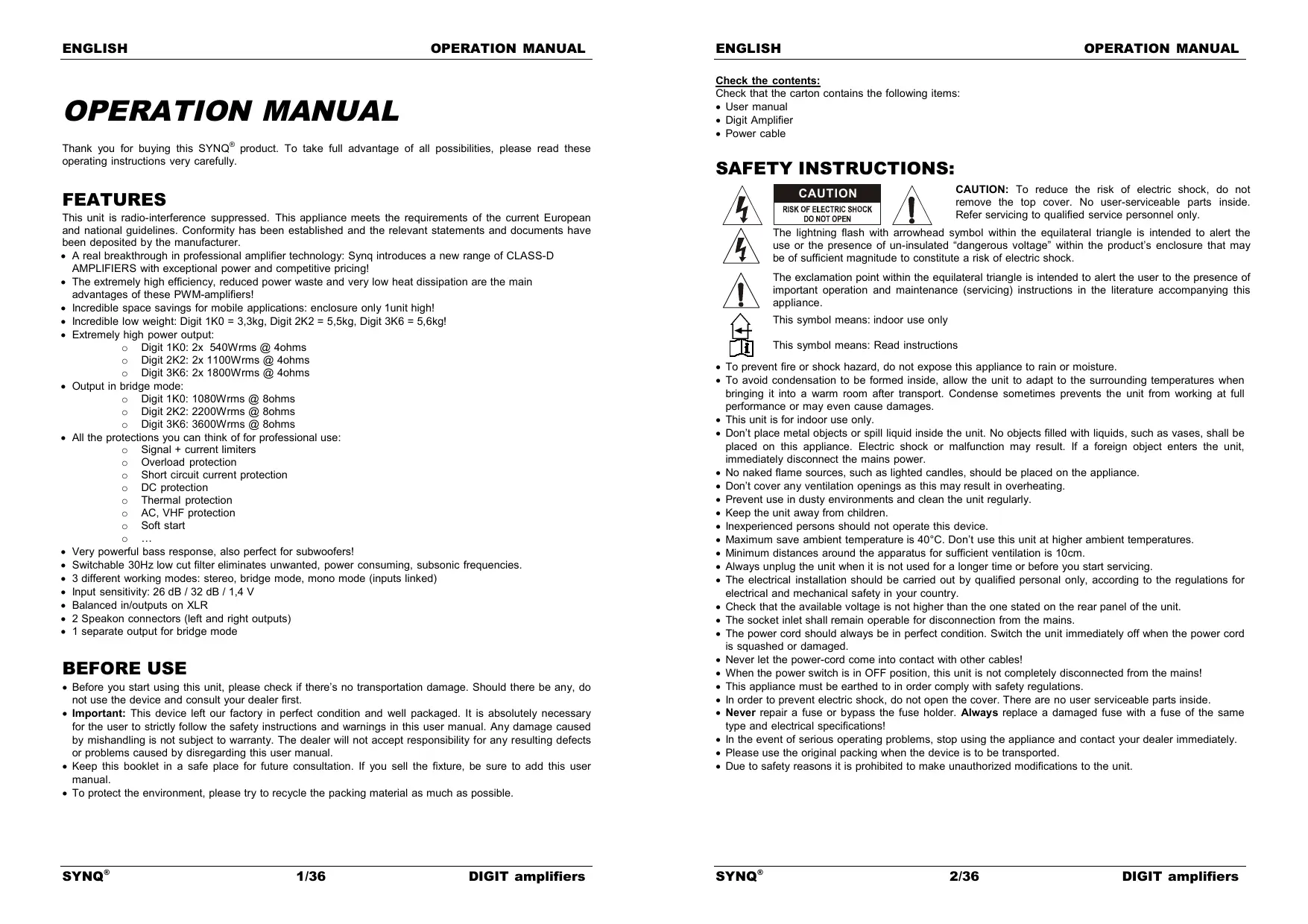


| Product type | Professional Class D audio amplifier |
| Brand | SYNQ AUDIO RESEARCH |
| Model | DIGIT 1K0 |
| Dimensions (W x H x D) | 482 x 44 x 215 mm (19 inches / 1U) |
| Weight | 3.3 kg |
| Power supply | AC 230 V / 50 Hz |
| Max power consumption | 1200 W (peak) |
| Output power (stereo 8 Ω) | 2 x 300 Wrms (1 kHz, THD+N < 0.1%) |
| Output power (stereo 4 Ω) | 2 x 540 Wrms (1 kHz, THD+N < 0.1%) |
| Output power (bridge 8 Ω) | 1 x 1080 Wrms (1 kHz, THD+N < 0.1%) |
| Frequency response | 5 Hz – 36,000 Hz (+/- 1 dB) |
| Signal-to-noise ratio | > 100 dB (A-weighted) |
| Input sensitivity | 26 dB / 32 dB / 1.4 V (selectable) |
| Input impedance (unbalanced / balanced) | 10 kΩ / 20 kΩ |
| Damping factor | 280 (5 Hz – 1 kHz) |
| Slew rate | 29 V/µs |
| Efficiency | > 90% |
| Cooling | Variable speed fan |
| Signal inputs / outputs | Balanced XLR (input and output) |
| Speaker connectors | 2 Speakon (L/R) + 1 Speakon (bridge) |
| Operating modes | Stereo, Mono, Bridge |
| Built-in protections | Signal + current limiter, overload, short circuit, DC protection, thermal, AC, VHF, soft start |
| Low-cut filter | 30 Hz (switchable) |
| Max ambient temperature | 40°C |
| Usage | Indoors only |
Frequently Asked Questions - DIGIT 1K0 SYNQ AUDIO RESEARCH
User questions about DIGIT 1K0 SYNQ AUDIO RESEARCH
0 question about this device. Answer the ones you know or ask your own.
Ask a new question about this device
Download the instructions for your Audio Amplifier in PDF format for free! Find your manual DIGIT 1K0 - SYNQ AUDIO RESEARCH and take your electronic device back in hand. On this page are published all the documents necessary for the use of your device. DIGIT 1K0 by SYNQ AUDIO RESEARCH.
USER MANUAL DIGIT 1K0 SYNQ AUDIO RESEARCH
Copyright © 2011 by BEGLEC n.v.
t Hofveld 2 C ~ B1702 Groot-Bijgaarden ~ Belgium
Reproduction or publication of the content in any manner, without express permission of the publisher, is prohibited.
SRE
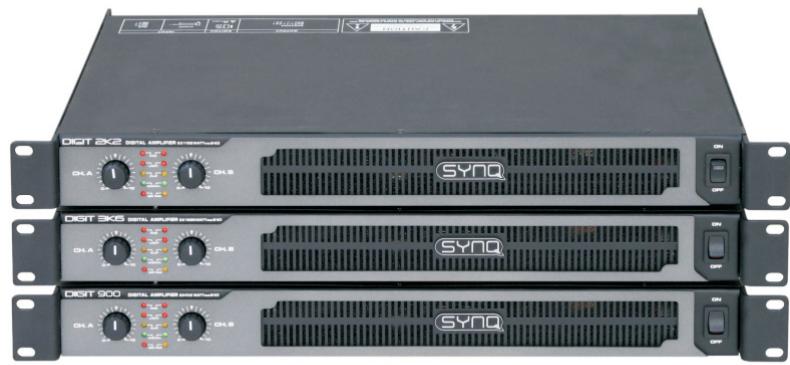
DIGIT 1K0 DIGIT 2K2 DIGIT 3K6
Operation Manual EN
Mode d'emploi FR
Dispose of the unit and used batteries in an environment friendly manner according to your country regulations.
FR-DECLASSES L'APPAREIL
Thank you for buying this SYNQ® product. To take full advantage of all possibilities, please read these operating instructions very carefully.
FEATURES
This unit is radio-interference suppressed. This appliance meets the requirements of the current European and national guidelines. Conformity has been established and the relevant statements and documents have been deposited by the manufacturer.
- A real breakthrough in professional amplifier technology: Synq introduces a new range of CLASS-D AMPLIFIERS with exceptional power and competitive pricing!
- The extremely high efficiency, reduced power waste and very low heat dissipation are the main advantages of these PWM-amplifiers!
- Incredible space savings for mobile applications: enclosure only 1unit high!
- Incredible low weight: Digit 1K0 = 3,3kg, Digit 2K2 = 5,5kg, Digit 3K6 = 5,6kg!
- Extremely high power output:
Digit 1K0:2x540Wrms @ 4ohms
Digit 2K2: 2x 1100Wrms @ 4ohms
Digit 3K6:2x1800Wrms @ 4ohms
Output in bridge mode:
Digit 1K0: 1080Wrms @ 8ohms
Digit 2K2: 2200Wrms @ 8ohms
Digit 3K6:3600Wrms @ 8ohms
- All the protections you can think of for professional use:
O Signal ^+ current limiters
Overload protection
Short circuit current protection
DC protection
Thermal protection
○ AC, VHF protection
Soft start
。
- Very powerful bass response, also perfect for subwoofoers!
- Switchable 30Hz low cut filter eliminates unwanted, power consuming, subsonic frequencies.
- 3 different working modes: stereo, bridge mode, mono mode (inputs linked)
- Input sensitivity: 26 dB / 32 dB / 1,4 V
Balanced in/outputs on XLR - 2 Speakon connectors (left and right outputs)
1 separate output for bridge mode
BEFORE USE
- Before you start using this unit, please check if there's no transportation damage. Should there be any, do not use the device and consult your dealer first.
- Important: This device left our factory in perfect condition and well packaged. It is absolutely necessary for the user to strictly follow the safety instructions and warnings in this user manual. Any damage caused by mishandling is not subject to warranty. The dealer will not accept responsibility for any resulting defects or problems caused by disregarding this user manual.
- Keep this booklet in a safe place for future consultation. If you sell the fixture, be sure to add this user manual.
- To protect the environment, please try to recycle the packing material as much as possible.
Check the contents:
Check that the carton contains the following items:
- User manual
- Digit Amplifier
Power cable
SAFETY INSTRUCTIONS:
CAUTION
RISK OF ELECTRIC SHOCK DO NOT OPEN

CAUTION: To reduce the risk of electric shock, do not remove the top cover. No user-serviceable parts inside. Refer servicing to qualified service personnel only.
The lightning flash with arrowhead symbol within the equilateral triangle is intended to alert the use or the presence of un-insulated "dangerous voltage" within the product's enclosure that may be of sufficient magnitude to constitute a risk of electric shock.

The exclamation point within the equilateral triangle is intended to alert the user to the presence of important operation and maintenance (servicing) instructions in the literature accompanying this appliance.
This symbol means: indoor use only
This symbol means: Read instructions
- To prevent fire or shock hazard, do not expose this appliance to rain or moisture.
- To avoid condensation to be formed inside, allow the unit to adapt to the surrounding temperatures when bringing it into a warm room after transport. Condense sometimes prevents the unit from working at full performance or may even cause damages.
- This unit is for indoor use only.
- Don't place metal objects or spill liquid inside the unit. No objects filled with liquids, such as vases, shall be placed on this appliance. Electric shock or malfunction may result. If a foreign object enters the unit, immediately disconnect the mains power.
- No naked flame sources, such as lighted candles, should be placed on the appliance.
- Don't cover any ventilation openings as this may result in overheating.
- Prevent use in dusty environments and clean the unit regularly.
- Keep the unit away from children.
- Inexperienced persons should not operate this device.
Maximum save ambient temperature is 40^ . Don't use this unit at higher ambient temperatures. - Minimum distances around the apparatus for sufficient ventilation is 10cm .
- Always unplug the unit when it is not used for a longer time or before you start servicing.
- The electrical installation should be carried out by qualified personal only, according to the regulations for electrical and mechanical safety in your country.
- Check that the available voltage is not higher than the one stated on the rear panel of the unit.
- The socket inlet shall remain operable for disconnection from the mains.
- The power cord should always be in perfect condition. Switch the unit immediately off when the power cord is squashed or damaged.
- Never let the power-cord come into contact with other cables!
- When the power switch is in OFF position, this unit is not completely disconnected from the mains!
- This appliance must be earthed to in order comply with safety regulations.
- In order to prevent electric shock, do not open the cover. There are no user serviceable parts inside.
- Never repair a fuse or bypass the fuse holder. Always replace a damaged fuse with a fuse of the same type and electrical specifications!
- In the event of serious operating problems, stop using the appliance and contact your dealer immediately
- Please use the original packing when the device is to be transported.
- Due to safety reasons it is prohibited to make unauthorized modifications to the unit.
INSTALLATION GUIDELINES:
- Install the unit in a well-ventilated location where it will not be exposed to high temperatures or humidity.
- Placing and using the unit for long periods near heat-generating sources such as amplifiers, spotlights, etc. will affect its performance and may even damage the unit.
- The unit can be mounted in 19-inch racks. Attach the unit using the 4 screw holes on the front panel. Be sure to use screws of the appropriate size. (screws not provided)
- Take care to minimize shocks and vibrations during transport.
- When installed in a booth or flight case, please make sure to have good ventilation to improve heat evacuation of the unit.
- To avoid condensation to be formed inside, allow the unit to adapt to the surrounding temperatures when bringing it into a warm room after transport. Condense sometimes prevents the unit from working at full performance.
CLEANING THE APPLIANCE:
Clean by wiping with a polished cloth slightly dipped with water. Avoid getting water inside the unit. Do not use volatile liquids such as benzene or thinner which will damage the unit.
Clean the ventilation holes regularly with a vacuum cleaner. This increases the cooling capacity of the amplifier fans and helps preventing temperature overheat.
CONNECTIONS
Be sure to turn off the unit before you make changes to the wiring. For the signal inputs we recommend using the XLR-connections. Use good quality signal cables to ensure excellent audio quality. For the speakers you must use the Speakon® outputs. In the description of the unit you will find more information on how to connect the amplifier.
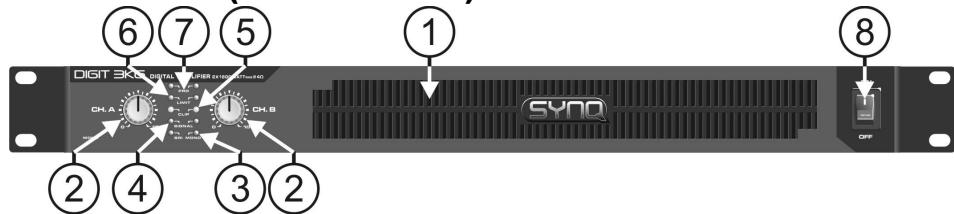
FUNCTIONS (FRONT)
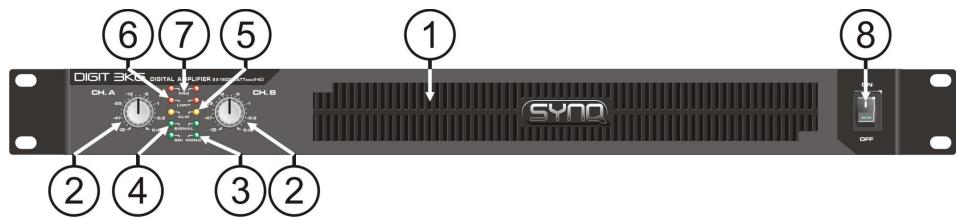
- VENTILLATION HOLES: during its operation the amplifier produces heat that needs to be dissipated. The fans inside the amplifier must be able to evacuate the heat in the most effective way. Therefore is it very important not to cover any of the ventilation openings as this may result in overheating. Clean the ventilation holes regularly with a vacuum cleaner. This increases the cooling capacity of the amplifier fans and helps preventing temperature overheat.
- GAIN CONTROLS: These potentiometers are used to control the input sensitivity of the amplifier. Each channel has its own control.
You can use these controls to set the maximum sound level of your setup:
- Turn both controls on the amplifier to the left.
- Put on some music on and make sure the VU meters on your mixer are at 0dB. (from time to time the red zone is lit)
- Set the Master output from your mixer to maximum.
- Open the Gain controls from the amplifier until the maximum desired sound level is reached.
- Make sure nobody can reach the Gain controls of the amplifier.
You have just set the maximum level the DJ is able to produce. Your neighbors will be glad... (in some cases the DJ is not )
Note: In Mono and Bridge mode, only the gain control of the left channel is used to adjust the input sensitivity.
-
OPERATION MODE LEDs: These LEDs indicate the operation mode. Switch (14) on the rear panel is used to choose one of these 3 possible modes:
-
STEREO MODE: Both LEDs are off. This is the most common mode, both channels are working separately.
- MONO MODE: 'MONO' LED is lit. Basically this is identical to stereo mode but the inputs of both channels are linked so the output will be mono. In this case you only need to use the input of the left channel to drive both output channels.
-
BRIDGE MODE: 'BRI' LED is lit. Both channels are linked in "bridge mode" to obtain a mono output with much higher power.
-
SIGNAL LEDs: these LEDs indicate that a music signal is present at the inputs.
-
CLIP LEDs: The LEDs will light up in the following situations:
-
When the output signal has reached a high level which can result in distortion (clipping). Meanwhile the signal limiters are working to keep the distortion low.
-
While short-circuit happened in the output section. Turn-off the amplifier, check the speaker and output wiring to find the problem(s).
-
LIMIT LEDs: [only on DIGIT 2K2 and DIGIT 3K6] these LEDs are lit in the following situations:
-
When the output power exceeds the safe working range of the amplifier, the LIMIT LEDs are lit while the current limiters come in action to reduce the dynamic range (current) of the output and bring the amplifier back to its safe working range. In this case you are urged lower the input!
-
While short-circuit happened in the output section and the amplifier is in protect mode. Turn-off the amplifier, check the speaker and output wiring to find the problem(s).
-
PROTECT LEDs: The protection LED is on in the following situations:
-
During the first seconds after switching on the amplifier.
- When the temperature of the power stage becomes too high.
- In case of a technical defect: DC protection!
-
While switching the amplifier off, the "protect led" turns on for a short time.
-
MAINS SWITCH: Used to turn the amplifier on and off. A few seconds after switching on the amplifier it is ready for operation.
FUNCTIONS (rear)
-
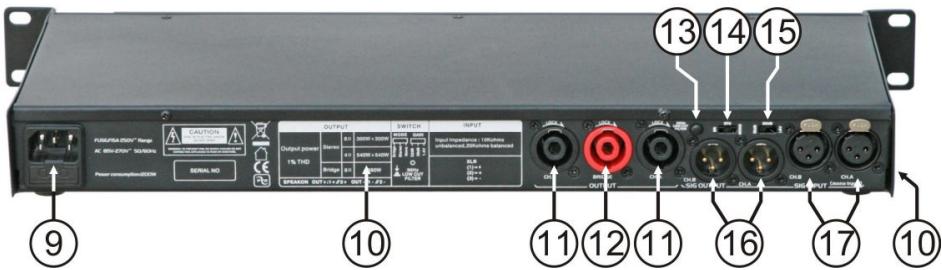
MAINS INPUT with IEC socket and integrated fuse holder, connect the supplied mains cable here.
-
FAN & VENTILLATION HOLES: during its operation the amplifier produces heat that must be dissipated. The fans inside the amplifier must be able to evacuate the heat in the most effective way. Therefore is it very important not to cover any of the ventilation openings as this may result in overheating. On DIGIT 1K0 the ventilation holes are located on the left side, on DIGIT 2K2/3K6 the ventilation holes are located on the back.
-
L+R SPEAKON OUTPUTS: use these Speakon® connectors to connect your speaker cabinets (impedance >4ohm) in stereo or mono mode. Wiring of these connectors is as follows:
-
POS (+) = Speakon connector PIN1+ and PIN2+
-
NEG(-) = Speakon connector PIN1- and PIN2-
-
BRIDGE OUTPUT: use this connector to connect your speaker cabinet (impedance >80hm ) in bridge mode. Wiring of this connector is as follows:
-
POS(+) = connector PIN1+ and PIN2+
- NEG(-) = connector PIN1- and PIN2-
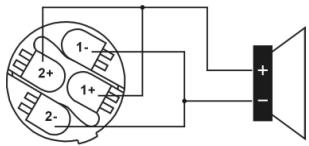
SPEAKON WIRE CONNECTION
- 30Hz LOW CUT FILTER: eliminates unwanted subsonic frequencies under 30Hz . In most cases these frequencies only consume a lot of energy without any added value to the music.
- OPERATION MODE switch: Used to set the operation mode of the amplifier. The most common operation mode is "stereo". If you need more power, you can operate the amplifier in bridge mode. In mono mode you only have to connect the left input to drive both outputs. Refer also to n^3 for more information.
- INPUT SENSITIVITY SWITCH: you can choose 3 different input levels: 26dB / 32dB / 1,4V
- BALANCED XLR OUTPUTS: Can be used to send the signal to the next amplifier. Pin1: signal ground, Pin2: signal+, Pin3: signal -
- BALANCED XLR INPUTS: Pin1: signal ground, Pin2: signal+, Pin3: signal -
HOW TO USE
STEREO OPERATION:
- Connect the audio signal to the inputs (15 or 16)
- Set the operation mode switch (13) to "stereo"
- Connect the matching speakers to the L+R Speakon® outputs (11)
- Make sure the mains voltage matches 230Vac before connecting the mains cable to the earthed wall socket.
- Set both input gains (2) to zero
- Make sure there's a music signal at the input
- Turn the amplifier on (8)
- Adjust the input gains (2) to the desired level
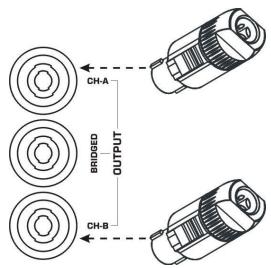
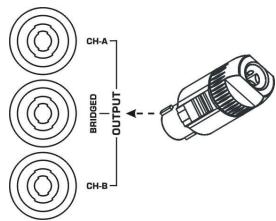
BRIDGE OPERATION:
- Connect the audio signal to the left input (15 or 16)
- Set the operation mode switch (13) to "bridge"
- Connect the matching speaker(s) to the Bridge output (12)
- Make sure the mains voltage matches 230Vac before connecting the mains cable to the earthed wall socket
- Set both input gains (2) to zero
- Make sure there's a music signal at the left input
- Turn the amplifier on (8)
- Adjust the left input gain (2) to the desired level, leave the right channel gain to zero.
MONO OPERATION:
- Connect the audio signal to the input of the left channel (15 or 16)
- Set the operation mode switch (13) to "mono"
- Connect the matching speakers to the L+R Speakon® outputs (11)
- Make sure the mains voltage matches 230Vac before connecting the mains cable to the earthed wall socket
- Set both input gains (2) to zero
- Make sure there's a music signal at the input
- Turn the amplifier on (8)
- Adjust the left input gain (2) to the desired level, leave the right channel gain to zero.
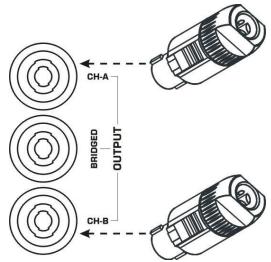
SPECIFICATIONS
| Digit-1K0 | Digit-2K2 | Digit-3K6 | |
| Power stereo 8Ω (1kHz, THD+N<0,1%) | 2x 300Wrms | 2x 650Wrms | 2x 1050Wrms |
| Power stereo 4Ω (1kHz, THD+N<0,1%) | 2x 540Wrms | 2x 1100Wrms | 2x 1800Wrms |
| Power bridge 8Ω (1kHz, THD+N<0,1%) | 1x 1080Wrms | 1x 2200Wrms | 1x 3600Wrms |
| Power mono 8Ω (1kHz, THD+N<0,1%) | 2x 300Wrms | 2x 650Wrms | 2x 1050Wrms |
| Power mono 4Ω (1kHz, THD+N<0,1%) | 2x 540Wrms | 2x 1100Wrms | 2x 1800Wrms |
| Power efficiency | >90% | >90% | >90% |
| Freq. Resp. (+/-1dB) | 5 - 36.000Hz | 5 - 36.000Hz | 5 - 36.000Hz |
| Input Sensitivity | 26 dB / 32 dB / 1,4 V | 26 dB / 32 dB / 1,4 V | 26 dB / 32 dB / 1,4 V |
| Input impedance unbalanced | 10 kΩ | 10 kΩ | 10 kΩ |
| Input impedance balanced | 20 kΩ | 20 kΩ | 20 kΩ |
| S/R ratio (A-Weighted) | >100dB | >100dB | >100dB |
| Damping factor (5Hz-1kHz) | 280 | 280 | 280 |
| Slew Rate | 29V/uS | 29V/uS | 29V/uS |
| Cooling | variable speed fan | variable speed fan | variable speed fan |
| Signal inputs | Balanced XLR | Balanced XLR | Balanced XLR |
| Signal outputs | Balanced XLR | Balanced XLR | Balanced XLR |
| Power supply | AC230V / 50Hz | AC230V / 50Hz | AC230V / 50Hz |
| Power consumption (max peak) | 1200 Watt | 3200 Watt | 3900 Watt |
| Dimensions (WxHxD mm) | 482x44x215 (19"/1U) | 482x44x301 (19"/1U) | 482x44x301 (19"/1U) |
| Weight (kg) | 3,3kg | 5,5kg | 5,6kg |
Every information is subject to change without prior notice
You can download the latest version of this user manual on our website: www.beglec.com
MODE D'EMPLOI
Digit 1K0:1080Wrms @ 8ohms
Digit 2K2: 2200Wrms @ 8ohms
Digit 3K6:3600Wrms @ 8ohms
FONCTIONS (FACE AVANT)
Digit 1K0:2x540Wrms @ 4ohms
Digit 2K2: 2x 1100Wrms @ 4ohms
Digit 3K6: 2x 1800Wrms @ 4ohms!
- Vermogen in bridge mode:
Digit 1K0: 1080Wrms @ 8ohms
Digit 2K2: 2200Wrms @ 8ohms
Digit 3K6:3600Wrms @ 8ohms
Digit 1K0:1080Wrms @ 8ohms
Digit 2K2: 2200Wrms @ 8ohms
Digit 3K6:3600Wrms @ 8ohms