NN-GT45KW - Microwave Oven PANASONIC - Free user manual and instructions
Find the device manual for free NN-GT45KW PANASONIC in PDF.


User questions about NN-GT45KW PANASONIC
0 question about this device. Answer the ones you know or ask your own.
Ask a new question about this device
Download the instructions for your Microwave Oven in PDF format for free! Find your manual NN-GT45KW - PANASONIC and take your electronic device back in hand. On this page are published all the documents necessary for the use of your device. NN-GT45KW by PANASONIC.
USER MANUAL NN-GT45KW PANASONIC
Operating Instructions
Bedienungsanleitung
Gebruiksaanwijzing
Mode d'emploi
Microwave Oven/Grill Oven
IMPORTANT SAFETY INSTRUCTIONS: Before operating this oven, please read these instructions carefully and keep for future reference.
-
Important safety instructions. Before operating this oven, please read these instructions carefully and keep for future reference.
-
This appliance can be used by children aged from 8 years and above and persons with reduced physical, sensory and mental capabilities or lack of experience and knowledge if they have been given supervision or instruction by a person responsible for their safety concerning the use of the appliance in a safe way and understand the hazards involved. Children shall not play with the appliance. Cleaning and user maintenance shall not be made by children without supervision. Keep the appliance and its cord out of reach of children less than 8 years.
-
When this oven is installed, it should be easy to isolate the appliance from the electricity supply by pulling out the plug or operating a circuit breaker.
-
If the supply cord is damaged, it must be replaced by the manufacturer or its service agent or a similarly qualified person in order to avoid a hazard.
- Warning! The appliance should be inspected for damage to the door seals and door seal areas and if these areas are damaged the appliance should not be operated until it has been repaired by a service technician trained by the manufacturer.
- Warning! Do not attempt to tamper with or make any adjustments or repairs to the door, control panel housing, safety interlock switches or any other part of the oven. Do not remove the outer panel from the oven which gives protection against exposure to microwave energy. Repairs should only be by a qualified service person.
- Liquids and other foods must not be heated in sealed containers since they are liable to explode.
-
Warning! Do not place this oven near an electric or gas cooker range.
-
Warning! Only allow children to use the oven without supervision when adequate instructions have been given so that the child is able to use the oven in a safe way and understands the hazards of improper use.
For Countertop use:
- Oven must be placed on a flat, stable surface 85 ~cm above the floor, with rear of oven placed against a back wall. If one side of the oven is placed flush to a wall, the other side or top must not be blocked. Allow 15 ~cm of space on the top of the oven.
- When heating food in plastic or paper containers, check the oven frequently as these types of containers ignite if overheated.
-
If smoke is emitted or a fire occurs in the oven, press Stop/Cancel button and leave the door closed in order to stifle any flames. Disconnect the power cord, or shut off power at fuse or circuit breaker panel.
-
When heating liquids, e.g. soup, sauces and beverages in your oven, overheating the liquid beyond boiling point can occur without evidence of bubbling. This could result in a sudden boil over of the hot liquid.
-
The contents of feeding bottles and baby food jars are to be stirred or shaken. The temperature has to be checked before consumption to avoid burns.
-
Do not cook eggs in their shells and whole hard-boiled eggs by MICROWAVE. Pressure may build up and the eggs may explode, even after the microwave heating has ended.
-
Clean the inside of the oven, door seals and door seal areas regularly. When food splatters or spilled liquids adhere to the oven walls, door seals and door seal areas wipe off with a damp cloth. Mild detergent may be used if they get very dirty. The use of harsh detergent or abrasive is not recommended.
-
DO NOT USE COMMERCIAL OVEN CLEANERS.
-
When using the GRILL or COMBINATION mode, some foods may inevitably splatter grease on to the oven walls. If the oven is not cleaned occasionally, it may start to "smoke" during use.
-
Failure to maintain the oven in a clean condition could lead to deterioration of surfaces that could affect the life of the appliance and possibly result in a hazardous situation.
-
Warning! The accessible parts may become hot in combination use. Young children should be kept away. Children less than 8 years of age should only use the oven under continuous adult supervision due to the temperatures generated.
-
A steam cleaner is not to be used for cleaning.
-
Do not use harsh, abrasive cleaners or sharp metal scrapers to clean the oven door glass since they can scratch the surface, which may result in shattering of the glass.
-
Exterior oven surfaces, including air vents on the cabinet and the oven door will get hot during COMBINATION and GRILLING, take care when opening or closing the door and when inserting or removing food and accessories.
- This appliance is not intended to be operated by means of an external timer or separate remote-control system.
- Only use utensils that are suitable for use in microwave ovens.
- The oven has heaters situated in the top of the oven. After using the GRILL and COMBINATION function, care should be taken to avoid touching the inside surfaces of the oven as these will be very hot. Care should be taken to avoid the heating element inside the oven.
Examine your microwave oven
Unpack the oven, remove all packing material, and examine the oven for any damage such as dents, broken door latches or cracks in the door. If you find any damage, notify your dealer immediately. Do not install a damaged microwave oven.
Earthing instructions
IMPORTANT: THIS UNIT HAS TO BE PROPERLY EARTHED FOR PERSONAL SAFETY.
If your AC outlet is not grounded, it is the personal responsibility of the customer to have it replaced with a properly grounded wall socket.
Operation voltage
The voltage has to be the same as specified on the label on the oven. If a higher voltage than specified is used, it may cause a fire or other damages.
Placement of the Oven
This oven is intended for household countertop use only. It is not intended for built-in use or use inside a cabinet.
- Place the oven on a flat and stable surface, more than 85 cm above the floor.
- When this oven is installed, it should be easy to isolate the appliance from the electricity supply by pulling out the plug or operating a circuit breaker.
- For proper operation, ensure a sufficient air circulation for the oven.
Counter-top use:
a. Allow 15cm of space on the top of the oven, 10cm at the back, 5cm on one side, and the other side must be opened more than 40cm .
b. If one side of the oven is placed flush to a wall, the other side or top must not be blocked.
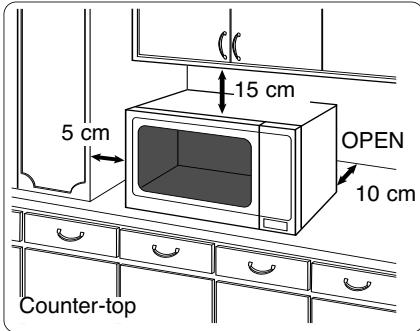
- Do not place this oven near an electric or gas cooker range.
- The feet should not be removed.
- This oven is only for household usage. Do not use outdoors.
- Avoid using the microwave oven in high humidity.
- The power cord should not touch the outside of the oven. Keep the cord away from hot surfaces. Do not let the cord hang over the edge of a table or work top. Do not immerse the cord, plug or oven in water.
- Do not block the air vents on the top and back of the oven. If these openings are blocked during operation the oven may overheat. In this case the oven is protected by a thermal safety device and resumes operation only after cooling down.
- This appliance is not intended to be operated by means of an external timer or separate remote-control system.
Attention: Hot Surfaces
Installation and Connection
WARNING
Important Safety Instructions
- The door seals and seal areas should be cleaned with a damp cloth. The appliance should be inspected for damage to the door seals and door seal areas and if these areas are damaged the appliance should not be operated until it has been repaired by a service technician trained by the manufacturer.
- Do not attempt to tamper with or make any adjustments or repairs to the door, control panel housing, safety interlock switches or any other part of the oven. Do not remove the outer panel from the oven which gives protection against exposure to microwave energy. Repairs should only be done by a qualified service person.
-
Do not operate this appliance if it has a damaged CORD OR PLUG, if it is not working properly, or if it has been damaged or dropped. It is dangerous for anyone other than a service technician trained by the manufacturer to perform repair service.
-
If the supply cord is damaged, it must be replaced by the manufacturer or its service agent or a similarly qualified person in order to avoid hazard.
- Only allow children to use the oven without supervision when adequate instructions have been given so that the child is able to use the oven in a safe way and understands the hazards of improper use.
- Liquids and other foods must not be heated in sealed containers since they are liable to explode.
- This appliance is not intended for use by persons (including children) with reduced physical, sensory or mental capabilities, or lack of experience and knowledge unless they have been given supervision or instruction concerning use of the appliance by a person responsible for their safety. Children should be supervised to ensure that they do not play with the appliance.
Safety Instructions
Use of your oven
- Do not use the oven for any reason other than the preparation of food. This oven is specifically designed to heat or cook food. Do not use this oven to heat chemicals or other non-food products.
- Before use, check that utensils/containers are suitable for use in microwave ovens.
- Do not attempt to use this microwave oven to dry newspaper, clothing or any other materials. They may catch on fire.
- When the oven is not being used, do not store any objects other than oven accessories inside the oven in case it is accidentally turned on.
- The appliance shall not be operated by MICROWAVE or COMBINATION (NN-J161MM / NN-J151WM) WITHOUT FOOD IN THE OVEN. Operation in this manner may damage the appliance.
- If smoke or a fire occurs in the oven, press Stop/Cancel button and leave the door closed in order to stifle any flames. Disconnect the power cord, or shut off power at the fuse or the circuit breaker panel.
Heater operation (NN-J161MM / NN-J151WM)
- Exterior oven surfaces, including air vents on the cabinet and the oven door will get hot during COMBINATION and GRILLING, take care when opening or closing the door and when inserting or removing food and accessories.
-
The oven has two heaters situated in the top of the oven. After using the COMBINATION and GRILL function, these surfaces will be very hot. Care should be taken to avoid touching the heating elements inside the oven. N.B: After cooking by these modes, the oven accessories will be very hot.
-
The accessible parts may become hot when the grill is in use. Children should be kept away.
- When the appliance is operated in the combination mode, children should only use the oven under supervision due to the temperatures generated.
Oven Light
When it becomes necessary to replace the oven light, please consult your dealer.
Accessories
The oven comes equipped with a variety of accessories. Always follow the directions given for use of the accessories.
Glass Tray
- Do not operate the oven without the roller ring and the glass tray in place.
- Never use another type of glass tray than the one specially designed for this oven.
- If the glass tray is hot, let it cool before cleaning or placing in water.
- The glass tray can turn in either direction.
- If the food or cooking vessel on the glass tray touches the oven walls and stops the tray rotating, the tray will automatically rotate in the opposite direction. This is normal.
- Do not cook foods directly on the glass tray.
Roller Ring
- The roller ring and the oven floor should be cleaned frequently to prevent noise and build-up of remaining food.
- The roller ring must always be used for cooking together with the glass tray.
- The Wire Rack is used to facilitate browning of small dishes and help with the good circulation of the heat.
- Do not use any metal container directly on the Wire Rack in COMBINATION with MICROWAVE.
- Do not use the Wire Rack in MICROWAVE mode only.
Important Information
1. Cooking Times
- The cooking time depends on the condition, temperature, amount of food and on the type of cookware.
- Begin with the minimum cooking time to help prevent overcooking. If the food is not sufficiently cooked you can always cook it for a little longer.
N.B.: If the recommended cooking times are exceeded the food will be spoiled and in extreme circumstances could catch fire and possibly damage the interior of the oven.
2. Small Quantities of Foods
- Small quantities of food or foods with low moisture content can burn, dry out or catch on fire if cooked too long. If materials inside the oven should ignite, keep the oven door closed, turn the oven off and remove the plug from the socket.
3. Eggs
- Do not cook eggs in their shells and whole hard-boiled eggs by MICROWAVE. Pressure may build up and the eggs may explode, even after the microwave heating has ended.
4. Piercing Skin
- Food with non porous skins, such as potatoes, egg yolks and sausages must be pierced before cooking by MICROWAVE to prevent bursting.
5. Meat Thermometer
- Use a meat thermometer to check the degree of cooking of roasts and poultry only when the meat has been removed from the oven. Do not use a conventional meat thermometer when using MICROWAVE or COMBINATION because it may cause sparking.
6. Liquids
- When heating liquids, e.g. soup, sauces and beverages in your microwave oven, overheating the liquid beyond boiling point can occur without evidence of bubbling. This could result in a sudden boil over of the hot liquid. To prevent this possibility the following steps should be taken:
a. Avoid using straight-sided containers with narrow necks.
b.Do not overheat.
c. Stir the liquid before placing the container in the oven and again halfway through the cooking time.
d. After heating, allow it to stand in the oven for a short time, stir again before carefully removing the container.
7. Paper/Plastic
- When heating food in plastic or paper containers, check the oven frequently as these types of containers ignite if overheated.
- Do not use recycled paper products (e.g. Kitchen Roll) unless the paper product is labelled as safe for microwave oven use. Recycled paper products may contain impurities which may cause sparks and/or fires during use.
- Remove wire twist-ties from roasting bags before placing the bags in the oven.
8. Utensils/Foil
- Do not heat any closed cans or bottles because they might explode.
Metal containers or dishes with metallic trim should not be used during microwave cooking. Sparking will occur.
If you use any aluminium foil, meat spikes or metalware the distance between them and the oven walls and door should be at least 2 cm to prevent sparking.
9. Feeding Bottles/Baby Food Jars
- The top and teat or lid must be removed from feeding bottles or baby food jars before placing in the oven.
- The contents of feeding bottles and baby food jars are to be stirred or shaken.
- The temperature has to be checked before consumption to avoid burns.
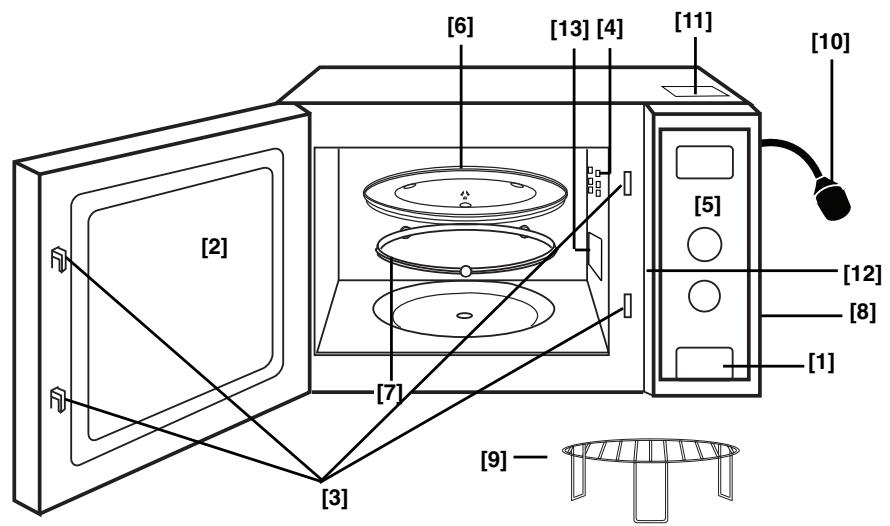
1. Door Release Button
Press to open the door. When you open the oven door during cooking, the cooking is stopped temporarily without clearing earlier made settings. The cooking is resumed as soon as the door is closed and Start Button pressed. The oven lamp lights as soon as the oven door is opened.
2. Oven Window
3. Door Safety Lock System
4. Oven Air Vent
5. Control Panel
6. Glass Tray
7. Roller ring
8 External Oven Air Vents
9. Wire Rack (NN-J161MM / NN-J151WM)
10. Power Cord
11. Caution Label (Hot surfaces) (NN-J161MM / NN-J151WM)
12. Identification Label
13. Feed Guide (Do not remove)
Control Panels
(1) Auto Weight Reheat
(2) Auto Weight Cook
(3) Auto Weight Combination
(4) Auto Weight Defrost
(5) Display Window
(6) Mode Selector Dial
(7) Microwave Power
(8) Grill Power
(9) Combination Power
(10) Time/Weight Dial
(11) Stop/Cancel Button:
Before cooking: one press clears your instructions.
During cooking: one press temporarily stops the cooking program. Another press cancels all your instructions and the time of day will appear in the display.
(12) Start Button:
Press to start operating the oven. If during cooking the door is opened or Stop/ Cancel Button is pressed once, Start Button has to be pressed again to continue cooking.
(13)Clock/Timer Button
Beep Sound:
A beep sounds when a button is pressed. After completion of cooking, five beeps sound and 'End' appears in the display.
- N.B. The design of your control panel may vary from the panel displayed (depending on colour), but the functionality will remain the same.
NN-S251WM*
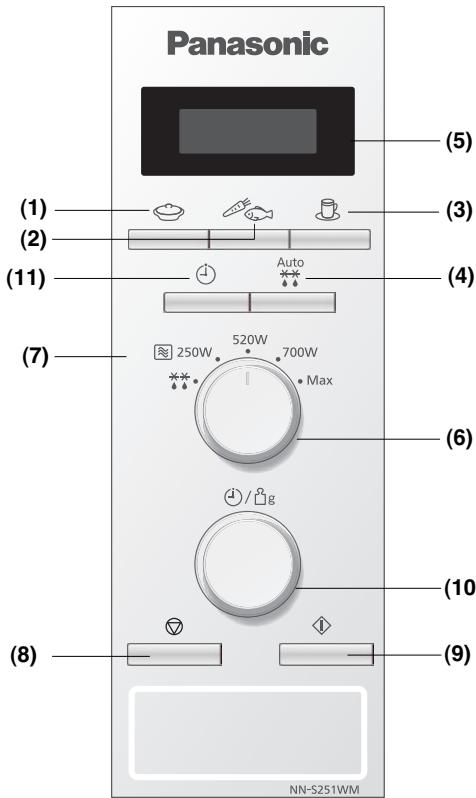
(1) Auto Weight Reheat
(2) Auto Weight Cook Vegetables/Fish
(3) Auto Reheat Cup/Bowl
(4) Auto Weight Defrost
(5) Display Window
(6) Mode Selector Dial
(7) Microwave Power
(8) Stop/Cancel Button: Before cooking: one press clears your instructions. During cooking: one press temporarily stops the cooking program. Another press cancels all your instructions and the time of day will appear in the display.
(9) Start Button: Press to start operating the oven. If during cooking the door is opened or Stop/ Cancel Button is pressed once, Start Button has to be pressed again to continue cooking.
(10) Time/Weight Dial
(11)Clock/Timer Button
Beep Sound:
A beep sounds when a button is pressed. After completion of cooking, five beeps sound and 'End' appears in the display.
- N.B. The design of your control panel may vary from the panel displayed (depending on colour), but the functionality will remain the same.
Controls and operation procedure
Clock Setting: Example: To set 14:25

- Press Clock/Timer Button twice. A colon starts to blink.
- Enter the time by turning the Time/Weight Dial. The time appears in the display.
- Press Clock/Timer Button. The time of day is entered.
NOTE:
- To reset the time of day repeat all the above steps.
- The time of day is displayed, unless the power supply is interrupted.
- This clock has a 24 hour display.
Child Safety Lock:
Using this system will make the oven controls inoperable; however, the door can be opened. Child Lock can be set when the display shows a dot or the time.
To Set:

To Cancel:

- Press Start Button three times.
The time of day will disappear. Actual time will not be lost.
- Press Stop/Cancel Button three times. The time of day will reappear in the display.
Microwave cooking and defrost
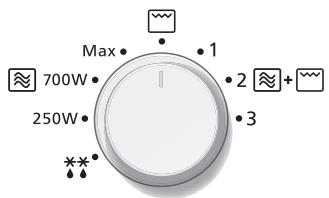
There are 4 (NN-J161MM / NN-J151WM) and 5 (NN-S251WM) different microwave power levels available. The chart below shows the approximate wattage for each power level.
Use of accessory:
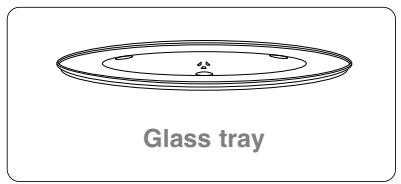
| Power Level | Wattage |
| MAX (HIGH) Power | 800W |
| MEDIUM Power | 700W |
| LOW Power (NN-S251WM) | 520W |
| SIMMER Power | 250W |
| MIN (DEFROST) Power | 270W |
NN-S251WM
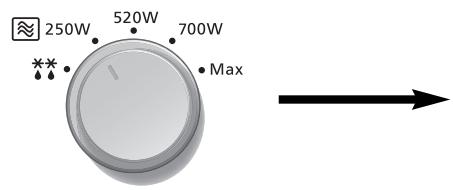
- Turn Mode Selector Dial to your desired power level.
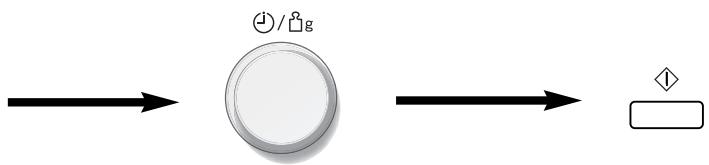
- Set the cooking time using the Time/Weight Dial (HIGH power: up to 30 minutes Other powers: up to 90 minutes).
- Press Start Button.
NOTE:
- You can change the cooking time during cooking, if required. Turn Time/Weight Dial to increase or decrease the cooking time. Time can be increased/decreased in 1 minute increments, up to 10 minutes. Turning the dial to zero will end cooking.
The Grill provides 1 Grill setting of 1000W.
Use of accessory:
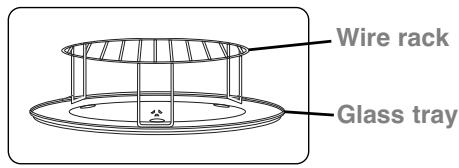
-
Turn Mode Selector to Grill setting.
-
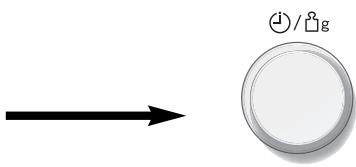
Set the cooking time using the Time/Weight Dial (up to 90 minutes).


- Press Start Button.
NOTE:
- The Grill will only operate with the oven door closed.
- You can change the cooking time during cooking, if required. Turn Time/Weight Dial to increase/decrease the cooking time. Time can be increased/decreased in 1 minute increments, up to 10 minutes. Turning the dial to zero will end cooking.
Combination cooking (NN-J161MM / NN-J151WM)
Use of accessory:
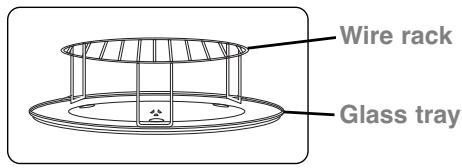
There are 3 combination settings. The following chart shows the approximate wattage for each power level.
| Combination Setting | Microwave | Grill |
| 1 | 290W | 640W |
| 2 | 370W | 540W |
| 3 | 455W | 430W |
-
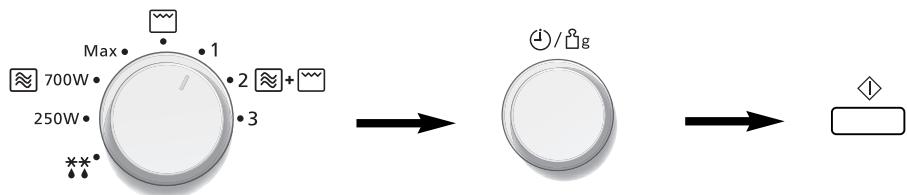
Turn Mode Selector to desired Combination setting.
-
Set the cooking time using the Time/Weight Dial (up to 90 minutes).
-
Press Start Button.
NOTE:
- The Combination mode will only operate with the oven door closed.
- You can change the cooking time during cooking, if required. Turn Time/Weight Dial to increase/decrease the cooking time. Time can be increased/decreased in 1 minute increments, up to 10 minutes. Turning the dial to zero will end cooking.
Auto defrost
With this feature you can defrost frozen foods according to the weight. Select the category and set the weight of the food. The weight is programmed in grams. For quick selection, the weight starts from the most commonly used weight for each category.
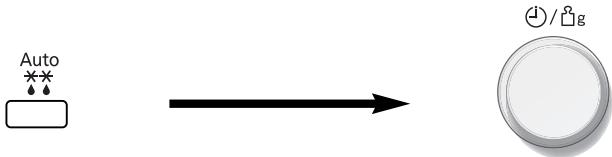
- Select the desired Auto Defrost Program.
1 press for small pieces
2 presses for big pieces
3 presses for bread/cake
The auto program number appears in the display.
- Set the weight of the frozen food by using the Time/Weight dial.
Turn clockwise, weight counts-up in 10g increments. Turn anti-clockwise, weight counts-down in 10g increments.

- Press Start Button.
| Program | Display | Min/Max. Weight | Hints |
| 1 Small pieces | 1 | 200 - 1000g | Small pieces of meat, scallop, sausages, minced meat, fish fillets, steaks, chops (each 100g to 400g). Turn/stir at beeps |
| 2 Big piece | 2 | 600 - 1600g | Big pieces of meat, roast, whole chicken, big piece of fish. Turn at beeps. |
| 3 Bread / Cake | 3 | 100 - 600g | For bread (whole or slices) and cakes. Cream cakes and iced cakes are unsuitable for this program. Turn at beeps. |
NOTE:
- When defrosting time is over 60 minutes the time will appear as Hours and Minutes.
- The shape and size of the food will determine the maximum weight the oven can accommodate.
Auto weight programs
This feature allows you to cook most of your favourite foods by setting the weight only. The oven determines Microwave power level, Grill power (NN-J161MM / NN-J151WM) and cooking time automatically. Select the category and set the weight of the food. The weight is programmed in grams. For quick selection, the weight starts from the most commonly used weight for each category.
e.g.
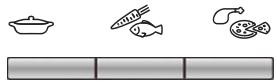
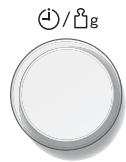
- Select the desired Auto Weight Program. See pages En-20-En-22. The auto program number appears in the display.
-
Press Start Button.
-
Set the weight of the food by using the Time/Weight Dial. Turn clockwise weight counts-up in 10g increments. Turn anti-clockwise, weight counts down in 10g increments.
NOTE:
- When cooking time is over 60 minutes, the time will appear as Hours and Minutes.
- Follow the charts overleaf for the recommended weight and accessories to be used.
Auto weight programs
| Category | Program | Recommended Weight | Accessory | Instructions |
| REHEAT | 1 Press FRESH MEAL Display 4 | 200 - 800g | To reheat a fresh plated meal or casserole. All foods must be pre-cooked. Foods should be at refrigerator temperature approx. +5°C. Stir at beeps. Allow a few minutes standing time. Ensure food is piping hot before serving. Large pieces of fish / meat in a thin sauce, may require longer cooking. | |
| WEIGHT COOK | 1 Press FRESH VEGETABLES Display 5 | 200 - 800g | To cook fresh vegetables. Place prepared vegetables into a suitable sized container. Sprinkle with 1 tbsp water per 100g vegetables. Cover with pierced cling film or a lid. Turn / stir at beeps. | |
| 2 Presses FRESH FISH Display 6 | 200 - 700g | For cooking fresh fish. Place in a suitable sized container, add 2 tbsp (30ml) water. Cover with pierced cling film or a lid. | ||
| Category | Program | Recommended Weight | Accesory | Instructions |
| WEIGHT COMBI | 1 Press FROZEN PIZZA Display 7 | 200 - 400g | For reheating and browning the top of frozen (NOT Fresh) purchased pizza. Remove all packaging and place the pizza on Wire Rack on Glass Tray. | |
| 2 Presses FROZEN GRATIN Display 8 | 300 - 500g | For reheating, browning and crisping the top of pre-cooked frozen gratin. This program is suitable for frozenlasagne, cannelloni, potato topped dishes, pasta bakes. Remove all packaging and place frozen gratin in heatproof dish on wire rack on glass tray. | ||
| 3 Presses FRESH CHICKEN PIECES Display 9 | 200 - 800g | For cooking fresh chicken pieces. eg. breasts, thighs, drumsticks and quarters. Place in a heatproof dish on Wire Rack on Glass Tray. Turn at beeps. |
Auto weight programs
NN-S251WM
| Category | Program | Recommended Weight | Instructions |
| REHEAT | 1 Press FRESH MEAL Display 4 | 200 - 800g | To reheat a fresh plated meal or casserole. All foods must be pre-cooked. Foods should be at refrigerator temperature approx. +5°C. Stir at beeps. Allow a few minutes standing time. Ensure food is piping hot before serving. Large pieces of fish / meat in a thin sauce, may require longer cooking. |
| COOK VEGETABLES / FISH | 1 Press FRESH VEGETABLES Display 5 | 200 - 800g | To cook fresh vegetables. Place prepared vegetables into a suitable sized container. Sprinkle with 1 tbsp water per 100g vegetables. Cover with pierced cling film or a lid. Turn / stir at beeps. |
| 2 Presses FRESH FISH Display 6 | 200 - 700g | For cooking fresh fish. Place in a suitable sized container, add 2 tbsp (30ml) water. Cover with pierced cling film or a lid. | |
| REHEAT CUP/BOWL | 1 Press Reheat Cup Display 7 | 150 ml | For reheating a cup of hot drink (e.g tea, coffee, milk and soup). Select reheat cup, enter weight (150 ml), press start button. |
| 2 Presses Reheat 1 Bowl Display 8 | 300 ml | For reheating one bowl of hot drink. Select reheat bowl, enter weight (300 ml), press start button. |
Hints for reheating cup and bowl.
- Stir the liquid before heating (Heated liquids can erupt if not mixed with air).
- Do not cover hot drinks such as tea or coffee. Cover soup with a saucer to avoid any risk of eruption.
- After heating, stir again and allow to stand for a short time.
By using the Clock/Timer button, you can program the oven as a minute timer.

-
Press Clock/Timer Button once.
-
Set desired amount of time by using the Time/Weight Dial (up to 90 minutes).
-
Press Start Button.
NOTE:
If the oven door is opened when the Minute Timer is in operation, the time in the display window will continue to count down.
Care of your oven
- Turn the oven off before cleaning.
- Keep the inside of the oven, door seals and door seal areas clean. When food splatters or spilled liquids adhere to the oven walls, door seals and door seal areas wipe off with a damp cloth. Mild detergent may be used if they get very dirty. The use of harsh detergent or abrasive is not recommended. DO NOT USE COMMERCIAL OVEN CLEANERS.
- The outside oven surface should be cleaned with a damp cloth. To prevent damage to the operating parts inside the oven, water should not be allowed to seep into the ventilation openings.
- If the Control Panel becomes dirty, clean it with a soft, dry cloth. Do not use harsh detergents or abrasives on the Control Panel. When cleaning the Control Panel, leave the oven door open to prevent the oven from accidentally turning on. After cleaning touch Button to clear the display window.
- If steam accumulates inside or around the outside of the oven door, wipe with a soft cloth. This may occur when the microwave oven is operated under high humidity conditions and in no way indicates a malfunction of the unit.
- It is occasionally necessary to remove the glass tray for cleaning. Wash the tray in warm soapy water or in a dishwasher.
-
The roller ring and oven cavity floor should be cleaned regularly to avoid excessive noise. Simply wipe the bottom surface of the oven with mild detergent and hot water then dry with a clean cloth. The roller ring may be washed in mild soapy water. Cooking vapours collect during repeated use but in no way affects the bottom surface or roller ring wheels. After removing the roller ring from the cavity floor for cleaning, be sure to replace it in the proper position.
-
When using the GRILL or COMBINATION mode, (NN-J161MM / NN-J151WM) some foods may inevitably splatter grease on to the oven walls. If the oven is not cleaned occasionally, it may start to "smoke" during use.
- A steam cleaner is not to be used for cleaning.
- This oven should only be serviced by qualified personnel. For maintenance and repair of the oven contact the nearest authorized dealer.
- Failure to maintain the oven in a clean condition could lead to deterioration of surfaces that could affect the life of the appliance and possibly result in a hazardous situation.
- Keep air vents clear at all times. Check that no dust or other material is blocking any of the air vents on the top, bottom or rear of the oven. If air vents become blocked this could cause overheating which would affect the operation of the oven and possibly result in a hazardous situation.
- NN-J161MM / NN-J151WM models. Do not use harsh abrasive cleaners or sharp metal scrapers to clean the oven door glass since they can scratch the surface, which may result in shattering of the glass.
Questions and answers
Q: Why won't my oven turn on?
A: When the oven does not turn on, check the following:
- Is the oven plugged in securely? Remove the plug from the outlet, wait 10 seconds and reinsert.
- Check the circuit breaker and the fuse. Reset the circuit breaker or replace the fuse if it is tripped or blown.
- If the circuit breaker or fuse is all right, plug another appliance into the outlet. If the other appliance works, there probably is a problem with the oven. If the other appliance does not work, there probably is a problem with the outlet. If it seems that there is a problem with the oven, contact an authorized Service Center.
Q: My microwave oven causes interference with my TV. Is this normal?
A: Some radio and TV interference might occur when you cook with the microwave oven. This interference is similar to the interference caused by small appliances such as mixers, vacuums, blow dryers, etc. It does not indicate a problem with your oven.
Q: The oven won't accept my program. Why?
A: The oven is designed not to accept an incorrect program. For example, the oven will only accept one stage cooking (excluding Delay Start), and will not accept an Auto Weight Program after Delay Start.
Q: Sometimes warm air comes from the oven vents. Why?
A: The heat given off from the cooking food warms the air in the oven cavity. This warmed air is carried out of the oven by the air flow pattern in the oven. There are no microwaves in the air. The oven vents should never be blocked during cooking.
Q: Can I use a conventional oven thermometer in the oven?
A: Only when you are using GRILL cooking mode (NN-J161MM / NN-J151WM). The metal in some thermometers may cause arcing in your oven and should not be used on MICROWAVE and COMBINATION cooking modes.
Q: There are humming and clicking noises from my oven when I cook by COMBINATION. What is causing these noises?
A: The noises occur as the oven automatically switches from MICROWAVE power to GRILL to create the combination setting. This is normal.
Q: My oven has an odour and generates smoke when using the COMBINATION and GRILL function. Why?
A: After repeated use, it is recommended to clean the oven and then run the oven without food, glass tray, and roller ring on Grill for 5 minutes. This will burn off any food, residue or oil which may cause an odour and/or smoking.
Technical specifications
| Power Source: | 230 V~50 Hz | |
| Power Consumption: | Maximum; | 1250 W |
| Microwave; | 1250 W | |
| Grill; | 1000 W | |
| Output: | Microwave; | 800 W (IEC-60705) |
| Grill Heater; | 1000 W | |
| Outside Dimensions: | 443 (W) x 329 (D) x 258 (H) mm | |
| Oven Cavity Dimensions: | 306 (W) x 305 (D) x 215 (H) mm | |
| Uncrated Weight: | 12.0 kg | |
| Noise: | 57dB | |
NN-S251WM
| Power Source: | 230 V~50 Hz | |
| Power Consumption: | ||
| Microwave; | 1250 W | |
| Output: | Microwave; | 800 W (IEC-60705) |
Outside Dimensions: 443 (W) x 340 (D) x 258 (H) mm
Oven Cavity Dimensions: 306 (W) x 308 (D) x 215 (H) mm
Uncrated Weight: 12.0 kg
Noise: 57dB
Specifications subject to change without notice.
This product is an equipment that fulfills the European standard for EMC disturbances (EMC = Electromagnetic Compatibility) EN 55011. According to this standard this product is an equipment of group 2, class B and is within required limits. Group 2 means that radio-frequency energy is intentionally generated in the form of electromagnetic radiation for warming up of foods. Class B means that this product may be used in normal household areas.
Technical specifications

Information on Disposal for Users of Waste Electrical & Electronic Equipment (private households)
This symbol on the products and/or accompanying documents means that used electrical and electronic products should not be mixed with general household waste.
For proper treatment, recovery and recycling, please take these products to designated collection points, where they will be accepted on a free of charge basis. Alternatively, in some countries you may be able to return your products to your local retailer upon the purchase of an equivalent new product.
Disposing of this product correctly will help to save valuable resources and prevent any potential negative effects on human health and the environment which could otherwise arise from inappropriate waste handling. Please contact your local authority for further details of your nearest designated collection point.
Penalties may be applicable for incorrect disposal of this waste, in accordance with national legislation.
For business users in the European Union
If you wish to discard electrical and electronic equipment, please contact your dealer or supplier for further information.
Information on Disposal in other Countries outside the European Union
This symbol is only valid in the European Union.
If you wish to discard this product, please contact your local authorities or dealer and ask for the correct method of disposal.
Pursuant to the EMC Directive 2004/108/EC, article 9(2):-
Panasonic Testing Centre
Panasonic Service Europe, a division of Panasonic Marketing Europe GmbH
Winsberging 15, 22525 Hamburg, F.R. Germany.
Manufactured for Panasonic Corporation by GMMEAM
No. 6 Yong An RD, Beijiao, Shunde, Foshan, Guangdong, Peoples Republic of China.
Panasonic Corporation
Web Site:http://panasonic.com.net