
T-RETRO20BL - T-RETRO20CREAM - T-RETRO20RED - Coffee maker THOMSON - Free user manual and instructions
Find the device manual for free T-RETRO20BL - T-RETRO20CREAM - T-RETRO20RED THOMSON in PDF.


| Product Type | Microwave oven |
| Brand | THOMSON |
| Models | T-RETRO20BL, T-RETRO20CREAM, T-RETRO20RED |
| Rated voltage | 230 V ~ 50 Hz |
| Nominal input power (microwave) | 1150 W |
| Nominal output power (microwave) | 700 W |
| Microwave frequency | 2450 MHz |
| Capacity | 20 liters (approx) |
| Control type | Buttons and rotary dial |
| Display | LED digital display |
| Cooking functions | Microwave cooking (5 power levels), express cooking, weight defrost (meat, poultry, seafood), delay cooking, automatic menus (popcorn, pizza, beverage, potatoes, fish) |
| Number of automatic programs | 8 (A.1 to A.8) |
| Child safety lock | Yes |
| Timer | Up to 60 minutes |
| Clock | 24-hour display |
| Interior light | Yes |
| Turntable | Glass, removable |
| Cavity materials | Stainless steel / plastic |
| Cleaning | Damp cloth and mild soap; do not use abrasives or steam cleaner |
| Safety | Door locks, automatic stop when opened, empty operation protection |
| Weight | Approx 10 kg (estimate) |
| Dimensions (W x D x H) | Approx 45 x 35 x 26 cm (estimate) |
| Included accessories | Glass turntable, rotating ring |
| Repairability | After-sales service Darty or Vanden Borre |
Frequently Asked Questions - T-RETRO20BL - T-RETRO20CREAM - T-RETRO20RED THOMSON
User questions about T-RETRO20BL - T-RETRO20CREAM - T-RETRO20RED THOMSON
0 question about this device. Answer the ones you know or ask your own.
Ask a new question about this device
Download the instructions for your Coffee maker in PDF format for free! Find your manual T-RETRO20BL - T-RETRO20CREAM - T-RETRO20RED - THOMSON and take your electronic device back in hand. On this page are published all the documents necessary for the use of your device. T-RETRO20BL - T-RETRO20CREAM - T-RETRO20RED by THOMSON.
USER MANUAL T-RETRO20BL - T-RETRO20CREAM - T-RETRO20RED THOMSON
Portuguese PT47-PT57
IMPORTANT SAFETY INSTRUCTIONS READ CAREFULLY AND KEEP FOR FUTURE REFERENCE
WARNING
- This appliance is intended to be used in household and similar applications such as:
staff kitchen areas in shops, offices and other working environments;
- farm houses;
by clients in hotels, motels and other residential type environments;
bed and breakfast type environments.
- If the supply cord is damaged, it must be replaced by the manufacturer, its service agent or similarly qualified persons in order to avoid a hazard.
- WARNING: If the door or door seals are damaged, the oven must not be operated until it has been repaired by a competent person.
- WARNING: It is hazardous for anyone other than a competent person to carry out any service or repair operation that involves the removal of a cover which gives protection against exposure to microwave energy.
- WARNING: Liquids and other foods must not be heated in sealed containers since they are liable to explode.
- Keep a minimum free space 30cm above the top surface of the oven.
- Only use utensils that are suitable for use in microwave ovens.
Metallic containers for food and beverages are not allowed during microwave cooking. - When heating food in plastic or paper containers, keep an eye on the oven due to the possibility of ignition.
- The microwave oven is intended for heating food and beverages. Drying of food or clothing and heating of warming pads, slippers, sponges, damp cloth and similar may lead to risk of injury, ignition or fire.
- If smoke is emitted, switch off or unplug the appliance and keep the door closed in order to stifle any flames.
- Microwave heating of beverages can result in delayed eruptive boiling, therefore care must be taken when handling the container.
- The contents of feeding bottles and baby food jars shall be stirred or shaken and the temperature checked before consumption, in order to avoid burns.
- Eggs in their shell and whole hard-boiled eggs should not be heated in microwave ovens since they may explode, even after microwave heating has ended.
- Regarding the instructions of the details for cleaning the door seals, cavities, adjacent parts
and the surfaces in contact with food, refer to the section "Cleaning and Maintenance" on pages 8-9 of the manual.
- The oven should be cleaned regularly and any food deposits removed.
- Failure to maintain the oven in a clean condition could lead to deterioration of the surface that could adversely affect the life of the appliance and possibly result in a hazardous situation.
- The appliance shall not be cleaned with a steam cleaner.
- The microwave oven is intended to be used freestanding.
- Group 2, Class B equipment
This equipment is Group 2 equipment as it intentionally generates radio-frequency energy for treating material and is designed to be used in domestic premises or an establishment directly connected to the low voltage electricity distribution network supplying buildings used for domestic purposes (Class B).
-
The appliance must not be placed in a cabinet.
-
This appliance can be used by children ages from 8 years and above and persons with reduced physical, sensory or mental capabilities or lack of experience and knowledge if they have been given supervision or instruction concerning use of the appliance in a safe way and understand the hazards involved. Children shall not play with the appliance. Cleaning and user maintenance shall not be made by children unless they are aged from 8 years and above and supervised.
- The appliance is not intended to be operated by means of an external timer or separate remote-control system.
- The temperature of accessible surfaces may be high when the appliance is operating.
- The door or the outer surface may get hot when the appliance is operating.
- The rear side of the oven must be against the wall.
- Do not place the appliance in or near hot gas or electric burner, or permit to touch a heated oven or mini oven.
IMPORTANT SAFETY INFORMATION
- When you will not use the microwave oven for a long period of time, please disconnect it from the supply mains, to do this you must remove the plug from the supply outlet.
- The plug shall be the main disconnection device and shall remain accessible at all times.
- The microwave oven cannot be operated with the door open due to the safety interlocks built into the door mechanism which switch off the cooking functions when the door is opened. Operating the microwave oven with the door open could result in harmful exposure to microwave energy. It is important not to tamper with the door mechanism.
-
Do not let water or any other liquid enter the oven through the ventilation slots.
-
Do not place any object between the oven front face and the door or allow soil or cleaner residue to accumulate on sealing surfaces.
- Avoid using straight-sided containers with narrow necks.
- Stir any liquid before placing the container back into the microwave oven half way through the heating time.
- After heating, always allow standing time, stir or shake the contents and carefully check the temperatures before consumption.
COOKING UTENSILS
Utensils should be checked to ensure that they are suitable for use in the microwave oven.
Materials you can use in microwave oven
| Utensils | Remarks |
| Browning dish | Follow manufacturer's instructions. The bottom of browning dish must be at least 5mm above the turntable. Incorrect usage may cause the turntable to break. |
| Dinnerware | Microwave-safe only. Follow manufacturer's instructions. Do not use cracked or chipped dishes. |
| Glass jars | Always remove lid. Use only to heat food until it's warm. Most glass jars are not heat resistant and may break. |
| Glassware | Heat-resistant oven glassware only. Make sure there is no metallic trim. Do not use cracked or chipped dishes. |
| Oven cooking bags | Follow manufacturer's instructions. Do not close with metal tie. Make slits to allow steam to escape. |
| Paper plates and cups | Use for short-term cooking/warming only. Do not leave oven unattended while cooking. |
| Paper towels | Use to cover food for reheating and absorbing fat. Use with supervision for a short-term cooking only. |
| Parchment paper | Use as a cover to prevent splattering or a wrap for steaming. |
| Plastic | Microwave-safe only. Follow the manufacturer's instructions. Should be labelled "Microwave Safe". Some plastic containers soften, as the food inside gets hot. "Boiling bags" and tightly closed plastic bags should be slit, pierced or vented as directed by package. |
| Plastic wrap | Microwave-safe only. Use to cover food during cooking to retain moisture. Do not allow plastic wrap to touch food. |
| Thermometers | Microwave-safe only (meat and candy thermometers). |
| Wax paper | Use as a cover to prevent splattering and retain moisture. |
Materials to be avoided in microwave oven
| Utensils | Remarks |
| Aluminium tray | May cause arcing. Transfer food into microwave-safe dish. |
| Food carton with metal handle | May cause arcing. Transfer food into microwave-safe dish. |
| Metal or metal-trimmed utensils | Metal shields the food from microwave energy. Metal trim may cause arcing. |
| Metal twist ties | May cause arcing and could cause a fire in the oven. |
| Paper bags | May cause a fire in the oven. |
| Plastic foam | Plastic foam may melt or contaminate the liquid inside when exposed to high temperature. |
| Wood | Wood will dry out when used in the microwave oven and may split or crack. |
NOTES:
- Care should be taken when removing utensils or the glass turntable, as they may become hot during cooking.
- Only use a thermometer that is designed for use in the microwave oven.
- Ensure the turntable is in place when you operate the oven.
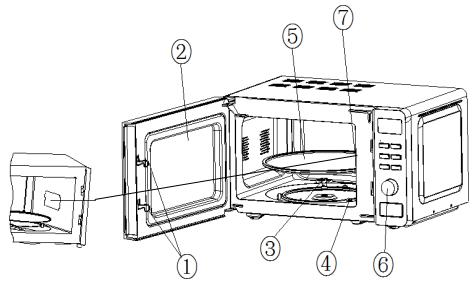
OVEN OVERVIEW
- Door lock
- Observation Window
- Rotating axis
- Rotating ring
- Turntable
- Control panel
-
Wave guide
-
Never place the turntable upside down. The turntable should never be restricted.
- Both turntable and rotating ring must always be used during cooking.
- All food and containers of food must always be placed on the turntable for cooking.
- If turntable or rotating ring cracks or breaks, stop using your microwave oven and contact a nearest authorised service centre.
INSTALLATION
PREPARATION
Remove all packing material and accessories. Examine the oven for any damage such as dents or broken door. Do not install the microwave oven if it is damaged.
Cabinet: Remove any protective film found on the microwave oven cabinet surface.
Do not remove the light brown Mica cover that is attached to the inside of the oven cavity to protect the magnetron.
Position
- Select a level surface that provides enough open space for the intake and/or outlet vents.
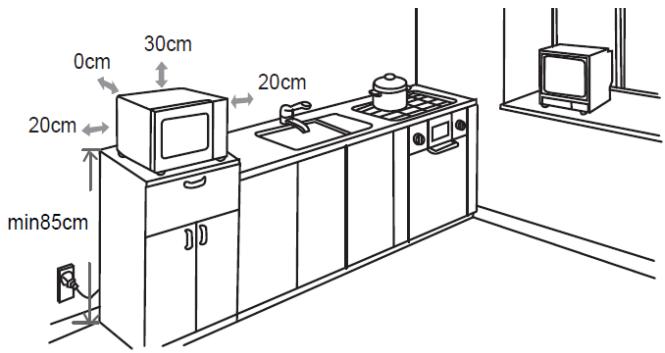
- The microwave oven must be placed on a surface with height more than 85cm above the floor.
- A minimum clearance of 20~cm is required on both sides of the oven.
- The minimum height of free space above the top surface of the oven is 30~cm .
- Do not remove the feet from the bottom of the oven.
- Blocking the intake and/or outlet openings can damage the oven.
-
Place the oven as far away from radios and TV as possible.
-
Operation of microwave oven may cause interference to your radio or TV reception.
- Plug your oven into a standard grounded outlet. Be sure the voltage and the frequency are the same as the voltage and the frequency on the rating label.
- WARNING: Do not install the oven over a range cooktop or other heat-producing appliance. If installed near or over a heat source, the oven could be damaged.
CONTROL PANEL
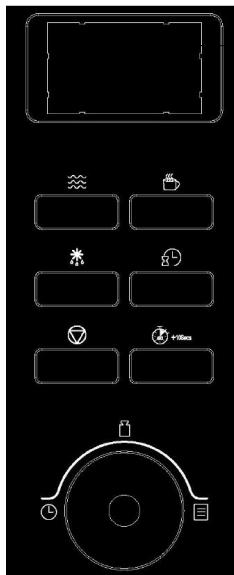
Display
Cooking time, power, indicators and present time are displayed.

Microwave cooking
Press this button to set microwave power level.

Express cooking
Press this button to set the express cooking function.

Defrosting by weight button
Press this button to set the defrost-food-by-weight function.

Preset/Clock button
Press this button to set the clock or preset function.

Pause/Cancel button
- Press this button to cancel setting or reset the oven before setting a cooking program.
- Press once to temporarily stop cooking or press twice to cancel cooking completely.
- This button is also used to activate/deactivate child lock function.

Instant cooking /Start/Confirm button
- Press this button to set instant cooking function.
- Press this button to start a cooking program.
- Press this button to confirm the setting.


Time/ Auto Menu/ Weight dial
Rotate this dial to select auto cook menus, time, weight or number of servings.
OPERATION
When the oven is first plugged in, the display will flash and then the symbol ":" will flash on the display.
General
- Press once to temporarily stop cooking. You can resume cooking by pressing ( 0 + 10sec) ,or press twice to cancel the cooking program.
- After the cooking time has elapsed, the oven will beep a few times.
Setting the Clock
1. Press

The hour digits will flash on the display.
- While the hour digits are flashing, turn to adjust the hour digits, the input hour should be a 24-hour time value.
- Press to confirm. The minute digits will flash.
- While the minute digits are flashing, turn to adjust the minute digits.
- Press to confirm the setting. ":" will flash on the display.
Microwave Cooking
The longest cooking time is 60 minutes. Suppose you want to cook for 1 minute at 60% of microwave power.
- Press three times.
| Number of pressing | Display | Cooking Power | |
| Once | 100P | H (High power) | 100% |
| Twice | 80P | M.H (Medium high power) | 80% |
| 3 times | 60 | M (Medium power) | 60% |
| 4 times | 40 | M.L (Medium low power) | 40% |
| 5 times | 20 | L (Low power) | 20% |
- Turn to 1:00.
- Press +1050s
Express
This function allows you to heat liquids easily. Choose the proper time depending the volume of the liquid.
- Repeatedly press to select the desired cooking time.
0:30-30 seconds 1:00-1 minute 1:30-1 minute and 30 seconds - Press
Defrosting Food
- Repeatedly press to select a desired mode among d.1, d.2 and d.3.
- Turn to set the defrost weight.
d.1: for defrosting meat, the weight ranges from 0.1 to 2.0kg
d.2: for defrosting poultry, the weight ranges from 0.2 to 3.0kg
d.3: for defrosting seafood, the weight ranges from 0.1 to 0.9kg
- Press

NOTE: During defrosting, the system will beep to remind you of turning over the food. After turning over the food, close the door and press Hides to resume.
Quick Start
The oven will operate at high microwave power for quick start cooking program.
To do this, press 4100s in quick secession to set cooking time, the oven will start immediately at full power. The longest cooking time is 60 minutes.
NOTE: The cooking time can be increased in the following increments:
| Cooking Time | Increments |
| 1 – 5 min: | 10 seconds |
| 5 – 10 min: | 30 seconds |
| 10 – 60 min: | 60 seconds |
Auto Cook Menu
For the food in the following table, it is not necessary to program the cooking power and time.
- Turn to select the desired menu from the below table.
- Press
| Menu Code | Food | Directions |
| A.1 | Popcorn | Suitable for popping a bag of corn which is available in the market, weighing 85g. During the cooking process, if the popping speed has decreased to 1 time per 1-2 seconds, you should press to end the process. |
| A.2 | Popcorn | Same as A.1 except with a weight of 100g. |
| A.3 | Pizza | To warm a piece of chilled pizza of 0.15kg. |
| A.4 | Beverage | To heat a cup of 250ml liquid. The liquid temperature should be 5-10°C. Use a big mouthed cup and do not seal. |
| A.5 | Beverage | To heat a cup of 500ml liquid. The liquid temperature should be 5-10°C. Use a big mouthed cup and do no seal. |
| A.6 | Potato | To cook potato strips, cut into 5mm width and height lengths with a total weight of 0.45kg. Place the strips on a large dish and cover with thin film to prevent water loss. |
| A.7 | Potato | Same as A.6 except that the weight of the potato strips is about 0.65kg. |
| A.8 | Fish | Suitable for steaming a fish of 0.45kg. After the fish is washed and the scales are removed, make slits in the skin. Put the fish on a shallow dish of 22-27cm diameter and cover with a thin film to prevent water loss. After cooking leave to stand for 2 minutes. |
NOTE:
- The automatic cooking times are suitable for food that is stored at room temperature.
- The result of auto cooking depends on factors such as the shape and size of food, your personal preference as to the doneness of certain foods and even how well you happen to place food in the oven.
Preset Function
Suppose the present time is 8:00 in the morning, and you want the oven to start a microwave at 11:30 for cooking 30 minutes with 80% power level automatically.
- Press twice.
- Turn until the display shows 30:00.
- Press and hold for about 3 seconds until the hour digits are flashing.
- Turn until the display shows 11:00.
- Press to confirm. The minute digits will flash.
- Turn until the display shows 11:30.
- Press to confirm.
NOTE: You can check the preset time by pressing
Setting Multiple Cooking Phases
It is possible to set the appliance to cook at different power levels in one cycle. A maximum of 4 cooking phases can be programmed.
- Press to select a power level.
- Turn to set the cooking time.
- Press to select another power level.
- Turn to set the cooking time.
- Repeat these steps a maximum of 2 times to create your desired cooking program.
- Press to start the cooking process.
Child Lock
The child lock prevents the oven from being operated unintentionally or by unsupervised children.
NOTE: This function is only available when the oven is not in operation.
- To set the child lock, press and hold for about 3 seconds. A beep will sound and the display will show the text "OFF". In the lock state, all buttons are disabled.
- To cancel the child lock, press and hold for about 3 seconds. A beep will sound and the text "OFF" will disappear from the display.
Foods
Forbidden foods
If you choose a cooking method using microwaves, you should never:
- Attempt to fry food - it is impossible to control the temperature of the oil and other fats- fire-risk.
- Attempt to cook or warm up eggs in their shells, hard-boiled eggs with or without their shells or snails - they may explode.
- Attempt to cook food in an intact shell (e.g. chestnuts) or hard skin (tomatoes, potatoes, sausages) - always make a slit.
Food temperatures
The action of microwaves is such that only the food is heated. The container may, therefore, remain cold or cool while the food that it contains is burning hot.
To avoid any risk of burning, always stir before serving and check the temperature carefully before serving - especially to children.
Shake feeding bottles well and try a few drops on the back of your wrist to check the temperature.
Preparing food for cooking
Before warming feeding bottles and small pots, remove teats and covers.
Remember to cover the food in order to:
- avoid any splashing of the oven cavity,
- retain sufficient moisture for cooking.
Heating liquids
When heating liquids, a sudden overflow may occur when you take the container to remove it from the appliance. In fact, when the temperature reaches boiling point, steam tends to remain trapped in the liquid until it is disturbed.
To avoid this superheating effect and the consequent risk of scalding, always place a plastic spoon in the liquid to be heated.
A container can easily be tested for microwave "transparency":
Place the empty container on the turntable together with a glass of water and run the oven for one minute at maximum power.
After one minute:
- if the container is cold, it is "transparent" and can be used for microwave cooking.
- if the container is warm or hot it is absorbent and must not be used for microwave cooking.
CLEANING AND MAINTENANCE
Before any cleaning or maintenance operation, disconnect the microwave oven from the mains supply and allow it to cool to room temperature.
General Advice
Frequent cleaning prevents the formation of smoke and bad odours during cooking and also sparking in the oven cavity and around the door seal.
Do not let food deposits or grease accumulate inside the oven cavity or on the door seal.
Make sure that the waveguide cover is kept clean at all times. Should food deposits or grease be allowed to accumulate on the cover, sparking will occur and may damage your oven invalidating the warranty.
Oven Door
Remove any food deposits and grease between the door seal and oven cavity using a damp
cloth, it is important to keep this area clean at all times.
Interior Walls
Remove any grease splashes from the oven cavity walls with soap and water, then rinse and dry.
The door seal and oven cavity have to be particularly well cleaned to ensure the door will close properly and to avoid sparking between the oven cavity and door assembly.
Do not use abrasive products such as scouring pads which will damage the surfaces of the oven cavity and door.
Outer Surfaces
To clean the outside surface, use a damp cloth.
Avoid using abrasive products such as scouring pads that may damage the cosmetic surfaces.
Make sure water does not seep into the ventilation slots.
Accessories should be washed in warm soapy water by hand.
CAUTION:
Some waveguide covers can be easily damaged, take care when cleaning.
Do not wash accessories in a dishwasher.
Cleaning surfaces that come into contact with food
For hygiene safety the glass tray should be cleaned regularly as it may come into contact with food.
It should be cleaned with warm soapy water and dried thoroughly.
If the inside of the oven cavity and door seal are not kept perfectly clean, there is a danger of damage due to sparking inside the oven cavity invalidating the warranty.
Never scrape the oven cavity walls with sharp objects.
SPECIFICATIONS
| Rated voltage and frequency: | 230V~, 50Hz |
| Rated input power (Microwave): | 1150W |
| Rated output power (Microwave): | 700W |
| Microwave frequency: | 2450MHz |
THOMSON is a trademark of Technicolor or its Affiliates used under license by DARTY
TROUBLESHOOTING
| Normal Phenomena | |
| Microwave oven interfering TV reception | Radio and TV reception may be affected when the microwave oven is operating. It is similar to the interference of small electrical appliances, like mixer, vacuum cleaner and electric fan. It is normal. |
| Dim oven light | During low power microwave cooking, the oven light may become dim. It is normal. |
| Steam accumulating on door, hot air out of vents | During cooking, steam may come out of food. Most of steam will escape from the vents. But some of them may accumulate on positions like the oven door. It is normal. |
| Oven operated accidentally with no food in. | It is forbidden to operate the appliance without any food inside. It is very DANGEROUS. |
| Problem | Possible Cause | Solution |
| Oven cannot be operated. | Power cord not plugged in tightly. | Unplug the appliance then plug it in again after 10 seconds. |
| There is something wrong with the mains socket. | Test the mains socket by plugging another appliance in. | |
| Oven does not heat up. | Door not closed well. | Close door well. |
| Glass tray makes noise when microwave oven operates. | Dirty rotating ring and oven bottom. | Refer to ‘CLEANING AND MAINTENANCE’ to clean dirty parts. |
| Glass tray is not positioned properly. | Position the glass tray properly. |

DISPOSAL
As a responsible retailer we care about the environment. As such we urge you to follow the correct disposal procedure for the appliance and packaging materials. This will help conserve natural resources and ensure that it is recycled in a manner that protects health and the environment.
You must dispose of this appliance and its packaging according to local laws and regulations.
Because this appliance contains electronic components, the appliance and its accessories must be disposed of separately from household waste when the appliance reaches its end of life.
Contact your local authority to learn about disposal and recycling.
The appliance should be taken to your local collection point for recycling. Some collection points accept appliance free of charge.
We apologise for any inconvenience caused by minor inconsistencies in these instructions, which may occur as a result of product improvement and development.
Hotline Darty France
- IMPORTANT SAFETY INSTRUCTIONS READ CAREFULLY AND KEEP FOR FUTURE REFERENCE
- WARNING
- IMPORTANT SAFETY INFORMATION
- COOKING UTENSILS
- NOTES:
- INSTALLATION
- PREPARATION
- Position
- CONTROL PANEL
- → Display
- Microwave cooking
- Express cooking
- Defrosting by weight button
- Preset/Clock button
- Pause/Cancel button
- Instant cooking /Start/Confirm button
- Time/ Auto Menu/ Weight dial
- OPERATION
- General
- Setting the Clock
- Press
- Express
- Defrosting Food
- Quick Start
- Auto Cook Menu
- NOTE:
- Preset Function
- Setting Multiple Cooking Phases
- Child Lock
- Foods
- Forbidden foods
- Food temperatures
- Preparing food for cooking
- Heating liquids
- CLEANING AND MAINTENANCE
- Before any cleaning or maintenance operation, disconnect the microwave oven from the mains supply and allow it to cool to room temperature.
- General Advice
- Oven Door
- Interior Walls
- Outer Surfaces
- CAUTION:
- Cleaning surfaces that come into contact with food
- SPECIFICATIONS
- Hotline Darty France
Brand : THOMSON
Model : T-RETRO20BL - T-RETRO20CREAM - T-RETRO20RED
Category : Coffee maker