
TEOX 10 - Graphic tablet THOMSON - Free user manual and instructions
Find the device manual for free TEOX 10 THOMSON in PDF.


| Product Type | Graphic Tablet |
| Brand | Thomson |
| Model | TEOX 10 |
| Active Area | 10 x 6.25 inches (approx.) |
| Dimensions | 285 x 200 x 10 mm |
| Weight | 450 g |
| Pen Technology | Battery-free electromagnetic resonance |
| Pen Pressure Levels | 8192 levels |
| Resolution | 5080 LPI |
| Report Rate | 233 RPS |
| Connection | USB (Type-C or Micro-USB) |
| Power Supply | USB bus-powered |
| Operating Systems | Windows, macOS, Android (with OTG) |
| Express Keys | 8 customizable buttons |
| Main Functions | Drawing, sketching, painting, photo editing, note-taking |
| Compatible Software | Adobe Photoshop, Illustrator, Corel Painter, Krita, GIMP, etc. |
| Maintenance | Clean with a soft dry cloth; avoid liquids and abrasive cleaners |
| Safety Warnings | Do not expose to water or excessive heat; use only provided USB cable |
| Spare Parts | Replacement pen nibs (4-pack included), USB cable |
| Repairability | User-replaceable nibs; professional service for electronic issues |
| General Information | Designed for digital artists and hobbyists; battery-free pen for convenience |
Frequently Asked Questions - TEOX 10 THOMSON
User questions about TEOX 10 THOMSON
0 question about this device. Answer the ones you know or ask your own.
Ask a new question about this device
Download the instructions for your Graphic tablet in PDF format for free! Find your manual TEOX 10 - THOMSON and take your electronic device back in hand. On this page are published all the documents necessary for the use of your device. TEOX 10 by THOMSON.
USER MANUAL TEOX 10 THOMSON
SAFETY & REGULATORY STATEMENTS
 | CAUTION |  |
| WARNINGSHOCK HAZARD. DO NOT OPEN. |
CAUTION: TO REDUCE THE RISK OF FIRE AND ELECTRIC SHOCK, DO NOT REMOVE THE COVER (OR BACK) OF THE UNIT. REFER SERVICING ONLY TO QUALIFIED SERVICE PERSONNEL.

The lightning flash with arrowhead symbol within an equilateral triangle is intended to alert the user to the presence of uninsulated “dangerous voltage” within the product’s enclosure that may be of sufficient magnitude to constitute a risk of electric shock.

The exclamation point within an equilateral triangle is intended to alert the user to the presence of important operation and servicing instructions in the literature accompanying the appliance.

For recycling or disposal information about this product, please contact your local authorities.
WARNING: To prevent fire or shock hazard, do not expose this device to rain or moisture. Dangerous high voltage is present inside the enclosure. Do not open the cabinet. Protect your hearing: Hearing experts advise against the
Constant use of personal stereos played at high volume. Constant exposure to high volumes can lead to hearing loss. If you should experience ringing in the ears or hearing loss, discontinue use and seek medical advice. Note: If the product suddenly has no response or powers off, an electrostatic discharge may be the cause. In this circumstance, please follow the procedures below for recovery: Turn off the unit by pushing and holding the slide button at the right (Power off position) for 15 seconds.
To avoid possible hearing damage, do not listen at high levels for long periods of time.
To avoid possible hearing damage, do not listen at high levels for long periods of time.
Please protect the device away from moisture and dust.
- Please protect the device against moisture and dust.
- Do not leave the device in a high-temperature environment, especially a closed car in hot weather.
- Do not shake the device violently, particularly the LCD screen, as this may cause the display to malfunction.
- Do not shake the device violently, particularly the LCD screen, as this may cause the display to malfunction.
- Please make sure to carefully adjust the earphone volume; excessive volume may be harmful to your hearing.
- Please charge the device when
- The power icon shows that the battery is nearly flat
- The device turns itself off automatically and will not come back on.
- There is no response when operating the buttons. ① Attention: Please use only the charger provided by the manufacturer; other chargers may damage the device.
- Do not disconnect the device from your PC when downloading, uploading or formatting as this may cause programming errors in the device.
- Do not disassemble the device yourself; only allow an expert to do so.
- Do not use alcohol, thinner or benzene-based chemicals to clean the surface of the device.
- Do not use the device in places where its use is prohibited, like aircraft.
- Please make sure to always back up your device. The manufacturer is not responsible for lost files or data after damage to or repair of the device.
- The manufacturer reserves all the rights to the technology and design of the device and has no obligation to inform the user if new versions or designs have been developed.
- The device is NOT waterproof; please keep it away from moisture at all times.
- This device will take approximately 20 seconds to power up; please don't try to operate the device during this period.
LEGAL AND TRADEMARK NOTICES
This product has been manufactured and sold under the responsibility of METAVISIO. THOMSON, and the THOMSON logo are trademarks used under license by METAVISIO - further information at www.thomson-brand.com.
Google, Android, Google Play, YouTube and other marks are trademarks of Google LLC. All other products, services, companies, trademarks, trade or product names and logos referenced herein are the property of their respective owners.
METAVISIO SA hereby declares that this product complies with the essential requirements and other relevant dispositions of 2014/53/EU Directive. The declaration of conformity is available on the Internet link: www.mythomson.com
UNIT AT A GLANCE
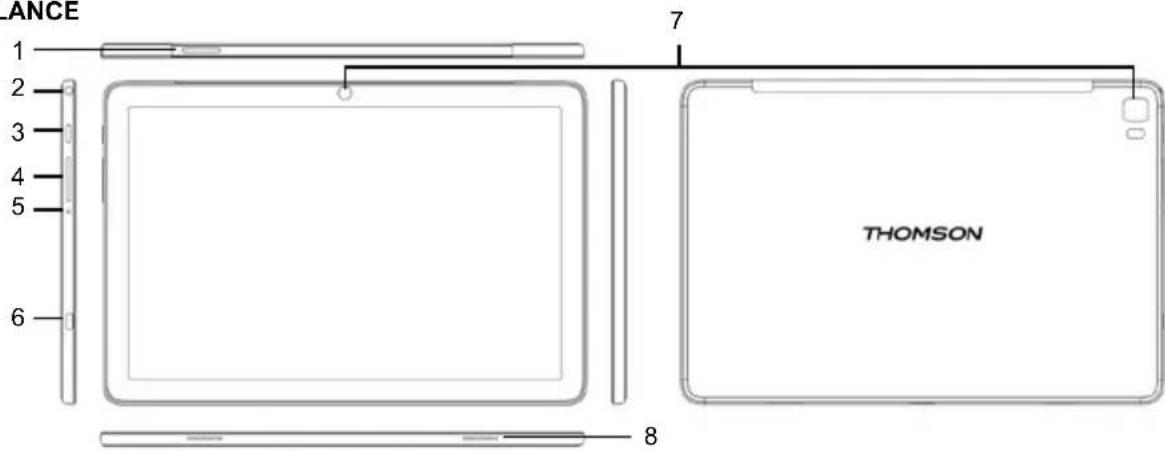
1. Micro SIM slot / Micro SD-CARD
Inserting a SIM card activates the 4G LTE module of your device. The 4G LTE module requires the subscription of a service contract purchased separately from a supplier.
Load external Micro SD-cards here.
2. Headphone
Audio output connection for headphones.
3. Power
Press to turn the unit on, or to turn the screen on or off. Press and hold to access the Power Off menu.
4. VOL+/VOL-
Press VOL+ to increase the volume level. Press VOL- to decrease the volume level.
5. Reset
Press this button to force off the system when the device is halted.
6. USB Type-C port
This new-generation USB port has the particularity of being versatile, since it allows data, video and audio streams, and energy to be transmitted. The use of an adapter (not supplied) will be necessary to use some of the connector's features.
7. Camera
Use it to take pictures or capture videos.
8. Speaker
BOX CONTENTS
- THOMSON tablet
- User manual
- Power USB charger
- USB type C cable
SPECIFICATIONS
| Processor Mediatek MT8 | 788 |
| RAM 8 GB LPDDR4 | |
| Storage | 8GB / 16GB / 32GB / 64GB / 128GB / 256GB flash built-in ( depend of model ), microSD card slot (max.64GB supported) |
| Display 10.1", IPS 1920x | 1200, 10 point multi-touch |
| Wi-Fi Networking 802.11 | a/b/g/n/ac |
| Audio Output 3.5mm headphone | |
| PC Interface 1 x USB type C cable | |
| Additional Features | Built-in microphone, Front facing camera 2MP, rear 5MP, speaker 1W x 2 |
| Operating System Android 13 | |
| Power USB charger | Rechargeable Li-poly battery power 3.8V / 5000mAh, adapter DC 5V 2A |
Press to turn the unit on, or to turn the screen on or off. Press and hold to access the Power Off menu.
4. VOL+/VOL-
Press VOL+ to increase the volume level. Press VOL- to decrease the volume level.
5. Reset
Press this button to force off the system when the device is halted.
6. USB Type-C port

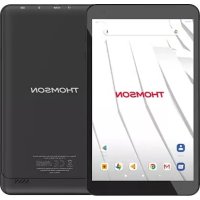
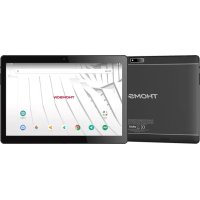

Brand : THOMSON
Model : TEOX 10
Category : Graphic tablet